
Atlas vs Claude for Research (2026): Workspace Comparison
Atlas Workspace vs Claude for research: compare citation grounding, paper maps, project context, long-document analysis, drafting, and AI assistant work.
- Byline

Summary
Use Atlas for project-scoped source-grounded research. Use Claude for long-context reasoning, writing, and one-shot document analysis.
The updated comparison covers citation grounding, Knowledge Maps, Projects migration, long-context strengths, and project context.
Atlas turns source libraries into navigable evidence, while Claude is stronger for general-purpose synthesis and drafting.
Claude can analyze a document deeply, while Atlas keeps a research corpus mapped and citable inside one project.
Note: We make Atlas, and the Atlas team wrote this comparison. We still call out the places where Claude is the better fit. See the rows where Claude wins and the "When Claude is the right call" section below. The goal is to help you choose the right tool for your research task.
This article compares Atlas Workspace with Claude for research. Atlas Workspace is separate from OpenAI's Atlas browser.

Atlas

Build a cited research library in Atlas
Upload your Claude papers and keep cited findings in one Atlas project.
Quick answer
Atlas is a visual research workspace with citation-grounded answers for people who need to understand a body of sources: a thesis, a treatment decision, a purchase memo, or a literature review. Claude is Anthropic's general AI assistant. It gives you chat, long context, Projects for file-scoped work, and Artifacts for drafts or code.
Both tools can help with research, but they diverge after the first answer. Atlas turns each paper into a Knowledge Map, a visual view of the paper's argument. Its Semantic Map clusters related sources across the project.
Atlas also shows each answer as a claim, a source passage, and a short reason why that passage supports the claim. This workflow resembles a research-focused second brain more than a general chat.
Claude is excellent at reading and writing in a long chat. Its context window, Artifacts, and computer-use tools are real strengths. If you need a trusted source trail for a thesis, brief, or treatment memo, Atlas is built for that job.
How is Atlas different?
Claude and Atlas overlap at the surface. Both can help you read sources and reason over them. They diverge on three jobs that decide whether the output is easy to defend.
Side-by-side feature comparison table:
| Atlas | Claude |
|---|---|
| Citation grounding: shows claim, source passage, and reason. | Can quote or cite, but usually needs follow-up. |
| Knowledge Maps: deconstructs each paper into claims and evidence. | Summarizes papers in chat. |
| Project source library: keeps sources, notes, maps, and chats together inside one project. | Keeps context inside a Project or chat. |
| ✗ Not mainly a one-shot reader for very long files. | ✓ Wins for long-context single-document analysis with 200K-token context. |
| ✓ Re-upload PDFs, then maps and cited answers persist. | ✓ Ties by job: native Claude Projects are faster for file-scoped chat. |
| Project context: bounded research evidence with maps and citation trails. | Session- or Project-scoped context. |
| Best when writing is tied to sources. | Wins for general writing and coding with Artifacts. |
Table 1: High-level Atlas vs Claude differences for source-grounded research workflows.
Visual maps for papers and projects
Atlas builds two kinds of visual map as you read. A Knowledge Map breaks one paper into claims, evidence, terms, and links between ideas. You see the paper's spine first, then click into the passages behind it.
A Semantic Map lays out the whole project: sources, notes, chats, and citations. Related items cluster by topic. You can ask for a new topic angle without reading the same stack again. This is how 200 papers stop being a folder and start being a corpus. The knowledge graph guide explains that distinction in more detail.
"It's like an ultimate GPT. I can finally see what I've read." Kyle Lao, CEO & Co-founder of MenSC Labs
Claude does not have a paper-by-paper claim map or a project map you can re-view by topic. If you have ever spent an afternoon trying to recover a paper you read three weeks ago, this is the surface that pays for itself first. Visual maps make a body of papers legible at a glance.
Source traces for every claim
A model can invent a fact, but a weak citation is just as risky. The claim may point to a passage that does not prove it.
Atlas shows each answer as a claim, source, and reason. You see the claim, the passage, and a short note explaining why the passage supports it. You can click into the source paragraph and read the highlight in context.
Atlas tracks this with the H/V ratio, or hallucination over verifiability. We check whether cited sentences survive a passage-level review. Atlas targets H/V < 0.1 on that benchmark. We explain the method in Verifiable AI Research.
Claude may cite or quote sources, but it does not show this claim-level reason trail. For casual Q&A, the missing trace may not matter. For a thesis sentence, legal brief paragraph, or treatment memo, it does. Atlas shows why the source supports the claim.
Project-scoped research context
Claude Projects keep files and chats in a workspace. Atlas also uses a project boundary, with research-specific maps and citation surfaces inside it.
Atlas keeps citations, notes, chats, Knowledge Maps, and the Semantic Map together inside the project where they were created. Later questions in that project can use the same bounded corpus.
A multiyear literature review benefits when its sources, notes, and cited chats stay together in one project. If a new question needs a different evidence base, create a separate project and add the relevant sources there.
Project-scoped context keeps cited synthesis focused on the selected corpus. Claude remains stronger for broad long-context reasoning and writing.
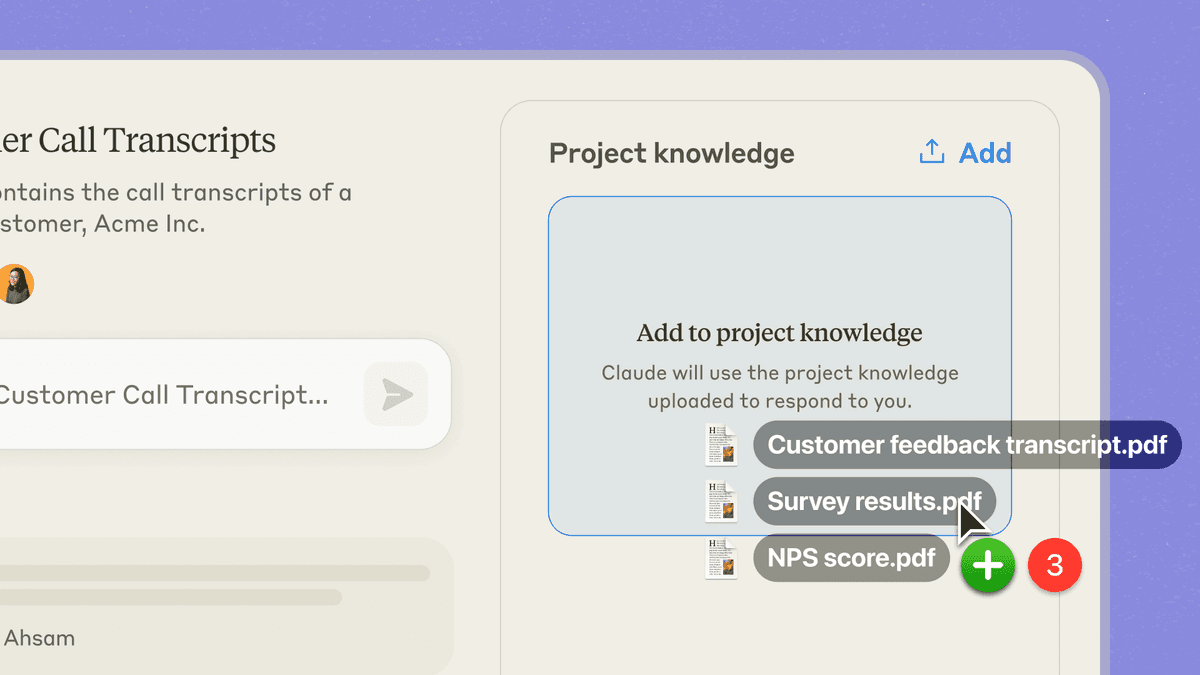
Anthropic's official Projects screenshot shows files being added to project knowledge. The image supports Claude's file-scoped chat workflow. Atlas adds research maps and citation traces within a similarly bounded project.
Criteria and methodology
This comparison uses a research workflow lens rather than a general AI model ranking. The checks are source structure, project maps, cited answers, source follow-up, project boundaries, and draft quality.
A row goes to Atlas when the job depends on a reusable source library. A row goes to Claude when the job depends on long-context chat, general writing, or one-shot reasoning.
Comparing Atlas and Claude: features
Both Atlas and Claude touch a researcher's day, but they live in different categories. Atlas is for project source libraries that need maps and cited answers.
Claude is a broad AI assistant for chat, long-context reading, writing, code, and Artifacts. Claude's interface is better for general writing. Claude's ecosystem includes Projects, Artifacts, and computer use. Atlas goes deeper on source-grounded research. If you are choosing a general assistant rather than a research workspace, compare Claude vs ChatGPT and review the wider field of ChatGPT alternatives. For research workspaces, see Atlas vs Gemini and Atlas vs Notion.
The table above gives the quick view. The sections below walk through the same checks in more detail. Each table includes at least one row where Claude wins or ties.
Paper deconstruction with Knowledge Maps
The Knowledge Map is Atlas's per-paper view. It breaks one paper into claims, evidence, and links between ideas. Node text is pulled from the paper's own wording, which keeps the map closer to source evidence than a loose generated outline. You can start with the thesis, then click down to a source paragraph.
| Atlas | Claude |
|---|---|
| Multi-level argument structure ✓ | ✗ |
| Labeled relations (motivates, causes, enables) ✓ | ✗ |
| Faithful-to-source node text ✓ | Generated outline of the paper |
| Hierarchical breadcrumbs ✓ | ✗ |
| ✗ | Long-context reading (200K tokens in one prompt) ✓. strong one-shot document analysis |
Table 2: Paper deconstruction capabilities in Atlas compared with Claude's long-context reading.
Good to know: The bottom row belongs to Claude. Atlas does not ship that surface. The Knowledge Map's payoff is recovering a paper's argument three weeks after you first read it, when topic chips alone are no longer enough.
Project view with Semantic Maps
The Semantic Map is Atlas's project view. It lays out sources, notes, chats, and citations so related items sit near each other. You can ask for a new topic angle without uploading the same files again.
| Atlas | Claude |
|---|---|
| Spatial embedding of sources + notes + chats ✓ | ✗ |
| Auto-labeled topic clusters ✓ | ✗ |
| Topic-angle re-projection ✓ | ✗ |
| One project-scoped evidence view ✓ | ✗ |
| ✗ | Artifacts (inline code, docs, diagrams) ✓. Best for generated outputs rather than source-cited map views. |
Table 3: Project-level map features in Atlas compared with Claude's output workspace.
Good to know: Claude's strength on that row is genuine. If your work depends on it, that's the boundary. The Semantic Map's payoff is when 200 papers stop being a folder and start being a corpus you can re-project under different topic angles without re-reading.
Citation-grounded answers
Atlas answers with a claim, a source passage, and a short reason. You can jump to the paragraph, read the highlight, and decide whether the answer is supported.
| Atlas | Claude |
|---|---|
| Claim-source-justification triples ✓ | ✗ |
| Reasoning traces (why this passage supports this claim) ✓ | ✗ |
| Jump-to-source with passage highlight ✓ | Quoted passages on request (no jump-to-source) |
| H/V ratio < 0.1 benchmark published ✓ | Per-session synthesis |
| ✗ | Stronger raw model on subtle reasoning tasks ✓. no reasoning trace per claim |
Table 4: Citation-grounding differences between Atlas answer traces and Claude synthesis.
Good to know: Both tools can cite passages. Atlas adds the reason each passage supports the claim. That extra trace is minor for everyday Q&A and important for a thesis sentence or brief paragraph.
Literature-grounded annotations
Atlas annotates each paper when you add it. Citations inside the paper become objects you can inspect. When the cited source is open access, Atlas pulls in the relevant passage. You can see how one paper builds its argument across sources without leaving the document.
| Atlas | Claude |
|---|---|
| Auto-annotate on ingest ✓ | ✗ |
| Multi-citation synthesis (how citations build the argument) ✓ | ✗ |
| Resolve cited sources (open-access) ✓ | ✗ |
| Exact passage / page / paragraph anchors ✓ | ✗ |
| ✗ | Computer-use (agentic actions in beta) ✓. Best for browser automation and tool-use tasks. |
Table 5: Literature-grounded annotation features in Atlas compared with Claude's automation strengths.
Good to know: Literature-Grounded Annotations resolve citations inside the paper you're reading. When a paper cites an open-access source, Atlas pulls in the cited passage. This is not web grounding. It is a way to see how a paper uses the sources it cites.
Project-scoped context
Atlas keeps citations, notes, Knowledge Maps, Semantic Maps, and chats inside one project. A separate project starts with its own sources and context.
| Atlas | Claude |
|---|---|
| Project-scoped research context ✓ | Per-Project context ✓ |
| Sources + notes + maps + chats share one project ✓ | Files + chats share one Claude Project ✓ |
| Separate projects isolate unrelated context ✓ | Projects also preserve a workspace boundary ✓ |
| Sources must be added to each relevant project | Files remain in their Claude Project |
| ✗ | General-task transfer across writing / code / analysis ✓. broad assistant work beyond source research |
Table 6: Atlas project context compared with Claude Project context.
Good to know: Both products provide bounded project context. Atlas specializes that boundary for cited synthesis, paper maps, and a project-level Semantic Map.
Price comparison
Atlas is a paid product. There is no permanent free plan. You get a short evaluation sample of 10 sources and 5 lifetime AI chats. After that, Atlas Pro costs $20/mo or $204/yr.
At that tier, Atlas includes Knowledge Maps, Semantic Maps, cited answers with reasons, unlimited AI chats, and unlimited sources. Compare that scope with Claude's current plans.
| Atlas | Claude |
|---|---|
| Free: ✗ (evaluation sample only: 10 sources · 5 lifetime AI chats) | Free: No-cost plan: limited daily messages, no Projects ✓ |
| Pro: $20/mo or $204/yr (unlimited sources · unlimited AI chats · all features) | Paid: Pro $20/mo, Projects, longer context, higher message limits |
| Pro unlocks Knowledge Map, Semantic Map, and claim-source-justification ✓ | Max $100–$200/mo, even higher quotas, priority access |
Table 7: Atlas and Claude pricing at free, Pro, and higher-quota tiers.
If the price is a tie for your workflow, compare the tools on the same PDFs. The useful comparison is the Knowledge Map, Semantic Map, and cited answer trail on your own source set.
When to choose Atlas vs Claude
Choose Atlas when you need a project paper library, visual source structure, and claim-level evidence checks. It is the stronger fit when one bounded research corpus must remain useful for months.
Choose Claude when one long context window, general writing, coding, or a self-contained analysis is the main job. It is the stronger fit when the conversation's output matters more than research-specific maps and source trails.
- Want paper structure deconstructed multi-level? Go with Atlas. (Knowledge Map)
- Want answers that explain how each citation justifies the claim? Go with Atlas. (claim-source-justification)
- Want one focused evidence base for maps, notes, and cited chat? Go with Atlas. (project-scoped context)
- Want the strongest raw model for careful writing or whole-document reading in one shot? Go with Claude.
- Tied: drafting an answer from one long paper you uploaded once**: both work fine. The wedge only opens up once you're building a corpus you'll return to.
Recommendations by user type
- PhD researchers: Atlas. In years 1-2, the Knowledge Map helps you read papers without losing the structure. In years 3-4, cited answers with reasons help you defend thesis claims. Claude still works for one-off tasks. Atlas fits a multi-year corpus kept in the same project.
- Students doing literature reviews and thesis research: Atlas for a dissertation, thesis, or review. The Knowledge Map saves time in the reading phase. Keep the thesis corpus in the same project so its sources, notes, and maps remain available across semesters.
- Knowledge workers (consultants, analysts, PMs, journalists): Atlas when research spans many documents. Claude when each session is a self-contained draft or analysis task.
- Personal researchers with stakes: Atlas for medical, legal, major-purchase, or deep self-study research. This is where cited reasoning earns its keep. Claude is a fine starting tool. Atlas is the tool to use once you need to defend the answer.
Claude is excellent for long-context reading, drafting, and careful prose work inside a single conversation. Atlas is designed for research that needs persistent source structure across sessions.
Use Claude when the context window is enough and the output is the draft. Use Atlas when paper maps, corpus maps, and claim-source-justification must remain part of a library you will keep using.
Bringing your Claude workflow into Atlas
If your Claude workflow is "drop ten PDFs into a Project, ask questions, paste useful answers into a Google Doc," the move to Atlas is mostly a re-upload. Anthropic documents the file types Claude accepts.
Add the same PDFs or long notes to an Atlas project. Each paper becomes a Knowledge Map and joins the project's Semantic Map. There is no manual tagging step.
The first difference is the citation surface. In Claude Projects, an answer can quote the source and often name the file. It does not show each claim with the passage and reason attached.
Atlas does. If you are moving an active thesis chapter, that changes the review task. Sentences you once had to spot-check by hand arrive with the source check attached.
The second difference is what each product adds inside a project. Claude Projects keep a file set and its chats together.
Atlas keeps sources, notes, chats, Knowledge Maps, and the Semantic Map together inside one project. A separate Atlas project starts with its own evidence base rather than inheriting another project's context.
Worked example with 8 papers
Suppose you are writing a literature-review section from 8 papers on one subtopic. In Atlas, you upload the PDFs into a project. Each paper becomes a Knowledge Map with claims, evidence, terms, and links between ideas.
The Semantic Map places all 8 papers on 1 canvas. Method papers cluster in 1 area, evaluation papers in another, and deployment papers elsewhere. You can view the same canvas under "limitations named by the authors" to find shared caveats.
Your next question is, "What are the main disagreements across these 8 papers?" Atlas returns a set of claims. Each claim has source passages, page anchors, and a short reason.
You click into the passages, check them, and move the synthesis into your draft. The draft remains auditable because each sentence points back to the source paragraph.
Now run the same job in Claude. You drop the eight PDFs into a Project. Claude's long-context handling is strong. A single prompt can hold many of the papers, and Claude may write the better first draft. For a one-off synthesis you will never revisit, that may be enough.
Claude does not give you a claim-by-claim source trail with the reason attached. Atlas keeps the 8 papers mapped and citable while continued work stays inside the same project. A separate project starts with separate context, so add the relevant papers there again.
Claude wins on phrasing, single-shot reasoning, and general writing help. Atlas wins on source trails, map views, and continued research inside the same project.
When Claude is the right call
Choose Claude when your main job is general reasoning, prose writing, or coding. Its chat, Artifacts, and general model are better shaped for those tasks.
Atlas does not ship inline code execution, draft full essays from scratch, or run computer-use sessions. If you need any of those, Claude is the correct call.
Long-context single-shot analysis is the second clear case. If you have one large document, Claude is usually easier. Think of a 200-page report, a contract, or a long transcript.
Claude's context window handles that one-shot job cleanly. Atlas's value shows up when the same project corpus needs maps, cited follow-up questions, and repeated source checks. For a single read, the project setup may not be worth it.
Brainstorming, creative writing, ideation, code review, and any open-ended reasoning task that does not need to ground every sentence in a cited source: Claude. Anything outside the read-deconstruct-cite research loop sits in Claude's zone, and we will say so without hedging.
Common objections and edge cases
Does Atlas use Claude under the hood? Atlas routes different subtasks, including deconstruction, synthesis, and justification scoring, to models that perform well in internal evaluations. Models from Anthropic, OpenAI, and others are in the routing mix.
The model behind a given answer can change as the system is tuned. Evaluate the stable product surfaces, including Knowledge Maps, Semantic Maps, and claim-source-justification inside one project.
Claude Projects vs Atlas Semantic Map: are these the same thing? No. Claude Projects scopes a chat to a set of files. It does not map the sources, offer another topic angle, or break each source into a Knowledge Map.
The Semantic Map is a project view that sits on top of your sources. The 2 products solve adjacent problems.
Pricing comparison? Atlas Pro is $20/mo or $204/yr with unlimited sources and unlimited AI chats. Claude Pro is $20/mo, while paid Max tiers cost $100–$200/mo.
The Pro prices match, but the product scope differs. Atlas Pro includes Knowledge Maps, Semantic Maps, and claim-source-justification.
Claude, Gemini Spark, and Grok
Search results for this query can mix several product names. Here is how they relate to this comparison.
OpenAI's Atlas-named browser
OpenAI's browser that uses the Atlas name is not this Atlas research workspace. If you mean that browser, the right comparison is about browsing and agentic web tasks. This article is about a research workspace for source libraries.
Anthropic Claude
Anthropic Claude is the Claude product discussed in this article. The relevant surfaces are Claude chat, Claude Projects, Artifacts, long context, and computer use.
Gemini Spark
Gemini Spark is a separate Google ecosystem query and is not a direct Atlas research-workspace peer. It may matter if your choice is about Google-native AI workflows, but it is not the main alternative for source-grounded research maps.
Grok
Grok is xAI's general AI assistant. It belongs in a broad assistant comparison, but it is not a direct peer for Atlas's project research maps and cited source trails.
Claude Agents
Claude Agents refers to agentic Claude use cases, such as tool use or computer-use flows. Those are useful, but they answer a different job than project research maps and cited source trails.
If your Claude workflow needs a mapped research library inside a project, compare the same source set in both tools. Check the Knowledge Map, Semantic Map, and cited answer trail on one real project.
Atlas
Build a cited research library in Atlas
Upload your Claude papers and keep cited findings in one Atlas project.
Frequently Asked Questions
Atlas explains how each citation supports a claim. Every answer is rendered as a claim-source-justification triple: the claim, the passage it draws from, and a one-sentence explanation of why the passage supports the claim. You can click into the source paragraph and read the highlighted sentences in context. Claude may cite at the sentence level or link to sources, but it does not render the reasoning trace that connects the claim to the passage. That trace is the move when you need to defend a thesis sentence, a brief paragraph, or a treatment-plan summary. Read more about how Atlas grounds claims in Verifiable AI Research (2026): What It Actually Means.