
Atlas vs Coggle (2026): An In-Depth Research Comparison
Atlas is a visual research workspace. Coggle is a free online mind-mapping tool. Compare paper deconstruction, citation grounding, and project-scoped context.
- Byline

Summary
Use Atlas for citation-grounded answers and research maps. Use Coggle for quick tree-style mind maps and lightweight visual brainstorming.
Updated for current products, this comparison covers Atlas Knowledge Maps, Coggle exports, moving sources, and reusable research context.
Atlas reconstructs paper arguments from sources, while Coggle helps users draw simple maps manually.
Coggle can remain useful for sketches, while Atlas handles research libraries that need citations and reasoning traces.
Note: We make Atlas, so this comparison comes from the team that built it. The table marks the research jobs where Coggle wins, and the guidance below explains those advantages. The goal is to help you choose the right tool for your current research task. Atlas does not suit every research job.
Atlas is a visual research workspace for people who need to understand a body of papers. It supports work such as a thesis, treatment decision, major purchase review, or literature review.
Coggle is an online mind-mapping tool for tree-style diagrams, fast brainstorming, live collaboration, and image export. The mind-mapping software guide explains the wider category.
The choice depends on what happens after the map exists. Atlas turns each paper into a Knowledge Map, which is a visual map of the paper's argument. The mind map and knowledge graph comparison explains why those structures support different jobs.
Atlas also projects a whole project into a Semantic Map and gives citation-grounded answers with a passage you can check. Sources, notes, chats, maps, and citations share context inside that project. Coggle is simpler and faster when you want to draw the map yourself.
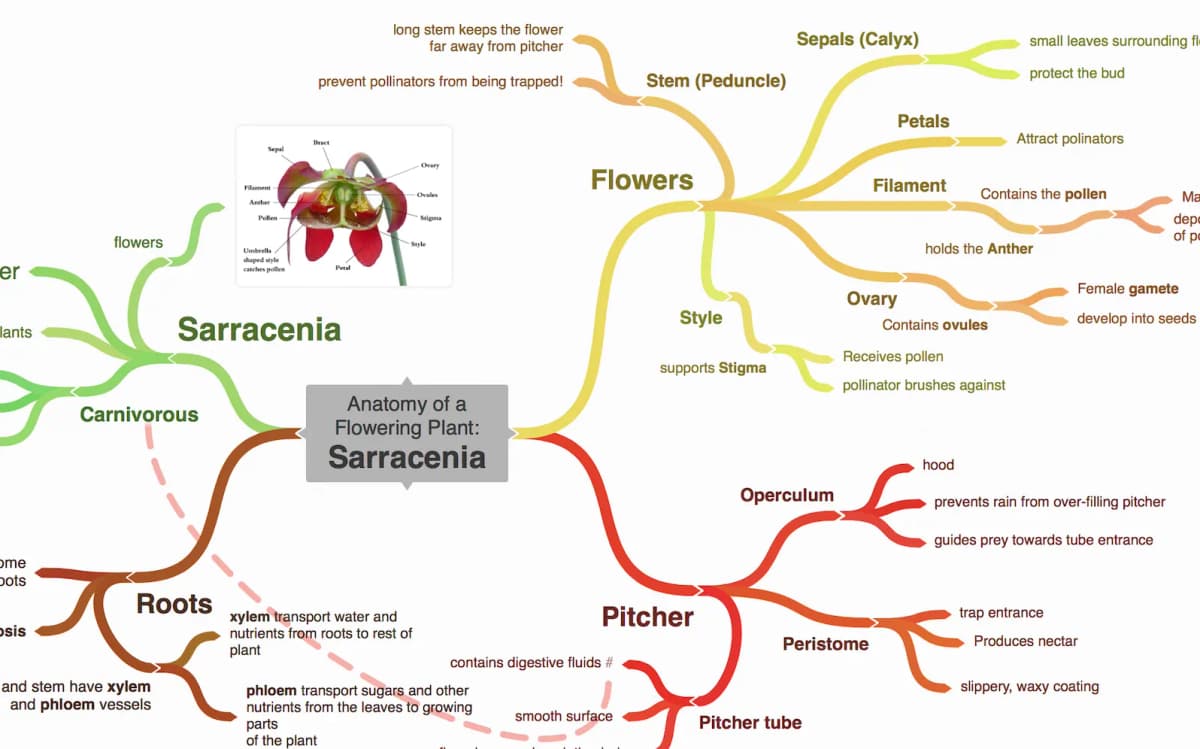
Coggle homepage screenshot showing its branch-style mind map.

Atlas

Map a paper's argument in Atlas
Upload a paper and compare its Knowledge Map with your Coggle diagram.
Quick verdict: Atlas or Coggle?
Choose Coggle when you need to deliver a diagram. It fits classroom maps, meeting brainstorms, and public diagrams you can share for free. Choose Atlas when the sources behind the map matter. Atlas is built for papers, citations, saved context, and answers you can check.
The main trade-off is control versus grounding. Coggle gives you a blank canvas and lets you author the structure. Atlas generates the structure from uploaded sources, then keeps the map tied to the evidence.
Criteria and comparison table
I compared the 2 tools on 6 research jobs. Can the map cite sources? Who creates the map? Can people edit together? What exports are available? Can old diagrams move over? Does the research stay useful over time?
I also checked Coggle's public pricing and help documentation against Atlas's current research workflow.
The comparison gives Coggle credit where it wins. Coggle is cheaper for simple diagrams, easier for live group sketching, and better when you need a user-drawn branch map. Atlas wins only when the research source, citation trail, or long-term corpus matters.
The table below maps the six capabilities a researcher should check before choosing one tool: citation grounding, AI-generated vs. manual Knowledge Maps, collaborative editing, export formats, source migration, and research depth.
| Atlas | Coggle |
|---|---|
| Source checks ✓. Answers include passages and a short reason each passage supports the claim. | Manual notes and links. Coggle does not verify claim-to-passage support. |
| Knowledge Maps ✓. Atlas generates paper maps from uploaded sources. | ✗ for source-generated paper maps. Users draw the tree by hand. |
| ✗ | Coggle wins: real-time collaborative mind maps ✓. Atlas is not a live branch-editing canvas. |
| ✗ | Coggle wins: PNG, PDF, text, and .mm exports ✓. Atlas has more limited workspace outputs. |
| Source migration ✓. Upload the underlying papers and notes, then generate new maps from those sources. | Preserves existing user-drawn diagrams better than Atlas. |
| Research depth ✓. Strong fit for cited synthesis and recurring literature reviews. | Strong fit for simple diagrams, class maps, and public brainstorming. |
Table 1: Atlas and Coggle compared across source grounding, map creation, collaboration, export, migration, and recurring research.
How is Atlas different?
Coggle and Atlas overlap at the surface because both help people reason visually. They split once the answer depends on sources. Coggle helps you draw a map. Atlas helps you inspect the structure already inside papers.
Visual maps for papers and projects
Atlas builds two visual maps automatically as you read. A Knowledge Map turns one paper into claims, evidence, definitions, and labeled relations. You can start with the paper's main argument and then open the supporting passage. A Semantic Map projects your whole project into a spatial canvas. Sources, notes, chats, and citations cluster by topic, so a large library becomes easier to scan.
"It's like an ultimate GPT. I can finally see what I've read." Kyle Lao, CEO & Co-founder of MenSC Labs
Coggle does not deconstruct a paper into claims and evidence. It also does not re-project a full research project under a new topic angle. That is not a flaw in Coggle. It is a different product category. Coggle is a drawing surface, while Atlas is a research surface.
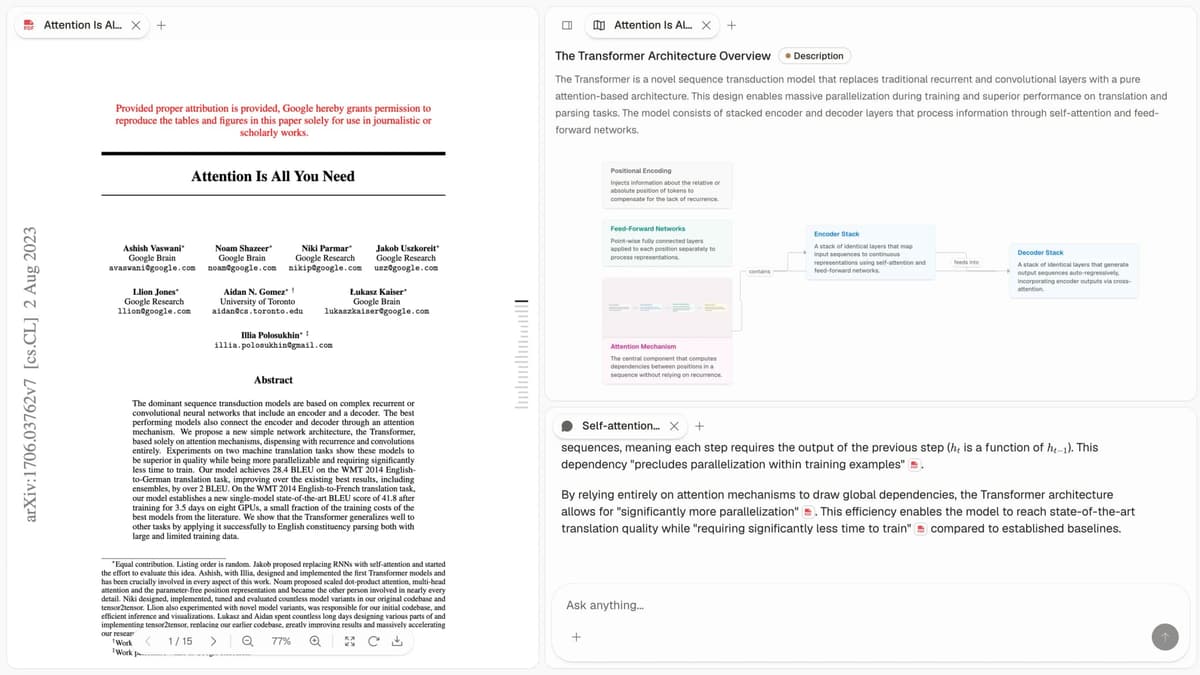
Atlas workspace screenshot showing a cited answer surface alongside the visual research map used for source-grounded synthesis.
Answers tied to source passages
The hard part of AI research is not only whether a citation exists. It is whether the cited passage supports the sentence beside it. Atlas renders answers as claim, source, reason triples. You get the claim, the source passage, and a short reason the passage supports the claim. You can open the paragraph and check the highlighted text in context.
Atlas tracks this with an internal H/V ratio: unsupported cited sentences divided by supported cited sentences. Atlas targets H/V < 0.1 on its citation-grounding benchmark. The method is published in the Verifiable AI Research benchmark. Coggle's maps can include links and notes, but they do not provide this claim-level reasoning trace.
Project-scoped research context
Coggle treats each diagram as its own container. That is useful when the map is a clean one-off artifact. Atlas keeps citations, notes, chats, Knowledge Maps, and the Semantic Map together inside the project where they were created.
A separate Atlas project starts with its own evidence base. Add a source to each relevant project rather than expecting another project's notes or chat history to appear automatically.
This is the feature long-term users mention most. John Tan, a postdoc using Atlas for a multi-year literature review, says prior research is "still doing work for me this semester." Atlas gets more useful once it has earlier sources and notes to draw from. Coggle does not try to solve that job.
Comparing Atlas and Coggle: feature comparison
Both tools can fit a research workflow, but they do different work. Atlas turns papers into maps, answers, and saved context. Coggle gives you manual tree maps, public diagrams, exports, and live editing.
Use the proof table above as the decision surface. The feature sections below explain why those rows matter in day-to-day research.
MindMap AI, Mindomo, Canvas, MindMup, Mapify
The broader mind-mapping market splits into three groups. MindMup and FreeMind are closest to lightweight diagramming. Lucidchart and Whimsical fit polished team diagrams and planning boards.
Mapify and MindMap AI sit closer to AI mind-map generation from prompts, files, videos, or web pages.
Mindomo represents the traditional editable-map category, while general canvas tools put free-form layout first. Neither changes the main decision here. Coggle is the lighter manual tree, and Atlas is the source-grounded research system.
MindMeister also fits team-ready presentation diagrams. Use these tools when the map belongs in a meeting, planning session, or deck. Atlas generates its map from research sources and keeps it tied to citations.
Use the market this way:
- Coggle: free public diagrams and simple collaborative tree maps.
- MindMup: lightweight web mind maps, often with Google Drive workflows.
- Lucidchart: diagramming and mind-map templates inside a broader visual-collaboration suite.
- MindMeister: team-ready mind maps and presentation-friendly diagrams.
- MindMap AI: prompt-assisted AI mind maps from quick inputs.
- Mapify: AI-generated mind maps from PDFs, videos, web pages, images, and other study material.
- Whimsical: polished team diagrams and planning boards.
- GitMind: low-cost mind maps and simple AI-assisted diagrams.
- FreeMind: offline
.mmfiles and legacy desktop mind mapping. - Atlas: source-grounded Knowledge Maps and cited research synthesis.
Paper deconstruction (Knowledge Map)
The Knowledge Map is Atlas's per-paper surface. It turns one paper into an argument map with claims, evidence, and labeled relations. The node text comes from the paper rather than from a free summary. Breadcrumbs let you move from the high-level thesis to a specific paragraph.
| Atlas | Coggle |
|---|---|
| Multi-level argument structure ✓ | Manual tree-based mind map per paper |
| Labeled relations (motivates, causes, enables) ✓ | ✗ |
| Faithful-to-source node text ✓ | ✗ |
| Hierarchical breadcrumbs ✓ | ✗ |
| ✗ | Free tree-based mind-mapping ✓. Users build the structure themselves. |
Table 2: Knowledge Map capabilities compared with Coggle's manually authored tree maps.
Good to know: The bottom row belongs to Coggle. Atlas does not ship that surface. The Knowledge Map's payoff is recovering a paper's argument three weeks after you first read it, when topic chips alone are no longer enough.
Project view (Semantic Map)
The Semantic Map is Atlas's per-project surface. It places sources, notes, chats, and citations on a spatial canvas. Related items cluster by topic. You can re-project the same canvas under a different angle without uploading the sources again.
| Atlas | Coggle |
|---|---|
| Spatial embedding of sources + notes + chats ✓ | Separate diagrams per topic |
| Auto-labeled topic clusters ✓ | ✗ |
| Topic-angle re-projection ✓ | ✗ |
| One project-scoped evidence view ✓ | ✗ |
| ✗ | Real-time collaboration in the no-cost plan ✓. Coggle supports shared editing. |
Table 3: Semantic Map capabilities compared with Coggle's separate collaborative diagrams.
Good to know: Coggle's strength on that row is real. If your work depends on live editing, choose Coggle. The Semantic Map helps when a large library needs to become a browsable corpus.
Citation-grounded answers
Atlas produces claim, source, reason triples. Each answer shows the claim, the passage, and why the passage supports it. You can jump to the paragraph and check the highlighted text.
| Atlas | Coggle |
|---|---|
| Claim, source, reason triples ✓ | ✗ |
| Reasoning traces (why this passage supports this claim) ✓ | ✗ |
| Jump-to-source with passage highlight ✓ | ✗ |
| H/V ratio < 0.1 benchmark published ✓ | ✗ |
| ✗ | Generous no-cost plan with unlimited public diagrams ✓. This is a cost advantage for public maps. |
Table 4: Atlas answer-verification features compared with Coggle's notes-and-links workflow.
Good to know: Both tools can carry links to sources. Atlas also explains why a passage justifies a claim. That extra check may be unnecessary for everyday brainstorming, but it matters for a thesis sentence or evidence-heavy paragraph.
Literature-grounded annotations
Atlas annotates each paper on ingest. Citations inside the paper become first-class objects. When a cited source is open access, Atlas can pull the relevant passage so you can see how the paper builds its argument.
| Atlas | Coggle |
|---|---|
| Auto-annotate on ingest ✓ | ✗ |
| Multi-citation synthesis (how citations build the argument) ✓ | ✗ |
| Resolve cited sources (open-access) ✓ | ✗ |
| Exact passage / page / paragraph anchors ✓ | ✗ |
| ✗ | Simple, fast UI for quick mind maps ✓. Coggle has the lighter drawing workflow. |
Table 5: Atlas citation-resolution features compared with Coggle's faster manual mapping interface.
Good to know: This feature resolves citations inside the paper you are reading. It does not search the web. It shows how a specific paper uses its cited sources.
Project-scoped context
Atlas keeps citations, notes, Knowledge Maps, Semantic Maps, and chats inside one project. A separate project starts with its own sources and context.
| Atlas | Coggle |
|---|---|
| Project-scoped research context ✓ | Per-diagram context |
| Sources + notes + maps + chats share one project ✓ | Diagram nodes share one canvas ✓ |
| Separate projects isolate unrelated context ✓ | Separate diagrams isolate unrelated maps ✓ |
| Sources must be added to each relevant project | Diagrams export as portable files ✓ |
| ✗ | PNG, PDF, and MM export ✓. Coggle provides more portable diagram files. |
Table 6: Atlas project context compared with Coggle's portable diagram exports.
Good to know: This is hard to show in a short demo. It pays off later. If your work is many small, unrelated projects, Coggle's clean-session design is the right choice.
Price comparison
Atlas is a paid product. There is no perpetual no-cost plan. The evaluation sample includes 10 sources and 5 lifetime AI chats. After that, Atlas Pro is $20/mo or $204/yr with unlimited sources and unlimited AI chats. The paid tier includes Knowledge Map, Semantic Map, cited answers, and project-scoped research context.
| Atlas | Coggle |
|---|---|
| Free: ✗ (evaluation sample only: 10 sources · 5 lifetime AI chats) | Free: No-cost plan: unlimited public diagrams, 3 private diagrams ✓ |
| Pro: $20/mo or $204/yr (unlimited sources · unlimited AI chats · all features) | Paid: Awesome $5/mo · Organisation $8/user/mo |
| Pro unlocks Knowledge Map, Semantic Map, cited answers, and saved context ✓ | ✗ |
Table 7: Atlas and Coggle pricing compared for source-grounded research and collaborative diagramming.
When to choose Atlas vs Coggle
- Want paper structure deconstructed multi-level? Go with Atlas. (Knowledge Map)
- Want answers that explain how each citation supports the claim? Go with Atlas.
- Want one focused evidence base for maps, notes, and cited chat? Go with Atlas. (project-scoped context)
- Want free, fast tree maps with live editing? Go with Coggle.
- Want free mind-mapping without a subscription? Go with Coggle.
- Tied: both can help with a simple tree map of an idea. Coggle is faster for a standalone mind map. Atlas starts to matter when the source corpus will return.
Here is the practical threshold. If the map is mainly for thinking aloud, choose Coggle. Its flexible branch layout and fast interface produce exports that are easy to share. If the map is a step toward cited writing, choose Atlas. The map then needs to show where each claim came from and whether you can defend it later.
For mixed workflows, use both. Start in Coggle when you are planning the rough outline of a project. Move the sources into Atlas once the project turns into reading, synthesis, and writing. That split keeps Coggle focused on planning while Atlas handles source checks.
Recommendations by user type
- PhD researchers: use Atlas for literature review and thesis writing. The Knowledge Map helps during the reading phase. The cited answer surface helps when a thesis sentence needs a passage behind it. Coggle still works for one-off diagrams.
- Students doing literature reviews and thesis research: use Atlas for dissertations, theses, and literature reviews. Its sources, maps, and cited chats remain accessible inside the same project across semesters.
- Knowledge workers: use Atlas when a report, memo, or client slide needs a defensible source trail. Use Coggle for sketches and planning maps.
- Personal researchers with stakes: use Atlas when you need a cited trail for medical, legal, or major purchase research. Use Coggle when a quick standalone map is enough.
Coggle is for diagrams you draw yourself: fast brainstorming, classroom maps, presentation visuals, and collaborative sketching. Atlas is for maps generated from source material and tied back to evidence. If the map is the deliverable, Coggle is the better fit. If the map is a way to work through papers and produce cited synthesis, Atlas is doing a different job.
Migration and worked example
Bringing Coggle work into Atlas
If you already have a year of Coggle diagrams, migration is concrete. Most of that work does not have a direct home in Atlas because the products store different artifacts.
Coggle's main artifact is a branching diagram with manual nodes, colors, and layout. Atlas's main artifacts are Knowledge Maps and Semantic Maps generated from sources.
Those artifacts do not map cleanly onto each other. The document-to-mind-map guide covers other file-based routes.
The practical migration path has 3 steps.
- Export each Coggle map you want to preserve. Coggle's export documentation lists PDF and PNG for the visual, plain text for the outline, and the open
.mmformat used by FreeMind. - Gather the sources behind each map: papers, reports, or notes. Upload those PDFs into a new Atlas project. Atlas will generate a Knowledge Map for each paper.
- If the Coggle map is your own synthesis, add the exported text outline to an Atlas Note. It can then appear beside the sources on the Semantic Map.
Some things do not migrate. Atlas lays out maps automatically, so hand-tuned branch positions are lost. Embedded images, icons, colors, collaborator history, and comment threads do not carry over. If a Coggle map is a slide or classroom poster, export it to PNG and keep it as a finished asset. Atlas is not the place to recreate that kind of map.
The best migration test uses a single project. Pick a Coggle map that represents real source work. Export the map, upload the original sources into Atlas, and compare the result against your old diagram. If Atlas surfaces claims or citations you missed, move more source-heavy projects over. If the Coggle map was mostly a hand-designed poster, keep it in Coggle.
Do not treat the .mm export as a magic bridge. It preserves hierarchy, but it does not preserve the research judgment behind each branch. A Coggle branch often means "this is how I wanted to explain the topic." An Atlas Knowledge Map means "this is how the paper argues." Those are related, but they are not the same object.
Eight-paper literature-review example
Consider a common literature review task. You have 8 papers on a subtopic, such as retrieval-augmented generation for scientific QA. You need to write 2 pages that explain what those papers argue together. Atlas and Coggle approach that job in opposite directions.
In Coggle, you open a fresh diagram, add the topic as the root node, then add 1 child node per paper. Each paper gets sub-branches for the claims you remember. You choose the claims, write the nodes, pick the colors, and repeat those steps for the other papers.
After two or three hours, you have a diagram with thirty to forty nodes. It captures what you decided was important. That can be useful, but the structure reflects your reading more than the papers' own arguments. When you write the section, the map helps you remember what you read. It does not produce cited prose because the nodes are your paraphrases.
In Atlas, you upload the eight PDFs into a project. Each paper becomes its own Knowledge Map. Claims become nodes. Evidence becomes supporting nodes. Relations such as "motivates" or "contradicts" connect them.
The eight Knowledge Maps then sit inside a Semantic Map. Methods, tests, and use cases form separate clusters. When you ask where the papers agree or disagree, Atlas answers with cited claim, source, and reason triples. Each claim is tied to a passage in a specific paper. The trade-off is clear: you spend less time drawing nodes and more time checking the claims Atlas surfaced.
The check I would run is simple. Take a paragraph from the draft and ask, "Could I point to the exact paper passage behind every sentence?" A Coggle map can still help your memory when the answer is no, though the evidence problem remains. When the answer is yes, Atlas has handled the source-checking job Coggle was not designed to do.
This is also why the 2 tools feel different in practice. Coggle asks you to decide what belongs on the map. Atlas asks you to review what the source material put on the map. The first method rewards fast thinking. The second rewards careful checking.
Coggle fit and objections
When Coggle is the right call
Coggle is better in several common situations.
First, use Coggle for quick brainstorming. If you want to get an idea out fast and do not need citations, Atlas is too heavy.
Second, use Coggle for presentation diagrams and posters. Atlas maps are interactive research surfaces. They are not designed as finished poster assets.
Third, use Coggle for classroom maps. Teachers and students often need a low-friction shared canvas for concept maps, vocabulary trees, or essay outlines. The no-cost plan with real-time collaboration is hard to beat for that job.
Fourth, use Coggle for live collaborative drawing. Atlas does not ship a real-time branch-editing surface. If your work is mostly one-off diagrams you draw by hand for an audience, Coggle is the right recommendation.
There is also a trust boundary. Coggle does not pretend to verify your research claims. That can be a benefit. For brainstorming, you may not want a tool that pushes every branch back toward source evidence. You may want a blank space where the team can sketch an idea before the sources are ready.
Common objections and edge cases
"My research comes mostly from web browsing. Will Atlas still help?" Atlas can help in a narrower way. It works best inside your uploaded library, plus open-access sources cited by those papers. If your daily task is skimming blog posts and news articles, Atlas offers less advantage over Coggle. Upload the 10 or 20 documents you keep returning to, then use lighter tools for the rest.
"Can I keep Coggle for diagrams and use Atlas for the corpus?" Yes. There is no integration between the 2 products, so sources must be uploaded separately. The methods still fit together. Coggle handles freeform sketching. Atlas handles source deconstruction and cited answers.
"My team uses Coggle's real-time collaboration. Does Atlas have an equivalent?" Not for live branch editing. Atlas is single-user for deep research projects today. If live editing is the reason your team chose Coggle, keep Coggle for that job.
Atlas
Map a paper's argument in Atlas
Upload a paper and compare its Knowledge Map with your Coggle diagram.
Frequently Asked Questions
Atlas explains the link between each claim and its evidence. Every answer is rendered as a claim-source-justification triple: the claim, the passage it draws from, and a one-sentence explanation of why the passage supports the claim. You can click into the source paragraph and read the highlighted sentences in context. Coggle may cite at the sentence level or link to sources, but it does not render the reasoning trace that connects the claim to the passage. That trace is the move when you need to defend a thesis sentence, a brief paragraph, or a treatment-plan summary. Read more about how Atlas grounds claims in the Atlas verifiability benchmark.