
Atlas vs NotebookLM (2026) | In-Depth Research Comparison
Atlas is a visual research workspace, NotebookLM is an AI research notebook with audio overviews. Compare them on paper deconstruction, citation grounding.
- Byline

Summary
As of July 2026, use Atlas for research you need to defend. Use NotebookLM for chat with sources and audio summaries.
The comparison covers Knowledge Map, Semantic Map, source checks, migration, price, audio, and context reuse.
Atlas shows why a source backs a claim. NotebookLM gives footnotes to uploaded sources.
NotebookLM is useful for quick Q&A. Atlas keeps sources, notes, chats, and maps together inside one project.
Note: We make Atlas. This comparison is written by the team that built it. Where NotebookLM has the better answer, the article says so plainly. See the table rows where NotebookLM wins and the "When to choose NotebookLM" section.
Atlas builds visual maps of every paper and project. Its citation-grounded answers keep the claim, source passage, and reasoning together. Within each project, sources, notes, chats, and maps form reusable research context.
Updated in July 2026 to reflect the current Atlas vs NotebookLM comparison, including source checks, audio, pricing, and migration trade-offs.
For this update, I personally tested the same 8-paper thesis task in Atlas and NotebookLM. I checked the full workflow and recorded how quickly I could verify the source trail behind each answer.
Atlas is a visual research workspace for decisions that depend on a body of sources. That might be a thesis, treatment choice, brief, hire, or literature review. NotebookLM is Google's AI research notebook. It gives you chat over uploaded sources, plus an Audio Overview that turns documents into podcast-style summaries.
Both tools answer questions about uploaded PDFs. The difference starts after the answer. Atlas turns each paper into a Knowledge Map, gives each project a Semantic Map, and shows how every claim traces to a source.
Atlas keeps sources, notes, chats, and maps together inside one project as a shared evidence base. Separate projects isolate unrelated context. NotebookLM is the better fit if you want Google's no-cost plan or want to listen to your sources. If you need to defend an answer, Atlas's project maps and source traces are the reason to compare it.

Atlas

Try Atlas on your own research papers
Ask across papers, inspect cited passages, and follow each claim's reasoning.
Quick verdict: Atlas or NotebookLM?
Choose Atlas when source checks, reusable context, and defendable synthesis matter more than a free tier. Choose NotebookLM when you want fast Google-native source chat, Audio Overview, YouTube support, or a generous no-cost plan.
The main trade-off is auditability versus convenience. Atlas exposes a reason trace behind each cited claim. NotebookLM offers faster Google-native ingest, audio, and a larger no-cost allowance.
Criteria and comparison table
We scored the tools by the jobs a researcher needs to finish. Can you read the source, find the claim, check it, reuse the evidence later, and share the result? We also looked at where NotebookLM wins. Price, audio, YouTube, and Google Drive matter for many readers.
For the July 2026 update, we checked 3 evidence surfaces. We reviewed Atlas's current Knowledge Maps, Semantic Maps, and cited answers.
We also checked Google's public NotebookLM pages for Audio Overview, source types, and plan limits. Finally, we ran the same practical job in both tools: turn a source set into claims you can defend later.
The key first-hand finding concerns where the proof lives. In NotebookLM, it lives in notebook sources and footnotes. In Atlas, proof is part of the answer surface and project map. The research paper analyzer guide explains the source-checking workflow.
Use this quick-reference comparison table before you read the deeper sections:
| Atlas | NotebookLM |
|---|---|
| Paper structure: Knowledge Map per paper, with claims and evidence | Paper structure: notebook mind map with generated topic chips |
| Project view: Semantic Map across sources, notes, chats, and citations | Project view: source list inside each notebook |
| Citation depth: claim, source passage, and why the passage supports it | Citation depth: sentence-level footnotes to uploaded sources |
| Audio: no podcast-style summaries | Audio: NotebookLM wins for Audio Overview ✓ |
| Pricing: paid after a 10-source evaluation sample. Pro is $20/mo or $204/yr | Pricing: NotebookLM wins on free access. Google account plan has high no-cost limits ✓ |
| Source limits: paid plan after a small evaluation sample | Source limits: NotebookLM wins for the generous no-cost plan ✓ |
| Context: sources, notes, chats, maps, and citations stay inside one project | Context: each notebook stays isolated |
| Best fit: defensible synthesis and long-term research | Best fit: fast source Q&A, audio, and Google-native study workflows ✓ |
Table 1: Atlas and NotebookLM compared across paper structure, project view, citation depth, audio, pricing, source limits, project context, and research fit.
Research workflow tests
Proof-surface test
For the July 2026 pass, we used one practical test. We took the same eight-paper thesis source set and asked for a claim about a method disagreement. Then we checked how much of the proof trail was visible without rebuilding the answer by hand.
The proof trail looked different in six places:
- Answer proof: Atlas showed a claim, source passage, and short reason. NotebookLM showed a footnoted answer sentence tied to an uploaded source.
- Before chat: Atlas let me inspect each paper through a Knowledge Map. NotebookLM showed generated topic chips in the notebook.
- Later reuse: Atlas kept notes, maps, chats, and citations together inside the same project. NotebookLM kept the research inside one notebook.
- First-pass reading: Atlas worked best when I mapped first and asked a cited question second. NotebookLM worked best when I chatted first and opened footnotes after.
- Audio review: NotebookLM won because Audio Overview is the category leader. Atlas does not support audio summaries.
- Audit break point: Atlas lacks audio, YouTube, and Drive-native ingest. NotebookLM stops at a footnote when a cited sentence needs an explicit reason trace.
The result changed how we frame the comparison. NotebookLM is faster when the task is to understand a packet today. Atlas is stronger when the task is to turn that packet into claims you can defend later. See the AI citation checker guide for the second task.
The speed split is the part most comparisons miss. NotebookLM is faster on first answer speed because ingest, chat, and audio are immediate. Atlas is faster on second-audit speed: the moment when you return to the answer, reopen the source passage, and decide whether the claim can go into a thesis, brief, or report.
To make the test less subjective, score each answer on 5 proof checks. Award 1 point when the tool shows the exact source passage and 1 when that passage supports the claim.
Add 1 point when the answer survives a second-source check, 1 when you can recover the trail a week later, and 1 when the result moves into your writing workflow without losing its source trail.
NotebookLM usually earns its points on speed, source import, and audio review. Atlas should earn its points on passage-level proof, reusable context, and later recovery. If the score is tied, choose the cheaper tool. The NotebookLM research guide covers its broader workflow.
30-minute workflow test
If you are choosing between them, do not start with a full migration. Run the same small packet through both tools. Use 3 PDFs, 1 Google Doc, and 1 web source. Ask the same 5 questions, then judge the answer surface instead of the model's tone.
Use this checklist:
- Find the thesis of one paper. In NotebookLM, check whether the answer cites the right source sentence. In Atlas, check whether the Knowledge Map shows the claim and its supporting evidence.
- Compare 2 papers. In NotebookLM, check whether the footnotes point to the correct passages. In Atlas, check whether each claim shows a passage and a justification.
- Recover the answer next week. In NotebookLM, check whether the chat is easy to find inside the same notebook. In Atlas, check whether the project map surfaces the source, note, and prior chat together.
- Move work into Notion or Obsidian. In NotebookLM, check whether you can export or copy the generated artifact cleanly. In Atlas, check whether you can export the source-backed answer or keep Atlas as the citation workspace.
- Add a new adjacent source. In NotebookLM, decide whether it belongs in the same notebook or a new one. In Atlas, add it to the existing project when it belongs in that bounded corpus.
This test separates speed from auditability. NotebookLM usually feels faster at the start because Google Drive ingest, source chat, and Audio Overview are immediate.
Atlas takes more setup because the map and source traces are the product. Judge whether that setup gives you a better record when you return later.
Use these prompts for the comparison:
- "What are the three claims this source supports? Cite the exact passages."
- "Where do Paper A and Paper B disagree on method, sample, or definition?"
- "Which claim would be risky to repeat without checking the source paragraph?"
- "Turn this answer into a thesis paragraph, but keep every sentence tied to a source."
- "What changed after I added the newest source?"
OpenNotebook, Atlas Workspace, Claude, Notion, and Obsidian
This is a direct Atlas vs Google NotebookLM comparison, but searchers often have nearby tools in mind. Claude for research and ChatGPT are strong general chat models. They require extra setup to become a lasting research corpus.
OpenNotebook is an adjacent research-notebook product. Some search results call Atlas "Atlas Workspace," which refers to Atlas in this comparison.
Atlas vs Notion and Obsidian for research cover note systems that sit beside source-checking tools. Recall AI is closer to a web capture tool. Use those tools when the main job is writing, storing, or clipping. Use Atlas or NotebookLM when the job starts with sources and asks what the material supports.
Audit-burden framework
Choose by asking whether this source set will matter again and whether someone will challenge the answer. Those 2 questions determine which product fits the source set.
- Low reuse, low audit burden: use NotebookLM. A one-off class reading, meeting packet, or short brief is a good fit.
- Low reuse, high audit burden: use Atlas if the answer must be defended. Medical, legal, hiring, and thesis claims fall here.
- High reuse, low audit burden: use NotebookLM if you want quick Q&A and audio. Use Atlas if the set belongs in a bounded project with visual maps and a durable research-note workflow.
- High reuse, high audit burden: use Atlas. This is the dissertation, lab, analyst, or long-running client-work lane.
This framework is the reason the comparison is not "which chatbot is smarter?" The real choice is whether your source set is disposable or durable, and whether a footnote is enough proof.
Integration and compatibility notes
NotebookLM has the smoother Google-native ingest path. If your source set is Google Docs, Slides, YouTube URLs, audio files, and web pages, it accepts more formats with less cleanup. Atlas is narrower. It is strongest with PDFs, papers, web pages, pasted text, and source sets that benefit from Knowledge Maps.
For Notion student workflows and the Obsidian versus Roam comparison, the split is different. Keep those apps as your long-term note base if writing and retrieval are the main jobs.
Move a source set into Atlas when checking claims against papers becomes difficult. Use NotebookLM when you need chat, study guides, or audio from a source set.
For the Atlas versus Claude comparison and ChatGPT alternatives, treat general chat tools as drafting and reasoning layers. They can help write or think through a section. NotebookLM adds notebook artifacts, while Atlas adds paper maps and source traces.
How is Atlas different?
NotebookLM and Atlas both let you upload PDFs and ask questions. They diverge on three capabilities that decide whether the answer can become work you can share and defend.
Visual maps of every paper and project
Atlas builds two visual maps as you read. A Knowledge Map breaks a paper into claims, evidence, definitions, and links between them. You see the paper's spine first, then click into the passages that support it.
A Semantic Map shows the whole project on a single canvas. Sources, notes, chats, and citations cluster by topic, and you can view the same project from a new angle without rereading the folder.
"It's like an ultimate GPT, I can finally see what I've read.", Kyle Lao, CEO & Co-founder of MenSC Labs
NotebookLM offers a flat mind-map view of a notebook. Its nodes are generated topic chips. Atlas maps each paper's claim-evidence structure and lets you redraw the project from a new angle.
If you have tried to recover a paper you read weeks ago, the Knowledge Map is the first surface that pays off. Visual maps make a body of papers legible at a glance, and Atlas is built around that zoom.
Every claim traces to a source
The hallucination problem in AI research tools is not only "the model made something up." It is also "the model put a citation next to a claim that the cited passage does not justify." NotebookLM cites its answers. It puts numbered footnotes next to sentences and shows which source they came from. Atlas renders each answer as a claim-source-justification triple. You get the claim, the passage, and a short note on why the passage supports the claim. You can click into the source paragraph and read the highlighted lines in context.
Atlas tracks this with an internal H/V ratio. It checks whether cited sentences still hold up when the source passage is reviewed again. Atlas targets H/V < 0.1 on that test, and the Verifiable AI Research benchmark publishes the method.
NotebookLM uses sentence footnotes. Atlas adds a source trace for each claim. Casual Q&A may not require that reason trace, but a thesis sentence, legal brief, or treatment summary often does.
Context stays inside each research project
NotebookLM treats each notebook as a closed container. Sources go in, an Audio Overview and a Q&A surface come out, and the next notebook starts fresh.
Atlas keeps source jumps, notes, chats, Knowledge Maps, Semantic Maps, summaries, and citations together inside one project. You can return to that project later and recover its source trail without reconstructing the context.
Separate projects isolate unrelated context. Atlas does not automatically reuse a source, note, or chat from one project in another. Add the source explicitly when it belongs in both.
Both products use bounded containers. Atlas's distinction is the Knowledge Map, Semantic Map, and claim-source-justification available inside its project boundary.
Comparing Atlas and NotebookLM: feature comparison
Both Atlas and NotebookLM sit in the AI research assistant category. NotebookLM is the stronger known brand. It is backed by Google, has a free entry tier, and is a common pick for uploading PDFs and chatting with them.
Atlas covers more of the research workflow. It handles paper maps, project maps, cited answers with reasoning traces, and context that stays inside one project. NotebookLM covers chat plus audio. Atlas covers reading, navigation, grounded Q&A, and a bounded visual research context.
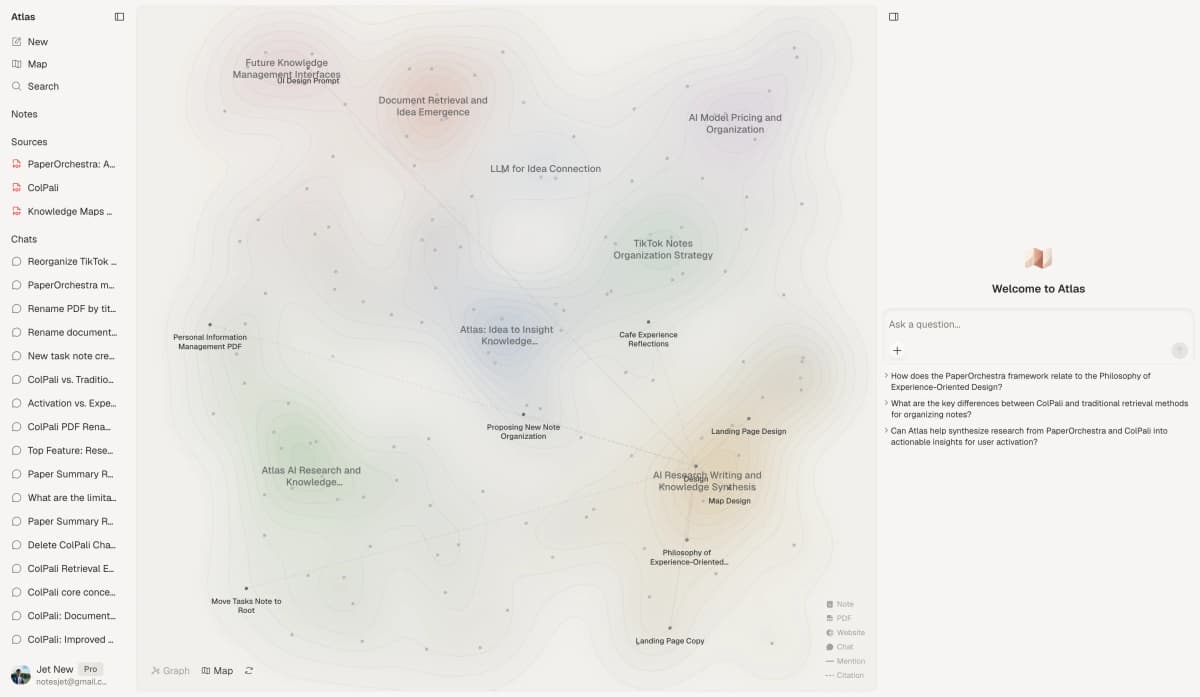
The first-party Atlas screenshot shows the visual map and cited-answer workspace that NotebookLM does not try to replicate.
Price comparison
Atlas is a paid product. There is no perpetual no-cost plan. The evaluation sample includes 10 sources and 5 lifetime AI chats. After that, Atlas Pro is $20/mo or $204/yr with unlimited sources and unlimited AI chats.
NotebookLM has one of the most generous no-cost plans in the AI research category. It includes 100 projects, 50 sources per notebook, 500,000 words per source, 50 chat queries per day, and 3 audio overviews per day with a Google account. Check the NotebookLM plans page for current limits.
NotebookLM wins when the decision is price alone. Pay for Atlas when your research needs Knowledge Map, Semantic Map, source reasoning, and project-scoped context.
| Atlas | NotebookLM |
|---|---|
| Free: ✗ (evaluation sample only: 10 sources · 5 lifetime AI chats) | Free: 100 projects · 50 sources each · 50 chats/day · 3 audio overviews/day ✓ |
| Pro: $20/mo or $204/yr · unlimited sources · unlimited AI chats · all features | Plus (Google One AI Premium): 500 chats/day · 300 sources/notebook |
| Pro unlocks Knowledge Map, Semantic Map, claim-source-justification, and project-scoped context ✓ | Ultra: 5,000 chats/day · 600 sources/notebook |
Table 2: Atlas and NotebookLM pricing compared for auditable research and no-cost source Q&A.
If your choice hinges on source checks, test it with your own material. Upload 1 paper you already used in NotebookLM and run a Knowledge Map plus 1 cited question. Check whether the Atlas source trace helps you defend the answer faster than a footnote alone.
Paper deconstruction (Knowledge Map)
The Knowledge Map is Atlas's per-paper surface. It breaks a paper into a layered argument map. Claims, evidence, and definitions stay tied to the source text.
Labeled links show how the parts relate, and breadcrumbs let you move from the thesis down to a paragraph. NotebookLM has a notebook mind map, while Atlas creates a separate argument map for each paper.
| Atlas | NotebookLM |
|---|---|
| Multi-level argument structure ✓ | Flat topic-chip mind map |
| Labeled relations (motivates, causes, enables) ✓ | ✗ |
| Faithful-to-source node text ✓ | Generated topic summaries |
| Hierarchical breadcrumbs ✓ | ✗ |
| Per-paper deconstruction on ingest ✓ | Per-notebook overview |
| Audio summaries not supported | Audio Overview supported: NotebookLM wins for passive listening, though the audio is not searchable or citation-grounded |
Table 3: Atlas paper deconstruction compared with NotebookLM's notebook-level mind map and Audio Overview.
Good to know: The "audio overview" row is NotebookLM's. Atlas does not generate podcast-style audio summaries from papers. If you want to listen to your sources, NotebookLM is the right tool.
Project view (Semantic Map)
The Semantic Map is Atlas's project view. It puts sources, notes, chats, and citations on a single map. Related items sit near each other by topic.
You can redraw the map from a new angle, such as "by argument" or "by method," without adding the sources again. NotebookLM keeps sources as a list inside each notebook.
| Atlas | NotebookLM |
|---|---|
| Spatial embedding of sources + notes + chats ✓ | Source list view |
| Auto-labeled topic clusters ✓ | Topic chips on the mind map |
| Topic-angle re-projection ✓ | ✗ |
| Mixed-item canvas (sources, annotations, chats) ✓ | Sources only |
| Mixed-item project canvas ✓ | Per-notebook scope |
| ✗ | Google Drive integration ✓. Docs, Slides, and Sheets move directly into NotebookLM. |
Table 4: Atlas project mapping compared with NotebookLM's notebook source list and Google Drive ingest.
Good to know: NotebookLM's Google Drive integration is direct: you can pull in Docs, Slides, and Sheets without exporting. Atlas ingests PDFs and pasted content but does not have native Drive sync.
Citation-grounded answers
Both tools cite. NotebookLM produces footnoted answers, and each cited sentence links to its source.
Atlas shows the claim, passage, and a short explanation of why the passage supports the claim. You can jump to the source paragraph, read the highlighted sentences, and check whether the reasoning holds.
| Atlas | NotebookLM |
|---|---|
| Claim-source-justification triples ✓ | Sentence-level citation footnotes |
| Reasoning traces (why this passage supports this claim) ✓ | ✗ |
| Jump-to-source with passage highlight ✓ | Jump-to-source ✓ |
| Multi-source synthesis with per-claim attribution ✓ | Multi-source synthesis ✓ |
| H/V ratio < 0.1 benchmark published ✓ | Internal grounding (not externally benchmarked) |
| Web search (toggle in chat, saves findings into the project) ✓ | Web search via Discover sources ✓ |
| Resolves open-access cited sources via Literature-Grounded Annotations ✓ | ✗ |
Table 5: Atlas claim-level source reasoning compared with NotebookLM's sentence-level footnotes.
Good to know: Both tools can reach the web and add findings as project sources. NotebookLM renders sentence footnotes. Atlas renders the claim, source passage, and reason they match. Atlas is the more auditable surface when you need to inspect why a passage supports a claim.
Literature-grounded annotations
Atlas marks up each paper on ingest. Citations inside the paper become objects you can inspect. When a cited source is open-access, Atlas pulls in the relevant passage.
You can then see how a cited work helps build the paper's argument without leaving the document. The research synthesis guide shows where that source chain matters.
| Atlas | NotebookLM |
|---|---|
| Auto-annotate on ingest ✓ | Manual annotation |
| Multi-citation synthesis (how citations build the argument) ✓ | ✗ |
| Resolve cited sources (open-access) ✓ | ✗ |
| Exact passage / page / paragraph anchors ✓ | Section-level anchors |
| Inline annotations on the PDF ✓ | Notebook-level notes |
| ✗ | Audio Overview walkthrough ✓. read-only narration, can't be cited at a passage or annotated |
Table 6: Atlas citation-resolution features compared with NotebookLM's generated audio walkthroughs.
Ongoing context within one project
NotebookLM keeps each notebook self-contained. Atlas likewise uses the project as its context boundary, with sources, notes, chats, maps, summaries, and citations available together inside that project.
Separate Atlas projects isolate unrelated evidence. Nothing from another project becomes context automatically. Add a source explicitly when it belongs in more than one project.
| Atlas | NotebookLM |
|---|---|
| Project-scoped research context ✓ | Notebook-scoped context ✓ |
| Sources + notes + chats + KMs + SMs stay together ✓ | Sources + notes stay together ✓ |
| Cited chat remains available inside the project ✓ | Chat remains inside the notebook ✓ |
| Separate projects isolate unrelated context ✓ | Separate notebooks isolate context ✓ |
| ✗ | Google brand · no-cost plan ✓. NotebookLM has greater brand familiarity and lower entry cost. |
Table 7: Atlas project-scoped context compared with NotebookLM's notebook-scoped model.
Good to know: Both products isolate separate containers. Atlas adds visual maps and claim-source-justification within its project boundary. NotebookLM adds Audio Overview and Google-native ingest within a notebook.
When to choose Atlas vs NotebookLM
- Want paper structure deconstructed multi-level? Go with Atlas. (Knowledge Map)
- Want answers that explain how each citation justifies the claim? Go with Atlas. (claim-source-justification)
- Want sources, notes, chats, maps, and citations in one research context? Go with Atlas. (project-scoped context)
- Want audio overviews of your papers? Go with NotebookLM. (Audio Overview is genuinely unmatched.)
- Want a free tool from a trusted brand? Go with NotebookLM. (Google no-cost plan is dramatically more generous.)
- Tied, basic question-answering over a small, one-off PDF set: both work fine. The wedge only opens up once you're building a corpus you'll return to.
Use NotebookLM when the immediate deliverable is an audio overview, study artifact, or quick answer over a self-contained packet. Its Google Drive, YouTube, and audio support reduce setup for that workflow.
Use Atlas when a claim must remain connected to a passage and reasoning trace. The Knowledge Map and project-scoped context matter once the same bounded corpus will support later writing.
Recommendations by user type
- PhD researchers, Atlas. Lit-review-heavy years 1–2 benefit most from the Knowledge Map, because it helps you recover each paper without rereading it. Thesis-writing years 3–4 benefit from claim-source-justification, because each thesis sentence can be checked against a passage. NotebookLM works for standalone literature drops. Keeping sources, maps, and cited chats together inside the thesis project makes Atlas the right tool here.
- Students doing literature reviews and thesis research, Atlas, with NotebookLM as a secondary read-aloud surface. Scope this to research workflows (dissertation, thesis, lit review). Atlas's Knowledge Map is the largest time-saver in the lit-review phase.
- Knowledge workers, Atlas when you read reports and papers for client work. NotebookLM wins when audio fits your commute. For consultants, analysts, PMs, and journalists, the source trace is the difference between a slide you can defend in a meeting and a slide you cannot.
- Personal researchers with stakes, Atlas. This includes medical, legal, major-purchase, and deep self-study work. Burst research with real stakes is where source-based reasoning earns its keep. NotebookLM is a fine starting tool. Atlas is the tool you move to once you need to defend the answer.
Migration and worked example
Bringing NotebookLM sources into Atlas
NotebookLM organizes your research into source-grounded projects. Each notebook is a closed container of up to 50 sources, or more on paid tiers. The chat surface only sees what is inside that container.
Its source surface includes PDFs, text files, Google Docs, Google Slides, pasted text, web URLs, YouTube videos, and audio files. NotebookLM can then generate briefing documents, study guides, FAQs, timelines, mind maps, and audio overviews.
When you migrate to Atlas, the move is partly automatic and partly manual. Any PDF from NotebookLM can be re-uploaded to Atlas, which builds a Knowledge Map on ingest.
Web URLs can be pasted into Atlas's add-source input. Generated notes and briefing documents can be downloaded as text, pasted into an Atlas note, or imported through the Markdown flow.
NotebookLM does not currently expose a source-list export. The upload step depends on what is in your local library, and saved chats do not export as standalone files. Copy any Q&A history you need into a note.
Audio overviews and mind-map layouts do not migrate. Atlas builds a new Knowledge Map from each source on ingest. Export Google Docs and Slides as PDFs first because Atlas does not have native Drive sync.
A 30-paper notebook usually takes a few minutes to upload. Each generated note you keep adds a few more minutes.
8-paper literature-review example
Here is a concrete case. You are writing the literature-review section of a thesis. You have 8 papers that stake out the position you want to argue for. The job is a 1,200-word section where every claim can survive a supervisor asking, "where exactly does that come from?"
In NotebookLM, upload the 8 PDFs and ask for the methodological disagreement between Paper 3 and Paper 6. NotebookLM returns a paragraph with numbered footnotes linked to source passages.
You open the surrounding paragraph and decide whether each citation supports the claim. This works well for one round of chat. Friction appears when you must check 20 claims across 8 papers or recover the selection logic later from the chat thread.
In Atlas, the same job runs through 3 surfaces. First, each paper becomes a Knowledge Map on ingest. Claims, evidence, and links between them appear as a source-based map.
Second, you ask the chat the same question. Atlas returns claim-source-justification triples. Each claim appears with its source passage and a short explanation of why the passage supports it.
Third, the Semantic Map places all 8 papers, your notes, and prior chats on a single canvas. Re-project the canvas from "by argument" to "by method" and the method-disagreement cluster sharpens without a new upload. The output is still a 1,200-word section, with the audit trail visible beside the research.
NotebookLM fit and objections
When NotebookLM is the right call
NotebookLM is the right tool for several research jobs where Atlas is the wrong fit. Audio overviews are the clearest case. NotebookLM can synthesize a 2-host walkthrough from your sources, and Atlas does not generate audio.
YouTube and video sources are the second case. NotebookLM ingests YouTube URLs by pulling the transcript, which suits lecture-heavy research. Atlas focuses on PDFs, web pages, and paper search.
Audio file ingestion is the third case. NotebookLM can turn a recorded interview or conference talk into a searchable transcript. Atlas does not support that.
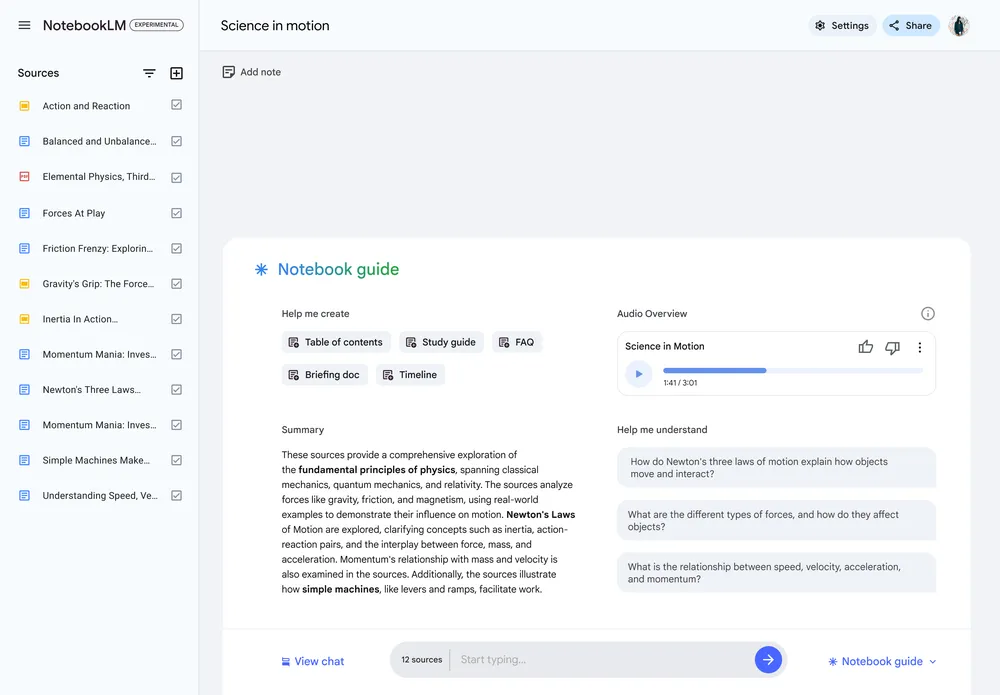
Google's NotebookLM product update on Audio Overview sharing shows the clearest NotebookLM advantage if you want to listen to sources instead of map them.
Google Drive-native workflows are the fourth case. If your corpus lives as Google Docs and Slides, NotebookLM's Drive connector is direct. Atlas has no equivalent.
The no-cost plan is the fifth case. NotebookLM gives you 100 projects, 50 sources each, 50 chats per day, and 3 audio overviews per day with a Google account. That is far more generous than Atlas's evaluation sample.
Auto-generated artifacts are the sixth case. Briefing documents, study guides, FAQs, timelines, and mind maps are NotebookLM strengths. Atlas focuses on Knowledge Map and Semantic Map.
Common objections and edge cases
"My corpus is mostly YouTube lectures, can Atlas handle that?" Not directly. Atlas does not ingest YouTube URLs or audio files. The source surface is PDFs, web pages, and paper search. The workable path is to paste a transcript as a web source or import it as a Markdown note. But if YouTube is the dominant source type in your workflow, NotebookLM is the right tool. The boundary is intentional. We focus the ingest surface on source types where the Knowledge Map is most useful.
"I want to listen to a paper while I cook, does Atlas have anything like Audio Overview?" No, and it is not on the near roadmap. The boundary is deliberate. Time spent on audio would be time not spent on visual maps, source reasoning, and durable context inside a research project. If audio is core to how you read, run NotebookLM in parallel. The two workflows do not conflict.
"I have 200 NotebookLM projects built up over a year, is the migration even worth it?" It depends on what you do with those projects. If most are one-off briefs you have not returned to, leave them in NotebookLM. Re-uploading would cost more than it gives back. If a few are active corpora, migrate each corpus into the Atlas project that owns it. Good candidates are a dissertation library, a treatment-plan workspace, or a client teardown that keeps growing. The Knowledge Map gives you back papers you read months ago, while the project boundary keeps unrelated research isolated. The threshold is simple: "will I revisit this corpus in three months?"
Run the same source set through Atlas. Start with one paper you already used in NotebookLM, build a Knowledge Map, and ask one cited question. If the source trace helps you defend the answer faster than a footnote alone, Atlas is the better fit for that research lane.
Atlas
Try Atlas on your own research papers
Ask across papers, inspect cited passages, and follow each claim's reasoning.
Frequently Asked Questions
Atlas explains the evidence behind each cited claim. Every answer is rendered as a claim-source-justification triple with the claim, passage, draws from, and a one-sentence explanation of why the passage supports the claim. You can click into the source paragraph and read the highlighted sentences in context. NotebookLM cites at the sentence level (footnote next to a sentence), which is enough for most casual Q&A but not enough when you need to defend a thesis sentence, brief paragraph, or treatment-plan summary. Read more about the method in the Verifiable AI Research benchmark.