
Atlas vs Obsidian (2026) | In-Depth Research Comparison
Atlas is a visual research workspace, Obsidian is a local-first markdown app. Compare paper deconstruction, citation grounding, and project-scoped context.
- Byline

Summary
Use Atlas to compare source files and check AI answers against cited passages. Use Obsidian to keep Markdown notes on your own device.
The guide compares research maps, moving files, backlinks, data control, offline work, plugins, and long-term use.
Atlas traces claims to source passages, while Obsidian keeps notes in a local markdown vault.
Obsidian can stay your daily note system while Atlas handles source folders that need checkable answers.
Atlas is a visual research workspace for people who need to understand a set of papers. It suits a thesis, treatment plan, purchase review, or paper review. Obsidian is a Markdown notes app that stores plain-text files on your device. Its data-storage guide explains where those files live.
Both tools can support research. Atlas maps each paper and the full set of sources in a project. Its answers cite passages and explain why they support each claim. Each project keeps its own sources, notes, maps, and chats.
Choose Obsidian for control of your files, offline work, backlinks, and community plugins. Choose Atlas when you need to open the source passage behind an AI answer.
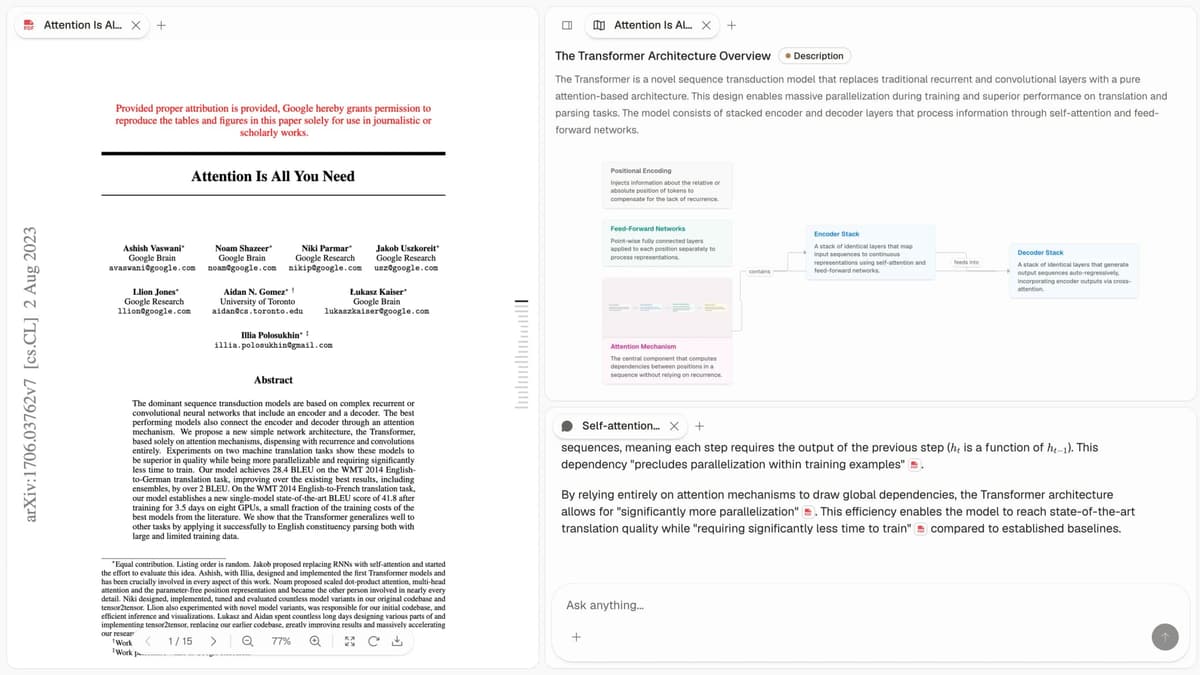
The screenshot shows a paper beside its Knowledge Map and cited chat. The map lays out the paper's ideas and links. The answer keeps citations next to each claim so you can open the PDF passage.

Atlas

Upload a paper and map it in Atlas
Upload papers, ask cited questions, and inspect the source passages.
Quick verdict: Atlas vs Obsidian
Choose Atlas when your project starts with papers and ends with a cited answer or a map of their arguments. It keeps each AI claim tied to a source passage. Knowledge Maps show one paper, while a Semantic Map shows the full project.
Choose Obsidian when you want Markdown files on your device, offline access, backlinks, themes, and plugins. You can also use both. Keep your own writing in Obsidian and use Atlas for source files that need checkable answers.
How we compared Atlas and Obsidian
We compare Atlas on paper maps, project maps, cited answers, and how it keeps one research project together. We compare Obsidian on written notes, backlinks, local files, and plugins. The second-brain apps guide covers other tools for building a connected note library.
The table uses eight checks: source support for AI answers, paper maps, project view, file control, plugins, backlinks, sync, and price.
Side-by-side proof table
Use the table to find the trade-offs that matter to your work.
| Atlas | Obsidian |
|---|---|
| AI citation grounding: claim-source-justification triples with a reason for each source | AI citation grounding: links and citations depend on your notes and plugins |
| Knowledge Maps: one paper becomes claims, evidence, and relations | Knowledge Maps: no native equivalent. You build notes, outlines, or plugin views |
| Project view: Semantic Map clusters sources, notes, chats, and citations by topic | Project view: graph view shows links between notes in a vault |
| File ownership: ✗ no local markdown vault | File ownership: ✓ plain markdown files on your disk |
| Plugin ecosystem: ✗ no community plugin shell | Plugin ecosystem: ✓ large community plugin library |
| Bidirectional links: source, citation, map, and chat graph | Bidirectional links: ✓ core wikilinks and backlinks for authored notes |
| Sync and offline: ✗ cloud-first, no full offline mode | Sync and offline: ✓ local-first with optional paid Sync and Publish |
| Pricing: evaluation sample, then Atlas Pro at $20/mo or $204/yr | Pricing: ✓ free for personal use, with paid Sync and Publish add-ons |
Table 1: Atlas and Obsidian compared on cited AI answers, research maps, file control, plugins, backlinks, sync, and price.
The rest of this article walks through five trade-offs. They are paper maps, project maps, cited answers, source notes, and project-scoped context.
How is Atlas different?
Both tools help people work with source files. Their differences matter when you need to share a finding and show what supports it.
Maps for papers and projects
Atlas builds two kinds of visual map as you read. A Knowledge Map turns one paper into its argument structure. You see claims, evidence, definitions, and links such as supports, causes, or challenges.
A Semantic Map shows a whole project on one canvas. It groups sources, notes, chats, and quotes by topic. You can view the same set from another angle without reading it all again. The research-note organization guide explains how to structure the notes that sit beside those sources.
"It's like an ultimate GPT. I can finally see what I've read." Kyle Lao, CEO & Co-founder of MenSC Labs
Obsidian does not break a paper into its claims and support. It also does not regroup a whole project by topic. A Knowledge Map helps when you need to recall a paper you read weeks ago. The AI mind-map comparison shows which other tools build maps from prompts, files, or manual branches.
Atlas explains every cited claim
The hallucination problem in AI research tools is often subtle. The model may put a citation next to a claim that the cited passage does not support. Atlas renders each answer as a claim, source, and reason. You get the claim, the passage, and a short note on why the passage supports the claim. You can click into the source paragraph and read the highlighted lines in context.
The benchmark Atlas runs internally is the H/V ratio. It checks generated sentences whose citations fail a passage-level review against those that pass. Atlas targets H/V < 0.1 on the citation-grounding benchmark. We publish the method in the Verifiable AI Research (2026) article.
The AI citation checker guide explains the passage-level review. Obsidian can link to sources, while Atlas adds a reason that explains why a passage justifies a claim.
Context stays inside the research project
Obsidian gives you a vault of notes that you control. Atlas keeps sources, notes, chats, maps, summaries, and citations in one research project. When you return, the files and source trail are still together.
Each Atlas project has its own sources. A note or chat from one project does not enter another unless you add it there.
Atlas keeps the work for one research question together. Obsidian gives you a broader personal vault whose links you create yourself.
Comparing Atlas and Obsidian
The proof table above gives the high-level trade-offs. The sections below expand each row. Obsidian wins or ties where local files, plugins, sync, or price matter more.
Paper deconstruction with a Knowledge Map
A Knowledge Map turns one paper into a map of its argument. Claims and definitions stay tied to the source text. The links show whether one idea supports, causes, helps, or challenges another. Use the questions in the chat-with-PDF guide to check the passage behind a mapped claim.
| Atlas | Obsidian |
|---|---|
| Multi-level argument structure ✓ | Manual markdown notes per paper |
| Labeled relations (motivates, causes, enables) ✓ | ✗ |
| Faithful-to-source node text ✓ | ✗ |
| Hierarchical breadcrumbs ✓ | ✗ |
| ✗ | Local-first markdown storage ✓. files stay on your disk. AI paper deconstruction is not part of this surface |
Table 2: Knowledge Maps reconstruct paper arguments; Obsidian stores the notes and links you create.
This is a choice between file ownership and structured recall. Obsidian stores Markdown files on your device; Atlas does not provide a local vault. Atlas instead turns a paper into a Knowledge Map that can help you recover its argument weeks later.
Project view with a Semantic Map
The Semantic Map shows an Atlas project on a canvas. It groups sources, notes, chats, and citations by topic. You can regroup the same files around another topic without adding them again.
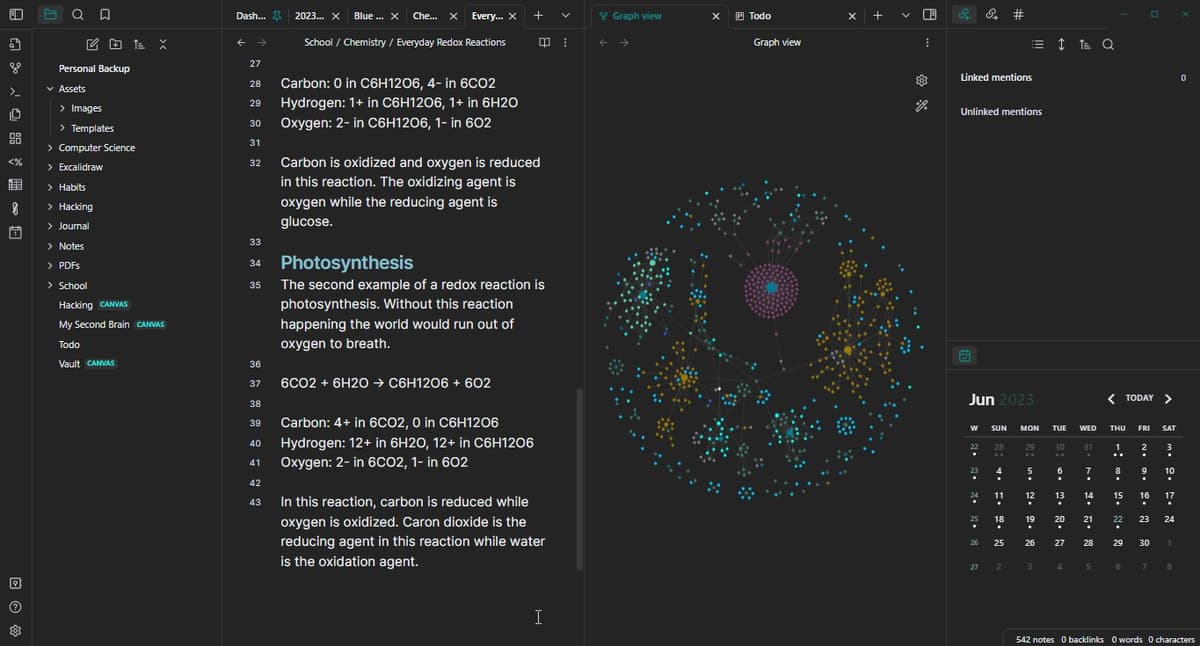
This Obsidian screenshot by Langstonzac25 on Wikimedia Commons uses a CC BY-SA 4.0 license. The file tree and note editor show Markdown files stored on the device. The graph shows links that the user made between notes. Atlas instead groups source files, notes, chats, and citations by topic.
| Atlas | Obsidian |
|---|---|
| Spatial embedding of sources + notes + chats ✓ | Graph view of note backlinks |
| Auto-labeled topic clusters ✓ | ✗ |
| Topic-angle re-projection ✓ | ✗ |
| Mixed-item project canvas ✓ | ✗ |
| ✗ | Plugin ecosystem (community plugins) ✓. broad community plugins extend the tool. Citation grounding is not built in |
Table 3: Semantic Maps group project sources by topic; Obsidian's graph follows user-created links.
Obsidian's graph view follows links that you create between notes. Atlas's Semantic Map looks across the papers in a project to surface shared topics and relationships, even when the source set began as a flat folder.
AI citation grounding
Atlas shows each claim with a source passage and a short reason that the passage supports it. You can open the source, read the highlighted lines, and check the answer. The cited-chat guide explains why a source link alone does not prove a claim.
| Atlas | Obsidian |
|---|---|
| Claim-source-justification triples ✓ | ✗ |
| Reasoning traces (why this passage supports this claim) ✓ | ✗ |
| Jump-to-source with passage highlight ✓ | ✗ |
| H/V ratio < 0.1 benchmark published ✓ | ✗ |
| ✗ | Pay-once Sync / Publish ecosystem ✓. favorable pricing for offline use. Citation grounding is outside its scope |
Table 4: Atlas adds passage-level claim checks; Obsidian depends on the citation behavior of the chosen plugin.
Both tools can point back to sources, but Atlas also explains why a retrieved passage supports the answer. When a thesis sentence or brief paragraph carries more risk, the citation-checker guide adds a second review step.
Literature-grounded annotations
Atlas adds notes to each paper when you upload it. You can open the sources cited inside the paper. If one is free to read, Atlas can also pull in the useful passage. The AI citation analysis guide shows how that source trail helps you compare papers.
| Atlas | Obsidian |
|---|---|
| Auto-annotate on ingest ✓ | Manual annotation via plugins (Zotero integration) |
| Multi-citation synthesis (how citations build the argument) ✓ | ✗ |
| Resolve cited sources (open-access) ✓ | ✗ |
| Exact passage / page / paragraph anchors ✓ | ✗ |
| ✗ | Markdown export and version control ✓. full file ownership and version control. Does not add research citation depth |
Table 5: Atlas follows citations inside uploaded papers; Obsidian keeps source connections that the user records.
Atlas can also follow source links inside the paper you are reading. If a cited work is open access, Atlas can retrieve the relevant passage, making it easier to inspect how the current paper builds its argument from earlier sources.
Ongoing context within one project
Atlas keeps the sources, notes, chats, maps, summaries, and citations for one question in the same project. Another project has its own source set.
| Atlas | Obsidian |
|---|---|
| Persistent project context ✓ | Persistent vault you fully own |
| Sources + notes + chats + KMs + SMs stay together ✓ | Notes and backlinks stay in the vault ✓ |
| Cited chat remains available inside the project ✓ | AI chat depends on plugins |
| Separate projects isolate unrelated context ✓ | Vault boundaries depend on user setup |
| ✗ | Offline, no-cloud requirement ✓. no AI features without cloud |
Table 6: How Atlas projects and Obsidian vaults keep research available over time.
The two products preserve context at different levels. An Atlas project keeps its source set, maps, notes, and chats together. An Obsidian vault can span a much broader body of local notes, with boundaries and links that you control yourself.
Price comparison
Atlas is a paid product with no permanent free plan. Its trial includes 10 sources and 10 total AI chats. Atlas Pro costs $20 per month or $204 per year. It includes unlimited sources and chats, Knowledge Maps, Semantic Maps, cited answers, and project history.
Obsidian is free without limits. Current Obsidian pricing lists Sync at $4 per user each month when billed annually or $5 monthly. Publish costs $8 per site each month annually or $10 monthly.
Catalyst is an optional $25 one-time license. The optional Commercial license costs $50 per user each year.
| Atlas | Obsidian |
|---|---|
| Free: ✗ (evaluation sample only: 10 sources · 5 lifetime AI chats) | Free: Core app is free without limits ✓ |
| Pro: $20/mo or $204/yr · unlimited sources · unlimited AI chats · all features | Paid add-ons: Sync $4 annual-billed or $5 monthly · Publish $8 annual-billed or $10 monthly |
| Pro unlocks Knowledge Map, Semantic Map, claim-source-justification, and project-scoped context ✓ | Optional support licenses: Catalyst $25 once · Commercial $50/user/year |
Table 7: Pricing comparison between Atlas and Obsidian, including free tier, Pro tier, and feature unlocks.
CodeAtlas, ATLAS ti, and Notion
Search results for "atlas vs obsidian" mix several products. This article compares Atlas Workspace with Obsidian. It does not cover software-project mapping tools or qualitative-analysis software for coding interviews and field notes.
Notion appears here because many readers compare Obsidian, Notion, and Atlas when choosing a notes or research system. Notion is a team workspace and database tool. Obsidian is a local Markdown vault. Atlas is for reading source files, mapping papers, and producing cited answers.
Logseq and Roam fit
Logseq and Roam also show up around Obsidian searches because they share the backlink-and-graph note-taking pattern. They are closer to Obsidian than to Atlas. Logseq is an outliner and local-first graph notes tool. Roam is a hosted outliner built around block references. Atlas starts with source documents, maps paper structure, and returns cited answers you can audit.
That is the key split.
When to choose Atlas vs Obsidian
Choose based on what you need to keep. Atlas keeps an AI claim tied to its source passage. Obsidian keeps your Markdown files, links, settings, and plugins under your control.
The tools can work together without holding the same notes. Keep your own writing in Obsidian. Add PDFs to Atlas when you need a map of their claims or an answer backed by citations.
Atlas earns its place when you need a map of a paper's claims, explanations of why passages support an answer, or one project containing the sources, notes, chats, and maps for a research question.
Obsidian is the clearer choice when local Markdown storage, community plugins, or fully offline work is non-negotiable. For quick notes on a paper you have already read, either tool works; the distinction matters more as the source collection grows and you need to use it again.
Recommendations by user type
- PhD researchers: Use Atlas when the same set of papers must support years of review and thesis writing. Use Obsidian for daily notes that you want to keep as local files.
- Students writing a literature review: Use Atlas to map papers and check the source behind each claim, then follow the literature-review process from question to final synthesis.
- Consultants, analysts, product managers, and journalists: Use Atlas when reading and citing PDFs takes most of the time. Use Obsidian when you mainly write notes by hand and want local files.
- People researching a high-stakes choice: Use Atlas when a health, legal, or major purchase decision needs a source trail. Use Obsidian when you want to collect and organize the material yourself.
Choose Obsidian for local Markdown files, plugins, backlinks, and full control of a personal note base. Choose Atlas when source files must become cited findings across many papers. Keep your own notes in Obsidian and use Atlas where checking sources takes the most time.
Migration and worked example
Migrating from Obsidian to Atlas
An Obsidian vault is a folder of plain Markdown files on your disk. It includes notes, attachments, a hidden .obsidian/ config folder, plugin settings, [[wikilinks]], and tags.
Atlas does not copy an Obsidian vault as-is. It organizes work around source files, research maps, and projects. Free-form notes and backlinks stay in Obsidian.
PDFs and other source files move cleanly. Add them to an Atlas project and each can become a Knowledge Map. You can paste useful Markdown notes beside the source. Keep author, title, and journal details in a reference manager; our citation-tool guide explains how.
Plugins such as Dataview, Templater, Excalidraw, and Kanban remain in Obsidian. Atlas is a focused research surface and does not function as an extensible plugin shell. Custom CSS, hotkeys, and workspace panes also stay behind.
Dataview queries over frontmatter need a new approach. The closest Atlas surface is the Semantic Map, which clusters sources by topic angle. Obsidian's backlinks graph remains in the vault, while Atlas builds its graph from sources, citations, and maps.
Start with the corpus you are reading now. Upload the PDFs and let Atlas build the Knowledge Maps. Then paste the most useful summary notes beside each source.
During the first week, ask Atlas the same questions you answered through backlinks. Check that cited answers land where you expect. Most researchers keep Obsidian open for daily notes during the switch.
Worked example with 8 papers
Imagine 8 papers on one research question. Four are foundational, three are current, and one is contrarian. The output is a literature-review section where each claim needs a passage a reader can check.
In Obsidian, you create one note per paper. You add quotes, comments, and [[wikilinks]] when you spot a connection. The graph view shows 8 nodes joined by your links.
Dataview can list notes tagged #methodology, and a map-of-content note can link to each paper. You write the draft by reading notes and assembling quotes. Each citation is typed and checked by you.
In Atlas, you upload the 8 PDFs into one project. Each paper becomes a Knowledge Map with claims, evidence, and labeled links in the paper's own words. The Semantic Map puts all 8 papers on a shared canvas. The best AI tools for students guide shows how this source-analysis stage fits into a wider tool stack.
You can ask where the papers disagree without re-reading the whole set. Atlas returns the claim, exact passage, and a short reason. You click into the source, read the highlighted lines, and decide whether the citation holds.
Obsidian still wins on ownership in this scenario. Your notes are Markdown files you own, with no cloud dependency. If your institution forbids cloud AI, Obsidian is the right tool. Obsidian's plugin ecosystem is also broader. Zotero links, Excalidraw sketches, and Pandoc export are common Obsidian workflows.
Atlas trades some local control for deeper grounding and cross-paper synthesis. That trade may not suit a one-off review. For a multi-year thesis kept inside one Atlas project, the Knowledge Map, cited answer, and durable project context can reduce re-reading.
This worked example is the proof surface for the comparison. Try it with one paper from a current Obsidian vault, then decide whether passage-level checks save enough time to add Atlas to the research workflow.
When Obsidian is the right call
Atlas is not the right answer for every research job. There are five cases where Obsidian is the better tool.
Use Obsidian for local-first and offline work. If you work on planes, in archives without Wi-Fi, or under a policy that forbids cloud AI, use Obsidian. Atlas runs on cloud infrastructure. It does not have a full offline mode.
Use Obsidian when plugins drive the note system. Its library includes Dataview, Templater, Excalidraw, Kanban boards, and calendar tools. A specific plugin dependency makes Obsidian the better fit. Atlas is a focused research surface.
Use Obsidian for raw markdown ownership. Your vault is plain text on your disk. You can keep it under version control. If long-term file control is a must, that form is hard to beat. Atlas exports are usable, but the live graph lives on Atlas's servers.
Use Obsidian for large existing vaults. If you already have a 10-year-old vault with thousands of notes, rebuilding it in Atlas may cost too much. Atlas can run alongside for new research. Full migration is a project.
Use Obsidian if you want no AI dependency. Some researchers prefer to read, summarise, and synthesise by hand because that cognitive work is the research. Obsidian respects that posture. Atlas is built around AI-assisted reading.
Common objections and edge cases
Can I keep Obsidian and use Atlas alongside? Many researchers use both. Obsidian handles daily notes, journals, and freeform writing. Atlas handles corpus reading and cited synthesis. There is no direct integration, so source files must be added to each product separately.
What about Obsidian's graph view versus Atlas's Semantic Map? Both are graphs, but they show different things. Obsidian's graph view shows the backlinks you created between notes. The structure reflects your manual links. The Semantic Map groups sources, notes, chats, and citations by topic. One shows the connections you drew. The other shows connections the corpus implies.
Does Atlas use portable Markdown files? Atlas is built around sources, Knowledge Maps, and project-scoped research context. Its live workspace does not use raw Markdown files. Uploaded PDFs remain yours, exports are available, and annotations stay accessible.
Knowledge Maps and Semantic Maps are Atlas-native. Choose Obsidian when Markdown portability is required. Choose Atlas when cited research depth is the priority.
Atlas
Upload a paper and map it in Atlas
Upload papers, ask cited questions, and inspect the source passages.
Frequently Asked Questions
Atlas makes that explanation the core of its citation surface. Every answer is rendered as a claim-source-justification triple: the claim, the passage it draws from, and a one-sentence explanation of why the passage supports the claim. You can click into the source paragraph and read the highlighted sentences in context. Obsidian may cite at the sentence level or link to sources, but it does not render the reasoning trace that connects the claim to the passage. That trace is the move when you need to defend a thesis sentence, a brief paragraph, or a treatment-plan summary. Read more about how Atlas grounds claims in Verifiable AI Research (2026).