
Atlas vs Scite (2026): An In-Depth Research Comparison
Atlas is a visual research workspace, Scite is a citation-context tool that classifies how papers cite each other. Compare paper deconstruction and citations.
- Byline

Summary
Use Atlas for deep reading and cited synthesis. Use Scite for citation contexts and supporting or contrasting citation signals.
The comparison covers source grounding, Knowledge Maps, Scite reports, citation labels, and workflow fit.
Atlas explains source support for claims, while Scite shows how papers cite each other.
Researchers can use Scite for citation-graph context and Atlas to synthesize the selected papers.
Note: We make Atlas. This comparison comes from the team that built it, so treat it as first-party guidance. Where Scite has the better answer for a given research job, the article says so plainly. See the rows where Scite wins and the "When to choose Scite" section below. The goal is to help you choose the right tool for your research task.

Atlas

Synthesize papers from your Scite report
Upload selected papers, compare their claims, and inspect each cited passage.
Quick verdict
Atlas is a visual research workspace for people reading a body of papers. The research may support a thesis, treatment plan, purchase decision, or literature review. Scite is a citation-context tool that labels citations as supporting, contrasting, or mentioning. Scite Assistant adds Q&A over that index.
The split appears after the first answer. Atlas deconstructs each paper into a Knowledge Map and projects one project's corpus into a Semantic Map. It also runs answers through claim-source-justification, so each claim points to a source passage and explains why that passage supports it. Scite's cite labels are broader across the field. Atlas's maps and source traces go deeper inside the papers you choose to read.
If you need to check how the literature received a claim, use Scite. If you need to write a defensible thesis sentence from a fixed set of papers, Atlas is the better fit.
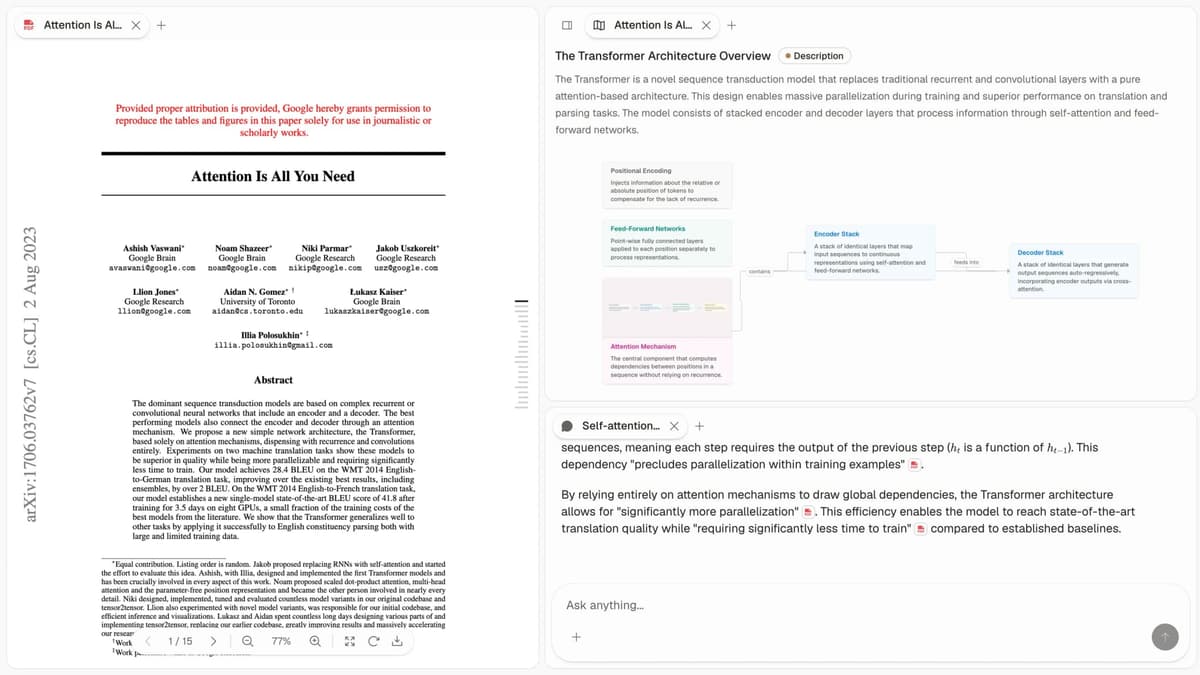
The first-party Atlas screenshot shows the source list, visual map, and cited-answer surface discussed in this comparison.
How we compared Atlas and Scite
We compared the tools by the job a researcher is trying to finish. Scite is strongest when the job is seeing how a paper has been cited. It shows who cited it and whether the citing paper supports or disputes it.
Atlas is strongest for close reading inside a chosen set of papers and a structured research-paper analysis. It shows what each paper argues, how sources connect, and which passage supports each draft sentence.
The criteria below follow that split. They cover cited answers, visual maps, cite labels, paper upload, synthesis depth, price, and project boundaries. Scite is stronger when the question is how later papers received a claim. Its reports are better for seeing how a claim was cited.
| Atlas | Scite |
|---|---|
| Citation grounding: claim-source-justification with claim, passage, and reason | Citation grounding: citation-aware answers and citation-context labels |
| Visual maps: Knowledge Map per paper and Semantic Map per project | Visual maps: no comparable map of a paper's argument |
| Citation-context classification: no supporting, contrasting, or mentioning labels | Citation-context classification: supporting, contrasting, and mentioning labels ✓ |
| Paper upload: upload PDFs into a project and map them on ingest | Paper upload: search reports, dashboards, and source lists from Scite's index |
| Synthesis depth: best for passage-backed synthesis across a curated corpus | Synthesis depth: best for reception checks across the wider literature |
| Project context: sources, maps, notes, and chats share one uploaded evidence base | Saved research: collections, reports, and dashboards organize work over Scite's index |
| Pricing: evaluation sample, then Atlas Pro at $20/mo or $204/yr | Pricing: free preview, personal paid plan, team and enterprise tiers |
Table 1: What Atlas and Scite do for citations, maps, uploads, synthesis, saved work, and price.
How is Atlas different?
Scite and Atlas both help with source work. They diverge on three capabilities that decide whether the output is shareable, defensible work. This section walks through those differences in order.
Visual maps for papers and projects
Atlas builds 2 kinds of visual map as you read. A Knowledge Map turns each paper into its argument structure. Claims, proof, terms, and links between ideas become map nodes. You see the paper's spine first, then click into the supporting passages.
A Semantic Map projects your whole project into a spatial canvas. Sources, notes, chats, and cites cluster by topic. You can view the same corpus from a new angle without reading it again.
"It's like an ultimate GPT. I can finally see what I've read." Kyle Lao, CEO & Co-founder of MenSC Labs
Scite does not have a per-paper claim-evidence map or a topic-angle view across an entire project. If you have spent an afternoon trying to recover a paper, the Knowledge Map is the first Atlas surface that pays off.
It restores the paper's argument structure. Visual maps make a body of papers legible at a glance, with multi-level zoom as the main reading surface.
Inspectable claim support
The hallucination problem in AI research tools isn't only a fabricated statement. A model can also put a citation next to a claim that the cited passage fails to justify.
Atlas renders every answer as a claim-source-justification triple. You get the claim, the passage, and a short reason the passage supports the claim. You can click into the source paragraph and read the highlighted sentences in context.
The benchmark Atlas runs internally is the H/V ratio. It checks whether a cited sentence still holds up when the source passage is read again. Atlas targets H/V < 0.1, and we publish the method in Verifiable AI Research.
Scite's answers may include citations or links to sources. They are not built around the same claim-level reasoning trace. That distinction may matter little for casual Q&A. It matters for a thesis sentence, brief paragraph, or treatment-plan summary. Every Atlas claim traces to its source, and Atlas explains why the source justifies it.
Project-scoped research context
Atlas keeps sources, notes, chats, Knowledge Maps, and Semantic Maps inside the project where they were created. That boundary gives each answer and map one focused evidence base.
A separate project starts with its own sources, so unrelated research does not leak into the answer. The knowledge-graph AI guide explains how these structures represent research.
Scite uses collections, reports, and dashboards around a much wider scholarly index. Choose Atlas when a bounded uploaded corpus and passage trace matter. Choose Scite when you need citation reception across the published literature.
Comparing Atlas and Scite
Both tools touch a researcher's daily work, but they live in different lanes. Atlas helps you break down papers, move through one project, and check cited answers. Scite labels how papers cite each other across the scholarly index and adds Scite Assistant Q&A.
Scite's cite graph is broader because it is tied to the scholarly index. That is the reason to keep it for reception work. Atlas's reading surface goes deeper inside each chosen paper.
Use Scite to check how a paper was cited, then use Atlas to read the paper and write from it. The sections below compare paper maps, project views, cited answers, paper notes, and project boundaries. Each table includes rows where Scite wins or ties.
Paper deconstruction with Knowledge Maps
The Knowledge Map is Atlas's per-paper surface. It turns a paper into a map of its argument. Claims, proof, terms, and links between ideas become visible nodes. Node text stays faithful to the source language.
Breadcrumbs let you move from the main thesis to a specific paragraph. This helps when a research-paper organizer must preserve argument structure.
| Atlas | Scite |
|---|---|
| Multi-level argument structure ✓ | Citation-context table (who cites this paper how) |
| Labeled relations (motivates, causes, enables) ✓ | ✗ |
| Faithful-to-source node text ✓ | ✗ |
| Hierarchical breadcrumbs ✓ | ✗ |
| ✗ | Citation-classification index (supporting / contrasting / mentioning) ✓. Classifier output for citation reception |
Table 2: How Atlas maps one paper and how Scite labels citations.
Good to know: The bottom row belongs to Scite. Atlas does not ship that surface. The Knowledge Map pays off when you need a paper's argument weeks after you read it. Topic chips alone are no longer enough.
Project view with Semantic Maps
The Semantic Map is Atlas's project surface. It places sources, notes, chats, and cites on a map where related items cluster by topic. You can view the same canvas from a new topic angle without ingesting the papers again.
| Atlas | Scite |
|---|---|
| Spatial embedding of sources + notes + chats ✓ | Per-paper citation report |
| Auto-labeled topic clusters ✓ | ✗ |
| Topic-angle re-projection ✓ | ✗ |
| One project-scoped evidence view ✓ | ✗ |
| ✗ | Scholarly index search across millions of papers ✓. Broad index coverage |
Table 3: How Atlas maps a project and how Scite reports citations.
Good to know: Scite's strength on that row is real. If your work depends on it, that's the boundary. The Semantic Map pays off when 200 papers stop being a folder. They become a corpus you can view from more than one angle without reading it all again.
Citation-grounded answers
Atlas produces claim-source-justification triples. Each one has the claim, the source passage, and a short explanation of why the passage supports the claim. You can jump to the source paragraph, read the highlighted sentences, and perform an AI citation check before using the answer.
| Atlas | Scite |
|---|---|
| Claim-source-justification triples ✓ | Scite Assistant: AI answers with citation classifications |
| Reasoning traces (why this passage supports this claim) ✓ | ✗ |
| Jump-to-source with passage highlight ✓ | Jump to citing paper ✓ |
| H/V ratio < 0.1 benchmark published ✓ | Citation-aware synthesis |
| ✗ | Citation-context labels in every answer ✓. Reception labels attached to answers |
Table 4: How Atlas explains cited answers and how Scite adds cite labels.
Good to know: Both tools have a citation surface. Atlas explains why a passage justifies a claim and identifies the cited passage. This extra reasoning trace may go unnoticed in everyday Q&A. It matters for a thesis sentence or brief paragraph.
Literature-grounded annotations
Atlas adds notes to each paper on ingest. Cites inside the paper become objects you can inspect. When the cited source is open-access, Atlas pulls the key passage.
You can see how one paper builds its argument across sources without leaving the document. This adds a second layer to citation analysis.
| Atlas | Scite |
|---|---|
| Auto-annotate on ingest ✓ | ✗ |
| Multi-citation synthesis (how citations build the argument) ✓ | ✗ |
| Resolve cited sources (open-access) ✓ | ✗ |
| Exact passage / page / paragraph anchors ✓ | ✗ |
| ✗ | Browser plugin showing citation context inline ✓. Citation context preview |
Table 5: How Atlas resolves cited sources and how Scite previews citation context.
Good to know: Atlas resolves cites inside the paper you're reading. When a paper cites an open-access source, Atlas pulls in the cited passage. The result is a visible chain inside the paper's structure.
Project-scoped context
Atlas keeps citations, notes, Knowledge Maps, Semantic Maps, and chats inside one project. Those surfaces share the same uploaded evidence. A separate project has a separate evidence base.
| Atlas | Scite |
|---|---|
| Project-scoped research context ✓ | Collections and dashboards over Scite's index ✓ |
| Sources, notes, maps, and chats share one evidence base ✓ | Citation reports connect papers across the index ✓ |
| Separate projects isolate unrelated context ✓ | Saved collections group related papers ✓ |
| Sources must be added to each relevant project | Scite searches its indexed scholarly corpus |
| ✗ | Cross-paper citation network view ✓. Reception graph across papers |
Table 6: How Atlas bounds project evidence and how Scite organizes citation-index research.
Good to know: Atlas's project boundary is deliberate. Put sources that answer the same research question together, and create a separate project when the evidence should stay isolated.
Price comparison
Atlas is a paid product. There is no permanent free plan. You get an evaluation sample with 10 sources and 5 lifetime AI chats. After that, Atlas Pro costs $20/mo or $204/yr. Atlas Pro includes Knowledge Maps, Semantic Maps, and claim-source-justification.
Scite's pricing page routes visitors to a free trial or sales contact. Check the live quote for paid access because old individual-plan prices are no longer reliable.
Institutional buyers should confirm seat limits, API access, and renewal terms.
| Atlas | Scite |
|---|---|
| Free: ✗ (evaluation sample only: 10 sources · 5 lifetime AI chats) | Trial: Scite advertises a free trial ✓ |
| Pro: $20/mo or $204/yr with unlimited AI chats and unlimited sources | Paid: check Scite's live pricing or request a quote |
| Pro unlocks Knowledge Map, Semantic Map, and claim-source-justification ✓ | Paid access covers Scite Assistant, Smart Citations, reports, and related research tools |
Table 7: What Atlas Pro and Scite paid plans include.
When to choose Atlas vs Scite
- Want paper structure deconstructed multi-level? Go with Atlas. (Knowledge Map)
- Want answers that explain how each citation justifies the claim? Go with Atlas. (claim-source-justification)
- Want one focused evidence base for maps, notes, and cited chat? Go with Atlas. (project-scoped context)
- Want to see how a paper has been cited across the literature (supporting / contrasting)? Go with Scite.
- Tied: checking how a single foundational paper has been received in the literature**: both work fine, different jobs. The wedge only opens up once you're building a corpus you'll return to.
The choice turns on evidence scope. Atlas works from the PDFs in one research project. Scite works from citation context across its scholarly index.
Use a real paper set for the decision. Start with Scite when you need reception signals, then test Atlas when you need to draft from the papers themselves.
Recommendations by user type
- PhD researchers: Atlas + Scite. Use Scite to see how a paper has been received. Use Atlas to read each paper closely and check each cited claim.
- Students doing literature reviews and thesis research: Atlas. The Knowledge Map saves the most time in the review phase, while each project keeps its sources and cited conversations together.
- Knowledge workers (consultants, analysts, PMs, journalists): Atlas when you read reports and the occasional paper for client work. Use Scite for the adjacent jobs it handles well. The Atlas edge is a slide you can defend in a meeting.
- Personal researchers with stakes: Atlas. Medical, legal, purchase, and deep self-study work all need answers you can check. For a broader personal knowledge system, compare the best second-brain apps. Scite remains useful for citation reception.
Scite is the better surface for citation reception: whether later papers support, contrast with, or mention a claim. Atlas is better for reading the papers and turning passages into defensible synthesis.
The AI research assistant guide places both jobs in the wider tool category. Scite asks how the literature has treated a paper or claim. Atlas asks what the paper argues and which passage supports the sentence you are about to write.
Migrating from Scite to Atlas
The 2 tools store different objects, so a clean one-to-one transfer is unavailable. Scite's primary object is the smart citation, a passage from one paper that cites another. Scite classifies it as supporting, contrasting, or mentioning. Around that index, Scite adds Assistant, reports, dashboards, and saved searches.
Atlas's primary object is the deconstructed paper. An uploaded PDF becomes a Knowledge Map with claims, evidence, and labeled relations, plus a Semantic Map of the whole project. The migration plan moves the parts that transfer and names the limits.
Paper references migrate cleanly. Scite reports can export reference data from the report interface. Pull the paper list from each report or dashboard you care about. If you also manage a library in Zotero, the Atlas comparison covers that boundary.
Resolve the PDFs through your institution or an open-access source and upload them to a new Atlas project. Atlas builds a Knowledge Map per paper and adds the corpus to your Semantic Map. One Scite report per Atlas project is a reasonable starting structure.
Scite's classification labels do not migrate. Supporting, contrasting, and mentioning labels are computed against Scite's index and have no native object in Atlas. Saved searches and citation-context dashboards stay in Scite.
Atlas stays inside your uploaded library plus cited sources. If Scite dashboards are core to your research, keep Scite alongside Atlas. Use Scite for citation reception and Atlas for paper maps, cited answers, and project-scoped synthesis.
Worked example with 8 papers
Picture a researcher writing a 1,000-word literature-review section from 8 papers on a contested mechanism. The job has 2 halves. First, understand what each paper argues. Second, write a section whose key claims can be defended back to a passage.
With Scite, you search the citation-context index for each paper and open its Smart Citation report. The report shows supporting citations, contrasting citations, and the passages where other authors cite the paper. Scite Assistant lets you ask a synthesis question over the cited literature. Its answer returns with citation-context labels that show which papers have been challenged in print and which have held up.
With Atlas, you drop the 8 PDFs into a new project. Each paper gets a Knowledge Map with its argument spine visible at the top level. Claims become nodes, evidence becomes supporting nodes, and labeled relations connect them.
The Semantic Map clusters the 8 papers by topic. When you draft, Atlas returns each synthesis sentence as a claim-source-justification triple. The research synthesis guide uses the same sequence. Draft across sources, then inspect the source trace before keeping the claim.
Scite's smart-citation index answers how a paper has been received in the literature. Atlas's Knowledge Map and claim-source-justification answer what the paper argues and which passage supports a draft sentence.
In an 8-paper section, start in Scite when filtering the set. Move to Atlas when writing from it. Keep those 8 papers and notes in one Atlas project so every cited answer uses the same evidence base.
When Scite is the right call
Scite is the cleaner fit for evaluating the evidence strength of a published claim. Its smart-citation classifier shows how a claim has held up across later papers. Atlas does not index citations across the wider literature.
Scite also wins for finding supporting and contrasting citations and for citation-context dashboards in systematic reviews. Those dashboards track how a defined list of claims has been received over time. A fourth use is checking individual claims against the published record. Each job asks how the literature has cited something, which is Scite's core surface.
Elicit, Consensus, and Scopus AI
Elicit, Consensus, and Scopus AI sit next to this choice, but they solve different jobs. Elicit helps screen papers and pull study details. Consensus offers fast answer summaries across a topic.
Scopus AI helps when your library already uses Elsevier's index. Semantic Scholar is another discovery-first option. These tools do not replace Scite's support and contrast labels or Atlas's paper maps and cited-answer workflow.
Common objections and edge cases
"My Scite dashboards track 40 claims across hundreds of papers. Can Atlas replace that?" Atlas has no citation-context dashboard that rolls up how a defined claim list has been received in the literature. Those dashboards live on Scite's index. Keep Scite when they are core to your research.
Atlas helps with the papers themselves. When a dashboard surfaces a paper you need to read deeply, Atlas supplies the Knowledge Map and claim-source-justification. Both products can coexist without conflict.
"I write papers rather than literature reviews. Why would I switch from Scite Assistant?" Keep Scite Assistant for citation-reception questions. Add Atlas when drafting from a bounded PDF set.
Atlas gives you a sentence-level check against passages in your library. That matters when a thesis sentence must hold up with an advisor or reviewer. Scite Assistant grounds against the citation index, while Atlas grounds against the papers you uploaded.
"I only need this for one project that ends in three months. Is Atlas worth it?" A short project can still benefit from Atlas when it has to produce a defensible thesis chapter, legal brief, or treatment plan. The cited-answer surface earns its keep when the cost of an unsupported sentence is high. For a quick citation-reception check, Scite has less setup friction.
Access and purchasing
Scite advertises a free trial and routes institutional buyers to a demo. Check its current pricing page for the quote and access model that applies to you.
Its API documentation covers Assistant, search, citation tallies, and Smart Citation Graph access. The Scite MCP connects that evidence to compatible AI clients. Atlas publishes its evaluation limits and Pro price directly.
Atlas
Synthesize papers from your Scite report
Upload selected papers, compare their claims, and inspect each cited passage.
Frequently Asked Questions
Atlas is built around this citation surface. Every answer is rendered as a claim-source-justification triple: the claim, the passage it draws from, and a one-sentence explanation of why the passage supports the claim. You can click into the source paragraph and read the highlighted sentences in context. Scite may cite at the sentence level or link to sources, but it does not render the reasoning trace that connects the claim to the passage. That trace is the move when you need to defend a thesis sentence, a brief paragraph, or a treatment-plan summary. Read more about how Atlas grounds claims in the Verifiable AI Research guide.