
Atlas vs Whimsical (2026): An In-Depth Research Comparison
Atlas is a visual research workspace, Whimsical is a visual workspace for flowcharts, wireframes, and mind maps. Compare deconstruction and citations.
- Byline

Summary
Use Atlas for source-grounded research maps. Use Whimsical for flowcharts, wireframes, mind maps, and visual planning.
The updated comparison covers citation grounding, Knowledge Maps, board export, source migration, and visual workflow fit.
Atlas reconstructs paper arguments from sources, while Whimsical helps users draw diagrams and canvases manually.
Whimsical can remain useful for diagrams while Atlas handles research libraries that need citations.
Note: We make Atlas, so this comparison reflects the builder's point of view. It also states where Whimsical has the better answer. See the table rows where Whimsical wins and the "When Whimsical is the right call" section below. Use the evidence to choose the tool that fits the research job in front of you.

Atlas

Build a cited map from research sources
Upload a paper and compare its argument map with your Whimsical board.
Quick verdict
Atlas is a visual research workspace for people who need to understand a body of papers. Think thesis, treatment decision, purchase teardown, or literature review. Whimsical is a visual canvas for flowcharts, wireframes, mind maps, and sticky notes. It is built for fast planning and product design work.
The category difference matters more than the shared visual vocabulary.
The wedge is what the map is made from. Atlas builds a Knowledge Map from each paper, a Semantic Map from one project, and citation-grounded answers where every claim traces to a source passage. Whimsical is stronger when you want to draw a diagram by hand. Atlas is stronger when the source documents should drive the map and the answer needs to be defended.
Start with the output you need, then choose the visual system that produces it.
How we compared Atlas and Whimsical
The comparison uses 7 criteria: citation grounding, Knowledge Maps, Semantic Maps, manual canvas control, flowcharts, wireframes, and pricing. Whimsical wins when the job is free-form diagramming. Atlas wins when the job is source-heavy research with answers you need to check.
We also checked the current free and paid plans, collaboration model, board controls, and how source files move between the products.
Whimsical's official guides document its infinite Boards canvas, mind-map workflow, and AI-assisted branching. Those sources establish what Whimsical is designed to do.
| Atlas | Whimsical |
|---|---|
| Cited answers explain why a passage supports the claim. | Links and notes depend on the user's diagram. |
| Knowledge Maps show a paper's argument from the source. | Manual mind maps are fast to draw. ✓ |
| Semantic Maps show the project as topic clusters. | Flowcharts and wireframes are native strengths. ✓ |
| Sources, maps, notes, and chats share one project evidence base. | Boards organize free-form visual planning. |
| Free-form diagramming is not the main primitive. ✗ | Manual canvas control is the core surface. ✓ |
| Pricing starts at $20/mo Pro after the evaluation sample. | Whimsical has lower-cost planning tiers for diagramming. ✓ |
Table 1: The criteria table establishes where Atlas's evidence workflow and Whimsical's canvas workflow each have the advantage.
How is Atlas different?
Whimsical and Atlas both make visual work easier. They split on three capabilities that decide whether the output is easy to defend.
Visual maps for papers and projects
Atlas builds two visual maps as you read. A Knowledge Map turns one paper into a map of claims, evidence, and definitions. You see the paper's spine first, then click into the passages that support it.
A Semantic Map shows the whole project as topic clusters. It exposes relationships across a 200-paper corpus that a file list can hide. Our guide to mind maps and knowledge graphs explains why a hand-drawn idea tree and a source-derived relationship map answer different questions.
"It's like an ultimate GPT. I can finally see what I've read." Kyle Lao, CEO & Co-founder of MenSC Labs
Whimsical does not have a per-paper claim map or a project-level topic map. If you have tried to recover a paper weeks after reading it, the Knowledge Map is the surface that pays for itself first. Visual maps make a body of papers legible at a glance.
Inspectable claim support
The hallucination problem in AI research tools is not only that a model invents text. A model can also place a citation beside a claim the passage does not support.
Atlas answers pair each claim with the supporting passage and a short explanation of why that passage fits. You can click into the source paragraph and read the highlighted text.
Atlas makes the passage-level check visible. Each cited claim includes the supporting excerpt and an explanation of why it applies. Our Verifiable AI Research guide describes how claims connect to passages.
Whimsical can hold links or notes on a board. It does not explain claim-to-passage reasoning in the same way. Casual planning rarely needs that evidence trail. A thesis sentence, brief paragraph, or treatment summary usually does. Run an AI citation check before the claim reaches the final draft.
Project-scoped research context
Atlas keeps sources, notes, chats, Knowledge Maps, and Semantic Maps inside the project where they were created. That boundary gives each answer and map one focused evidence base. A separate project starts with its own sources, so unrelated research does not leak into the answer.
Whimsical uses workspace boards for collaborative visual planning. Its 2026 release notes also document Ask Whimsical, agent integrations, and newer diagram controls.
Choose Atlas when a bounded uploaded corpus and passage trace matter. Choose Whimsical when collaborators need to draw and edit the same diagram.
Comparing Atlas and Whimsical
Atlas and Whimsical live in different categories. Atlas is for source-heavy research. Whimsical is for visual planning and diagrams. Whimsical is broader as a canvas tool. Atlas is deeper at the citation surface.
The sections below compare paper maps, project maps, cited answers, annotations, and project boundaries. Whimsical's own Boards guide groups flowcharts, diagrams, wireframes, sticky notes, and mind maps on one flexible canvas. That breadth is the right baseline for this comparison.
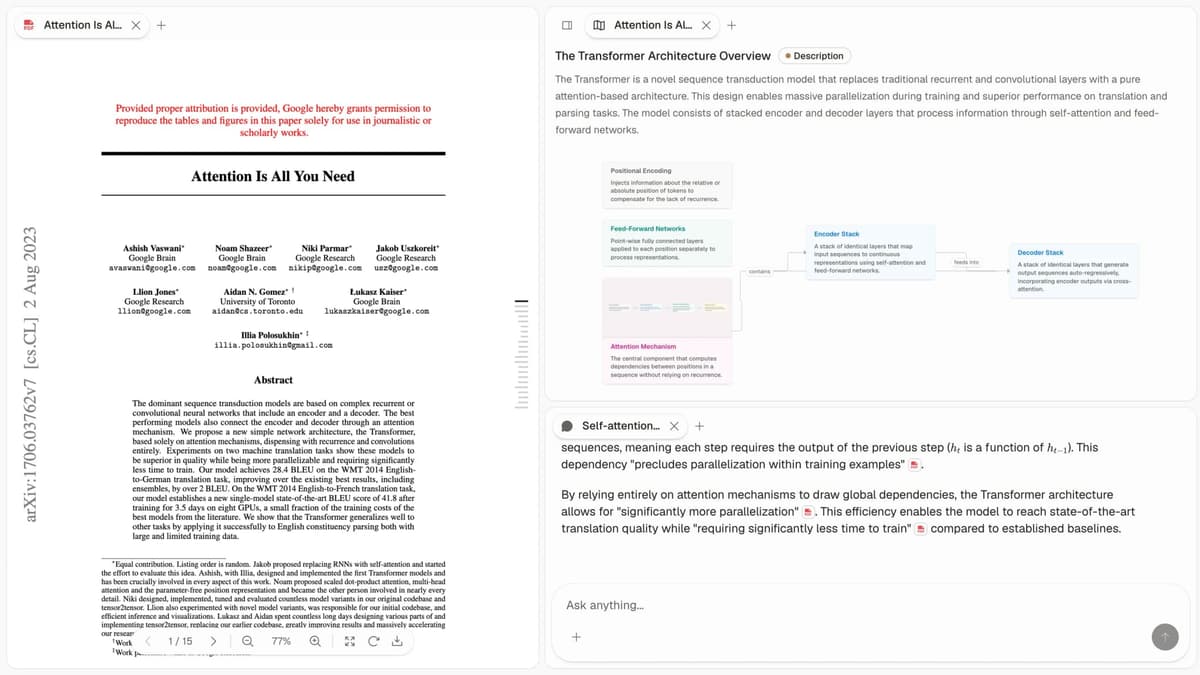
The Atlas product view above shows 3 connected research steps. First, the source library holds the uploaded papers. Second, Knowledge Maps and the Semantic Map expose paper structure and project-level clusters.
Third, cited answers link a claim back to the passage that supports it. The screenshot therefore has the same crawlable sequence described in this text.
Atlas is built around uploaded sources, visual maps, and cited answers. Whimsical is built around manually arranged boards, flowcharts, wireframes, and mind maps.
Whimsical also offers AI-assisted diagram generation. The output remains a canvas artifact rather than a passage-grounded model of an uploaded paper. Whimsical's AI mind-map guide describes prompting from a selected node and adding generated branches.
Paper deconstruction with Knowledge Maps
The Knowledge Map is Atlas's per-paper surface. It turns a paper into an argument map. Its node text stays faithful to the paper. Breadcrumbs let you move from the main thesis to a specific paragraph.
This is structured research-paper analysis. The source constrains what appears in the map, and the reader can move back from structure to text.
| Atlas | Whimsical |
|---|---|
| Multi-level argument structure ✓ | Free-form mind map sketched per paper |
| Labeled relations (motivates, causes, enables) ✓ | ✗ |
| Faithful-to-source node text ✓ | ✗ |
| Hierarchical breadcrumbs ✓ | ✗ |
| ✗ | Free-form mind map and flowchart canvas ✓. Manual canvas without automatic paper deconstruction |
Table 2: The paper-map comparison separates source-derived argument structure from a manually arranged canvas.
Good to know: The bottom row belongs to Whimsical. Atlas does not ship that surface. The Knowledge Map's payoff is recovering a paper's argument three weeks after you first read it, when topic chips alone are no longer enough.
Project view with Semantic Maps
The Semantic Map is Atlas's project surface. It places sources, notes, chats, and citations into topic clusters. You can view the same project from a new angle without uploading it again.
That project view supports research synthesis across papers. Whimsical gives collaborators freedom to place and connect objects exactly where they want them.
| Atlas | Whimsical |
|---|---|
| Spatial embedding of sources + notes + chats ✓ | Boards with mind maps and flowcharts |
| Auto-labeled topic clusters ✓ | ✗ |
| Topic-angle re-projection ✓ | ✗ |
| One project-scoped evidence view ✓ | ✗ |
| ✗ | Wireframes and flowcharts in one tool ✓. Purpose-built diagramming |
Table 3: The project-map comparison shows the difference between corpus clustering and multipurpose visual diagramming.
Good to know: Whimsical's strength on that row is genuine. If your work depends on it, that's the boundary. The Semantic Map's payoff is when 200 papers stop being a folder and start being a corpus you can re-project under different topic angles without re-reading.
Citation-grounded answers
Each Atlas answer pairs a claim with the source passage and a short explanation of why the passage supports it. You can jump to the source paragraph and check the reasoning.
That same inspection habit is central to citation analysis. A citation is useful only when the cited passage supports the sentence being written.
| Atlas | Whimsical |
|---|---|
| Claim-source-justification triples ✓ | Whimsical AI for diagram generation |
| Reasoning traces (why this passage supports this claim) ✓ | ✗ |
| Jump-to-source with passage highlight ✓ | ✗ |
| Passage-level evidence remains inspectable ✓ | ✗ |
| ✗ | Fast canvas with snappy keyboard shortcuts ✓. Efficient manual editing |
Table 4: The answer comparison focuses on whether a reader can inspect the evidence behind a generated claim.
Good to know: Both tools can hold source links. The wedge is whether the surface explains why a passage justifies a claim. For a thesis sentence or a brief paragraph, that check matters.
Literature-grounded annotations
Atlas annotates each paper on ingest. Citations inside the paper become objects you can inspect. When the cited source is open-access, Atlas can pull the relevant passage.
This shows how a paper builds its argument across sources. It complements a research-paper organizer that must preserve more than filenames and tags.
| Atlas | Whimsical |
|---|---|
| Auto-annotate on ingest ✓ | Manual sketches per source |
| Multi-citation synthesis (how citations build the argument) ✓ | ✗ |
| Resolve cited sources (open-access) ✓ | ✗ |
| Exact passage / page / paragraph anchors ✓ | ✗ |
| ✗ | Sticky notes and form primitives ✓. Flexible board components |
Table 5: The annotation comparison concerns citation chains inside papers. Whimsical's comments and sticky notes serve the separate job of collaborative planning.
Good to know: These annotations resolve citations inside the paper you are reading. When a cited source is open-access, Atlas pulls in the cited passage. That makes the citation chain visible.
Project-scoped context
Atlas keeps citations, notes, Knowledge Maps, Semantic Maps, and chats inside one project. Those surfaces share the same uploaded evidence. A separate project has a separate evidence base.
| Atlas | Whimsical |
|---|---|
| Project-scoped research context ✓ | Workspace boards and files ✓ |
| Sources, notes, maps, and chats share one evidence base ✓ | Visual primitives share a board ✓ |
| Separate projects isolate unrelated context ✓ | Shared workspaces support collaboration ✓ |
| Sources must be added to each relevant project | Boards remain available according to workspace access |
| ✗ | Generous no-cost plan ✓. Pricing is a separate decision factor |
Table 6: The context comparison distinguishes an evidence boundary inside one Atlas project from Whimsical's collaborative workspace organization.
Good to know: Atlas's project boundary is deliberate. Put sources that answer the same research question together, and create a separate project when the evidence should stay isolated.
Price comparison
Atlas is a paid product. There is no permanent free plan. The evaluation sample includes 10 sources and 5 lifetime AI chats. After that, Atlas Pro is $20/mo or $204/yr.
Whimsical's current pricing lists Free at $0, Pro at $10 per editor each month with annual billing, and Business at $20 per editor each month with annual billing.
| Atlas | Whimsical |
|---|---|
| Free: ✗ (evaluation sample only: 10 sources · 5 lifetime AI chats) | Free: $0 with 3 team boards and 20 AI credits per workspace ✓ |
| Pro: $20/mo or $204/yr with unlimited AI chats and unlimited sources | Pro: $10/editor/mo with annual billing and unlimited team boards |
| Pro unlocks Knowledge Map, Semantic Map, and claim-source-justification ✓ | Business: $20/editor/mo with annual billing and added security controls |
Table 7: Atlas and Whimsical package different jobs, so compare the research limits and editor-based board limits against your current requirements.
Run the source comparison
Upload one paper behind a current Whimsical board, generate its Knowledge Map, and ask one question whose answer you already know. Atlas earns a place in your research stack only if the map helps recover the paper and the cited passage makes the answer faster to verify.
When to choose Atlas vs Whimsical
- Want paper structure deconstructed multi-level? Go with Atlas. (Knowledge Map)
- Want answers that explain how each citation justifies the claim? Go with Atlas. (claim-source-justification)
- Want one focused evidence base for maps, notes, and cited chat? Go with Atlas. (project-scoped context)
- Want a fast canvas for free-form mind maps, flowcharts, and wireframes? Go with Whimsical.
- Want product wireframes or process diagrams? Go with Whimsical.
- Tied: sketching a literature-review structure as a mind map. Both work fine. Whimsical is better for the free-form sketch. Atlas is better once the structure must be tied to source passages.
Workflow comparison
Use Whimsical for the diagram you draw by hand: flowcharts, wireframes, sticky notes, and planning boards. Use Atlas for the corpus you need to inspect: PDFs, source passages, claims, citations, and project maps. That split keeps Whimsical's canvas strength intact while moving evidence-heavy work into a tool built around source checks.
Test the split with a real project before moving a larger corpus. Ask Atlas a question you already answered on a Whimsical board, open the cited passage, and check whether it supports the answer. Then pick a paper you read weeks ago and compare how quickly you can recover its main argument from the board and the Knowledge Map.
Check the writing handoff as well. Whimsical gives you diagram objects and notes. Atlas gives you a claim, passage, and reason. The difference matters when a sentence needs a defensible citation. It matters less when the final artifact is only a planning sketch.
Run the comparison against an old PDF, a half-finished mind map, one source you disagree with, and one consequential question. Keep rough structures and live visual conversations in Whimsical. Move the source files into Atlas when the sketch becomes a research project, then use Knowledge Maps to recover individual papers and the Semantic Map to see project clusters.
A small handoff is enough. Keep an eight-node Whimsical map, upload its underlying PDFs to Atlas, and ask the question the board was meant to answer. If the cited answer agrees, move the supported claim into your draft. If it differs, inspect the passage before revising the board. This separates your memory of the paper from the paper itself.
A collaborator may need both layers. A Whimsical board shows how the idea was organized. An Atlas answer shows which passage supports a claim. Review the visual artifact in Whimsical and the evidence trail in Atlas when an advisor, client, editor, or decision-maker needs both.
Keep Whimsical in the loop when the deliverable is a diagram. Make Atlas the source of record when the deliverable is a cited paragraph, report, memo, or thesis section. When both matter, place the visual summary in the shared board and keep the passage-level citations in the draft.
Recommendations by user type
- PhD researchers: Atlas. In years 1-2, Knowledge Maps help you recover papers without re-reading. In years 3-4, cited answers help anchor thesis claims to passages. Whimsical works for one-off sketches. Atlas is stronger for multi-year research.
- Students doing literature reviews and thesis research: Atlas, scoped to thesis and dissertation work. The Knowledge Map helps during reading, while each project keeps its sources and cited conversations together.
- Knowledge workers (consultants, analysts, PMs, journalists): Atlas when reading and citing papers is the core work, Whimsical when fast free-form sketching is the daily need. Readers comparing a broader personal knowledge stack can also use the second-brain app guide.
- Personal researchers with stakes: Atlas. Medical, legal, major-purchase, and deep self-study projects need answers you can defend. Whimsical is a fine starting tool. Atlas is stronger once citations matter.
Whimsical is best for lightweight diagrams, flows, wireframes, and fast planning. Atlas is best for source-derived maps and cited answers. If the visual object is something you draw for communication, Whimsical is faster. If the visual object needs to reflect what a paper or corpus says, Atlas is doing the heavier research work.
Lucidchart, Miro, Mural, and FigJam
Whimsical is closest to Lucidchart, Miro, Mural, and FigJam when the job is visual planning. Lucidchart is stronger for formal diagrams. Miro and Mural are broader for workshops. FigJam is strong for design collaboration. None of those tools replace Atlas for source-grounded research maps. They help you draw what you think. Atlas helps you inspect what the sources say. Our Atlas and Miro comparison applies the same evidence-versus-canvas boundary to workshop-heavy collaboration.
Migrating from Whimsical to Atlas
Most Whimsical users should not replace Whimsical wholesale. Keep the canvas for flowcharts, wireframes, and brainstorms. Move only the source-heavy research work into Atlas. If the source collection is already hard to manage, use a deliberate paper-organization workflow before importing everything at once.
What carries over cleanly:
- Exported board images for reference.
- Draft prose from Whimsical docs.
- Source PDFs, papers, and articles.
- Per-source notes that belong beside a paper.
What does not carry over cleanly:
- The spatial layout of a Whimsical board.
- Wireframe components.
- Connector styling.
- Flowchart objects used for process diagrams.
Whimsical layouts are drawn by hand. Atlas maps are generated from sources. Start with 5 or 10 papers that anchor your current project. Upload them to Atlas. Open the Knowledge Map on one paper. If the map reflects how the paper argues, bring across the notes. Leave the flowcharts and wireframes in Whimsical.
Worked literature-review example
Suppose you have 8 papers on one sub-topic and need a short literature-review section with citations.
In Whimsical, the usual pattern is a mind map with eight branches. Each branch is one paper. You type the headline finding, add child nodes, and drag related branches together. The output is a clean visual of what you remember. The cost comes later. When you write, you still need to reopen each PDF and find the exact sentence to cite.
In Atlas, the same 8 PDFs go into one project. Each paper gets a Knowledge Map. Claims, evidence, definitions, and relations come from the source. The Semantic Map then clusters the 8 papers by topic.
When you ask for a draft paragraph, each answer comes back with a claim, a passage, and a reason. You click into the source paragraph, read the highlighted text, and accept or rewrite. Review becomes editorial rather than archaeological. You can focus on whether the synthesis is right instead of reconstructing every citation from memory.
When Whimsical is the right call
Whimsical is better for several jobs.
Diagrams and brainstorms
The first fit is quick diagrams. Sequence diagrams, flowcharts, decision trees, org charts, and process maps belong in Whimsical. Atlas has no flowchart primitive.
The second fit is sticky-note brainstorms. Whimsical is good when the artifact is a board of notes clustered by theme. Atlas's Semantic Map is generated from sources. It answers a different question.
Wireframes and product flows
The third fit is wireframes. Whimsical ships wireframe components and layout tools. Atlas has no wireframe surface.
The fourth fit is product design workflows. If designers, PMs, and engineers are sketching product flows together, Whimsical is the right surface. Atlas is for source-grounded research.
Common objections and edge cases
"I already have my literature organized in Whimsical mind maps. Is moving to Atlas worth the re-upload?" Re-uploading source PDFs is a one-time cost. Atlas adds Knowledge Maps and cited answers inside the new project. If the output is a fixed diagram rather than cited prose, stay in Whimsical.
"I'm not sure my papers are the kind Atlas deconstructs well. How do I check?" Use the evaluation sample and run the Knowledge Map on one paper from your field. If the claims, evidence, and relations match what you would extract by hand, the map will likely hold across the library.
"My advisor uses Whimsical. Can I still collaborate?" Yes. Export an Atlas map as an image and place it in the Whimsical board. Or paste claim, passage, and reason into sticky notes with the source link attached. Native integration is still on the roadmap. The artifacts can sit side by side today.
Atlas
Build a cited map from research sources
Upload a paper and compare its argument map with your Whimsical board.
Frequently Asked Questions
Atlas is built around that check. Every answer is rendered as a claim-source-justification triple: the claim, the passage it draws from, and a one-sentence explanation of why the passage supports the claim. You can click into the source paragraph and read the highlighted sentences in context. Whimsical may cite at the sentence level or link to sources, but it does not render the reasoning trace that connects the claim to the passage. That trace is the move when you need to defend a thesis sentence, a brief paragraph, or a treatment-plan summary. Read more about how Atlas grounds claims in the Verifiable AI Research guide.