
AI for Literature Review: Best Tools and Workflow Guide
A tested workflow for using AI in literature reviews. Specific tools for each phase, Semantic Scholar and Elicit for discovery, Rayyan for screening and review.
- Byline

Summary
Use AI to speed up paper search, screening, data pulls, and synthesis while keeping human judgment in charge.
The workflow pairs Semantic Scholar, Elicit, Rayyan, Zotero, Atlas, and review methods.
Pick tools by job in 2026: find papers, screen papers, pull data, manage cites, and link claims to sources.
Atlas fits reviews that need cited answers and visual links across a growing paper set.
AI tools can cut discovery, screening, and extraction time by 50-70%. A systematic review can take 6-18 months without them. Making sense of all the papers you find is harder than discovery itself. This guide shows you which tools to use at each stage, how to use them well, and what to avoid. The phase-by-phase checklist keeps search, screening, data pulls, reading, and source checks in one path. It also leaves an audit trail instead of turning the review into a black-box automation project.
The control point most teams miss is a two-log system: an alert log for new papers and a claim ledger for every draft claim you may cite.
The safest workflow splits tool work from human judgment. Use AI to search, rank, extract, explain, and map. You still set the rules, check results, build the synthesis, and write the final argument.
Use this rule for every AI-assisted review. Let AI do the first pass while you set the question, set the cut line, check the source, and write the claim. If a tool cannot show where an answer came from, verify it before any claim reaches your draft.
What you'll learn: how to pick AI literature review tools by phase. You'll also see where Atlas fits in synthesis and which checks keep the review auditable.
For a benchmark of seven AI research assistants on a 200-paper corpus, see our AI research assistants guide.
- What to Look For
- Comparison Matrix.
- When Atlas Fits
- Phase 1: Search and Discovery
- Phase 2: Screening.
- Phase 3: Pull Data From Papers
- Phase 4: Deep Reading.
- Phase 5: Synthesis
- Complete AI Literature Review Workflow.
- Common Mistakes to Avoid
- Best Stack by Review Type.
- Pricing and Budget Trade-Offs
- Limitations and Ethical Considerations
- Getting Started.

 Atlas
AtlasSynthesize your screened literature
Compare included papers with cited answers and thematic connections.
What to Look For
The best AI literature review workflow assigns one tool to each job. Use Semantic Scholar or Elicit to find papers. Use Rayyan or ASReview to screen them. Use Elicit to pull study details. Use Atlas to synthesize the screened corpus with source-linked answers.
Judge every tool by the control point it supports. Discovery tools should surface papers you would have missed. Screening tools should record include and exclude choices. Extraction tools should preserve methods, sample sizes, outcomes, and limits. Synthesis tools should connect claims across the final corpus. Each claim should still point back to source evidence.
If your screened papers are ready, Atlas fits the source-check step. Upload the included PDFs, ask a cross-paper question, and verify the cited passages before any claim reaches your draft.
Comparison Matrix
Traditional literature review pain points:
| Phase | Traditional Pain | AI Solution |
|---|---|---|
| Search | Keyword limits miss relevant papers | Semantic search finds related work. You find papers that use different terms for the same concept |
| Screening | Reading hundreds of abstracts | AI ranks papers by relevance. The most useful papers surface first, saving time on borderline candidates |
| Extraction | Manual data entry into spreadsheets | Automatic extraction of methods, outcomes, and limits. This cuts data entry time from hours to minutes |
| Reading | Dense papers in unfamiliar areas | AI explains complex concepts. You can grasp difficult passages without slowing down |
| Synthesis | Connecting insights across many papers | AI-powered cross-paper analysis. You can see how studies agree, conflict, or build on each other |
Table 1: Literature review phases mapped to the AI tool role that reduces manual work while keeping the researcher in control.
The synthesis step is where Atlas fits. Rayyan or ASReview narrows the corpus. Elicit pulls study details. Then upload the included PDFs to Atlas. Ask a cross-paper question. Check the cited passages before using any claim in your draft.
Example Atlas synthesis check:
- Upload the 20-50 included papers from the screened corpus.
- Ask "Which methods and outcome measures appear across these studies?"
- Open the cited passages behind the answer and reject weak matches.
- Generate a mind map to see clusters, contradictions, and isolated papers.
- Move only verified claims into your literature review draft.
Use Atlas after screening narrows the set. Check patterns there before you turn them into claims.
AI doesn't write your literature review. It cuts the time from starting your lit review to drafting your synthesis in half.
When Atlas Fits
Pick the stack by review risk. For a thesis chapter, use Elicit and ResearchRabbit to find papers. Use SciSpace for hard papers, Atlas for cited synthesis, and Zotero for citations. For a formal review, keep Rayyan or ASReview as the screening record. Use AI only where the protocol allows.
Choose Atlas when the hard part is checking claims across a screened paper set. AI can speed up literature reviews, but it does not replace judgment. You still frame the question, judge quality, and build the argument. After screening, upload the accepted papers to Atlas and open each cited passage before using an answer in the draft.
Phase 1: Search and Discovery
The Problem
Keyword search misses conceptually related papers. You search "remote work productivity" but miss papers about "telecommuting outcomes" or "distributed team performance", even though they're studying the same thing.
AI Solutions
Start with Elicit for semantic search. It's the most complete single tool for AI-powered literature reviews.
- Frame searches as research questions. This helps you find relevant papers even when authors use different terms for the same concept.
- "How does remote work affect employee productivity?" returns relevant papers even when terms vary.
- Searches 125M+ papers from the Semantic Scholar index.
If you need broader coverage, Semantic Scholar is the best free option.
- TLDR summaries for quick screening.
- Semantic search with good coverage.
- Research alerts for new relevant papers.
To discover papers you didn't know to look for, use ResearchRabbit.
- Add seed papers, then explore citation networks.
- Find core studies from nearby fields.
- See the citation network at a glance.
Keep an alert log during discovery. Record the alert query, database, date created, and why each new paper was accepted or rejected. For fast-moving topics, this prevents your review from freezing around the first search day.
Check Consensus for evidence synthesis across papers.
- Ask questions and get answers with paper citations.
- See whether the field tends to agree or disagree.
- Filter by study type.
Workflow
- Start with Elicit. Search your research question semantically.
- Add key papers to ResearchRabbit. Explore the citation network.
- Check with Consensus. See where the field agrees.
- Set up alerts. Use Semantic Scholar to track new papers.
What AI Cannot Do
- Determine relevance to your exact angle.
- Judge method quality.
- Decide include and exclude rules.
- Replace field expertise.
Phase 2: Screening
The Problem
Your search returns 500 papers, and maybe 50 are relevant. You will not know which ones belong until you screen the abstracts, so the review can lose weeks before full-text reading begins.
AI Solutions
Use Rayyan for systematic review screening. It's designed specifically for formal review protocols.
- Upload all papers and let AI suggest relevance based on your choices.
- Use blind mode for two-person screening.
- Generate a PRISMA flow diagram from review data.
- After 50 choices, AI predicts whether each remaining paper should be included.
For quick filtering without formal protocols, use Elicit.
- Bulk import papers and rank them by relevance.
- Extract key information before full reading.
- Filter by year, sample size, and study design.
- Export to a spreadsheet for review.
ASReview is the best open-source option if you need full control.
- Active learning for screening.
- Can cut the number of papers you screen by 80%+.
- Free and open-source.
- Runs locally for stronger data privacy.
Workflow
- Import all found papers to Rayyan or ASReview
- Screen 20-50 papers manually (about 2-3 hours) to train the AI
- Let AI rank remaining papers by predicted relevance. This cuts your screening time by 50-70%.
- Focus manual review on borderline cases (you make the final decision)
- Generate PRISMA diagram from inclusion/exclusion decisions
PRISMA reporting tracks each record from search to screening to final inclusion. Rayyan can make the diagram from screening data. You still need to check the counts and exclusion reasons.
What AI Cannot Do
- Make final inclusion decisions.
- Apply subjective criteria.
- Account for your exact research angle.
- Replace duplicate human screening.
Phase 3: Pull Data From Papers
The Problem
This is the spreadsheet slog: sample size, methods, study groups, outcomes, and limits. Copy-paste, copy-paste, copy-paste. Hours disappear. You lose your place. You mis-type a number and don't notice until later.
AI Solutions
Use Elicit to pull fields from many papers.
- Define what to extract, such as methods, outcomes, limits, and sample size.
- Let AI fill a table across papers.
- Export to a spreadsheet for review.
- Use it with PDFs, preprints, and published papers.
SciSpace helps you understand papers outside your field.
- Highlight text and get a plain explanation.
- Ask questions about a specific paper.
- Decode formulas without stopping your read.
- Use it with any PDF you upload.
Atlas is best for synthesis preparation.
- Upload your sources and extract themes, arguments, and links between them.
- Use mind maps to see links that spreadsheets miss.
- Chat across the library and trace each citation back to the source.
Atlas is most useful after extraction because every answer, note, and map stays tied back to source evidence. The synthesis visual should show which evidence links to which claim.
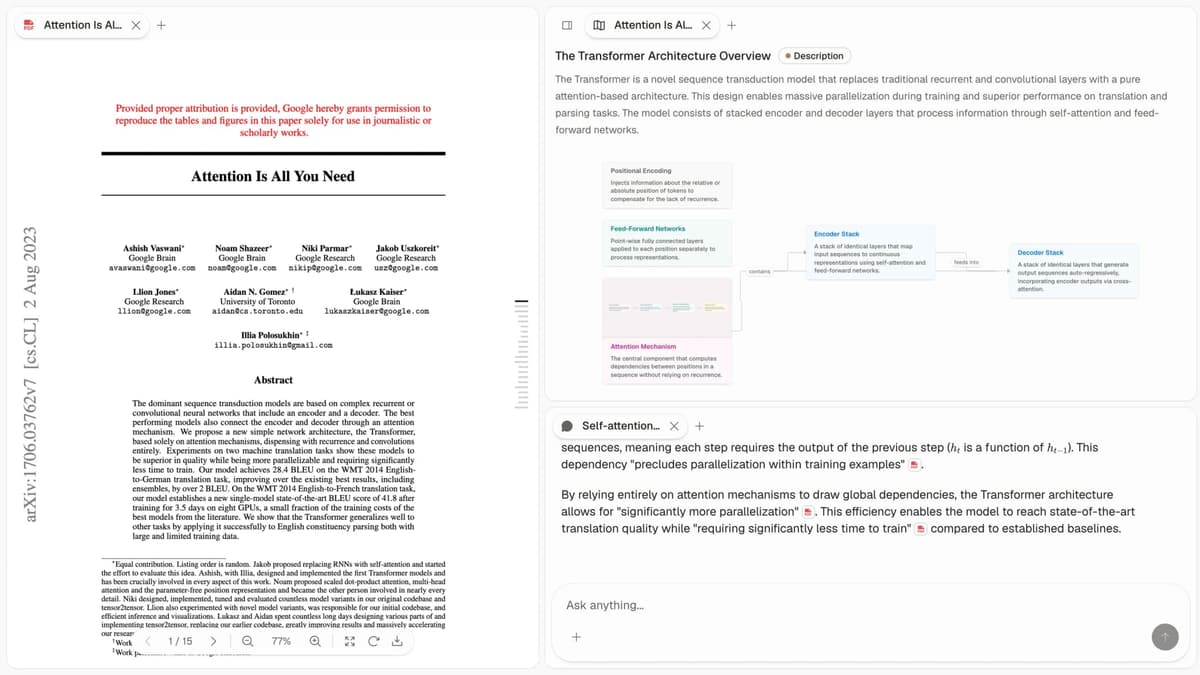
First-party Atlas product screenshot showing a paper, concept map, and cited answer in the same research workspace.
Workflow
-
Define extraction template in Elicit
- Study design, sample size, and population.
- Intervention or exposure.
- Outcomes measured.
- Key findings.
- Limits.
-
Run extraction across your papers.
-
Verify extractions for key papers.
-
Export to a spreadsheet for review.
What AI Cannot Do
- Guarantee accuracy.
- Interpret subtle findings.
- Judge study quality.
- Understand unstated meaning.
Phase 4: Deep Reading
The Problem
Some papers need deep reading. They may be core papers. They may use hard methods. They may sit outside your field. A deep read of a complex paper can take 2-4 hours. You don't always have this time.
AI Solutions
Use SciSpace Copilot for concept help as you read.
- Highlight any text and get an explanation.
- Ask for help with formulas and methods.
- Ask follow-up questions.
- Use it with any PDF you upload.
Use NotebookLM for chat-based exploration.
- Upload papers and ask about them.
- Use it before a deep read.
- Turn dense papers into audio summaries.
Claude or ChatGPT can help with detailed questions across papers.
- Upload a PDF and ask detailed questions.
- Compare the methods used by 2 papers.
- Ask why a study used one method instead of another.
Workflow
- First pass. Use SciSpace to understand the structure.
- Deep questions. Upload to Claude for detailed analysis.
- Cross-paper comparison. Ask how papers relate to each other.
- Note-taking. Save AI explanations with your own notes.
What AI Cannot Do
- Critically judge methods.
- Notice what papers leave out.
- Place papers in field debates.
- Understand historical context.
Phase 5: Synthesis Tools and Workflow
Synthesis tools should help you group themes, find conflicts, and trace each claim back to a paper. Use Elicit for tables. Use NotebookLM for small source sets. Claude or ChatGPT can help draft rough theme notes. Atlas fits when you need cited cross-paper answers and a map of how papers connect.
A practical synthesis pass has five moves:
- Group the included papers by method, population, outcome, or theory.
- Mark where studies agree, conflict, or leave a gap.
- Pull the source passages behind each pattern.
- Draft theme notes in your own words.
- Keep only claims you can trace back to a checked paper.
The Problem
You've read 20 papers. Now you need to group them into themes. You need to find conflicts. You need to write a synthesis that shows what the field knows and where gaps remain. The links exist but aren't obvious. You can't see the forest for the trees.
AI Solutions
Use Elicit for structured synthesis tables across papers.
- Build comparison tables across papers.
- Find missing populations, methods, or questions.
- See how the field has changed over time.
- Export tables for your write-up.
Claude or ChatGPT can assist with drafting. Treat it as a starting point only.
- Upload your extractions and ask for themes.
- Draft a rough section on one theme.
- Ask where papers disagree.
- Rewrite heavily before anything goes into the review.
Use Atlas after screening and data pulls when the question shifts from "which papers belong?" to "what does this corpus say?"
- Upload all your sources into one workspace.
- Use mind maps to see how ideas connect across papers.
- Ask "What do my papers say about X?"
- Check each citation against the original source.
- Reuse past notes and chats as the project grows.
Claim Ledger for AI Synthesis
Once your screened corpus is ready, ask cross-paper questions in the tool that fits your source set. You might ask, "What methods are most common in this corpus?" Keep the answer only if the tool points back to source passages you can verify.
A typical source-trace session looks like this:
- Export your included PDFs from Zotero or your reference manager. Keep Zotero as the source of truth for cite data.
- Upload the 20-50 included papers to one workspace or table. Do this after Rayyan or ASReview has narrowed the candidate set.
- Ask a corpus question. Start with "What are the main findings on X across these papers?" or "Which methods are repeated across the included studies?"
- Review the cited answer. Check the claims you might cite, then open the source passages the tool links.
- Map the pattern. Use a mind map, table, or notes view to spot clusters, contradictions, and isolated papers before drafting.
- Move verified notes into your draft. Copy only the claims you checked, then rewrite them in your own analytical voice.
Use this claim ledger before drafting:
| Field | What to record | Why it matters |
|---|---|---|
| Draft claim | The sentence you may use in the review | Keeps the check tied to real prose |
| Source passage | Paper title, page, DOI, and exact quoted or paraphrased passage | Verifies the publication details before citation |
| AI tool | Atlas, Elicit, NotebookLM, Claude, or another tool | Documents which system surfaced the claim |
| Human decision | Keep, revise, reject, or needs second reviewer | Preserves judgment outside the model |
| Check date | The day you verified the source | Shows when the claim last matched the paper |
Table 2: Claim-ledger fields for checking AI-suggested literature review claims before they enter the draft.
Reject claims that do not survive this source-trace test.
Generic chatbots can draft plausible synthesis paragraphs. Source-grounded tools are narrower: each usable answer should point back to passages. That helps you catch weak or mismatched evidence before it enters your draft.
Atlas is not always the right tool. If your corpus is under 5 papers, a simple reading list works fine. Atlas adds the most value when links across sources are hard to hold in your head.
Workflow
- Build a knowledge base in Atlas with all your sources.
- Explore connections through mind maps.
- Identify themes with AI help.
- Create comparison tables in Elicit.
- Draft sections with AI help, then revise heavily.
What AI Cannot Do
- Develop your argument.
- Make interpretive claims.
- Ensure your synthesis is original.
- Replace your analysis.
Complete AI Literature Review Workflow
Here's how all the pieces fit together:
Example Timeline (adjust based on your scope):

Week 1: Discovery
-- Elicit: Semantic search for core papers
-- ResearchRabbit: Citation network exploration
-- Consensus: Check field consensus
-- Output: 300-500 candidate papers

Week 2: Screening
-- Import to Rayyan/ASReview
-- Manual screening: 50 papers (2-3 hours)
-- AI-assisted ranking: Remaining papers
-- Output: 50-100 papers for inclusion

Week 3-4: Extraction & Reading
-- Elicit: Structured data extraction
-- SciSpace: Deep reading of complex papers
-- Atlas: Build knowledge base
-- Output: Completed extraction table

Week 5: Synthesis
-- Atlas: Discover connections through mind maps
-- Claude: Draft synthesis sections
-- Your revision: Add analysis and argument
-- Output: Literature review draft
Costs, Limits, and Getting Started
Common Mistakes to Avoid
Mistake 1: Trusting AI for inclusion decisions AI can rank and suggest. You decide what belongs in your review. Each inclusion needs your reason. You're the expert. AI is your assistant.
Mistake 2: Accepting AI extraction without verification Always verify AI-extracted data for key papers. One wrong number can distort the whole table. At minimum, spot-check the extraction. Verify key papers in full.
Mistake 3: Using AI drafts directly AI drafts lack your analytical voice. If you copy-paste AI output, reviewers will notice. Use AI to organize and spot patterns. Write the synthesis yourself.
Mistake 4: Ignoring AI limits AI may miss paywalled papers. It may have stale data. It can invent citations. Cross-check everything with the original papers.
Mistake 5: Not documenting AI use Record what AI tools you used and how. A simple methods note can say, "Elicit for screening and extraction, Atlas for synthesis." Many journals now require this note.
Best Stack by Review Type
For more tool options, see our literature review software guide. Use this as a quick pick list. Start small and pay only when the review set gets hard to manage.
| Review type | Discovery | Screening | Reading | Synthesis |
|---|---|---|---|---|
| Thesis chapter | Elicit + ResearchRabbit | Manual shortlist | SciSpace + Atlas | Atlas + Claude |
| Systematic review | Elicit + PubMed | Rayyan | Manual full text | Manual, with limited AI checks |
| Scoping review | Elicit + Semantic Scholar | Rayyan or ASReview | SciSpace | Atlas mind maps + Elicit tables |
Table 3: Recommended AI literature review stack by project type, showing where automation helps and where manual judgment remains central.
Thesis Chapter Review
- Discovery: Elicit + ResearchRabbit.
- Reading: SciSpace + Atlas.
- Synthesis: Atlas + Claude.
- Budget: ~$25/month total.
Formal Systematic Review
- Search: Elicit + PubMed + database searches.
- Screening: Rayyan.
- Extraction: Elicit + manual checks.
- Synthesis: Manual, with limited AI help.
- Budget: ~$30/month total.
Scoping Review
- Discovery: Elicit + Semantic Scholar.
- Mapping: Atlas mind maps.
- Charting: Elicit tables.
- Reporting: AI-assisted drafting.
- Budget: ~$25/month total.
Pricing and Budget Trade-Offs
Not every researcher has the same budget. Here is how to pick the right stack based on what you can spend.
| Budget | Discovery | Screening | Synthesis | Monthly cost |
|---|---|---|---|---|
| Free only | Semantic Scholar + Elicit free | ASReview (open source) | NotebookLM | $0 |
| Under $20 | Elicit Plus | ASReview | Atlas | ~$12–20 |
| Under $40 | Elicit Plus | Rayyan subscription | Atlas | ~$30–40 |
| Full stack | Elicit Plus + Consensus | Rayyan | Atlas + Claude | ~$50–60 |
Table 4: Budget tiers for AI literature review tools, with discovery, screening, and synthesis choices matched to typical monthly spend.
The free stack gets you 80% of the benefit. Elicit's free tier searches 125M papers, and ASReview runs locally, so data stays on your machine. NotebookLM handles light synthesis for small corpora at no cost. Upgrade when the paper set needs source tracing across more than a dozen papers.
When to upgrade: upgrade when you manage more than 20 papers and need source links in your draft. A tool that links answers to passages, like Atlas, can save more time than it costs. Cross-paper questions that take an afternoon by hand can take minutes.
The trade-off most guides skip: free tools give you search and screening at no cost, but synthesis gets risky without source tracing. A false synthesis claim in a paper costs far more than a $20/month tool.
Limitations and Ethical Considerations
Transparency: Disclose AI use in your methods. Say which tools you used and why. Reviewers and readers deserve to know.
For formal reviews, keep an audit log of prompts, inclusion rules, model output, source checks, and final human decisions. This supports PRISMA reporting and later replication. Document reviewer disagreements and resolution notes.
Check AI-pulled data: Never publish AI-pulled data without checking it. You are responsible for accuracy. "The AI got it wrong" is not a defense.
Originality: Treat AI synthesis as source material for review. The argument must be yours. So must the reading, judgment, and critique.
Bias: AI tools can reflect bias in training data. Check for missing papers, old-paper bias, and English-only bias. Use database searches and non-English sources where needed.
Access: AI tools may not reach paywalled papers. Don't assume full coverage. Use your library access for complete searching.
Control: You stay in control. AI suggests, you decide. AI drafts, you revise. AI extracts, you verify. The scholarship is yours.
What's new in 2026
This guide was refreshed on 2026-05-07 for current tool roles, source-cited synthesis, and pricing trade-offs. Google AI Overviews now compete for clicks on many search queries. Clear source links can affect whether a page is cited in generated answers. Where prices or platform support changed, the body has been updated inline.
Getting Started
If you're new to AI for literature review, start here:
- Sign up for free tiers of Elicit, Semantic Scholar, and ResearchRabbit.
- Pick a small review of 10-20 papers. Learn the tools on a low-stakes project.
- Use AI for discovery and screening first. These are the lowest-risk uses.
- Verify everything before trusting AI for extraction. Spot-check accuracy on your small review.
- Expand to synthesis only after you trust the tools. Synthesis needs the most judgment.
AI can speed up literature reviews, but it does not replace judgment. You still frame the question, judge quality, and build the argument. For tools that tie findings to real sources, see our guide to AI with references for literature review. For a deeper workflow, see our literature review AI workflow guide.
Last updated: May 7, 2026
Sources:
- 11 Best AI Tools for Scientific Literature Review in 2026 | Cypris
- AI Tools for Literature Review: Complete Guide | Anara
- 7 Best Literature Review AI Tools in 2026 | Paperguide
- How do I export my Zotero library? | Zotero
- Introduction | ASReview LAB documentation
- Rayyan AI Deep Dive | Skywork AI
- Visualize Your Research Insights with AI-Driven Mind Maps | Ponder
- Knowledge Graphs and Mind Maps | Nodus Labs
AtlasSynthesize your screened literature
Compare included papers with cited answers and thematic connections.
Frequently Asked Questions
AI can assist with drafting, but the analytical contribution must be yours. AI-generated text needs substantial revision, and most institutions require disclosure of AI use.