
8 Best NotebookLM Alternatives (2026): AI-Powered Research
NotebookLM alternatives compared: Atlas, Elicit, Claude Projects, and Perplexity scored on source handling, AI accuracy, exports, pricing, and migration.
- Byline

Summary
The best NotebookLM alternative depends on whether you need paper search, source chat, private notes, exports, or audio.
This 2026 guide covers Atlas, Elicit, Claude Projects, Perplexity, Consensus, Semantic Scholar, and migration tradeoffs.
Use Elicit for paper review, Atlas for source maps, Claude for reasoning, and Perplexity for web search.
Keep NotebookLM for audio overviews when you do not need broader exports, privacy controls, or visual maps.
Atlas focuses on private research synthesis. Each answer links back to the source PDF, and the workspace can turn many sources into mind maps. That matters when your review needs to grow over time instead of starting from scratch in each notebook.
NotebookLM made source chat easier to try. Heavy users often need more room, better exports, or a visual way to see ideas.

 Atlas
AtlasMap your sources in Atlas
Compare source links, maps, and cited answers across your uploaded research.
Why Should You Switch from NotebookLM?
For our test of 7 AI research tools on 200 papers, see our AI research assistants guide.
People usually switch from NotebookLM for a few clear reasons. Heavy research can hit usage limits. Google account lock-in can be a problem. Exports are limited, there is no public API, and audio overviews are not always the main job. NotebookLM also depends on cloud access.
Disclosure: we make Atlas, one of the products discussed in this post. We publish our scoring criteria and name the research workflows where each alternative is stronger.
NotebookLM is impressive, but users commonly run into these walls:
- Usage limits: the free tier runs out fast during heavy research sessions
- Google account required: a dealbreaker for users with privacy concerns
- Limited exports: your notes stay locked inside
- No API access: no way to connect with other tools in your workflow
- Audio-first focus: podcast summaries are clever but not always what you need
- Cloud-only: no offline access when you need to work without Wi-Fi
If any of these sound familiar, the alternatives below address these gaps directly. For a deeper look at what holds NotebookLM back, see our breakdown of NotebookLM's limitations.
Comparison Scorecard
Scores use a 1 to 5 scale. A 5 means the tool is strong for that criterion.
| Tool | Source handling score | Citation score | Knowledge maps score | Audio score | Export score | Paid pricing |
|---|---|---|---|---|---|---|
| NotebookLM | 4, uploads docs, links, and audio | 4, source-linked answers | 1, no maps | 5, best audio support | 2, limited export | NotebookLM Plus around $20/month |
| Atlas | 5, PDFs, notes, links, and saved research | 5, cited answers tied to source text | 5, built-in maps | 1, no audio summaries | 4, workspace and source exports | Pro $20/month |
| Elicit | 4, paper search and study tables | 4, paper-level citations | 1, no maps | 1, no audio summaries | 5, CSV and citation exports | Plus $14/month |
| Consensus | 3, question search across papers | 4, paper-backed answers | 1, no maps | 1, no audio summaries | 2, limited export | Premium $11.99/month |
| Claude Projects | 4, uploaded docs and long chats | 3, depends on uploaded sources | 1, no maps | 1, no audio summaries | 3, chat and artifact export | Pro $20/month |
| Perplexity | 4, live web and paper search | 4, web citations | 1, no maps | 1, no audio summaries | 3, thread sharing | Pro $20/month |
| SciSpace | 4, paper uploads and browser PDFs | 4, paper citations | 1, no maps | 1, no audio summaries | 3, notes and citation export | Premium about $20/month |
Table 1: NotebookLM alternatives scored on source handling, citation quality, knowledge maps, audio, export, and paid pricing.
Top NotebookLM Alternatives
The 8 tools below cover five jobs: maps, paper review, file chat, web search, and free paper search. Each entry states who it fits, where NotebookLM is stronger, what it does, and what the paid plan costs.
| Rank | Tool | Best fit | Main tradeoff against NotebookLM | Paid plan |
|---|---|---|---|---|
| 1 | Atlas | Connected source synthesis with maps and cited answers | No podcast-style audio summaries | Pro $20/month |
| 2 | Elicit | Literature reviews and study data extraction | Limited support for mixed non-paper sources | Plus $14/month |
| 3 | Consensus | Quick evidence checks across papers | Less useful for your own uploaded files | Premium $11.99/month |
| 4 | SciSpace | Reading and explaining difficult papers | Weaker for web links, notes, and non-paper sources | Premium about $20/month |
| 5 | Claude Projects | Flexible file chat and general reasoning | Fewer research-specific features | Pro $20/month |
| 6 | Perplexity | Current web and academic search | Not built as a source notebook | Pro $20/month |
| 7 | Scholarcy | Fast paper summaries and review cards | Limited cross-source synthesis | Premium $9.99/month |
| 8 | Semantic Scholar + TLDR | Free academic search and paper discovery | No source upload or private workspace | Free |
Table 2: Ranked tools by fit, tradeoff, and common paid plan.
1. Atlas, for Connected Source Synthesis
- Best for: Researchers who want AI-powered knowledge management with visual mind maps
Atlas fits users whose sources are scattered and who need to see how they connect. NotebookLM is strongest for source chat and audio summaries. Atlas research paper workspace focuses on source maps, cited answers, and long-running research work.
The workspace makes the difference visible. Uploaded sources, notes, and chats become points on a map. Related ideas stay near each other instead of hiding inside separate notebooks. You can scan a topic, open the source, and keep building from the same context.
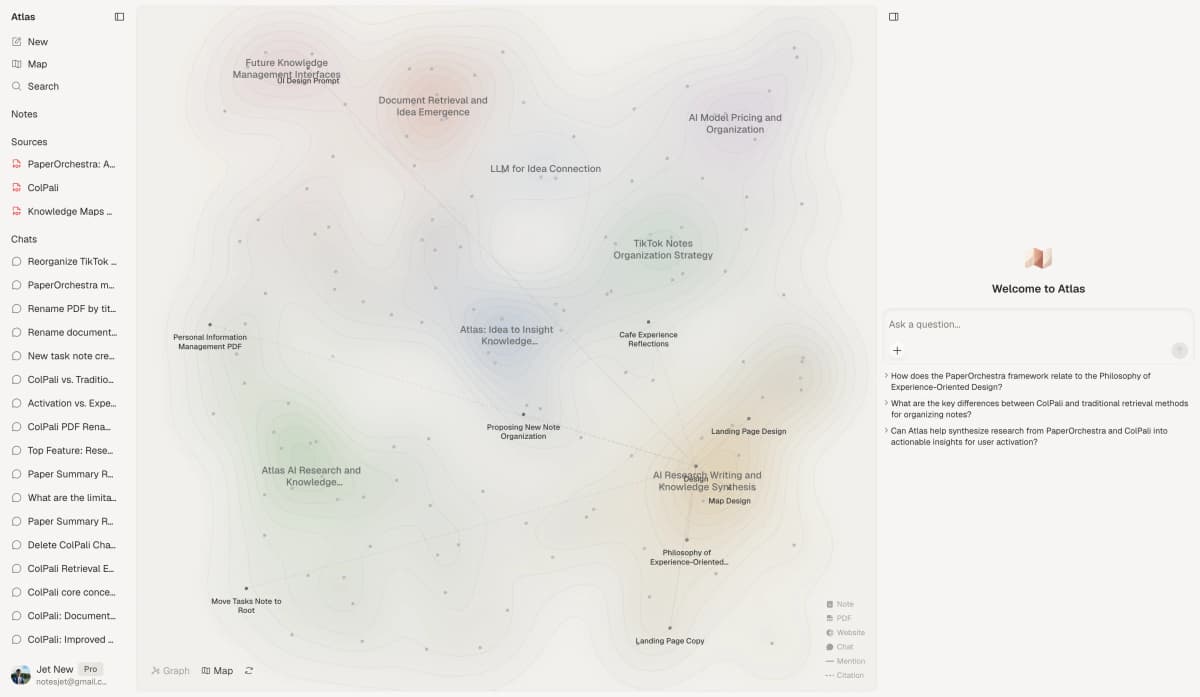 First-party Atlas product screenshot showing Step 1 source upload, Step 2 map review, and Step 3 cited chat beside the research map.
How it compares to NotebookLM:
- Mind maps reveal links NotebookLM cannot show (see our guide to NotebookLM alternatives with mind maps)
- Cross-source links tie ideas across your library.
- Web clipping saves articles into your workspace.
- Persistent workspace that grows over time
- No podcast-style audio summaries
Key features:
-
Upload PDFs, articles, and notes as sources
-
AI chat grounded in citations across all your sources
-
Mind maps generated from any source, note, or conversation
-
Automatic link discovery across your workspace
-
Citation tracking. Click any citation to verify the exact quote
-
Pricing: Free tier available, Pro from $20/month
-
Migration from NotebookLM: Export your sources from NotebookLM and upload them to Atlas. Atlas then finds links across what you add, so the map starts with your existing research.
2. Elicit, for Academic Research
- Best for: PhD students and paper reviewers.
Elicit is built for paper review. It searches 125M+ papers and helps you pull study data. NotebookLM does not do that job well. For nearby tools, see Elicit alternatives.
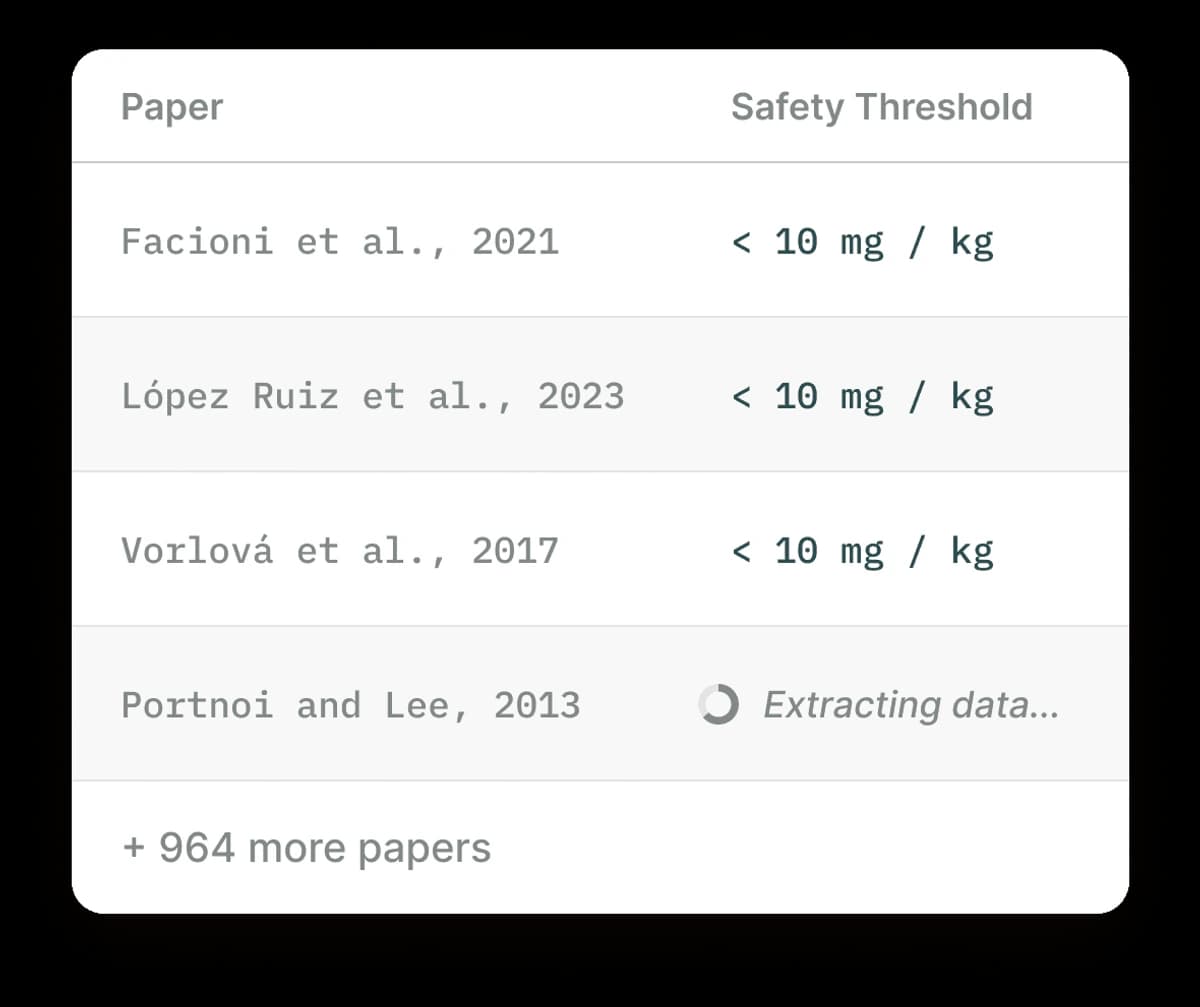 Elicit groups paper results into a study table. Each row can be compared with the source paper before you cite it.
How it compares to NotebookLM:
- Built-in paper search.
- Study tables for methods, groups, and results.
- Citation export.
- Workflow built for literature reviews.
- Can't upload every kind of source.
Key features:
-
Paper search by meaning.
-
Study summaries.
-
Related paper discovery.
-
Export to citation tools.
-
Review support.
-
Pricing: Free tier (5,000 credits/month), Plus $12/month
-
Best for: People who mostly work with published papers and structured review tables.
3. Consensus, for Evidence-Based Answers
- Best for: Anyone who wants answers backed by papers.
Consensus answers questions with paper citations. It is less about managing your own files. It is better for quick evidence checks.
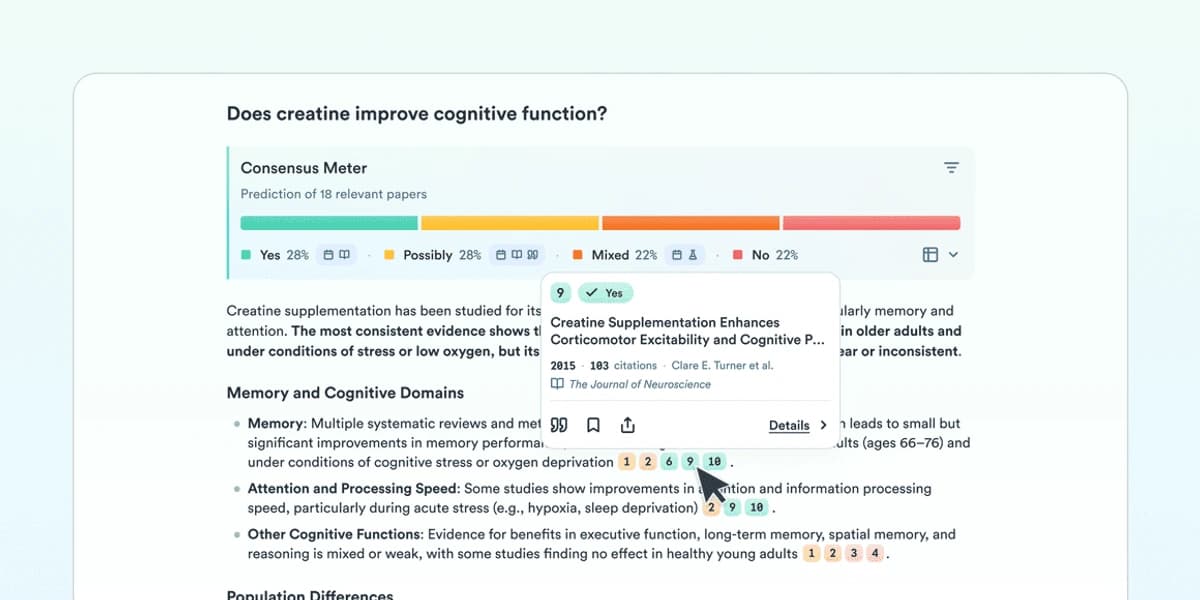 Consensus shows agreement across cited papers.
How it compares to NotebookLM:
- Answers cite reviewed papers.
- Consensus meter shows where studies agree.
- No source upload needed. Searches 200M+ papers.
- Can't study your own files.
- Less chat-like than NotebookLM.
Key features:
-
AI answers with paper links.
-
Agreement signals.
-
Study type filters.
-
Direct paper links.
-
Copilot workflow links.
-
Pricing: Free tier available, Premium $8.99/month
-
Best for: Getting quick, sourced answers when you are checking published evidence.
4. SciSpace, for Paper Understanding
- Best for: Readers who need help with hard papers.
SciSpace helps make dense papers easier to read. Its Copilot lets you highlight text and ask what it means. Use it when a paper is outside your field.
How it compares to NotebookLM:
- Help for hard ideas.
- Math and formula help.
- Literature review tools.
- Multi-language support.
- Weaker for non-paper sources.
Key features:
-
Highlight text to ask why it matters.
-
Paper summaries.
-
Key findings.
-
Citation extraction.
-
Chrome extension for PDFs.
-
Pricing: Free tier available, Premium $12/month
-
Best for: Students reading papers outside their field.
5. Claude Projects, for General Analysis
- Best for: Users who want flexible file chat.
Anthropic's Claude has Projects. You can upload sources and keep context across chats. It feels close to NotebookLM, but with stronger reasoning and fewer research tools. See our detailed comparison of NotebookLM vs Claude Projects.
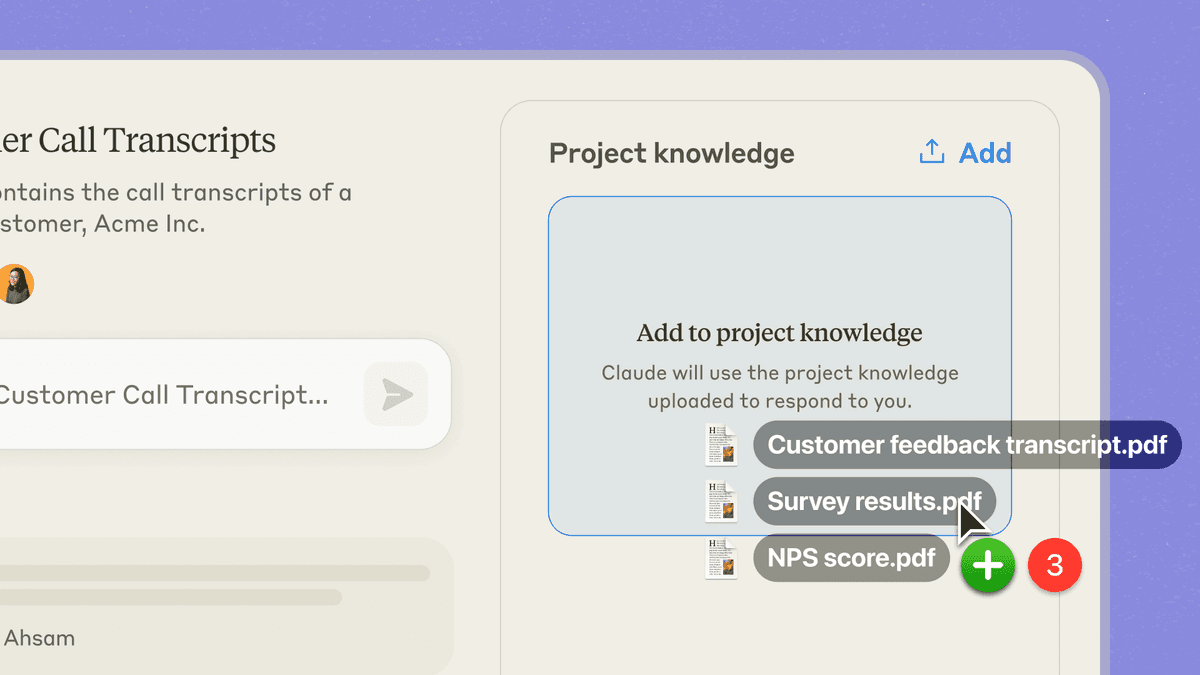 Claude Projects stores uploaded source context.
How it compares to NotebookLM:
- More careful answers.
- Strong reasoning.
- Works with many source types.
- API access.
- No mind maps.
- Fewer research tools.
Key features:
-
Upload PDFs, docs, and text.
-
Project context.
-
Artifacts for code and visuals.
-
Team sharing.
-
Pricing: Free tier available, Pro $20/month
-
Best for: Users who want better answers more than research tools.
6. Perplexity, for Current Research
- Best for: Users who need current web results.
Perplexity is an AI search engine that cites sources. It is not a source-chat notebook. Use it when you need current web results.
How it compares to NotebookLM:
- Live web search with citations.
- Answers about recent events.
- Built-in source checks.
- Can't upload your own source set.
- Not built for deep file review.
Key features:
-
AI search with citations.
-
Focus modes for Academic, YouTube, Reddit, and more.
-
Collections for saved work.
-
Related questions.
-
Pro Search.
-
Pricing: Free tier available, Pro $20/month
-
Best for: Research that needs current web results and link checking.
7. Scholarcy, for Summarization
- Best for: Users who need fast paper summaries.
Scholarcy turns papers into summary cards. The cards pull out key points, methods, and findings.
 Scholarcy uses flashcard-style paper summaries.
How it compares to NotebookLM:
- Summary cards.
- Key findings.
- Citation library.
- Browser extension for PDFs.
- Less chat-like than NotebookLM.
- Limited cross-source review.
Key features:
-
Summary cards from papers.
-
Key study data.
-
Citation export.
-
Highlights and notes.
-
Zotero workflow.
-
Best for: Quickly working through many papers during a review.
8. Semantic Scholar + TLDR
- Best for: Users who want free paper search.
Semantic Scholar is a free paper search engine with AI summaries. Its citation tools make it useful when you need a no-cost option for published papers.
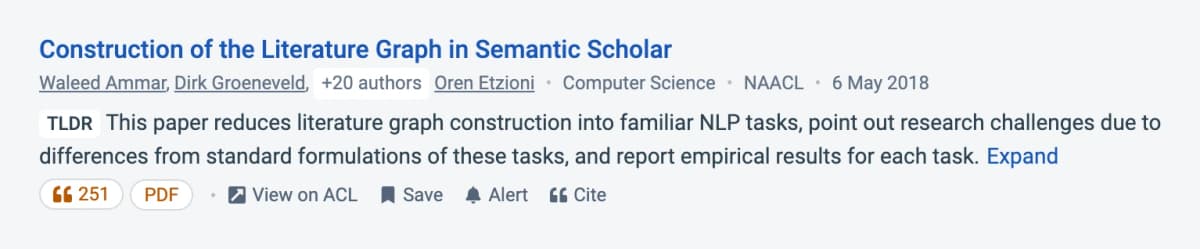 Semantic Scholar shows TLDR paper summaries.
How it compares to NotebookLM:
- Free to use.
- AI paper summaries.
- Citation graph.
- Research alerts.
- No source upload.
- Limited to papers in its index.
Key features:
-
TLDR summaries.
-
Citation tracking.
-
Research feeds.
-
Author pages.
-
Free API access.
-
Pricing: Free
-
Best for: Budget-conscious users who mostly work with published papers.
Where Atlas Fits After the Scorecard
For more tools in this space, see our guides on PDF chat AI tools and best document AI tools.
If your main gap is that NotebookLM keeps source work in separate notebooks, Atlas is the best fit in this table. Upload the same sources, ask a cited question, and check whether the answer links back to the passage you would cite yourself.
Choose Atlas when that connected, passage-linked workflow matters more than NotebookLM's audio summaries or isolated notebooks.
How to Choose an Alternative
The best alternative depends on what you need:
-
Choose Atlas if you want a connected workspace for long-running research. Mind maps help you see the big picture, and citations help you check each claim.
-
Choose Elicit if you study papers and want study tables.
-
Choose Consensus if you need quick answers backed by reviewed papers.
-
Choose SciSpace if you're reading complex papers and want in-line explanations of difficult concepts.
-
Choose Claude if you want stronger AI reasoning and can live without research-specific features.
-
Choose Perplexity if you need fresh web sources.
-
Choose Scholarcy if you need to summarize many papers quickly.
-
Choose Semantic Scholar if you want academic search features for free.
Not sure where to start? Pick the tool that matches the task you do most each week, then test it with sources you already know well.
Migrating from NotebookLM
If you're moving away from NotebookLM, here's how to preserve your work:
- Export your sources. Download the files you uploaded.
- Save useful chats. Copy the AI answers you want to keep.
- Note key insights. Write down links you found between sources.
- Choose your new tool. Base the choice on what you valued most about NotebookLM.
Most tools accept the same source formats, so the move is simple. If you are a student, our guide on NotebookLM for students covers workflows you may want in your new tool. You can also learn how to use NotebookLM effectively if you keep it alongside another tool.
Where AI Research Tools Are Going
AI research tools are changing fast. NotebookLM led with podcast summaries. Atlas focuses on mind maps and connected notes. Elicit focuses on study tables.
The trend is toward tools built for one job. For more detail, see our guide to NotebookLM competitors. For a three-way view, see NotebookLM vs Obsidian vs Atlas. Consider what you need:
- Source understanding: NotebookLM, Claude, SciSpace
- Knowledge management: Atlas, Obsidian with AI plugins
- Literature review: Elicit, Semantic Scholar
- Evidence-based answers: Consensus, Perplexity
You can also explore how Atlas compares directly on our NotebookLM vs Atlas comparison page.
Open-Source and Workflow Alternatives
Some search results for this query point to tools outside the main research-assistant set. They are worth knowing, but they fit narrower jobs.
Open Notebook
Open Notebook is a self-hosted NotebookLM-style project. It is best for users who want local control, model choice, and podcast-style output without Google's notebook limits.
Khoj
Khoj is an open-source AI assistant for personal knowledge bases. It fits teams that want chat over notes, docs, and web pages, especially when self-hosting matters.
Obsidian
Obsidian matters for users who want local notes, linked files, and community AI plugins. It is strongest when note ownership matters more than built-in audio or hosted source chat.
Notion
Notion fits teams that want docs, databases, and lightweight AI in one shared workspace. It is less research-specific than NotebookLM, Elicit, or Atlas, but it can be the right alternative when the main job is organizing team knowledge.
Prezent AI
Prezent AI is closer to a business presentation tool than a research notebook. Consider it when the end product is a deck for stakeholders.
Saner.AI
Saner.AI is a personal knowledge management app with AI search and note workflows. It is closer to a second-brain tool than a NotebookLM clone.
Cost, Privacy, and Source Limits
Three-year cost
Pricing across this category shifts often. Current rates from each vendor's pricing page (verified May 2026):
| Tool | Free tier | Paid tier | 3-year solo cost |
|---|---|---|---|
| NotebookLM | Yes (with caps) | NotebookLM Plus, ~$20/month | $0-720 |
| Atlas | Free personal | $20/month (Pro) | $720 |
| Claude Projects | Limited free | $20/month (Pro) | $720 |
| ChatGPT (with Projects) | Limited free | $20/month (Plus) | $720 |
| SciSpace | Limited free | $20/month (Premium) | $720 |
| Elicit | Limited free | $14/month (Plus) | $504 |
| Perplexity Spaces | Limited free | $20/month (Pro) | $720 |
| Consensus | 20 searches/month | $11.99/month (Premium) | $432 |
Table 3: Three-year solo cost for common paid tiers across NotebookLM alternatives.
Most paid tiers cluster at $20/month, the common price for AI research tools in 2026. Free tiers vary. NotebookLM's free plan works for moderate use. SciSpace and Elicit limit free queries sooner.
Privacy and data handling
Research often includes drafts, team reports, and review notes. Privacy matters more here than it does in a basic notes app.
| Tool | Trains on uploads | Notes |
|---|---|---|
| NotebookLM | No (per NotebookLM privacy) | Personal Google account, Workspace tenants get tenant boundary |
| Atlas | No | Per-document encryption available |
| Claude Projects | No (paid tiers, per Anthropic privacy) | Free-tier conversations may be used unless opted out |
| Elicit | No (per Elicit privacy) | OpenAI subprocessor with zero-retention API |
| ChatGPT Projects | No (paid tiers, per OpenAI enterprise privacy) | Free-tier ChatGPT may train unless opted out |
Table 4: Upload training policies and privacy notes for common NotebookLM alternatives.
For unpublished work or sensitive files, use a paid tier that excludes training. Do not rely on a free tier unless you have checked its data policy.
Choosing by source type
The fit between tool and source type matters more than overall capability rankings.
For academic PDFs, start with NotebookLM, SciSpace, or Elicit. NotebookLM handles source chat. SciSpace helps explain hard passages. Elicit extracts study data across 50 to 200 papers.
For web articles and research links, use Perplexity Spaces or ChatGPT Projects. They can browse the web and pull in sources as you work. That makes them less dependent on pre-uploaded files.
For mixed sources, use Atlas or Claude Projects. Both can handle PDFs, notes, and web text in one workspace.
For lectures and podcasts, NotebookLM is still the simplest option because it can ingest audio directly. For other tools, transcribe first with Otter or Whisper, then upload the transcript.
Source limits and context windows
Different tools have different limits for how much source text can sit in one project. The ceiling matters most for large reviews and many-source work.
- NotebookLM's free tier supports up to 50 sources per notebook, with 500,000 words per source. NotebookLM Plus raises both limits.
- Claude Projects exposes the 200K-token context window. That is roughly 150,000 to 180,000 words of source text at one time.
- ChatGPT Projects offers a smaller working set, roughly 32K to 128K tokens depending on tier, but adds web browsing.
- Atlas, SciSpace, and Elicit use retrieval. They can work across larger libraries, but each answer sees the most relevant chunks rather than the full text.
For large source sets, such as 500+ papers, use a retrieval-based tool. NotebookLM and Claude Projects are not built for that workload.
AtlasMap your sources in Atlas
Compare source links, maps, and cited answers across your uploaded research.
Frequently Asked Questions
Yes, several alternatives offer free tiers. Atlas, Elicit, Consensus, Claude, and Semantic Scholar all have functional free versions. The free tiers typically have usage limits but work well for moderate research needs.