


Atlas helps after you collect papers. Each answer can point back to cited PDF passages. The workspace also turns a growing library into maps you can reuse across a literature review. That makes it a better fit after Elicit helps you find or pull the first batch of papers.
Elicit is strong at paper search and data pull. You may need a broader source set, a map view, or a different way to read.
Before replacing Elicit, name what must survive the move. A paper list still needs search. A data table still needs Elicit. A cite trail needs Scite. A seed-paper map needs ResearchRabbit or Connected Papers. A hard methods section needs SciSpace. A kept PDF library that now has to become an argument needs Atlas.
For the July 2026 update, I organized this comparison around a six-step review flow. The steps were search, data pull, cite checks, paper reading, synthesis, and writing. I started with the item that has to survive each switch: a paper list, data table, cite trail, PDF library, or draft argument. That method keeps the comparison grounded in research work instead of turning it into a generic AI-tools ranking.
Synthesize the papers you kept from Elicit
Upload your selected papers and compare findings through cited answers.
Where Elicit Excels and Falls Short
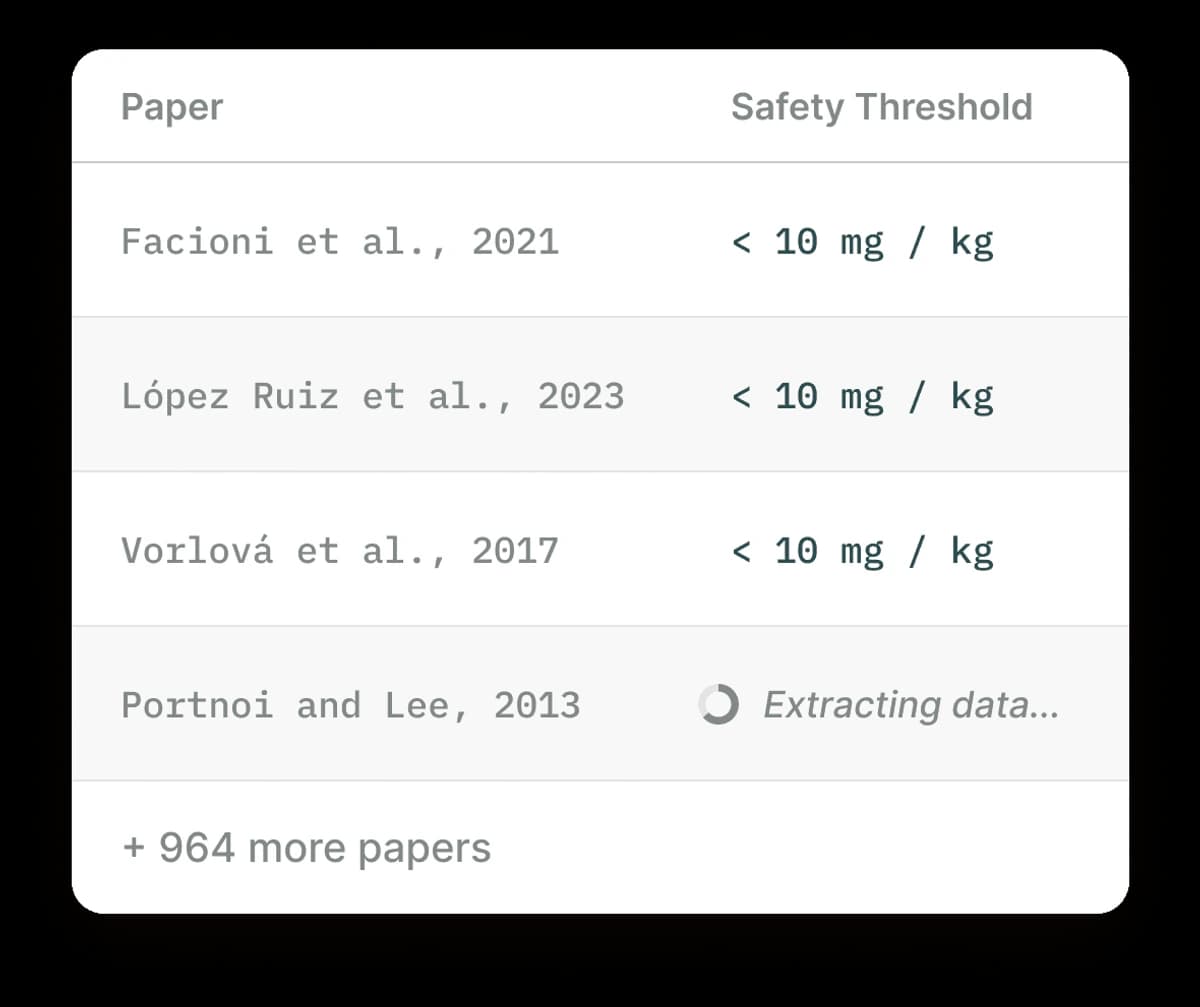
Elicit's strengths are meaning-based paper search, data pull, and review support. It does not handle every source type. PDFs, reports, and web pages may fall outside the job. It also lacks a visual map and deep library order. These gaps are where other tools differ.
Where Elicit Leads
Elicit excels at:
- Searching academic papers by meaning.
- Pulling fields, such as methods, outcomes, and limits.
- Creating tables across studies.
- Supporting review workflows.
Where Other Tools Help
But users commonly want:
- Support for PDFs, reports, and web pages.
- Visual maps for ideas and claims.
- Better order for a growing paper library.
- Lower cost for heavy use.
- Real-time web information.
Let's look at alternatives that address these gaps.
Elicit Alternatives Compared
This is the comparison table promised in the brief. Elicit is still the benchmark for paper search and data tables. Atlas is the better fit when the next job is reading across a saved source set. Each column reflects a specific workflow stage to help you pick by the job you need to complete next.
| Tool | Paper search | Data pull | Cite quality | Source breadth | Review support | Typical paid tier |
|---|---|---|---|---|---|---|
| Atlas | No broad index. | Limited. | Cited answers from uploads. | PDFs, articles, notes. | Best after screening. | $20/month Plus. |
| Elicit | Strong. | Strong. | Paper-level citations. | Academic papers. | Strong. | $49/month Pro, billed yearly. |
| Consensus | Strong for questions. | No. | Study-linked answers. | Academic papers. | Light. | $20/month Pro ($12/month yearly). |
| Semantic Scholar | Strong. | No. | Paper pages and citation graph. | Academic papers. | Light. | Free. |
| ResearchRabbit | Cite-network search. | No. | Cite graph. | Academic papers. | Search support. | Free; ResearchRabbit+ $12.50/month. |
| Scite | Cite-context search. | No. | Support, contrast, or mention labels. | Academic papers. | Evidence-check support. | $12/month Basic. |
| SciSpace | Paper search and PDF reading. | Light. | Paper-linked notes. | Papers and uploaded PDFs. | Light. | See its pricing page. |
| Undermind | Deep paper search. | No. | Search reasons and fit notes. | Academic papers. | Strong discovery support. | $16/month Pro, billed yearly. |
Table 1: Elicit alternatives compared by paper search, data pull, citation quality, source breadth, review support, and typical paid tier.
The Elicit Handoff Test
Before switching tools, separate the job Elicit already does well from the job that now feels blocked. Use this handoff test:
Identify the Blocked Research Step
The Elicit Handoff Test makes six practical claims:
- Paper lists need search.
- Data tables need Elicit.
- Cite trails need Scite.
- Seed-paper maps need visual discovery.
- Hard methods sections need reading help.
- Kept PDF libraries need synthesis.
Treat those as separate jobs before you pay for another tool.
| If the blocked job is... | Stay with or add... | Why |
|---|---|---|
| Writing across a final saved paper set | Atlas | The job is cross-source synthesis with citations. |
| Finding the first relevant papers for a question | Elicit, Semantic Scholar, Undermind | The job is still search recall. |
| Pulling study fields into rows and columns | Elicit | The job is extraction, where Elicit is strongest. |
| Checking how later papers treat a claim | Scite | Citation context shows whether later work supports or disputes the claim. |
| Expanding from a seed paper into nearby work | ResearchRabbit or Connected Papers | The job is network discovery. |
| Reading a difficult methods section | SciSpace | The job is comprehension at the paper level. |
Table 2: Handoff guide matching each blocked research job to the tool best suited to handle it.
Replace only the missing step
Researchers often switch away from Elicit because one later step is painful, but that is usually a sign to add a tool rather than replace it. In most serious reviews, Elicit remains the front-end table builder. Any alternative earns its place only if it handles a different stage better.
Migration Checklist: Moving Work Out of Elicit
Do not migrate everything. Move only the artifacts that still have research value:
Keep research outputs you can reuse
- Export or copy only the final paper list. Discard intermediate search results.
- Keep the data columns that explain why you kept, cut, or cited a paper.
- Save PDFs for the papers you will cite or synthesize.
- Put citation-check tasks into Scite if the argument depends on contested papers.
- Put reading-support tasks into SciSpace if the issue is comprehension.
- Put retained PDFs, notes, and reports into Atlas if the issue is cross-source synthesis.
- Write a stop rule before testing another tool, such as "this must replace one current step within a week."
Give Each Output One Destination
A handoff often works better than replacing Elicit. Let Elicit find papers and organize their fields. Then use a second tool to check the evidence, explain the papers, or help you write across the set you kept.
7 Best Elicit Alternatives
The seven tools below solve different parts of the research process. Compare them by the step that Elicit does not cover well enough for your project.
1. Atlas: Best for Research Synthesis
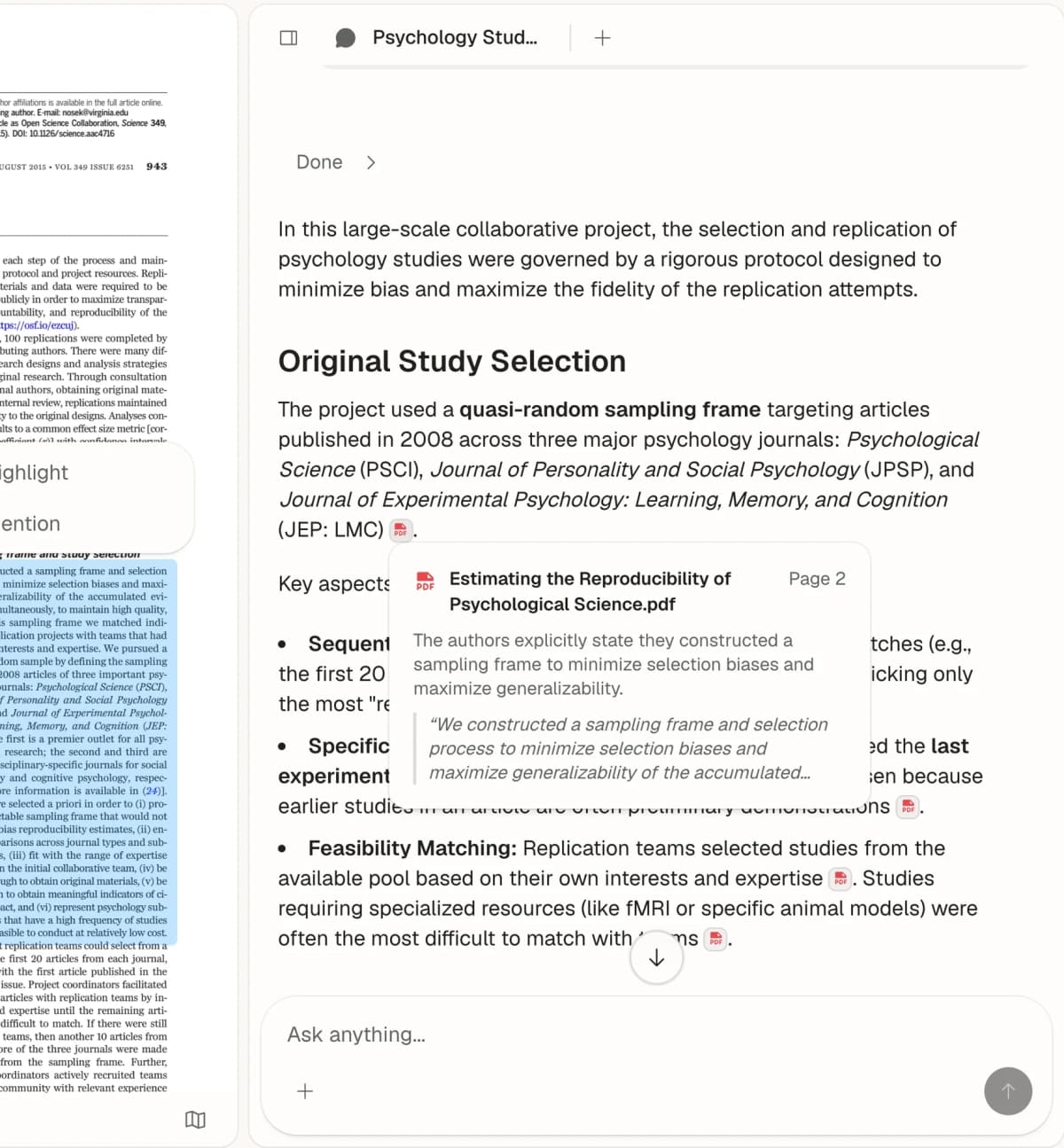
Atlas shows a cited answer beside the passage from a research paper, so the reader can inspect the source.
Best for: Researchers who want to connect ideas across all their sources.
Atlas literature review workspace takes a different path than Elicit. It does not search broad paper indexes. You build your own library by uploading PDFs, articles, and notes. Atlas then helps you find links and write across that set.
In a practical Elicit-to-Atlas flow, Elicit handles the table first. That table might include methods, outcomes, limits, and sample details. Atlas becomes useful once you have the papers worth keeping. Upload that short list. Ask a question such as "Which steps improved adherence?" Then check the cited passages before writing.
How it compares to Elicit:
- Works with PDFs, web pages, YouTube videos, and notes.
- A Semantic Map shows how sources cluster by topic.
- Builds a lasting library over time.
- Writes across sources.
- No external paper search.
Key features:
- PDF and article upload.
- AI chat across all sources.
- Semantic Map and Knowledge Map views.
- Citations that open the supporting passage.
Best for: Researchers who already have their papers and want to organize and connect them.
Pricing: Free plan with 10 sources and 5 AI messages; Plus is $20/month or $192/year.
2. Consensus: Best for Evidence-Based Answers
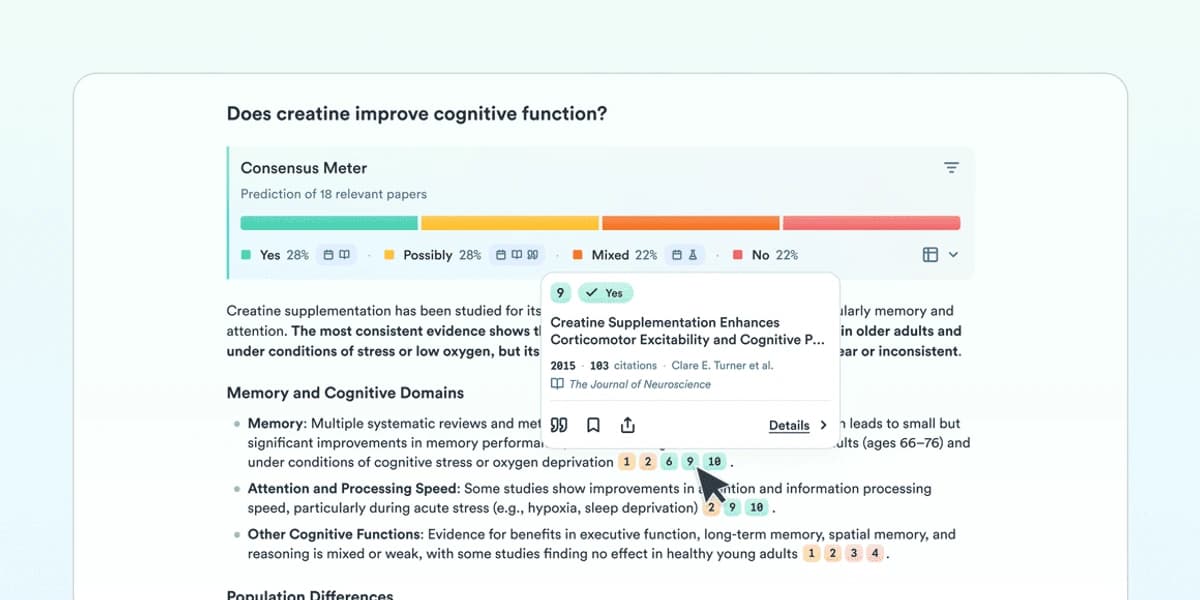
Consensus helps when the question can be answered from published studies. Source: official product material.
Best for: Quick answers backed by peer-reviewed research.
While Elicit helps you explore and extract from papers, Consensus answers specific questions. It is faster when you need a quick answer. It is less useful when you need deep extraction.
How it compares to Elicit:
- Faster for specific questions.
- Shows research consensus.
- Cleaner, simpler interface.
- Less detailed extraction.
- Cannot create comparison tables.
Key features:
- Search across a large academic index.
- Consensus meter: Yes, No, or Mixed.
- Study type labels.
- Copilot integration.
Best for: Getting quick, evidence-based answers rather than deep paper review.
Pricing: Free tier available; Pro is $20/month, or $12/month billed yearly, per the Consensus help center.
3. Semantic Scholar: Best Free Search
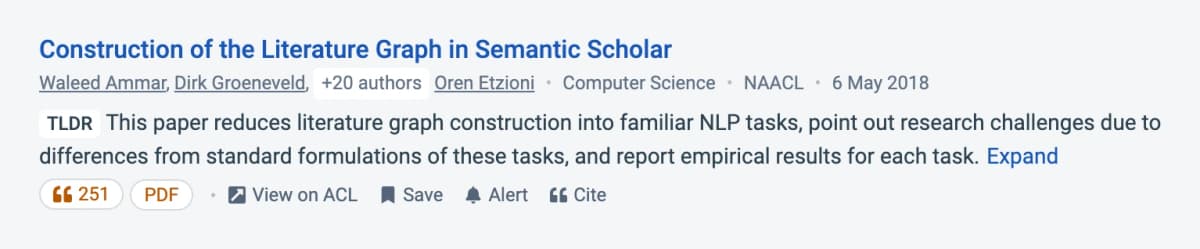
Semantic Scholar helps with discovery and quick paper-level context. Source: official product material.
Best for: Researchers on a budget who need help finding papers.
Semantic Scholar is free and offers AI features like TLDR summaries and citation graphs. It has fewer workflow features than Elicit. It is still excellent for finding papers and seeing research influence.
How it compares to Elicit:
- Completely free.
- Strong cite analysis.
- Research alerts and feeds.
- TLDR summaries.
- No structured data extraction.
- Less advanced search.
Key features:
- TLDR one-sentence summaries.
- Cite influence tracking.
- Author pages and metrics.
- Research feeds and alerts.
- Open API access.
Best for: Researchers who mainly need paper search.
Pricing: Free.
4. ResearchRabbit: Best for Paper Discovery
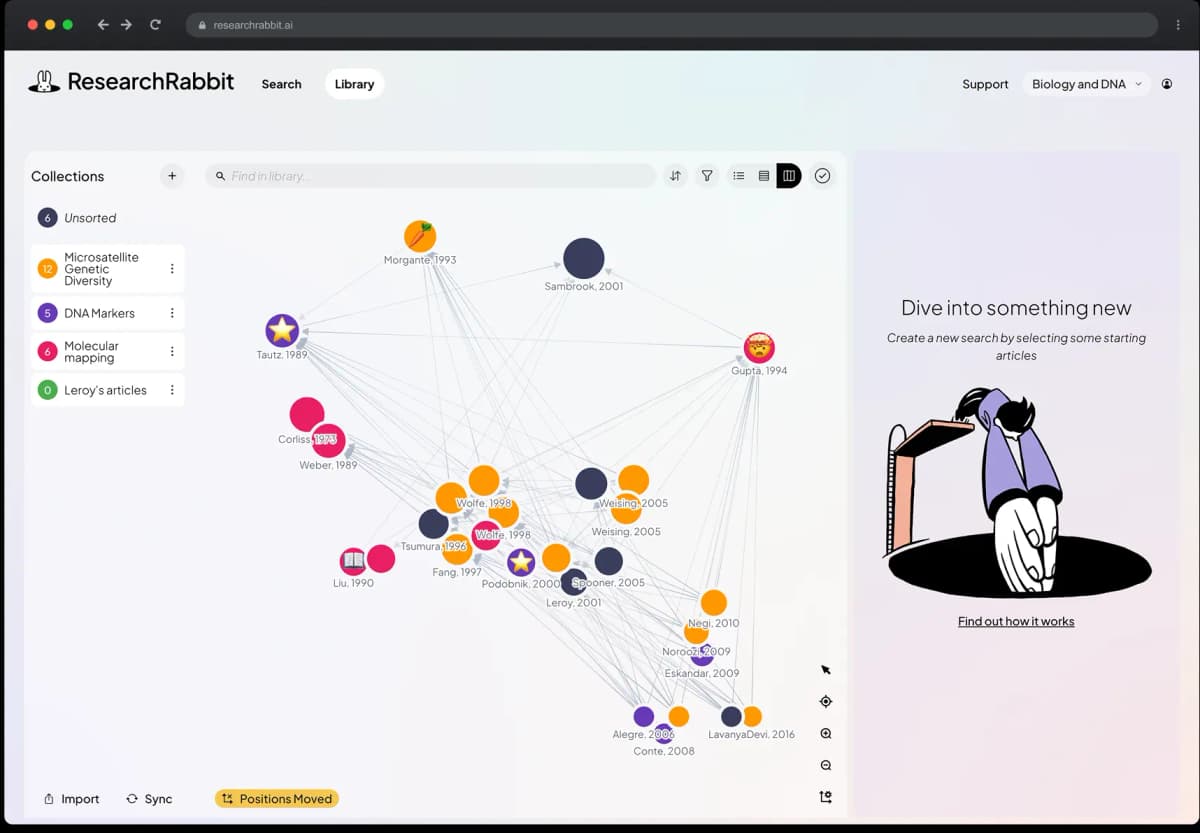
ResearchRabbit is strongest for exploring relationships between papers. Source: official product material.
Best for: Finding related papers through citation networks.
ResearchRabbit is best at one job. It helps you find papers you did not know existed. Add seed papers, and it shows cite networks to surface related work.
How it compares to Elicit:
- Excellent cite network view.
- Collection-based organization.
- Email alerts for new papers.
- Free tier, with a paid ResearchRabbit+ plan.
- No AI chat or question answering.
- No data extraction.
Key features:
- Cite network graphs.
- Collection organization.
- Paper recommendations.
- New paper alerts.
- Zotero integration.
Best for: The expand phase of a review: finding related work after you know the seed papers.
Pricing: Free tier; ResearchRabbit+ is $12.50/month, or $10/month billed yearly.
5. Scite: Best for Citation Context
Best for: Understanding how papers cite each other.
Scite provides one clear value. It shows whether citing papers support, contrast, or merely mention a paper. That context helps you read research debates. Elicit does not capture that layer. For more tools that cite sources, see our guide to AI that cites sources.
How it compares to Elicit:
- Smart cite classes.
- Shows support or dispute.
- Cite context search.
- Citation checks for drafts.
- Less advanced extraction.
- Smaller paper database.
Key features:
- Smart Citations with context.
- AI Assistant for questions.
- Citation check tool.
- Browser extension.
Best for: Readers who need to know how later papers treat a claim.
Pricing: 7-day free trial; Basic is $12/month per Scite's pricing page.

6. SciSpace: Best for Paper Understanding
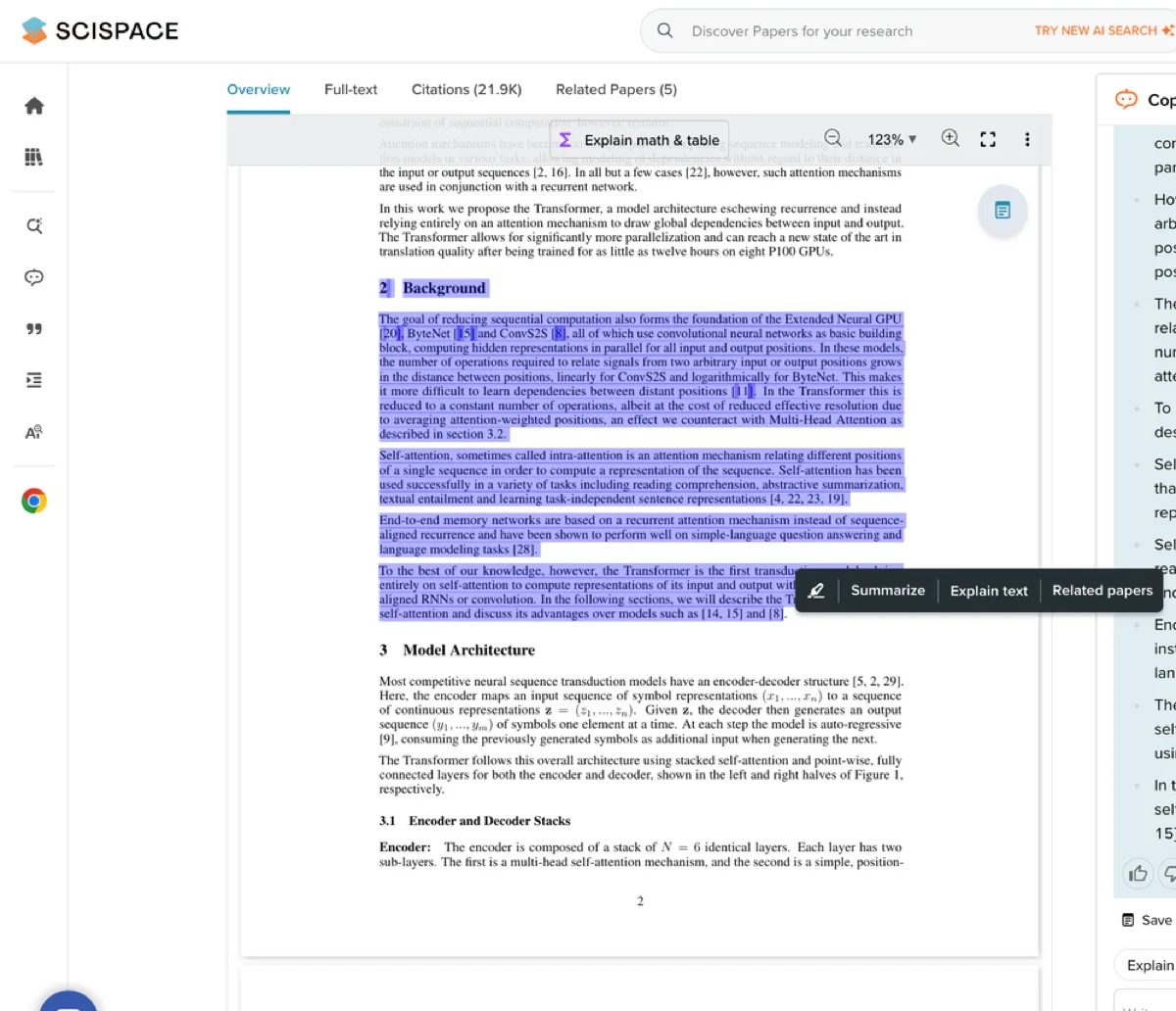
SciSpace shows a selected PDF passage beside explanation controls and its Copilot panel. Source: SciSpace Copilot PDF explanation screenshot.
Best for: Making hard papers easier to read.
SciSpace helps you read papers. It used to be called Typeset. It is useful in fields you do not know well. Its highlight-to-explain feature makes dense text easier to read.
How it compares to Elicit:
- In-line concept notes.
- Math and formula notes.
- Literature review matrix.
- Chrome extension for any PDF.
- Smaller paper database.
- Less structured extraction.
Key features:
- Copilot highlight-to-explain.
- Paper summaries.
- Literature review automation.
- Cite extraction.
Best for: Students and researchers reading papers outside their expertise.
Pricing: Free tier available; check SciSpace's pricing page for current Premium rates, which third-party listings differ on.
7. Undermind: Best for Deep Research
Best for: Complete literature searches.
Undermind focuses on thorough literature searches that find papers other tools miss. It fits researchers who value broad coverage and can wait for a deeper search.
How it compares to Elicit:
- More thorough search results.
- Better at finding obscure papers.
- Explains search reasoning.
- Slower than Elicit.
- Fewer extraction features.
Key features:
- Deep meaning-based search.
- Search explanation and reasoning.
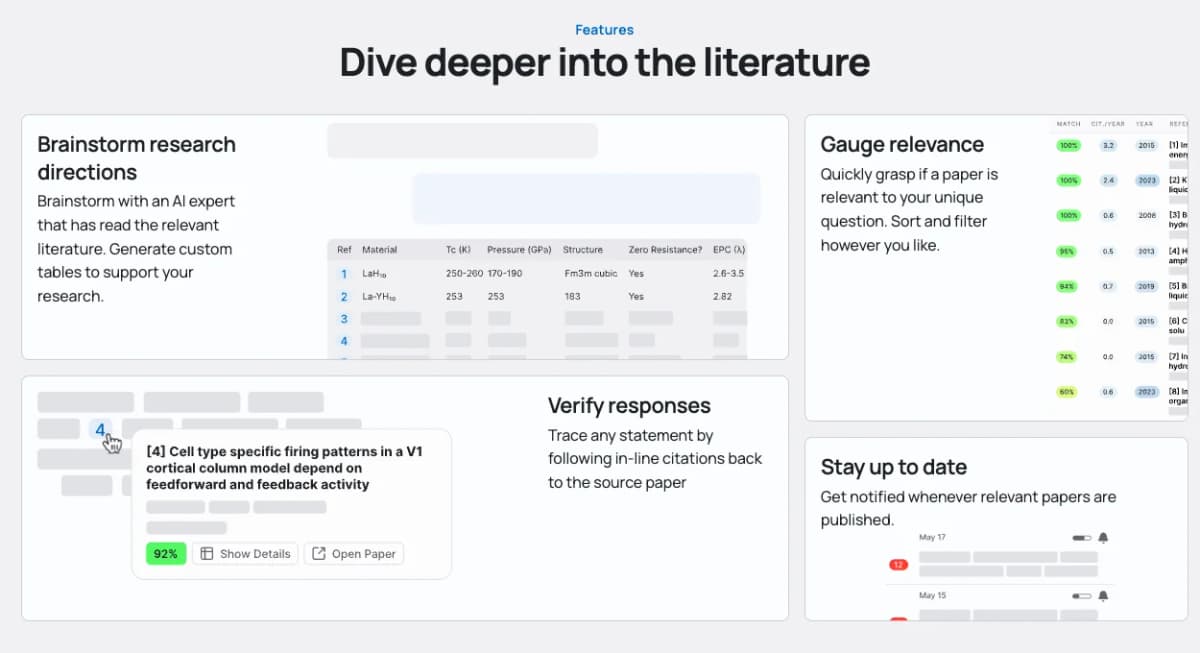
- Paper relevance scoring.
- Thorough coverage focus.
Best for: Review projects that need broad coverage. See our AI systematic review tools guide for more options in this space.
Pricing: Free tier available; Pro is $16/month billed yearly, per Undermind's pricing page.
Other Elicit Alternatives You Will See
These tools appear often in Elicit-alternative searches. They are not always a direct replacement for Elicit's paper search and extraction workflow.
Paperguide
Paperguide is closest to Elicit when the job is reading and sorting papers. It is worth testing if you want a paper-first workspace. It is less direct if you need Elicit's exact table flow.
Connected Papers
Connected Papers is strongest as a visual discovery layer. Use it when you have one key paper and want to see nearby work. Then move the final paper set into Atlas, Elicit, Zotero, or another tool.
Perplexity AI
Perplexity is useful for fast web-backed orientation. It helps when the question includes current policy, market, or product facts. It is weaker than Elicit for academic extraction because it is not built around paper tables.
Decision Guidance by Research Job
Choose the tool that solves the next unfinished step in your review. The best option changes depending on whether you still need papers, need to check a claim, or are ready to write across the sources you kept.
- Choose Atlas if you already have papers and want a linked knowledge base with cited answers.
- Choose Consensus if you need quick answers based on research findings.
- Choose Semantic Scholar if you want free paper search with AI summaries.
- Choose ResearchRabbit if you want to view citation links and find related papers.
- Choose Scite if you need to know whether later papers support or dispute a claim.
- Choose SciSpace if you need help reading hard papers in a field you do not know well.
- Choose Undermind if you need broad coverage and can wait for a deeper search.
If your choice is between "keep pulling fields" and "start writing across sources," use Elicit for the table. Use Atlas for the second step. Upload the retained PDFs and ask questions across the full set. Synthesize your research corpus with cited answers once you have the papers you plan to keep. For a broader comparison, see our guides to tools for research analysis and the best AI research assistants.
A Practical Research Workflow
Use a small set of tools with separate roles so search results, extracted data, citation checks, and retained papers move forward without duplicating work.
Combine Tools by Research Stage
Most researchers benefit from using multiple tools:
Discovery phase:
- ResearchRabbit for cite network search.
- Semantic Scholar for broad search.
- Elicit for meaning-based search.
Analysis phase:
- Elicit for structured data pull.
- Scite for cite context.
- SciSpace for reading hard papers.
Synthesis phase:
- Atlas for connecting ideas across papers.
- Consensus for quick evidence checks.
Literature Review Example
Here is one way to combine these tools:
- Start with Elicit : Search for your research question.
- Expand with ResearchRabbit : Add key papers and find linked work.
- Check consensus with Consensus : See what the field agrees on.
- Understand with SciSpace : Read hard papers in plain language.
- Organize with Atlas : Upload key papers and build links.
- Verify with Scite : Check how your key papers are cited.
For a full guide, see our AI for literature review article. You can also compare literature review AI tools for a workflow breakdown.
Cost, Privacy, and Tool Limits
Before adopting a tool, compare its long-term cost, treatment of unpublished files, database coverage, and known failure modes.
Three-Year Cost
Pricing for research AI tools shifts often. Rates below were checked on each vendor's pricing or help page in October 2026, using yearly billing where offered:
| Tool | Free tier | Paid tier (monthly) | 3-year solo cost |
|---|---|---|---|
| Atlas | 10 sources, 5 AI messages. | $20/month Plus. | $720. |
| Elicit | Basic plan. | $49/month Pro, billed yearly. | $1,764. |
| Consensus | Unlimited Papers searches, limited Pro messages. | $12/month Pro, billed yearly. | $432. |
| Semantic Scholar | Unlimited and free. | N/A. | $0. |
| ResearchRabbit | Free plan. | $10/month ResearchRabbit+, billed yearly. | $0 free, $360 paid. |
| Scite | 7-day trial. | $12/month Basic. | $432. |
| SciSpace | Free tier. | See pricing page. | Varies. |
| Undermind | Free plan. | $16/month Pro, billed yearly. | $576. |
Table 3: Three-year solo cost for each tool based on pricing pages checked in October 2026.
For a graduate student or solo researcher, a lean stack can stay simple. Use Semantic Scholar for search. Use ResearchRabbit for citation networks. Add one paid tool for synthesis. Per Elicit's pricing page, Elicit Pro costs $49/month billed yearly, while Atlas Plus, Consensus Pro, Scite Basic and Undermind Pro sit between $12 and $20 a month. If you need Elicit only for occasional tables, its free Basic plan may cover that step.
Privacy and Data Handling
Research teams often handle draft papers and private data. Privacy matters more here than it does in most work apps.
| Tool | Trains on uploads | Retention | Notes |
|---|---|---|---|
| Atlas | Not stated in the privacy policy. | While the account is active. | Saved projects can be deleted at any time. |
| Elicit | No, per Elicit privacy. | User-controlled. | Check its privacy page for subprocessors. |
| SciSpace | No, per SciSpace privacy. | Standard. | Check its privacy page for subprocessors. |
Table 4: Data handling summary for the three tools here that take user uploads of unpublished drafts.
For unpublished work, prefer tools whose policy states that uploads are not used for model training and that names its AI providers. Read the policy page before you upload a draft.
When to Stop Testing Tools
A common failure mode is tool shopping. You spend more time testing tools than doing research. Three signals show you have enough:
You have one search tool you trust: This could be Elicit, Consensus, or Semantic Scholar. Trust comes from running the same query in two tools, and if the results overlap, you can move on.
You have one synthesis tool that holds your project: This is where notes, highlights, and links live. Atlas, a Notion database, or a plain Obsidian vault can work if you use one place.
You have a clear stop rule for new tools: Give a new tool a 30-minute trial. If it does not replace a current tool within a week, stop using it because half-tried tools are a hidden cost.
What These Tools Search
Most of these tools sit on top of the same paper indexes. That is why their results often overlap. Knowing the source helps explain the gaps.
Semantic Scholar is a broad academic search index. It draws from publisher feeds, preprint servers, and web sources. Per the Semantic Scholar about page, it covers all major fields. Coverage still varies by field, so search for a few papers you already know before relying on it.
Elicit, Consensus, Undermind: All three rely on Semantic Scholar or similar indexes. OpenAlex is another common source. The difference is the layer on top. Elicit is built for data tables. Consensus gives yes/no answers from study findings. Undermind goes deeper with recursive search. The same search will often surface many of the same papers.
Scite focuses on cite context. It reads the sentences around cites and labels them as support, dispute, or mention. The Scite methods page explains how it works.
ResearchRabbit builds visual cite networks from a seed set of papers. It has a free plan and a paid ResearchRabbit+ tier. It works best as a discovery layer in the expand phase of a review rather than as a primary search tool.
SciSpace indexes papers and adds a chat-with-PDF layer. It helps with dense methods sections and unfamiliar terms.
Common AI Research Failures
Three patterns that recur in academic AI workflows, each with a fix.
One risk is over-trusting AI summaries. Every paid tool here uses an LLM to summarize papers. A summary can still misstate a finding or attach it to the wrong paper, so read the original paragraph for any claim that will appear in your own writing.
Search recall is easy to confuse with full coverage. Elicit returning 50 papers can feel complete, but it is not, and the same query in Google Scholar may return 5,000 hits. AI tools rank the most relevant 20-50 papers. Systematic reviews still need database searches such as PubMed and Web of Science.
Do not treat chat-with-PDF as a methods check. SciSpace and similar tools answer questions about a paper's own text. They may summarize a flawed method as sound because the chat response is drawn from the paper's own claims. The field's reception of those claims only appears in the citation record, so pair any chat-with-PDF tool with Scite to see how later papers treated the same work.
Synthesize the papers you kept from Elicit
Upload your selected papers and compare findings through cited answers.