


Most AI tools can write a source list. Fewer make each claim easy to check. For research work, the deciding check is whether you can open the source, find the passage, and see why the answer used it.
The tools below do that in different ways. Some search the web. Some search paper indexes. Atlas works from files you upload, which is useful when your best sources are class readings, PDFs, and notes.
Ask a cited question against your own sources
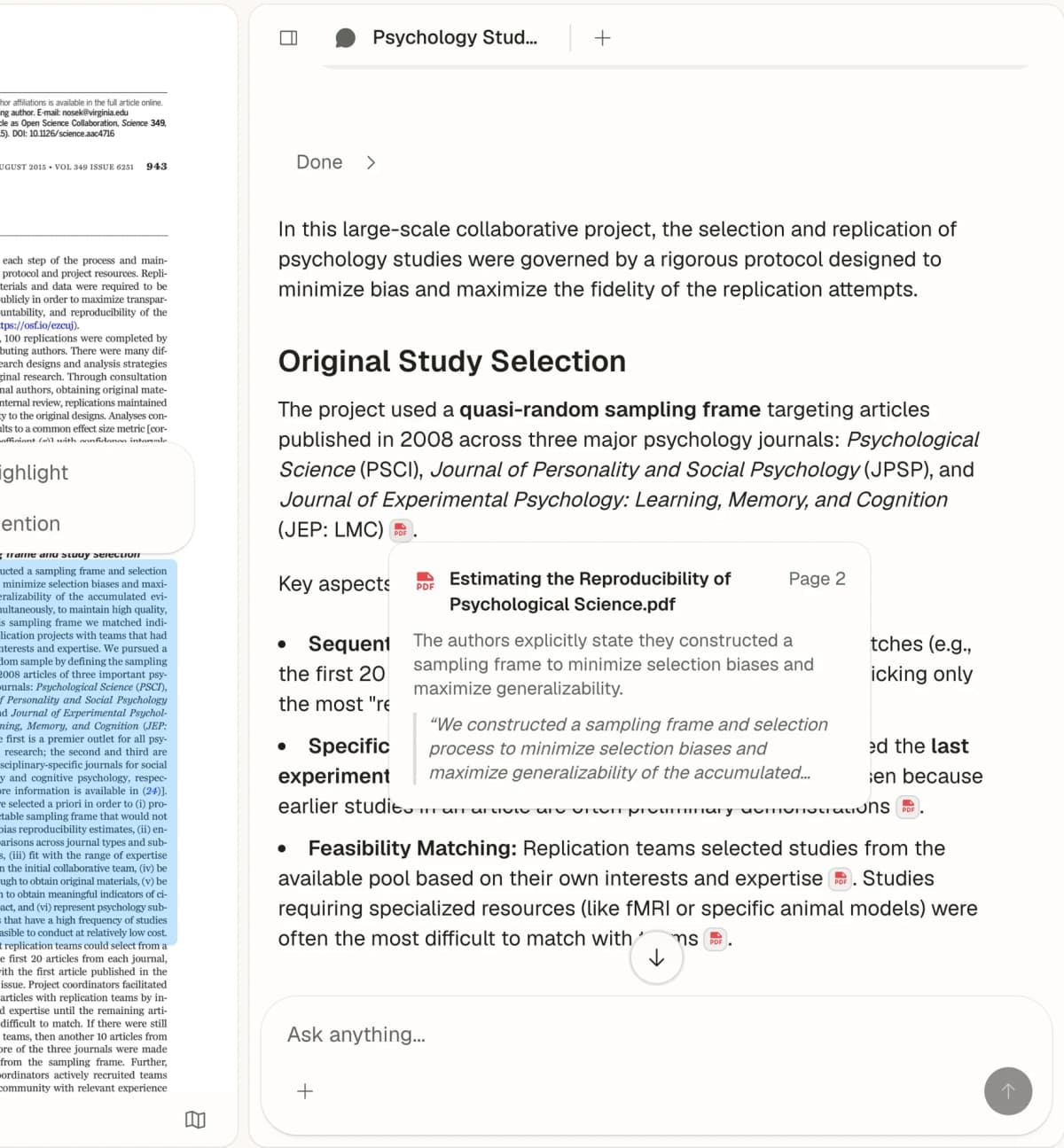
Ask across uploaded papers, then open each cited passage before you write.
Feature comparison matrix
For a phase-by-phase walkthrough, see the student's guide to AI research.
| Tool | Best for | Source base | Check path | Best score |
|---|---|---|---|---|
| Atlas | Your own source set | Uploaded PDFs and notes | Check cited passages | Private corpus grounding |
| Perplexity | Fast web search | Web + uploads on Pro | Click linked pages | Broad live search |
| Consensus | Research claims | Published papers | Open paper links | Study-level answers |
| Scite | How papers cite papers | Published papers | Read cited context | Support or contrast labels |
| Elicit | Paper screening | Academic paper index | Open rows and exports | Data tables from papers |
| Semantic Scholar | Free paper search | Published papers | Open paper records | Free TLDR summaries |
Table 1: Use this matrix to choose among live web search, academic-paper search, and private-source grounding.
Use this table as a first pass. If you need live web facts, start with Perplexity. If you need paper search, start with Consensus, Scite, Elicit, or Semantic Scholar. If you already have the sources and need answers tied to those files, Atlas is the fit.
Why Do AI Citations Matter?
AI citations matter because standard ChatGPT-style models can sound sure without showing proof. A fake source can look real. A real source can be used for the wrong claim. A link can point to a page that does not support the answer.
That creates four risks:
- Fake sources: Paper titles and authors may not exist. See our guide to AI research tools that don't hallucinate.
- Old facts: A model may miss new work.
- Weak proof: A link may not support the exact claim.
- Academic risk: You still own the sources you cite.
Good source tools reduce those risks. They show the source, the claim, and enough context for you to check the match.
How to Choose a Citation Tool
Use four checks before you trust an AI source tool. First, check whether the source exists. Second, check whether the linked passage supports the claim. Third, check whether the tool shows the paper, page, or web record in plain view. Fourth, check whether the tool fits your job: finding new sources, reading papers, or asking questions against files you already have.
I use a Source-Check Score before trusting any AI answer with citations. Give each answer 0, 1, or 2 points on each line. A research answer needs at least 8 out of 10 before it is safe to draft from, and any 0 on claim support means the answer needs manual repair.
| Check | 0 points | 1 point | 2 points |
|---|---|---|---|
| Source exists | The source is missing or unverifiable. | The source exists but is hard to reach. | The source opens to a real paper, page, or uploaded file. |
| Claim support | The source does not support the claim. | The source is related but indirect. | The cited passage directly supports the claim. |
| Citation precision | The answer gives only a loose source list. | The answer links the source but not the exact passage. | The answer points to a passage, quote, page, row, or context window. |
| Source fit | The source type does not match the job. | The source is acceptable but not ideal. | The source type matches the job: paper for academic claims, web page for current facts, uploaded file for private-source work. |
| Recheck speed | Verification takes more than two minutes per claim. | Verification is possible but slow. | You can check the claim-source match in under one minute. |
Table 2: The Source-Check Scorecard turns citation quality into a repeatable 10-point check before you reuse an AI-generated claim.
10 AI Tools That Cite Sources
1. Atlas: Best for Cited Source Sets
Best for: Building a personal research library with AI Atlas is different from web search tools. You upload the sources. Atlas answers from that set, then points back to the source passages it used.
How citations work:
- Upload PDFs, notes, articles, or class files,
- ask one question across the set,
- check the cited passage for each claim,
- Use the map to see links between sources.
Key features:
- PDF and note upload,
- AI chat with source links,
- visual source map,
- Cross-source questions.
Source quality: Strong when you already trust the source set. It is not the best choice for live web search.
Pricing: Free has 10 sources and 5 AI messages. Plus is $20/month with hundreds of AI messages a month and up to 1,000 sources. Pro is $40/month with twice Plus's AI usage and up to 10,000 sources.
A good Atlas test is concrete. Upload two papers and a lecture note. Ask, "Which claims about retrieval practice appear in more than one source?" Then open each cited passage. Use Atlas when the answer must stay tied to your own files. Use Perplexity or Consensus when you still need to find new sources.
When your sources are ready, ask a cited question against your own sources and check each linked passage before you write.
2. Perplexity: Best All-Purpose AI Search
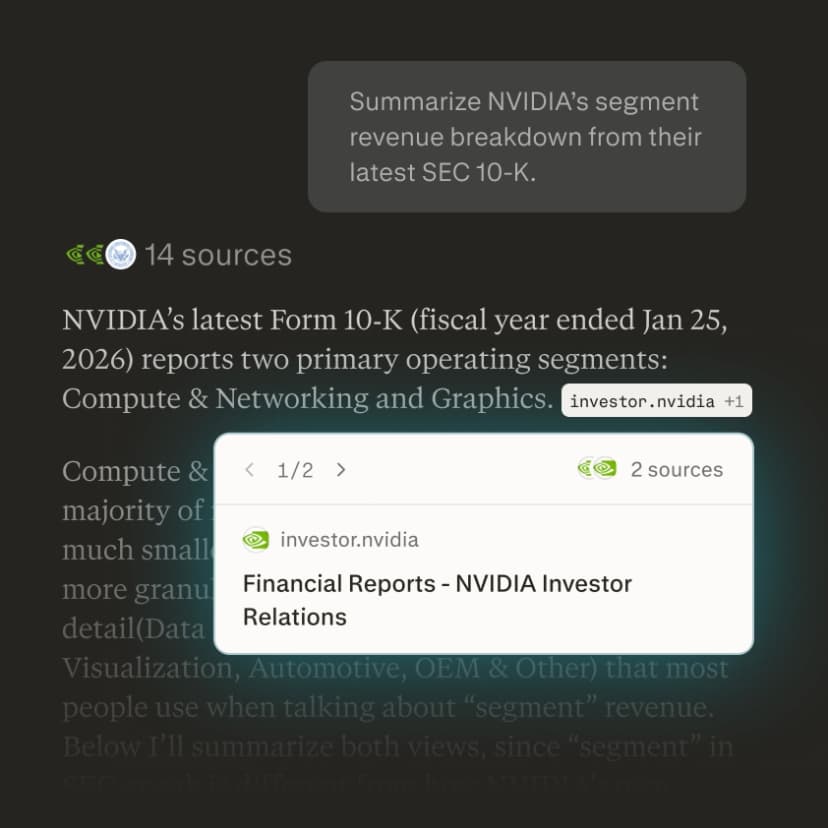
Best for: General research questions with web-sourced citations Perplexity is a strong first stop for questions that need current web sources. Each answer includes numbered links. Click each link before you reuse a claim.
How citations work:
- Real-time web search for current facts,
- numbered inline links,
- source cards you can open,
- Source filters, including an Academic option for papers.
Key features:
- Pro Search for deeper checks,
- Projects for saved research,
- follow-up questions that keep context,
- File upload on paid plans.
Source quality: Good for broad research. Use Academic mode when papers matter.
Pricing: Free tier available, Pro $20/month
If your best sources are already in your own PDFs and notes, ask a cited question against your own sources in Atlas instead. Perplexity is better for live web search. Atlas is better for private source sets you upload.
3. Consensus: Best for Academic Citations
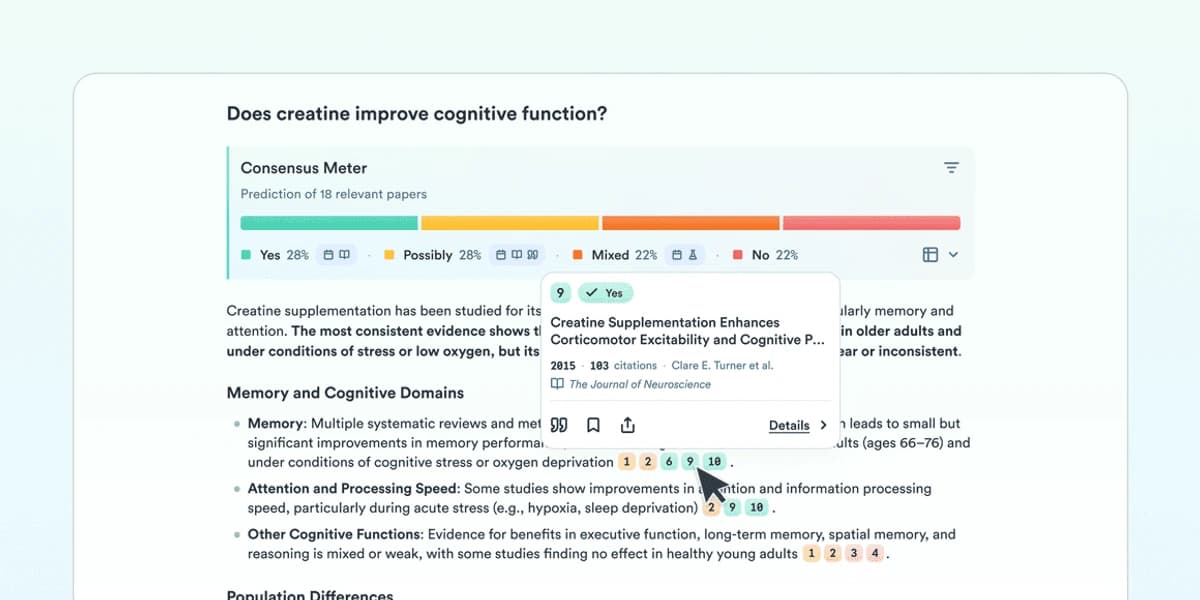
Best for: Evidence-based answers from peer-reviewed research Consensus answers questions with papers. It also shows whether studies tend to agree, disagree, or give mixed results.
How citations work:
- Uses published papers,
- shows a Consensus Meter,
- links to paper pages,
- Labels study type when it can.
Key features:
- Semantic search across 200M+ papers,
- yes, no, and mixed answer labels,
- study filters,
- follow-up questions generated from the current result.
Source quality: Strong for paper-backed claims. Still read the paper before you cite it.
Pricing: Free plan available. See the Consensus pricing page for paid plans.
4. Scite: Best for Citation Context
Best for: Understanding how papers cite each other Scite shows how papers cite each other. A citing paper may support a claim, dispute it, or only mention it. That context helps you avoid weak evidence.

How citations work:
- Smart Citations show support or contrast,
- cited text is shown in context,
- citation networks make paper links visible,
- Manuscript checks flag risky references.
Key features:
- Smart citation labels,
- AI Assistant for paper questions,
- citation check for drafts,
- Browser extension.
Source quality: Strong for checking how a claim is used in the literature.
Pricing: 7-day free trial. Basic is $12/month billed yearly.
5. Elicit: Best for Research Synthesis
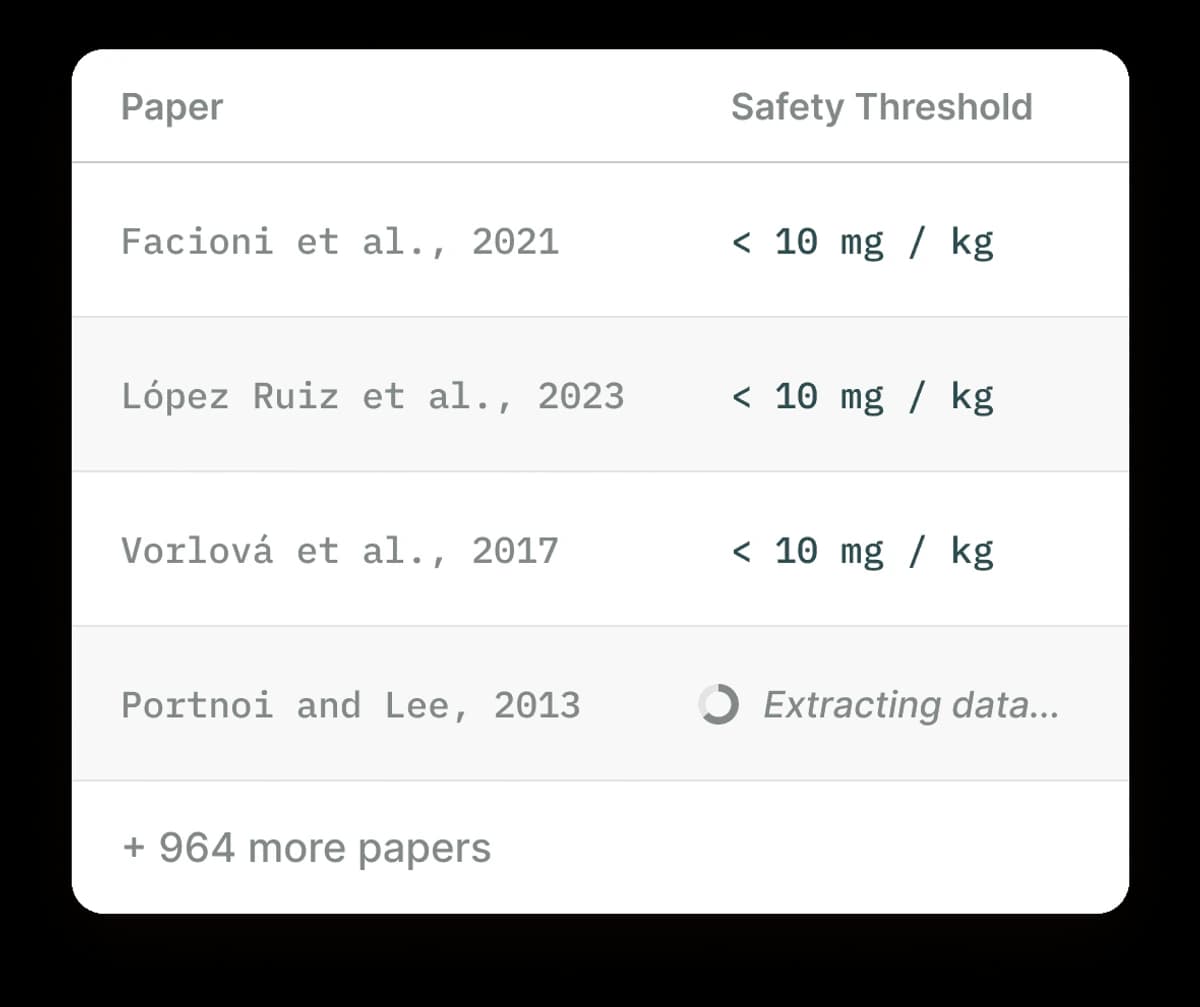
Best for: Literature reviews with structured data extraction Elicit helps you find papers and turn them into a table. Ask a research question, then review the papers, findings, methods, and limits. See our Elicit alternatives guide for more options.
How citations work:
- Searches over 138 million papers,
- extracts methods, outcomes, and limits,
- builds paper tables,
- Exports source data.
Key features:
- Paper discovery,
- data extraction,
- review workflows,
- Export to other tools.
Source quality: Strong for early review work. Check each extracted row.
Pricing: Free Basic plan. Pro is $49/month billed yearly.
6. Sourcely: Best for Finding Sources
Best for: Students who need to find sources for papers Sourcely helps you find papers for a topic or claim. Paste a paragraph, then review the suggested sources.
How citations work:
- Reads your text.
- Suggests related papers.
- Links to source pages.
- Helps build a bibliography.
Key features:
- Source suggestions from text.
- Paper recommendations.
- Bibliography tools.
- Citation manager support.
Source quality: Good for source discovery. You still need to read the paper.

Pricing: Pro from $9/month.
7. Semantic Scholar: Best Free Search
Best for: Academic research on a budget Semantic Scholar is Allen Institute's free academic search engine with AI features. The TLDR feature gives one-sentence paper summaries. The citation graph helps you see which papers build on each other.
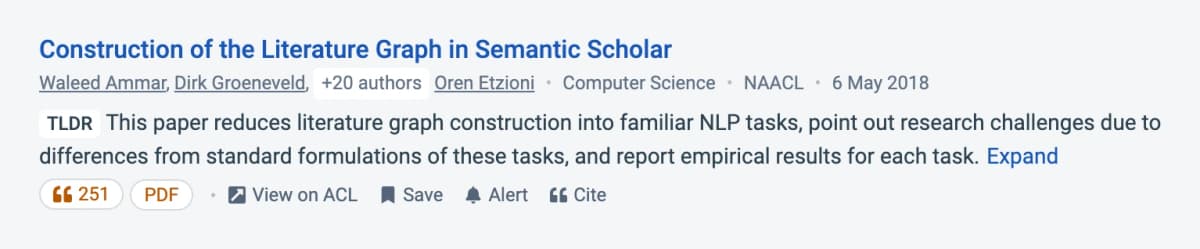
How citations work:
- Results are paper records.
- Citation counts show reach.
- Paper links are direct.
- Author pages help with follow-up search.
Key features:
- TLDR paper summaries.
- Citation graph.
- Research alerts.
- Free access.
Source quality: Strong for free paper search.
Pricing: Free
8. ChatGPT Browse: Flexible but Limited
Best for: Users who want to stick with ChatGPT ChatGPT can browse the web and cite pages in some modes. That is better than plain chat, but it is still not a full research database.
How citations work:
- Browse searches the web.
- Some connectors search paper databases.
- Answers can include inline links.
- You still need to check the link.
Key features:
- Familiar chat flow.
- Web browsing.
- File analysis.
- Memory in supported plans.
Source quality: Useful for quick checks. Less reliable than tools built for source review.

Pricing: Web search is available on the free plan. OpenAI's search guide explains how cited answers work.
9. Paperpal: Best for Writing Assistance
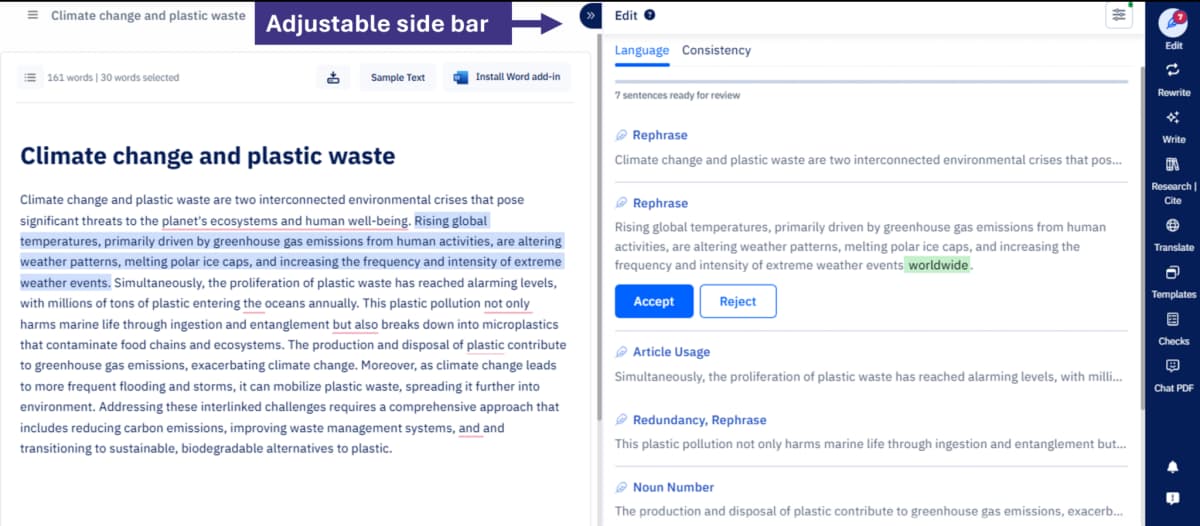
Best for: Researchers writing papers who need source suggestions Paperpal helps with academic writing. It can suggest sources while you draft and help polish wording.
How citations work:
- Suggests sources from your text.
- Links to paper records.
- Works inside writing tools.
- Helps check draft references.
Key features:
- Academic writing help.
- Source suggestions.
- Plagiarism checks.
- Grammar feedback.
Source quality: Good as a writing aid. Verify each suggested source.
Pricing: See the Paperpal pricing page for current plans.
10. QuillBot: Best for Formatting
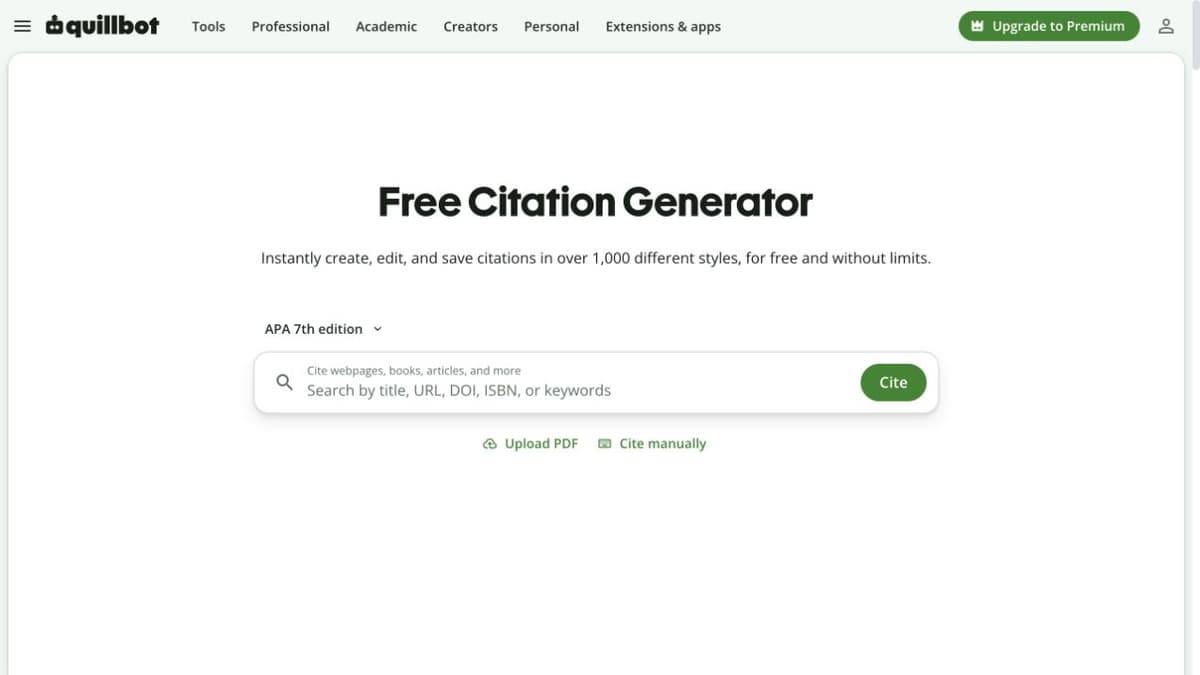
Best for: Students who need properly formatted citations QuillBot is mainly a formatting tool. Use it after you already have the source.
How citations work:
- Enter source details.
- Paste a URL when available.
- Pick APA, MLA, Chicago, or another style.
- Export the result.
Key features:
- Many style formats.
- Chrome extension.
- Bibliography tools.
- Free citation builder.
Source quality: It does not find sources. It formats the ones you provide.
Pricing: Free
Understanding Citation Quality
Not all AI source links mean the same thing. Sort them into three groups:
Tier 1: Peer-Reviewed Academic Sources
- Tools: Consensus, Scite, Elicit, Semantic Scholar.
- What you get: Links to published papers.
- Trust level: High, if the paper supports the claim.
Tier 2: Web Sources with Verification
- Tools: Perplexity, ChatGPT Browse.
- What you get: Links to web pages and some papers.
- Trust level: Medium. Check the page and the author.
Tier 3: Your Own Sources
- Tools: Atlas, NotebookLM.
- What you get: Links back to files you uploaded.
- Trust level: Depends on the files you chose.
Privacy Check for Sensitive Sources
Citation quality covers the answer, but a private source raises a second question: whether it belongs in that tool at all. Before you upload a draft paper, interview transcript, patient note, legal memo, or internal report, run a privacy check. The question is not only "does the AI cite sources?" It is also "should this source be in that tool?"
| Source type | Better fit | Why |
|---|---|---|
| Public web pages | Perplexity or ChatGPT Browse | The source is already public, so speed matters more than upload control. |
| Published papers | Consensus, Scite, Elicit, Semantic Scholar | The source lives in a paper index, and the tool can link to the record. |
| Class readings, private PDFs, field notes | Atlas or another private-source workspace | The answer should stay tied to files you chose and can review. |
| Regulated, client, patient, or embargoed material | Tool approved by your institution | The vendor policy, data location, deletion rights, and contract terms matter more than citation UI. |
Table 3: Match the source type to the citation tool before uploading sensitive material or relying on a generated answer.
When public web pages become a source set you need to sort, summarize, and verify, use a dedicated website organization workflow before those links turn into uncited notes.
For Atlas, review the current privacy terms before uploading sensitive material. For third-party tools, read the vendor privacy page and check whether uploads are used for model training, how deletion works, and whether your institution has a contract in place.
How to Verify AI Citations
Even with source-aware AI, you still need to check the work:
- Click the link: Confirm the source exists.
- Check the claim: Make sure the source says what the AI says.
- Check the source: Look for the author, venue, and publisher.
- Check the date: Make sure the source is current enough.
- Check the context: Read the nearby passage.
Best Practices for AI-Assisted Research
Do:
- Use paper tools for paper work.
- Verify every source before citing it.
- Check key claims in more than one place.
- Use AI to find sources, then read them yourself.
Don't:
- Trust a link you did not open.
- Use web links in a paper without review.
- Assume the AI caught the debate.
- Submit AI-made references without checking them.
Avoiding common literature review mistakes will also help you use these tools more effectively. For a broader view, explore the best AI research assistants for your research workflow. If you need dedicated reference management, see our guide to citation tools for research.
The Future of AI Citation
The field is moving toward:
- Better source links in base models.
- Real-time claim checks.
- Automatic fact checks against trusted sources.
- Clearer confidence levels.
For now, the tools above represent the best options for research that requires verifiable sources. For a deeper comparison, see our guide to AI tools with references and the ChatGPT alternatives guide. For a complete guide to AI-powered literature review, see our AI for literature review guide and the research paper organizer workflow.
Ask a cited question against your own sources
Ask across uploaded papers, then open each cited passage before you write.