
Mind Mapping for Exam Success: A Complete Student Guide
Use mind maps to study smarter. Visual note-taking techniques, subject-specific tips, and AI tools for exam prep, studying, and retention. Includes examples.
- Byline

Summary
Use mind maps for studying by putting the topic at the center, adding branches, and testing recall from memory.
The guide covers study tips, subject examples, paper maps, digital maps, AI tools, and exam review.
Use paper for recall practice, digital tools for large topics, and Atlas for maps from course readings.
Mind mapping works when students sort ideas themselves instead of copying notes into a prettier format.
Mind mapping helps exam study when you use it as a recall tool. It should not be a pretty copy of your notes. Put the topic in the center. Add branches from memory. Then check the gaps against your notes, textbook, or past papers.
By Jet New, founder of Atlas.

 Atlas
AtlasCompare AI tools for students
Find tools for visual study maps built from readings and lecture notes.
How I tested the workflow
I, Jet New, tested the 5-4-3 workflow on June 30, 2026. The source was OpenStax Biology 2e's section on using light energy to make organic molecules. I read the section once, waited ten minutes, then drew a blank map for five minutes.
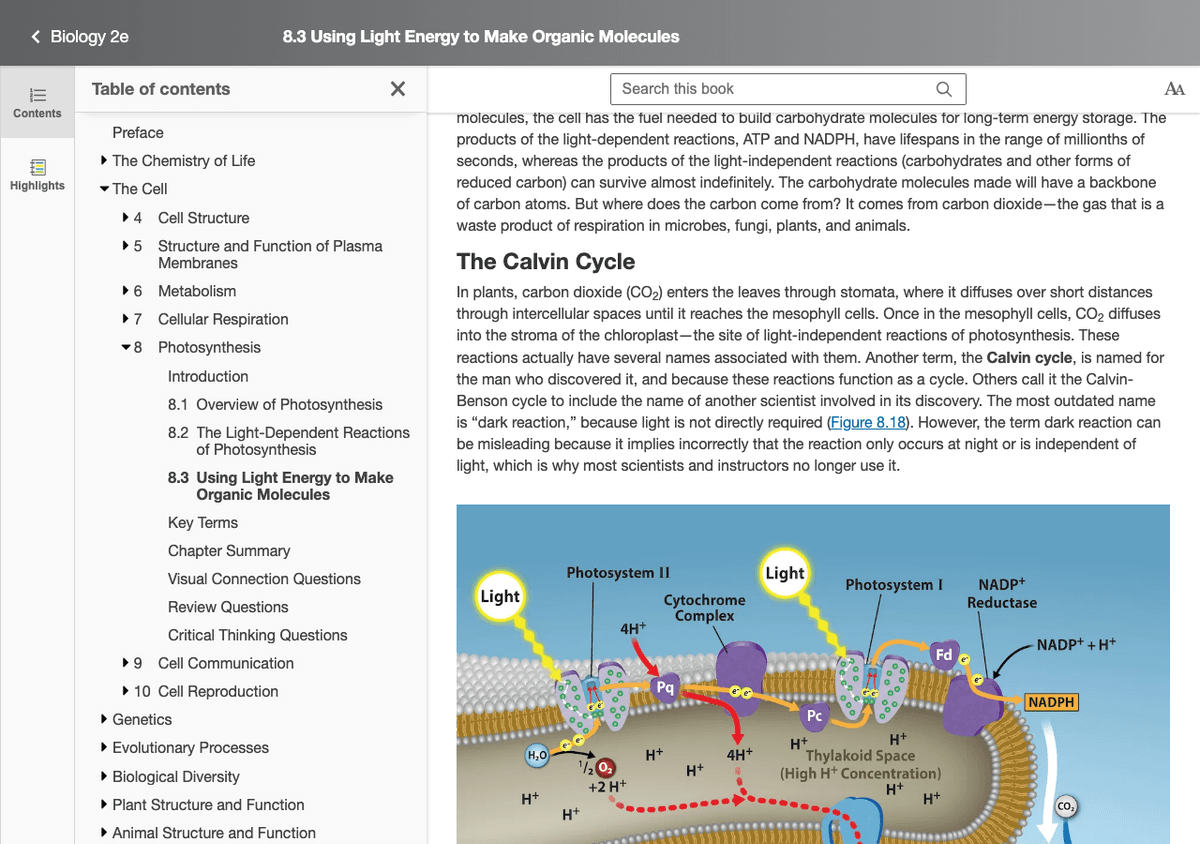
Source screenshot from the OpenStax Biology 2e section used in the five-minute blank-map test. The figure shows the light reactions feeding ATP and NADPH into the Calvin cycle, which are the branches the first recall map missed.
| Test pass | Nodes recalled | Useful links missed | Recall score |
|---|---|---|---|
| First blank map | 17 | 3 | 14/17 |
| After one notes check | 22 | 1 | 20/22 |
Table 1: Recall scores from two passes on the OpenStax Biology photosynthesis section
The first map missed ATP/NADPH moving into the Calvin cycle. It missed RuBP reuse. It also missed where water fits in the source figure. Those gaps became the branches to check on the next redraw.
I also use a branch heat score for triage: (red branches × 2) + yellow branches. In the OpenStax test, a map with 3 red branches and 2 yellow branches scored 8. That map came before a larger map with 1 red branch and 4 yellow branches, which scored 6.
Mind-mapping techniques for exam success
For a phase-by-phase walkthrough of a student research workflow, see the student's guide to AI research.
| Technique | Goal | Best for | Time per session |
|---|---|---|---|
| Spaced-recall blank map | Recall | Words, formulas, dates | 15-20 min |
| Concept-cluster map | Synthesis | Theory topics | 30-45 min |
| Past-paper question map | Use | Exam patterns | 20-30 min |
| Error-analysis map | Fix mistakes | Math, science, languages | 15-30 min |
| Whole-course map | Overview | Final week | 60-120 min |
Table 2: Five mind-mapping techniques for exam study with goals and recommended session lengths
Why Do Mind Maps Work for Studying?
Mind maps work for studying because they make you choose a structure. You have to decide what belongs in the center, what sits on each branch, and which ideas connect. That active choice is the learning work.
The Science of Visual Learning
Visual layouts let your brain use more than one channel at once. Mayer's Cognitive Theory of Multimedia Learning explains the effect. Words use one channel. Images and layout use another. A mind map combines both because the branch layout carries meaning too.
Mind maps use this by:
- Creating visual patterns your brain can scan fast
- Showing links between ideas
- Reducing load by grouping related facts
- Adding cues through color, layout, and simple icons
Farrand, Hussain & Hennessy (2002, Medical Education) tested mind mapping with medical students. Students read a 600-word passage. Then they studied it with either a mind map or their usual method. One week later, the mind-map group recalled about 10% more. The gain was modest, but study time was the same. The paper also says the mind-map group felt less motivated. Even so, the structure helped.
How Mind Maps Mirror Memory
Your memories are not stored like files in a folder. One idea cues another. A date may cue an event, a person, a cause, and a quote.
Mind maps make that web visible. When you redraw a map from memory, you can see which links are solid and which ones are missing.
Active vs. Passive Learning
Reading and highlighting feel productive, but they are mostly passive. Your brain is receiving the material. It is not yet proving that it can organize it.
Creating a mind map forces active work:
- You decide what the main concepts are
- You choose how concepts relate
- You group material by space
- You decide which details do not belong on the map
- You see gaps in your understanding
That work creates stronger recall than copying a page again.
Mind maps or linear notes?
Mind maps are not always better than linear notes. Use the format that matches the task.
| Study task | Use mind maps when... | Use linear notes when... |
|---|---|---|
| Lecture notes | Review after class | Teacher moves fast |
| Definitions | Terms fit groups | Exact words matter |
| Processes | Steps have causes | Order is the answer |
| Essays | Plan claims and proof | Draft paragraphs |
| Formula work | Compare use cases | Solve line by line |
Table 3: Choosing between mind maps and linear notes by study task
Use Mind Maps When:
- Learning concept-heavy material: Mind maps show how ideas link
- Reviewing: Turn linear notes into mind maps
- Planning: Essays, projects, and problem sets
- Memorizing linked facts: History, biology, literature
- Preparing for essay exams: See the big picture
Use Linear Notes When:
- Recording sequences: Steps, timelines, processes
- Capturing lecture details: Sometimes you just need to get it down
- Math drills: Equations need line-by-line space
- Quick reference: Lists, formulas, definitions
In practice, many students need both. Linear notes are useful during class because they preserve order. Mind maps work better during review because they make you rebuild the topic. For more options, see our guide to note-taking systems.
Creating Effective Study Mind Maps
Step 1: Start with the Central Topic
Place your main topic in the center of the page. Use:
- A chapter title
- An exam topic
- A key concept
- A question you're trying to answer
Make it bold and clear. This is the anchor for everything else.
Step 2: Add Main Branches
Draw branches from the center for each main subtopic.
For example, studying photosynthesis:
- Center: "Photosynthesis"
- Main branches: "Light," "Calvin Cycle," "Needs," "Products," "Location"
Keep branch labels short. One to three words. Write a keyword, never a full sentence.
Step 3: Add Sub-Branches
Each main branch gets smaller branches with key details. Stop when the map has enough depth for the exam.
Under "Light Reactions":
- Occurs in thylakoid
- Needs light, water
- Produces ATP, NADPH, O2
- Photosystems I and II
Step 4: Add Visual Elements
This is where mind maps become powerful:
- Colors: Use different colors for different branches. Color aids memory and helps you see structure at a glance.
- Images: Simple drawings or icons are remembered better than words
- Symbols: Arrows showing cause/effect, stars for important points
- Size: Make important concepts larger
You don't need artistic talent. Stick figures and simple icons work fine.
Step 5: Show Connections
Draw lines between ideas on separate branches. Novak and Cañas (2008), in the Florida IHMC paper on concept maps, call these cross-links a strong sign of understanding. A cross-link shows that you joined two ideas that were separate before. Linear notes struggle to show that move.
In your photosynthesis map, connect "ATP" under Light to where ATP is used in the Calvin Cycle. This shows how the two processes depend on each other.
Mind Mapping Different Subjects
Sciences (Biology, Chemistry, Physics)
Sciences are full of links, so they fit mind maps well.
Tips:
- Map processes showing cause and effect
- Include simple diagrams within branches
- Use colors for structures, functions, and examples
- Create separate maps for small, cell-level, and whole-body scales
Example: For cell biology, make one map per organelle. Show structure, job, and links to other organelles.
Humanities (History, Literature, Philosophy)
Humanities involve themes, claims, and evidence.
Tips:
- Map themes and how they appear across texts or events
- Show cause and effect in historical events
- Connect claims to evidence
- Separate primary evidence from your interpretation
- Map character links in literature
Example: For a history exam, map one major event. Use branches for politics, money, society, and culture.
Languages
Word lists and grammar are easier to review when patterns sit together.
Tips:
- Map words by theme (food, travel, emotions)
- Show grammar rules with examples branching off
- Connect related words (synonyms, antonyms, word families)
- Map verb conjugations visually
Example: Map irregular verbs by pattern type, with examples under each branch.
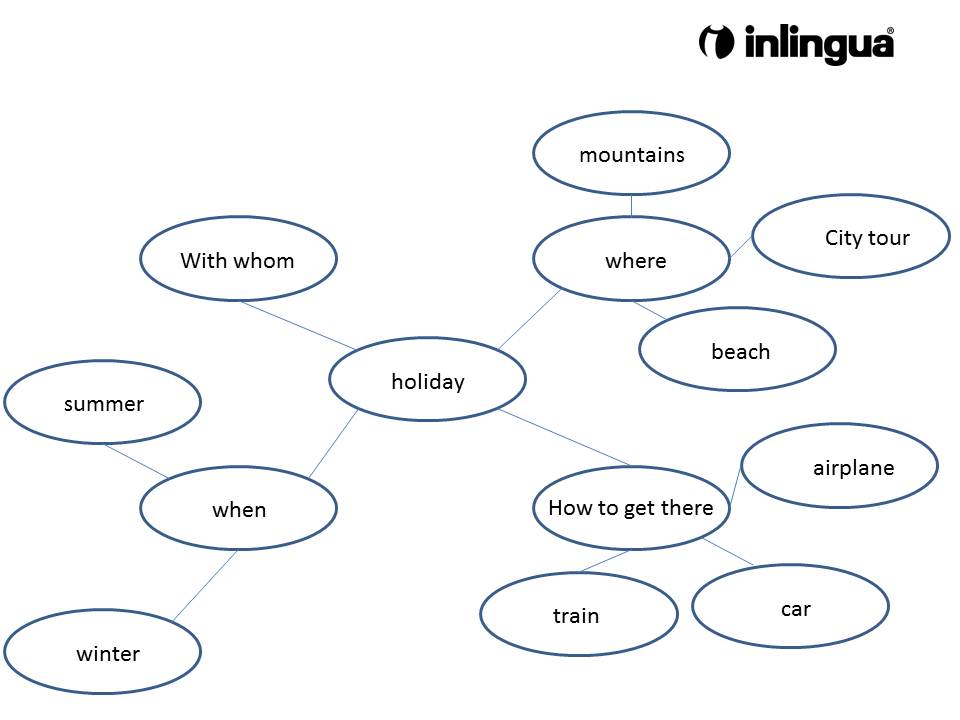
Elmschrat's Wikimedia Commons word map shows a real language study map. Short word branches sit around one topic instead of in a long list.

Liu, Zhu, Wu & Zhang (2014, Frontiers in Psychology) tested mapping with second-language learners. It beat normal word lists on immediate and delayed recall. The largest gains came from rule-based items, such as irregular verbs and gendered nouns.
Math and Quantitative Subjects
Math is harder to mind map, but it is not impossible.
Tips:
- Map problem types and solution moves
- Show relationships between formulas
- Map when to use each method
- Create concept maps of formulas and rules
Example: Map "Solving Quadratics" with branches for factoring, square completion, and the formula. Add when to use each method and one worked problem.
Digital vs. Paper Mind Maps
Paper Mind Maps
Advantages: Paper is fast. It has no setup, no logins, and no tabs.
Disadvantages: Paper is hard to edit, share, and back up. Space runs out.
Best for: first drafts, quick review, and exam rooms where computers are not allowed
Digital Mind Maps
Advantages: Digital maps are easy to edit. They can be searched, shared, and backed up.
Disadvantages: Tools take time to learn. They also add screen distractions.
Best for: large topics, group work, and long-term review
Common tools include MindMeister, Coggle, and tools that make maps from documents. For more options, see MindMeister alternatives.
Buzan & Buzan's The Mind Map Book treats easy revision as part of the method. The first map is often wrong about where an idea belongs. Digital tools let you move a branch without drawing the whole page again.
The 5-4-3 Exam Map Workflow Score
Use this score once you have set an exam date. A vague plan to "revise" gives you no deadline for each pass.
- 5 minutes: blank-page recall. Put the topic in the center and draw everything you can remember without notes.
- 4 checks: notes, textbook, past paper, mark scheme. Add missed branches in a different color so gaps are visible.
- 3 scores: coverage, accuracy, speed. Score each from 0 to 2 after every redraw.
| Score | Coverage | Accuracy | Speed |
|---|---|---|---|
| 0 | Major branches missing | Many facts wrong | Could not finish |
| 1 | Main branches present, details thin | Some facts or links wrong | Finished with hesitation |
| 2 | Main branches and key details present | Facts and links hold up | Finished smoothly |
Table 4: 5-4-3 scoring rubric for coverage, accuracy, and speed after each map redraw
A topic is exam-ready when it scores 2-2-2 twice. Leave at least one day between attempts. The gap matters because active recall works best when paired with spacing.
If your course uses long readings, keep one resource branch on the map. Link the lecture, chapter, paper, or past-paper question that supports each weak branch. A document-based study workflow can keep those links available when your map starts from several PDFs rather than one handout.
Resource Organization for Study Materials
Treat each weak branch as a small study file. Add one source, one practice task, and one recall date.
| Branch status | Add this source link | Add this practice task | Review next |
|---|---|---|---|
| Red | Textbook page or lecture slide | One worked example | Tomorrow |
| Yellow | Past-paper mark scheme | One timed question | In 3 days |
| Green | Summary sheet | One quick redraw | In 7 days |
Table 5: Study resource and review schedule for each branch status color
This keeps the map from becoming a poster. Every weak branch points to the exact page, slide, or question that can fix it.
Progress Tracking and Assessment
Track progress by branch. A two-hour session can still miss the one link that appears on the exam. Hours studied tell you little about actual readiness.
A branch should not turn green until you can redraw it, explain it aloud, and answer one exam-style question from it. If a branch fails any of those three checks, keep it yellow or red.
For final-week planning, use the branch heat score from the test above. Red branches count 2 points. Yellow branches count 1 point. Green branches count 0. Study the map with the highest heat score first.
Quick Revision Maps
The night before an exam, create simplified quick maps:
- One page per major topic
- Only key concepts and relationships
- Heavy use of visuals and color
- Use them as final review sheets
Using Mind Maps During Exams
For essay exams, spend the first few minutes mapping your answer:
- Main argument in the center
- Supporting points as branches
- Evidence and examples as sub-branches
- Connections between points
This reduces the chance that you forget a key point halfway through the essay.
AI-Powered Mind Mapping
AI tools can help you start, but they should not do the recall work for you.
Starting structure: Upload notes or readings and ask for a first-pass map.
Connection checks: Ask which ideas are linked and why.
Question practice: Ask, "How does X relate to Y?" and then answer before reading the response.
Source checking: Keep the answer tied to the readings you uploaded.
Atlas is useful when your course has many readings. The student AI research workflow shows how to upload lecture notes, textbook chapters, or papers and keep source checks beside the generated map. Recreate the final version from memory so the map still becomes study practice.
Common Mind Mapping Mistakes
Too Much Text
Mind maps work best with keywords. Turn a full sentence or paragraph into a short branch label.
Fix: Limit each branch to 1-3 words. If you need more detail, add sub-branches.
No Visual Variation
A mind map with no colors, no images, and uniform branches doesn't use visual memory.
Fix: Use at least 3-4 colors. Add simple images or icons. Vary branch thickness.
Too Complex
A mind map with 200 branches is overwhelming and unusable.
Fix: Create multiple maps for complex topics. Each map should fit on one page and be graspable at a glance.
Never Reviewing
Creating a mind map is not the same as learning from it. The map only helps if you review it and test yourself against it.
Fix: Schedule review sessions. Test yourself by recreating maps from memory.
Mind maps are just one approach to visual note-taking. Build a second brain that combines mind maps with other methods, source review, and spaced recall for a complete study system.
Start Mind Mapping Today
You don't need special software or artistic ability. Grab a piece of paper and a few colored pens.
- Pick a topic you're currently studying
- Put the main concept in the center
- Add 4-6 main branches for subtopics
- Add details as sub-branches
- Add colors and simple images
- Test yourself by recreating it from memory
Your first mind map won't be perfect. That's fine. The skill develops with practice.
If your exam prep depends on many PDFs, a generated map can give you a first draft. Rebuild it from memory so you still practise retrieval and decide which relationships matter.
The AI tools for students comparison shows which study tools can work from readings and lecture notes.
However you start, start today. One rough map from memory is more useful than one perfect map copied from notes.
AtlasCompare AI tools for students
Find tools for visual study maps built from readings and lecture notes.
Frequently Asked Questions
They can help, but the evidence is modest. In a 2002 study of medical students, the mind-map group recalled about 10% more from a short passage one week later than students using their usual study methods. Study time was the same, and the mind-map group reported lower motivation.