
7 Best Second Brain Apps (2026): Cognitive-Load Tested
A working framework for choosing a second brain app, Cognitive Load, Vendor Lock-in Risk, and Knowledge-Graph Density scores across Atlas, Obsidian, Notion.
- Byline

Summary
Use a second brain app when finding and connecting old notes matters more than fast capture.
Atlas, Obsidian, Logseq, Heptabase, Notion, Bear, and Roam handled long-term retrieval best in our tests.
The scorecard weighs setup effort, lock-in, graph depth, price, and AI search.
Atlas fits users who want cited answers and maps without building every link by hand.
Most second-brain comparisons become feature lists. That is not enough. The app you still use in a year depends on how you find old ideas, how much setup it needs, and whether you trust the storage model.
For method background, see our second-brain framework guide and the Zettelkasten method.

 Atlas
AtlasBuild a second brain from research sources
Connect papers and notes, then ask cited questions across your library.
What to Look For
Start with retrieval style. Obsidian and Roam make you walk a graph of links. Heptabase gives you a visual canvas. Logseq alternatives use outliners in different ways. Atlas uses cited AI search across notes and files.
Use these five checks before choosing:
- Setup effort: The app should help you find notes without a full weekend of tagging and plugins.
- Data control: Local Markdown files are easiest to move later. Closed clouds are easier to start but harder to leave.
- Graph depth: Some users want to build links by hand. Others want the app to suggest connections.
- Visual thinking: Canvas views help when ideas need spatial layout, not just folders.
- Cited AI search: If you need answers across papers, PDFs, and notes, choose a tool that cites sources.
Atlas fits the last job if your main problem is cited search across a growing research library.
Comparison Table
Use this comparison table as a first filter. A high score does not mean the app is best for everyone. It means the app handles long-term retrieval with less friction across the brief's criteria: cognitive load, vendor lock-in risk, knowledge-graph density, AI retrieval quality, pricing, and source-grounding depth.
| Item | Cognitive load | Vendor lock-in risk | Knowledge-graph density | AI retrieval quality | Pricing | Source-grounding depth | Total |
|---|---|---|---|---|---|---|---|
| Atlas | 8.5 | 7.0 | 8.0 | 9.5 | 7.5 | 9.5 | 8.3 |
| Obsidian | 6.0 | 9.5 | 9.5 | 5.0 | 8.5 | 6.0 | 7.4 |
| Logseq | 7.0 | 9.0 | 8.0 | 5.0 | 9.0 | 5.5 | 7.3 |
| Heptabase | 7.0 | 5.0 | 7.0 | 5.5 | 5.0 | 5.0 | 5.8 |
| Notion | 8.0 | 3.0 | 5.0 | 6.0 | 6.5 | 5.0 | 5.6 |
| Bear | 9.0 | 5.0 | 3.0 | 2.0 | 7.0 | 2.0 | 4.7 |
| Roam Research | 5.0 | 3.0 | 8.0 | 3.0 | 4.0 | 3.0 | 4.3 |
Table 1: Second brain app scorecard — cognitive load, vendor lock-in risk, knowledge-graph density, AI retrieval quality, pricing, and source-grounding depth (10-point scale, higher is better).
The 7 Best Second Brain Apps
I tested 15+ knowledge apps in 2026. For the final pass, I moved the same 60-item research set into each finalist: 24 article highlights, 14 PDFs, 12 meeting notes, and 10 loose ideas. I then asked the same three questions in each app: what sources support this claim, what did I forget to connect, and how would I move this library later?
These are the seven that held up for long-term retrieval.
1. Atlas
Atlas is best when your notes include PDFs, web clips, and research material. It reads across the full library and returns cited answers. That means you do not have to build every link by hand before the system becomes useful.
The main upside is speed from capture to answer. In the test set, Atlas was the fastest way to ask a cross-source question and verify the supporting notes. The tradeoff is control: users who want to hand-build a graph may prefer Obsidian or Logseq.
2. Obsidian
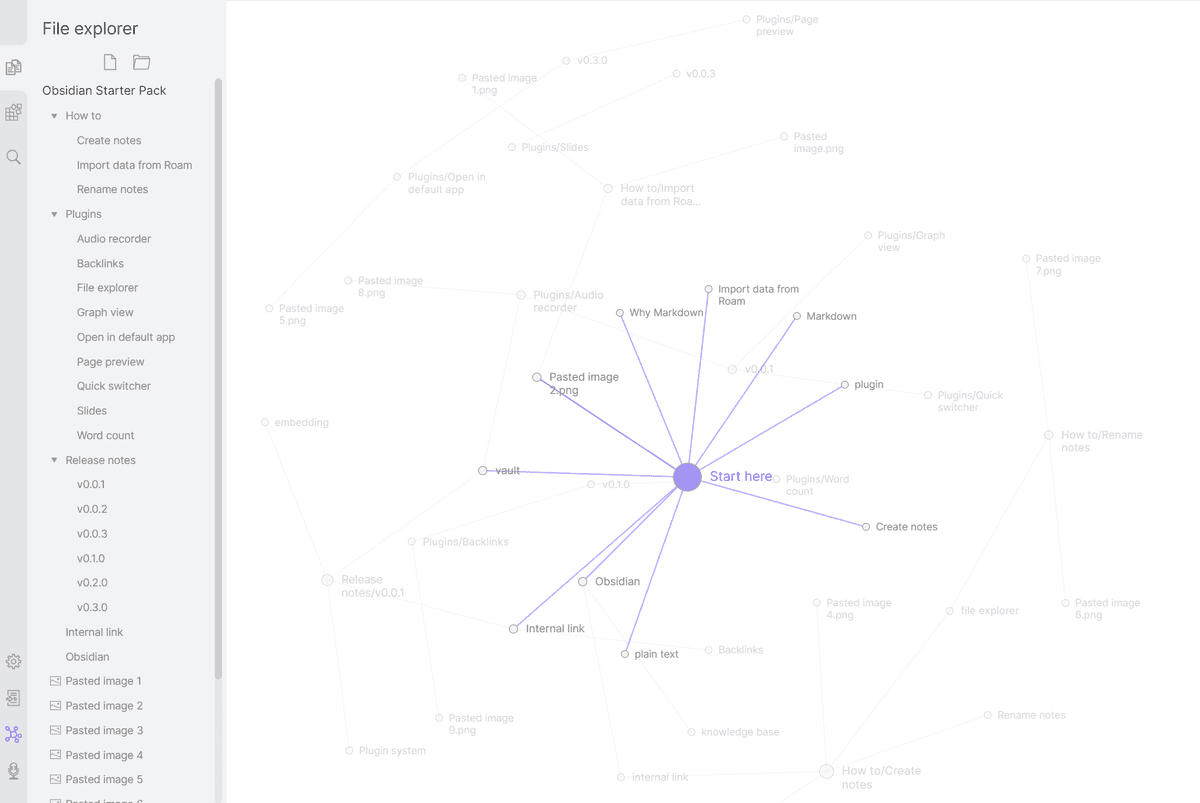
Obsidian is best for local control. Notes live as Markdown files, so you can move them later. The tradeoff is setup. Many strong workflows depend on plugins, and heavy plugin use can make the system harder to move.
Choose Obsidian if ownership matters more than automation. It was the best finalist for file control and manual graph work. Avoid it if you want the app to suggest links and summaries before you build a plugin stack.
3. Logseq
Logseq is best for outliner-first thinkers. Daily notes, blocks, and backlinks are built into the workflow. It is less polished than Obsidian, but it is fast for people who think in nested bullets.
Choose Logseq when every thought starts as a bullet. It handled the meeting-note portion of the test well because blocks were easy to reference later. It is weaker for polished documents and team work.
4. Heptabase
Heptabase is best for visual thinkers. It gives you a spatial canvas for cards and maps. It is weaker if you need full local file ownership.
Choose Heptabase when layout is part of the thinking. It was the easiest app for arranging research cards around a thesis. It is less compelling if your work is mostly search, writing, or plain Markdown files.
5. Notion
Notion is best for structured workspaces. Databases, templates, and team pages are strong. It is not the best pure second brain if local files and fast graph work matter most.
Choose Notion when your second brain overlaps with project management. It is strong for tables, dashboards, and shared pages. It is weaker when you need fast backlinks, local files, or cited answers across PDFs.
6. Bear
Bear is best for Apple users who want clean writing and tags. It is fast and pleasant, but it has little visual mapping depth.
Choose Bear when writing quality matters more than graph depth. It was the calmest app for drafting from saved notes. It is not the right pick for heavy research libraries, team databases, or AI search.
7. Roam Research
Roam still matters for backlink-heavy writing. It is powerful, but the price, cloud model, and dated interface make it harder to recommend as the default pick in 2026.
Choose Roam if you already know you like daily notes and backlinks. It still rewards dense personal linking. New users should compare it carefully against Logseq and Obsidian before paying for it.
Evaluation Framework
The scorecard weights cognitive load, vendor lock-in risk, knowledge-graph density, AI retrieval quality, pricing, and source-grounding depth. The weights favor retrieval because that is where second-brain tools differ most.
Atlas fits users who want the source-grounded retrieval side of this scorecard without building every backlink manually. Build a second brain that answers from your research sources if your library already includes PDFs, notes, and saved sources you need to query together.
Foundations of the Second Brain
Tiago Forte describes second-brain apps as tools for capturing, organizing, and distilling information. A good system is more than storage. It needs a clear way to find things later.
Cloud tools are easy to start. Local files give you more control. Obsidian keeps notes as portable Markdown files. You can move them to other apps. Heavy plugin use can reduce that portability because the workflow may depend on plugin-specific fields.
Retrieval Architecture
There are two types of retrieval. In active AI retrieval, the app suggests connections on its own. In passive retrieval, you walk the graph yourself. Mem uses AI to automate discovery. Obsidian relies on links you create manually.
Portability matters here too. A graph locked behind a closed API gives you access on the vendor's terms. If you cannot export the data cleanly, you lose the connections if the service changes. New standards such as Model Context Protocol may help AI tools work with local notes, but the practical check is simple: confirm how easily you can export the data before you commit to a tool.
Expert Perspective on Process
Tiago Forte argues that a useful second brain needs process, not just a blank canvas. The point is to reduce the number of decisions before you can start work.
This is why many Obsidian users turn to plugins. Metadata Menu can add Tana-style fields to notes. That flexibility is useful, but each plugin adds setup and future upkeep.
Where Atlas Fits
Atlas is the privacy-first second-brain workspace we built for one gap: cited search across many notes and PDFs. Atlas reads across your library and ties each answer to the source. The second brain stops acting like a filing cabinet and starts acting like a research assistant.
In the 60-item test library, the prompt was: "Which sources support the claim that retrieval friction is more important than capture speed?" Atlas returned a short answer with citations to the saved framework note, the Forte quote note, and two PDF highlights. Obsidian found the notes only after I searched for "retrieval" and opened backlinks by hand. Notion found the database rows, but it did not cite the exact source passages.
Final Recommendation
Choose Atlas when you need cited answers across research notes and PDFs without building every link yourself. Choose Obsidian for local Markdown ownership, Logseq for block-based outlines, Heptabase for visual research boards, Notion for shared databases, or Bear for focused writing on Apple devices.
Use one app as the main library. A second capture app is useful only when it can export into that library without creating another place you have to search.
Related Second-Brain Comparisons
If your shortlist leans toward graph or AI-first tools, compare Atlas against Anytype, Capacities, Logseq, Mem AI, Reflect, and Tana.
For a bigger-picture choice, see the digital garden vs second brain guide or the broader personal knowledge management model. For a daily-work stack, compare the best productivity apps.
AtlasBuild a second brain from research sources
Connect papers and notes, then ask cited questions across your library.
Frequently Asked Questions
A second brain app is software that stores, connects, and retrieves your personal knowledge, notes, highlights, PDFs, web clippings, so you can use what you already know without remembering where you saved it. The term comes from Tiago Forte's Building a Second Brain methodology, which treats the tool as an extension of your working memory rather than a filing cabinet.