
How to Build a Second Brain That Actually Works for You
Build a second brain using Tiago Forte's CODE method. Covers tool selection (Atlas, Obsidian, Notion), PARA organization, & the daily habits that make KM stick.
- Byline

Summary
To build a second brain, pick one tool, save useful ideas, sort them lightly, and review them each week.
The CODE loop has four steps: capture, organize, distill, and express.
Use Atlas to search saved sources with citations, Obsidian for files you own, and Notion for tables and project lists.
A second brain should help you remember and act. Perfect filing often turns into busywork.
Most people who try to build a second brain fail for a simple reason. They turn it into a storage locker, then wonder why it never helps them think. This guide shows you how to build one you can use each day, not just fill.

 Atlas
AtlasGive your second brain cited research answers
Upload project sources and ask questions across them with cited passages.
How to build a second brain
Start with one active project, choose one place to save useful material, and follow the CODE loop: capture, organize, distill, and express. Review the project each week, remove notes you will not use, and test retrieval by creating a real output from what you saved.
Use this table to pick the method before you pick the app. PARA is the easiest starting point for active projects. Zettelkasten is stronger when your goal is writing or research.
| Method | Originator | Core unit | Capture-to-output workflow | Best for |
|---|---|---|---|---|
| PARA | Tiago Forte | Project / Area / Resource / Archive folder | Capture → organize by actionability → progressively summarize → express | Knowledge workers shipping projects |
| Zettelkasten | Niklas Luhmann | Atomic linked note | Capture → atomize → link → write from links | Researchers, long-form writers |
| LATCH | Richard Saul Wurman | Location / Alphabet / Time / Category / Hierarchy | Pick one organizing axis per collection | Reference libraries, archives |
| Johnny Decimal | Johnny Noble | Numbered area + category | Predefine 10 areas × 10 categories before capture | Operations-heavy roles, IT |
| Building a Second Brain (CODE) | Tiago Forte | Note inside PARA | Capture → Organize → Distill → Express | Course-style step-by-step learners |
Table 1: Second-brain systems by origin, core unit, workflow, and use case.


AI retrieval workflow
Traditional second brains need a lot of hand work. You have to sort, tag, link, and remember where things live. AI helps when your system has grown past simple folder browsing.
Atlas fits best when your second brain holds source documents, reports, papers, or long reference notes. Use it for research. Keep task lists and databases in the tools that already handle them well.
Here is the practical workflow:
- Upload three to five reference documents for one project, such as papers, briefs, meeting notes, or saved PDFs.
- Ask one cited question that needs more than one source. Try "Which claims support our pricing recommendation?" or "What did these papers agree on?"
- Open the cited source links before you reuse the answer.
- Save the answer back into the project note with the source names attached.
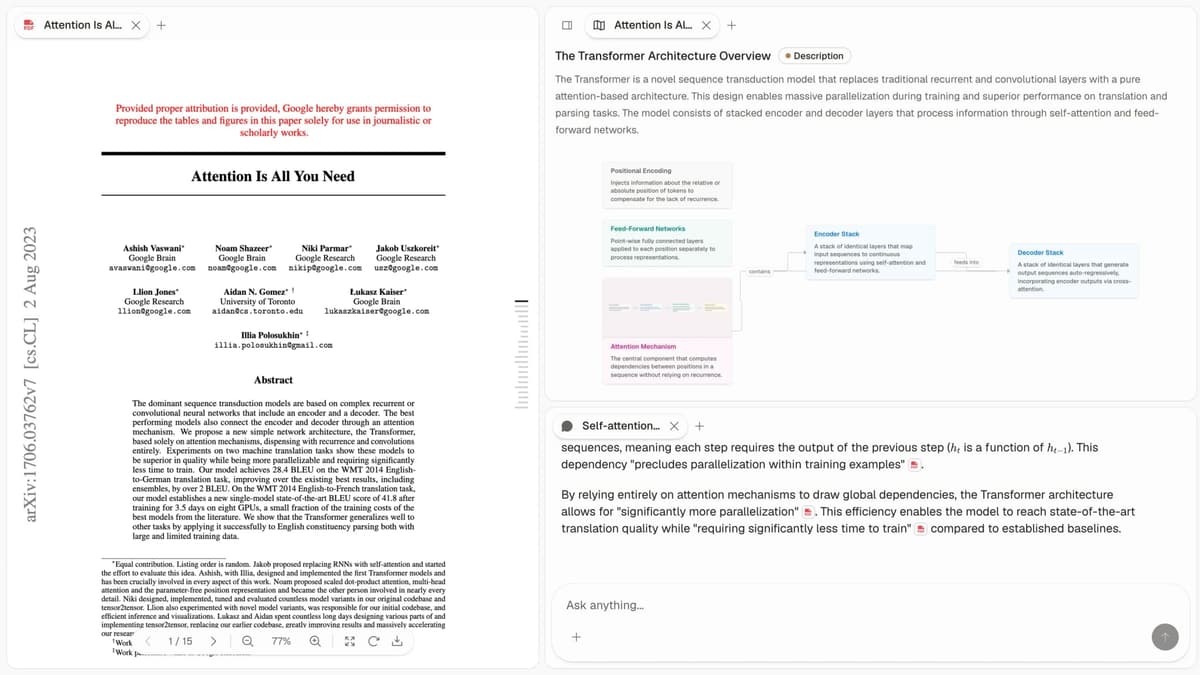
This is the moment where Atlas helps most. Instead of browsing folders or guessing search terms, you ask across the corpus and verify the answer from citations.
If your second brain is starting to hold research papers, reports, and source-heavy notes, use Atlas for that research layer. Keep Notion or Obsidian for general capture if they already work for you.
What Is a Second Brain?
A second brain is an outside system for saving and finding what you learn. It is a personal knowledge management system that extends your mind. The term was popularized by productivity expert Tiago Forte. The core idea is plain: your brain is good at thought, but poor at filing details.
Your brain excels at:
- Pattern recognition
- Creative thinking
- Making connections
- Generating insights
Your brain struggles with:
- Remembering specific facts
- Recalling where you read something
- Storing information reliably
- Retrieving knowledge on demand
A second brain moves storage and search into a trusted system. That frees your mind to do what it does best: think.
Why Do Most Second Brains Fail?
Most second brain attempts fail for four reasons. People collect too much, sort more than they use, switch tools, or cannot find what they saved. The fix is to care more about finding than filing. Commit to one tool for at least six months.
The Collector's Trap
The collector's trap starts when you save every interesting article, podcast, video, or post. Your second brain becomes a hoarder's paradise, thousands of items you'll never revisit. The act of saving feels productive, but it's an illusion.
The fix is selective capture. Before saving something, ask whether you will use it and what specific purpose it will serve.
The Organization Obsession
You spend more time organizing than using your knowledge. Folders within folders. Complex tagging systems. Color-coded everything. The structure starts taking attention away from the work it was supposed to support.
The fix is to allow some messiness. Your retrieval system matters more than your organizational structure.
The Tool Treadmill
The tool treadmill starts with a familiar promise: a new app will make the system finally work. You migrate everything to Notion. Then Obsidian. Then Roam. Then the next shiny thing. Each migration resets your progress.
The fix: Commit to one tool for at least six months. The best system is the one you use.
The Retrieval Problem
You saved it, you know you saved it, but you can't find it. Your second brain has become a black hole. Information goes in but never comes out.
The fix: Prioritize retrieval over storage. If you can't find it, it doesn't exist.
The CODE Framework
Tiago Forte's CODE framework is a useful starting loop: capture, organize, distill, and express. Each step has one job. Capture keeps useful material from slipping away. Organize puts it near the work it can support. Distill turns long notes into short cues. Express forces the system to create an output, such as a draft, decision, lesson plan, or research memo.
Capture
Capture the material that makes you pause. Do not save everything. Save the ideas, quotes, and facts that connect to work you expect to do. Add the source and one sentence on why it matters.
Practical tips:
- Use a quick capture tool (notes app, voice memo)
- Capture the source and your initial thoughts
- Don't process immediately. Batch your processing
Organize
Organize around future action. Instead of asking "Where does this belong?", ask "Where will I look when I need this?"
The PARA method works well here:
- Projects: Current initiatives with deadlines
- Areas: Ongoing responsibilities
- Resources: Topics of interest
- Archive: Completed or inactive items
Distill
Extract the essence from each saved item. Most saved material is too long to reuse later. Your job is to make the useful part easy to spot.
Progressive summarization helps:
- Bold the most important passages
- Highlight the bolded text that's essential
- Write a brief summary in your own words
Each layer makes the content more useful for future you.
Express
Use what you saved. Write, create, share, teach, or decide. A second brain earns its keep by helping you produce work.
If you're not expressing, you're just hoarding.
Building Your Second Brain: A Step-by-Step Guide
Step 1: Choose Your Tool
You need a tool that supports:
- Quick capture from anywhere
- Full-text search
- Linking between notes
- Ideally, some form of AI assistance
Popular options include Notion for databases and Obsidian for local Markdown files. Atlas second brain workspace helps with cited answers from saved sources. For a full breakdown, compare the best second brain apps.
The key change today is AI. Modern tools can find links, answer questions, and surface useful notes. You no longer have to build every path by hand.
Step 2: Start with One Area
Don't try to capture everything at once. Pick one area of your life:
- Your current work project
- A skill you're learning
- A topic you're researching
Build your capture habit in this single domain before expanding.
Step 3: Establish a Capture Habit
Make capturing frictionless:
- Mobile app for on-the-go capture
- Browser extension for web content
- Keyboard shortcut for quick notes
Capture happens more often when the workflow is easy.
Step 4: Schedule Processing Time
Raw captures aren't useful. You need to process them:
- Review what you've captured
- Add your thoughts and connections
- Organize into your system
A weekly review works for most people. Some prefer daily. Find your rhythm.
Step 5: Use Your System Daily
A second brain only works if you use it. Make it part of your workflow:
- Starting a new project? Check your second brain first
- Writing something? Query your knowledge base
- Making a decision? See what relevant information you've collected
The more you use it, the more it pays back.
Maintaining Your Second Brain
Building is one thing. Keeping it useful is another. Here is the simple care plan:
Regular Reviews
- Weekly review: Process captures and check active projects.
- Monthly review: Archive completed projects and review areas.
- Quarterly review: Evaluate what is working and adjust your system.
Prune Ruthlessly
Your second brain will accumulate cruft. Delete or archive:
- Notes you'll never reference
- Outdated information
- Duplicates and fragments
A lean system is a usable system.
Trust the Process
Some days your second brain will feel weak. You will miss a note or question the effort. That is normal.
The system becomes more useful with time. A second brain with six months of your best thinking is far more useful than one you started yesterday.
The Tool Choice in Practice
Tool choice rarely causes second-brain failure by itself. It still matters because it sets the friction floor. Three patterns show up after a year of use.
Choose Notion when databases and shared project pages matter most. Choose Obsidian when local Markdown files and backlinks matter most. Add Atlas when research papers and reports need cited answers across several sources.
The Notion Path
Notion is the easiest start if you like databases. PARA maps cleanly to it because Projects, Areas, and Resources can each use Notion database templates, while Archive can be a status. The tradeoff is cloud reliance and slower large workspaces. Per Notion's pricing page, the free personal tier covers most solo second-brain use. The $10/month Plus tier removes block limits for teams. For a side-by-side view, see our Notion vs Obsidian comparison.
The Obsidian Path
Obsidian is strong for long-term ownership because notes are plain Markdown files. Its internal links and backlinks make relationships visible in notes and the graph. The tradeoff is setup. There is no single default PARA template. Mobile sync needs Obsidian Sync or another sync layer such as iCloud, Syncthing, or Git. The Obsidian community has 80,000+ members, and plugins fill many gaps.
The Atlas-As-Layer Path
Some users keep Notion or Obsidian for raw notes and add Atlas for cited Q&A. The split is simple. Notion or Obsidian stores the notes. Atlas answers questions across them with links back to the sources. This works once browsing note by note stops scaling.
Compounding Indicators
Six months in, three signals tell you whether the second brain is helping or just growing.
Search-first behavior means you check your second brain before opening a browser tab. If you still default to Google for topics you already studied, the system has not absorbed the work.
Cross-project pattern recognition shows up when a new project starts and you can pull useful notes from three older projects. That pattern is the asset. Storage is only the base. Karpicke and Roediger's 2008 retrieval-practice research found that pulling stored material from memory helps future recall. The second brain then compounds in the archive and in your memory.
Distillation should eventually outpace capture. Spend more time refining old notes than saving new ones. If capture always wins, the system turns into a dump. If distillation wins, it becomes a real reference.
Start Today
Your second brain won't build itself. But it doesn't have to be complicated either.
Start here:
- Choose one tool
- Pick one area to focus on
- Capture three things today
- Process them this weekend with a research-notes organization routine
The best second brain is the one that exists. Start small, stay consistent, and let it grow.
AtlasGive your second brain cited research answers
Upload project sources and ask questions across them with cited passages.
Frequently Asked Questions
You can set up the basics in an afternoon, but a useful second brain takes 2-3 months of consistent use. The value compounds over time. A system with six months of your best thinking is dramatically more valuable than one started yesterday.