
8 Best Connected Notes Apps (2026): Linked Note-Taking
8 connected notes apps on bidirectional linking, graph visualization, AI connections. Obsidian, Atlas, Roam, Logseq, Notion, more scored for each workflow type.
- Byline

Summary
Obsidian is best for local backlinks, Atlas for AI-sourced maps, and Logseq or Roam for block links.
Choose Notion for team databases, Capacities for object-based notes, Reflect for polished AI notes, and Apple Notes for simple links.
Use backlinks for daily navigation, graph views for broad patterns, and Atlas when links should come from your own sources.
Connected notes work best when each link helps you find, review, or reuse an idea later.
A connected notes app is a note-taking tool where notes can link back to each other, show backlinks, and often appear in a graph view. The goal is to make ideas easier to revisit, compare, and combine as your notes grow. Some apps rely on manual links. Others build links from sources, objects, or AI.
The right connected notes app depends on how you think. Choose Obsidian for local files, Roam or Logseq for blocks, Notion for team structure, and Atlas when you want links found from your source material.
A large graph is not proof that a note system is useful. Check whether a connection helps you recover context, compare ideas, or trace a claim to its source. Decorative links add visual density without making the notes easier to use.

 Atlas
AtlasMap connections across your research sources
Upload notes, papers, and PDFs to surface links without manual tagging.
How to Compare Connected Notes Apps
Connected notes apps differ from regular note apps because notes can point back to each other. A backlink shows every note that links to the one you are reading. Over time, old notes gain value because new links make them easier to find again.
Disclosure: we make Atlas, one of the products discussed in this post. We publish our scoring criteria and name the workflows where other tools are stronger.
In a connected notes system:
- Notes link to notes: Create clear paths between ideas
- Backlinks appear automatically: See what links to the current note
- Knowledge compounds: Old notes gain value as you add new links
- Discovery happens: Related ideas become easier to spot
- Graph view: See notes as dots and links as lines
The goal is not just storage. It is a network that helps you think.
The 8 Best Connected Notes Apps
The eight apps below use different kinds of connections: page backlinks, block references, database relations, object links, or links generated from source content. Compare the linking model first, then check file ownership, collaboration, setup time, and price.
1. Obsidian: The Power User's Choice
Obsidian stores notes as local Markdown files. It adds backlinks, a graph view, and a large plugin store on top.
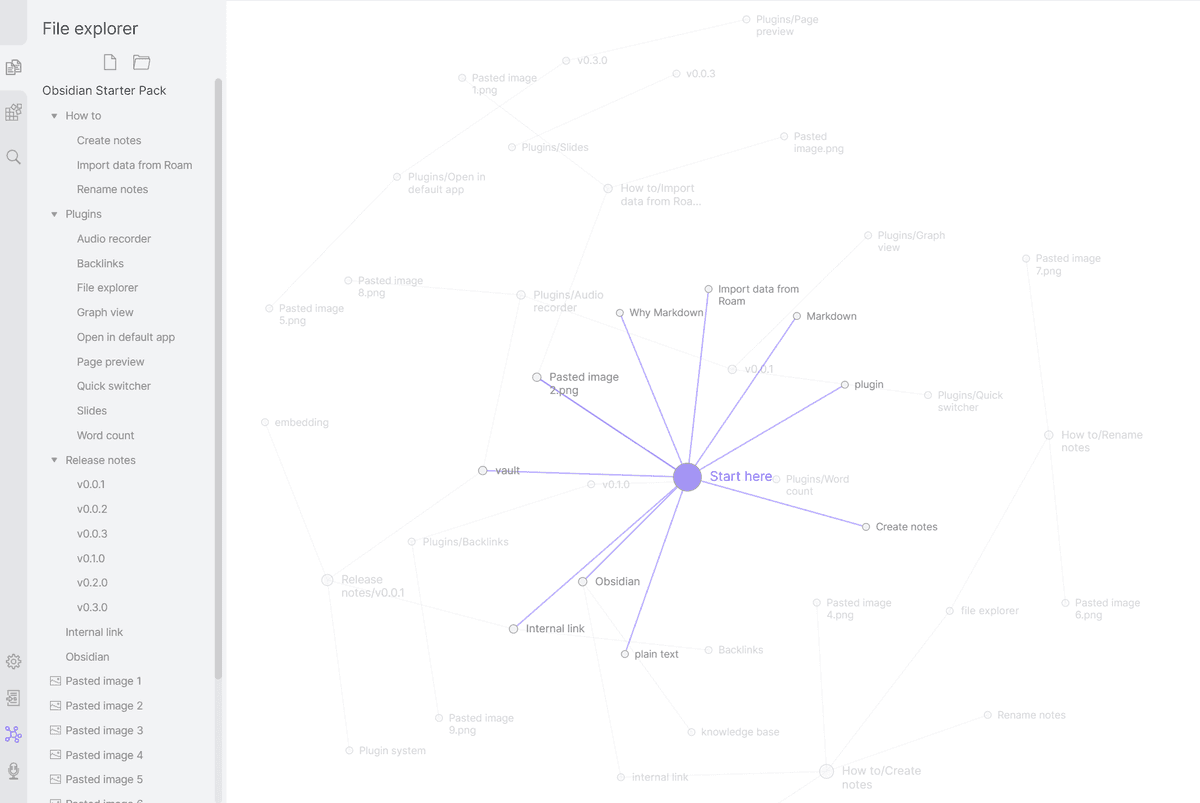
The Obsidian Graph View documentation shows the manual-linking model: notes become nodes, and internal links become paths through the vault.
-
Key features:
-
Plain Markdown files
-
Backlinks panel
-
Graph view
-
1000+ plugins
-
CSS and JS tweaks
-
Local files you own
-
Pricing: Free for personal use, Sync $4/month, Publish $8/month
-
Pros:
-
Full control over your data
-
Large plugin store
-
Active user base
-
No lock-in
-
Cons:
-
Takes time to learn
-
Needs setup
-
Mobile apps feel less polished
-
No live team editing
-
Best for: Users who want power, privacy, and file export.
2. Atlas: AI-Powered Connections
Atlas Zettelkasten workspace takes a different path. Instead of asking you to make every link, Atlas reads your notes, PDFs, and saved sources. It then builds a map from the material itself.
-
Key features:
-
AI-made links
-
Mind map view
-
Chat across your notes
-
PDF and article support
-
Plain-English search
-
No setup
-
Pricing: Pro from $20/month
-
Pros:
-
No manual linking
-
Finds links you may miss
-
Works with notes and source files
-
Starts fast
-
Cons:
-
Cloud-based
-
Less manual control
-
Newer tool
-
Different from classic backlinks
-
Best for: Users who want connection benefits without manual linking work across research notes or saved PDFs.
3. Roam Research: The Original Networked Notebook
Roam Research uses blocks rather than pages as its core unit. Daily notes sit at the center of the workflow.
-
Key features:
-
Block embeds
-
Daily notes home screen
-
Backlinks
-
Queries and filters
-
Live team editing
-
Research-heavy user base
-
Pricing: $15/month or $165/year
-
Pros:
-
Block links are powerful
-
Strong for research
-
Good for writing
-
Live team editing
-
Cons:
-
Expensive
-
Web-only
-
No local vault
-
Interface feels dated
-
Best for: Researchers who value block-level links. If Roam's price or limits concern you, see our list of Roam Research alternatives.
4. Logseq: Open-Source Roam Alternative
Logseq offers Roam's outliner style with local storage. It is open source and free. For the broader option set, see Logseq alternatives.
-
Key features:
-
Outliner like Roam
-
Local Markdown or Org files
-
Backlinks
-
Built-in flashcards
-
Queries and templates
-
Active updates
-
Pricing: Free (open source)
-
Pros:
-
Free and open source
-
Local file storage
-
Roam-like feel
-
Active user base
-
Cons:
-
Requires outline habits
-
Less polished than Obsidian
-
Sync needs another tool
-
Takes time to learn
-
Best for: Roam fans who want local storage and open source.
5. Notion: Connected Databases
Notion connects notes through databases. You make a relation between two databases, then link records inside them. This works best when your notes have a clear structure.
-
Key features:
-
Database relations
-
Templates
-
Built-in team editing
-
Polished interface
-
Flexible pages
-
Pricing: Free for personal, Plus $10/month
-
Pros:
-
Best team workspace
-
Structured links
-
Good onboarding
-
Polished app
-
Cons:
-
No true backlinks
-
Requires database setup
-
No graph view
-
Cloud-only
-
Best for: Teams who want connection through structure.
6. Capacities: Object-Based Connections
Capacities organizes by objects rather than plain documents. People, books, places, and concepts each get their own type. Those objects can then link to each other.
-
Key features:
-
Object types
-
Auto links
-
Polished graph
-
Daily notes
-
Media embeds
-
Modern app
-
Pricing: Free tier available, Pro from $9.99/month
-
Pros:
-
Natural mental model
-
Clean design
-
Easier to learn
-
Good mobile apps
-
Cons:
-
Newer app
-
Smaller user base
-
No local storage
-
Still growing
-
Best for: Visual thinkers who prefer objects to documents.
7. Reflect: Networked Notes + AI
Reflect combines note links with built-in AI. It feels polished without asking you to manage plugins.
-
Key features:
-
Backlinks
-
Built-in AI
-
End-to-end encryption
-
Graph view
-
Calendar links
-
Clean design
-
Pricing: From $10/month
-
Pros:
-
AI built in
-
Strong design
-
E2EE privacy
-
Fast capture
-
Cons:
-
No free tier
-
Smaller ecosystem
-
Less control
-
Requires a paid plan
-
Best for: Users who want polished AI + linking without DIY.
8. Apple Notes + iCloud: Surprisingly Connected
Apple Notes added note linking. With iCloud sync and Apple Intelligence, it is good enough for many Apple users.
-
Key features:
-
Basic note links
-
Apple Intelligence summaries
-
No setup
-
Deep Apple ties
-
Fast capture
-
Free
-
Pricing: Free (with Apple devices)
-
Pros:
-
Already installed
-
Smooth sync
-
Built-in AI features
-
Easy to learn
-
Cons:
-
No backlinks
-
No graph view
-
Basic links only
-
Apple-only
-
Best for: Apple users who want simplicity over power.
Comparison Table
Use this table to separate true graph tools from simple note-linking apps. The most important columns are link depth, graph quality, AI link quality, local files, sync, and price.
| App | Bidirectional Linking Depth | Graph View Quality | AI Connection Quality | Local File Support | Sync Reliability | Pricing |
|---|---|---|---|---|---|---|
| Obsidian | Strong page links and backlinks | Strong and customizable | Plugin-dependent | Yes, Markdown files | Strong with paid Sync | Free personal, Sync $4/mo |
| Atlas | Source-level links found automatically | Strong for generated maps | Strong for research sources | No | Cloud sync included | Pro $20/mo |
| Roam | Strong block-level references | Useful but less polished | Limited | No | Cloud sync included | $15/mo or $165/yr |
| Logseq | Strong block links and backlinks | Good for local graphs | Plugin-dependent | Yes, Markdown or Org | Depends on your sync setup | Free |
| Notion | Strong database relations, weaker backlinks | No true knowledge graph | Good for writing help | No | Strong team sync | Free personal, Plus $10/mo |
| Capacities | Strong object links | Polished and visual | Moderate | No | Cloud sync included | Free tier, Pro $9.99/mo |
| Reflect | Solid page links and backlinks | Simple and clean | Good for capture and recall | No | Cloud sync included | From $10/mo |
| Apple Notes | Basic page links | None | Basic system summaries | No Markdown vault | Strong inside iCloud | Free with Apple devices |
Table 1: The strongest app depends on whether you value local files, block links, team structure, or source-grounded AI.
Connected-note apps differ most in how they create links, display the graph, store local files, and synchronize changes.
Other Connected Notes Apps Worth Checking
The following smaller and newer tools also appear in current search results for connected notes.
NoteConnect
NoteConnect is a small web app focused on linking notes and browsing those links. It is worth a look if you want a light graph tool rather than a full PKM system.
Cranium
Cranium presents itself as a connected notes app for personal knowledge. It is closer to a focused knowledge graph than a team workspace.
JotAid
JotAid is another lightweight option for linked notes. It is best treated as an emerging tool until its export, sync, and long-term support are clearer.
How to Choose
Choose by the kind of connection you will use every week. Obsidian suits local files, Logseq and Roam suit block references, Notion suits shared databases, and Atlas finds links across research sources.
-
For control and local files: Choose Obsidian.
-
For automatic links from source material: Choose Atlas.
-
For blocks and outlines: Choose Logseq or Roam.
-
For a shared team workspace: Choose Notion or Roam.
-
For a polished visual workspace: Choose Capacities or Reflect.
-
For simple links inside the Apple ecosystem: Choose Apple Notes.
For a broader look at how these tools fit into knowledge management, compare the best second brain apps.
Making Links Work For You
Having connected notes is one thing. Getting value from them is another. Here's how:
1. Link While Writing
Do not link after the fact. As you write, notice related notes and link them right away. If you are writing about spaced practice, link to your note on memory.
2. Develop Link Habits
- Concept links: Ideas that relate (memory -> learning)
- Source links: Where ideas came from (papers, books)
- Project links: Relevant to what you're working on
- Question links: Things to explore further
3. Review Through Links
Instead of reading in a straight line, follow links. Start with today's note. Follow one link, then the next. This is how old ideas come back.
4. Trust the Graph
Linked notes still work when the system is messy. Graph views show broad patterns. Backlinks show paths you forgot.
5. Let Connections Emerge
You do not need the perfect link. Link what feels related. Weak links fade. Useful links get reused.
Connected Notes for Different Use Cases
The same linking model does not suit every project. Researchers need source trails, writers need reusable ideas, students need review paths, and teams need shared structure with permissions that do not break when collaborators join.
Start with the unit you naturally work in: pages for sustained notes, blocks for reusable claims, objects for structured records, or source passages for evidence-heavy research. The examples below match each use case to that unit.
Zettelkasten / PKM
Use Obsidian, Logseq, or Roam for short, durable notes and a structure that grows through deliberate links over time.
Research
Use Atlas, Obsidian with academic plugins, or Roam when the system must preserve paper links, develop concepts, and support synthesis.
Writing / Creativity
Use Roam for reusable blocks, Obsidian for long drafts, or Atlas for source synthesis when draft links and traceable ideas matter.
Learning
Use Logseq, Obsidian, or Capacities to connect concepts and create paths for review rather than leaving course notes in isolated folders.
Work / Projects
Use Notion, Capacities, or Obsidian when project notes, meeting decisions, and working documents need to link inside a shared operating system.
Connected notes work best with a simple system. Try organizing with PARA for light structure. Go deeper with the Zettelkasten method.
Cost, Privacy, and Long-Term Fit
The app has to remain affordable, exportable, and trustworthy after the initial setup. Compare the full cost of sync and add-ons, decide whether local or cloud storage fits the sensitivity of your notes, and choose a linking style you can maintain.
Three-Year Cost Across the Top Picks
Sticker prices hide the real spend. A free app may still need paid sync, a plugin license, or a backup tool. Here is the three-year cost for one person. The table includes common add-ons most users buy in year one.
| App | Year 1 | Year 2 | Year 3 | 3-Year Total | Notes |
|---|---|---|---|---|---|
| Obsidian | $96 | $96 | $96 | $288 | Sync $4/mo, Publish optional |
| Logseq | $0 | $0 | $0 | $0 | Self-hosted sync via iCloud or Git |
| Roam Research | $165 | $165 | $165 | $495 | Annual plan, no free tier |
| Notion Plus | $96 | $96 | $96 | $288 | $8/mo billed annually |
| Capacities Pro | $96 | $96 | $96 | $288 | $7.99/mo billed annually |
| Tana Pro | $108 | $108 | $108 | $324 | $9/mo billed annually |
| Atlas Pro | $240 | $240 | $240 | $720 | $20/mo, AI-native search and graph |
Table 2: Obsidian's pricing page treats the app itself as free for personal use. Sync and Publish are the paid parts. Logseq remains free and open source, but you bring your own sync. Roam lists $15/mo or $165/year and has no long-term free tier. Notion's Plus plan is $8/mo billed annually. Atlas costs more because each search and graph run uses AI inference.
Privacy and Data Handling
Linked notes can hold years of thinking. Where that body of notes lives matters. Ask three questions. Can you export the files? Is the data encrypted? Can the vendor use your notes for training or analytics?
| App | Storage | E2EE | File Format | Training Use |
|---|---|---|---|---|
| Obsidian | Local files | With Sync add-on | Markdown | Never |
| Logseq | Local files | Via Git/iCloud | Markdown/Org | Never |
| Roam | Cloud (managed) | No | Proprietary JSON export | Per terms |
| Notion | Cloud | No | Markdown export, blocks API | Opt-out per privacy policy |
| Capacities | Cloud | No | Markdown export | Per privacy policy |
| Atlas | Cloud | No | Markdown export | Review current privacy terms before uploading sensitive notes |
Table 3: Two patterns emerge. Local-first apps like Obsidian and Logseq win on privacy and export. They also make you handle backup and sync. Cloud apps trade local control for easy sync, team use, and AI. If you handle clinical, legal, or client data, choose local files unless the vendor signs the right agreement.
Choosing Based on Your Linking Style
How you think about links should drive the tool choice more than the feature list. Three patterns dominate.
Page-level linking (Obsidian, Notion, Reflect, Apple Notes) treats each note as the unit. You link from one page to another. This works well when ideas live as medium-length notes.
Block-level linking (Roam, Logseq, Tana) treats each bullet or paragraph as linkable. You can link directly to a claim within a page. This helps when you reuse the same facts in many drafts. The outline format can feel odd if you prefer prose.
AI-augmented linking (Atlas, Reflect, Capacities) builds links from content. You do less manual filing. The trade-off is control: you may find links you missed, but you cannot always predict the map.
Common Failure Modes
Across user threads on r/ObsidianMD, r/Zettelkasten, and Roam's forum, the same failure patterns recur.
Linking as performance is common. People often link too much in month one, then quit in month three. Links without a real idea behind them become noise. Link when you expect to use the path later.
Tool migration loops can eat weeks. The "should I switch from Obsidian to Logseq to Tana" loop rarely improves your thinking. Pick one app for at least a year before moving again.
Orphan notes are notes made in a hurry. They often never get linked or reviewed. Use the weekly review in the research-notes organization guide to link each new note into the graph or archive it.
Graph as art is a trap. Use the graph to check whether useful paths exist between notes. If every note links to everything, the map becomes noise. Write for a future reader, including future you.
AtlasMap connections across your research sources
Upload notes, papers, and PDFs to surface links without manual tagging.
Frequently Asked Questions
Connected notes help you think by making relationships explicit. Instead of notes existing in isolation, they form a network where ideas reinforce each other and unexpected connections emerge.