
NotebookLM vs Obsidian vs Atlas (2026): Which Fits You?
Compare NotebookLM, Obsidian, and Atlas by source grounding, local file ownership, linked notes, visual maps, pricing, and fit for research workflows.
- Byline

Summary
Use NotebookLM for bounded source projects, Obsidian for local Markdown notes, and Atlas for connected AI synthesis.
The updated comparison covers NotebookLM, Obsidian, and Atlas across source grounding, data ownership, linking, maps, and workflow fit.
NotebookLM is project-based, Obsidian is vault-based, and Atlas is built around cross-source retrieval and visual connections.
Researchers often need different tools for temporary document Q&A, permanent notes, and long-term synthesis.
NotebookLM, Obsidian, and Atlas solve different parts of knowledge work. NotebookLM answers questions within a defined source collection. Obsidian keeps linked Markdown notes on your device. Atlas combines cited answers across selected sources with notes and visual knowledge maps.
If that Atlas workflow is the gap you are trying to solve, compare the tradeoffs below before you pick a tool.

 Atlas
AtlasBuild a cited map across your sources
Upload PDFs, map connections, and inspect cited answers across your corpus.
Comparison criteria
We compare each product using its official documentation and the jobs a researcher needs to complete: asking questions about a bounded source set, keeping notes for years, finding connections across projects, and moving work into a draft. For a wider comparison, see our second-brain apps guide, which covers setup, lock-in, and graph depth.
The comparison focuses on source support, citations, data ownership, linking, maps, setup effort, and the limits that affect daily research. These criteria show whether a tool fits one temporary project or a second brain that must remain useful across projects.
Quick Overview
Before diving deep, here's what each tool is:
What is NotebookLM? NotebookLM is Google's AI research tool. You upload sources, then ask questions about that set. It is best for a defined project that needs cited answers and audio summaries.
What is Obsidian? Obsidian stores your notes as local Markdown files. It supports links in both directions and has a large plugin library.
What is Atlas? Atlas is an AI workspace for sources, notes, maps, and chat. It helps you ask across your whole knowledge base.
Now let's go deeper.
Tool-by-Tool Breakdown
NotebookLM: Google's AI Research Assistant
NotebookLM is strongest when your work starts with a defined set of sources. It is good for cited answers, summaries, and audio review. For example, a student can upload 12 papers for one seminar project. They can ask for cited comparisons, then make an Audio Overview before class. Its main tradeoff is scope. Each notebook works well as a project space, but it is not meant to become your permanent linked-note system.
NotebookLM Basics
NotebookLM (formerly Project Tailwind) is Google's experiment in AI-assisted research. You create a notebook by uploading PDFs, Google Docs, websites, or YouTube videos. NotebookLM then answers from those sources.
NotebookLM Strengths
Source-grounded AI: When you ask questions, NotebookLM answers based only on your uploaded sources, with citations. Answers stay within your uploaded sources, with citations shown for each claim.
Audio overviews: NotebookLM can generate podcast-style audio summaries of your sources. Engaging for reviewing material on the go.
Google integration: Works smoothly with Google Docs and Drive. If you're in the Google ecosystem, import is frictionless.
Free to use: As of 2026, NotebookLM remains free with a Google account.
NotebookLM Limitations
Project-based only: Each notebook is isolated. You can't query across notebooks or build a long-term knowledge base. Knowledge doesn't accumulate.
Upload limits: Each notebook has source limits. For extensive research with hundreds of papers, you'll hit walls. If this is a dealbreaker, see NotebookLM alternatives that handle larger libraries.
No personal notes: NotebookLM works with sources you upload. It is built for querying existing material rather than writing and organizing your own notes.
No connections visualization: You can't see how concepts relate across your sources. The AI knows about connections but doesn't show them.
Google dependency: Your notebooks live on Google's servers. No local backup, no export to standard formats.
For a deeper look at these constraints: NotebookLM limitations
For tips on making the most of it: How to use NotebookLM
For a deeper comparison: Atlas vs NotebookLM
Obsidian: The Customizable Knowledge Vault
Obsidian Basics
Obsidian is a notes app built on Markdown files. Your notes are plain text files stored on your device. The app lets you write, edit, and link notes.
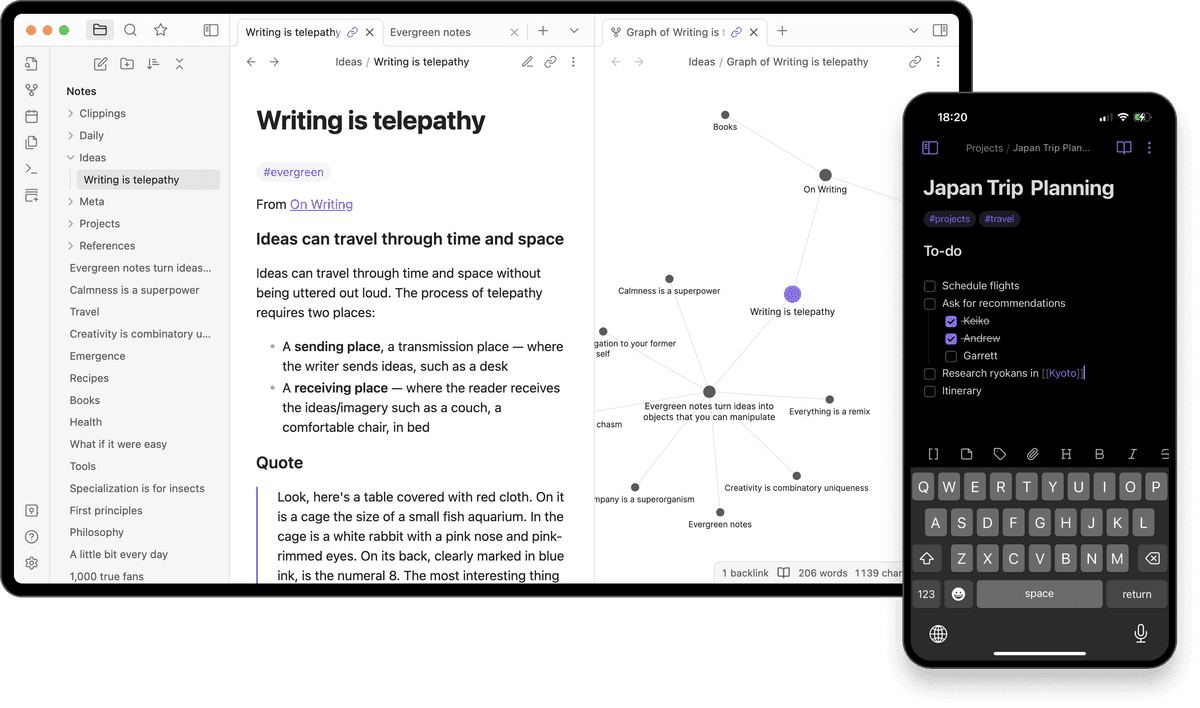
Obsidian graph view supports local note-link review: notes appear as nodes, links appear as edges, and source Q&A is not shown. Image from Obsidian.
The screenshot matters because the graph turns backlinks into nodes and edges. It shows where Obsidian helps: your own notes become a visible network, but the links still depend on what you create by hand.
Obsidian Strengths
You own your data: Notes are Markdown files on your computer. No lock-in. If Obsidian disappeared tomorrow, your notes remain.
Links and backlinks: The core feature is linking both ways. Link two notes, and Obsidian tracks that tie for you. This supports Zettelkasten and other linked note methods.
Graph view: See your notes as a map of linked nodes. Spot clusters and gaps.
Plugins: Hundreds of community plugins add AI, tasks, publishing, templates, and more. Whatever you need, there's probably a plugin.
One-time purchase: No subscription. Pay once for sync (optional) and use forever.
Obsidian Limitations
Learning curve: Obsidian is powerful but not simple. To get the most from it, you learn Markdown, link habits, and plugin setup. Plan for ramp-up time. If you want the benefits without the setup, see simpler alternatives to Obsidian.
Manual work: Links do not appear on their own. You create them. You also keep the vault clean.
AI is added through plugins: Quality and uptime vary by plugin. The flow is less smooth than an AI-first tool.
Sync costs extra: The free app stores locally only. If you want sync across devices, you pay for Obsidian Sync or configure your own solution.
For a deeper comparison: Atlas vs Obsidian
Atlas: AI-Native Knowledge Workspace
Atlas Basics
Atlas is a workspace built around AI. Upload sources, take notes, and use chat plus visual maps.
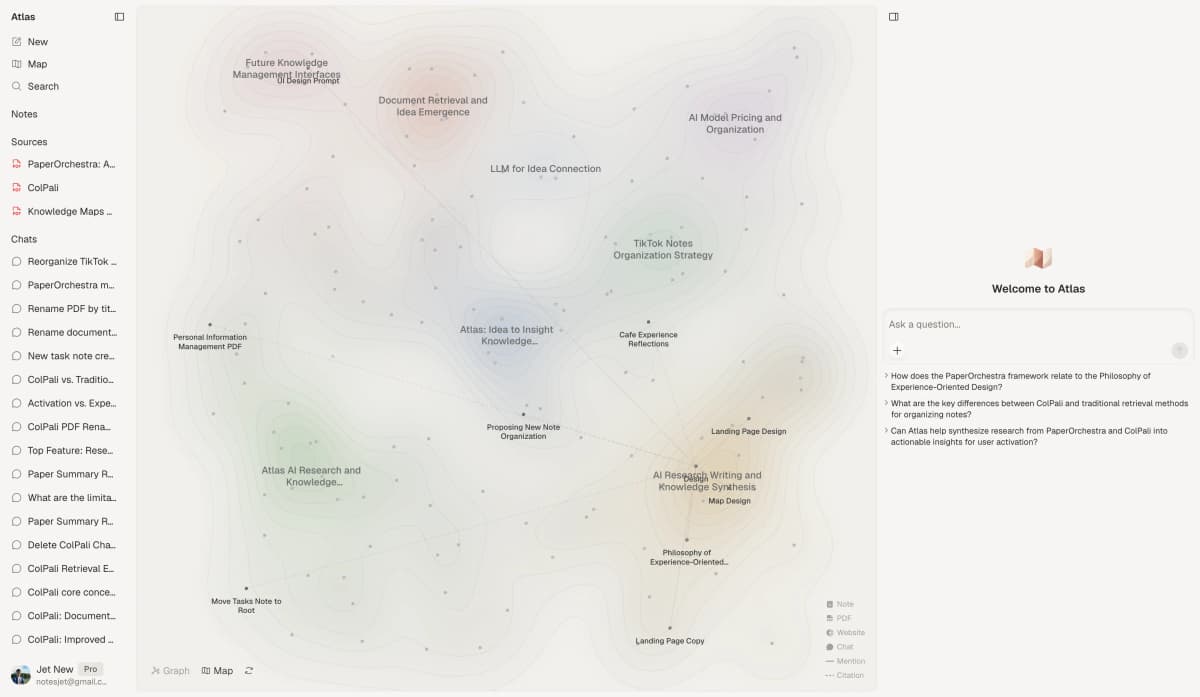
Atlas connected research map showing source files, linked ideas, and a cited chat panel in one workspace.
Atlas Strengths
AI search: Ask plain questions and get answers from your full source base. You do not need to remember where you saved something.
Auto links: The AI finds ties between your sources and notes. Links surface without manual work. That's why Atlas is a connected note-taking tool.
Visual mind map: See your entire knowledge base as an interactive network. Explore visually, discover unexpected relationships.
Built for growth: Unlike project-based tools, Atlas is designed for long-term knowledge accumulation. Your knowledge compounds over time.
Low friction: Upload and start asking. No configuration, plugins, or markdown syntax required. Useful from day one.
Atlas Limitations
Atlas has four tradeoffs. Your data lives on Atlas servers, so local-only users should choose Obsidian. Atlas also has fewer knobs than Obsidian. You get less setup work, but less room to reshape the app. Atlas is paid, so it makes sense for regular AI work and less sense for light note storage. It is also newer than Obsidian, with a smaller community and fewer tool links.
For more details: Atlas for Second Brain
Feature Comparison Table
| Feature | NotebookLM | Obsidian | Atlas |
|---|---|---|---|
| AI Chat | Yes (per-project) | Via plugins | Yes (full knowledge base) |
| Visual Mind Map | No | Yes | Yes |
| Automatic Connections | Limited | No (manual) | Yes |
| Citation Support | Yes | Via plugins | Yes |
| Local Storage | No | Yes | No |
| Cloud Sync | Yes (Google) | Paid add-on | Yes (included) |
| Offline Access | No | Yes | Limited |
| Learning Curve | Low | High | Low |
| Customization | Low | Extensive | Medium |
| Note-Taking | No | Yes | Yes |
| Source Upload | Yes | Limited | Yes |
| Pricing | Free | Free (sync extra) | Subscription |
Table 1: Feature-level comparison of NotebookLM, Obsidian, and Atlas for AI chat, storage, linking, sync, and setup tradeoffs.
Bottom line: NotebookLM wins on ease and cost. Obsidian wins on file control. Atlas wins on cited AI search and maps.
Quick Comparison: Which Tool Should You Choose?
Choose NotebookLM when the job is narrow. It is the fastest fit for one class paper, one client packet, or one source set that will not need to grow for years.
Choose Obsidian when local files matter most. It is the best fit when you want Markdown notes, offline access, and full control over your vault.
Choose Atlas when you need cited answers across a growing source base. It is the best fit when you want AI chat, a visual map, and links between ideas without plugin setup.
Best Use Cases for Each Tool
Choose NotebookLM If:
- You have a specific research project with defined sources
- You want source-grounded AI answers with citations
- You're already in the Google ecosystem
- You don't need long-term knowledge accumulation
- You want free and simple
Ideal users: Students writing a paper. Teams prepping for one project. Anyone with a clear source set. See our NotebookLM for students guide for student-specific workflows.
Choose Obsidian If:
- You want complete ownership of your data
- You enjoy customizing your tools
- You're willing to invest time in learning and setup
- You want to implement Zettelkasten or similar methods
- You prefer local-first software
Ideal users: Power users and developers. People building long-term knowledge systems. Privacy-focused users. Zettelkasten fans. For a comparison of note-taking methods, see our note-taking systems compared guide.
Choose Atlas If:
- You want AI assistance without complexity
- You have diverse materials (sources, notes, web clips)
- You want to see how your knowledge connects
- You're building a long-term knowledge base
- You value low friction over customization
Ideal users: Researchers with many papers, PhD students writing a thesis, students with source-heavy work, and anyone who wants AI help that works with less setup.
Plain-English Decision Checks
Use these checks before you commit to a tool:
- Use NotebookLM when the work has a clear start and end. A term paper fits. A client brief fits. A stack of PDFs for one call fits. You can add the files, ask a set of questions, and use the cited answers.
- Use Obsidian when the notes are the main asset. You write the notes. You own the files. You can keep them on your laptop. This is the right fit when control matters more than speed.
- Use Atlas when the source base keeps growing. You may have papers, notes, PDFs, and web clips from many projects. You want to ask across all of them, with a map that helps you see where ideas link.
- Pick the tool for the job. If the job is a one-week read, use the simple tool. If the job is a five-year vault, use the local tool. If the job is a live source base that must answer hard questions, use the tool built for cited search and maps.
- For a simple test, open the last 3 things you saved for work or school. If you need to read and cite one set, use NotebookLM. If you need to keep the notes for years, use Obsidian. If you need to see how ideas connect, use Atlas.
- For trust, ask where the files can live. If you need every file on your own disk, choose Obsidian. If you trust Google for the project and want no setup, choose NotebookLM. If you can use a cloud app and want cited chat plus a map, choose Atlas.
- For teams, ask who will do the upkeep. Obsidian works when someone owns the setup. NotebookLM works when each person owns a small source set. Atlas works when the team needs shared source search and a map with less manual work.
- For school, research, and work, match scope to the tool. Use NotebookLM for a packet or one review set. Use Obsidian for long-term notes and drafts. Use Atlas when the next person needs the source trail and idea map.
The wrong choice is usually clear after one week. If you spend more time moving notes than using them, the system is too heavy. If you cannot find old work, the system is too small. If you cannot trust the answer, the system lacks clear sources.
If that describes your workflow, test Atlas with a real source set and compare the cited answers against your current setup.
One-Hour Trial Plan
Run the same small test in each tool before you move real work. Pick five files you know well. Use 2 papers, one note, one web page, and one old draft if you have them. Keep the set small enough that you can check each answer by hand.
Start with a fact check. Ask for three claims from the files. Then open the cited lines and mark each claim as right, close, or wrong. This shows whether the tool can point you back to evidence you can inspect.
Next, ask for a link between two ideas. Use one idea from an old file and one idea from a new file. A good tool should show why the link matters. A weak tool will give a broad theme with no clear source trail.
For the recall task, close the files and ask where a point came from. If you can get back to the right source fast, the system is helping. If you have to search by hand, the system is just storing files.
For the writing task, ask for a short brief with three claims and three source links. Do not judge the prose first. Judge the trail. You need to know where each claim came from before you trust the draft.
For the handoff test, send the output to a classmate, teammate, or future you. If they can see the source path and the main idea in two minutes, the tool is clear enough. If they need a tour, the setup may be too hard.
Score the trial with four plain marks. Mark source trust, speed, setup, and future use. The best tool is the one with the fewest weak marks for your real job.
NotebookLM + Obsidian Workflow
Many users are discovering these tools work better together than as replacements for each other. One practical workflow splits the system by permanence, project scope, and synthesis.
The Setup
Use Obsidian as the permanent archive. Your notes are Markdown files you own forever, so this becomes the long-term knowledge base for accumulated thinking.
Use NotebookLM for project-specific research. For a literature review or a bounded client project, upload the relevant sources and use its AI to synthesize and query that set.
Use Atlas for active knowledge building. When you want AI to connect ideas across your entire collection instead of 1 project's sources, Atlas bridges the gap.
How to Make It Work
-
Start permanent notes in Obsidian: Anything you want to keep long-term goes here. You own the files.
-
Spin up NotebookLM notebooks for bounded projects: Have 30 papers for a research review? Upload them, ask questions, generate audio summaries. When the project ends, archive or discard.
-
Use Atlas when you need cross-domain AI: Researching how concepts from different domains connect? Atlas can query your entire knowledge base at once.
Why This Works
Each tool has a genuine strength:
- Obsidian's ownership and customization can't be matched
- NotebookLM's source-grounded AI is excellent for defined projects
- Atlas shows links you would miss by hand
Using them together costs more setup time but gives you each tool's strengths without their limitations.
The Bottom Line
The right tool depends on the workflow you need to protect.
NotebookLM is best for one set of sources. It is free and simple, but limited to each project.
Obsidian is best for local notes you own. It is powerful and flexible, but takes setup.
Atlas is best for cited AI search across a growing source base. It is easy and visual, but paid.
Try the one that matches your priorities:
- For project-based research: Start with NotebookLM
- For local-first customization: Start with Obsidian
- For AI-powered knowledge management: use Atlas when you need cited chat and maps
The best knowledge management system is the one you use consistently. Pick one, start building, and let your knowledge compound.
Costs, Privacy, Migration, and Daily Workflows
Three-Year Cost in Real Numbers
Sticker price hides the full picture. The three-year cost depends on which add-ons you pay for.
| Scenario | NotebookLM | Obsidian | Atlas |
|---|---|---|---|
| Solo, base plan | $0 (free, with caps) | $0 (free personal) | $720 (Pro, $20/mo × 36) |
| Solo with sync | $0 | $144 (Sync, $4/mo × 36) | included (cloud-native) |
| Solo with AI | $720 (Plus, $20/mo × 36) | bring own API key, ~$5-20/month | included on Pro |
| Commercial use | included in Workspace | $1,800 (Commercial, $50/user/mo × 36) | $720 |
Table 2: Three-year cost comparison for NotebookLM, Obsidian, and Atlas across personal, sync, AI, and commercial scenarios.
Per NotebookLM pricing, Obsidian's pricing page, and Atlas pricing, NotebookLM and Obsidian both have free personal tiers. Atlas is paid-only at $20/mo Pro. For solo personal use, NotebookLM and Obsidian are free. For serious AI source work, Atlas and NotebookLM Plus both sit at $20/month. Obsidian's $50/user/month commercial license is the line item that can surprise companies.
Privacy and Data Handling
| Property | NotebookLM | Obsidian | Atlas |
|---|---|---|---|
| Encryption at rest | AES-256 (Google) | Local (your disk) | AES-256 |
| End-to-end encryption | No | Yes (Obsidian Sync) | Yes (per-document on Pro) |
| Trains on your data | No (per NotebookLM privacy) | No (no cloud) | No |
| Data residency | Multi-region (Google Workspace) | Your machine | US (AWS) |
Table 3: Privacy and data handling comparison for NotebookLM, Obsidian, and Atlas.
Obsidian is strictest because the data stays on your machine unless you set up sync. NotebookLM gets the benefit of Google Workspace controls, including FedRAMP High and HIPAA BAA on Workspace plans. Atlas lands in the middle. It is cloud-based, encrypts each document on Pro, and hosts data in the US.
Migration Between the Three
NotebookLM -> Atlas or Obsidian: NotebookLM does not export notebooks as a single archive. The realistic path is to download each source individually, then re-upload to the destination tool. Notes and chat history must be copied manually. A 50-source NotebookLM notebook takes 2-4 hours to migrate cleanly.
Obsidian -> Atlas: Atlas imports Markdown files. Wikilinks usually convert, Dataview queries do not transfer. A 1,000-note Obsidian vault takes 2-5 hours to clean up post-import.
Atlas -> Obsidian: Atlas exports as Markdown with front matter. Obsidian imports Markdown natively. The migration is the cleanest of the 3 pairs because both tools share Markdown as their common format.
Real-World Workflows Compared
In NotebookLM, a typical day starts inside the notebook for the current research project. Drop a new PDF into the sources panel. Ask a question, and NotebookLM answers with inline citations to the source passages. Generate an Audio Overview to listen to on the commute. By the end of the day, the notebook is the working artifact for that project alone, and nothing crosses notebooks.
In Obsidian, a typical day starts with the vault. Today's daily note auto-creates. Capture meeting notes, link to project notes with [[wikilinks]]. Tweak a Templater snippet. Run a Dataview query. At the end of the day, commit to Git for version history. The pattern is do-it-yourself across years of accumulated material.
In Atlas, a typical day starts in the workspace. Upload new sources to the relevant project. Ask a cross-source question, and Atlas answers with cited passages. The mind-map view surfaces connections across the workspace. By the end of the day, the answers add to a workspace that compounds over time.
AtlasBuild a cited map across your sources
Upload PDFs, map connections, and inspect cited answers across your corpus.
Frequently Asked Questions
Yes. Many users use Obsidian as their permanent note archive (you own the markdown files forever) while using NotebookLM for specific research projects. When a project ends, export insights to Obsidian for long-term storage.