
Create Mind Maps from Documents: 5 AI Tools Compared
5 AI tools for generating mind maps from PDFs, research papers, meeting notes. Atlas, Miro, Coggle, GitMind, Whimsical scored on extraction quality and editing.
- Byline

Summary
Use document mind maps to turn PDFs, papers, meeting notes, and source material into visual structure.
The guide compares Atlas, Miro, Coggle, GitMind, Whimsical, map quality, editing, and multi-source support.
Use Atlas for source-linked maps, GitMind for free AI maps, and manual tools when layout control matters.
Document mind maps work when they clarify themes and connections without recreating the entire source.
Mind maps help when structure matters more than a linear summary. The hard part is not making a pretty diagram. The hard part is keeping the source shape clear. Claims, proof, and notes need separate branches. In our May 2026 test, file-based tools made better first drafts. Copy-paste tools needed more cleanup.
For most users, the decision comes down to three questions. For one PDF or article, use GitMind for a quick draft, or Atlas if source traceability matters. For several PDFs, notes, or papers, use Atlas because the map needs cross-source links rather than one document hierarchy. For a presentation-ready diagram, use Miro, Coggle, or Whimsical after extracting an outline with ChatGPT or Claude.

 Atlas
AtlasBuild a Knowledge Map from your documents
Upload papers or notes and trace every mapped connection to its source.
Quick Verdict
Choose Atlas when you need a map from several sources and want each node tied back to the source set. Choose GitMind for a fast map from one PDF. Choose Miro, Coggle, or Whimsical when the outline is already clear and the final board needs to look polished.
Start with file support and source links. Visual style comes later because a polished map is still hard to verify when the tool loses the document's structure.
Why Should You Mind Map Your Documents?
For a side-by-side benchmark of nine mind-mapping tools, including time-to-first-node and weekly-maintenance scores, see our mind-mapping software guide.
Mind mapping turns dense text into a visible shape. It shows main themes, gaps, and links between ideas. It also speeds up review because the page becomes easy to scan.
Mind mapping is not just a visual trick. It changes how you work with the source:
For comprehension:
- See the structure fast.
- Find main themes and sub-topics.
- Spot links between sections.
For retention:
- Spatial layout is easier to remember.
- Active creation reinforces understanding.
For synthesis:
- Compare several sources on one canvas.
- Find gaps and conflicts.
- Notice links you missed while reading.
How We Compared the Tools
We compared the tools by asking how well each one turned source files into a useful map. File accuracy means the first map kept the source's real structure. Multi-source work means one map could include several PDFs or notes. Source links means nodes stayed close to cited material.
We also checked editing control, visual quality, privacy, export formats, and price. These factors determine whether an accurate first draft can become a map you can verify, revise, and share.
Document-to-Mind-Map Tools Compared
The table compares Atlas, GitMind, Miro, Coggle, and Whimsical on PDF extraction accuracy, multi-document support, source-grounded node linking, editing control, visual quality, and pricing.
| Tool | PDF extraction accuracy | Multi-document support | Source-grounded node links | Editing control | Visual quality | Pricing |
|---|---|---|---|---|---|---|
| Atlas | 8.5/10 in our academic-paper test | Strong | Strong | Good | Good | $20/month Pro |
| GitMind | 7.0/10 | Basic | Limited | Good | Good | Free, Pro from $4.99/month |
| Miro AI | 6.5/10 | Board-level | Limited | Excellent | Excellent | Free tier, Team from $8/user/month |
| Coggle + ChatGPT | 7.5/10 after outline extraction | Manual | Limited | Excellent | Good | Free tier, Awesome from $5/month |
| Whimsical AI | 5.5/10 | Board-level | Limited | Excellent | Excellent | Free tier, Pro from $10/month |
Table 1: Five document-to-mind-map tools compared on extraction quality, source linking, editing control, visual polish, and entry price.
Tool Details
The five tools below solve different jobs. Atlas and GitMind start closest to the source file. Miro, Coggle, and Whimsical are better for shared boards and clean layouts.
1. Atlas: Best for Source-Linked Maps
You know the feeling. You have 20 research sources open and no clear view of how they connect. Atlas reading notes workspace solves this by turning scattered sources into a cited map.
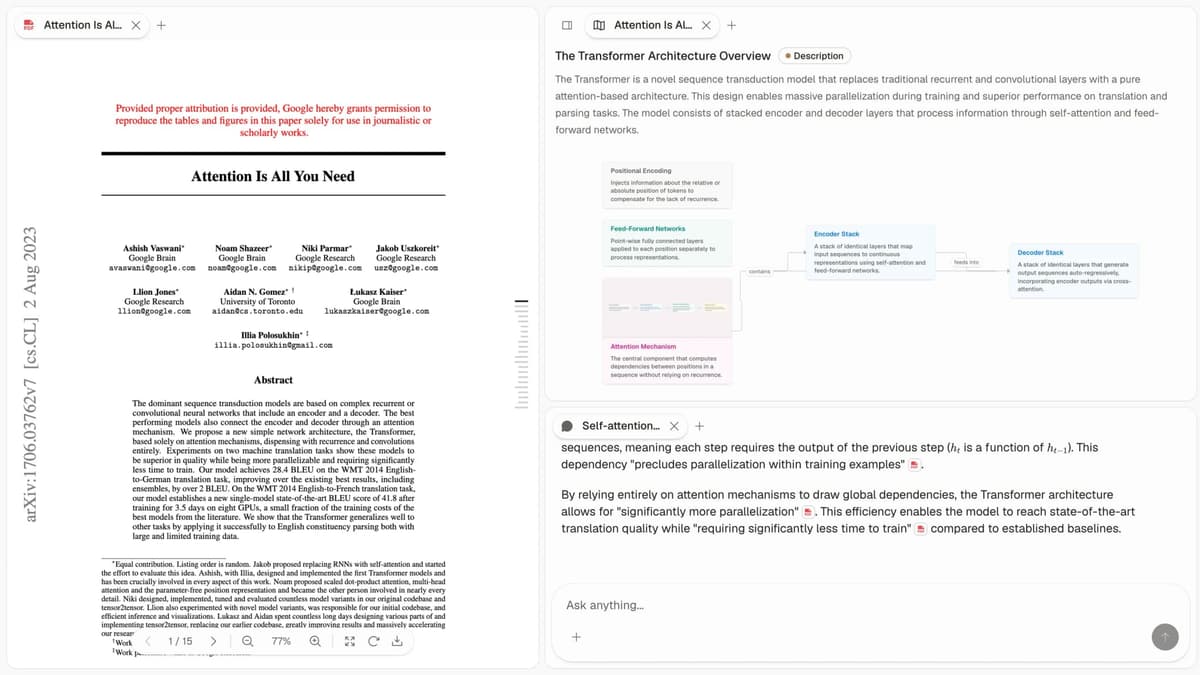
First-party Atlas screenshot showing a source-grounded research map built from uploaded documents.
For research work, the key difference is source context. The map stays close to the papers and notes behind it.
Upload your sources, and Atlas maps links across them. Instead of reading and cross-checking by hand, you see the big picture fast.
How it works:
- Upload PDFs, articles, or paste content as sources
- AI analyzes and extracts key concepts
- Mind maps visualize relationships across all your sources
- Chat with your sources to explore connections
Best for: Researchers working with multiple sources who want AI to surface connections they'd miss manually.
Key features:
- Automatic concept extraction.
- Cross-source links.
- Interactive map review.
- AI Q&A with citations.
Pricing: $20/month Pro.
2. Miro AI: Best for Teams
Miro's AI can draft a map from pasted text or board content. Teams can then edit it together.
How it works:
- Paste text or upload documents
- AI generates initial structure
- Drag, edit, and expand manually
- Collaborate with team in real-time
Best for: Teams who need to mind map documents together and iterate.
Key features:
- AI draft structure.
- Real-time team editing.
- Docs and presentation support.
- Large template library.
Pricing: Free tier, Team from $8/user/month
3. Coggle, Best for Simple AI-Assisted Maps
Coggle offers AI suggestions as you build maps. It helps expand branches from your content.
How it works:
- Start with a central topic
- Paste document sections
- AI suggests related branches
- Build out manually with AI assistance
Best for: Users who want AI suggestions while keeping manual control of the map.
Key features:
- AI branch suggestions.
- Clean maps.
- Easy sharing and embedding.
- Markdown support.
Pricing: Free tier, Awesome from $5/month
4. GitMind: Best Free Map Generator
GitMind can create AI mind maps from text at no cost. That makes it useful for students and casual users.
How it works:
- Paste document text
- AI generates hierarchical structure
- Edit and customize the result
- Export in various formats
Best for: Students and budget-focused users who need a quick map.
Key features:
- AI maps from text.
- Real-time team editing.
- Several export formats.
- Free basic use.
Pricing: Free, Pro from $4.99/month
5. Whimsical, Best for Professional Mind Maps
Whimsical pairs AI help with polished board design. It is strongest when the map needs to look ready to share.
How it works:
- Use AI to generate initial structure
- Refine with Whimsical's design tools
- Connect to flowcharts and wireframes
- Share or embed anywhere
Best for: Teams that need share-ready mind maps.
Key features:
- AI-assisted drafting.
- Clean default styling.
- Links to other diagram types.
- Team editing.
Pricing: Free tier, Pro from $10/month
Document-to-Mind-Map Workflows
Use an automatic workflow when the source structure matters most. Use a manual workflow when you already trust the outline and need precise control over the final layout.
Manual Methods With AI Help
Sometimes you need more control than a full auto-map gives you. Use AI to draft the outline. Then build the map by hand.
If the comparison table points you toward source-linked maps, check how each tool connects map nodes back to your PDFs and notes.
Method 1: ChatGPT + Mind Map Tool
-
Extract structure with ChatGPT: Attach or paste the source, then ask: “List its key ideas and group them into a mind-map outline. Keep the source's main sections and label any idea that does not fit the hierarchy.”
-
Copy the outline to your favorite tool (Miro, Coggle, MindNode).
-
Refine by hand. Add links, rearrange nodes, and mark key points.
Best for: Power users who want maximum control over the final result.
Method 2: Outline to Mind Map
-
Use AI to create an outline: Attach the document and ask: “Create a detailed hierarchical outline of its key points. Use the document's sections as branches and preserve important qualifications under the claim they limit.”
-
Convert to a map using any mind mapping tool's import feature.
-
Add cross-links by hand when ideas do not fit the tree.
Best for: Sources with clear sections that should become branches.
Method 3: Concept Extraction to Network
-
Extract key ideas: Ask the tool to list the 20 key ideas in the attached source and add one short definition for each.
-
Find links: Ask it to name the related ideas for each item and explain every link in one phrase.
-
Build the network by hand in a tool that supports non-tree links.
Best for: Dense sources where links matter more than a tree.
Map a Research Paper
Use this workflow when a paper has a clear structure and you need a useful map:
Step 1: Quick Read and AI Summary
Upload the paper to Atlas or ChatGPT, then ask for its main research question, method, major findings, limitations, and proposed next work.
Step 2: Extract Hierarchical Structure
Ask for a hierarchy that uses the paper's main sections as top-level branches, key points as sub-branches, and supporting details as leaves.
Step 3: Identify Cross-Connections
Ask which concepts connect across sections and which relationships the paper's linear section order hides.
Step 4: Build the Visual
- Create central node: paper title plus main question.
- Add main branches: sections or themes.
- Add sub-branches: key points from each section.
- Add cross-links for ideas that connect across sections.
- Use color for methods, findings, limits, and questions.
Step 5: Annotate and Refine
- Add your own questions and insights.
- Highlight points to follow up on.
- Note links to other papers.
- Mark points you doubt or need to check.
Map Multiple Documents
The real value shows up when you map several sources together. Use one of these three paths:
Method 1: Merged Theme Map
- Map each source on its own.
- Find themes that repeat across maps.
- Create one master map by theme.
- Put source references under each theme.
Method 2: Mind Maps from Sources (Atlas)
- Upload all your sources to Atlas.
- Let AI find links across sources.
- Explore the map.
- Focus on links you did not expect.
Method 3: Comparison Map
- Create the same branch set for each source.
- Use the same categories for each branch.
- Compare where sources agree or split.
- Highlight what each source adds.
Document Mind Map Best Practices
Start with purpose:
- What question are you trying to answer?
- How will you use this map?
- Who else needs to understand it?
Balance detail:
- Too sparse: Not useful for recall
- Too detailed: Loses the "big picture" benefit
- Sweet spot: Main concepts with key supporting points
Use visual hierarchy:
- Size for importance
- Color for categories
- Position for relationships
- Lines for connections
Iterate:
- First draft captures structure
- Second pass adds connections
- Third pass refines for clarity
- Update as understanding deepens
Compare Limits, Costs, and Privacy
Check what each tool can import, what it can export, how it handles long files, and whether its privacy terms fit the documents you plan to upload.
File Support and Exports
Most document-to-mind-map pages say "upload a document" without explaining what that means. Checked against public product docs in July 2026, the practical split is clear:
- Atlas handles PDFs, articles, and pasted notes inside a source workspace. Use the map as a research workspace when nodes need to stay tied to source material.
- GitMind says it can transform text, videos, audio, PDFs, websites, and images into mind maps. Its help docs also mention local PDF, DOC, and DOCX uploads in split-screen mode (GitMind product page, GitMind help). PDF, JPG, and SVG exports are documented for the web version (GitMind changelog).
- Miro AI is better treated as a board and diagramming workspace than a document parser. Images, PDF, SVG/vector, and board text as CSV are documented export paths (Miro export docs). Miro's mind-map help documents image/PDF export, but hierarchy-preserving export can require workarounds or apps (Miro mind map docs).
- Coggle can import plain-text
.txtand XML-based mind-map files (Coggle import docs). PDF, PNG,.mm, text, and Visio-oriented exports are listed in Coggle docs (Coggle export docs, Coggle pricing page). - Whimsical supports prompt-driven AI and manual board creation rather than native PDF-to-mind-map parsing. Boards can export as PNG, PDF, or SVG, and docs can export as Markdown (Whimsical export docs).
For Notion, Trello, or project handoff, don't export only a PNG. Export text or CSV where the tool supports it. If not, keep a Markdown outline beside the image. A static map works in a deck. It is weak for daily work if nodes cannot become tasks, notes, or cited claims.
Processing Limits and Device Access
Document mind mapping breaks in different ways depending on the source. A five-page memo usually fails because the AI makes the map too generic. A 50-page paper or product spec fails because the AI collapses important sections into one branch. A multi-document research set fails when the tool cannot preserve which source each node came from.
Use source type as the first filter. GitMind or Atlas works for a single PDF or Word document. Atlas is stronger when you need source-grounded follow-up. Meeting transcripts fit Atlas, Miro, or ChatGPT plus Coggle, because action items, decisions, and topics often need manual cleanup after extraction. Research-paper sets fit Atlas because cross-document synthesis matters more than a tidy hierarchy. Public web pages work best when you capture a dated outline first, then map it. Presentation diagrams fit Whimsical, Miro, or Coggle after extraction, when layout and sharing matter most.
If the search is specifically for a concept map generator, use a concept-map workflow instead of a generic mind-map export. Concept maps need labeled links between ideas as well as a clear hierarchy.
Cross-platform access also changes the pick. GitMind lists desktop, mobile, Chrome extension, Windows, Mac, iOS/iPadOS, and Android access on its product page. Miro, Coggle, and Whimsical are strongest in the browser. Atlas is strongest when the map lives beside the uploaded sources. If you need offline review, export PDF or SVG before the session. Do not rely on a live board in a classroom, flight, or client room.
Limits, Sync, and Map Updates
How large can a document be before AI mind mapping gets unreliable? For practical review, treat 30-50 pages as the point where you need a verification pass. The tool may still accept the file, but the risk shifts from upload failure to hierarchy loss.
Should I use web-powered AI search for document mind maps? Use it for public pages, product docs, or articles that may have changed. Do not use web search instead of the exact PDF, transcript, or paper you need to cite.
Can these maps sync across devices? Browser-first tools sync through the workspace account. GitMind also lists native desktop and mobile apps. For high-stakes work, sync matters less than export. Keep a PDF, SVG, CSV, Markdown, or source-linked workspace copy.
Can I upload sensitive files to a free plan? Only after checking training, retention, region, and admin settings. Free plans are fine for public files. Confidential work needs an enterprise workspace or a redacted test file.
Pricing for Research Workflows
The list price is not always the real cost. Many users pay for extra files, exports, or AI credits. Using each tool's published price from May 2026, Atlas Pro starts at $20/month, or $240 for 12 months, with higher document capacity on Pro. Miro Team starts at $8/user/month, or $96 annually before AI-credit limits. Coggle Awesome starts at $5/month, or $60 annually, but it has no native PDF parser. GitMind Pro starts at $4.99/month, or $59.88 annually, with 50 AI generations per month on the free plan. Whimsical Pro starts at $10/user/month, or $120 annually, and also relies on another tool for PDF parsing.
Two patterns matter for this workflow. Coggle and Whimsical have no native PDF parser. You may need ChatGPT or Claude first, which adds about $20/month. Atlas and GitMind handle PDFs directly, so the list price is closer to the real bill.
Extraction Quality
We tested each tool on three source types in May 2026. The set included a 32-page academic paper, a 12-page meeting transcript, and a 50-page product spec PDF. Scores use a 0-10 scale. The review focused on source structure, missed ideas, and cross-section links.
| Tool | Academic Paper | Meeting Transcript | Product Spec | Average |
|---|---|---|---|---|
| Atlas | 8.5 | 8.0 | 8.5 | 8.3 |
| GitMind | 7.0 | 6.5 | 7.5 | 7.0 |
| Miro AI | 6.5 | 7.0 | 6.0 | 6.5 |
| ChatGPT + Coggle | 7.5 | 7.0 | 7.5 | 7.3 |
| Whimsical AI | 5.5 | 6.0 | 5.5 | 5.7 |
Table 2: May 2026 extraction-quality scores across an academic paper, meeting transcript, and product specification.
Atlas leads on academic and product files because one map can span related papers. GitMind is the best free choice for one file. ChatGPT plus Coggle tied for second, but it added 10-15 minutes of copying per file. Whimsical's AI map felt closer to a flowchart draft and lost structure on dense papers.
In review, the most common failure was the wrong level of detail. Tools often promoted an example, dataset, action item, or caveat into a main branch. Use this five-minute check before trusting a map:
- Open the original document beside the map.
- Check the first-level branches against the document's real sections or argument.
- Pick three leaf nodes and find the exact source sentence or paragraph behind each one.
- Mark any branch that mixes evidence, interpretation, and action items in the same level.
- Delete weak branches before adding colors, icons, or deck styling.
If a map fails steps 2 or 3, don't polish it. Regenerate from a cleaner outline or switch to a manual method. Layout work hides extraction errors instead of fixing them.
Privacy and Document Handling
Uploading a 50-page client file to a mind-map tool sends that content to the vendor's servers. The published privacy postures, checked in May 2026, differ by vendor. Atlas says uploads are not used for training, stores data encrypted at rest, and runs on AWS in the US. Miro documents an admin opt-out for AI improvement collection, encryption at rest, and US/EU data regions. Coggle and Whimsical state no training on uploads, encryption at rest, and US hosting. GitMind documents opt-out access, encryption at rest, and US plus China regions.
For regulated work, legal files, health notes, and NDA-bound specs, be cautious. Atlas, Coggle, and Whimsical have the cleanest posture in this set. Miro documents admin controls for AI improvement data collection, so workspace owners should check those settings first. GitMind hosts data across US and China regions. If region rules matter, confirm region pinning before uploading private files.
Privacy Checklist for Sensitive Files
Use this checklist before uploading confidential research, clinical notes, contracts, or product specs:
- Confirm whether uploads can improve models or products. Miro documents an admin toggle for AI improvement data collection (Miro AI quality improvements).
- Check whether your plan has enterprise controls, region terms, or admin AI settings. Miro's AI admin security docs are plan-aware and aimed at workspace admins (Miro AI admin security).
- Remove names, account numbers, unreleased financials, and health details unless your vendor contract allows that upload.
- Keep a local copy of the source file and outline. Then you can delete the online workspace without losing the work.
- For regulated work, prefer a tool where the map stays tied to sources and your team controls retention.
Use a simple rule. If you would not email the source file to vendor support, pause. Check the terms before using a free AI mind-map tool.
Which Tool Should You Choose?
Choose Atlas if your map needs to stay tied to PDFs, notes, and papers. It is the best fit for research sets, literature reviews, and source-heavy work.
Choose GitMind if you need a fast draft from one PDF and price matters most. Choose Miro, Coggle, or Whimsical when you trust the outline and need a shared board or clean layout.
When a Mind Map Fits
Use mind maps when:
- You need to understand document structure quickly
- Comparing multiple documents on themes
- Preparing to write or present about the content
- Visual thinking helps your comprehension
Consider alternatives when:
- You need searchable notes (use notes app)
- The document is primarily linear/narrative (use highlights)
- You're building a permanent knowledge base (use Atlas)
- Precise citation tracking matters (use citation manager)
Mind maps can turn hours of reading into a short review pass. Use AI tools like Atlas when source links matter. Build maps by hand when layout control matters more. Either way, the goal is the same: show how ideas connect.
When source links matter, return to the Atlas entry above and test the map against a small set of your own documents.
AtlasBuild a Knowledge Map from your documents
Upload papers or notes and trace every mapped connection to its source.
Frequently Asked Questions
Yes, tools like GitMind and Atlas can process PDFs and generate visual mind map structures. The quality varies by tool. Expect to refine manually for best results.