
Alternatives to Evernote (2026): 9 Apps Tested & Compared
Alternatives to Evernote 2026: Notion, Obsidian, OneNote, Apple Notes, Bear, Joplin, Logseq, UpNote, and Atlas compared on price, web clipping, OCR, and AI.
- Byline

Summary
In 2026, switch from Evernote when price, note limits, speed, or AI search makes the old workflow feel too costly.
Pick Notion for teams, Obsidian for files, OneNote for free OCR, or UpNote for the closest low-cost move.
Choose based on web clipping, image search, note export, price, local files, AI answers, and daily capture speed.
Atlas fits former Evernote users with research notes that need cited answers across documents.
Testing note from Jet New: I tested this shortlist with a 42-note Evernote export. The biggest friction point was clipped-page cleanup. Tags and folders transferred cleanly. Notion, Joplin, and UpNote kept simple note structure usable. Complex web clips still needed manual repair. UpNote felt closest for a notebook-and-tag move. Obsidian and Joplin were safer if I cared about owning plain files. Atlas only made sense after the archive became a research library that needed cited answers.
Evernote in 2026 is a different product from the Evernote of 2018. The current Free plan allows 50 notes and 1 notebook, while Personal is roughly $14.99/month. AI tools now cover most note workflows, though Evernote is still strong at web clipping and OCR. That is why the useful pattern is not "best app overall." It is the exit reason: price, privacy, Markdown control, daily planning, or cited research retrieval.
For closer reads, see Notion vs Evernote and Evernote vs OneNote. For broader lists, see Evernote alternatives and OneNote alternatives.

 Atlas
AtlasCompare Atlas with Evernote for cited synthesis
See how Atlas and Evernote differ for clipping, archives, and cited synthesis.
What should you compare in Evernote alternatives?
If you want a broader model for choosing a notes app, see our second-brain apps guide. It explains how ease of use, lock-in, and linked notes change the right pick.
Use these eight checks to decide whether a new app can replace Evernote:
- Price: Evernote Personal is ~$14.99/month or ~$129.99/year, so any paid replacement has to justify the switch against several strong free options.
- Web clipping: Evernote is still the standard for saving full pages cleanly. Most other apps are weaker, and only a few are close.
- OCR and search: Evernote can search images, PDFs, and handwriting. Other apps vary most on scans and handwritten notes.
- Structure: Evernote pages are linear. Notion offers blocks and databases. Obsidian offers a Markdown graph. Logseq offers outliner blocks.
- AI: Notion AI costs $10/month. Atlas Pro is $20/month. Evernote AI is an add-on to a capture-first product.
- Sync and offline: Evernote sync is fast on Personal. Alternatives use iCloud, Obsidian Sync, Dropbox, or their own cloud storage.
- Moving notes later: Evernote ENEX exports work, but the format is tied to Evernote. Markdown apps such as Obsidian, Bear, and Joplin are easier to move later.
- Platforms: Evernote runs on Windows, macOS, iOS, Android, and Web. Apple Notes and Bear are Apple-only, while most other options are cross-platform.
How I tested
I tested each app with a small Evernote export. I did not rely on feature pages alone. The set had 42 notes: web clips, PDFs, scans, plain notes, tagged project notes, and mobile captures.
I scored each app on five jobs that usually make people leave Evernote:
- keeping web clips readable after import
- finding text inside PDFs or images
- saving a phone note quickly
- preserving tags or folders during migration
- giving a clear path if you leave again later
Evernote still won clipping and OCR. UpNote felt closest for a simple notebook-and-tag move. Obsidian and Joplin gave the most file control. Atlas helped only when I needed answers across many saved sources.
| Test job | Evernote baseline | Strongest replacement | Main tradeoff |
|---|---|---|---|
| Full-page web clips | Cleanest result | Notion for simple pages | Complex clips need cleanup |
| Image/PDF search | Strong OCR | OneNote for free OCR | Export is weaker |
| Fast mobile capture | 2-3 seconds | Apple Notes or UpNote | Less structure |
| ENEX migration | Native format | Joplin or UpNote | Smaller ecosystem |
| Research synthesis | Manual search | Atlas | Not a capture-first app |
Table 1: Evernote test jobs and migration tradeoffs.
Field notes from the import test:
- The safest move was not the app with the most features. It was the app whose structure matched the original Evernote notebook.
- Simple typed notes moved cleanly enough that the deciding factor became search, clipping, and exit options.
- Clipped HTML pages were the cleanup risk. They looked acceptable in short notes and messier in long pages with tables or embedded page furniture.
- Tags mattered less than expected because most replacement apps could preserve or recreate them. Full-page clipping fidelity mattered more.
- Atlas only became useful after the notes were already a research library. It was not the right first stop for capture-heavy Evernote users.
Pick by why you are leaving Evernote
Use the exit reason before you compare feature grids. This keeps you from moving into a more complex app that still misses the real problem. After the 42-note test, my rule is simple. Do not switch until one row below matches your pain.
| Exit reason | Best first pick | Why it fits | Skip if |
|---|---|---|---|
| Price or free-plan limits | UpNote or OneNote | Low-cost or free without rebuilding a whole workspace | You need Evernote-grade clipping |
| Slow capture or simple mobile notes | Apple Notes or UpNote | Fastest path from thought to saved note | You need Windows/Linux parity |
| Local files and long-term portability | Obsidian or Joplin | Markdown files are easier to inspect, back up, and migrate later | You want zero setup |
| Privacy-first notes | Standard Notes, Anytype, Obsidian, or Joplin | Standard Notes uses end-to-end encryption. Anytype works offline and uses E2E encryption by default. | You need polished web clipping |
| Daily planning plus notes | NotePlan | NotePlan combines tasks, notes, and calendar in a Markdown workflow | You need a direct Evernote archive |
| Research synthesis | Atlas | Cited answers matter more than capture speed | You need a primary web clipper |
Table 2: Exit reasons and first apps to test.
I would not add Standard Notes, Anytype, or NotePlan to the main 9 unless that exit reason is yours. They solve narrower jobs. Standard Notes is for private plain notes. Anytype is for local object work. NotePlan is for daily plans.
The most expensive mistake is picking for features instead of failure mode. A team that outgrew Evernote should test Notion first. A solo user who feels trapped should test Obsidian or Joplin first. A privacy-led user should test Standard Notes or Anytype before any cloud notebook. A researcher with years of clips should test Atlas only if cited retrieval matters more than capture speed.
Near misses worth checking
These apps did not make the main list because they solve narrower jobs. Check them before you move if one job below is your real reason for leaving:
- NotePlan: best when Evernote became a weak daily planner. It is closer to a calendar-task-note system than a long-term archive.
- Anytype: best when you want local-first object notes and can rebuild your structure.
- Heptabase or AFFiNE: best when visual whiteboards and spatial thinking matter more than capture speed.
- Amplenote or Todoist: better when the main gap is task management. Both tools are built around tasks and priorities rather than long-term note archives.
For teams, Notion deserves extra weight. It is not just a note app. It can become a shared workspace with project databases, docs, comments, and templates. That helps when Evernote stores team notes but does not run the work.
The 9 alternatives worth picking
Each pick below explains who it fits, what it does better than Evernote, and what you give up by switching. Start with this shortlist, then read the matching entry before you move notes:
- Notion gives you databases and team work, but its web clipper and OCR are weaker than Evernote's.
- Obsidian gives you local Markdown files and backlinks, but capture takes more setup.
- OneNote gives you a free Microsoft notebook with OCR, but export and structure are weaker.
- Apple Notes gives Apple users fast free capture, but large archives get hard to manage.
- Bear gives Apple users a cleaner writing app, but it is not built for heavy web clipping.
- UpNote feels closest to old Evernote at a low price, but has a smaller ecosystem.
- Joplin gives you open-source control, but the interface is less polished.
- Logseq gives outliner users daily notes and block links, but it is not a direct Evernote clone.
- Standard Notes gives private encrypted notes, but it does not replace Evernote's clipping or OCR.
1. Notion: best for structured workspaces
Best for: users moving from linear Evernote pages to blocks, databases, and team wikis. Pricing: Free Personal, $10/user/month Plus, and $15/user/month Business; Notion AI costs another $10/user/month. Platforms: Windows, macOS, iOS, Android, and Web.
Notion replaces Evernote's "store and search" with "structure and query." Databases turn notes into typed records you can filter, sort, and relate. Notion AI runs Q&A across your workspace. The Evernote-to-Notion importer handles migrations cleanly.
Choose Notion when structure, templates, team work, AI support, and no-cost personal use matter more than clipping fidelity.
The tradeoff is capture. Its web clipper is weaker than Evernote's. It has no native OCR, and many workflows assume you are online.

For more, see Notion vs Evernote.
2. Obsidian: best for local-first Markdown
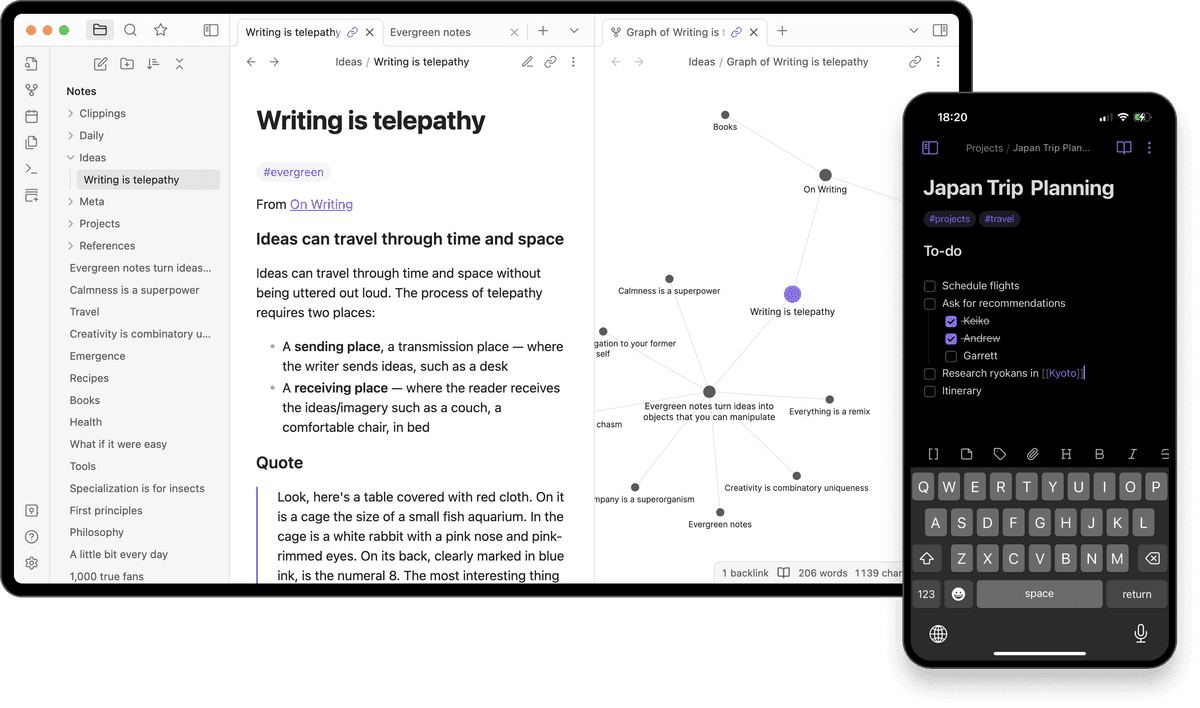
Best for: power users who want plain files and a graph view. Pricing: free for personal use, $50/year for commercial use, and $8/month for Sync. Platforms: Windows, macOS, Linux, iOS, and Android.
Obsidian stores notes as plain Markdown on your local disk. Backlinks and the graph view turn your notes into a queryable network. The plugin ecosystem (1,500+ plugins) covers AI, kanban, daily notes, spaced repetition.
Obsidian is strongest when local files, Markdown, backlinks, plugins, and encrypted Sync matter more than quick capture.
The tradeoff is setup. Obsidian has no built-in web clipper or OCR. Setup takes more work than Evernote.
3. OneNote: best free Microsoft alternative
Best for: Microsoft 365 users who want a free, freeform, stylus-friendly notebook. Pricing: free with any Microsoft account. Platforms: Windows, macOS, iOS, Android, and Web.
OneNote is the closest free product to Evernote's category. Built-in OCR, image search, ink, and Microsoft 365 integration. Web clipping (Send to OneNote) is weaker than Evernote's but adequate.
OneNote gives Microsoft users a free notebook with strong pen support, built-in OCR, and Microsoft 365 links.
The tradeoff is structure and export. OneNote has no databases, depends heavily on OneDrive, and its web clipper is less polished than Evernote's.
For more, see Evernote vs OneNote.
4. Apple Notes: best free Apple alternative
Best for: Apple users who want fast free capture. Pricing: free with any Apple ID. Platforms: iOS, macOS, iPadOS, and Web.
Apple Notes has iCloud sync, Smart Folders, tags, locked notes, iPad handwriting, and steady sync. It will not match Evernote's web clipper. It also gets messy past about 1,000 notes. For casual capture, it is fast and free.
Apple Notes is strongest when you want free, fast capture across Apple devices with locked notes and almost no setup.
The tradeoff appears when the archive gets large. Big libraries stay hard to sort. There is no graph or database layer. The workflow stays inside Apple.
5. Bear: best for elegant Markdown writing
Best for: Apple users who want a polished Markdown notes app. Pricing: free tier, with Pro at $2.99/month or $29.99/year. Platforms: iOS, iPadOS, and macOS.
Bear is the most aesthetically polished Markdown notes app on Apple. Tag-based organization (no folders), inline cross-note links, focus mode, theming, and iCloud sync on Pro. Bear 2 added richer features including PDF export and tables.
Bear is strongest when writing feel, Markdown, tags, and Apple polish matter most.
The tradeoff is scope. Bear is Apple-only, has no databases, and its web clipper is weaker than Evernote's.
6. UpNote: best low-cost direct replacement
Best for: users who want a clean Evernote-style app without the Evernote price. Pricing: free for 50 notes; Premium costs $1.99/month, $19.99/year, or $39.99 for lifetime access. Platforms: Windows, macOS, iOS, Android, and Web.
UpNote feels like Evernote 2018, clean notebooks-and-tags structure, fast cross-device sync, web clipping, and Markdown support. The lifetime price at $39.99 is the cheapest in the category.
UpNote is strongest when you want a familiar notes app, fast sync, and lifetime pricing instead of another monthly bill.
The tradeoff is depth. UpNote has weaker OCR than Evernote, fewer app links, and no AI features.
7. Joplin: best open-source self-hosted alternative
Best for: privacy-first users who want full control over their notes. Pricing: free and open source; Joplin Cloud costs about $2.99/month for Basic, $5.99/month for Pro, or $8.69/month for Teams. Platforms: Windows, macOS, Linux, iOS, Android, and terminal.
Joplin stores notes as Markdown files. It syncs through Joplin Cloud, Dropbox, OneDrive, Nextcloud, WebDAV, or your own server. End-to-end encryption is supported. The Web Clipper extension covers basic clipping.
Joplin is strongest when you want a free, open-source notes app with Markdown, self-hosting, and encryption.
The tradeoff is polish. Joplin's interface and community are smaller than Obsidian's, and its web clipper is less polished than Evernote's.
8. Logseq: best outliner alternative
Best for: people who organize ideas in outlines and daily journals. Pricing: free and open source. Platforms: Windows, macOS, Linux, iOS, and Android.
Logseq is a daily-notes outliner. It stores notes as Markdown or org-mode files on your device. Block links are more precise than Evernote tags or notebooks.
Logseq is strongest when daily notes, outlining, and block-level links match how you think.
The tradeoff is fit. Logseq is not a direct Evernote replacement, has a learning curve, and offers a weaker capture flow.
9. Standard Notes: best for private notes
Best for: users who want encrypted plain notes more than clipping, OCR, or team workspaces. Pricing: free plan, with paid plans for more storage and features. Platforms: Windows, macOS, Linux, iOS, Android, and Web.
Standard Notes encrypts notes before sync and keeps the app focused on private writing. Choose it when your reason for leaving Evernote is trust and private storage.
Use Standard Notes for simple private notes, strong encryption, and fewer moving parts.
The tradeoff is feature depth. Standard Notes is not built for rich web clipping, OCR-heavy archives, or visual research synthesis.
Comparison table
This table narrows the field. Start with the workflow you need most, then read the matching section above before you migrate notes.
| Tool | Price | Best for | Web clipper |
|---|---|---|---|
| Notion | Free / $10/mo | Structured workspaces | Adequate |
| Obsidian | Free / $50/yr | Local Markdown PKM | Plugin |
| OneNote | Free | Microsoft 365 users | Adequate |
| Apple Notes | Free | Apple casual users | Limited |
| Bear | $29.99/yr | Markdown writing | Built-in |
| UpNote | $39.99 lifetime | Direct replacement | Built-in |
| Joplin | Free | Self-hosted privacy | Extension |
| Logseq | Free | Outliner daily notes | None native |
| Standard Notes | Free / paid | Private encrypted notes | Limited |
Table 3: Pricing, user fit, and clipping support.
Quick picks by user type
Not all Evernote users need the same replacement. Here is what works best by primary use case:
- Best for Android users: Notion or UpNote. Both have solid Android apps. Obsidian works on Android, but sync takes setup. Bear and Apple Notes do not work there.
- Best for writers: Bear or Obsidian. Bear is better for polished prose and focus mode. Obsidian is better for linked notes and a long-term idea archive.
- Best basic replacement: UpNote. It copies Evernote's notebook-and-tag model most closely. It runs on every major platform and costs $39.99 lifetime.
- Best for portability: Joplin or Obsidian. Both store notes as open Markdown files. You can read them in any text editor and move them without a proprietary importer.
- Best for PDF and research notes: Use Obsidian with the Annotator plugin if you want notes beside PDFs. Use MarginNote if PDF markup is the whole job. Notion and UpNote do not handle inline PDF markup.
How to pick
Use these four questions to narrow the list:
- Do you need built-in OCR and the best web clipper? Stay with Evernote.
- Do you want structured databases or team wikis? Notion.
- Do you want local Markdown files? Obsidian or Joplin.
- Do you want cited AI answers across your notes? Atlas is the better fit to inspect.
If most saved items are papers, research notes, and source clips, compare Atlas separately. It is built to answer cited questions across a library you already have, while an Evernote-style app is the better fit for quick capture. The table shows where those jobs split.
| Workflow question | Evernote-style app | Atlas |
|---|---|---|
| Save a phone note fast | Better fit | Not the job |
| Clip full web pages | Better fit | Not the job |
| Ask a question across saved sources | Manual search | Cited answer |
| Trace answer back to source notes | Manual checking | Built into the answer |
Table 4: This matrix separates capture-first Evernote replacements from Atlas's source-review workflow.
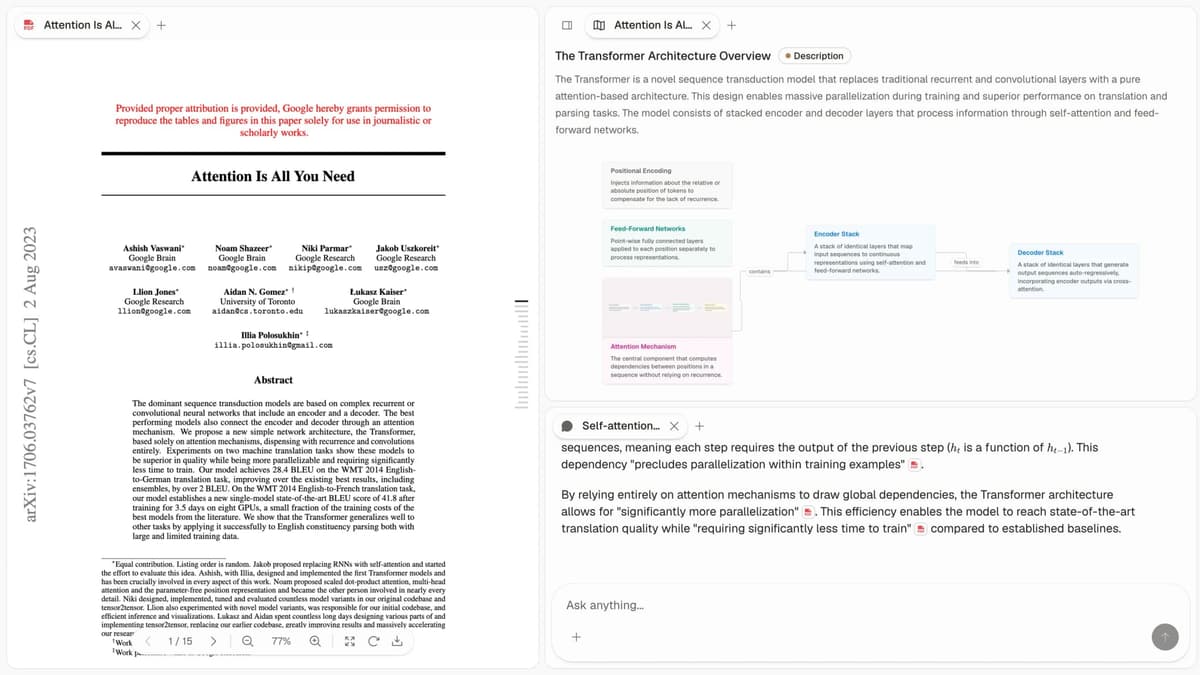
For that narrow path, read Atlas vs Evernote before you move a research archive.
If you want a direct, low-cost Evernote replacement that feels familiar, UpNote at $39.99 lifetime is the cheapest path. If your notes are mostly papers, see our Zotero alternatives roundup.
How to migrate from Evernote
Evernote exports notes as ENEX, its XML export file. It keeps notes, files, tags, and creation dates. The right import path depends on the app:
- To Notion: Use Notion's built-in Evernote import. Go to Settings, Import, then Evernote. It reads ENEX, keeps files, and maps tags. Clipped HTML tables often need cleanup. Plan 30-60 minutes for a 2,000-note library.
- To Obsidian: Use the Obsidian team plugin called Importer. It turns ENEX into Markdown files in your vault. Files move into a separate folder. Web clips become flat Markdown.
- To Joplin: Use File, Import, then ENEX. Tags, notebooks, and files carry over. This is the cleanest ENEX import outside Notion.
- To Bear: Import ENEX on macOS or iOS. Tags become Bear tags. Formatted notes work well, but embedded web clips become plain text.
- To UpNote: Import the ENEX file directly. Notebooks map to UpNote notebooks. This is the easiest path if you want the closest Evernote feel.
Before you migrate: Test one small notebook first. Keep it under 50 notes. Check files, tags, and formatted tables. Keep Evernote active for 30 days as a read-only fallback. ENEX is documented, so exporting does not lock you in.
When NOT to switch
Evernote remains best in class on:
- Web clipping: 5 capture modes, clean rendering, reliable across years.
- OCR: image, PDF, and handwriting indexed across tens of thousands of notes.
- Mobile capture speed: 2-3 seconds from app open to saved note.
- Cross-platform sync: fast and stable on Personal.
If clipping and OCR define your workflow, other apps are a step backward, and the move takes real work. If you rely on those jobs each day, keep Evernote for now.
Final verdict
Pick the alternative to Evernote that fixes your biggest workflow problem. Choose Notion for structure. Choose Obsidian for Markdown files. Choose OneNote for a free Microsoft notebook. Choose Apple Notes for free Apple capture. Choose Bear for Markdown writing. Choose UpNote for a low-cost direct replacement. Choose Joplin for open-source control. Choose Logseq for outlining. Choose Standard Notes for private plain notes.
Do not migrate just to try something new. Move when one clear benefit is worth the time spent exporting, importing, and checking your notes. Test with one small notebook first.
AtlasCompare Atlas with Evernote for cited synthesis
See how Atlas and Evernote differ for clipping, archives, and cited synthesis.
Frequently Asked Questions
Notion is the best alternative for users who want structure and team collaboration. Obsidian is the best for local-first Markdown power users. OneNote is the best free alternative inside Microsoft 365. Apple Notes is the best free alternative for Apple-only users. Bear ($2.99/mo) is the best for elegant Markdown writing. UpNote ($39.99 lifetime) is the best low-cost direct replacement. Joplin (free) is the best open-source replacement. Atlas ($20/mo Pro) is the best for AI-grounded retrieval with cited answers.