
Personal Knowledge Management (2026): The Practical Guide
Personal knowledge management in 2026: compare PARA, Zettelkasten, BASB, Obsidian, Notion, Atlas, and a 30-day plan for reusable knowledge at work and research.
- Byline

Summary
Use personal knowledge management to capture, organize, retrieve, and synthesize information so useful ideas keep compounding.
The updated guide compares PARA, Zettelkasten, Building a Second Brain, Obsidian, Notion, Atlas, and Logseq.
Method fit matters more than tool novelty: PARA supports projects, Zettelkasten supports thinking, and BASB supports capture.
Atlas fits PKM workflows that need source-grounded answers and maps across notes, PDFs, and saved ideas.
Personal knowledge management sounds abstract. In daily work, it is the gap between saving ideas and being able to use them later. This guide covers what PKM is and the 3 methods worth knowing. It also compares the 5 tools that hold up in 2026 and gives you a 30-day starter workflow. It uses real prices and direct tradeoffs.
I tested this guide against my 10/60/30/90 PKM readiness rubric. A system is ready when it clears 10-second capture, 60-second retrieval, a 30-minute weekly review, and a 90-day tool freeze. Those numbers matter more than a large note count because they show whether the system can survive normal work.
The 10/60/30/90 rubric is a PKM readiness test. The capture-find-trust-reuse score shows which part of a notes system is broken. Source trails matter more than graph density when a note becomes evidence in a decision, paper, or plan. If weekly maintenance takes more than 30 minutes, the system is too heavy.
For a deeper look at how to wire a system end-to-end, see our personal knowledge management system guide.

 Atlas
AtlasBuild a source-grounded knowledge base
Upload papers and saved sources, then ask cited questions across them.
PKM tools by use case
For a deeper framework across second-brain apps, see our second-brain apps guide. That guide scores cognitive load, lock-in, and graph depth across 8 tools.
| Tool | Method fit | AI synthesis | Source grounding | Citation support | Price (2026) |
|---|---|---|---|---|---|
| Notion | PARA, team workspaces, databases | Good with Notion AI across workspace pages | Page history and links, but weak source trails | Limited unless you maintain source fields by hand | Free / $10 mo Plus |
| Obsidian | Zettelkasten, local Markdown, linked notes | Depends on plugins and model setup | Strong if files, links, and Zotero keys are maintained | Strong with citation plugins, but setup is manual | Free + $50/yr Sync |
| Logseq | Daily notes, outlines, block references | Limited unless extended with plugins | Block links help, but source files need care | Possible with plugins and manual fields | Free, open-source |
| Roam Research | Networked thought and block references | Limited native AI synthesis | Block graph helps, but source evidence is manual | Manual citation tracking | $15/mo or $165/yr |
| Apple Notes | Fast capture and Apple-only notes | None built for synthesis across many notes | Folders, tags, and search only | Manual citations only | Free |
| Atlas | Research-heavy PKM with PDFs, saved sources, and maps | Cited answers across uploaded sources | Answers link to source notes and documents | Built around cited answers | Free / $20/mo Pro |
Table 1: The tools differ most in method fit, source traceability, collaboration, and maintenance effort.
What personal knowledge management is
Personal knowledge management systems succeed when they do 4 jobs well:
- Capture: every interesting idea, quote, fact, or decision lands somewhere you trust.
- Organize: structure (folders, tags, links) is light enough to maintain and rich enough to find things later.
- Retrieve: when you need a fact 6 months later, you find it in under a minute.
- Synthesize: when you write, decide, or teach, the system reduces the time from question to answer.
A failing PKM system usually breaks at one of those 4 jobs. People who "tried PKM and bounced" often spent too much time filing notes. They spent too little time finding and using them. The system became a gallery for notes rather than a workshop for thinking.
The point is compounding. Each new note should make old notes easier to use. Links, search, source trails, and summaries all help. A flat folder of isolated notes is only a filing cabinet.
A 2-minute PKM fit test
Before choosing a method or one of the broader knowledge management tools, score your current system from 0 to 2 on each job. I use this test when reviewing a messy vault, notes app, or research folder because it separates the real failure from the tool complaint.
- Capture: 0 means ideas live in many inboxes. 1 means most ideas land in one place. 2 means capture is fast on every device you use.
- Find: 0 means search rarely works. 1 means you can find recent notes. 2 means you can find a 6-month-old fact in under a minute.
- Trust: 0 means claims have no source trail. 1 means some notes link to sources. 2 means important claims point back to a note, PDF, page, or citation.
- Reuse: 0 means notes pile up. 1 means you review them sometimes. 2 means saved ideas turn into decisions, drafts, study notes, or research answers.
Your lowest score picks the fix. Low capture needs a simpler inbox, so start with Apple Notes, Notion, or Obsidian mobile capture. Low find needs PARA or stronger search. Low trust needs better source links, Zotero keys, or a cited-answer tool. Low reuse needs a weekly review, Zettelkasten links, BASB distillation, or Atlas-style synthesis across sources.
First-party PKM maintenance benchmark
PKM works when saved material comes back into use. I evaluate a system with a 4-step loop: capture a source, retrieve it without browsing folders, make a decision or draft from it, then review what changed. That loop catches the collector's fallacy early. A large archive with weak retrieval is only a storage habit.
The learning side matters because memory improves when you pull an idea from memory and revisit it later. In PKM terms, that means search, questions, backlinks, and weekly reviews are more important than a perfect folder tree. A note that supports a decision, argument, study session, or synthesis answer has paid rent.
| Benchmark | Target | Failure sign |
|---|---|---|
| Capture speed | Save a source in under 10 seconds | Ideas stay in browser tabs, screenshots, or memory |
| Retrieval speed | Find a 6-month-old claim in under 60 seconds | Search returns too many vague notes |
| Reuse proof | Use one note in a decision, draft, answer, or plan | Notes grow, but output does not |
| Review cost | Spend 30 minutes each week and surface one reusable idea | Maintenance becomes a separate hobby |
| Tool stability | Keep the same core tool for 90 days | Setup work replaces knowledge work |
Table 2: This is why analog notebooks can still work for small systems and why they strain at research scale. Paper is fast, private, and durable. It is weak at cross-source search, transclusion, backup, and citation trails. Digital tools add data models: files in Obsidian, blocks in Logseq, databases in Notion, and source-linked documents in Atlas. The right model is the one that makes retrieval and reuse happen with the least maintenance.
The 3 PKM methods worth knowing
There are dozens of named methods. Three matter.
PARA (Tiago Forte, 2017)
Projects, Areas, Resources, Archives. Every note lives in one of those 4 buckets, sorted by actionability.
- Projects: short-term efforts with a defined goal (ship the redesign, write the dissertation chapter).
- Areas: ongoing responsibilities (health, finances, the team you manage).
- Resources: topics of interest you draw from (machine learning, woodworking, Stoic philosophy).
- Archives: anything from the first 3 that is no longer active.
PARA is action-oriented. The question it answers is "where does this go?" The answer is always one of 4 places. It is the easiest method to start with. It also survives busy weeks because there are only 4 buckets.
PARA suits anyone who manages projects or carries clear ongoing responsibilities. The 4 categories are narrow enough that mis-filing is nearly impossible.
Zettelkasten (Niklas Luhmann, 1950s)
Zettelkasten is a slip-box method. Each note is atomic (one idea per note), densely linked to other notes, and assigned a unique ID. The corpus becomes a graph, new ideas emerge by following links and noticing patterns.
Niklas Luhmann, the German sociologist, produced 70+ books and 400+ academic articles. He worked from a slip-box of roughly 90,000 notes over 30 years. The method is famously productive for writers and researchers and famously slow to set up.
In 2026, tools like Obsidian, Logseq, and Atlas make links and graphs much easier. They remove much of the manual ID and cross-reference work Luhmann had to do. For a deeper walkthrough of the Ahrens method, see our how to take smart notes (PDF guide).
Zettelkasten works best for researchers, thesis writers, and people who build new ideas from many sources.
Building a Second Brain (Tiago Forte, 2022)
BASB is built on CODE: Capture, Organize, Distill, Express. Capture widely, organize lightly using PARA, distill through progressive summarization (highlight, then bold, then summarize), express by remixing notes into output.
Progressive summarization is the load-bearing technique. You read a 5,000-word article, highlight 500 words, bold 100, summarize the gist in 20. The next time you visit, the 20 words carry the cognitive load.
BASB fits people who read, listen, and save a lot. It helps them reuse ideas without reading each source again.
How to mix methods
Most working PKM systems use PARA for filing and Zettelkasten or BASB for thinking. PARA gives the system a simple spine. The other method gives ideas room to connect. Pick one of each. Do not collect rituals.
For a method-by-method comparison with examples, see our how to take good notes guide.
The 5 tools worth picking in 2026
There are 100+ apps in the PKM space. Five hold up.
1. Obsidian: best for local-first power users
Best for: writers, researchers, technical users.
Pricing: free for personal use, $50/year commercial, $8/month Sync (cross-device), $10/month Publish (web hosting), $25/month Catalyst supporter.
Obsidian stores notes as plain Markdown files on your local disk. There is no required cloud. There is no hard lock-in. Its best feature is the link graph: every [[link]] between notes appears as a backlink. The visual graph shows your notes as a network. The plugin ecosystem has 1,500+ community plugins for boards, tasks, citations, and spaced repetition.
It is fast and portable across editors. Plain-file backups are simple. The tradeoffs are setup work, uneven AI Q&A plugins, and a mobile app that trails the desktop app.
2. Notion for structured team workspaces
Best for: teams, project managers, anyone who thinks in databases.
Pricing: $0 Personal, $10/user/month Plus, $15/user/month Business, $10/user/month AI add-on.
Notion's database is the moat. Every page is made of typed blocks, and tables can be databases with filters, relations, and rollups. Notion AI ($10/month) can answer questions across a workspace, draft text inline, and summarize pages.
Notion is strong for structure, templates, teams, and built-in AI. Its tradeoffs are cloud reliance, limited offline access, slower large workspaces, and exports that lose database structure.
For a head-to-head, see Notion vs Obsidian.
3. Atlas for synthesis with citations
Best for: anyone whose real job is "synthesize what I know" rather than "store what I know."
Pricing: $20/month Pro for unlimited AI usage.
Atlas is an AI-native knowledge workspace that treats your notes, web clips, and uploaded documents as a queryable corpus from day one. Three things it does that traditional PKM tools do not:
- Cited answers: every answer links back to the specific notes or sources that supported it. No hallucinated facts.
- Mind maps from multiple sources: 1-click visual maps across your corpus, surfacing connections backlinks miss.
- Compounding context: each new note enriches the answers Atlas can give about your existing knowledge.
Atlas is privacy-first. Your data is not used to train shared models. If you want to ask your notes a question and get a cited answer, Atlas is the most direct path. (Atlas is the product behind this blog.)
4. Logseq: best for daily-notes outliners
Best for: daily-note users, outline thinkers, and open-source fans.
Pricing: free, open-source. Optional Logseq Sync for cross-device.
Logseq stores notes as Markdown or org-mode files locally. Its outliner treats every bullet as a unit you can query and link. Daily journals are the home page. Tasks, references, and notes grow from there. Block-level backlinks are more specific than Obsidian's page-level links.
It is free, open-source, and built around daily notes. The tradeoffs are fewer plugins than Obsidian, slower large graphs, and a learning curve if you do not think in outlines.
5. Apple Notes for effortless capture
Best for: Apple-only users who want zero friction.
Pricing: free with any Apple ID.
PKM fans often dismiss Apple Notes, but it is a solid capture tool. It has iCloud sync, Smart Folders (saved filters), tags, handwriting recognition on iPad, and collaborative notes. It lacks a graph view and Notion-style database queries. It makes up for that with speed, zero cost, and reliable sync.
The case for it is zero friction, Apple-wide access, and no cost. The case against it is weak structure once the library gets large. It also has no graph view, no AI Q&A, and a hard lock to Apple devices.
A 30-day starter workflow
Skip the system-design phase. Use this:
-
Days 1–2: Pick the spine. Choose one tool from the 5 above. Default to Obsidian for local-first, Notion for structure, or Atlas for AI-grounded retrieval. Install on every device.
-
Days 3–7: Capture 30–50 starter notes. Capture anything: a quote from a book, a meeting decision, a half-formed idea. Do not organize yet. The goal is volume. Structure follows substance.
-
Days 8–14: Pick a filing method. Use PARA by default. Create 4 top-level folders or tags (Projects, Areas, Resources, Archive) and re-file the starter notes. Resist sub-folders for now.
-
Days 15–21: Add daily capture. Open the tool every day. Capture at least 3 things: one from what you read, one from what you did, one from what you thought. Do not edit or perfect. The only failure mode is not opening the tool.
-
Days 22–30: Run a weekly review. Spend 30 minutes once a week. Re-file new notes, link them to existing ones, archive completed projects, and surface one idea worth writing about.
That is the system. After 30 days you have roughly 100 notes, a habit, and a working filing structure. The compounding starts in month 2, when retrieval pays off.
The traps that kill PKM systems
- Tool-hopping: rebuilding the system every month. Pick a tool, commit for 90 days minimum.
- Over-tagging: 50 tags become 500. Limit yourself to about 10 top-level tags or none at all.
- Capture without distill: 5,000 highlights you never re-read. Use progressive summarization or stop highlighting.
- Public-system bias: copying someone else's elaborate template. Their context is not yours, their friction will become yours.
- Optimizing organize at the cost of retrieve: a beautiful system has still failed if it is slow to search.
When AI changes the equation
Traditional PKM relies on you tagging, linking, and filing. AI-native tools like Atlas move some of that work to search and synthesis. Semantic search handles rough structure while you focus on capture quality. The question shifts from "where does this go?" to "what do I have on this topic?"
This shift matters for 3 reasons:
- Lower setup cost: no method to learn before you can use the system.
- Better retrieval: ask a plain-language question and get a cited answer.
- Compounding gets visible faster: the synthesis layer is built in. Value can show up in weeks instead of after years of manual linking.
The tradeoff is privacy and citation. Use a tool that processes your data privately and links each claim to a source note. AI without citations can sound sure while being wrong. AI with citations is easier to check.
A source-grounded Atlas workflow
For research-heavy PKM, the useful moment is not "AI writes a note." It is "AI connects source material I already trust."
A typical Atlas flow looks like this:
- Upload 5 to 10 PDFs, saved articles, or source notes on the same topic.
- Ask a synthesis question, such as "What do these sources say about attention, memory, and retrieval?"
- Open the cited answer and check the source links before reusing the claim.
- Use the visual map to spot themes, gaps, and follow-up questions.
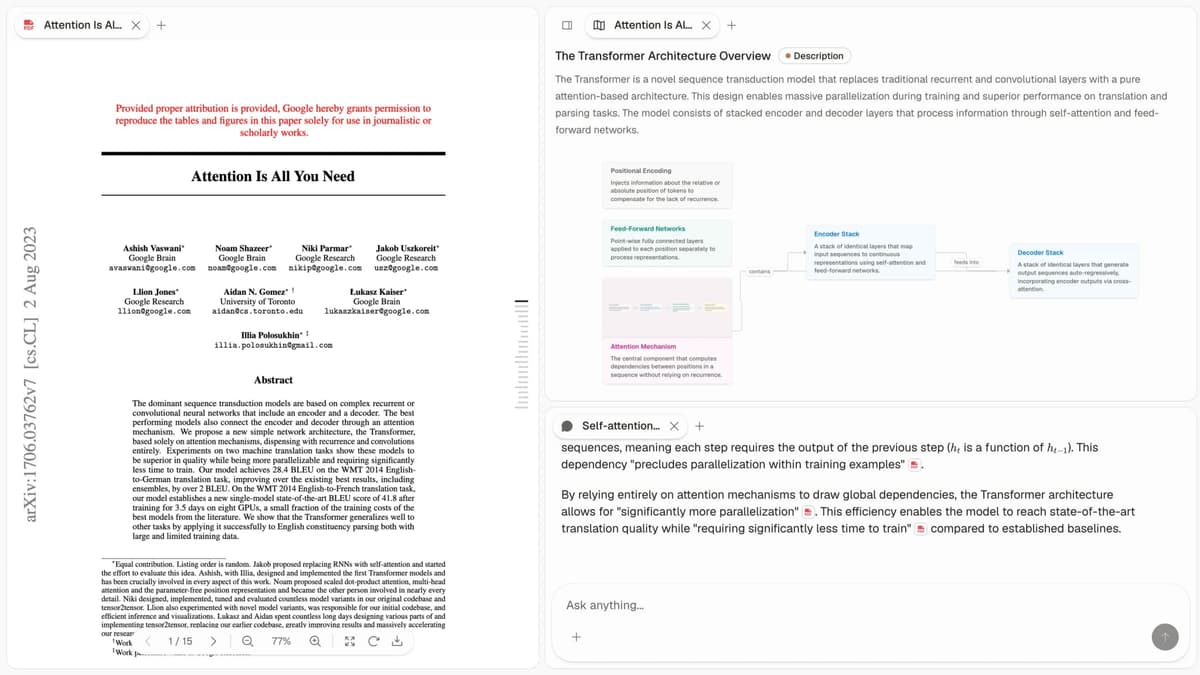
First-party Atlas product screenshot. It shows the source-grounded PKM workflow: a paper on the left, a visual map on the right, and a cited answer panel below.
Decision path
Use these recommendations to choose the tool that matches your main constraint:
- Are you Apple-only and want zero friction? Apple Notes.
- Do you want local-first, plain-file portability, plugins? Obsidian.
- Do you need databases, templates, team collaboration? Notion.
- Do you want AI-grounded retrieval with cited answers and mind maps? Build the knowledge base in Atlas, then check each answer against its cited source passage.
- Do you live in a daily-journal outliner workflow? Logseq.
For more direct tool matchups, see Notion vs Obsidian, Notion vs OneNote, and knowledge graph tools.
If daily reflection is your primary capture habit, the best app for journaling guide narrows the choice to lower-friction tools.
Final verdict
In 2026, personal knowledge management is less about choosing the perfect method and more about running a system long enough to compound. PARA is the safest spine. Zettelkasten is the highest-ceiling thinking method. AI-native tools are the fastest path from capture to synthesis. Pick one tool, run it for 90 days without rebuilding, and let the system do its work.
AtlasBuild a source-grounded knowledge base
Upload papers and saved sources, then ask cited questions across them.
Frequently Asked Questions
Personal knowledge management (PKM) is the practice of capturing, organizing, and reusing what you read, learn, and think, so it compounds over time instead of evaporating. A working PKM system has 4 jobs: capture (clip, type, record), organize (tag, link, file), retrieve (search, query, ask), and synthesize (write, decide, share). Tools like Obsidian, Notion, and Atlas handle the mechanics, methods like PARA, Zettelkasten, and BASB handle the structure. The goal is not a perfect archive, it is reliable retrieval when you need it.