
How to Take Good Notes 2026: The Methods That Actually Work
How to take good notes: the 5 methods (Cornell, outlining, mapping, charting, sentence) plus what cognitive science says about active recall, spacing.
- Byline

Summary
Use the 30/10/3 diagnostic audit: recall for 30 seconds, write 10 cue questions, and link 3 ideas to old notes.
The updated guide covers Cornell, outlining, mapping, charting, sentence notes, handwriting, laptop capture, and note-taking tools.
Watch for transcript debt, cue debt, and link debt when notes feel complete but fail during review.
Tools matter less than method consistency, active recall, and whether the notes help you teach the topic back.
Most note-taking advice fails because it starts with a template. Start with the job instead, because good notes make you retrieve ideas later, not just store words today.
The methods that survived for decades, including Cornell, outlines, and maps, all use two plain ideas: active recall and spaced review. The quick test I use is 30/10/3: after class, spend 30 seconds recalling the page, write 10 cue questions, then link 3 ideas to old notes. A page that fails all three is storage at best. Transcript debt means you copied too much, cue debt means you have no recall prompts, and link debt means the note cannot connect to older ideas.
This guide covers how to take good notes for lectures, reading, and meetings. It also covers what memory research says and which tools fit each method. For deeper detail on Cornell, see how to take Cornell notes.

 Atlas
AtlasAtlas for source-backed research notes
Explore Atlas for cited answers across papers, PDFs, and source documents.
What Good Notes Are
For a deeper tool framework, see our second-brain apps guide.
Good notes are not a transcript. They are a future-you cheat sheet for a topic you will need to recall, explain, or apply later.
Three properties distinguish good notes from transcripts:
- Dense: A 50-minute lecture should produce one Cornell page or one mind map per major topic. Five pages of bullet points is a transcript.
- In your own words: The act of compressing the lecturer's words into yours is what encodes the material.
- Reviewed on a spaced schedule: Notes you never reopen are worse than no notes. You spent the effort of capture but skipped the gains of review.
The single most quoted study on notes is Mueller and Oppenheimer (Princeton, 2014). Across three experiments, laptop users wrote more words and copied more phrases. They also scored worse on concept questions one week later. The useful lesson is not "always write by hand." The useful lesson is "compress the idea."
Typing removes friction, so it tempts you to copy. Writing by hand adds friction, so it nudges you to choose. If you type, type less. If you write by hand, let the bottleneck do useful work.
The 30/10/3 Note Audit
Use this audit after any lecture, chapter, or meeting. It gives you a quick way to tell whether the notes are ready for review.
| Test | What to do | What failure means |
|---|---|---|
| 30-second recall | Close the notes and explain the page out loud. | You copied words but did not form a model. |
| 10 cue questions | Write questions the page should help you answer. | The page has facts but no retrieval hooks. |
| 3 old-note links | Connect three ideas to earlier notes, examples, or problems. | The note is isolated and will be hard to reuse. |
Table 1: 30/10/3 note audit tests and what each failure indicates
This audit separates three common failures. Transcript debt means you captured too much. Cue debt means you have no prompts for recall. Link debt means the note has no place in a larger system. The audit is intentionally diagnostic rather than decorative, because its purpose is to expose retrieval gaps before review feels fluent.
I use the same split when reviewing source-heavy research notes. If a note cannot answer a cue or point back to a source, I do not treat it as ready to trust.
That is where Zettelkasten belongs. Do not use it for every class bullet. Use it when one idea should survive beyond the current test, project, or meeting. Turn that idea into a short, named note and link it to nearby ideas.
Set purpose and capture limits
Preparation matters because note-taking is a cognitive-load problem. Your working memory is small. If you decide the note format, the goal, and the review plan while the lecture is already moving, you spend attention on logistics instead of ideas.
This preparation step is not decorative. It externalizes priorities, reduces attentional switching, and prevents the shallow fluency that makes copied notes feel more useful than they are.
Without that constraint, the session becomes a simultaneous exercise in listening, filtering, formatting, prioritizing, and future retrieval design, which is too much cognitive work for a single pass.
Set one purpose before you begin. Are you trying to pass a quiz, brief a team, compare tools, or build a long-term knowledge base? The purpose decides what counts as signal. A quiz note needs cue questions. A team note needs decisions and owners. A research note needs source links and reusable claims.
Also set a capture limit. For a lecture, that might mean one Cornell page per major topic. For a chapter, it might mean five questions before you write any bullets. For a meeting, it might mean only decisions, actions, open issues, and dates. Limits reduce transcript debt before it starts.
Why Active Recall and Spacing Matter
Two findings drive every good note method.
Active recall means pulling an idea from your head before you look at the source. Roediger and Karpicke (2006) showed why this matters: testing yourself helps long-term recall more than rereading. Rereading feels smooth, so it creates an illusion of competence. A blank-page recall attempt feels harder, but it tells you what you know.
Spaced review means coming back after longer gaps, such as 1 day, 1 week, and 1 month. The forgetting curve, first plotted by Hermann Ebbinghaus in the 1880s, shows memory drops fast after first exposure. Each successful recall slows that drop.
Both ideas point to the same design rule for good notes: the page should make active recall and spaced review easy.
Cornell does this with the cue column. Mind maps do it through visual chunks that trigger re-tracing. Outlines do it through nested headings. The structural form differs. The underlying mechanism is the same.
5 note-taking methods
1. Cornell notes
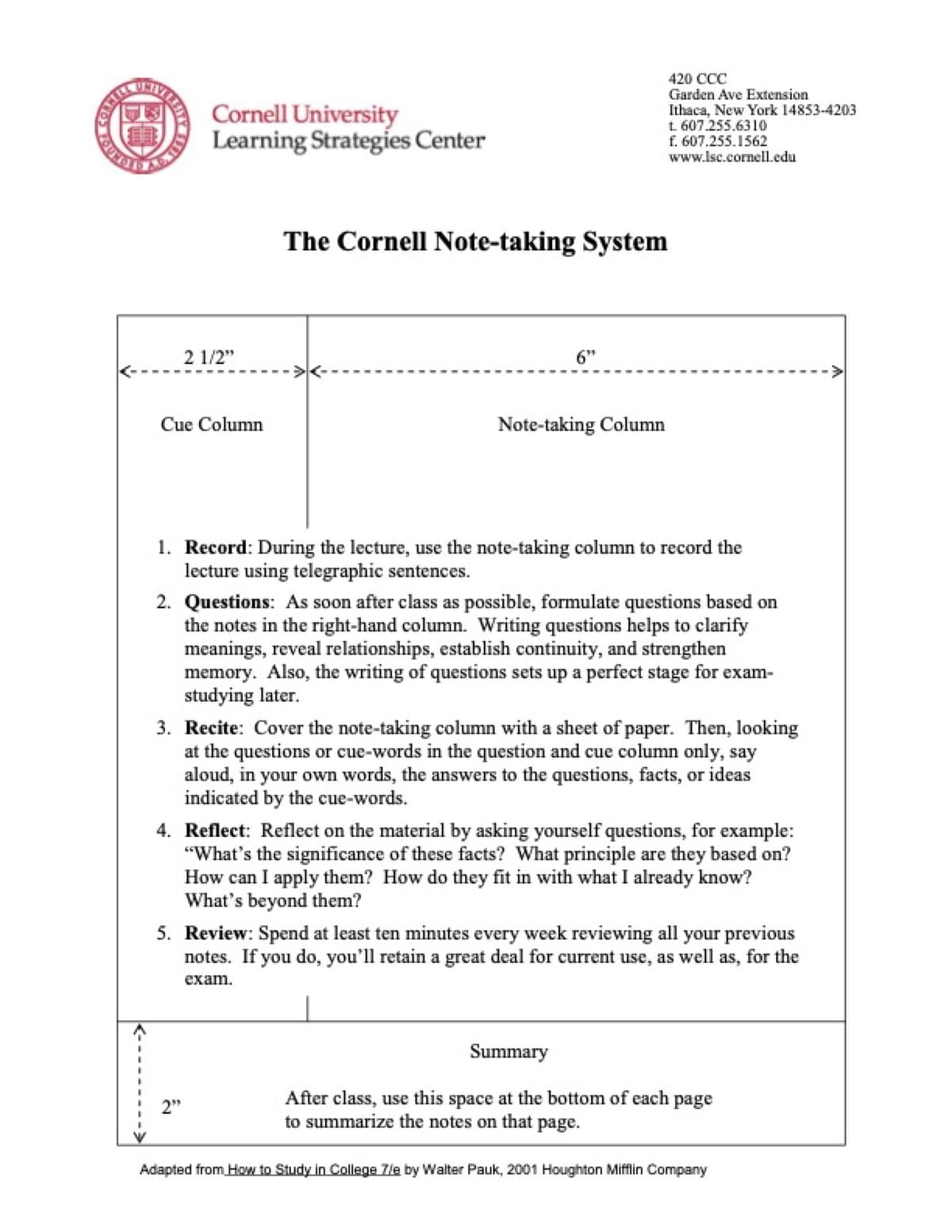
Cornell notes use one page split into three zones:
- Right column (~6 in wide): main notes, captured during the lecture.
- Left column (~2.5 in wide): cue questions, written within 24 hours after the lecture.
- Bottom strip (~2 in tall): 2-3 sentence summary, written within 24 hours.
To review, cover the right column and use the left-column cues to recall what's there.
Best for: tested lectures in school, college, or work training.
Strengths: forces active recall by design. The cue column is hard to skip if you set up the page correctly.
Weaknesses: slow for fast classes. It is also a poor fit for open-ended brainstorms.
For the full method, see how to take Cornell notes.
2. Outlining
A hierarchy of bullet points:
- Photosynthesis
  - Inputs
    - Light
    - CO2
    - Water
  - Outputs
    - Glucose
    - O2
  - Stages
    - Light reactions
    - Calvin cycle
Most note apps default to outlines. Notion, OneNote, Apple Notes, Bear, and iA Writer all make indented bullets easy.
Best for: textbook chapters, docs, and any topic with parent-child links. For symbol-heavy subjects with theorems and proofs, see our how to take math notes guide.
Strengths: fast to type, easy to skim, native in nearly every app, scales to long documents.
Weaknesses: invites over-capture. A 60-bullet outline of a chapter is still a transcript. Compress it.
To turn an outline into review-ready notes, write the headings as questions before each section. Reading the question first, then trying to recall the bullets, is the active-recall mechanic.
3. Mind mapping
Mind maps put one idea in the center and branch outward. Branches hold subtopics. Leaves hold details. Cross-links show ideas that belong together.
Best for: brainstorms, plans, literature review, exam prep, and system design.
Strengths: shows links that linear notes hide. You also remember where an idea sat on the page, which can help recall.
Weaknesses: slow during fast-moving capture (you can't easily mind-map a 50-minute lecture in real time). Best generated after linear capture, as a synthesis step.
MindNode, Xmind, Whimsical, and MindMeister handle maps natively. Other note apps support maps through side tools, such as Excalidraw in Obsidian, Whiteboards in Notion, and Freeform on macOS.
For tool comparisons, see best mind mapping software.
4. Charting
Charting turns notes into a table. Rows are items. Columns are shared traits. Each cell is one fact.
| Tool | Pricing | Free tier | Best for |
|---|---|---|---|
| Notion | $10/mo | Yes | Teams |
| Obsidian | $50/yr commercial | Free personal | Plain-text |
| Atlas | $20/mo | Yes | Cited AI |
Table 2: Sample charting table comparing note-taking tools on pricing and use case
- Best for: topics that compare things on the same axes, such as tools, products, events, reactions, or drugs.
- Strength: forces you to name the comparison axes. That column design is part of the thinking.
- Weakness: does not suit stories or arguments. Do not chart a narrative.
Charting works in any app that renders tables: Notion, OneNote, Markdown editors, Excel, Google Docs. Notion's databases make charting more powerful by adding filters and views to the same underlying table.
5. Sentence notes
Sentence notes are dated lines in time order. You add almost no structure while you capture.
2026-05-06, 14:00, all-hands meeting
- Q1 revenue $4.2M, up 18% YoY
- New product launch slipped to June 15
- Open: who owns hiring plan?
- Next standup Friday 10am
Best for: fast-moving meetings, interviews, calls, situations where structure isn't yet visible.
Strengths: zero capture overhead. You write what's said, when it's said.
Weaknesses: unprocessed. Sentence notes need a follow-up step (Cornell-style cues, an outline, or a summary) within 24 hours, or they decay into junk.
How to Pick a Method
Match the format to the content by asking what the session will demand during capture and what kind of review you need later.
| Content type | Method |
|---|---|
| University lecture you'll be tested on | Cornell |
| Textbook chapter | Outline |
| Brainstorming or planning | Mind map |
| Comparing tools / drugs / historical events | Chart |
| Live meeting or interview | Sentence (then process) |
| Long-running research project | Mind map + Cornell per source |
Table 3: Note-taking method matched to content type
Most serious students stack two or three methods. Use Cornell during class, an outline during chapter reading, and a mind map before the exam. For visual notes without losing recall, our how to take aesthetic notes guide covers the 20% rule.
Use the bottleneck matrix when two methods both seem plausible. Scores are 1-3, where 1 is light and 3 is heavy.
| Method | Capture load | Recall strength | Reuse strength | Best reuse path | |---|---|---|---| | Cornell | 2 | 3 | 2 | Study sessions and quizzes | | Outline | 1 | 2 | 2 | Summaries and reference docs | | Mind map | 3 | 3 | 3 | Exam synthesis and project planning | | Chart | 2 | 2 | 3 | Decisions and memorized contrasts | | Sentence notes | 1 | 1 | 1 | Meeting records and action lists |
Bottleneck matrix comparing note-taking methods on capture load, recall strength, and reuse strength (1 = light, 3 = heavy)
The tradeoff is predictable. Low capture load helps during fast sessions, but it creates more processing work later. High capture load slows you down, but it can make review easier if the format creates strong cues.
Add a Question-First Pass
The fastest upgrade is not a new app. It is a second pass that turns notes into questions.
After capture, scan the page and write one question for each useful chunk. A heading like "Krebs cycle" becomes "What enters and leaves the Krebs cycle?" A bullet like "working memory overload causes shallow notes" becomes "What makes notes shallow?"
This question-first pass fixes the illusion of competence. If you cannot answer the question without looking, you do not know the idea yet. That gap is the most useful thing your notes can show you.
For long-term knowledge work, add one more step: make one atomic note for any idea you expect to reuse. This is the Zettelkasten move. Keep the note short, give it a clear title, and link it to one or two related notes. Cornell helps you learn a class. Zettelkasten helps ideas survive across projects.
Take notes by situation
During lectures
The hardest case is real-time capture because you have to listen, filter, and write before the speaker moves on. Use three rules.
First, capture concepts in your own words. Put the claim the lecturer is making into one compressed phrase. If a lecturer spends 90 seconds on the Krebs cycle, write one compressed line: "Krebs cycle: pyruvate to CO2, makes NADH/FADH2 in the mitochondrial matrix." Do not write four paragraphs.
Second, leave space between ideas. White space gives you room for cues later. If the page is wall-to-wall text, the cue pass has nowhere to go.
Third, mark questions fast. When the lecturer says something unclear, write a ? and one word. Come back later. Marking the question now is faster than trying to rebuild it from memory. For a college-specific 1/7/30/90 review schedule, see our how to take good notes in college guide.
For lecture-specific tools, the iPad with Apple Pencil is the strongest pick. Notability ($7.99-$20/mo) and GoodNotes (Essential $11.99/yr, Pro $35.99/yr) both ship Cornell templates and reduce handwriting latency to imperceptible levels. See best note-taking apps for iPad.
While reading
Different rules apply to text you control the pace of, because you can pause before writing and use the structure of the source.
First, read the section before you write notes. First-pass reading is for sense-making. Notes come after that. Doing both at once produces transcripts.
Second, use the chapter's headings. Most textbook chapters show their structure in headings. Turn each heading into a question. Your notes are the answers.
Third, mark what you cannot compress yet. If a paragraph is dense, mark the page number and come back. Some material needs two reads. For book-length reading, our how to take notes on a book guide covers the 4-pass method.
For research reading specifically, see academic research software and AI for literature review.
In meetings
Meetings need sentence notes during capture and structured cleanup after, because the value usually lives in decisions, owners, dates, and open issues.
During the meeting, write decisions, action items with owners, open questions, and deadlines. Skip opinions and chatter.
Within 24 hours, convert the notes to a three-line summary you could send to someone who missed the meeting. Cornell-style cues are overkill for most meetings. A simple "decisions / actions / open" format works fine.
For meeting-specific tools that auto-transcribe and summarize, see best meeting notes app.
Handwritten vs Digital Notes
Choose the medium by bottleneck. Handwriting is better when the main risk is copying too much. Typing is better when the main risk is losing search, links, or team access.
For lectures, handwriting often wins because the slower pace forces selection. For documentation, research, and meetings, digital notes often win because search and links matter later. A hybrid setup is common: write during capture, then store the cleaned version digitally.
The mistake is treating medium as identity. Paper, iPad, laptop, and AI tools are inputs. The real test is whether the page gives you cues, links, and a review path.
Which Note-Taking Tool Should You Choose?
The tool set splits into four groups, and the right choice depends on whether your bottleneck is handwriting, syncing, ownership, or source-backed synthesis.
- Handwriting on iPad: Notability ($7.99/mo Plus, $20/mo Pro), GoodNotes ($11.99/yr Essential, $35.99/yr Pro), Apple Notes (free), and Noteshelf. These apps suit lecture handwriting and PDF markup. Cornell templates ship by default.
- Cloud workspaces: Notion ($10/mo Plus, free tier), OneNote (free with Microsoft account), and Evernote. These workspaces suit typed, structured notes that must sync across devices or support team collaboration.
- Plain-text tools: Obsidian (free for personal use, $4/mo Sync), Bear ($2.99/mo, $29.99/yr), and iA Writer ($29.99 one-time desktop). These tools suit long-running personal knowledge bases and Markdown ownership.
- AI knowledge tools: NotebookLM (free, Google) and Atlas ($20/mo Pro). These tools suit notes tied to source documents when you need cited answers across many sources.
For the comparison ranking, see best note-taking apps for students, best note-taking apps for college students, and best knowledge management software.
What to Do Next
To take good notes, turn capture into a review system rather than a storage habit. Use this checklist after choosing your method:
- Pick a method that matches the content. Use Cornell for lectures, outlines for textbooks, maps for brainstorms, charts for comparisons, and sentence notes for meetings.
- Compress during capture. Write in your own words and leave space between ideas.
- Process within 24 hours. Add cue questions or a short summary while the material is fresh.
- Review after 1 day, 1 week, and 1 month. Spacing is what makes notes durable.
- Pick a tool that fits your input. Use Apple Pencil on iPad for handwriting, Notion or OneNote for typing, Obsidian for plain text, and a source-backed AI tool only when your notes depend on research sources.
The methods are more than 50 years old because they match how memory works. Active recall and spaced review are constants. Tools change. The principles do not.
For deeper detail on Cornell, see how to take Cornell notes. For tool picks, see best note-taking apps for students.
For source-specific workflows, see how to take notes from a video, how to take notes in nursing school, and best apps for nursing students.
AtlasAtlas for source-backed research notes
Explore Atlas for cited answers across papers, PDFs, and source documents.
Frequently Asked Questions
The best way to take notes is the method that forces you to process material twice and review on a spaced schedule. Cognitive-psychology research since the 1970s consistently shows active recall and spaced repetition outperform passive re-reading by 50-80%. The Cornell method, outlining, and mapping all encode active recall when used correctly. Pick the format that matches the content (Cornell for lectures, outlining for hierarchical reading, mapping for non-linear ideas) and review on a 1-day, 1-week, 1-month spacing. Tools matter less than method consistency.