
How to Take Cornell Notes (2026): The Method, Step by Step
How to take Cornell notes: the 70-year-old 3-section system from Walter Pauk. Steps, examples, templates, digital tools (Notability, GoodNotes, Atlas).
- Byline

Summary
Use Cornell notes by recording main notes, reducing them into cues, reciting answers, reflecting, and reviewing over time.
The updated guide covers page layout, cue prompts, recaps, active recall, digital templates, and iPad or laptop workflows.
Use Cornell notes for lecture-paced linear content, outlines for hierarchy, and mind maps for non-linear concept work.
Atlas can turn Cornell notes into cues and cited review answers when notes become study content.
If you have ever finished a lecture, looked back at your notes, and realized you can't remember half of what was said, the Cornell method is the fix. The system is older than the personal computer (Walter Pauk introduced it at Cornell in the 1950s). Its core move is simple: process the same page once while you capture it and again when you turn it into prompts.
This guide walks through how to take Cornell notes step by step, with examples for class, textbook reading, and meeting notes. It includes paper, iPad, and laptop setups, along with clear guidance on when Cornell isn't the right method.
For the broader question of how to take good notes, Cornell is one of three methods worth learning. This article covers Cornell in depth.
I converted four weeks of lecture notes into Cornell format and compared them with linear notes from the same classes. The Cornell pages took longer to finish after each lecture, but the cue column made gaps easier to find: I could hide the notes, answer each prompt, and reopen the page when an answer was incomplete. This was one person's self-assessment, so it shows how I tested the workflow rather than how much Cornell notes will improve another student's recall.

 Atlas
AtlasCompare AI tools for students
Find tools for cited study prompts built from papers and lecture files.
Before You Start: What You Need
You need one page per lecture topic, a way to hide the right column during review, and 10 minutes after class to write cues before the details fade. The method works on paper, iPad, or laptop, but it fails if you only copy notes into boxes and never quiz yourself.
Use this quick fit check before you commit:
| If your content is... | Use Cornell? | Better default |
|---|---|---|
| A paced lecture with definitions, causes, or examples | Yes | Cornell notes |
| A textbook chapter with nested headings | Sometimes | Outline first, Cornell for exam cues |
| A messy brainstorm or design session | No | Mind map or whiteboard |
| A research paper you need to cite later | Yes, with page numbers | Cornell plus a source manager |
| API docs, formulas, or code snippets | Rarely | Worked examples or a code notebook |
Table 1: Cornell note-taking fit check by content type
Cornell page dimensions and timing reference
For the deeper framework, Cognitive Load, Vendor Lock-in, and Knowledge-Graph Density, applied across eight leading second-brain apps, see our second-brain apps guide.
| Section | Position | Letter-paper size | A4 size | When you write it | Time |
|---|---|---|---|---|---|
| Notes column | Right | ~6 in wide | ~16 cm wide | During lecture | ~5 min/page |
| Cue column | Left | ~2.5 in wide | ~6 cm wide | Within 24 hours | ~3 min/page |
| Summary strip | Bottom | ~2 in tall | ~5 cm tall | Within 24 hours | ~2 min/page |
| Margin (optional) | Top | ~1 in tall | ~2.5 cm tall | Date, topic, source | under 1 min |
Table 2: Cornell page section dimensions and timing on US Letter and A4 paper
The layout matters because each section has a different job. The right side captures the lecture while it is happening, the left cue column turns those notes into retrieval prompts after class, and the bottom strip forces a short synthesis before the page goes stale.
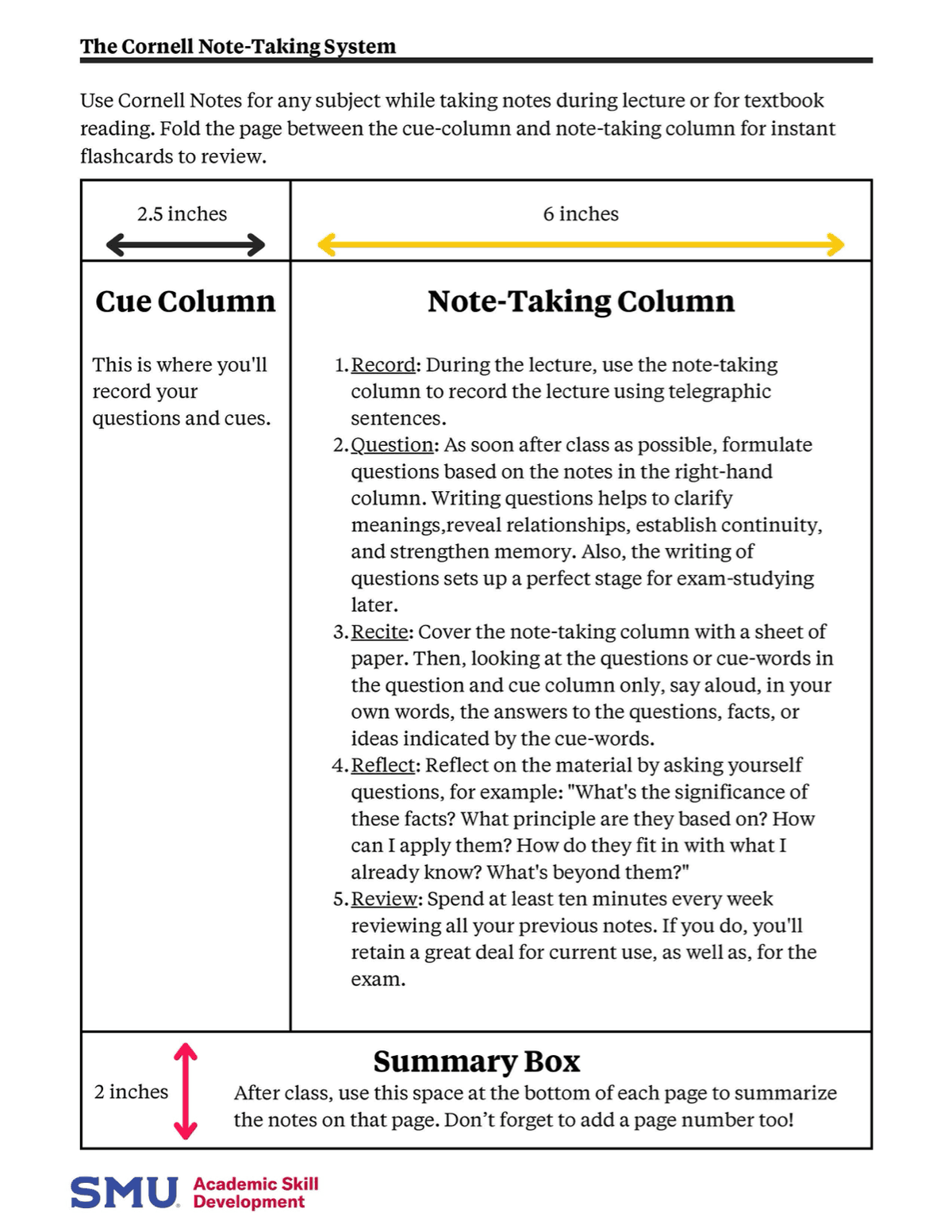
What Cornell Notes Are
A Cornell note page is one piece of paper, divided into three regions:
- Right column (about 6 inches wide on US Letter): your main notes, written during the lecture or reading.
- Left column (about 2.5 inches wide): cue words and prompts, written after the lecture, within 24 hours.
- Bottom strip (about 2 inches tall): a 2-3 sentence recap of the page, written within 24 hours.
The layout is simple. The mental work comes from what each part asks you to do.
The right column captures information. That's the obvious part, you write down what the lecturer said in your own words.
The left column forces reduction. After class, re-read your notes and ask which prompt would recover the whole passage. Put that prompt in the left margin. Writing it makes you encode the idea a second time, as a short study task instead of a transcript.
The bottom strip forces synthesis. You write 2-3 sentences that capture the page as a whole. If you can't, the page is unfocused and you should re-write the notes.
When you sit down to study, you cover the right column and use the left-column cues to recall what's there. That is active recall, a well-studied technique in learning research and one that consistently beats passive re-reading.
The 5 Rs of Cornell Notes
Walter Pauk introduced the system as a sequence of five steps. Each R corresponds to a phase of the workflow.
1. Record (during class)
Write notes in the right column as the lecture happens. Keep sentences short. A phrase or two per idea is enough. Use abbreviations. Capture examples, definitions, and open points.
Skip a line between distinct ideas, you'll need the white space later for the cue column to align.
Resist the urge to transcribe everything verbatim. Cornell notes work because the right column is already a digest. If your right column is a transcript, the left column has nothing to do.
2. Reduce (within 24 hours)
After class, re-read the notes and write cue questions in the left column. Each cue should map to a chunk of the right column.
Good cues:
- "What are the three branches of US government?"
- "Define gravity."
- "Why did the Roman Republic fall?"
Bad cues:
- "Branches" (too vague)
- "Gravity" (a label, not a prompt)
The cue should be a question because it asks you to retrieve an answer. Labels only ask you to recognize a topic.
3. Recite (during review)
Cover the right column. Read each cue. Recite the answer aloud, from recall, in your own words. Uncover the right column and check.
If you got it right, mark a tick. If you missed, mark an X and revisit tomorrow.
Reciting aloud matters. Speaking forces you to reconstruct the explanation in linear words, which is a stronger memory signal than reading silently.
4. Reflect (within 24 hours)
Write the 2-3 sentence recap at the bottom. Then connect this page to last week's lecture, the textbook chapter, and the upcoming exam.
The recap forces synthesis. The reflection ties the page to the rest of your knowledge.
5. Review (on a schedule)
Revisit the page on a spaced schedule, typically 1 day, 1 week, 1 month. The exact interval matters less than the spacing, what kills retention is reviewing right before the exam and never again.
Each review is another Recite pass with the right column covered.
The hardest step in the Cornell workflow is Reduce, generating good cues when you are tired after class. Do not automate the layout before you understand that habit. Once you are using it for research papers or source-heavy reading, the AI tools for academic research guide shows how Atlas can turn source text into cited study prompts, but the core Cornell loop still starts with your own cues.
A Worked Example: A 50-Minute Biology Lecture
Suppose the lecture topic is cellular respiration. During class, write the details in the right column. Within 24 hours, add each question in the left column beside the notes needed to answer it.
| Left-column cue | Right-column lecture notes |
|---|---|
| What is cellular respiration? | Cells convert energy from glucose into ATP. |
| What are the three stages, and where does each happen? | Glycolysis occurs in the cytoplasm and converts glucose into two pyruvate molecules, with a net gain of two ATP. The Krebs cycle occurs in the mitochondrial matrix, releases carbon dioxide, and produces NADH and FADH2. The electron transport chain runs across the inner mitochondrial membrane and uses electrons carried by NADH and FADH2 to produce most of the ATP. |
| How much ATP does one glucose molecule produce in this lecture's model? | About 36 ATP in total: two from glycolysis and roughly 32 from the electron transport chain, plus the remaining yield associated with the cycle. |
| How do aerobic and anaerobic respiration differ? | Aerobic respiration uses oxygen and runs the full pathway. Without oxygen, the cell relies on glycolysis and fermentation, producing two ATP and lactate in the example discussed. |
Table 3: Worked Cornell notes for a cellular-respiration lecture
Bottom recap (within 24 hours):
Cellular respiration converts glucose to ATP in three stages: glycolysis (cytoplasm, 2 ATP), Krebs cycle (mitochondrial matrix), and the electron transport chain (mitochondrial membrane, 32 ATP). Total yield per glucose is about 36 ATP. Aerobic respiration uses oxygen and runs the full chain. Anaerobic respiration runs glycolysis only, yielding 2 ATP and lactate.
When the exam comes, cover the right column, read each cue, recite the answer. Two passes per page across 14 lectures and you've already done more active retrieval than 90% of students who re-read the textbook the night before.
Cornell Notes for Different Contexts
The method generalizes beyond classroom teaching.
Textbook Reading
Use the right column for what the chapter says: definitions, claims, examples. Use the left column for cues you'd ask a study partner. Use the bottom for a thesis-style recap, "this chapter argues X by showing Y."
For dense chapters, one Cornell page per major section beats one Cornell page for the whole chapter. The same right-column-plus-cues structure adapts cleanly to non-textbook reading. See our how to take notes on a book guide for the 4-pass adaptation.
Meeting Notes
Use the right column for decisions, action items, names, and dates. Put follow-up prompts for the next meeting in the left column, with owners flagged. End with the 2-3 sentence "what was decided" recap that you would send to someone who missed the meeting.
For meeting notes specifically, see how to take good meeting notes for tools that auto-generate the recap from a recording.
Research Reading
Use the right column for passages and page numbers. In the left column, write the research prompt each passage answers. At the bottom, note how the paper connects to your thesis.
This is where Cornell merges with literature-review workflows. If your notes come from papers rather than class slides, keep each cue tied to a page number or source paragraph so you can verify it later.
Templates: Paper, iPad, Laptop
Paper
Cornell notebooks are sold pre-printed (Mead, Oxford, AmazonBasics) for $5-15. You can also draw the lines on any blank notebook in 30 seconds:
- Mark a vertical line 2.5 inches from the left edge.
- Mark a horizontal line 2 inches from the bottom.
- Done.
Some students prefer hand-drawn lines because the act of drawing the layout primes the brain for the method.
iPad
The strongest digital experience for Cornell notes is iPad with Apple Pencil:
- Notability (free tier, Plus $7.99/mo or $20/yr, Pro $20/mo or $99/yr) ships Cornell templates and adds audio sync, you tap a word in your notes during review and Notability replays the lecture audio from the moment you wrote it.
- GoodNotes (Essential $11.99/yr, Pro $35.99/yr, AI Pass $9.99/mo) ships Cornell templates and searchable handwriting.
- Apple Notes is free and supports Apple Pencil, though the layout is manual.
For the broader iPad pick, see best note-taking apps for iPad.
Laptop
If you type faster than you write, Cornell on a laptop works in:
- OneNote: insert a 2-column table, type in the right column, generate cues in the left after class. Add a recap block at the bottom.
- Notion: 2-column layout with a callout block at the bottom.
- Markdown editors (Obsidian, Bear, iA Writer): a YAML frontmatter
cues:array plus a body section for notes. Less visually structured but plain-text durable.
Typing trades hand-encoding strength for speed and searchability. For dense content you don't need to memorize, type. For exam content you do, hand-write.
Common Mistakes
The method fails in predictable ways.
The most common pattern is doing too much capture and too little review. Students write too many lecture words, skip the cue pass, leave the bottom strip blank, and then try to fix all of it the night before the exam.
Use this repair checklist:
- After class, set a 10-minute timer and write cues before opening another app.
- For the bottom strip, write one sentence for the main idea, one for the strongest example, and one for what you still need to test.
- Put the first review on tomorrow's calendar before you close the notebook.
- If one page has more than 8 cues, split it into two pages so each review pass stays short.
Mistake 1: Skipping the cue column
This is the most common failure mode. You take notes in class, never come back to write cues, and lose the active-recall benefit. If you only do one Cornell step after class, do this one.
Fix it by blocking 10 minutes right after class. Write one cue for every 5-8 lines of notes before you check messages or start the next task.
Mistake 2: Writing labels instead of questions
"Gravity" is a label. "How does gravity affect falling objects?" is a cue. Questions make you retrieve an answer. Labels only make you recognize a topic.
Mistake 3: Transcribing the lecture
If your right column is a transcript, the cue column has nothing to do. Cornell only works if the right column is already a digest, written in your words.
Write fewer words during class. Prioritize claims, examples, formulas, dates, and confusing points. Skip sentences the instructor restates or repeats.
Mistake 4: Last-minute review
Spaced review beats massed review by a wide margin. One pass at 1 day, 1 week, and 1 month is stronger than three passes the night before.
Mistake 5: Using Cornell for everything
It is slow for fast-moving brainstorming and clumsy for non-linear content. Use mind maps for brainstorming, outlines for nested topics, and Cornell for lecture content you need to recall.
Mistake 6: Leaving the bottom strip blank
The bottom strip is not decoration. If you cannot write a 2-3 sentence recap, the page probably mixes too many ideas. Split the page or rewrite the right column around one clearer topic.
When Not to Use Cornell
Cornell is not the right method for every situation:
- Brainstorming. A mind map captures branching ideas faster.
- System design or architecture. A diagram tool (Excalidraw, Miro) communicates structure better than columns.
- Highly technical reference material (API docs, code samples). An outline or a code-first notebook works better. For symbol-heavy math coursework, see our how to take math notes guide.
- Notes you'll never review. If a meeting will not generate exam-style recall, full Cornell is overhead. A short recap is enough. If you want pretty notes that still drive recall, our how to take aesthetic notes guide covers the visual layer.
Before choosing, ask whether an instructor, exam, or future project will quiz you on this content. If yes, Cornell. If no, use a simpler format. For the college-specific version with iPad and spaced review, see our how to take good notes in college guide.
Next Step: Review One Page Tonight
Choose one page you took this week. Add 5-7 cue prompts in the left column, cover the right side, and answer each cue aloud. Mark the ones you missed and review only those tomorrow.
For a cited review built from papers or lecture files, compare AI tools for students. Open each cited passage before turning it into a cue question.
Cornell Notes in 6 Steps
To take Cornell notes:
- Draw a 3-section page (right notes, left cues, bottom recap) or open a Cornell template in Notability, GoodNotes, OneNote, or Notion.
- Record concise notes in the right column during the lecture.
- Reduce to cue prompts in the left column within 24 hours.
- Recite by covering the right column and answering each cue from recall.
- Reflect with a 2-3 sentence recap at the bottom.
- Review on a 1-day, 1-week, 1-month schedule.
Cornell beats free-form notes because the layout itself enforces active recall and spaced review, the two strongest study techniques in cognitive psychology. Pick the tool that matches your input style (pen, stylus, or keyboard) and run the 5 Rs consistently.
For the broader set of study methods, see how to take good notes, best study apps for college students, and best note-taking apps for college students.
AtlasCompare AI tools for students
Find tools for cited study prompts built from papers and lecture files.
Frequently Asked Questions
The 5 Rs of Cornell notes are Record, Reduce, Recite, Reflect, and Review. Record means writing concise notes in the right-hand column during the lecture or reading. Reduce means distilling those notes into cue questions in the left-hand column within 24 hours. Recite means covering the right column and answering each cue from recall. Reflect means writing a 2-3 sentence recap at the bottom of the page. Review means revisiting the page on a spaced schedule, typically 1 day, 1 week, and 1 month later. Walter Pauk introduced the 5 Rs in How to Study in College in 1962.