
How to Take Good Notes in College (2026): Methods, Apps, GPA
How to take good notes in college: Cornell, outline, mapping, charting, laptop-vs-handwriting research, lecture note apps, and review systems for exams.
- Byline

Summary
Use college notes to compress lectures into cues, explanations, examples, and review prompts rather than transcribing everything.
The updated guide covers Cornell notes, outlines, mapping, charting, laptop versus handwriting research, apps, and exam review systems.
Use Cornell as the default, then switch to outlines, maps, or charts when the material needs a different structure.
Good college notes become useful when they support active recall, spaced review, and reconstruction of the lecture argument.
By Jet New, based on an editorial test pass for this guide.
College note-taking is a study skill, not a transcription skill. In my test pass for this guide, I scored each method against three jobs: listen now, recall later, and decide what to review next. A page that fails all three is decoration. The cleanup after class is where lecture notes become exam tools. Three failure modes kept coming up. Transcript-only pages that captured words but skipped thinking. Pretty pages with no cues to test against. App stacks with no built-in review trigger. Karpicke and Roediger's retrieval-practice work is why this guide treats review prompts as integral to the note itself. For a broader overview beyond college, see our how to take good notes guide.

 Atlas
AtlasOptional AI research workflow reference
Follow a rigorous workflow for discovery, screening, extraction, and synthesis.
Quick answer
For a deeper framework applied across eight leading second-brain apps, see our second-brain apps guide.
| Method | Best class type | Effort during | Effort after | Recall benefit |
|---|---|---|---|---|
| Cornell | Lecture-heavy humanities, social sciences | Medium | Medium | High (forces cues + summary) |
| Outline | Structured lectures with clear hierarchy | Low | Low | Medium |
| Mapping | Conceptual courses (philosophy, theory) | Medium | Low | High (visual recall) |
| Charting | Comparative content (history dates, biology systems) | High | Low | High for compare/contrast |
| Sentence | Fast-talking lectures, last resort | Low | High | Low without rework |
Table 1: College note-taking methods by class type, effort, and recall benefit
College note-taking methods
Cornell Notes (default)
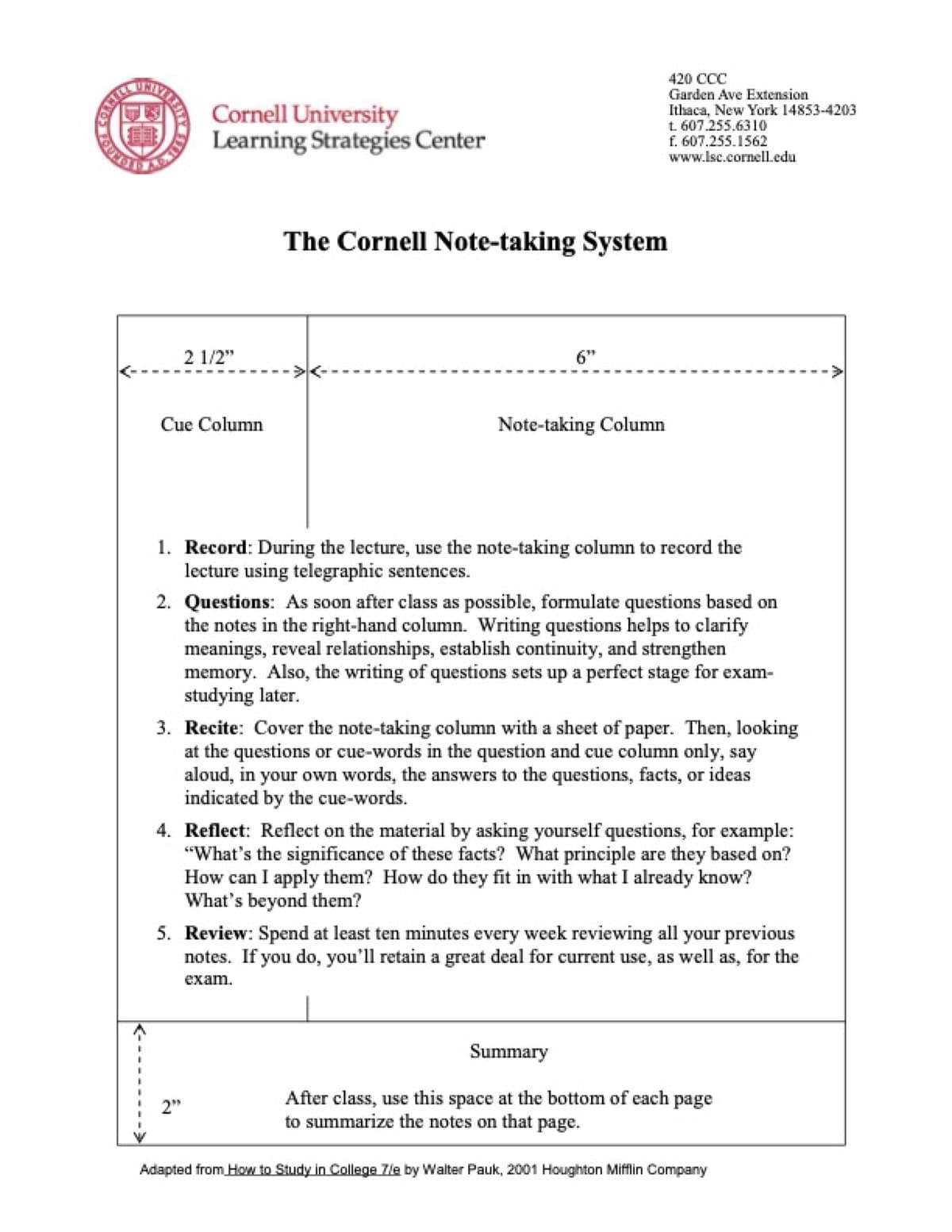
Cornell notes divide the page into cues, notes, and a short recap. Take notes in the right column during lecture. Fill cues and the recap after class, when you can turn the lecture into questions.
The cue column is the active-recall trigger. Cover the notes, restate from cues, check. This is the cognitive move that turns notes into memory. For a deeper walkthrough of the layout and templates, see our how to take Cornell notes guide.
Outline Notes
Outline notes use nested bullets or Roman numerals. They work best when the lecturer already speaks in a clear order, such as causes, events, and results. They are weaker when the class is about many links at once.
Mind Mapping
Mind maps put one idea in the center and draw branches from it. Use them when links matter more than order, such as body systems, ecosystems, or reaction paths. Tony Buzan's 1974 method is the common reference point.
Charting
Charting turns notes into a table. Use it for classes that ask you to compare things: drug names, time periods, leaders, or software features. It saves time before finals because the compare-and-contrast work is already done. For symbol-heavy STEM courses with theorems and proofs, see our how to take math notes guide.
Flow Notes
Flow notes are for messy lectures that do not follow a clean outline. Start with the main question in the center of the page. Add arrows for causes, examples, objections, and professor emphasis. Use relationship words in the margins, such as "causes," "contrasts," "evidence," and "exception." After class, turn the best arrows into cue questions.
Why note-taking works
Why selecting information matters
Good notes are an attention tool first and a study tool second. In class, they force you to choose what matters. After class, they turn a long lecture into small recall prompts. That decision process is metacognition, the habit of noticing what deserves attention before memory fades. That is why copying slides rarely works. It records words, but it does not make you decide.
Note utility rubric
I use this rubric when judging whether a college note method is worth keeping. Mark each job as weak or strong after a week of use. A method with more weak marks than strong marks needs a change before the next lecture.
| Job | Weak mark | Strong mark |
|---|---|---|
| Listen now | The method distracts you during class | The method helps you catch main claims |
| Recall later | The page is only a transcript | The page includes cues, blanks, or questions |
| Review next | The page gives no next action | The page shows what to reread, quiz, or practice |
Table 2: Note utility rubric for evaluating a college note-taking method after one week
Use this simple test after each lecture:
| Note job | What the page should contain | Review question |
|---|---|---|
| Listen | Main claims, examples, and unclear points | What did the professor stress? |
| Connect | Links to readings, labs, or past lectures | What does this build on? |
| Recall | Cue questions, blank diagrams, or flashcards | Can I explain it without looking? |
Table 3: Per-lecture note quality check by job, expected content, and review question
Vocabulary-heavy courses need one extra pass. Put new terms into a Leitner box or Anki deck after class. For each card, add a short example from the lecture. Terms stick better when they are tied to a use case, not only a definition.
Active recall
Notes work when they move facts through attention, recall, and spaced reuse. Passive review keeps the page familiar. Active recall makes the brain rebuild the idea. That is why a cue question is more useful than a polished sentence.
Review timing
Memory drops fastest soon after class. The fix is not a long reread. It is a short return while the lecture is still fresh, then wider review gaps later. Use the first review to repair the page and later reviews to test the page.
What to listen for
Go into class primed to filter. Listen for what the professor repeats, writes, contrasts, or says will appear on an exam. Those signals matter more than slide density. Write fewer words when the signal is clear and more questions when it is not.
Vocabulary review
New terms need examples. Put the term on one side of a flashcard and a lecture example on the other. If you miss the card, move it back to the start of your Leitner box or Anki queue. Do not let a memorized definition pass without a use case.
Hand vs Laptop
Mueller and Oppenheimer's 2014 Princeton/UCLA study found laptop note-takers did worse on conceptual questions, even though they captured more words. Laptops make transcription easy. Handwriting forces you to compress, and compression is what builds memory.
Pam Mueller and Daniel Oppenheimer wrote in Psychological Science that "students who took notes on laptops performed worse on conceptual questions."
That finding comes from Pam Mueller and Daniel Oppenheimer's Psychological Science paper. The study skill is compression. An iPad works well when you use it for handwriting, diagrams, and quick search rather than verbatim typing.
The 2019 Morehead study found a smaller gap but still favored handwriting on conceptual work. The broader research is consistent: handwriting wins on concepts, the gap shrinks on factual recall.
The best answer for most students is iPad + Apple Pencil. You get hand-written notes, search, and audio sync in Notability. For app-by-app picks, see our how to take notes on iPad guide.
App Stack
Use Notability for live capture on iPad with Apple Pencil. The audio sync is the key feature. Tap a word to hear what the professor said at that moment. GoodNotes is the strong alternative, so pick by interface feel. OneNote fits Windows + Surface users. For textbook work, see our how to take notes from a textbook guide.
Between lectures, use Notion for exam-prep notes with filters. Use Obsidian for plain-text notes linked across courses.
Before exams, use Anki for spaced-review flashcards. If a course includes research papers, Atlas can help you ask cited questions across notes and PDFs. That workflow applies to research synthesis, and it sits alongside your live lecture notes rather than replacing them.
Four-step note-taking system
Run the same loop for every class. Preview before class, capture during class, clean up the same day, then review on a spaced schedule. The workflow is short on purpose. It gives each lecture one job at a time instead of turning notes into a second class.
- Preview: write three terms you expect to hear.
- Capture: write claims, examples, and unclear points.
- Clean up: add cue questions and a two-sentence recap within 24 hours.
- Apply: test yourself on the cues, then make flashcards or practice problems from misses.
For research-paper courses, keep source synthesis separate from lecture capture. Use the notes workflow for class, then use an AI literature review workflow when you need cited connections across papers.
Step 1: Pre-Class Preview (10 minutes)
Skim the slides, syllabus topic, or assigned reading. Write three expected terms at the top of the page. This gives your brain hooks before class starts.
Step 2: In-Class Capture (50 minutes)
Use Cornell format on iPad or paper. Write the main point first, then the example. Aim for 2-4 pages per 50-minute class. Mark unclear points with ? and keep moving.
Step 3: Same-Day Review (5-10 minutes)
Within 24 hours, fill the cue column with terms and questions. Write a two-sentence recap at the bottom. Look up each ? item while the class is still fresh.
Step 4: Spaced Review (5-20 min sessions)
Review after 1 day, 7 days, 30 days, and 90 days. Cover the notes and answer from the cues. Then check. Karpicke and Roediger (2008) reported ~80% one-week recall under retrieval practice versus ~36% under restudy.
Preparation before class
Pre-class prep should take 10 minutes, not an hour. Open the slide deck, reading title, or lab prompt. Write the topic, three expected terms, and one question you want answered. This primes attention without turning prep into a second study block.
Active review techniques
Turn notes into tasks before you reread them. Cover the notes column and answer from the cue column. Redraw one diagram from memory. Make flashcards only from missed terms. For problem-set classes, close the notebook and solve one fresh problem before checking the worked example.
Organizing notes after class
Keep the folder system boring. Use one notebook or digital folder per course, then sort by date and topic. Add tags only when they change review behavior, such as exam-1, lab, essay, or needs-help. If a tag does not tell you what to do next, skip it.
Writing on slides and recording lectures
Record lectures only when your school and professor allow it. When you do record, use playback to fill specific gaps you marked during class rather than replaying the whole session. If the professor gives slides, write beside the slide instead of copying it. Mark the reason a slide matters, the example the professor used, and the question it raises.
Common Mistakes
Do not transcribe instead of compressing. The purpose of notes is to select what matters. If you wrote down everything the professor said, you retained the decision-making that makes notes useful.
Do not skip same-day review. Without Step 3, you can lose much of a new lecture within a day (Ebbinghaus forgetting curve, 1885). The quick review after class is the highest-yield habit.
Do not reread before recall. Rereading feels productive but is one of the lowest-utility study techniques (Dunlosky 2013). Always recall first, check second.
Do not skip the summary line. The two-sentence recap forces you to compress the whole lecture into one idea. Most students skip it, and many underperform on finals. For the visual layer that keeps the habit going, see how to take aesthetic notes.
When to Use AI
AI helps when your class depends on readings, papers, and source notes. Ask a narrow question such as "what do my Bio 201 notes and textbook say about cellular respiration?" Then check the cited answer against the source. Citations matter because you still need to verify the claim.
For research-heavy classes, see our students guide to AI research. It covers Atlas's cited Q&A workflow across uploaded sources, which is distinct from lecture capture or flashcard drilling.
Course-specific adaptations
The Cornell-plus-review system is the universal default. Different course types reward different emphasis.
STEM (math, physics, engineering): These courses run on formulas, proofs, and worked examples. Use a definition, theorem, proof, example order for hard topics. Spend most review time on closed-book problems. Handwrite during class, then clean up key formulas after class.
Humanities (history, literature, philosophy): These courses focus on claims and proof. Cornell works well. Put the thesis question in the cue column. Put quotes or examples in the notes column. In review, restate the main claim in your own words.
Pre-med and biology: These courses ask you to remember terms, pathways, and named conditions. Use Cornell with diagrams in the notes column. Put terms into Anki. Pair flashcards with blank diagram redraws for pathways.
Foreign languages: Use three columns: target language, English meaning, and one sample sentence. Review for 10 minutes each day. For vocabulary, use a Leitner box or Anki and move missed words back to the first pile.
Discussion seminars: These need fewer notes, and the quality of your participation matters more than coverage. Use a reading journal for the 2-3 strongest claims from each reading and your response. Bring those notes to class.
The pattern is simple: match the page to the exam. Multiple-choice tests need broad review. Essay exams need claims and proof. Problem-set courses need closed-book practice. Neat notes can still fail if they train the wrong task.
Final recommendation
College note-taking is a system, not a single skill. Use Cornell as the default. Use iPad + Apple Pencil + Notability if you want search and audio. Review on the 1/7/30/90 schedule. Use Atlas only when research sources become part of the study problem. The system beats the tool, and review beats the system.
AtlasOptional AI research workflow reference
Follow a rigorous workflow for discovery, screening, extraction, and synthesis.
Frequently Asked Questions
Cornell Notes is the most-used college method for a reason: the cue/notes/summary structure forces active recall, which Karpicke and Roediger (2008) showed produces ~80% one-week recall versus ~36% for restudy. Outline notes work for structured lectures (humanities, theory courses). Mapping works for systems courses (biology, anatomy). Charting works for comparison-heavy material (history dates, drug tables). Most students do best with Cornell as the default and add outline/map/chart as the material requires.