
How to Take Notes From a Textbook (2026): The Guide
How to take notes from a textbook with a 3-pass method: preview, compress, and review using Cornell, outline, mind-map, margin, and summary notes for exams.
- Byline

Summary
Use textbook notes to read, compress, and review material instead of copying the chapter line by line.
The updated guide covers the pass-based workflow, Cornell notes, outlines, mind maps, handwriting, typed notes, exams, and AI help.
Match Cornell to narrative chapters, outlines to structured technical content, and mind maps to concept-heavy material.
Textbook notes work when they help you teach the chapter without reopening the source.
If you have read a textbook chapter, highlighted half of it, and forgotten most of it a week later, use the method below. It rests on one rule. Compression is what helps the material stick. Highlighting only marks text. Rewriting the idea in your own words forces you to understand it.
This guide covers textbook notes for study, exam prep, and later reference. It also shows which note format fits each kind of chapter. For the broader note-taking framework, see how to take good notes.

 Atlas
AtlasSource-backed AI is optional for research PDFs
Upload a research PDF and ask a cited question about its claims or methods.
Choose a textbook note method
Use the table as a quick filter before you read. Pick the method that matches the chapter, then choose an app that supports it.
| Method | Reading pace | Effort | Recall benefit | Best for |
|---|---|---|---|---|
| SQ3R (Survey, Question, Read, Recite, Review) | Slow | High | Highest | Dense conceptual textbooks |
| Cornell | Medium | Medium | High | Lecture-paired textbooks |
| Outline | Fast | Low | Medium | Well-structured chapters |
| Marginalia + summary | Fast | Low | Medium | Re-readable physical books |
| Concept map | Slow | Medium | High | Theory-heavy chapters |
Table 1: SQ3R offers the deepest recall practice, while lighter methods preserve reading pace.
Take textbook notes in 3 passes
The most reliable way to take textbook notes is to make three passes through each chapter: preview and read for the main idea, compress from memory before checking the chapter, then review with recall after 1 day, 1 week, and 1 month.
Before pass 1, preview the chapter for five minutes. Read the title, learning goals, section heads, bold terms, figures, captions, review questions, and chapter summary. Write three questions you expect the chapter to answer. This gives your brain a map before the dense reading starts.
Read the chapter before taking notes
Read the section from start to finish with almost no notes. Use the first pass to understand the main thread. Capture detailed notes during the second pass.
Mark the page numbers of passages you did not understand, then return to them during the second pass.
Pass 2: Compress into your own words
Open a fresh page (paper, iPad, or laptop). Without looking at the textbook, write what you remember. Then go back to the chapter and fill in the gaps.
The order matters. Writing from memory first shows what you understood. Then consult the chapter to fill specific gaps without copying its wording.
The output of pass 2 is 1-2 pages of compressed notes. If your notes are 10 pages, you copied. Pass 2 is also where you decide the format:
- Cornell layout: right column for key claims, left column for quiz questions, bottom strip for a 2-3 sentence recap. Best for chapters where recall matters.
- Outline: nested bullets. Best for chapters with clear parts, such as code, formulas, or manuals.
- Mind map: one main idea with branches. Best for chapters where ideas connect in several directions.
Pass 3: Review on a spaced schedule
Notes you never reopen are weak notes because writing them is only the first half of the learning process. The third pass tests whether you can recall the ideas without seeing the page.
Review the compressed notes:
- 1 day later: cover the page, recite the cue questions, check what you missed.
- 1 week later: same routine.
- 1 month later: same routine.
Spaced reviews slow forgetting. The exact interval matters less than returning to the material before it fades from memory.
For the underlying cognitive science, see the active-recall and spaced-repetition primer in how to take good notes.
A 5-Minute Chapter Preview Checklist
Previewing is not a shortcut. It keeps you from treating every paragraph as equal.
Use this before pass 1:
- Turn headings into questions. "Photosynthesis" becomes "What does photosynthesis produce, and where does it happen?"
- Circle task words in learning goals. Define, compare, solve, prove, and evaluate each demand different notes.
- List bold terms on a blank page. Leave space under each one. Fill it only after you can explain the term without copying.
- Scan figures and pull-out boxes. These often show the testable model faster than the paragraph does.
- Check the chapter summary last. Compare its predictions with the notes you wrote from memory.
After pass 2, verify your notes against the chapter summary and review questions. If the textbook asks a question your notes cannot answer, add a cue question and one short answer in your own words.
A Simple Margin System for Textbook Pages
In my own textbook notes, I use a three-box margin system before I write a full summary. It keeps the page clean and stops bold terms, figures, and sidebars from becoming a long copied list.
| Margin box | What goes there | How to use it in pass 2 |
|---|---|---|
| Terms | Bold words, formulas, dates, and names | Define each one from memory, then check the textbook wording |
| Links | Arrows, cause-and-effect notes, figure references | Show why one idea changes another |
| Questions | Confusing claims, likely exam prompts, missing steps | Turn each question into a cue for review |
Table 2: Leave more blank space than feels natural. A crowded page makes review harder because every line looks equally important. White space lets you add corrections after checking the chapter summary, lecture slides, or review questions.
Use textbook pull-out boxes only when they change the chapter's argument. Flag a sidebar that does not help you answer the learning goals, and exclude it from your final notes.
Common Mistakes to Avoid
Highlighting feels productive, but it mostly trains recognition. Running a marker over a sentence is not the same as recalling it later.
Two common failure modes:
- Over-highlighting: Half the chapter is yellow. The act of choosing what to mark requires no compression, so nothing encodes.
- Rereading highlights: You see the same sentence again and it feels familiar. Familiar is not the same as learned.
Highlighting is fine as a flagging tool. Mark passages you will return to in pass 2. Do not treat the mark itself as study.
Textbook note formats
The chapter's structure determines which format will be easiest to review. Use Cornell notes for an argument or process, an outline for nested rules and steps, and a mind map for ideas with many relationships.
Cornell layout for narrative chapters
Use Cornell notes when a chapter tells a story, explains a process, or builds toward an argument.
Use the right column for short claims and examples, the left column for cue questions, and the bottom strip for a 2-3 sentence summary that captures the chapter's argument.
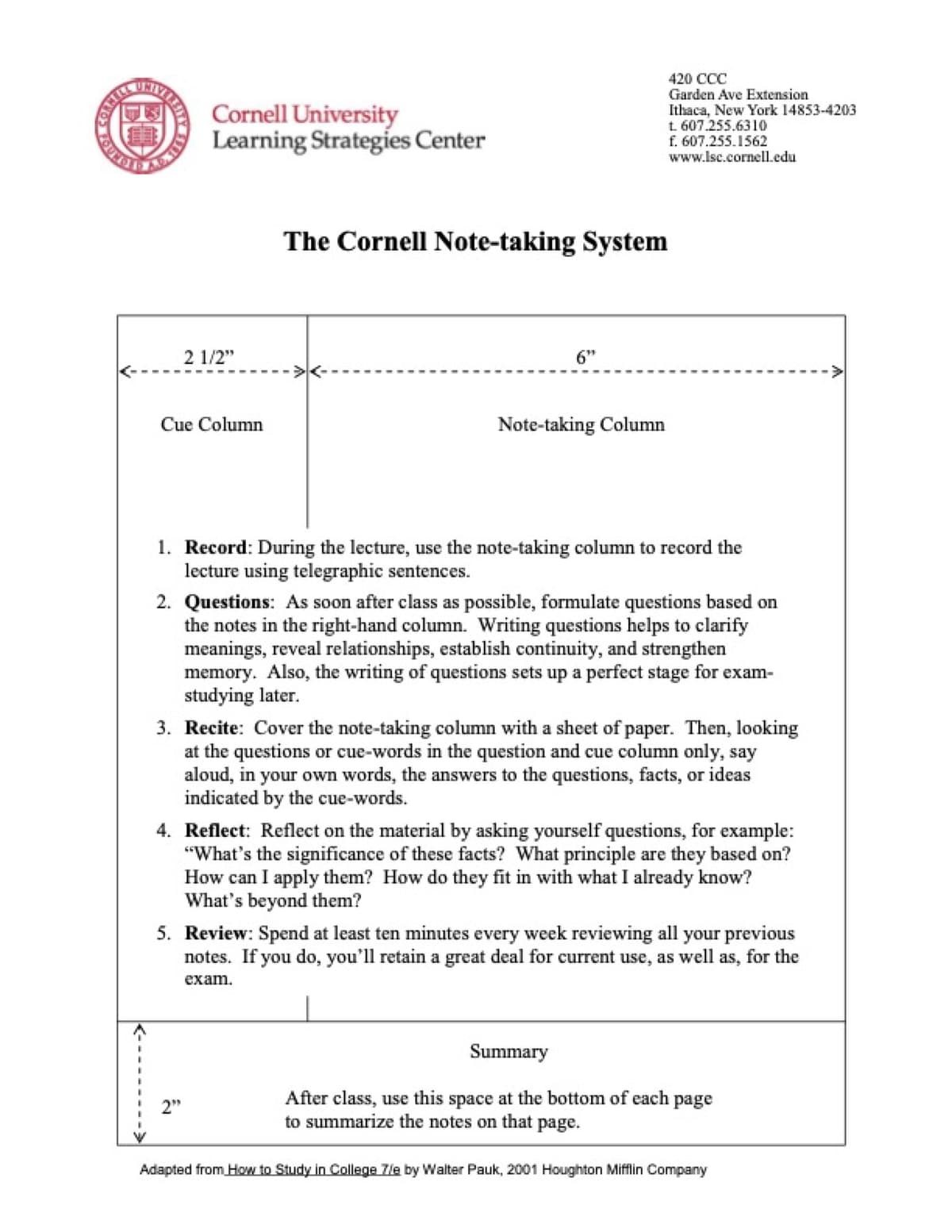
Example for a biology chapter on cellular respiration:
Right column:
- Cellular respiration converts glucose to ATP in 3 stages.
- Glycolysis (cytoplasm): glucose → 2 pyruvate, net 2 ATP.
- Krebs cycle (mitochondrial matrix): pyruvate → CO2,
  produces NADH/FADH2.
- Electron transport chain (mitochondrial membrane):
  NADH/FADH2 → ATP via O2, ~32 ATP.
- Total per glucose: ~36 ATP.
- Anaerobic = glycolysis only = 2 ATP + lactate.

Left column:
- What are the 3 stages of cellular respiration?
- Where does each stage occur?
- How much ATP per glucose, aerobic vs anaerobic?

Bottom: Cellular respiration converts glucose to ATP in
3 stages (glycolysis, Krebs, electron transport chain),
yielding ~36 ATP per glucose under aerobic conditions and
2 ATP per glucose anaerobically.
For the full Cornell method, see how to take Cornell notes.
Outline layout for technical chapters
Use outlines for math, code, technical manuals, and system design.
Nested bullets mirror how the material is built. Put code samples and worked examples under the rule they explain.
- Hash tables
  - Average O(1) lookup, insert, delete
  - Worst case O(n) on collisions
  - Implementations
    - Separate chaining (linked list per bucket)
    - Open addressing (linear/quadratic probing)
  - When to use: O(1) lookups by key
  - When not to use: ordered iteration, range queries
For typed outlines, Notion (free tier, $10/mo Plus), OneNote (free), and Obsidian (free personal use) all work well. Markdown files in any editor work for plain-text durability.
Mind maps for concept-heavy chapters
Use mind maps when ideas connect across the chapter instead of forming a simple list.
Start with the chapter title in the center. Add major claims as branches. Add proof, examples, and exceptions under each branch. Draw cross-links where two branches affect each other.
Mind maps are slow during live reading. They work better as a pass 2 synthesis step after you know the chapter.
For tools, see best mind mapping software.
Tools for textbook notes
Pick by input modality.
Hand-written, on iPad:
- GoodNotes ($11.99/yr Essential, $35.99/yr Pro). Strong PDF import, AI handwriting search.
- Notability ($7.99/mo Plus, $20/mo Pro). Audio sync if you also listen to lectures alongside reading.
- Apple Notes (free). Works for casual use, weaker organization at scale.
For app rankings, see best note-taking apps for iPad. If your textbook is a PDF, our smart notes from PDFs guide covers PDF markup and permanent notes.
Typed, on laptop:
- Notion ($10/mo Plus, free tier). Best if you want notes plus a database of textbooks read.
- OneNote (free with Microsoft account). Best for free, Windows-native users.
- Obsidian (free personal use). Best for plain-text Markdown durability and a long-running personal knowledge base.
Hybrid (handwriting + AI):
- GoodNotes AI and Notability AI can turn handwritten notes into summaries or flashcards.
- Atlas ($20/mo Pro) is only worth considering for research-heavy PDFs where you need answers tied back to source pages. We disclose Atlas is our product. Most textbook readers will be better served by paper, iPad notes, and a spaced-review app.
Reading and Note-Taking for Different Subjects
Different subjects reward different note structures.
For science chapters, use Cornell notes for terms and processes. Use mind maps for how ideas connect. Put worked examples in outline form and review them each week.
For math, outline theorems and definitions. Write worked examples in detail. Then redo problems instead of rereading notes.
For humanities, use Cornell notes for claims and counterarguments. Add a thesis-style recap at the bottom of each page. Use mind maps for themes across chapters.
For law and case-based study, brief each case with facts, issue, holding, and reasoning. Add a cue column for the rule or principle.
For medicine and nursing, use charts for drugs, anatomy, and disease comparisons. Use Cornell notes for case-based learning. See best apps for nursing students.
For programming and engineering, use outlines for parts and rules. Keep code samples in monospace. Build the thing instead of only writing about it. For lecture-plus-textbook coursework, see our how to take good notes in college guide.
Active Recall and Spaced Review
Every strong textbook note method needs active recall and spaced review.
Active recall: instead of rereading your notes, cover them and rebuild the answer from cue questions or chapter headings.
Spaced review: review after 1 day, 1 week, and 1 month. Each review makes the next one easier.
Tools that automate spacing:
- Anki (free desktop, $25 iOS lifetime). Build flashcards from your textbook notes, and Anki schedules reviews.
- Notability AI and GoodNotes AI: generate flashcards from notes on paid tiers.
The schedule matters more than the tool. Spaced review on paper beats cramming with the best app. The same compression-and-review system applies to general reading. See how to take notes on a book for the 4-pass version.
Your textbook note-taking plan
To take notes from a textbook:
- Read the chapter first, no annotation in pass 1.
- Compress to 1-2 pages in pass 2, write from memory, then fill gaps from the textbook.
- Pick the format that fits, Cornell for narrative, outline for technical, mind map for concept-heavy.
- Hand-write for retention, type when you need search later.
- Review on a 1-day, 1-week, 1-month schedule, spacing is the durability mechanic.
Highlighting alone is the trap. Rewriting in your own words is the step that helps the idea stick. The tools change every decade, but the principles do not.
For deeper detail on Cornell, see how to take Cornell notes. For tool comparisons, see best note-taking apps for college students and best study apps for college students.
AtlasSource-backed AI is optional for research PDFs
Upload a research PDF and ask a cited question about its claims or methods.
Frequently Asked Questions
The best way to take notes from a textbook is the 3-pass method: read the section first, then compress it into your own words on a second pass, then review on a spaced schedule. The compression pass is where active encoding happens, copying the textbook does not encode the material, rewriting it in your own words does. Cornell layout works for narrative chapters, outlines work for structured technical content, mind maps work for non-linear concept-heavy material. Avoid highlighting alone: re-reading highlights produces shallow recall.