
Best Study Apps for College Students: Free, AI, Flashcards
Best study apps for college students in 2026 for notes, flashcards, PDFs, focus, and AI tutoring. Compare free and paid tools by study task and major.
- Byline

Summary
The best study apps for college students depend on whether the task is notes, flashcards, PDFs, focus, or AI tutoring.
Compare Atlas, Notion, Anki, Quizlet, NotebookLM, GoodNotes, focus timers, and free study tools.
Use Anki for long-term memorization, Quizlet for quick drilling, NotebookLM for PDFs, and Atlas for source-cited synthesis.
The evaluation covers free tiers, paid limits, college majors, active recall, AI reliability, and exam-prep verification.
| Need | Pick | Why |
|---|---|---|
| Class notes, tasks, and planning | Notion | Free Plus plan with .edu, strong templates, flexible databases |
| Memorization and exam recall | Anki | Free on desktop and Android, SM-2 spaced repetition, strong shared decks |
| Fast flashcard drills | Quizlet | Huge library of shared decks and easier setup than Anki |
| PDF readings and lecture slides | NotebookLM | Free source-grounded Q&A across up to 50 sources per notebook |
| iPad handwriting | GoodNotes | Best fit for equations, diagrams, and annotated lecture slides |
| Lecture audio plus notes | Notability | Audio playback syncs to handwritten notes |
| Phone distraction | Forest | Simple Pomodoro sessions with lightweight gamification |
| Research-heavy courses | Atlas | Connects notes, PDFs, and lecture sources into cited answers and mind maps |
Table 1: Quick picks by study need — recommended app and rationale for each college study task.
The best study apps for college students are not one universal app. A normal week has lectures, chapters, problem sets, vocab drills, PDFs, group projects, and exams. Most students need one notes app, one recall app, one reading or AI app, and one focus tool.
This guide ranks 8 apps across the 4 core study tasks: taking notes, recalling facts, reading sources, and staying focused. Each section includes pricing, fit, and tradeoffs. We tested every app on real coursework. The test set included history essays, chemistry problem sets, MCAT prep, and Spanish drills. We used both Mac and iPad workflows.
Atlas is included for majors with lots of readings and papers. It is not for every college student. Drop a textbook chapter and a lecture transcript into Atlas. The same chat can pull from both, cite the source passage, and make a mind map on demand. If most of your studying is memorizing facts, start with Anki or Quizlet instead.
For research beyond class study, see our guide to the best AI research assistants. We also cover AI tools for academic research.

 Atlas
AtlasLearn when cited AI answers matter
Upload course readings and check every cited answer against its passage.
What to Look For
For a phase-by-phase walkthrough drawn from interviews with fourteen students, see the student's guide to AI research.
Five checks separate apps that keep helping from apps you abandon by midterms.
Cross-device sync matters first. You may take notes on a laptop, review on your phone, and study on a tablet. Apps that sync across iOS, Android, web, Mac, and Windows save real friction. Apps locked to one ecosystem, such as Apple Notes or Google Keep, become liabilities when you switch devices.
Price matters more than feature count. Five paid apps can turn into $50-100/month. Look for real free plans, such as Anki, NotebookLM, or Notion for .edu users. The best free plans are not crippled. Anki uses the same core card schedule for free users. NotebookLM gives free users the main Google AI workflow.
Use timed review for memory-heavy courses. This matters for pre-med, pre-law, languages, and any class with a vocab list. Anki's SM-2 schedule has years of memory research behind it. Many flashcard apps drill cards on a fixed plan, which is less useful.
AI reading help is useful only when it points back to the source. Most students read more PDFs than printed books. Tools that read PDFs, sum them up, and answer questions can cut reading time. Tools that cite passages, such as Atlas and NotebookLM, are easier to check. Tools that summarize without sources, such as raw ChatGPT, are risky for graded work.
Long-term notes should survive the semester. The app you use senior year should still hold useful notes from freshman year. Linked-note apps such as Atlas, Notion, and Obsidian grow over a 4-year degree because one course can connect to another.
8 Best Study Apps
1. Atlas for Synthesis-Heavy Majors
Best for: Reading-heavy majors that write essays, papers, and theses
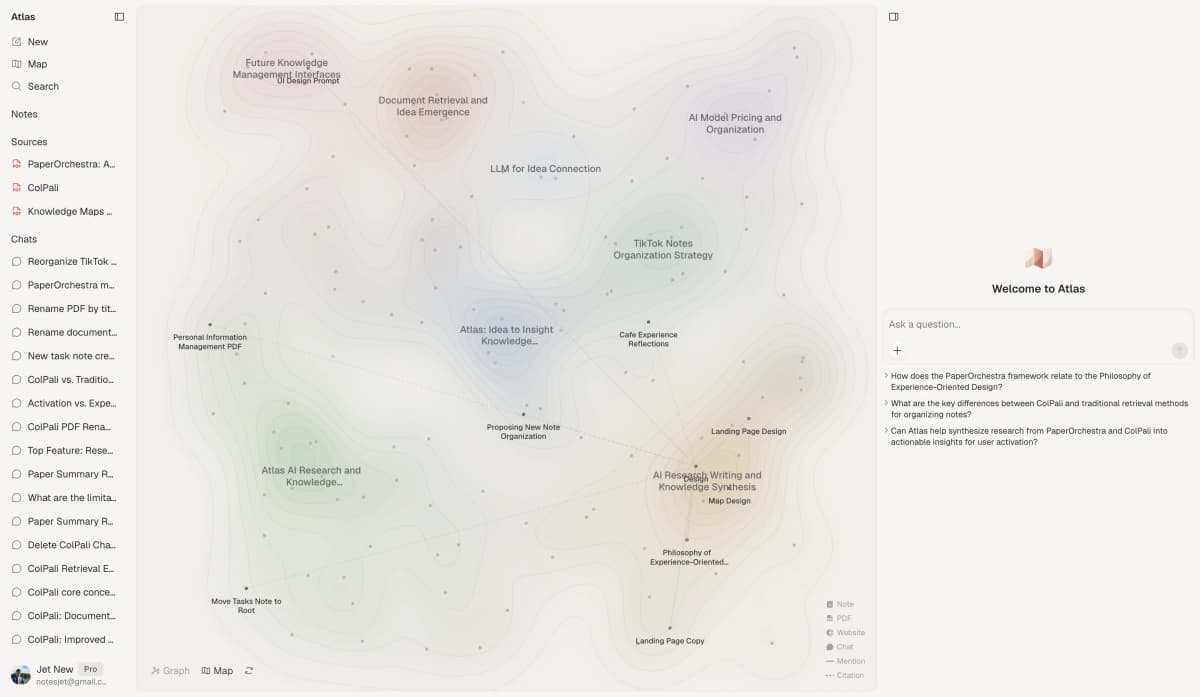
Atlas is built for study work that connects ideas across many sources. That fits history, politics, policy, and thesis prep. Upload lecture slides, readings, and your own notes. Atlas builds a mind map that shows how ideas connect. Each AI answer cites the passage it used.
For dense reading courses, this changes exam review. In history, policy, philosophy, or sociology, you can ask where a concept appeared across the semester. Atlas can answer with sources instead of making you reread 200 pages of notes. See how source citations change AI study before adding an AI tool to graded work.
Key capabilities
- Cross-document mind map. Atlas shows how concepts link across your sources.
- Source-grounded Q&A. Every answer cites a specific passage from your uploads.
- PDF, web, and notes ingestion. Papers, articles, lecture slides, and your own writing live in one workspace.
- Concept-level navigation. Click a concept and see every source that mentions it.
- Persistent knowledge base. Notes from semester 1 stay connected to material in semester 4.
Strengths
- Best-in-class for cross-source synthesis, the workflow most other tools cannot do.
- Citations make it safer for graded work.
- Mind maps surface connections you would miss while reading linearly.
- It works equally well for one course or your whole degree.
Limitations
- Less useful for pure memorization. Use Anki or Quizlet for that.
- No handwriting input. Use GoodNotes for that.
- Newer tool, so the template community is smaller than Notion's.
Best for
Atlas works best for students in reading-heavy majors such as history, policy, and cultural studies, where essays often draw on many sources.
Pricing: Free tier available, Pro from $20/month
2. Notion for an All-in-One Workspace
Best for: Students who want notes, task lists, calendar, and class info in one app
Notion is the closest thing to a default student app right now. With a .edu email, students get the Plus plan free. That removes most limits you would hit. The flexibility is the strength. One Notion workspace can hold class notes, assignments, a study plan, club notes, and a job-search tracker.
Key capabilities
- Free Plus plan with
.edu. Students get unlimited blocks, file uploads, and version history. - Template ecosystem. Community templates cover study planners, course notes, and GPA trackers.
- Database views. Track readings, assignments, and grades with custom fields.
- Notion AI add-on. It can summarize notes and draft study questions for $10/month.
- Cross-device sync. Notion works on Mac, Windows, iOS, Android, and the web.
Strengths
- One app can hold most non-recall study work.
- The large template community lowers setup cost.
- The student plan covers the core features at a reduced price.
Limitations
- Too much flexibility can become page-building instead of studying.
- AI features cost extra.
- There is no spaced repetition.
Best for
Students who like organizing systems and want one workspace for academic and life logistics. Less ideal if you find yourself building dashboards instead of doing coursework.
Pricing: Free for students with .edu email (Plus plan), Notion AI $10/month add-on
3. Anki for Spaced-Repetition Flashcards
Best for: Pre-med, pre-law, language students, anyone with heavy memorization
Anki is the serious memorization tool. The desktop and Android apps are completely free. The iOS app is $25 one-time because it funds the project. Anki's SM-2 system shows each card near the time you would forget it. That is more efficient than fixed-schedule review.
The reputation is real. Surveys find 80%+ of US medical students use Anki for board prep. The popular shared deck AnKing has been downloaded over a million times.
Key capabilities
- SM-2 spaced repetition. The algorithm has decades of memory research behind it.
- Shared decks. Pre-built decks cover medical school, law, languages, and more.
- Cloze deletion. Turn your own notes into fill-in-the-blank cards.
- Image and audio cards. These help with anatomy, art history, and language pronunciation.
- Cross-platform sync. A free AnkiWeb account keeps cards in sync.
Strengths
- Free on desktop and Android, with no feature paywalls.
- The algorithm is stronger than most flashcard apps.
- The community has many pre-built decks for popular courses.
- Medical students have used it for board prep for years.
Limitations
- The learning curve is steep.
- The interface feels dated.
- The iOS app is $25 one time, while Android is free.
- Card creation is slow without a workflow. Many users draft cards from notes first.
Best for
Any student in a memorization-heavy field. If you are pre-med, pre-law, learning a language, or studying for the MCAT, LSAT, or bar, this is the app.
Pricing: Free on desktop, Android, and web. $25 one-time on iOS.
4. Quizlet for Quick Flashcard Drills
Best for: Short-term test prep, students who want shared decks and game-style practice
Quizlet is easier to start than Anki. Anki rewards long-term commitment. Quizlet is better for "I have a vocab quiz Friday." Its deck library is huge. For common courses like Spanish 101, organic chemistry, or intro economics, someone has usually made a set already.
Key capabilities
- Pre-built decks. Quizlet has more than 500M shared sets.
- Game-style learn modes. Match, Test, and Learn make drills feel lighter.
- Quizlet AI. The Plus plan can generate practice questions from notes.
- Audio for language learning. Native-speaker audio covers 18+ languages.
- Mobile-first design. It works well in spare 5-minute windows.
Strengths
- It has the lowest friction of any flashcard app.
- You can make a deck in 60 seconds.
- Game modes make repeated drills easier to tolerate.
- Pre-built decks save hours for common courses.
- The free tier is strong.
Limitations
- Spaced repetition is paywalled and weaker than Anki's.
- The free tier shows ads.
- It is less effective than Anki for long-term retention.
- The Plus subscription costs more than Anki for many students.
Best for
Students with a test coming soon, language learners who want native audio, and anyone who finds Anki hard to start.
Pricing: Free tier available, Plus $35.99/year
5. NotebookLM for PDFs and Readings
Best for: Students drowning in PDF readings and lecture slides
Google's NotebookLM is one of the most useful free tools for college students right now. Upload up to 50 sources per notebook, including PDFs, Google Docs, slide decks, and YouTube transcripts. Then ask questions across them. Every answer cites the exact passage. The audio overview turns your sources into a short spoken review, which can help during a commute.
For a class with many readings, NotebookLM can help you find the parts that deserve a close read. Ask a question, open the cited passage, and check the answer against the source.
Key capabilities
- Up to 50 sources per notebook. Each notebook supports large course reading sets.
- Source-grounded Q&A. Every answer cites a specific passage.
- Audio overview. NotebookLM can turn sources into a short spoken review.
- PDF, Google Doc, web URL, and YouTube support. It handles common course materials.
- Free with any Google account. No credit card is needed.
Strengths
- Genuinely free, with no credit card.
- The spoken overview is useful for commute review.
- Source citations are precise and reliable.
- It is built on Gemini, so reasoning quality is strong.
Limitations
- Scope is limited to one notebook at a time.
- It is tied to the Google ecosystem.
- Export options are limited.
- It has no spaced repetition and no full note-taking interface.
NotebookLM works best for students with a syllabus full of PDFs. It does not replace a note-taking app, so use it to read and question sources before you move the useful parts into your notes. A Google account includes free access, while NotebookLM Plus is available through Google One AI Premium.
For setup advice, see how to use NotebookLM effectively. The NotebookLM limitations guide explains when another tool will fit better.
6. GoodNotes for iPad Handwriting
Best for: STEM students who write equations, diagrams, and figures by hand
For math, physics, engineering, and chemistry students, handwritten notes often beat typing. GoodNotes is the strongest iPad handwriting app for this job. It handles sketches, formulas, and PDF slides better than keyboard-first apps.
Key capabilities
- Apple Pencil-first design. Writing feels fast and stable.
- PDF annotation. Import lecture slides and mark them directly.
- Handwriting search. Find written words across notebooks.
- Templates. Choose Cornell notes, grid paper, music staff, or planners.
- Cross-device sync. iCloud sync covers iPad, iPhone, and Mac.
Strengths
- Best-in-class handwriting feel on iPad.
- PDF lecture slides are fast to mark up.
- Handwriting search is good enough to be useful.
Limitations
- It is iPad-centric. Mac and Windows apps are weaker.
- It now costs $9.99/year.
- It is not ideal for typed notes. Use Notion or Atlas for that.
Best for
STEM majors who attend lectures with an iPad and Apple Pencil and prefer handwriting equations to typing them.
Pricing: $9.99/year
7. Notability for Recorded Lectures
Best for: Students who want to record lectures alongside written notes
Notability can sync a class recording with your notes. You record the lecture while writing. Later, tapping a word jumps to that moment. In slower classes, this changes the workflow. You can write less in real time because you can replay the key part later.
Key capabilities
- Recording synced to notes. Tap a word to play that moment.
- Apple Pencil and typed notes. Mix handwriting and text in one note.
- PDF annotation. Mark up slides and readings.
- Math conversion. Handwritten equations can become rendered LaTeX.
- iCloud sync. Notes sync across iPad, Mac, and iPhone.
Strengths
- Synced recordings are unique and useful.
- Math handwriting recognition is strong.
- The app is mature and stable.
Limitations
- The 2021 subscription change pushed some users to GoodNotes.
- It is mainly for the Apple ecosystem.
- There is no Android app, and Windows support is weaker.
- Recording class may require professor permission.
Best for
Students who want to listen more, write less, and replay specific lecture moments later.
Pricing: $14.99/year
8. Forest for Distracted Studying
Best for: Students who struggle to start a study session or stay off their phone
Forest is popular because the game loop is simple. Start a focus session and a virtual tree grows. Leave the app and the tree dies. The mechanism is silly, but it works for many students. Timed study sessions can help students who tend to multitask.
Key capabilities
- 25-minute default. Sessions follow the Pomodoro rhythm by default.
- Tree-growing game loop. Quit early and your tree dies.
- Real-tree partnership. Coins can fund tree-planting NGOs.
- Friend mode. Study with friends in shared sessions.
- Cross-device sync. A Forest account enables sync.
Strengths
- It has low setup friction.
- It is fun enough to keep many students using it.
- The charitable angle adds motivation.
- iOS is a one-time purchase, while Android has a free ad-supported version.
Limitations
- It does not block other apps unless you let it.
- Use Apple Screen Time or Android Digital Wellbeing when you need hard blocking.
- Some students can still game the system.
- It is less useful once you have strong focus habits.
Best for
Students who genuinely struggle to start sessions or who find themselves picking up their phone every 5 minutes.
Pricing: $3.99 one-time on iOS, free with ads on Android.
Comparison Table
Use the table to narrow the field quickly. Start with the study task you do most often, then check whether the free tier is enough for a semester before paying.
| App | Best For | Free Tier | Paid Price | Spaced Repetition | Cross-Device |
|---|---|---|---|---|---|
| Atlas | Synthesis, essays, research | Yes | $20/month | No | Yes |
| Notion | All-in-one workspace | Yes (Plus free for .edu) | $10/mo personal | No | Yes |
| Anki | Memorization, med/law | Yes (full) | $25 one-time iOS | Yes (SM-2) | Yes |
| Quizlet | Quick flashcards | Yes | $35.99/year | Limited (paid) | Yes |
| NotebookLM | PDF Q&A, lectures | Yes (full) | $19.99/mo Plus | No | Yes |
| GoodNotes | iPad handwriting | Limited | $9.99/year | No | iPad-first |
| Notability | Lecture audio + notes | No | $14.99/year | No | Apple-only |
| Forest | Focus timer | Android free | $3.99 one-time iOS | N/A | Yes |
Table 2: Study app comparison — best use case, free tier, paid pricing, spaced repetition support, and cross-device availability.
How to Choose Your Study Stack
The right setup depends on your major and the study task. Pick one notes app, one recall app, and one focus aid first. Add an AI reading tool only if PDFs or source-heavy essays take up much of your week.
For Humanities and Social Science Majors
- Notes and linked ideas: Atlas or Notion for connecting readings across the semester.
- Memory: Anki for vocab, key dates, and quotes worth knowing.
- Reading support: NotebookLM for dense PDF readings.
- Focus: Forest if you struggle to start sessions.
For STEM Majors (Math, Engineering, Physics)
- Lecture notes: GoodNotes or Notability on iPad for formulas and sketches.
- Concepts: Atlas can connect ideas across class notes and textbooks.
- Practice: Anki for formulas and definitions.
- Focus: Forest when you need a session timer.
For Pre-Med, Pre-Law, and Language Students
- Memory work: Anki for board exams, LSAT prep, and vocab.
- Notes: Notion or Atlas.
- Quick drills: Quizlet for shared decks of common course material.
- Focus: Forest if phone distraction is the real blocker.
For Students With Many Reading-Heavy Classes
- Reading workflow: NotebookLM for free PDF Q&A.
- Linked ideas: Atlas to connect ideas across courses and semesters.
- Notes: Notion or Atlas. Pick Atlas if linking ideas matters more. Pick Notion if planning matters more.
- Recall: Anki or Quizlet for vocabulary.
If your major asks you to connect ideas across many sources, compare AI research tools before choosing an AI study layer.
What Most Students Get Wrong
Two failure modes show up repeatedly.
Stacking too many apps is the first failure mode. Students download 6 study apps, configure none of them, and use Apple Notes anyway. Pick one note-taking app, one recall app, and one focus app. Three is enough. Add a fourth only when you hit a real wall.
Treating notes as studying is the second failure mode. Beautiful Notion pages feel like work, but they are not recall. The students who do best close their notes and force themselves to remember. Timed review and self-testing move facts into long-term memory.
The best study apps are tools, not productivity theater. Pick the smallest set that covers note-taking, recall, and focus, and use them.
Build Your Study Stack
Most students do well with a small default stack. Use Atlas or Notion for notes and linked ideas. Use Anki for memory work. Use NotebookLM for PDF readings. Use Forest for focus. Total cost is usually $20-31/month, with most pieces free.
If your hardest work is connecting readings, start with the synthesis layer. Upload a syllabus's worth of readings into one source-grounded workspace. Then decide whether that changes how you review for exams.
AtlasLearn when cited AI answers matter
Upload course readings and check every cited answer against its passage.
Frequently Asked Questions
There is no single best app, different study tasks need different tools. For note-taking and reading-heavy courses, Atlas or Notion. For memorization-heavy courses (medicine, languages, law), Anki. For quick flashcard drilling, Quizlet. For PDF-heavy reading, NotebookLM (free with a Google account). Most successful students use 2-3 apps together: one for notes, one for spaced-repetition recall, and one for focus.