
Best Productivity Apps 2025: 10 Tools Tested for Real Work
Best productivity apps of 2025, ranked. Atlas, Notion, Todoist, Things, Linear, Sunsama, Motion, Obsidian, Raycast, Cron, tested for tasks, notes, scheduling.
- Byline

Summary
The best productivity app depends on the job, with strong stacks spanning tasks, notes, calendars, launchers, scheduling, and knowledge work.
The updated guide compares Atlas, Notion, Todoist, Things, Linear, Sunsama, Motion, Obsidian, Raycast, and Cron.
Use Todoist or Things for tasks, Atlas or Notion for knowledge work, Linear for product teams, and Raycast for quick actions.
The evaluation covers AI usefulness, focused tools, app count, scheduling, task management, and real-work productivity tradeoffs.
Atlas is AI-native and designed for source-backed research notes. Each answer links back to the source note, so you can check the claim before you use it. The workspace also keeps context as you add material instead of starting over each session. Pro is $20/mo.
Productivity software in 2025 is in a healthy state of fragmentation. The "everything app" pitch (Notion, ClickUp, Coda) is losing ground to focused tools that do one job well. AI scheduling went mainstream. A new class of grounded AI workspaces, led by Atlas and NotebookLM, split away from notes and project tools.
This guide ranks 10 apps across 5 jobs. Those jobs are synthesis, notes, tasks, calendar planning, and quick actions. The ranking comes from a year of daily use across writing, research, engineering, and team work.

 Atlas
AtlasSee how Atlas fits the knowledge layer
Compare eight knowledge tools for search, cited answers, team fit, and upkeep.
What to look for
For a deeper framework on cognitive load, lock-in, and knowledge graphs, see our second-brain apps guide.
Five criteria.
Cross-platform sync should work across macOS, Windows, iOS, Android, and web. Apps locked to one ecosystem, such as Things and Apple Notes, are great but fragile if you switch.
The strongest tools have a narrow job. Linear works because it is built around engineering issue tracking with product-team speed. Atlas works because it handles knowledge synthesis while leaving task management to dedicated apps.
Good AI removes a step you already repeat. Atlas saves source-checking time with citations. Motion saves calendar cleanup by placing tasks for you. Notion AI can turn meeting notes into a recap. Generic AI sidebars rarely help.
Pricing has to survive the whole stack. Many SaaS tools now cost $15-20/month each. Four apps at that rate cost $720/year. One-time buys, such as Things, and strong free tiers, such as Notion, Obsidian, and Atlas, matter more now.
Fast productivity tools respect the keyboard because apps that force constant trackpad use lose time against Linear, Raycast, and Notion Calendar.
How I tested these apps
I used one small work loop for each app. I captured a task, planned a day, saved source material, found it again, and moved one result into a real project. I also tracked hidden costs. The checks were setup time, context switching, and whether the app made the next step clearer.
The 2025 pattern was clear. Tools that owned one layer felt faster than broad suites with too many half-used modules. The winning stacks used one task app, one calendar or planner, one knowledge layer, and one quick-action tool.
I used a 1-5 Stack Fit Score for the final pass. A 5 means the app made that layer faster without extra cleanup. A 1 means the app can do the job, but only with too much setup or switching.
| App | Best layer | Stack Fit Score | Main tradeoff from testing |
|---|---|---|---|
| Atlas | Knowledge synthesis | 5 | Great for source work, weak for task lists |
| Todoist | Personal tasks | 5 | Fast capture, no deep notes layer |
| Things | Apple tasks | 4 | Calm workflow, Apple-only |
| Linear | Team issue tracking | 5 | Fast for product teams, too rigid for personal tasks |
| Sunsama | Daily planning | 4 | Strong day plan, adds another paid layer |
| Motion | Auto-scheduling | 4 | Saves calendar work, needs clean task inputs |
| Notion | All-in-one workspace | 4 | Flexible, easy to overbuild |
| Obsidian | Local notes | 4 | Durable files, setup can sprawl |
| Raycast | Quick actions | 5 | Mac-only |
| Notion Calendar | Calendar | 4 | Fast and free, best if you already use Notion |
Table 1: Stack fit scores from the hands-on testing loop for each productivity app layer.
10 best productivity apps
1. Atlas: Best AI-Grounded Knowledge Workspace
Atlas is the best fit when the productivity problem is source-heavy thinking. Upload documents, notes, and research, then ask questions across them. The answer cites specific passages. The mind map view turns the workspace into a knowledge graph you can browse.
For researchers, writers, analysts, and consultants, Atlas replaces a three-tool loop. You can capture notes, find source material, and ask synthesis questions in one workspace.
Atlas is best when your work depends on synthesizing documents, notes, and research. Pricing: $20/mo Pro.
Pros:
- Strong citation trail back to source notes.
- Good fit for research, writing, and analysis work.
- Visual map helps when a project has many sources.
Cons:
- Not a task manager or calendar.
- Web-first, so it does not replace local-first notes.
2. Notion: Best All-in-One Workspace
Notion remains the most flexible productivity tool of the decade. The 2024-2025 additions of Notion AI, Notion Calendar, and Notion Mail brought the suite closer to a true all-in-one.
Choose Notion if you want notes, tasks, databases, and docs in one place. Pricing: Free tier, $10/month Personal Pro, $10/month Notion AI add-on.
3. Todoist: Best Cross-Platform Personal Task Manager
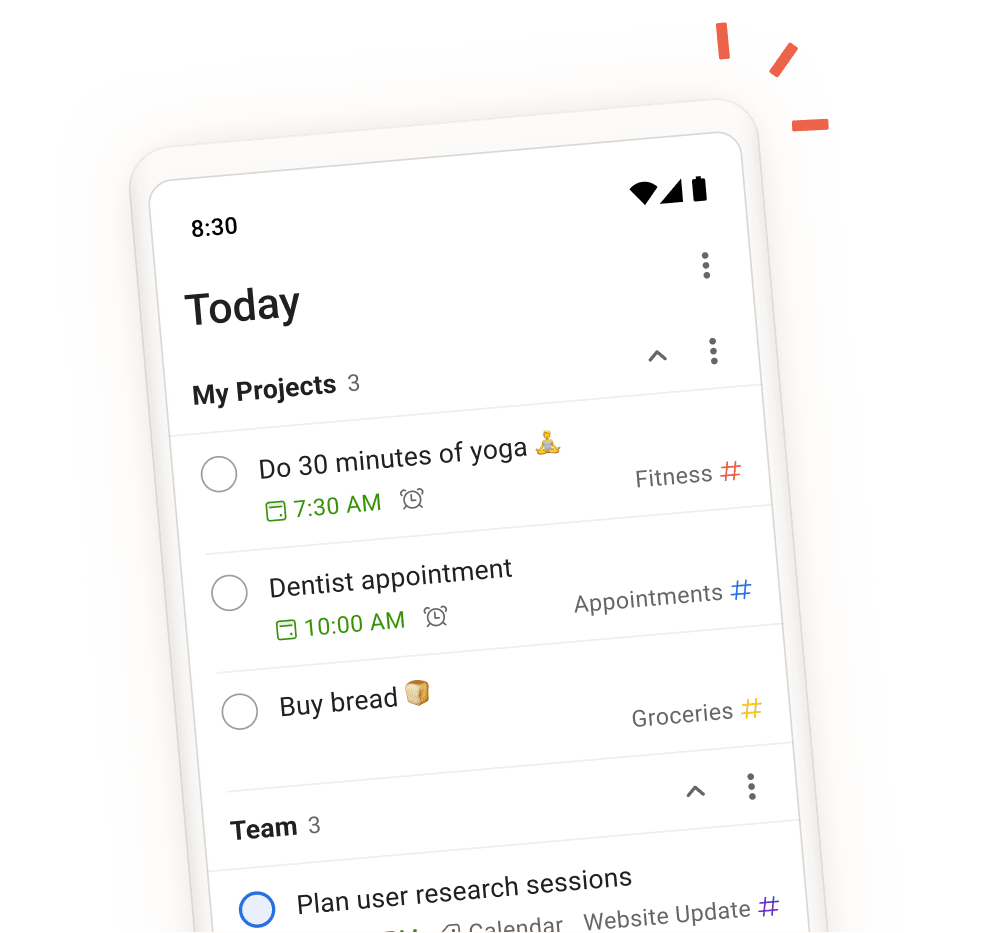
Todoist has been the consensus best cross-platform task manager for years and 2025 did not change that. The natural-language quick-add ("Submit report Friday at 3pm p1 #work") is still the fastest task entry in the category. AI Assist (paid) breaks down tasks into subtasks.
Todoist is the safest pick for reliable tasks across iOS, Android, Mac, Windows, and web. Pricing: Free tier, Pro $4/month, Business $6/month.
4. Things: Best Apple Task Manager
Things 3 by Cultured Code is the polished, premium pick for Apple-only users. It uses a GTD-inspired workflow (Today / Upcoming / Anytime / Someday), and each platform is a separate one-time purchase.
Things is for Apple-only users who want a calm task manager with almost no setup. Pricing: $49.99 Mac, $9.99 iPhone, $19.99 iPad, one-time per platform.
5. Linear: Best for Engineering Teams
Linear is a keyboard-first issue tracker for engineering and product teams. Its Insights and AI features add reporting and assistance without turning the core workflow into a general project-management suite.
Linear fits engineering and product teams that want speed over deep admin controls. Pricing: Free for up to 10 users, Standard $8/user/month, Plus $14/user/month.
6. Sunsama: Best Daily Planning App
Sunsama combines tasks from Todoist, Linear, Asana, GitHub, or Google Tasks with calendar time blocks and a guided daily review. It fits people whose work is already split between a task manager and calendar.
Sunsama fits knowledge workers who have tasks everywhere and need a daily plan. Pricing: $16/month annual, $20/month monthly.
7. Motion: Best AI Auto-Scheduler
Motion takes your task list and automatically books it into your calendar around meetings, deadlines, and priorities. When something changes, it reschedules. The 2025 updates made the AI scheduling more transparent and less prone to creating awkward 12-minute slots.
Motion works best for solo professionals and freelancers with high task volume and shifting days. Pricing: $19/month annual, $34/month monthly.
8. Obsidian: Best Local-First Power-User Notes
Obsidian remains the local Markdown notes app for power users. Notes live as files on your device. Plugins, more than 2,000 of them, extend the app into almost any workflow. Its graph view shows how notes link together.
Obsidian fits users who care about file ownership, plugins, and linked notes. Pricing: Free for personal use, $8/month Sync, $10/month Publish.
9. Raycast: Best Mac Productivity Launcher
Raycast replaced Spotlight for many Mac power users in 2024-2025. It handles AI commands, snippets, clipboard history, window control, and extensions for tools such as Linear, Notion, GitHub, and Calendar.
Raycast is for Mac users who want one keyboard shortcut to reach everything. Pricing: Free core app, Pro $8/month for AI features and Raycast AI.
10. Notion Calendar: Best Keyboard-First Calendar
Notion Calendar, formerly Cron, is a fast calendar app that stays free. The Notion hook is simple: pages with date fields show up on your calendar.
Notion Calendar fits Notion users and anyone who wants a free, fast calendar. Pricing: Free.
Comparison table
Use this table to choose by job. Pick the app that owns the layer you are missing. Keep your current tools for jobs they already do well.
| App | Job | Free Tier | Paid From | Platform |
|---|---|---|---|---|
| Atlas | Knowledge synthesis | Yes | $20/mo | Web |
| Notion | All-in-one | Yes | $10/mo | All |
| Todoist | Tasks | Yes | $4/mo | All |
| Things | Tasks (Apple) | No | $49.99 one-time | Apple |
| Linear | Engineering tracking | Yes (≤10 users) | $8/user/mo | All |
| Sunsama | Daily planning | No (trial) | $16/mo | All |
| Motion | AI scheduling | No (trial) | $19/mo | All |
| Obsidian | Notes | Yes | $8/mo Sync | All |
| Raycast | Launcher | Yes | $8/mo Pro | Mac |
| Notion Calendar | Calendar | Free | N/A | All |
Table 2: Pricing and platform snapshot for the 10 productivity apps covered in this guide.
Interface Examples
The screenshots below show the clearest interface patterns behind this list. Todoist covers fast task capture. Notion Calendar covers calendar planning. The Atlas screenshot above covers the source-heavy knowledge layer.

Which productivity stack should you choose?
The best stacks combine 3-4 apps that cover all 5 jobs without overlap. Start with tasks and calendar. Add a knowledge layer only if your work depends on source material, research, or long-running projects. For that layer, compare the broader category in our knowledge management software guide.
The Knowledge Worker Stack ($24-32/month)
- Atlas ($20/mo), knowledge synthesis.
- Todoist ($4/mo) or Things (one-time), tasks.
- Notion Calendar (free), calendar.
- Raycast (free or $8/mo Pro), launcher.
The Engineering Stack ($16-30/month)
- Linear ($8/user/mo), issue tracking.
- Notion or Obsidian, docs and notes.
- Notion Calendar (free), calendar.
- Raycast Pro ($8/mo), launcher with AI commands.
The Researcher Stack ($24-40/month)
- Atlas ($20/mo), research synthesis and notes.
- Todoist ($4/mo), tasks.
- Sunsama ($16/mo), daily planning if needed.
- Notion Calendar (free), calendar.
The Apple-Only Minimalist ($60 one-time + $20/mo)
- Things ($49.99 + $19.99 + $9.99), tasks.
- Apple Notes (free), basic notes.
- Atlas ($20/mo), knowledge work.
- Apple Calendar (free), calendar.
If your work involves synthesizing knowledge across documents, notes, and research, Atlas is the fit when you need cited answers from your own source base.
What to Avoid
Two anti-patterns kill productivity-app ROI.
Stack sprawl kills the return because adding a fifth or sixth tool rarely solves the core workflow. It adds switching cost and weakens your habits around the 3-4 tools that matter.
Generic AI features are easy to overbuy. An AI button that summarizes text you wrote yourself is usually just a wrapper. Pay for AI when it does repeat work: placing tasks, citing sources, or planning the day.
Next Steps for Your Productivity Stack
Start with the smallest setup that covers tasks and time. Add another app only when a recurring job cannot be handled without manual copying or lost context.
If documents and notes become hard to search together, compare the knowledge tools linked above. Otherwise, keep the current stack and spend the saved setup time on the work itself.
AtlasSee how Atlas fits the knowledge layer
Compare eight knowledge tools for search, cited answers, team fit, and upkeep.
Frequently Asked Questions
There is no single answer because productivity is multiple jobs, task management, calendar, notes, focus, and communication. Most effective setups use 3-4 apps: one task manager (Todoist, Things, or Linear), one note-taking or knowledge app (Atlas, Notion, or Obsidian), one calendar (Google Calendar, Cron, or Sunsama), and a launcher (Raycast or Alfred). Atlas is the standout new entrant for knowledge-work productivity in 2025.