
Best Note-Taking Apps 2025: 9 Apps Ranked After a Year
Best note taking apps of 2025, ranked. Atlas, Notion, Obsidian, Apple Notes, OneNote, Evernote, Logseq, Bear, and Capacities, tested across writing, research.
- Byline

Summary
The best note-taking app depends on workflow, with Atlas, Notion, Obsidian, Apple Notes, OneNote, Evernote, Logseq, Bear, and Capacities serving different needs.
Compare AI features, linked notes, free options, migration risk, research workflows, and focused tool choices.
Use Atlas for AI-grounded knowledge work, Notion for all-in-one workspaces, Obsidian for linked markdown, and Apple Notes for friction-free capture.
The right choice depends on whether notes are for capture, writing, linked thinking, team work, or source-cited research.
The note-taking app conversation in 2025 is different from 2023. AI features became standard. The linked-notes paradigm went mainstream. Evernote's price hikes and Notion's "everything app" sprawl pushed power users toward focused tools. And a new category, AI-grounded knowledge workspaces with source citations, emerged led by Atlas and NotebookLM.
This guide ranks the 9 apps that matter in 2025. The ranking comes from a year of daily use across writing, research, and personal capture. Each section says where the app fits, where it breaks down, and who should pick it.
For the evergreen, methodology-first ranking, see our best note-taking apps guide.

 Atlas
AtlasAsk cited questions across your research notes
Upload notes and PDFs, then inspect the source behind each answer.
What Changed in Note-Taking Apps in 2025?
For a deeper filter, see our second-brain apps guide. It compares cognitive load, lock-in risk, and graph depth.
Three shifts shaped the year.
AI features became normal by mid-2025. Notion, Apple Notes, Evernote, and OneNote all added AI. Many tools still feel like a chat box beside your notes. The better versions answer from your own files and notes, which is the job Atlas, NotebookLM, and Notion AI try to solve.
Linked notes went mainstream. Obsidian crossed 2 million users. Logseq and Capacities both grew fast. Notion added inline backlinks. Roam Research made bidirectional links familiar in 2020. By 2025, users expected serious note apps to support links between notes.
Consolidation pressure hit Evernote and Notion. Evernote changed hands and raised prices. Notion kept adding projects, CRM, and AI. For people who only wanted notes, both apps started to feel heavier. That pushed many users toward smaller tools.
How to Compare Note-Taking Apps
I ranked each app against five jobs:
- Fast capture
- Long-form writing
- Linked thinking
- Team use
- Source-cited research
For this 2025 refresh, I used the same small test in every app. I captured a phone note, clipped a web page, linked two notes, and exported a sample. Then I opened it on a second device and asked an AI question when the app offered one.
An app moved up only when it did one job better than the rest in daily use. It moved down when setup, price, export risk, or slow sync got in the way.
Use this short test before you switch:
- If the note starts as a fleeting thought, pick the app that opens fastest on your phone.
- If the note becomes a draft, pick the editor you can write in for an hour.
- If the note links to other ideas, pick a tool with backlinks or a graph.
- If the note belongs to a team, pick the shared workspace with the least upkeep.
- If the note came from papers or PDFs, pick the tool that can cite the source.
Price matters, but only after fit. A free app that cannot export your work or find old notes becomes expensive later. A paid app is easier to justify when it saves search time every week.
How This Ranking Was Built
The ranking combines daily workflow tests with a strict archive requirement. The following sections explain what counted as evidence, why narrower tools were excluded, and how pricing changed the final order.
Why Trust This Ranking
This is not a scraped feature list. The ranking favors daily use over long checklists. A tool scored higher when a note could move from capture to reuse without extra cleanup.
I also excluded tools that are good but too narrow for this list. Google Keep is excellent for quick lists, photos, and reminders, but it is too light for research notes or long-form writing. Roam Research still matters for networked thought, but Obsidian and Logseq give most users a lower-risk path today. Shadow is useful for meeting capture, but it is closer to an AI meeting assistant than a general notes app.
E-ink devices need a separate decision. reMarkable and Kindle Scribe are strong for handwriting, but they do not replace a full notes archive for most people. If you write on e-ink, choose the note app based on where the exported PDFs or handwritten pages will live afterward.
Apps Outside the Top 9
The cutoff was whether the app could hold a durable notes archive. Some tools are useful, but they solve a narrower job.
| Tool or device | Why it missed the main ranking | Best handoff |
|---|---|---|
| Google Keep | Fast for lists, photos, and reminders, but too thin for research notes or long drafts | Send durable notes to Apple Notes, OneNote, or Notion |
| Roam Research | Still important for networked thought, but most users get lower risk from Obsidian or Logseq now | Use Obsidian for local files or Logseq for an outliner |
| Shadow | Strong for meeting capture, but closer to an AI meeting assistant than a full notes app | Send decisions and action items into the main notes archive |
| reMarkable or Kindle Scribe | Excellent for handwriting, weak as the only long-term archive | Export PDFs or handwritten pages into the app you search every week |
| Boox tablets | Flexible Android e-ink hardware, but app quality depends on the note app you install | Pick the archive first, then test whether writing latency is acceptable |
Table 1: Useful note tools that work better as inputs or handoff points than as the main notes archive.
My rule: the capture tool can be narrow, but the archive cannot be. If a note may need search, links, citations, or export later, move it into the system where that future work will happen.
Pricing Reality in 2025
The pricing pattern is simple. Capture apps are usually free because they come with a device or account. Workspace apps charge for teams, sync, or AI. Research apps charge when they save review time across many sources.
| Pricing model | Apps in this guide | What to check before paying |
|---|---|---|
| Free with account or device | Apple Notes, OneNote, Logseq | Export, cross-platform access, and whether sync is reliable enough |
| Paid sync or pro tier | Obsidian, Bear, Capacities | Whether the paid plan solves a daily problem, not just a nice-to-have |
| Workspace subscription | Notion, Evernote | Team permissions, importer quality, and long-term lock-in |
| AI research subscription | Atlas | Whether cited answers save enough reading and search time |
Table 2: Pricing models to check before choosing a note-taking app in 2025.
The 9 Best Note-Taking Apps of 2025
The nine ranked apps represent distinct jobs rather than interchangeable feature bundles. Each review states the workflow the app handles best, the limitation that should disqualify it, and the price or migration cost attached to that choice.
1. Atlas: Best AI-Grounded Knowledge Workspace
Atlas is the 2025 answer to "what if your notes were navigable as a knowledge graph and the AI cited your sources?" Upload notes, PDFs, articles, and lecture material, and Atlas builds a mind map showing how concepts connect. Every AI answer points to a specific note or passage.
Its main edge is cross-source synthesis. You can ask a question across notes and PDFs, then check the cited passage before you use the answer. The map also shows links you might miss in a plain folder view.
It is not the best plain scratchpad. There is no handwriting input, and the template community is smaller than Notion's. Pick it when your notes come from many sources and need to turn into cited answers.
Atlas Pro is $20/mo.
2. Notion: Best All-in-One Workspace
Notion is still one of the most-used note apps in 2025. It is hard to beat when you use its databases and project views. The free tier is large, the template market is huge, and Notion AI can answer across a workspace.
Its edge is breadth. Notes, tasks, calendars, databases, and team docs can all live in one place. The template market is also much larger than any focused notes app.
The tradeoff is upkeep. A workspace can turn into a setup project, and large pages can feel slow. Notion AI also costs extra.
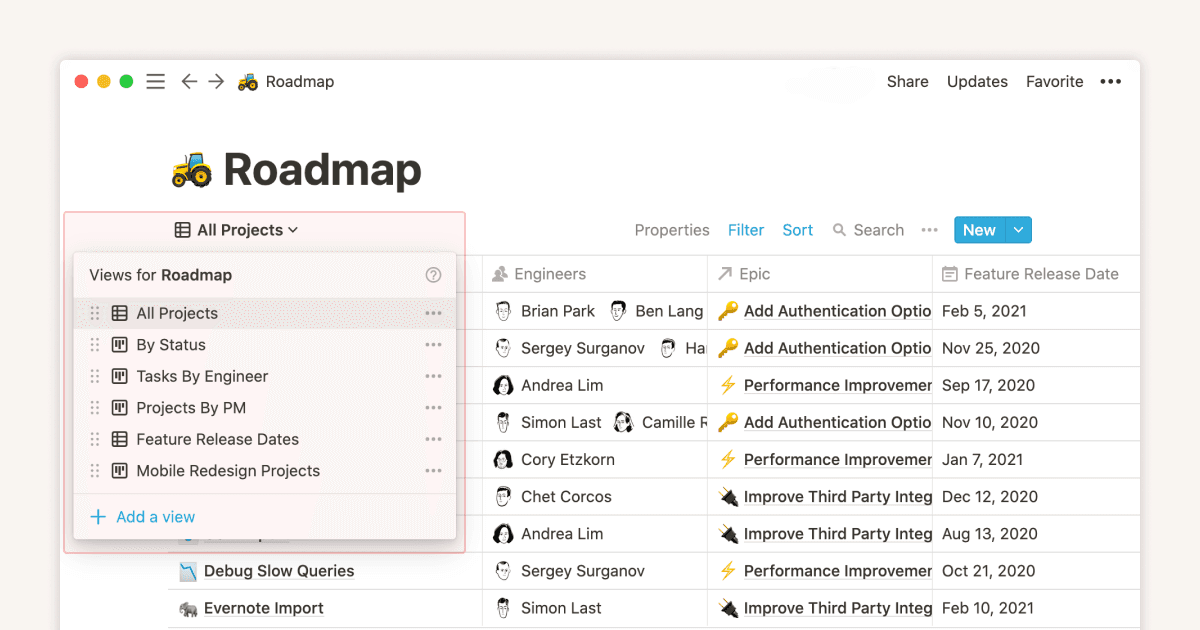
Choose Notion when notes need databases, owners, due dates, and shared views. The free tier is strong. Personal Pro is $10/month, and Notion AI is a $10/month add-on.
3. Obsidian: Best for Local-First Markdown
Obsidian remains the power-user darling in 2025. Notes are local markdown files. The plugin library has more than 2,000 community plugins, and the graph view is built in. Sync is paid at $8/month, but the core app is free for personal use.
Obsidian's edge is file ownership. Your notes are local markdown files, so you are not locked into a cloud workspace. Links and the graph view make it strong for long-running ideas.
The cost is setup time. Mobile is weaker than desktop, teams need workarounds, and new users often spend too long tuning plugins.
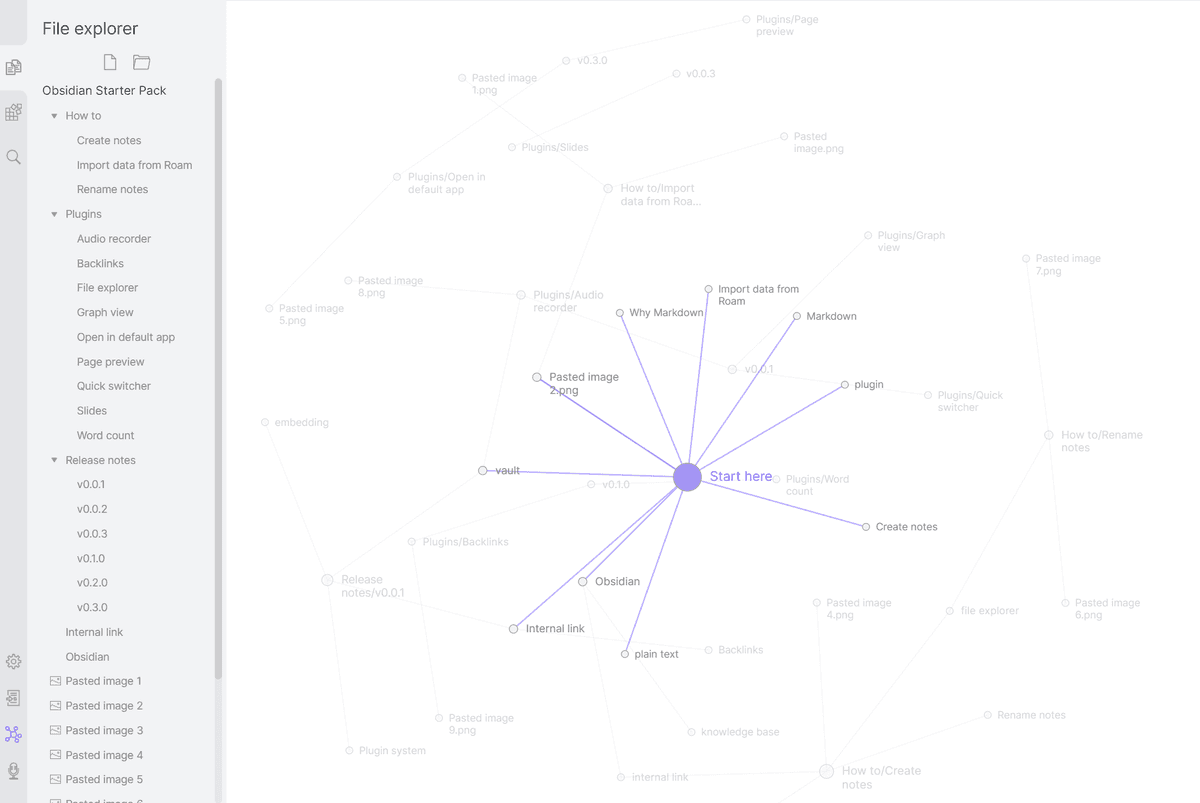
Choose Obsidian if you care about local files and custom workflows. It is free for personal use. Sync is $8/month and Publish is $10/month.
If Obsidian feels too complex, see simpler Obsidian alternatives.
4. Apple Notes: Best Frictionless Free Option
Apple Notes quietly became one of the best note apps in 2025. Recent updates added shared notes, math notes, smart folders, and AI summaries. If you already use Apple devices, setup is almost zero.
Its edge is speed. It opens fast, syncs through iCloud, supports Apple Pencil, and now includes Apple Intelligence for summaries and rewrites.
The limit is the Apple wall. There is no Windows or Android app, exports are narrow, and links are basic. New AI features also need recent Apple hardware.
Choose Apple Notes if you live on iPhone, iPad, or Mac and want free notes with almost no setup. It is included with an Apple ID.
5. OneNote: Best Free Note-Taking for Windows
Microsoft OneNote is still the best free notes app for Windows users in 2025. Its notebooks, sections, and pages fit classes, meetings, and client work. Copilot can help with meeting summaries when paired with Microsoft 365.
OneNote's edge is structure. Notebooks, sections, and pages fit classes, meetings, and client work. It is free with a Microsoft account and works across Mac, iOS, Android, and web.
It also has strong handwriting support on Surface. Copilot can help with meeting summaries when paired with Microsoft 365. The weak points are slow sync in large notebooks, few link features, and an older interface.
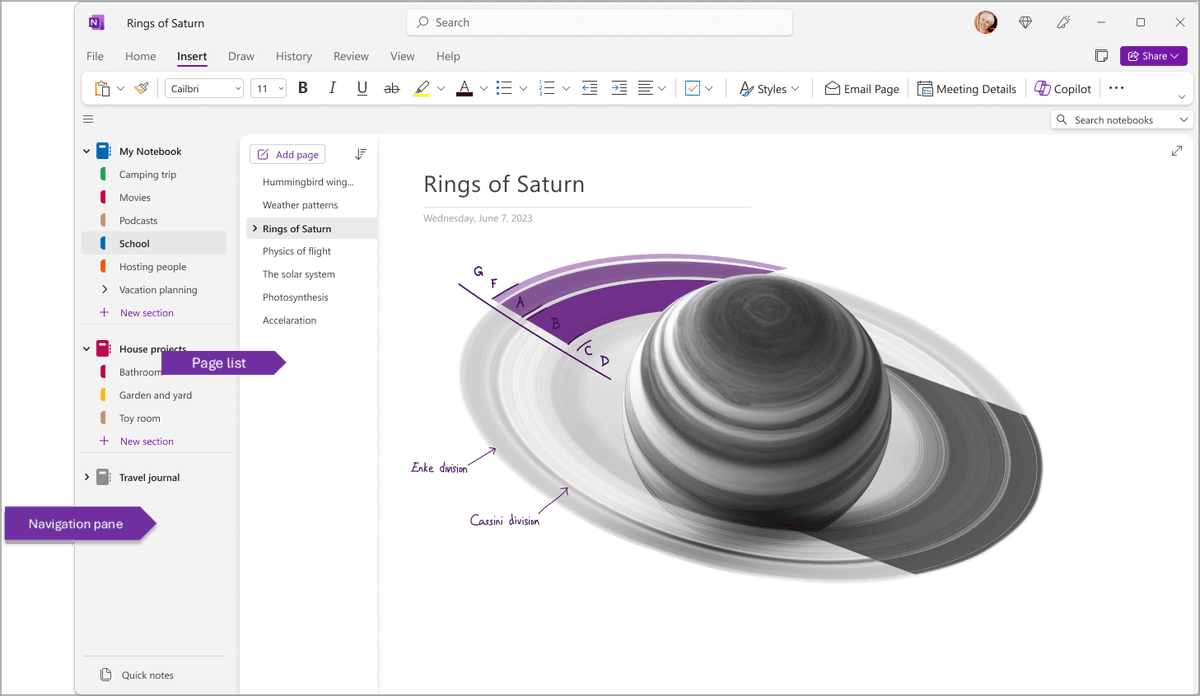
Choose OneNote for Windows, Surface handwriting, or meeting-heavy work.
6. Evernote: Best for Web Clipping
Evernote in 2025 is in an awkward position. The core product still works well for web clipping, PDF markup, and OCR search. That is why many large old archives still live there. But the pricing changes under Bending Spoons ownership pushed many long-time users to Notion, Obsidian, or Apple Notes.
Evernote still wins at capture from the web. Its clipper, PDF markup, and OCR search are the reasons many large archives still live there.
The risk is price and direction. The free tier is tight. Paid plans cost far more than they did in 2020. Many long-time users no longer trust the roadmap.
Choose Evernote only if your archive is already there or web clipping is the core job. The free tier allows 1 device and 50 notes. Personal is $14.99/month, and Professional is $17.99/month.
7. Logseq: Best Open-Source Outliner
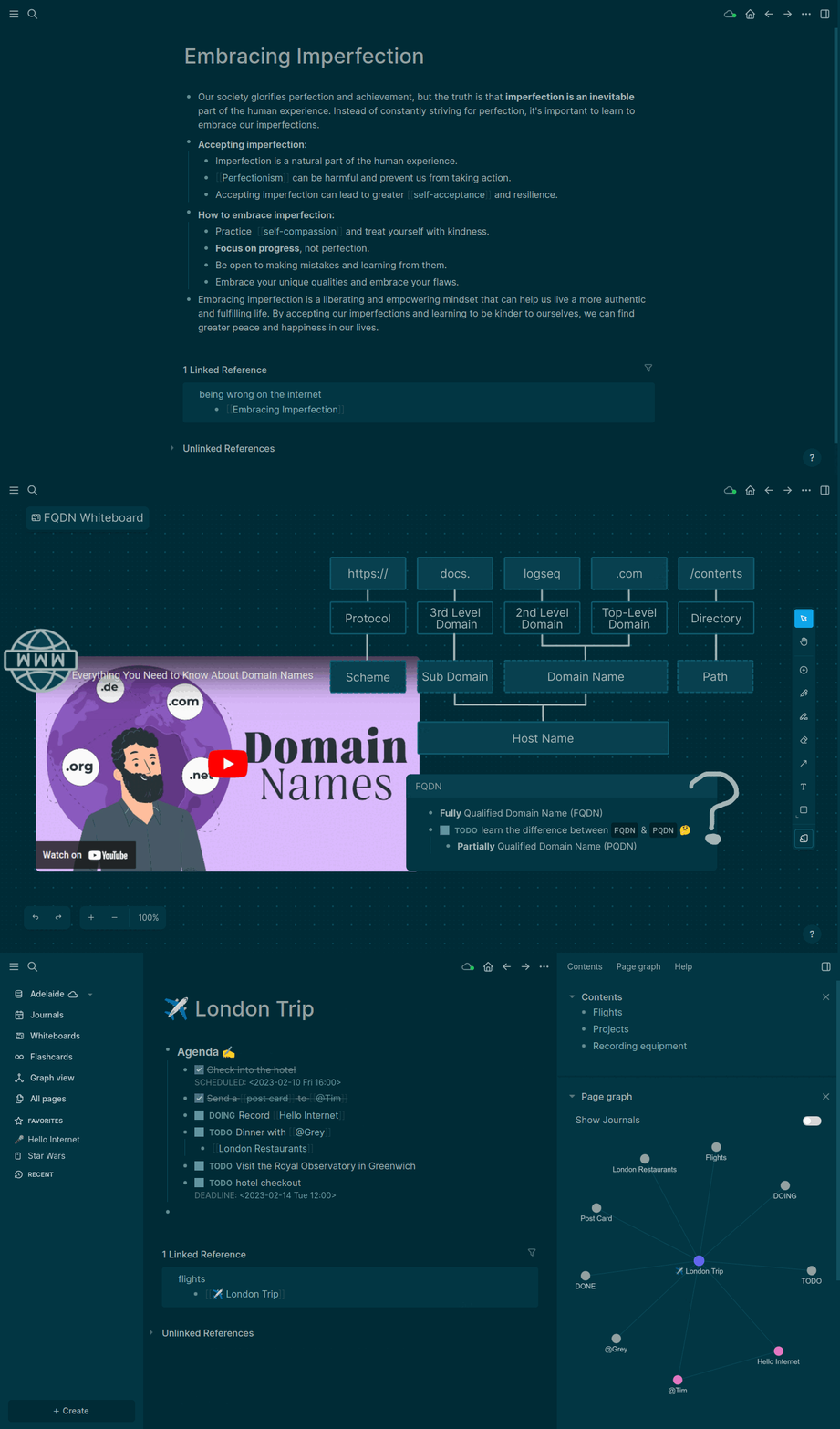
Logseq is the open-source answer to Roam Research. It gives you blocks, links, daily notes, and local markdown files. The app is free.
Logseq's edge is the outline. Daily notes, blocks, and backlinks make it good for research logs and journals. It is open source, stores notes as local markdown, and has low vendor risk.
The outline can feel rigid if you prefer pages. Mobile sync is still less polished, and the plugin market is smaller than Obsidian's. Choose Logseq if you want open-source linked notes and like writing in nested blocks. It is free.
8. Bear: Best Apple Markdown Editor
Bear remains one of the cleanest writing apps on Apple platforms. It uses markdown, tags, and a calm editor on iOS and macOS. Bear 2 added wiki-style links and better PDF handling.
Bear's edge is writing feel. It is fast, calm, and built around markdown. Hashtags make filing simple without turning notes into a database.
The limits are clear. Bear is Apple-only, has no web or Android app, and does not try to be a team workspace.
Choose Bear if you write a lot on Apple devices and want a focused editor. There is a free tier, and Pro is $14.99/year.
9. Capacities: Best Object-Based Notes
Capacities flips the page-based model: instead of pages, you have typed objects, Book, Person, Project, Idea. Each object type has structured properties. The result is closer to a database than a notebook, but with note-taking ergonomics.
Capacities' edge is structure without a blank-page feel. Books, people, projects, and ideas become typed objects with fields. Daily notes, tags, and backlinks tie them together.
The model takes time to learn. Offline mobile work has lagged behind desktop, and the community is smaller than Notion's or Obsidian's.
Choose Capacities if your notes revolve around recurring people, books, projects, or topics. There is a free tier. Pro is $9.99/month or $79/year.
Comparison Table
Use the table to find the app whose weak column does not matter for your daily work.
| App | AI features | Linked notes | Free tier limits | Research workflow support | Migration risk | Focused tool fit |
|---|---|---|---|---|---|---|
| Atlas | Source-cited Q&A | Yes, via mind map | Free entry, Pro for heavy use | Strong for PDFs, reading notes, and cross-source questions | Medium, because it is a newer research workspace | Best when notes must answer questions with citations |
| Notion | Notion AI add-on | Yes, via backlinks | Generous personal free tier | Good for team docs, weaker for source checking | Medium-high, because databases and pages can sprawl | Best when notes share space with projects |
| Obsidian | Mostly plugin-based | Yes, graph view | Free for personal use | Strong for linked markdown and long-term writing | Low, because files stay local | Best for power users who want control |
| Apple Notes | Apple Intelligence on newer devices | Limited | Free with Apple ID | Good for capture, weak for research synthesis | Medium, because export is limited | Best for fast Apple-only notes |
| OneNote | Copilot with Microsoft 365 | Weak | Free with Microsoft account | Good for classes, meetings, and handwriting | Medium, because notebooks can be hard to move cleanly | Best for Windows and Surface users |
| Evernote | AI Edit on paid plans | Limited | 1 device and 50 notes | Good for web clips and scanned archives | High for large old libraries | Best when the archive already lives there |
| Logseq | Mostly plugin-based | Yes | Free | Strong for daily research logs and outlines | Low-medium, because files are local but sync needs care | Best for open-source outliner users |
| Bear | None native | Yes, via Bear 2 links | Limited free tier | Good for writing, light for research | Medium, because it is Apple-only | Best for focused Apple writing |
| Capacities | AI assistant | Yes | Useful free tier | Strong for structured notes about people, books, and projects | Medium, because the object model is distinct | Best for object-based knowledge work |
Table 3: 2025 note-taking apps compared by AI support, linking, free tier, research fit, migration risk, and best use case.
How to Pick in 2025
Start with the job your notes have to do this week:
- If you want AI that cites your notes and source passages, Atlas is the strongest fit for source-heavy research and writing.
- If notes share space with projects, docs, and databases, Notion is still the practical default, especially with the free tier or
.eduplan. - If file ownership matters, choose Obsidian. Budget time for setup, then keep the system simple enough that you keep writing.
- If you are Apple-only and want zero friction, Apple Notes is the right first stop. Add Bear only if you write enough long-form prose to care about the editor.
- If you use Windows, want a free tool, and take meeting notes often, choose OneNote.
- If you have a big existing Evernote library, stay until pricing forces a migration. Evernote's web clipper is still the best of its kind.
- If you are an open-source advocate or developer, choose Logseq.
- If you are a researcher who thinks in objects, choose Capacities.
Before moving a full archive, test the new app with one week of active notes. Check whether search finds old material, links survive export, and the app still feels fast on every device you use.
Related note app comparisons
For a focused switch, compare Atlas with Apple Notes, Bear, Coda, Craft, Evernote, Heptabase, and OneNote.
If you are leaving an older tool, start with alternatives to Evernote, OneNote alternatives, or Obsidian vs OneNote. For device filters, use best cross-platform note-taking apps and best note-taking apps for Mac.
What 2026 Will Probably Bring
Expect three things. Grounded Q&A will become normal, and Atlas and NotebookLM show where that is going. The "everything app" pitch will keep losing ground to focused tools. Local-first apps such as Obsidian, Logseq, and Apple Notes will keep gaining trust as users get tired of subscription churn.
Pick the smallest set of tools that fits your actual workflow, and write more than you configure.
AtlasAsk cited questions across your research notes
Upload notes and PDFs, then inspect the source behind each answer.
Frequently Asked Questions
Use Atlas when you need to ask questions across papers and notes and open the source passage behind an answer. Use Obsidian for local Markdown and manual links, or NotebookLM for questions within a bounded source set.