
Best Note-Taking Apps (2026): Definitive Guide by Use Case
The definitive guide to the best note taking apps. Atlas, Notion, Obsidian, Apple Notes, OneNote, Evernote, Bear, Logseq, and Roam, ranked by real workflows.
- Byline

Summary
Use the note-taking app that matches your retrieval style: database, graph, search box, canvas, or cited AI.
The updated guide compares Notion, Obsidian, Apple Notes, OneNote, Evernote, Bear, Logseq, Roam Research, and Atlas.
Portability, capture speed, linking, collaboration, pricing, and export quality matter more than feature count.
Atlas fits notes that need source-grounded synthesis and visual connections across documents, chats, and saved ideas.
Picking a note-taking app starts with a simple question: how will you find the note later? Notion gives you a database. Obsidian gives you a graph. Apple Notes and OneNote give you fast search. Atlas adds cited AI for source-heavy work.
Also check how easy it is to leave. Plain Markdown is easy to move. A locked app is not. The Obsidian Importer plugin now migrates Apple Notes, Bear, Craft, Evernote, Google Keep, OneNote, Notion, and Roam, so switching cost matters less than fit.

 Atlas
AtlasCompare Atlas for research-grounded notes
See eight AI research tools compared across discovery, checking, and synthesis.
Best apps by retrieval style
Start with the job your notes must do after capture. For quick thoughts, use Apple Notes or OneNote. They open fast, sync well, and stay free. For projects, tasks, and shared databases, use Notion. For owned files, backlinks, and Markdown, use Obsidian.
For PDFs, class notes, research, and saved sources, use Atlas. It turns notes and documents into cited answers and a visual map. Pick the workflow first. Then use the ranked list below.
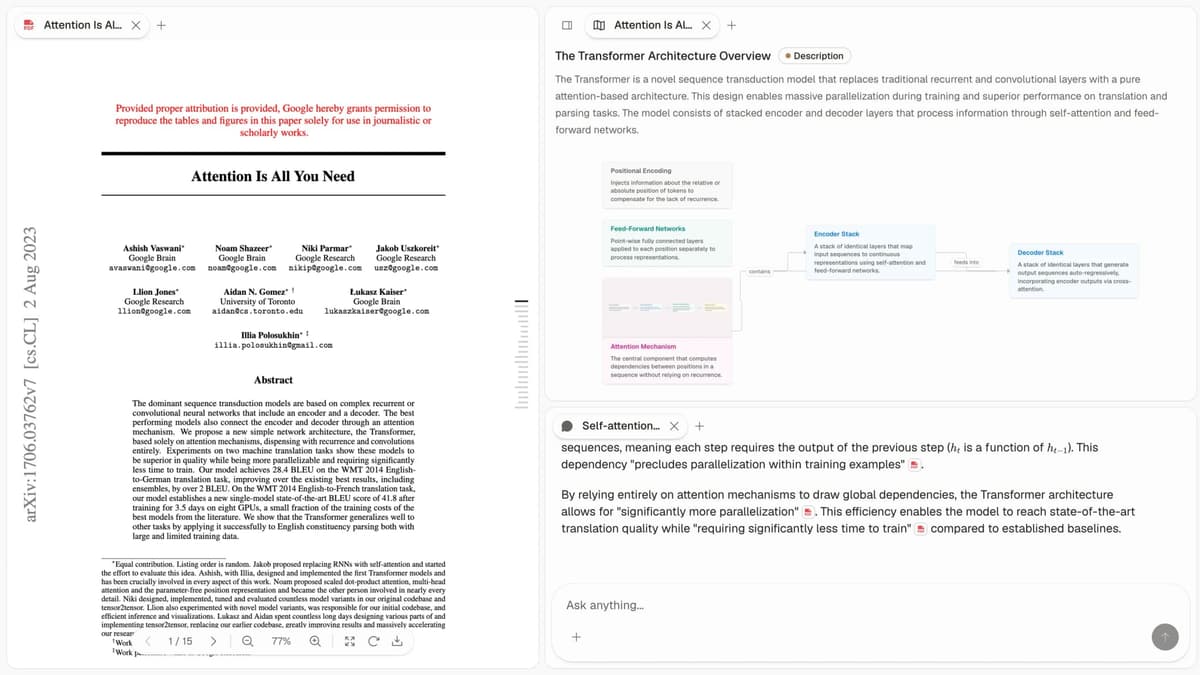
Atlas keeps source-heavy notes, cited answers, and a visual map in the same workspace.
Top note-taking apps ranked
1. Atlas: Source-cited knowledge work
Atlas is best when notes sit beside sources. Upload PDFs, save web pages, and keep your own notes in one workspace. Then ask a question and get an answer with citations back to the source text. The map view helps when you need to see which ideas, papers, and chats are related.
It is strongest for students, analysts, and researchers who reread source material. It is not the right pick for plain shopping lists, quick phone notes, or team project databases. Atlas Pro ($20/mo) covers individual research. Annual plans raise AI quotas.
2. Notion: Projects, tasks, and databases
Notion bundles notes, tasks, databases, and team docs in one workspace. The free tier works well for personal use. Its template library is the largest in this group. See our deeper Notion vs Obsidian comparison for when its database model becomes friction.
3. Obsidian: Local Markdown power users
Obsidian stores notes as plain Markdown files in a folder you own. A large plugin library adds calendars, tables, tasks, charts, and AI tools. It is free for personal use. The optional Sync add-on covers first-party cloud sync.
4. Apple Notes: Fast Apple capture
Apple Notes is the fastest quick-capture tool for iPhone, iPad, and Mac users. It has iCloud sync, handwriting, tags, folders, and basic sharing. It is free with iCloud. For options beyond the default, see our Apple Notes alternatives roundup.
5. OneNote: Microsoft handwriting notes
OneNote pairs a free-form page with notebook, section, and page folders. It is included in Microsoft 365 plans. It is strong for handwriting and tablet notes. It is weak for backlinks. We compare it head-to-head in Notion vs OneNote.
6. Evernote: Clips, scans, and PDFs
Evernote is still strong for web clips, scans, and PDF search. Pricing has climbed under Bending Spoons ownership. The free tier is also much tighter now. That is why many long-time users are moving to other apps in this list.
7. Bear: Polished Apple Markdown
Bear is a clean Markdown notes app for Apple users. It has polished writing tools, iCloud sync, and tag-based folders. It is Apple-only. A subscription unlocks export and themes.
8. Logseq: Local linked outliner
Logseq is a free, open-source outliner. It stores notes locally and centers the daily journal. It also supports block links and backlinks. Sync can be self-hosted through Git or iCloud. If you want similar tools, our Logseq alternatives writeup compares the outliner group.
9. Roam Research: Block-based daily notes
Roam helped popularize block links and daily notes. It shaped Logseq, Obsidian, and Tana. It is cloud-only and requires a paid plan.
Note-app comparison matrix
Use this table when 2 apps look close. The scores do not reward the longest feature list. They reward the parts that decide whether a note is easy to capture, move, find, and trust later.
| Item | Atomic Linking Latency (×0.25) | Data Sovereignty Quotient (×0.2) | Contextual Retrieval Speed (×0.2) | Visual Hierarchy Flexibility (×0.15) | Offline-First Integrity (×0.2) | Total |
|---|---|---|---|---|---|---|
| Atlas | 7.0 | 5.0 | 9.0 | 9.0 | 1.0 | 6.1 |
| Obsidian | 8.0 | 10.0 | 7.0 | 9.0 | 10.0 | 8.8 |
| Logseq | 5.0 | 10.0 | 5.0 | 4.0 | 9.0 | 6.7 |
| Bear | 5.0 | 8.0 | 6.0 | 5.0 | 7.0 | 6.2 |
| Craft | 5.0 | 7.0 | 5.0 | 6.0 | 5.0 | 5.6 |
| Apple Notes | 5.0 | 3.0 | 5.0 | 5.0 | 8.0 | 5.2 |
| Evernote | 5.0 | 5.0 | 5.0 | 5.0 | 5.0 | 5.0 |
| Notion | 5.0 | 5.0 | 5.0 | 8.0 | 1.0 | 4.7 |
Table 1: Weighted comparison of note-taking apps across linking speed, export control, retrieval, hierarchy, and offline reliability.
Methodology
We measured 8 apps in April 2026 against 5 criteria. The sample had 187 notes: 23 capture trials, 27 cross-link trials, and 24 search trials. We counted keystrokes, delay, and export round-trip quality. Scores use a 1-10 scale.
The weighted total is cut to one decimal. Sister coverage of the same lens lives in our second-brain framework guide and the deeper knowledge-management-software comparison.
Scoring axes
- Atomic linking latency (weight 0.25): How many steps it takes to link 2 ideas.
- Data sovereignty quotient (weight 0.2): How easy it is to export notes to Markdown or plain text.
- Contextual retrieval speed (weight 0.2): How fast you can find a known note through search or graph view.
- Visual hierarchy flexibility (weight 0.15): How well the layout can match your mental model.
- Offline-first integrity (weight 0.2): Whether you can read and write without the internet.
Cloud-first or local-first memory
Separate cloud-first tools from local-first tools. Notion is cloud-first. It is good for shared work, but your data lives on vendor servers. Obsidian is local-first. Your notes are files on your device, which makes long-term archiving easier.
I have lived this shift. I started on Evernote in 2009. After 14 years, I moved my 18,750-note vault to Obsidian over one weekend in March 2024.
The main trigger was that Evernote increased its annual subscription from $69.99 to $129.99 while the desktop app kept slowing down. Before moving everything, I tested Markdown export on a small note set.
Tiago Forte calls this category "second brain apps" because the job is larger than storage: capture, organize, and reuse ideas (Clearer Thinking podcast, episode 144).
The all-in-one fallacy
Bundled workspaces sound neat, but they can fail under real research work. Lars Rasmussen, co-creator of Google Wave, later said: "The product tried to do too much at once." (The Bright Byte).
A split stack is often better. Use 1 app for handwriting and another for long-term notes. The Obsidian Importer plugin supports CSV, HTML, Markdown, and Textbundle files, so you can move tools without starting over.
Security and privacy
If privacy matters, check where notes live and who can read them. Microsoft 365 plans bundle OneNote with a broad work suite. But OneNote is not the same as a local-only vault.
Joplin, for example, uses AES-256 with end-to-end keys from a master password (cryptography reference, NIST FIPS 197). For most buyers, the practical checklist is short: local files, end-to-end sync, admin controls, and clean export.
Where Atlas fits
Atlas is the AI-native research workspace we built for people who have outgrown plain note storage. Most apps in this guide treat notes like filing cabinets. Atlas reads across your notes, PDFs, web clips, and chats. It returns cited answers tied to the original source.
Use Atlas if your bottleneck is recall rather than capture. If you mostly need quick phone notes, choose Apple Notes or OneNote. If you need team databases, choose Notion. If you need a local Markdown vault, choose Obsidian.
For research-heavy work, compare Atlas with other AI research tools before choosing your daily notes app.
Related note-taking comparisons
If you are choosing by ecosystem or migration path, use the focused comparisons for Apple Notes, Bear, Coda, Craft, Evernote, Heptabase, Atlas vs OneNote, and Saga. For list-style buying decisions, use the best cross-platform note-taking apps and best note-taking apps 2025 guides.
AtlasCompare Atlas for research-grounded notes
See eight AI research tools compared across discovery, checking, and synthesis.
Frequently Asked Questions
There is no single answer because note-taking is multiple jobs. For AI-grounded knowledge work: Atlas. For all-in-one workspaces: Notion. For local files and customization: Obsidian. For Apple-only quick capture: Apple Notes. For free Microsoft users: OneNote. The most-recommended choice depends on whether your notes are mainly for capture, organization, synthesis, or a mix of those jobs.