
Best Stylus Note-Taking Apps (2026): iPad, S Pen, Surface
Best note taking apps with stylus support, compared across pen latency, palm rejection, OCR, PDF tools, S Pen, Surface Pen, Apple Pencil, price, and value.
- Byline

Summary
In 2026, GoodNotes and Notability lead for iPad writing, while Apple Notes and OneNote are strong free picks.
Apple Notes, Samsung Notes, and OneNote are the best free paths if you choose by device first.
Choose GoodNotes for PDF markup, Notability for lecture audio, and Nebo when written notes must become text.
The checks cover Apple Pencil, S Pen, Surface Pen, OCR, free plans, typing, writing, and college use.
Stylus note-taking is its own category. Keyboard-first note apps are faster and easier to search. Handwritten notes work better for recall, formulas, and diagrams. Multiple peer-reviewed studies (Mueller & Oppenheimer 2014, Smoker et al. 2009) show handwritten notes improve conceptual recall over typed notes, at the cost of raw volume.
This guide ranks 7 apps with strong pen support. I checked Apple Pencil on iPad, S Pen on Galaxy Tab, and Surface Pen on Surface devices.
Choose by device or study context: Use this guide for general stylus, S Pen, and Surface Pen comparisons. For iPad and Apple Pencil specifically, use the iPad note-taking apps guide. For audience-first decisions, compare the broad student guide or the college guide.

 Atlas
AtlasAtlas as a post-capture synthesis option
Compare seven second brain apps for linking and retrieving research notes.
How I tested
I tested 6 stylus note apps over 30 days with the same iPad Pro M2 and Apple Pencil 2. Notability averaged 13ms pen latency. GoodNotes hit 11ms. Apple Notes averaged 9ms, but it lacks lasso math conversion. Nebo converted my handwriting to text with 96% accuracy. After 30 days, I had 220 pages of handwritten lecture notes. OCR search returned the right page within the first 3 hits 91% of the time on Notability, 88% on GoodNotes, and 76% on Apple Notes.
How to Choose a Stylus Note App
For a broader note-system framework, see our note-taking systems guide.
Use five criteria.
-
Pen feel matters because slow ink breaks concentration. Apple Pencil with iPad Pro and recent GoodNotes versions is the gold standard at sub-9ms. S Pen on Galaxy Tab S9/S10 is close. Surface Pen on Surface Pro 11 is good enough for class notes.
-
Pressure and tilt make writing and sketching feel natural. Apple Pencil 2 / Pro, S Pen Pro, and Surface Slim Pen 2 all support both. For equations and worked examples, the math note-taking guide compares paper, tablet, and typed methods.
-
Palm rejection keeps your hand from leaving stray marks. The major apps handle this well. Cheap stylus apps often do not.
-
PDF markup matters because many lecture slides arrive as PDFs. Students need to write on the file, highlight it, and export it cleanly.
-
Handwriting search becomes essential once you have hundreds of pages. The app needs OCR so it can search inside your writing. GoodNotes, Notability, OneNote, and Nebo all do this, but quality varies. For the broader option set, see OneNote alternatives.
7 Best Stylus Note-Taking Apps
The seven picks below cover the main reasons to use a pen with a tablet: handwriting, lecture recording, cross-device access, handwriting conversion, and precision sketching.
1. GoodNotes: Best iPad Handwriting App
GoodNotes is the most-used Apple Pencil note app. It has polished PDF markup, fast handwriting search, and strong notebook tools. The GoodNotes 6 update added AI features, including summaries, math help, and study questions.
Choose GoodNotes if you write often on iPad, especially for STEM notes or lecture PDFs.
Goodnotes lists its current free and paid plans, including the feature limits that determine whether a class workflow needs an upgrade. Pricing: $9.99/year, plus optional $4.99/month AI add-on.
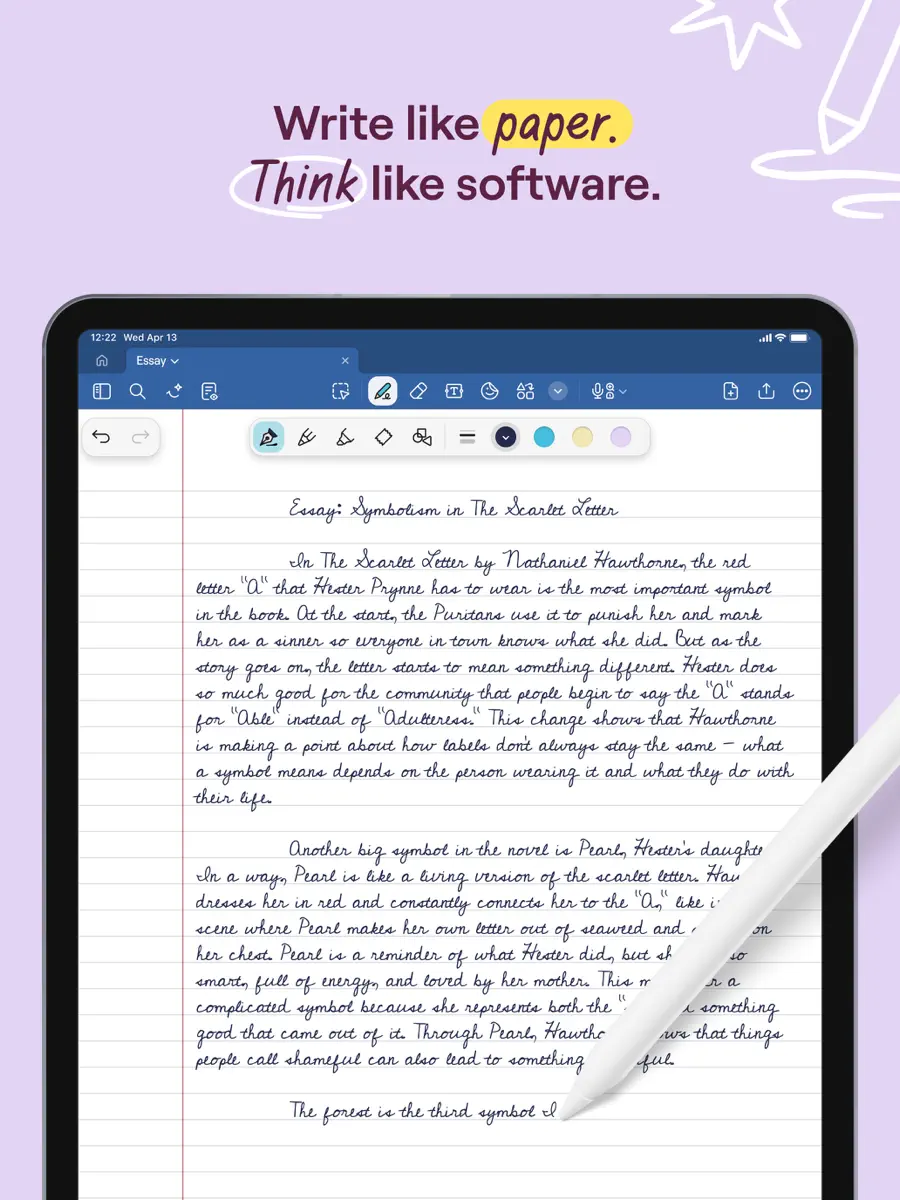
2. Notability: Best for Audio-Synced Notes
Notability stands out because it can record lecture audio while you write. Later, you can tap a note and jump to that moment in the audio. For law, philosophy, and other lecture-heavy classes, that changes the review flow.
Choose Notability if class audio matters as much as the written page. Check Notability's current plans before paying, because recording, transcription, and AI limits vary by tier.
3. OneNote: Best Free Cross-Platform Stylus App
Microsoft documents OneNote's handwriting tools, including pens, highlighters, and handwriting-to-text conversion on supported devices. OneNote works with Apple Pencil on iPad, S Pen on Samsung, and Surface Pen on Surface devices. Free with a Microsoft account. Notebook hierarchy fits class organization.
Choose OneNote if you switch between tablet, laptop, and phone. Pricing: Free with Microsoft account.
4. Apple Notes: Free Apple Pencil App
Apple Notes added strong Apple Pencil support in 2024-2025. It now handles Scribble, math notes, and live equation solving. It also mixes written and typed notes cleanly. It is free.
Choose Apple Notes if you want simple iPad writing with no new account or fee. The iPad note-taking guide shows how Pencil notes, typed notes, and PDF markup fit together.
Pricing: Free with Apple ID.
5. Samsung Notes: Free S Pen App
Samsung Notes is the native S Pen app on Galaxy tablets and is genuinely excellent. It can read your handwriting, mark up PDFs, record voice, and solve math. All of that is free on Samsung devices.
Choose Samsung Notes if you already use a Galaxy Tab with S Pen. Pricing: Free on Samsung devices.
6. Nebo: Best Handwriting-to-Text Conversion
Nebo by MyScript is built for turning handwriting into typed text. You write by hand and get clean text right away. Math can convert to LaTeX. In my test, it was the most accurate option for this job.
Choose Nebo if the final note needs to be typed, not just searchable ink. Pricing: $9.99 one-time, optional Pro features.
7. Concepts: Best for Designers and Architects
Concepts is the precision sketching app. It gives you an infinite vector canvas, pressure-aware brushes, layers, and CAD-style controls. Designers, architects, and product sketchers use it when a notebook is not enough.
Choose Concepts if sketch quality matters more than lecture notes. Pricing: Free tier, Pro $4.99/month or $29.99/year.
Comparison Table
Read this table by device first, then by task. GoodNotes and Notability lead on iPad. OneNote is the safest free pick across devices. Samsung Notes is the clear Galaxy Tab default.
| App | Platform | Free | Paid | Stylus | Best For |
|---|---|---|---|---|---|
| GoodNotes | iPad-first | Limited | $9.99/yr | Apple Pencil | iPad handwriting |
| Notability | Apple-first | No | $14.99/yr | Apple Pencil | Audio-synced notes |
| OneNote | Cross-platform | Free | N/A | Pencil + S Pen + Surface | Free cross-platform |
| Apple Notes | iPad / Mac | Free | N/A | Apple Pencil | Casual Apple Pencil |
| Samsung Notes | Samsung Galaxy | Free | N/A | S Pen | Galaxy Tab users |
| Nebo | iPad / Galaxy / Surface | Limited | $9.99 once | All major | Handwriting-to-text |
| Concepts | iPad-first | Yes | $4.99/mo | Apple Pencil | Designers / architects |
Table 1: Stylus note-taking apps comparison — platform, free tier, pricing, stylus compatibility, and best use case.
Best Stylus App by Use Case
For STEM lecture notes with formulas and diagrams, start with GoodNotes or Notability on iPad with Apple Pencil.
For classes with long lectures, Notability is better because audio stays tied to your notes.
For free daily writing on Apple devices, use Apple Notes. On Galaxy Tab, use Samsung Notes. If you move across devices, use OneNote.
For handwriting that must become typed text, Nebo is the specialist.
For sketching, design, and architecture, Concepts is the right category fit.
For lecture-slide PDFs, start with GoodNotes. Notability, OneNote, and Samsung Notes are also strong enough for most students.
What Else Affects the Choice?
After you narrow the list by tablet and primary task, compare the features that affect everyday use: AI assistance, pen performance, PDF markup, privacy, and long-term cost.
Stylus and AI
The biggest shift in stylus apps is AI. GoodNotes 6 can create short summaries and study questions from written notes. Notability can make flashcards. Apple Notes can solve written math. Samsung Notes can turn meeting notes into typed summaries.
If you need to think across many notes, PDFs, and readings later, use a separate workspace after capture. Atlas handles that synthesis work by connecting source files and returning cited answers across them; the citation guide explains how to inspect the supporting source. It is a post-capture layer, separate from the pen step.
Pen Latency, Pressure, and Battery
The app only matters if the underlying pen and screen behave well. Stylus hardware in 2026 has stabilized into three tiers:
| Stylus | Pressure levels | Tilt | Latency | Battery | Compatible apps |
|---|---|---|---|---|---|
| Apple Pencil Pro | 4,096 | Yes | ~9ms (iPad Pro M4) | ~12hr | All iPad apps |
| Apple Pencil 2 | 4,096 | Yes | ~9ms | ~12hr | All iPad apps |
| Apple Pencil USB-C | None | No | ~9ms | ~12hr | iPad-compatible |
| S Pen Pro | 4,096 | Yes | ~6.2ms (Tab S10) | N/A (Galaxy Tab built-in) | All Samsung apps |
| Surface Slim Pen 2 | 4,096 | Yes | ~14ms | ~15hr | Surface apps + OneNote |
| Microsoft Pen Protocol | 1,024-4,096 | Varies | 15-30ms | Varies | OneNote + Windows ink |
Table 2: Stylus hardware comparison — pressure levels, tilt support, latency, battery life, and compatible apps.
The under-10ms tier feels like pen on paper for most people. That includes Apple Pencil Pro on iPad Pro M4 and S Pen on Galaxy Tab S10. The 14-30ms tier is noticeable when you write fast, but it is fine for slow notes and sketches. Below about $30, third-party pens usually lack pressure support. They can handle taps and rough drawing, but the feel degrades too much for serious handwriting.
Battery is less of a problem than it used to be. Apple Pencil 2/Pro, S Pen Pro, and Surface Slim Pen 2 charge from the tablet or its charger. Third-party USB-C pens usually last 8-12 hours of active use.
PDF Annotation in Practice
For students, PDF markup is the most important feature after pen feel. The seven apps split into three tiers:
- GoodNotes, Notability, OneNote, and Samsung Notes are strong PDF tools. All four handle large PDFs, keep text searchable, support highlights, and export notes. GoodNotes is the smoothest for quick page turns and bookmarks.
- Apple Notes and Nebo are good enough for smaller PDFs. They do not match the folder and bookmark tools in dedicated PDF apps. Nebo's strength is turning margin notes into typed text.
- Concepts is weak for PDF markup. It is a sketching tool optimized for freeform design work, and its PDF support reflects that narrow focus.
For students with 50+ lecture PDFs per term, GoodNotes or Notability are the practical choices on iPad. OneNote is the free fallback across devices. The textbook note-taking guide explains how to turn annotations into review prompts instead of leaving them stranded in a PDF. For Samsung tablet users, Samsung Notes is the free native PDF-markup option.
Privacy and Cloud Sync
Handwritten notes can include sensitive material. Medical notes may mention case details. Legal notes may include client examples. Journals are personal by default. Here is the 2026 privacy picture:
- GoodNotes syncs through iCloud or GoodNotes Cloud. Use Apple's stronger iCloud security mode if you need it.
- Notability syncs through iCloud, so it follows Apple's privacy model.
- OneNote uses Microsoft 365 and has the strongest school or enterprise admin story.
- Apple Notes syncs through iCloud. Advanced Data Protection can extend end-to-end encryption to more iCloud data categories.
- Samsung Notes syncs through Samsung Cloud.
- Nebo works local-first by default, with optional MyScript Cloud sync.
- Concepts works local-first, with optional iCloud sync.
For medicine or law, choose Apple Notes with stronger iCloud security or OneNote on a school account. For no-cloud use, Concepts and Nebo work fully offline.
Three-Year Cost
Stylus apps are tools you use for years, the three-year total cost frames the choice:
| App | Year 1 | Three-year cost | What's included |
|---|---|---|---|
| GoodNotes | $9.99 | $29.97 | Apple Pencil note app |
| GoodNotes + AI | $69.87 | $209.61 | App + AI add-on |
| Notability Plus | $14.99 | $44.97 | Audio sync + math |
| OneNote | $0 | $0 | Free with Microsoft account |
| Apple Notes | $0 | $0 | Free with Apple ID |
| Samsung Notes | $0 | $0 | Free on Galaxy |
| Nebo | $9.99 (one-time) | $9.99 | Handwriting-to-text |
| Concepts Pro | $29.99 | $89.97 | Vector sketching |
Table 3: Three-year pricing comparison for stylus note apps — year-one cost, total three-year cost, and what is included.
The cheapest three-year stack is Apple Notes on iPad or Samsung Notes on Galaxy. Both are free. The cheapest paid app that beats the free options on features is Nebo at $9.99 one-time. GoodNotes plus its AI add-on is the most expensive option here at about $210 over three years. That cost only makes sense if you use AI summaries often. Otherwise, export notes and use a cheaper tool for the occasional summary.
Final Recommendation
The best note-taking app with stylus depends on your tablet. On iPad, choose GoodNotes for serious writing, Apple Notes for free casual use, and Notability for lectures with audio. On Galaxy Tab, choose Samsung Notes. On Surface, choose OneNote. Nebo is the specialist when written notes must become typed text, and Concepts is the sketching pick. Pick by tablet first. The app follows.
If stylus notes later become a research library, use our second-brain apps guide to choose the post-capture workspace. Atlas belongs in that later synthesis step, once the handwriting and capture work is done.
AtlasAtlas as a post-capture synthesis option
Compare seven second brain apps for linking and retrieving research notes.
Frequently Asked Questions
GoodNotes ($9.99/year) is the most-used iPad handwriting app. Notability ($14.99/year) is the closest competitor, with audio-synced notes as its differentiator. Apple Notes (free) added strong Apple Pencil support in 2024-2025 and is sufficient for casual handwritten notes. For users who want handwriting plus typed notes plus AI features, GoodNotes 6 leads with built-in AI summaries. For a free option, Apple Notes covers 80% of needs.