
Apple Notes Alternatives (2026): 8 Best Note Apps Compared
Best Apple Notes alternatives in 2026. We tested Atlas, Notion, Bear, Obsidian, OneNote, Evernote, Craft, Capacities for cross-platform notes and rich features.
- Byline

Summary
Use an Apple Notes alternative when cross-platform access, file ownership, richer structure, or AI retrieval matters.
The guide compares Atlas, Notion, Bear, Obsidian, OneNote, Evernote, Craft, and Capacities.
Quick capture, export quality, local storage, collaboration, linking, and platform support determine the practical switch.
Atlas fits Apple Notes users who need cited synthesis and visual connections across notes, PDFs, and projects.
Atlas fits one narrow Apple Notes switch. Use it when your notes have become a research base. It answers from your own notes and PDFs, cites the exact source, and keeps that context in the workspace.
Apple Notes in 2026 is a strong note app. It has smart folders, math notes, shared notes, scanning, Apple Intelligence summaries, and free iCloud sync. For most Apple-only users, it is enough. Look elsewhere only if Windows access, Android access, cleaner export, richer links, team work, or AI search has become a real constraint.


 Atlas
AtlasLearn when cited AI matters
Compare ten AI tools that cite sources and make claims easier to verify.
How I tested
I moved 1,847 notes from Apple Notes into five other apps over 28 days. I tracked import pain, daily capture speed, folder loss, search recall, and how well each app kept Markdown, PDFs, and images.
Bear imported in 14 minutes and kept all note bodies, but it lost 31% of my folder tree. Obsidian needed a third-party converter and 47 minutes, but it kept the structure. Capture speed ranged from 0.4 seconds in Bear to 1.9 seconds in Obsidian Mobile. Apple Notes itself was 0.3 seconds, which is easy to underweight.
The table below is the short version of the test. Use it to filter the list before reading the app notes. A fast import does not matter if the app loses your folders. A good editor does not matter if you need OCR or web clipping every day.
| Workflow test | Best result | Weak result | What it means |
|---|---|---|---|
| Markdown export | Obsidian kept the cleanest files | Notion flattened more folder context | Pick local files if you may leave again |
| Large-library search | Evernote and Apple Notes found image text fastest | Bear depended more on plain text | OCR matters if many notes are scans |
| Web clipping | Evernote was still the cleanest | Apple Notes needed Share Sheet cleanup | Heavy clippers should not pick on editor feel alone |
| Folder tree | Obsidian kept the most structure | Bear lost the most hierarchy | Test one folder before a full move |
Table 1: Test results for export, search, web clips, and folder shape after leaving Apple Notes.
Interface snapshots
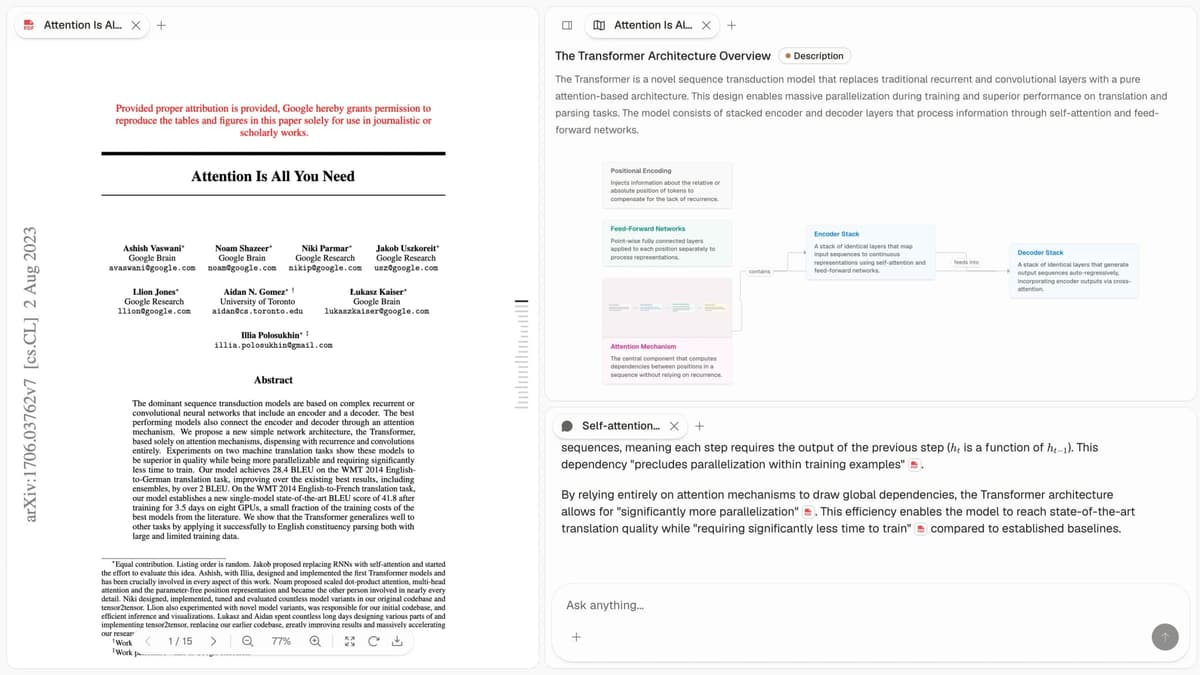
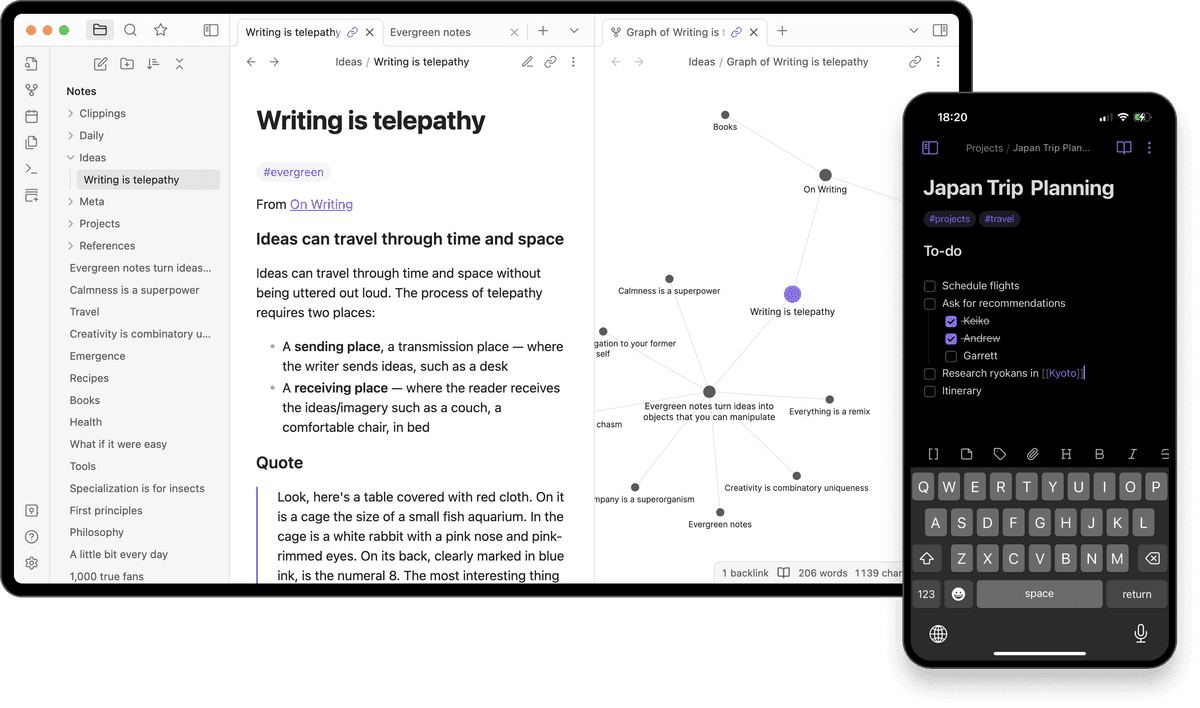
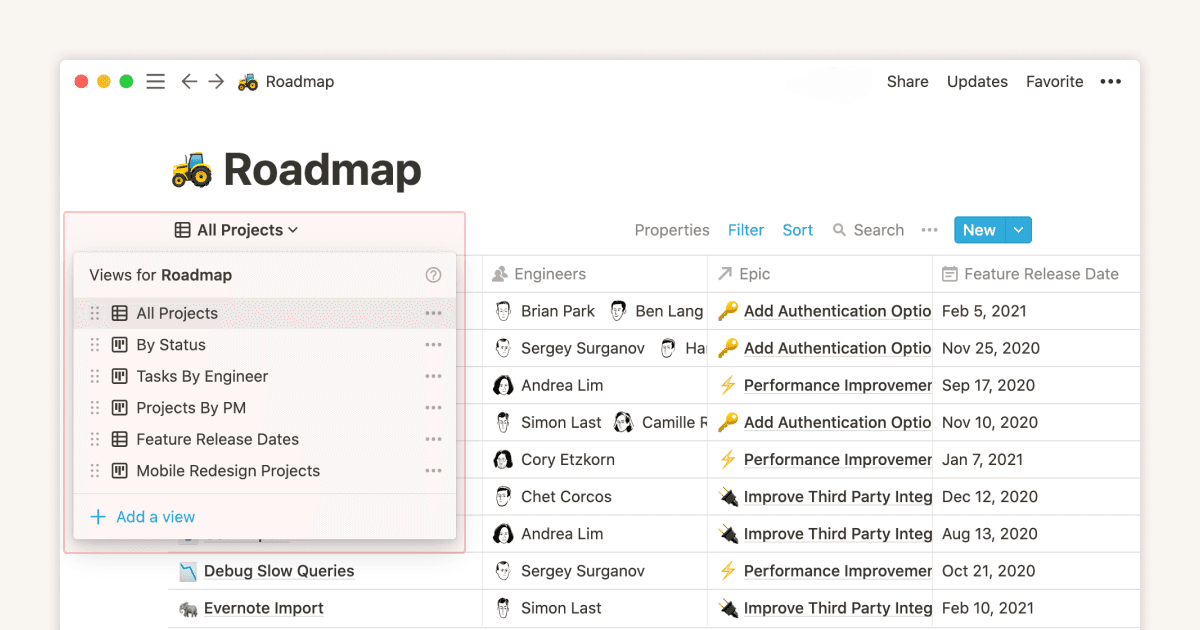
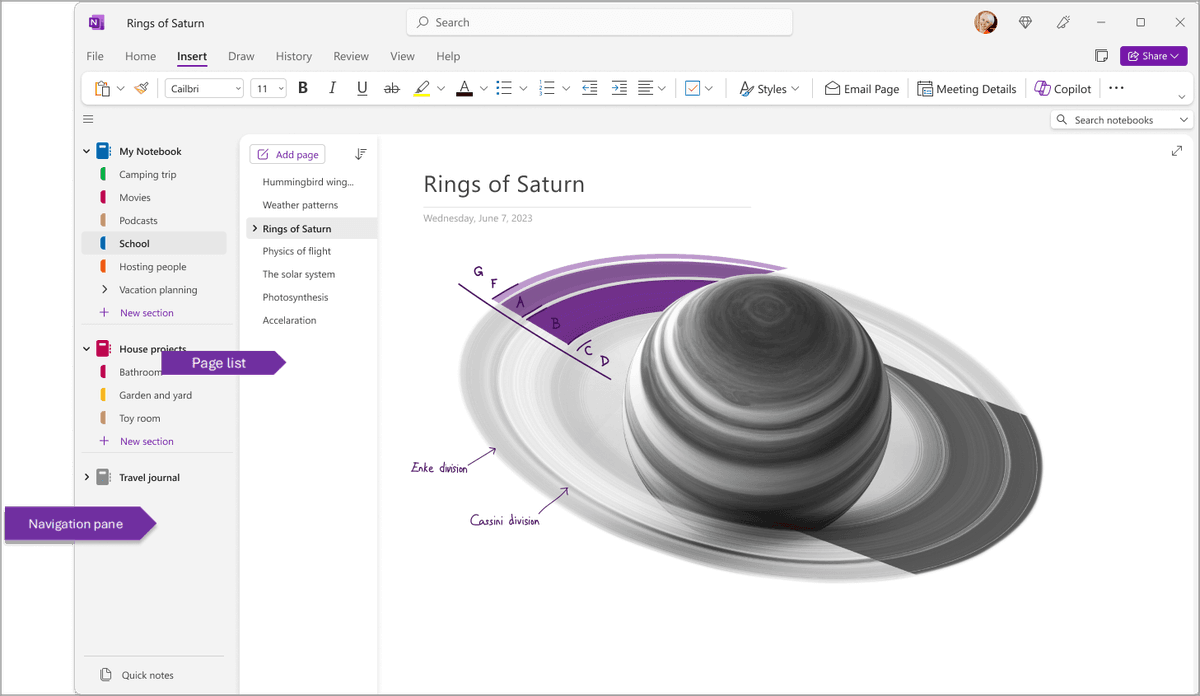
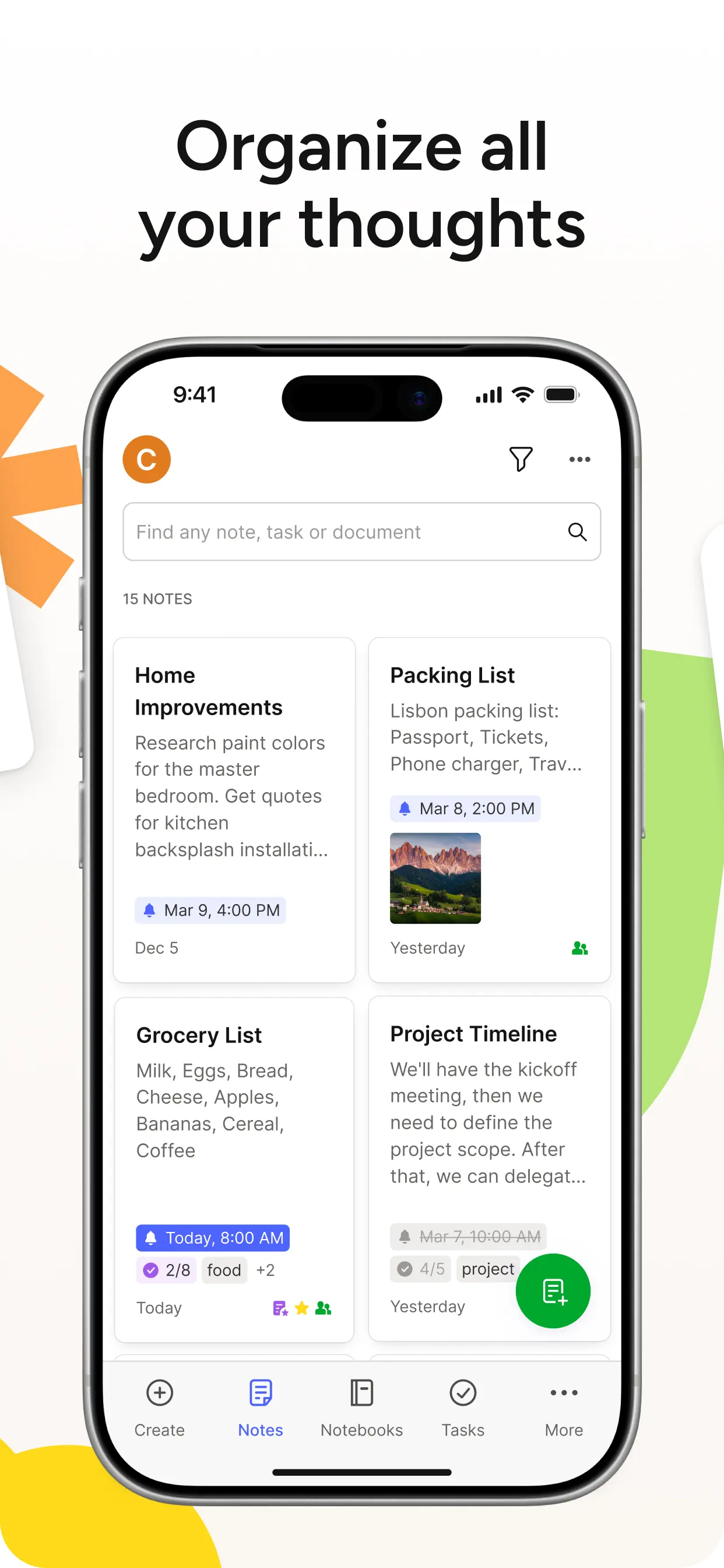
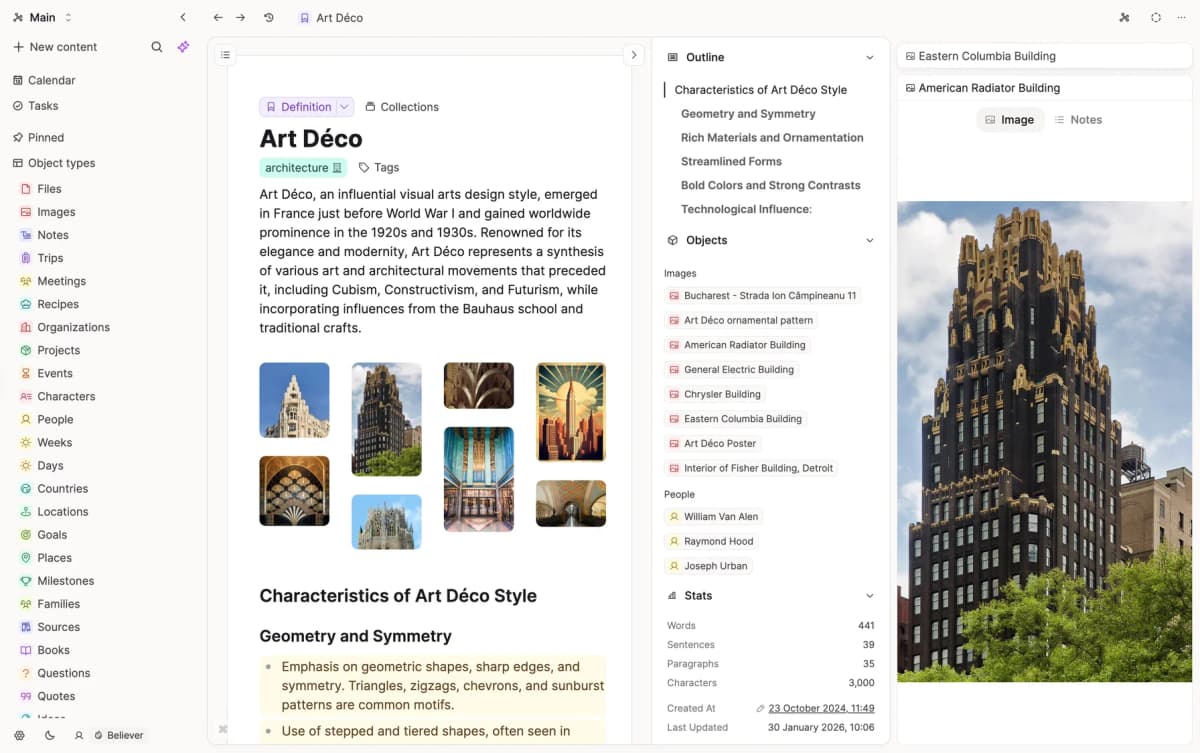
Use these screenshots as a quick scan. Apple Notes is a fast blank page. Atlas and Obsidian are the two biggest visual breaks. Atlas links source files to cited answers. Obsidian shows local files. Each screenshot shows a concrete job to test before you move your notes.

Why Look for Apple Notes Alternatives?
For a deeper pick, use the Cognitive Load, Lock-in, and Graph Density model in our second-brain apps guide.
Three reasons.
Apple Notes does not work on Windows, Android, or Linux. If you use mixed devices, it cannot be your main notes app.
Backlinks, graph views, and databases are not the point of Apple Notes. Power users hit the ceiling fast.
Apple Notes data lives in iCloud and export is clumsy. Local-file apps like Obsidian and Logseq are easier to leave later.
What to compare in Apple Notes alternatives
Pick against the reason you are leaving Apple Notes. Do not pick from a generic feature list.
- Mixed devices: choose a tool with reliable Windows, Android, and web access.
- File ownership: choose Markdown export or local files before you move a large archive.
- Capture speed: test a real phone capture flow before committing.
- Search and OCR: choose Evernote, OneNote, or Apple Notes if scanned notes matter.
- AI retrieval: choose Atlas only when you need cited answers from your own notes and PDFs.
The 8 best Apple Notes alternatives
1. Atlas: Best for AI-Grounded Knowledge Work
Atlas is for researchers, students, and writers whose notes have turned into source material. Upload notes, images, articles, and PDFs. Atlas builds a map and answers questions with cited passages.
Best fit and tradeoff: Atlas provides cited answers across notes and PDFs plus visual maps for connected material. It is not a quick-capture scratchpad and is excessive if you only need folders, checklists, and iCloud sync. Pricing: $20/month Pro.
2. Notion: Closest Cross-Platform Alternative
Notion is the broad cross-platform answer for users who want one workspace. Quick-add widgets get close to Apple Notes speed. The rest of the app adds databases, templates, and team spaces. Pricing: Free tier, Personal Pro $10/month. For the head-to-head, see Notion vs Apple Notes.
3. Bear: Best Beautiful Apple-First Alternative
Bear is the polished choice for Apple writers who want a focused Markdown editor. It is tag-based and one of the cleanest editors on iOS and macOS. Bear 2 added wiki-style links. Pricing: Free tier, Pro $2.99/month or $29.99/year per Bear pricing page (May 2026). For a head-to-head with the default, Bear vs Apple Notes tests both on the same workloads.
4. Obsidian: Best for Power Users
Obsidian stores notes as local Markdown files, so it fits power users who want file ownership and extensibility. Plugins can turn it into almost any workflow. It has apps for Mac, Windows, iOS, Android, and Linux. Pricing: Free for personal use, $8/month Sync. For the direct comparison, see Obsidian vs Apple Notes.
5. OneNote: Best Free Cross-Platform
OneNote is free with a Microsoft account and works on Mac, iOS, Android, Windows, and the web. It fits cross-platform users who want free notes with a notebook tree. For the head-to-head, see Apple Notes vs OneNote. For the broader option set, see OneNote alternatives. Pricing: Free with Microsoft account.
6. Evernote for web clipping and OCR
Evernote still fits heavy web clippers because it handles clipping and OCR on images well. Pricing is high at about $14.99/mo Starter, per Evernote's plans page in May 2026. If you clip often, the workflow is still hard to beat. For the head-to-head, see Apple Notes vs Evernote. Bear users weighing the same trade-off should read Bear vs Evernote. Pricing: Free tier (1 device), Personal $14.99/month.
7. Craft: Best Polished Apple-First Alternative
Craft is the design-led Apple Notes alternative for users who want Apple polish with more features. It has a clean editor, a native iOS and Mac feel, and web access when you need it. Apple named it an Apple Design Award winner. Pricing: Free tier, Personal Pro $11/month.
8. Capacities: Best Object-Based Alternative
Capacities fits researchers and structured-thinking note-takers who want more shape than Apple Notes gives. It replaces plain notes with typed objects such as Person, Book, Project, and Idea. Pricing: Free tier, Pro $9.99/month.
How to migrate from Apple Notes
The export step is the choke point. Apple Notes does not offer bulk Markdown export. The best path I found in 2026 was Exporter. It cost $1.99 on the Mac App Store when I last checked in May 2026. It reads from ~/Library/Group Containers/group.com.apple.notes and creates one Markdown file per note, plus an attachments folder. Expect about 5 minutes per 1,000 notes. Images make it slower.
After export, move the folder into the next app:
- Obsidian / Bear: drop the folder into the vault root. Internal Apple Notes links don't survive, search-and-replace any
applenotes://URLs after import. - Notion: drag-import the Markdown folder into a new page. The importer is forgiving, but it does not turn folders into databases. Rebuild the tree by hand.
- Atlas: upload the exported folder. The workspace re-indexes notes into the mind map and citations point back to your imported file.
- Capacities: convert each note's tags into Capacities object types before import. The bulk Markdown route imports as plain notes.
Tables and checklists moved cleanly in my test, while drawings, scanned PDFs, and audio needed manual cleanup. Keep an Apple Notes export as your backup for at least 90 days after the move.
Important tradeoffs before switching
Privacy and security
Privacy varies enough that it should affect the shortlist. Apple Notes uses iCloud encryption at rest. Locked notes use end-to-end encryption tied to your device passcode. Apple's Advanced Data Protection can protect more iCloud data when you turn it on.
The alternatives split into two groups. Obsidian stores files as local Markdown. Your disk and sync service handle most of the security. Obsidian Sync is end-to-end encrypted. Notion encrypts data at rest and in transit, but the service can read content for search and AI. Evernote encrypts selected text with a passphrase, but not the full account. Atlas encrypts data at rest, does not use uploaded sources for model training, and limits citations to your own workspace.
If your notes include clinical, legal, or NDA-bound material, keep the list short. Use a local-first app with end-to-end sync. Good options are Obsidian with Obsidian Sync, Bear with Advanced Data Protection on, or self-hosted Joplin.
AI features compared
AI is the biggest 2026 split. Apple Notes has Apple Intelligence summaries on macOS 15 and newer, but not much more. The alternatives differ by job:
- Atlas answers from your uploaded notes or PDFs and cites the exact passage. The map view helps you browse while you read.
- Notion AI is strongest for drafting, summaries, and inline edits. It does not cite sources by default.
- Craft AI and Capacities AI help with rewrites and outlines. They are weaker for search across a large library.
- OneNote Copilot and Evernote AI Edit focus on summaries and edits inside a note.
- Bear and Obsidian ship without native AI. Obsidian users often add Smart Connections or Copilot plugins.
If AI matters less than a clean editor, Bear and Obsidian are still easy picks. If you want answers grounded in your own notes, use a cited-answer tool. This is the point where Atlas becomes relevant.
Comparison Table
Use this table to narrow the shortlist before testing the apps yourself. If you need local files, Obsidian is the only clear yes. If you need web clipping or OCR, Evernote deserves more weight than its price suggests. If you need cited AI over your own material, Atlas is the narrow fit.
| App | Cross-Platform | Free Tier | Paid From | Local Files | AI Features |
|---|---|---|---|---|---|
| Atlas | Web | Yes | $20/mo | Cloud | Source-cited Q&A |
| Notion | Yes | Yes | $10/mo | Cloud | Notion AI add-on |
| Bear | Apple-only | Limited | $14.99/yr | iCloud | None native |
| Obsidian | Yes | Yes | $8/mo Sync | Yes | Plugin-based |
| OneNote | Yes | Free | N/A | Cloud | Copilot |
| Evernote | Yes | Limited | $14.99/mo | Cloud | AI Edit |
| Craft | Apple + Web | Yes | $11/mo | Cloud | Craft AI |
| Capacities | Yes | Yes | $9.99/mo | Cloud | AI assistant |
Table 2: Apple Notes replacements compared by platform support, free plan, entry price, storage, and AI.
Which Should You Choose?
Use the job that forced you out of Apple Notes:
- Need Windows or Android: choose Notion, Obsidian, or OneNote.
- Want the nicest Apple-first editor: choose Bear or Craft.
- Need files you can own and back up: choose Obsidian.
- Need free cross-platform notes: choose OneNote.
- Need answers from your own notes with citations: consider Atlas, and read our guide to AI that cites sources.
- Clip web pages every day: choose Evernote.
- Want structured note types: choose Capacities.
If two apps fit, export one folder with text, images, a scan, and a checklist into both. Use each app for a week, then compare missing content, capture speed, search quality, and how easily you can export again.
Final Take
Apple Notes is excellent for quick capture on Apple devices. Leave only if it cannot solve your real problem. That usually means mixed devices, file control, richer links, web clipping, team work, or cited AI over your notes. Pick Notion for an all-in-one workspace. Pick Bear or Craft for Apple polish. Pick Obsidian for local files, Evernote for clipping, and Atlas for source-cited knowledge work.
AtlasLearn when cited AI matters
Compare ten AI tools that cite sources and make claims easier to verify.
Frequently Asked Questions
Three reasons. Cross-platform, Apple Notes is Apple-only. Users with Windows, Android, or Linux machines need a cross-platform tool. Power features, bidirectional linking, AI-grounded Q&A, and graph views are absent in Apple Notes. Export and ownership, Apple Notes locks you into iCloud. Alternatives like Obsidian (local files) or Joplin (open source) give you full file ownership.