
OneNote Alternatives 2026: 8 Best Note-Taking Apps Compared
Best OneNote alternatives in 2026. Compare Atlas, Notion, Obsidian, Evernote, Apple Notes, Joplin, Logseq, and Capacities across Windows, Mac, and mobile.
- Byline

Summary
In 2026, choose Notion for team docs. Choose Obsidian or Joplin for local files.
The list covers AI notes, team docs, Markdown files, web clipping, Apple capture, and open-source apps.
Use Notion for teams. Use Obsidian or Joplin for files. Use Apple Notes for Apple capture.
Before switching, test export, pen notes, sync, and whether your old folders survive.
OneNote has been part of Microsoft Office since 2003. It still works well for pen notes and loose notes. But in 2026, many users want cleaner sync, better exports, stronger search, or notes that link together without extra work.
This guide ranks 8 apps by the jobs people usually use OneNote for. Those jobs are meetings, research, quick capture, pen notes, and long-term storage.
The comparison uses current product documentation and the jobs that tend to decide a move: import, quick capture, file control, search, backlinks, sync, and special inputs such as handwriting. It does not claim a controlled migration benchmark. Test one representative notebook in the two strongest candidates before moving a full archive.
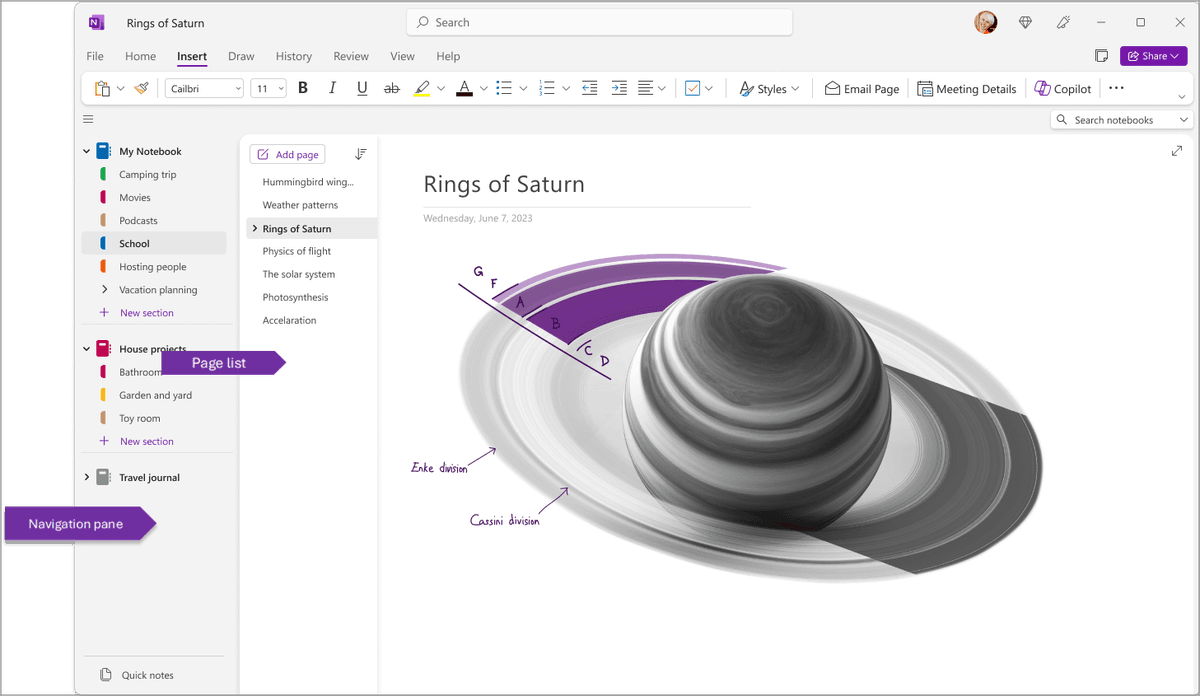
OneNote is still strong for notebooks and pen notes. The apps below are better for local files, research answers, or fast capture.

 Atlas
AtlasCompare connected note apps beyond OneNote
See eight apps compared on backlinks, graph views, AI connections, and pricing.
How this comparison works
Each app is compared against the jobs that usually break during a move from OneNote: import, quick capture, file control, search, backlinks, sync, handwriting, and attachment handling. The capability claims come from the current official product and help pages linked throughout the guide.
That evidence can establish what a product supports, but it cannot predict how a particular OneNote archive will migrate. Old clips, ink, tables, attachments, and nested sections create different failure modes, and vendor pricing or import support can change.
Use the table to narrow the field, then export one notebook that includes the formats you actually depend on. Check the result on every required device before choosing a replacement.
What to check before replacing OneNote
Start with the part of your current workflow that is failing. A better app for team docs may be worse for pen notes. A better app for local files may be worse for shared class or work folders. If your main issue is platform coverage, compare this list with the cross-platform note-taking app guide.
Check five things before switching:
- Sync: large notebooks should update on every device without manual repair.
- Export: your notes should leave the app as useful text and recoverable attachments. PDF-only exports create cleanup work.
- Structure: the app should match how you think: pages, folders, backlinks, tables, or objects.
- Capture: quick notes should still be fast on phone and desktop.
- Special inputs: handwriting, web clips, PDFs, and audio notes need a real replacement.
For a deeper framework across second-brain apps, see our second-brain apps guide.
Why replace OneNote?
Most users leave OneNote for three reasons. First, large notebooks can sync slowly. Users with years of notes feel this most.
Second, OneNote lacks newer linked-note features. It does not offer native backlinks, graph views, or cited answers across a notebook.
Third, OneNote requires a Microsoft account. That can be a problem for people leaving Microsoft tools or working under strict IT rules.
8 best OneNote alternatives
Use this ranked overview before reading the full notes below. Atlas is the focused pick for research answers with sources. The other picks are for team docs, local files, web clips, Apple notes, open files, outlines, and typed records.
- Atlas: best when OneNote search cannot answer from notes and documents with citations.
- Notion: best when the replacement needs team docs, tasks, and shared pages.
- Obsidian: best when local Markdown files and plugins matter most.
- Evernote: best when web clipping and OCR are the main jobs.
- Apple Notes: best free option for Apple-only note capture.
- Joplin: best free open app with a notebook tree.
- Logseq: best for daily notes, outlines, and linked bullets.
- Capacities: best when notes need types like Person or Project.
1. Atlas for cited research answers
Atlas is for users who want notes to become more than a filing cabinet. Upload notes, PDFs, and meeting records, and Atlas builds a map across them with source-cited answers.
Choose Atlas when the goal is to connect old notes and explain them with sources. It is less useful if all you need is a faster scratchpad. Pricing: a 10-source, 10-chat evaluation allowance; Pro is $20/month or $204/year.
2. Notion for team workspaces
Notion is the closest replacement for people who want one workspace for notes, tasks, and docs. Its workspace, page, and subpage model maps loosely to OneNote's notebook, section, and page model.
Notion also adds tables, templates, and team edits. That makes it stronger than OneNote for shared work. Pricing: Free tier, Plus from $10/month.
3. Obsidian for local files and plugins
Obsidian stores notes as local Markdown files. That makes it the best choice if you want file ownership and deep control. For the direct tradeoff, read the Obsidian vs OneNote comparison.
Plugins can turn it into many workflows. The graph view turns OneNote's file cabinet into linked notes. Pricing: Free for personal use, $8/month Sync.
4. Evernote for web clipping and OCR
Evernote and OneNote have competed for years. Evernote still wins on web clipping, OCR, and PDF markup. The broader Evernote alternatives guide explains where it still beats newer note apps.
It costs more than many newer apps. It still works well for people who save web pages and scans. Pricing: Limited free tier, Personal $14.99/month.
5. Apple Notes for Apple devices
Apple Notes is now strong enough for many Apple users. Smart folders, shared notes, math notes, Apple Intelligence, and free iCloud sync cover the basics with less setup.
It is best for Apple-only users who want free capture. For the head-to-head, see Apple Notes vs OneNote. Pricing: Free with Apple ID.
6. Joplin for open notebooks
Joplin is the closest match to OneNote's notebook, section, and page structure. It is open source and can sync through Joplin Cloud, Nextcloud, Dropbox, or WebDAV.
It is best for users who want a free open notebook app. Pricing: Free, with optional Joplin Cloud from $2.99/month.
7. Logseq for outlines and daily notes
Logseq swaps OneNote pages for daily notes and outlines. Every bullet can link to another note.
It fits researchers and journalers who think in outlines. Pricing: Free, open source.
8. Capacities for typed notes
Capacities replaces pages with typed objects such as Person, Book, Project, and Idea. That structure helps when a note belongs to a known category.
It fits researchers and PARA-method users who want guided note types. Pricing: Free tier, Pro $9.99/month.
How each alternative works day to day
Screenshots make the choice easier than feature lists. OneNote is a free-form notebook. These apps look different because each one solves a different job.
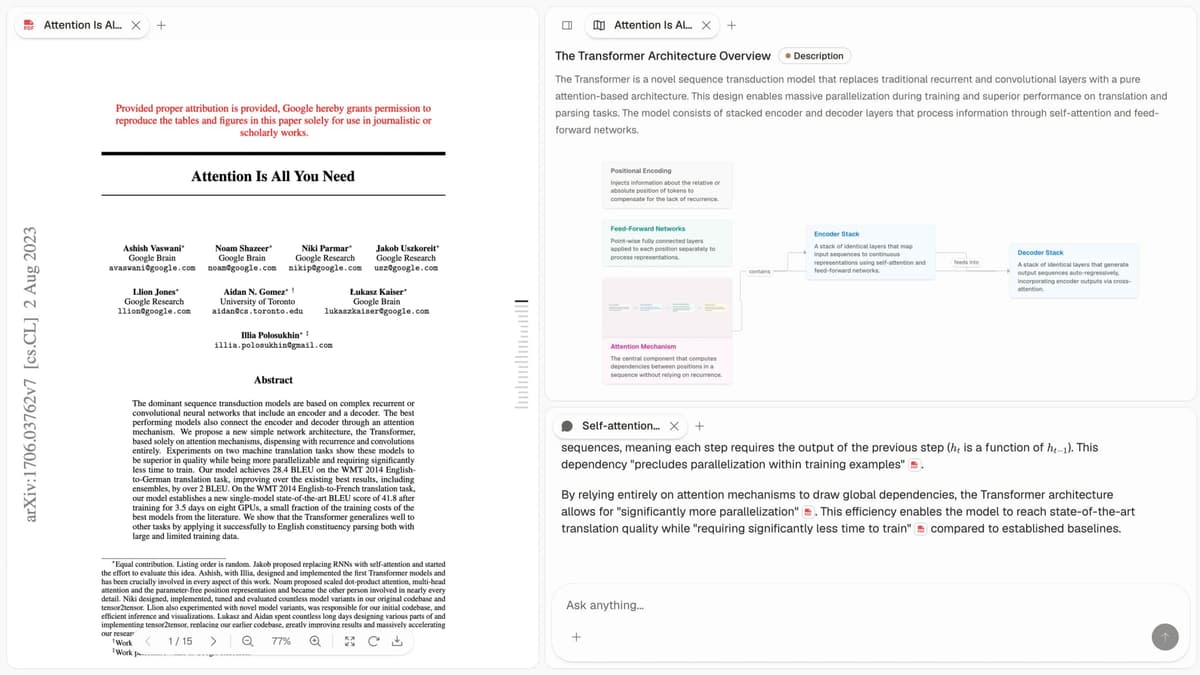
Atlas helps when you need answers from your notes, with sources attached to the response.
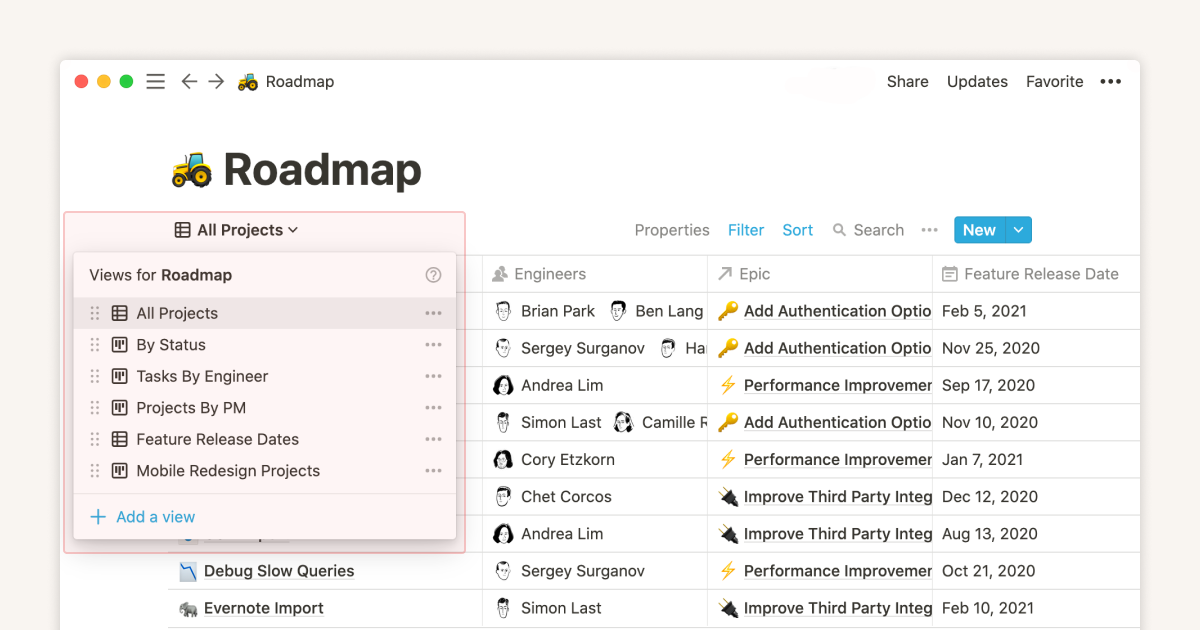
Notion is closer to a shared workspace than a classic notebook. Its database views can show the same notes as a table, board, list, or calendar.
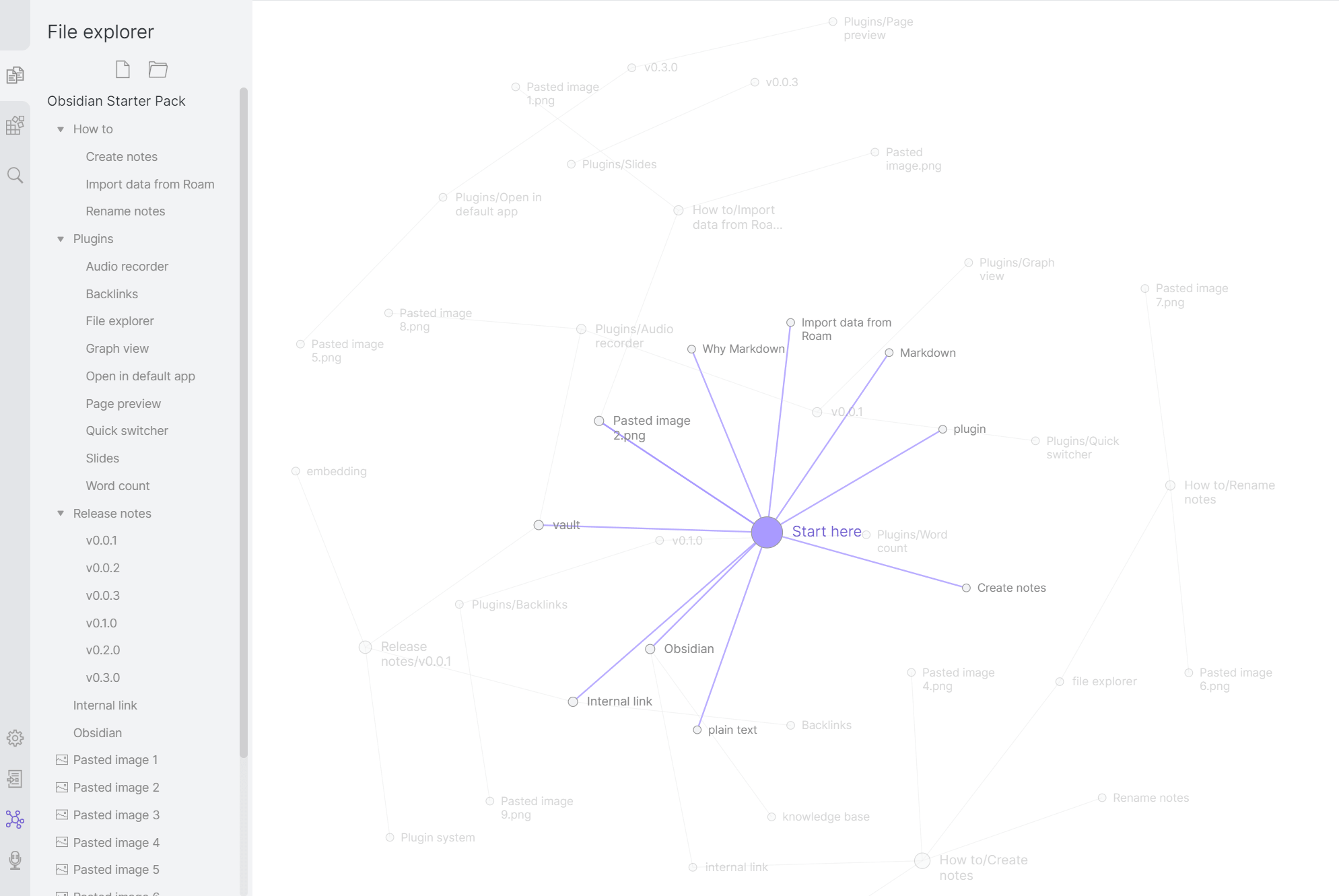
Obsidian fits people who want local files and linked notes. The graph helps them spot ties across classes, clients, or research themes.
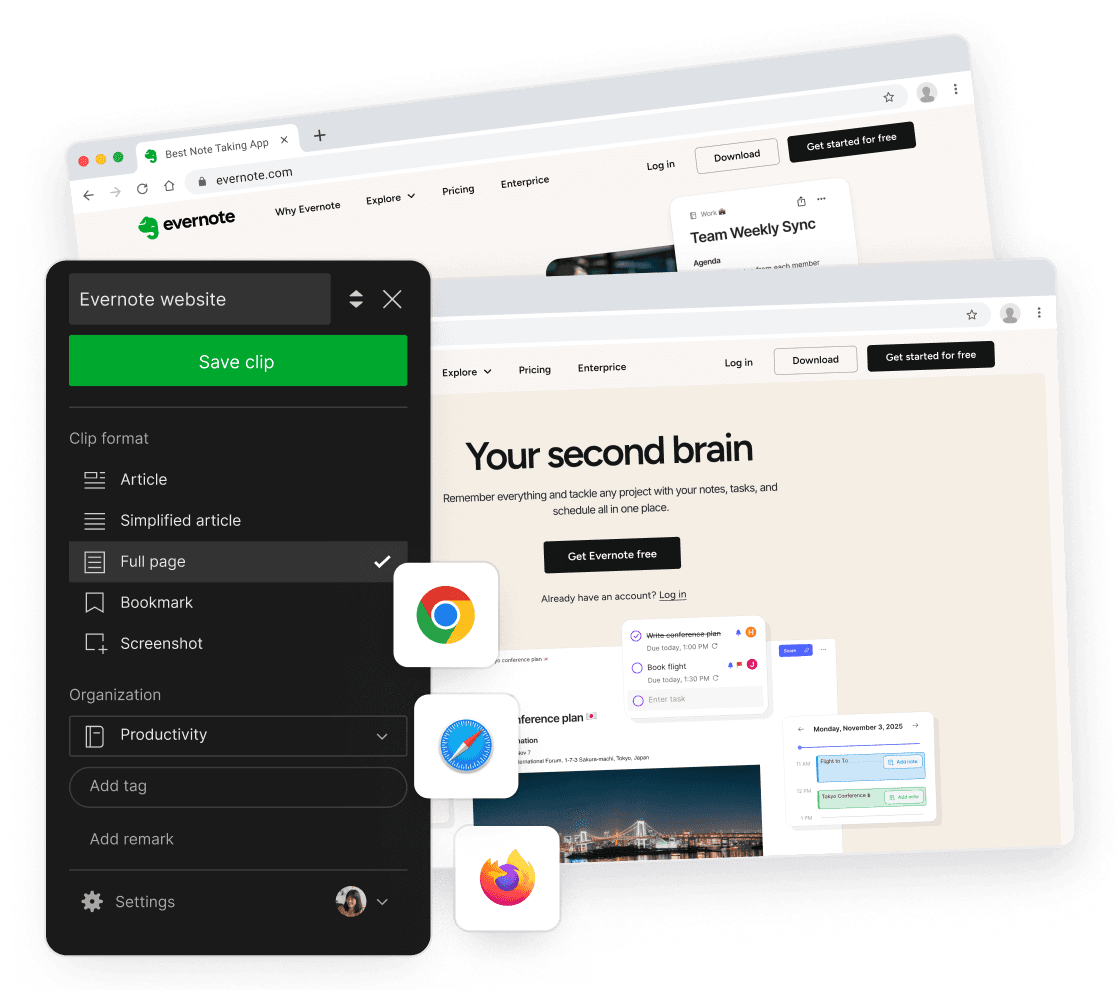
Evernote still stands out for web pages, PDFs, and scans because capture is the product's center of gravity rather than a side feature.

Apple Notes is the easy pick on Apple devices. It works best when you do not need a team space or local Markdown archive.
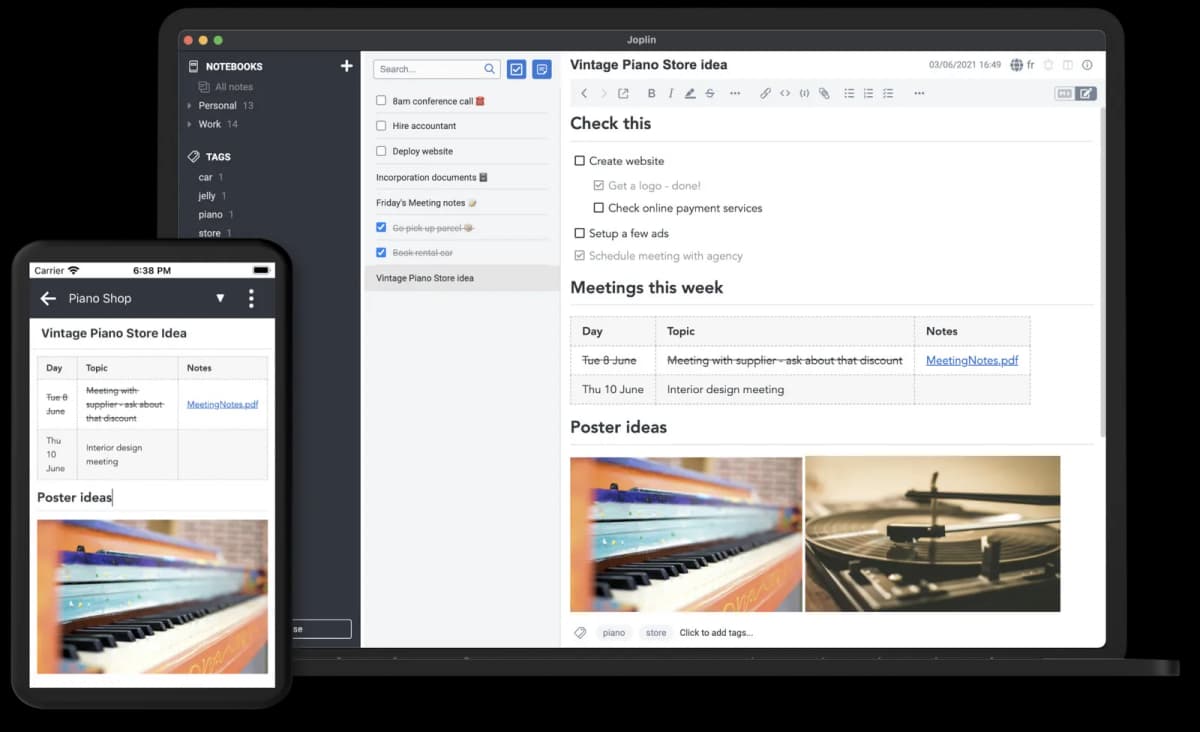
Joplin keeps the notebook tree and gives you more control over sync, which helps if you like OneNote's structure but want open files.
Logseq fits daily notes, outlines, and linked bullets when you want a journal-first workflow instead of nested folders.
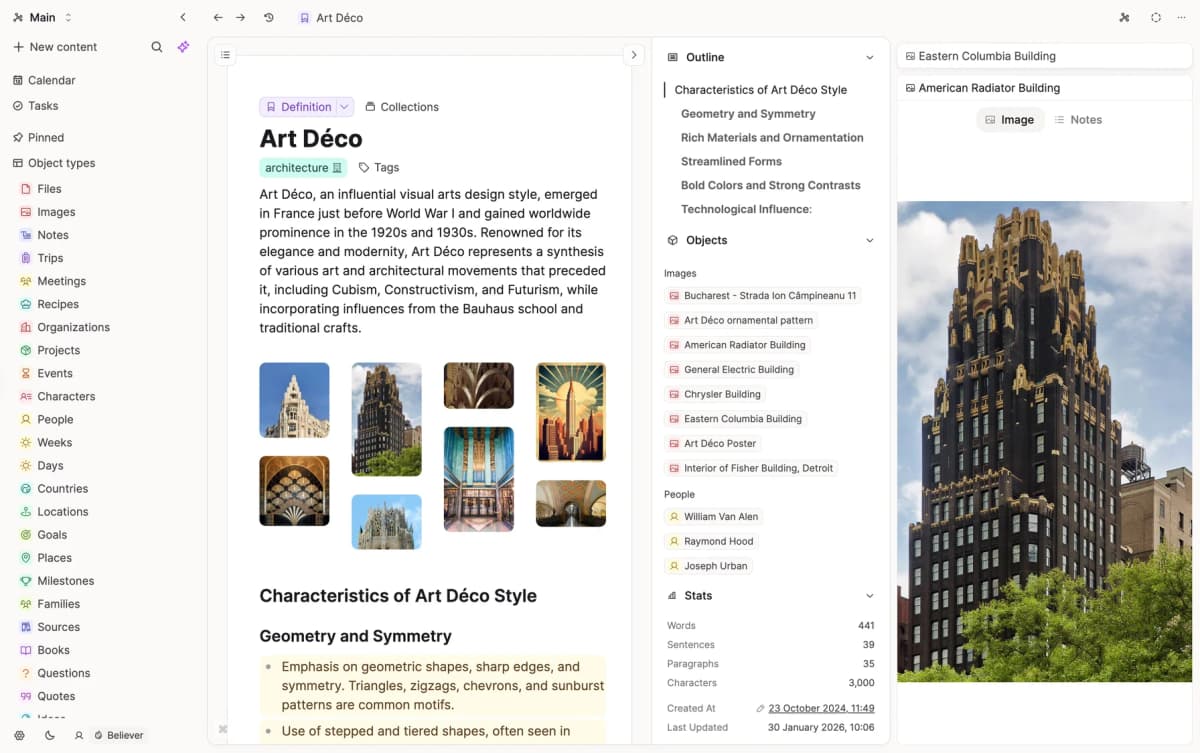
Capacities works best when notes are people, books, projects, or ideas, because each note type can carry its own fields.
OneNote alternatives compared
Use this table as a first filter. Pick the row that solves your main problem. Then read the section above before moving real notebooks.
| App | Free Tier | Paid From | Local Files | Bidirectional Links | AI Features |
|---|---|---|---|---|---|
| Atlas | Evaluation allowance | $20/mo | Cloud | Yes (mind map) | Source-cited Q&A |
| Notion | Yes | $10/mo | Cloud | Yes (backlinks) | Notion AI |
| Obsidian | Yes | $8/mo Sync | Yes | Yes (graph) | Plugin-based |
| Evernote | Limited | $14.99/mo | Cloud | Limited | AI Edit |
| Apple Notes | Free | N/A | iCloud | Limited | Apple Intelligence |
| Joplin | Yes | Optional sync | Yes | Limited | None native |
| Logseq | Yes | N/A | Yes | Yes | Plugin-based |
| Capacities | Yes | $9.99/mo | Cloud | Yes | AI assistant |
Table 1: Use these rows to compare OneNote alternatives by price model, file ownership, linking, and AI note features.
Choose by your main OneNote problem
Start with the use case that creates the most friction today. A clean import matters less if daily work still feels wrong after the move. Use this section as a shortcut before you test migration.
- Meeting notes: choose Notion if you want database tracking. Choose Atlas if you need cited answers across past meetings and documents.
- Research notes: try Atlas, Obsidian, or Capacities. Use Atlas when citations matter.
- Daily capture: use Apple Notes if you live in Apple devices. Use Notion if you need all major platforms.
- Handwriting: stay with OneNote for Surface pen workflows. Obsidian can work with Excalidraw. GoodNotes is the closest iPad option.
- Open source: choose Joplin or Logseq.
If two problems matter equally, test the two leading apps with the same notebook. Keep the one that preserves the notes you already have and makes the repeated daily task easier.
Test migration, cost, and lock-in
Move notes without losing files
The migration path depends on the destination, so test one notebook before you move a whole library.
- To Notion: export OneNote pages to Word, then drag the files into Notion. Basic text usually survives. Complex tables and ink lose fidelity, so test one notebook before trusting a full workspace import.
- To Obsidian or Logseq: use
onenote-to-markdownor OneNote Batch. Each notebook becomes a folder of Markdown files, which works best when your old pages are mostly text. - To Evernote: use the Web Clipper for individual OneNote pages. A bulk move needs a third-party tool, but the payoff is stronger capture for web pages and scanned material.
- To Atlas: export from OneNote to PDF, then upload the PDFs. Atlas reads them and builds a map across the sources, which is more useful for research synthesis than for daily capture.
For large OneNote libraries (10GB+), expect several days of cleanup. Set aside project time instead of trying to finish the move between other tasks.
Compare three-year costs
Notes apps are tools you live with for years. Compare paid plans by three-year cost before you trust the monthly sticker.
| App | Year 1 | Three-year cost | What's included |
|---|---|---|---|
| OneNote | $0 | $0 | Free with Microsoft account |
| Atlas Pro | $240 | $720 | Cloud, source-cited AI Q&A |
| Notion (free) | $0 | $0 | Up to 5 collaborators |
| Notion Plus | $96 | $288 | Unlimited file uploads |
| Obsidian (personal) | $0 | $0 | Local files, plugins |
| Obsidian + Sync | $96 | $288 | E2E encrypted cross-device sync |
| Evernote Personal | $179.88 | $539.64 | Web clipper + OCR |
| Apple Notes | $0 | $0 | Free with Apple ID |
| Joplin | $0 | $0 | Free, Joplin Cloud $36-96/yr optional |
| Logseq | $0 | $0 | Free, open source |
| Capacities Pro | $120 | $360 | Cloud, typed objects |
Table 2: Use this cost view to compare paid note-taking plans over three years. The monthly price on each pricing page hides how small differences add up.
The cheapest stack is still free: OneNote, Notion free, Obsidian personal, Joplin, or Logseq. The lowest paid upgrade here is Notion Plus at $288 over three years. Evernote Personal is about $540 over three years, after the 2024-2025 price increases.
Team pricing is different. Notion Business is $20/user/month, or about $3,600/year for ten seats. Obsidian's work license is $50/user/year. OneNote remains the default if your team already pays for Microsoft 365.
Check format lock-in before switching
The deeper cost of switching is not the monthly price. It is the move itself. OneNote exports are often messy. Ink, tables, and attached files cause most of the cleanup.
- To Notion: Export each notebook to .docx, then drag it into Notion. Images usually survive. Ink and complex tables often degrade.
- To Obsidian or Joplin: Use community tools like
onenote-to-markdownor OneNote Batch. Each notebook becomes a folder of markdown files. Inks and embedded files require manual recovery. - To Apple Notes: Export to PDF, then drag the PDFs into Apple Notes. The PDFs arrive as attachments rather than editable notes.
- To Atlas: Export to PDF and upload. Atlas reads the files and builds a map. The PDFs stay as the source.
For libraries under 1GB, plan half a day. For libraries over 10GB, plan three to five work days plus cleanup over the next month. The common failure is lost structure. Sections flatten, page order changes, and tags disappear. Joplin and Notion are smoother because they stay closer to OneNote's notebook tree.
Privacy, Compliance, and Microsoft Lock-In
OneNote uses the same admin controls as Microsoft 365. If your company already runs on Microsoft 365, that may be enough. If you are choosing for yourself, ask three simpler questions. Where do notes live? Who can read them? How easy is export?
Atlas stores notes in storage you control and uses local AI when possible. Notion gives teams security controls. Enterprise plans can keep data in the EU. Obsidian stores files on your device. Obsidian Sync can encrypt them end to end. Evernote stores notes in the cloud.
Apple Notes uses iCloud. Turn on Advanced Data Protection if you need stronger privacy. Joplin is open source and can sync through WebDAV, Nextcloud, Dropbox, or Joplin Cloud. Logseq keeps files local by default. Capacities is hosted in Germany with GDPR-focused controls.
If privacy is the main reason you are leaving OneNote, start with Joplin, Logseq, or Apple Notes. If your company must stay inside Microsoft 365, OneNote may still be the practical default.
Test one notebook before switching
OneNote still handles loose notes well, so test a replacement against the job that is failing. Import one shared notebook into Notion if you need team docs and tasks. Copy one text-heavy notebook into Obsidian if you want local Markdown files. Apple users who mainly capture short notes should repeat the test in Apple Notes.
Atlas applies to a narrower problem. If OneNote search cannot answer a research question from your notes and show the supporting sources, export one project as PDF and compare connected note apps beyond OneNote before moving the full library.
AtlasCompare connected note apps beyond OneNote
See eight apps compared on backlinks, graph views, AI connections, and pricing.
Frequently Asked Questions
Apple Notes (free with Apple ID), Obsidian (free for personal use), Joplin (open-source and fully free), and Notion (generous free tier) are the top free OneNote alternatives. Apple Notes is best for Apple users, Obsidian and Joplin are best for users who want local file ownership, Notion is best for users who want database-style notebooks like OneNote sections.