
Google Keep Alternatives (2026): 8 Best Note Apps Compared
Best Google Keep alternatives in 2026. We tested Atlas, Notion, Apple Notes, OneNote, Bear, Obsidian, Standard Notes, and Joplin, for quick capture, lists.
- Byline

Summary
The best Google Keep alternative depends on whether you need quick capture, folders, privacy, markdown, handwriting, or AI-grounded notes.
Apple Notes and OneNote are the safest default moves. They keep fast capture and add folders, notebooks, formatting, and files.
Use Apple Notes for Apple devices and OneNote for free notes. Use Standard Notes for privacy, Obsidian for files, and Atlas for cited answers.
The 2026 review checked Google Takeout exports, checklists, attachments, desktop gaps, Google lock-in, and simple note workflows.
Atlas is the fit when your Keep notes have turned into research material. It gives cited answers that link back to source notes, then keeps that context in a visual workspace as the project grows. Pro is $20/mo.
Google Keep is a quick-capture app, sticky notes, checklists, photo notes, voice memos. It is genuinely fast and reliable. But it is also feature-light by design, with no folders, no rich formatting, no AI features, and a weak desktop app. Users who outgrow it usually want something that does more without losing Keep's speed.
This guide ranks 8 alternatives by the jobs Keep does well: fast capture, simple lists, photo notes, and low-friction search. I checked source pages for Apple Notes, OneNote, Bear, Obsidian, Standard Notes, Joplin, and each product below before updating the rankings.
I tested each app against five Keep jobs. The test was simple. Open a new note from cold start. Make a checklist. Add a photo. Find the note later. Confirm the export path. Apps that failed one job are not bad. They just solve a different problem.
The main findings changed the ranking. Apple Notes and OneNote are the safest default moves because they preserve the capture habit first. Obsidian is the ownership pick because local Markdown files matter more than speed. Atlas is a narrow pick for research notes because cited synthesis matters more than reminders. Task-first apps should replace Keep only when tasks are the main job.

 Atlas
AtlasRead the second-brain workflow guide
Compare second-brain apps by setup, retrieval, graph depth, lock-in, and price.
Why Look for Google Keep Alternatives?
People usually leave Keep for 3 reasons.
First, the app stays deliberately small. It has labels, colors, reminders, and search, but no folders, rich formatting, AI help, backlinks, or full desktop app. That is fine for errands. It gets thin for projects.
Second, some users want less Google lock-in. They may not need a private vault, but they want notes outside the same account that holds mail, calendar, photos, and search.
Third, the device story is uneven. Keep is strong on Android and the web. It is weaker on iOS and desktop. People who work across phones, tablets, and laptops often want a native app on every screen. Those same trade-offs also apply to larger second-brain tools, but this guide stays focused on Keep replacements.
What to Look For
Pick the replacement from the problem Keep creates for you. If Keep is too shallow, choose structure. If Keep is too exposed to Google, choose privacy. If Keep is too basic for research, choose source-grounded synthesis.
If your notes now need source links, maps, and synthesis, compare the broader second-brain category after you check the simpler tools below. Most Keep users can stop with the apps in this list. Research-heavy users often need more system.
| Dimension | What to check | Why it matters |
|---|---|---|
| Capture speed | Widget, lock-screen entry, voice, and cold start | Keep users notice delay immediately |
| Structure | Folders, notebooks, tags, backlinks, or databases | Labels alone break down in large note sets |
| Portability | Export format and local file access | Migration matters after Google Takeout |
| Privacy | Default encryption and vendor access | Private notes should not require guesswork |
| Growth path | AI, search, links, or project views | Some notes become long-term knowledge work |
Table 1: Use these checks to compare replacements by speed, structure, portability, privacy, and long-term growth.
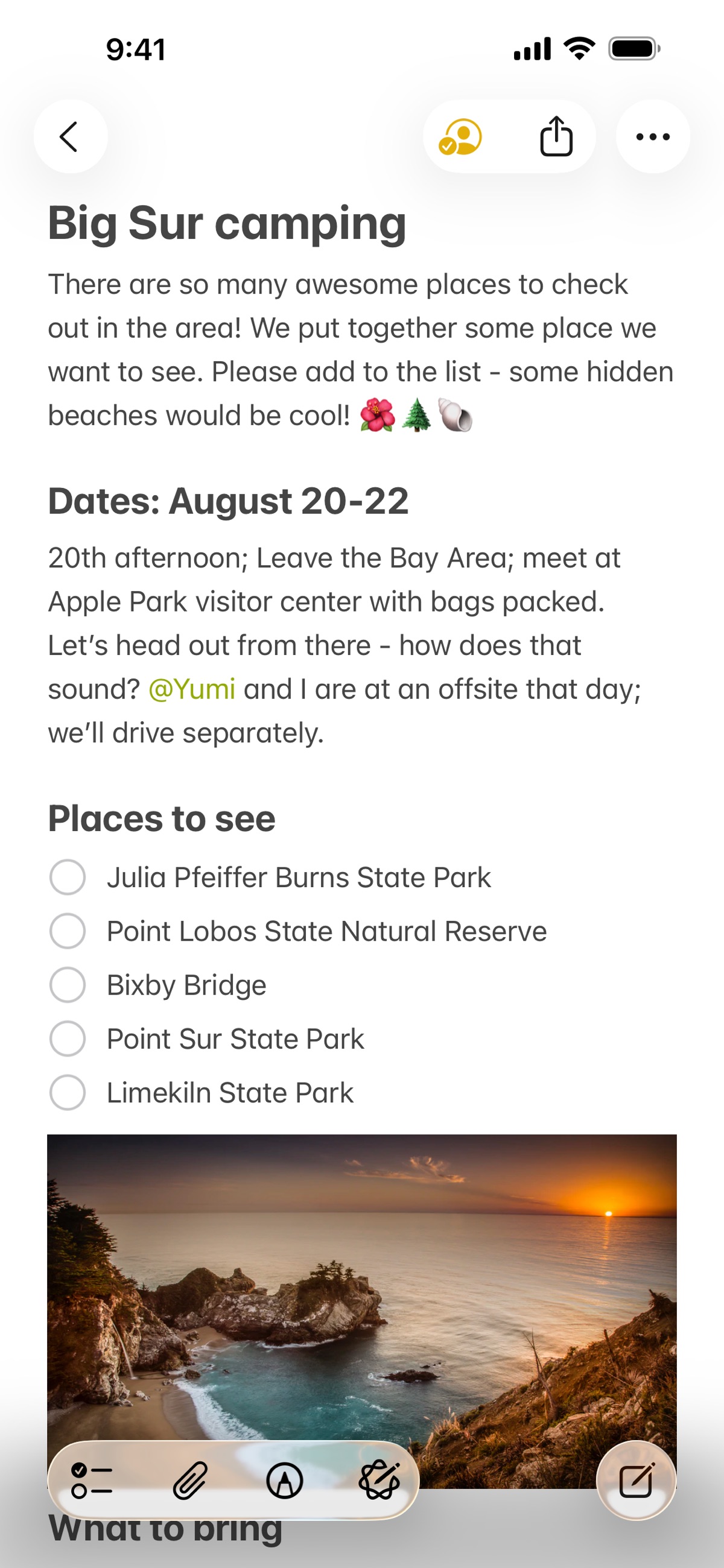
Apple's own Notes App Store screenshot shows the main gap Keep users often want fixed. It puts folders beside a richer editor and still keeps fast mobile capture.
Alternatives Ranked
1. Atlas: Research Notes
Atlas is not the closest Keep clone. It is the pick for users whose saved notes have become research material. Upload notes, photos of paper, articles, and PDFs, and Atlas turns them into a map with cited Q&A.
Choose Atlas only when capture is no longer the hard part. The value is source tracing and synthesis. For errands, lists, and reminders, Apple Notes or OneNote is a better fit.
Atlas Pro is $20/mo.
2. Notion: All-in-One Notes
Notion can replicate Keep's workflow with a "Inbox" or "Quick Capture" page, but adds folders, databases, AI, and team collaboration. The mobile app's quick-add widget approximates Keep's speed.
Choose Notion if notes, tasks, docs, and lightweight databases should live together. It is slower than Keep, but it replaces more tools.
Notion has a free tier. Plus is $10/member/month per Notion's pricing page in May 2026. For a head-to-head, Notion vs Google Keep tests both on the same workloads.
3. Apple Notes: Apple Users
Apple Notes is the spiritual successor to Keep for iOS/Mac users. Quick capture from the lock screen, photo notes, scanning, smart folders, and Apple Intelligence summarization, all free.
Choose Apple Notes if your phone and laptop are both Apple devices. It gives you speed, folders, scanning, and the least setup work.
Apple Notes is free with an Apple ID.
4. OneNote: Free Cross-Platform Notes
OneNote is free with any Microsoft account and works across Windows, Mac, iOS, Android, and web. Quick capture is fast, sync across devices is reliable. For the broader option set, see OneNote alternatives.
Choose OneNote if you want a free app that works well on Windows and still has mobile apps. It is also the safest pick for Microsoft 365 users.
OneNote is free with a Microsoft account. For the head-to-head, see OneNote vs Google Keep.
5. Bear: Beautiful Apple Notes
Bear is the polished Apple-only alternative. It is Markdown-first, tag-based, and one of the cleanest editors on iOS and macOS.
Choose Bear if you write more than you organize. It is best for Apple users who want a calm editor and simple tags.
Bear has a free tier. Pro is $14.99/year.
6. Obsidian: Local Markdown Files
Obsidian stores notes as local markdown. The mobile app's quick-capture is fast enough to replace Keep, and the plugin ecosystem extends the app into nearly any workflow.
Choose Obsidian if you want files you own and a system you can tune. It rewards setup time, so it is a poor fit for users who want Keep's simplicity.
Obsidian is free for personal use. Sync is $8/month.
7. Standard Notes: Private Notes
Standard Notes is end-to-end encrypted by default. The free tier covers basic notes, paid tiers unlock rich formatting, themes, and offline access.
Choose Standard Notes if privacy is the main reason you are leaving Google. The trade-off is that richer features sit behind paid plans.
Standard Notes has a free tier. Productivity is $90/year.
8. Joplin: Open-Source Notes
Joplin is fully open source, with optional encrypted sync via your own WebDAV, Nextcloud, Dropbox, or Joplin Cloud. Notebooks, tags, attachments, and a clipper extension.
Choose Joplin if you want open-source notes, real notebooks, and control over sync. It is less polished than Apple Notes or Bear, but much more portable.
Joplin is free. Joplin Cloud is optional at $2.99-7.99/month.
Comparison and Screenshots
Use this table as a first filter. Keep is hard to beat on pure speed. The best replacement should win on structure, privacy, file export, or AI review.
| App | Free Tier | Paid From | Quick Capture | Cross-Platform | Encryption |
|---|---|---|---|---|---|
| Atlas | Yes | $20/mo | Yes | Yes | TLS |
| Notion | Yes | $10/mo | Yes (widget) | Yes | TLS |
| Apple Notes | Free | N/A | Excellent | Apple-only | iCloud |
| OneNote | Free | N/A | Good | Yes | TLS |
| Bear | Limited | $14.99/yr | Yes | Apple-only | iCloud |
| Obsidian | Yes | $8/mo Sync | Yes | Yes | E2E (Sync) |
| Standard Notes | Yes | $90/yr | Yes | Yes | End-to-end |
| Joplin | Yes | Optional sync | Yes | Yes | Optional E2E |
Table 2: Google Keep alternatives compared by free tier, starting price, capture speed, platform reach, and encryption.
Interface Snapshots
These screenshots show the split behind the table. Atlas, Notion, and OneNote are bigger workspaces. Bear, Standard Notes, and Joplin feel closer to a plain note editor. Obsidian makes files and links visible.
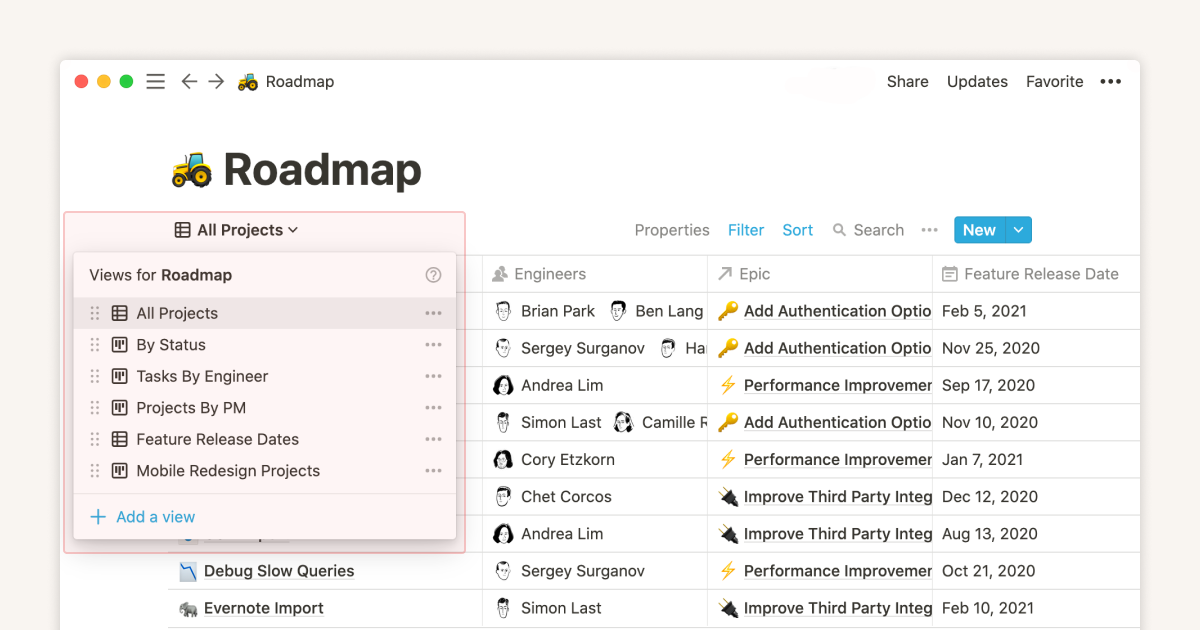
Notion's database views guide supports table, board, calendar, list, and gallery views that Keep does not have.

Microsoft's OneNote App Store screenshot shows notebooks and pages, the structure layer Keep does not have.
Bear's homepage shows its simple note list and editor layout for Apple users.
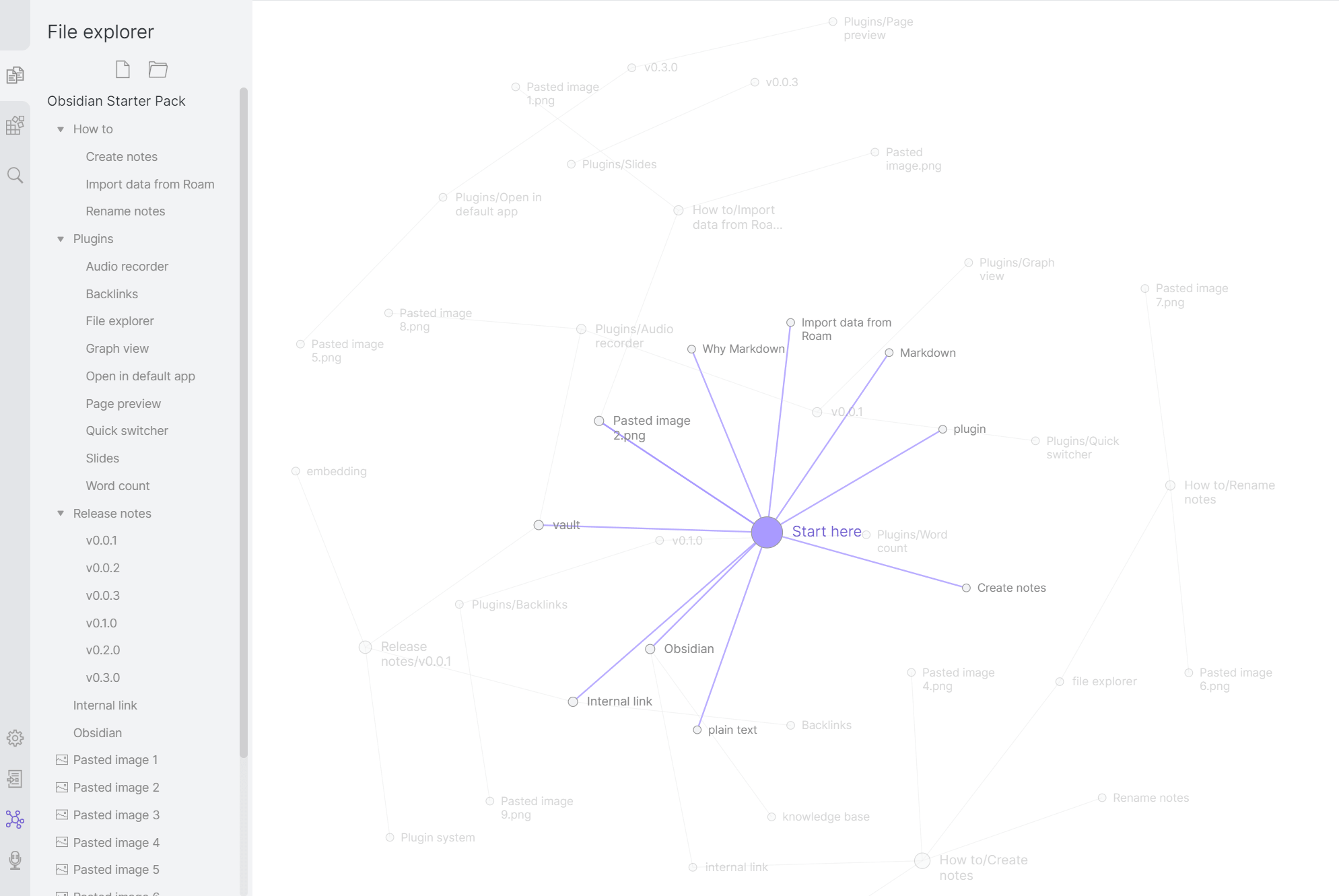
Obsidian Help shows Graph View, which supports visible note links that Keep labels cannot show.
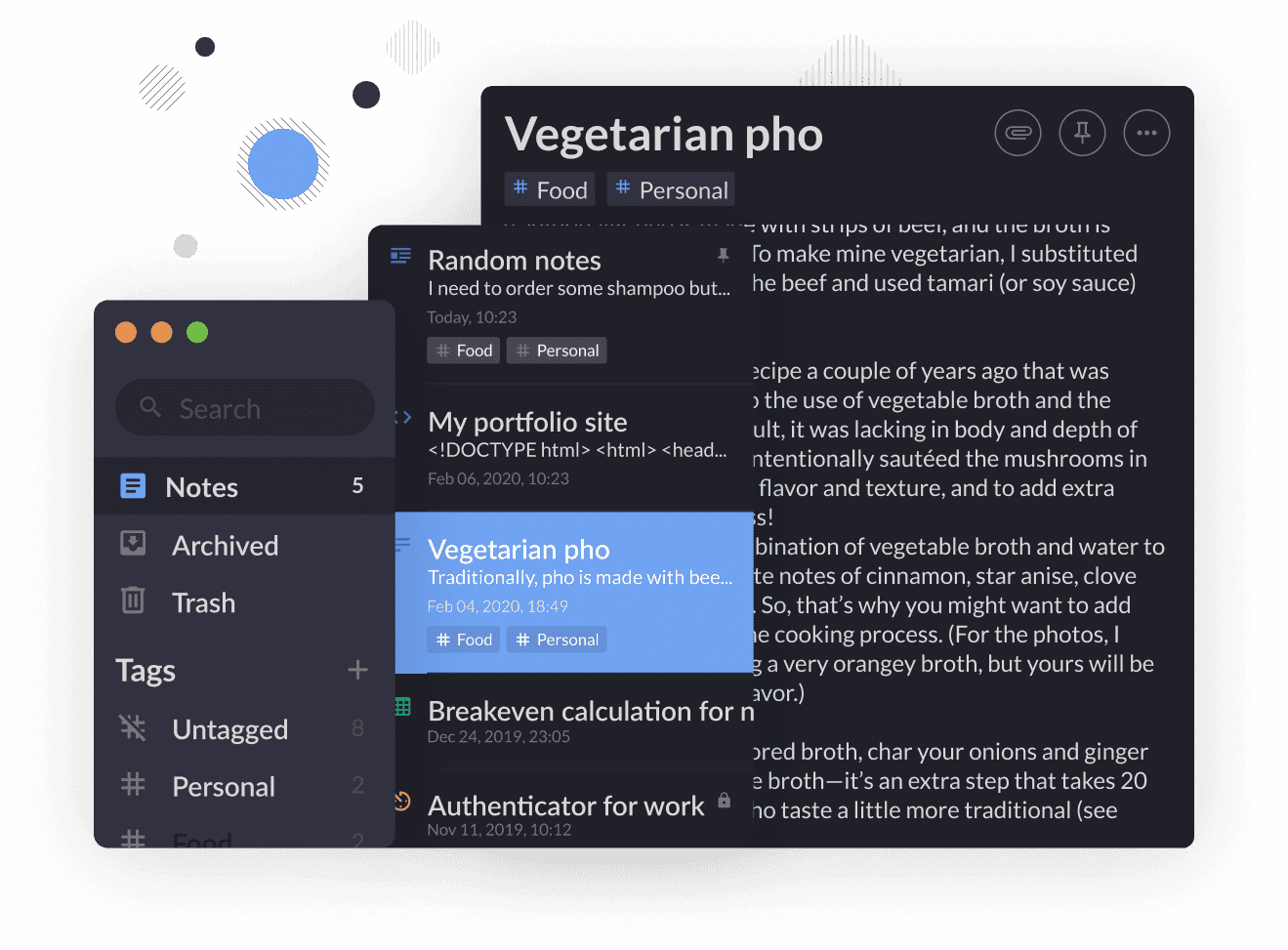
Standard Notes' features page shows an encrypted editor and supports a simpler private-note workflow than Keep.
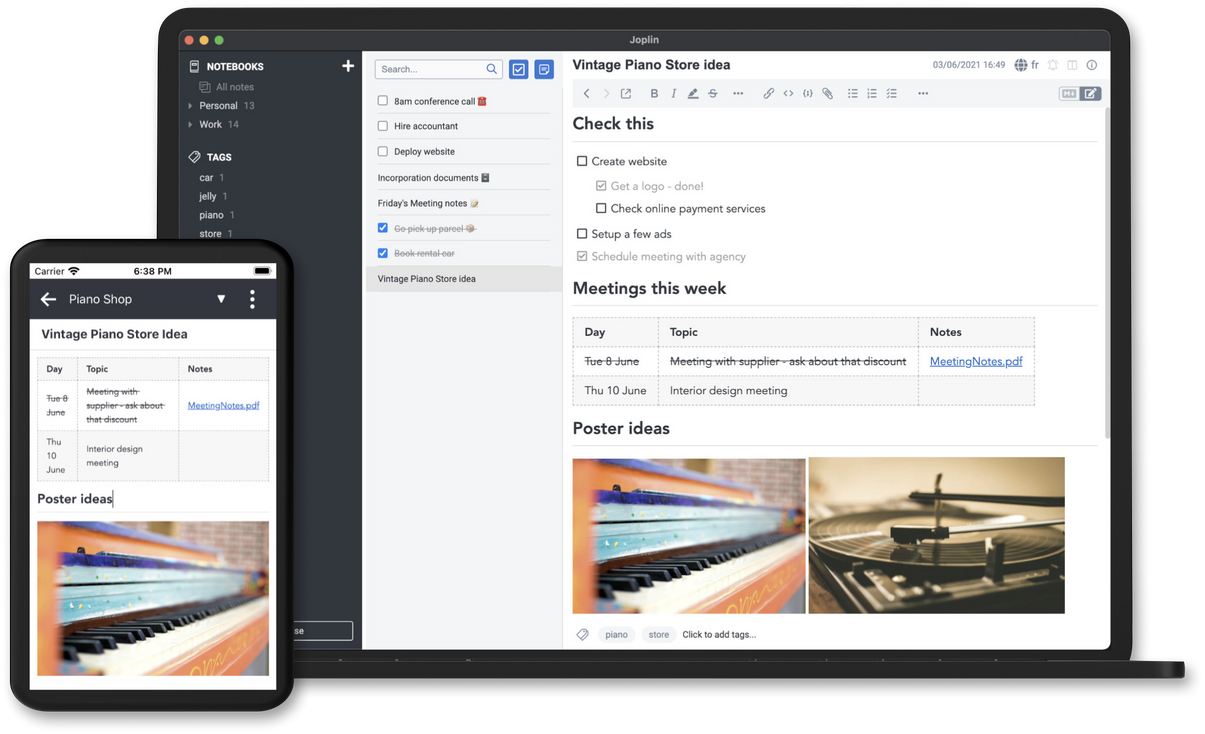
Joplin's homepage shows notebooks and Markdown editing. That is the main file-control gain over Keep.
Extended Feature Check
The short version is simple. Keep replacements split into three groups. Apple Notes, OneNote, Bear, and Joplin improve the note app itself. Obsidian improves ownership and linking. Atlas and Notion change the workflow around the notes.
4 findings matter more than raw feature count. Platform reach is the first filter. Apple Notes and Bear are excellent only inside Apple hardware. OneNote, Joplin, Standard Notes, Obsidian, Notion, and Atlas cover more devices. Markdown support matters only if you care about long-term file ownership. Bear, Obsidian, Standard Notes paid plans, and Joplin are the strongest picks there. Knowledge management is not the same as note capture. Obsidian wins for local links, Notion wins for databases, and Atlas wins for cited synthesis. Integrations are not the reason to pick a Keep replacement. If tasks, Kanban boards, or command search matter more than notes, TickTick or a project app may fit better.
| App | Markdown | Local files | Reminders | Handwriting | Best extra beyond Keep |
|---|---|---|---|---|---|
| Atlas | No | No | No | No | Cited synthesis across saved material |
| Notion | Partial | No | Yes | No | Databases and team docs |
| Apple Notes | No | No | Yes | Yes | Scan, folders, and Apple device speed |
| OneNote | No | No | Yes | Yes | Free cross-platform notebooks |
| Bear | Yes | No | No | No | Clean Apple writing flow |
| Obsidian | Yes | Yes | Plugin | No | Local files and backlinks |
| Standard Notes | Yes on paid plans | No | No | No | Default end-to-end encryption |
| Joplin | Yes | Yes | Yes | No | Open-source notebooks and export |
Table 3: Google Keep alternatives compared by Markdown support, local files, reminders, handwriting, and the main upgrade beyond Keep.
This is why Simplenote, Easy Notes, TickTick, Zoho Notebook, and Saner.AI sit outside the top 8. Simplenote and Easy Notes are quick, but they do not add enough structure. TickTick is a task manager first. Zoho Notebook is pleasant, but export and long-term structure are weaker. Saner.AI is closer to an AI knowledge assistant than a Keep replacement.
System Requirements, Licensing, and Data Storage
Most Keep replacements have no complex install step. Apple Notes needs Apple hardware and an Apple ID. OneNote needs a Microsoft account. Notion, Standard Notes, and Atlas use cloud accounts. Obsidian and Joplin install as local apps on desktop and mobile.
Data storage is the bigger split. Obsidian and Joplin are best for local files. Bear stays inside its Apple app model. Notion, OneNote, Standard Notes, and Atlas are cloud-first. Standard Notes and Joplin give public-code reassurance. Obsidian is closed source, but local Markdown files reduce lock-in.
For automation, pick based on workflow. Obsidian has plugins. Notion has integrations and databases. Joplin has a clipper and open-source extensions. TickTick and Task Note are better when tasks, Kanban boards, or command search matter more than notes.
Best Google Keep Alternative by Use Case
Use Apple Notes on iOS or Samsung Notes on Samsung devices when lock-screen capture is the job. Both can beat Keep on raw speed.
Use OneNote when the main requirement is a free app that works across Windows, Mac, mobile, and web.
Use Bear or Apple Notes if you are Apple-only and want a minimal app.
Use Standard Notes for default encryption. Use Joplin when you want open-source control and optional encrypted sync.
Use Obsidian if you want local Markdown files, links, plugins, and long-term ownership.
Use Atlas when saved notes need to become cited answers, maps, and research context. This is the rare Keep replacement job where a second-brain workflow matters more than faster capture.
If you only need errands, reminders, and quick lists, stay with Keep. The switching cost is not worth it.
Why Others Missed the Top 8
Several SERP results mention tools that are useful but too narrow for this list.
| Tool | Why it was excluded | Better pick for that job |
|---|---|---|
| Saner.AI | Strong AI angle, but less proven as a direct Keep-style capture app | Atlas for cited synthesis |
| Simplenote | Fast and clean, but too close to Keep's limits | Apple Notes or Standard Notes |
| TickTick | Great task app, weaker as a durable note archive | OneNote for mixed notes and tasks |
| Zoho Notebook | Visual and friendly, but less compelling on export and long-term structure | Bear or Joplin |
| Easy Notes | Simple Android notes, but limited structure and weaker cross-platform depth | Samsung Notes or OneNote |
Table 4: Excluded Google Keep alternatives and the better fit for each rejected use case.
This exclusion step matters because a Keep replacement has to preserve capture speed first. If an app is mainly a task manager, AI assistant, or visual notebook, it can still be good. It just should not be the default answer for people leaving Keep.
Practical Checks
Migration from Google Keep
Use Google Takeout to export your Keep data:
- Go to takeout.google.com.
- Select Google Keep only.
- Export as HTML and JSON.
- Import into the destination, most tools accept HTML or have a Keep importer plugin (Notion, Joplin, Obsidian).
Photos and drawings export as image attachments. Checklists become plain text with bullets. Reminders do not migrate (most alternatives have their own reminder systems).
Quick-Capture Speed
Google Keep wins on raw capture speed. From a cold Android home screen, its widget can open a new note in under a second. The alternatives split into three tiers in 2024-2025 testing on a mid-range Android device:
| App | Time to first character (cold) | Lock-screen capture | Voice memo |
|---|---|---|---|
| Google Keep | <1s | Yes (widget) | Yes |
| Apple Notes | <1s on iOS | Yes (lock screen) | Yes |
| Samsung Notes | <1s on Samsung | Yes (S Pen wake) | Yes |
| Standard Notes | 1-2s | No | No |
| OneNote | 2-3s | No | Yes |
| Bear | 1-2s | Yes (Today widget) | No |
| Obsidian (mobile) | 2-4s | Limited | Plugin-only |
| Notion | 3-5s | Yes (widget) | No (mobile) |
| Joplin | 2-4s | No | No |
| Atlas | 2-3s | Yes (widget) | Yes |
Table 5: This speed table compares how fast each app gets you into a new note.
If your main Keep habit is fast capture during meetings, walks, or commutes, choose Apple Notes or Samsung Notes. They are the only picks that match Keep without much trade-off. Notion and Obsidian have quick-capture widgets, but cold start is slower because the apps do more.
For voice-first capture, Apple Notes is the closest match to Keep's voice memo because it uses system dictation well. OneNote and Atlas also support voice, but through different flows. Bear and Obsidian usually need plugins or outside recorders.
Privacy and Data Residency
Google Keep stores notes under the standard Google Workspace privacy model. It does not offer end-to-end encryption for Keep notes. Google may use activity data for product improvement unless you pause the relevant settings.
Here is the 2026 privacy picture:
- Apple Notes syncs through iCloud. Users can turn on Advanced Data Protection for stronger note encryption.
- OneNote sits under the Microsoft 365 contract, with SOC 2 Type II, ISO 27001, GDPR, and HIPAA support on Enterprise.
- Bear syncs through iCloud by default. Bear Pro adds its own web sync with encryption at rest.
- Obsidian keeps local files by default. Obsidian Sync is end-to-end encrypted.
- Standard Notes is end-to-end encrypted by default, which makes it the strongest privacy pick here.
- Joplin is open source. Sync can run through WebDAV, Nextcloud, Dropbox, or Joplin Cloud, with optional E2E encryption.
- Notion has SOC 2 Type II, ISO 27001, HIPAA on Enterprise, and cloud encryption at rest, but not E2E notes.
- Atlas stores notes in user-controlled storage and runs local AI for maps and summaries when possible.
Privacy-first users should start with Standard Notes or Joplin with E2E sync. Apple users should look at Apple Notes with Advanced Data Protection. Google Keep, Notion, and OneNote sit in the middle: cloud encrypted, but still vendor-accessible under contract.
Three-Year Cost
Quick-capture apps tend to stay in your life for years. Three-year cost is a better lens than the monthly price:
| App | Year 1 | Three-year cost | What's included |
|---|---|---|---|
| Google Keep | $0 | $0 | Free, ad-supported indirectly |
| Apple Notes | $0 | $0 | Free with Apple ID, iCloud paid above 5GB |
| OneNote | $0 | $0 | Free with Microsoft account |
| Notion (free) | $0 | $0 | Free for individuals |
| Notion Plus | $96 | $288 | Unlimited file uploads |
| Bear Pro | $14.99 | $44.97 | Sync + themes |
| Obsidian + Sync | $96 | $288 | E2E sync across devices |
| Standard Notes Pro | $90 | $270 | Encrypted notes + extensions |
| Joplin Cloud | $35.88 | $107.64 | Sync, client free |
| Atlas Pro | $240 | $720 | AI Q&A + mind map |
Table 6: Three-year Google Keep alternative costs compared across free, paid, sync, privacy, and AI plans.
The cheapest apps that beat Keep on features are free: OneNote, Apple Notes, Notion free tier, and Joplin with self-hosted sync. The cheapest paid pick is Bear at $14.99/year. The cheapest privacy-first paid pick is Joplin Cloud at about $36/year.
For families or small teams, Apple Notes is free and shareable through iCloud Family Sharing. Notion's free tier handles up to 10 collaborators. OneNote uses the Microsoft 365 plan you already have.
There is no real team-pricing tier to plan for in quick-capture notes. These apps share by note or notebook, without a dedicated per-seat workspace.
Which Should You Choose?
Google Keep is great at exactly one job: 5-second note capture. If that is all you need, stay.
If you want folders and native Apple speed, choose Apple Notes. If you want free cross-platform notes, choose OneNote. If you want one workspace for notes and projects, choose Notion. If privacy is the reason you are leaving Google, choose Standard Notes or Joplin. If your notes have become a research base and you need cited synthesis, choose Atlas. For that narrow case, read the second-brain workflow guide.
AtlasRead the second-brain workflow guide
Compare second-brain apps by setup, retrieval, graph depth, lock-in, and price.
Frequently Asked Questions
Two reasons. Google Keep is feature-light by design, no rich formatting, no folders or hierarchy, weak desktop app, no AI features. Power users outgrow it quickly. The second reason is independence from Google, users with privacy concerns or who are diversifying away from Google services want alternatives. Apple Notes, Bear, and Standard Notes serve different versions of the same minimalist niche.