


Note systems help you capture, sort, review, and reuse ideas. The right method feels almost effortless. The wrong one turns each class, meeting, or reading session into a filing chore. No single method is best for everyone. One of them is likely best for how you learn and work.

Ask Atlas about research notes
Import Markdown notes, ask a question, and inspect citations for research.
What Are the Main Note-Taking Methods?
For a tool-level comparison, see our second-brain apps guide. It compares eight apps across cognitive load, lock-in, and graph depth.
The six main methods are Zettelkasten, PARA, Cornell, Outline, Mind Mapping, and Evergreen Notes. Each suits a different kind of learner or worker.
Quick Guide to 6 Methods
| Method | Core Idea | Best For | Learning Curve | Maintenance |
|---|---|---|---|---|
| Zettelkasten | Atomic, linked notes | Researchers & writers | High | Ongoing |
| PARA | 4 actionability tiers | Project managers & professionals | Low | Weekly review |
| Cornell Method | Structured lecture format | Students in lecture-heavy courses | low | Per session |
| Outline Method | Hierarchical structure | Linear thinkers & structured topics | low | Minimal |
| Mind Mapping | Visual, radial structure | Visual thinkers & brainstormers | Low | Per session |
| Evergreen Notes | Living, evolving documents | Long-term knowledge builders | Moderate | Ongoing |
Table 1: Six note-taking systems at a glance.
Use Cornell for lectures and Outline for readings. PARA fits active projects. Mind Mapping helps with brainstorms. Zettelkasten fits research writing. Evergreen Notes fit ideas that need months to mature.
PARA ranks material by action needs. The four buckets go from "needs action now" to "store for later." That is why PARA fits active project work better than lecture recall or brainstorming.
How We Compared Note-Taking Methods
The best note taking systems compared here work because they force one of three learning behaviors. Selection stops verbatim copying. Structure makes links visible. Retrieval turns notes from storage into practice.
That is why handwritten notes often help with concept learning. Slower capture forces compression. Typed notes win when speed and search matter, but only if you summarize instead of copying. Cornell and Outline are strongest for review because they create a built-in recall path. Zettelkasten and Evergreen Notes are strongest for writing because they make ideas useful beyond the original class, book, or meeting.
The methods outside this six-system shortlist still have clear use cases. The Charting Method works when you compare the same fields again and again, such as causes, symptoms, proof, and objections. The Sentence Method helps in fast classes where structure is unclear. The 2-6 method gives students a narrow cue column and a wider notes column. It is a lighter Cornell variant for recall prompts.
Apps for Each Method
The method matters more than the app, but the wrong app adds upkeep. Pick the app you will open each day; a simple tool you trust beats a feature-rich tool you avoid.
-
Obsidian: Strong for Zettelkasten and Evergreen Notes. Local Markdown files keep notes portable, while two-way links connect each small idea to related work.
-
Zettelkasten apps: Use Atlas, Obsidian, or Logseq when links between ideas matter most. The method needs quick links, backlinks, and durable text notes.
-
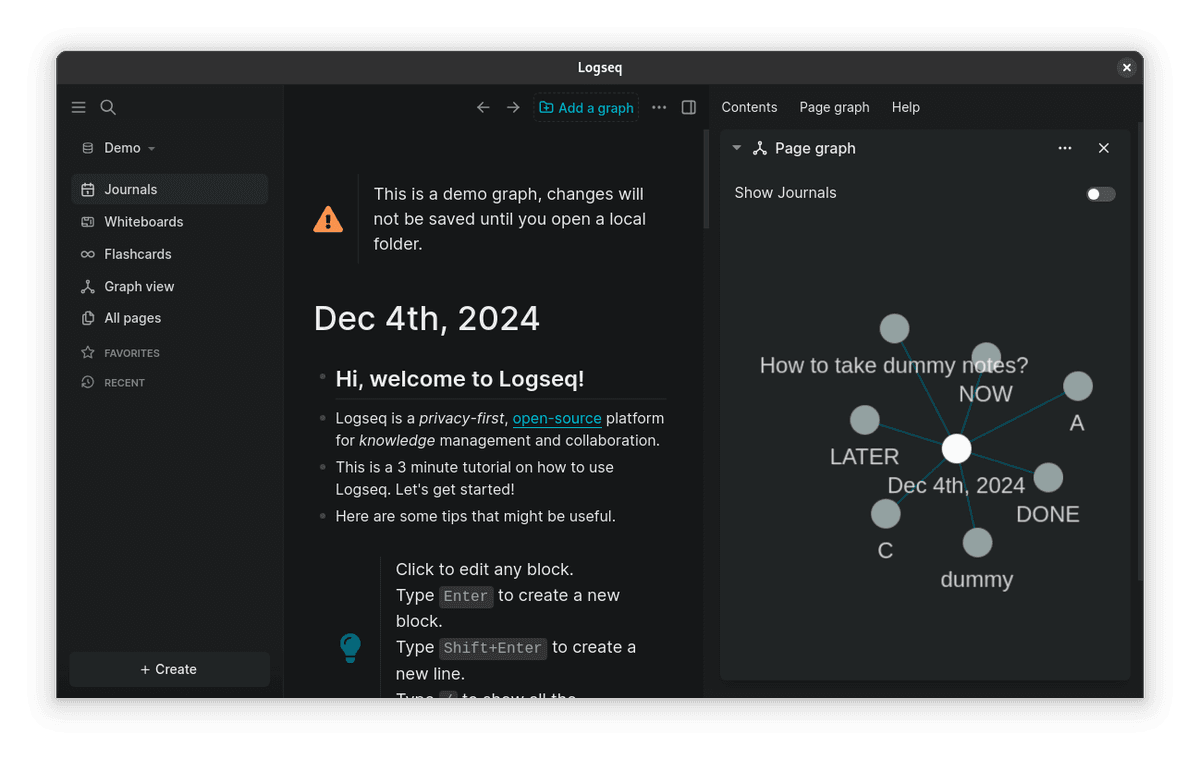
Logseq: Suits outline-heavy thinkers. Each idea becomes a block, and daily notes can serve as the home base.
-
Notion: Fits PARA because databases, project pages, and templates separate active work from saved files and archives.
-
Microsoft OneNote: Works for students who mix typed notes, handwriting, screenshots, and class diagrams in one notebook.
-
Cornell apps: Use OneNote, Goodnotes, Notability, or paper when the goal is lecture recall. The format needs a stable two-column layout and a summary area.
-
Goodnotes: A strong Cornell choice for iPad handwriting. Its template keeps cues, main notes, and summary space on one page, so review stays part of the note.
-
Apple Notes: Good for fast capture and simple folders. It fits lightweight Cornell pages, outlines, and quick meeting notes.
-
Evernote: Still works for web clipping and archive-heavy systems. Link-heavy methods require you to maintain the links yourself.
-
Joplin: A good open-source choice for Markdown notes and offline access, especially when portable files matter more than polished teamwork.
-
Notesnook: Fits privacy-sensitive note taking where encrypted sync matters more than AI features or visual mapping.
-
Standard Notes: Strongest for encrypted long-term storage and simple writing. Choose another tool for visual brainstorming or project dashboards.
-
VoiceDash: Captures spoken ideas quickly. Rewrite them into Cornell cues, PARA projects, or Evergreen notes later, before the real system work begins.
Six Note-Taking Systems in Detail
1. The Zettelkasten Method
Zettelkasten is the best fit when you want notes to become writing material over time. It asks for more care than Cornell or PARA, but it gives researchers and writers a stronger web of ideas. The core steps are simple. Write one idea per note. Link it to related notes. Keep an index or map so clusters stay easy to find.
- Pros: deep links, strong reuse, and good raw material for essays.
- Cons: slow start, daily upkeep, and poor fit for deadline tracking.
- Example: a grad student can turn paper notes into linked claims, then pull those claims into a thesis chapter.
How It Works
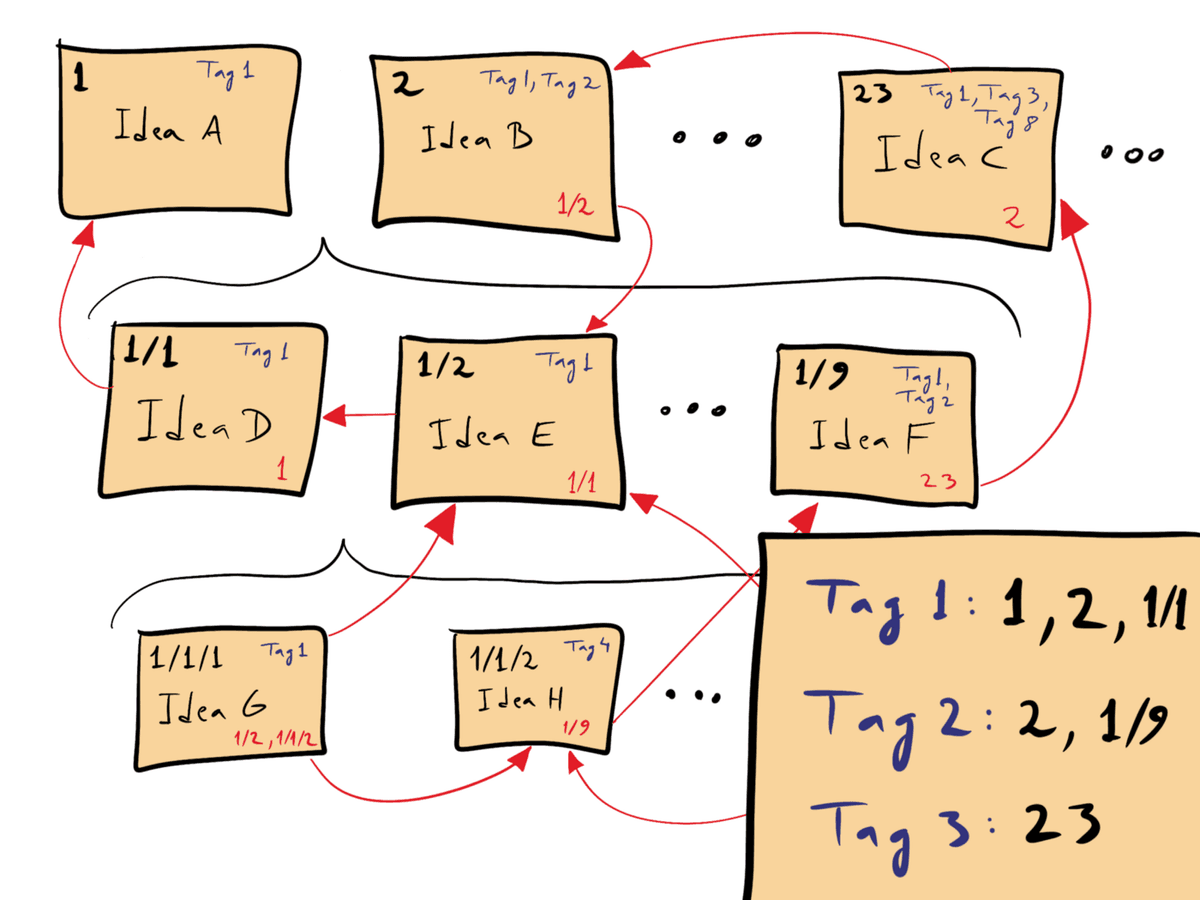
The Zettelkasten method treats your notes as a web of ideas rather than a pile of documents. Each note holds one idea, written in your own words, and links to related notes.
Over time, this creates a web of linked knowledge. You organize by relationship. The structure grows from links between ideas instead of fixed folders.

The Workflow
- Find an idea worth keeping (from reading, lectures, or talks)
- Write it as a standalone note in your own words
- Find existing notes that relate to it and create links
- Add the source for reference
- Revisit and develop clusters as they form
Strengths
- Ideas compound over time. The more notes you add, the more connections emerge. Your knowledge literally grows smarter with use.
- Cross-topic insights. Links between notes from different subjects reveal patterns you would not see in siloed folders.
- Ready for writing. When you sit down to write, you assemble ideas you have already shaped.
Weaknesses
- High startup cost. It takes hundreds of notes before the system generates real value.
- Requires consistent effort. You have to actively link new notes to existing ones. Skip this step and you just have a pile of disconnected notes.
- Weak for time-bound tasks. Zettelkasten builds long-term knowledge. If you need to organize a project with deadlines, use PARA or a project tool.
Best For
Grad students, thesis writers, nonfiction authors, and anyone building skill over years rather than weeks.
2. The PARA Method
How It Works
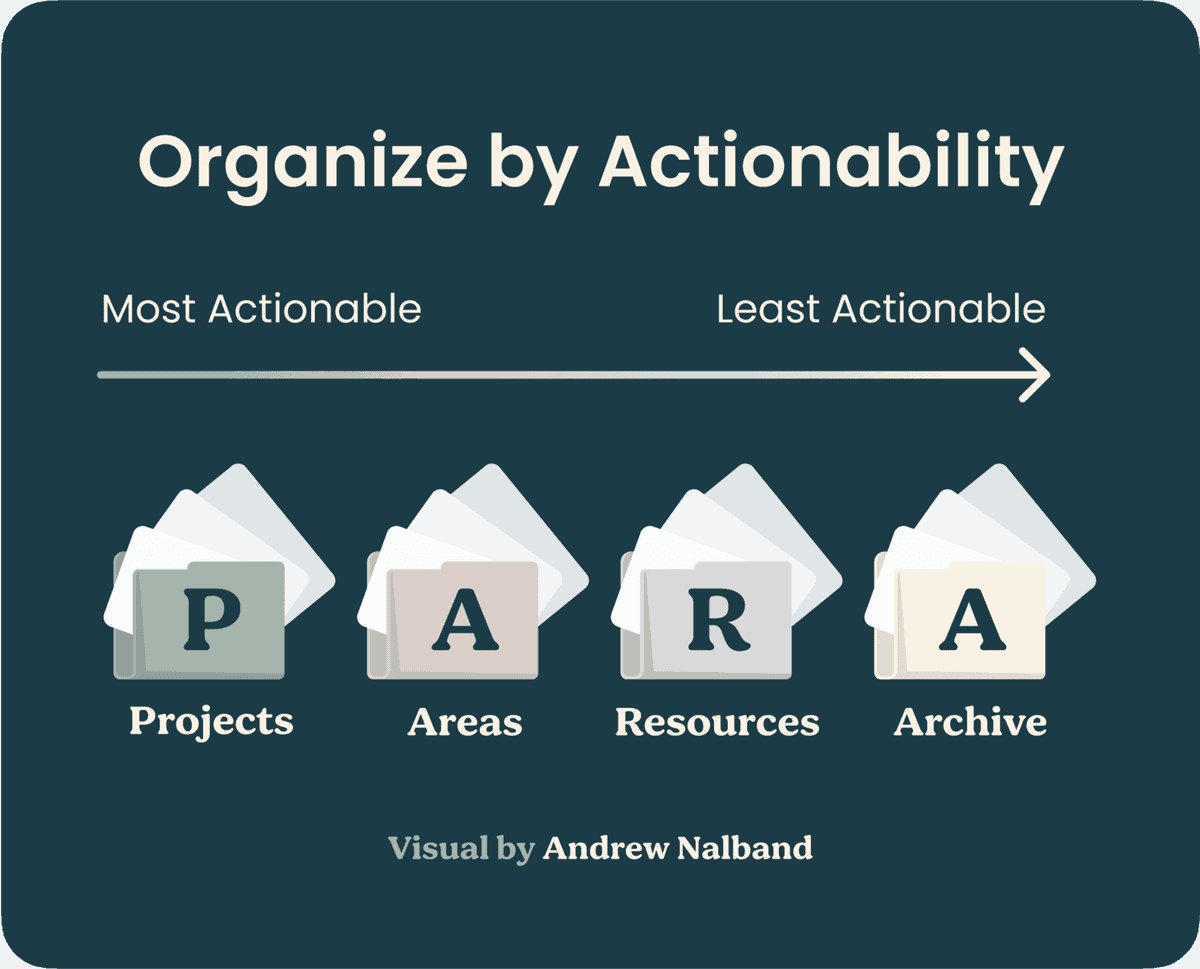
PARA sorts notes into four buckets by urgency. Projects are active work with deadlines. Areas are ongoing duties. Resources are topics of interest. Archives hold inactive items.
PARA replaces complex folders and tags with four buckets and a weekly review. That keeps the system current without much upkeep.
The Workflow
- When you save something, ask: "Is this related to an active project?" If yes, file it there.
- If not, ask: "Is this an ongoing area of responsibility?" File accordingly.
- Everything else goes into Resources.
- When things become inactive, move them to Archives.
- Review weekly.
Strengths
- Simple setup. You can set it up in five minutes and explain it to anyone.
- Action-oriented. Information is organized by what you need to do, not what it's about.
- Low maintenance. A 15-minute weekly review keeps the system running.
- Tool-agnostic. Works in any app, file system, or even physical folders.
Weaknesses
- No connection-building. PARA tells you where to put things but doesn't help you connect ideas across categories.
- Shallow knowledge work. PARA helps you file work. It does not help much with idea growth.
- Requires discipline for the weekly review. Skip the review and your Projects folder fills with stale items.
Best For
People managing several projects, students who want simple order, and anyone who has quit more complex systems.
3. The Cornell Method
How It Works
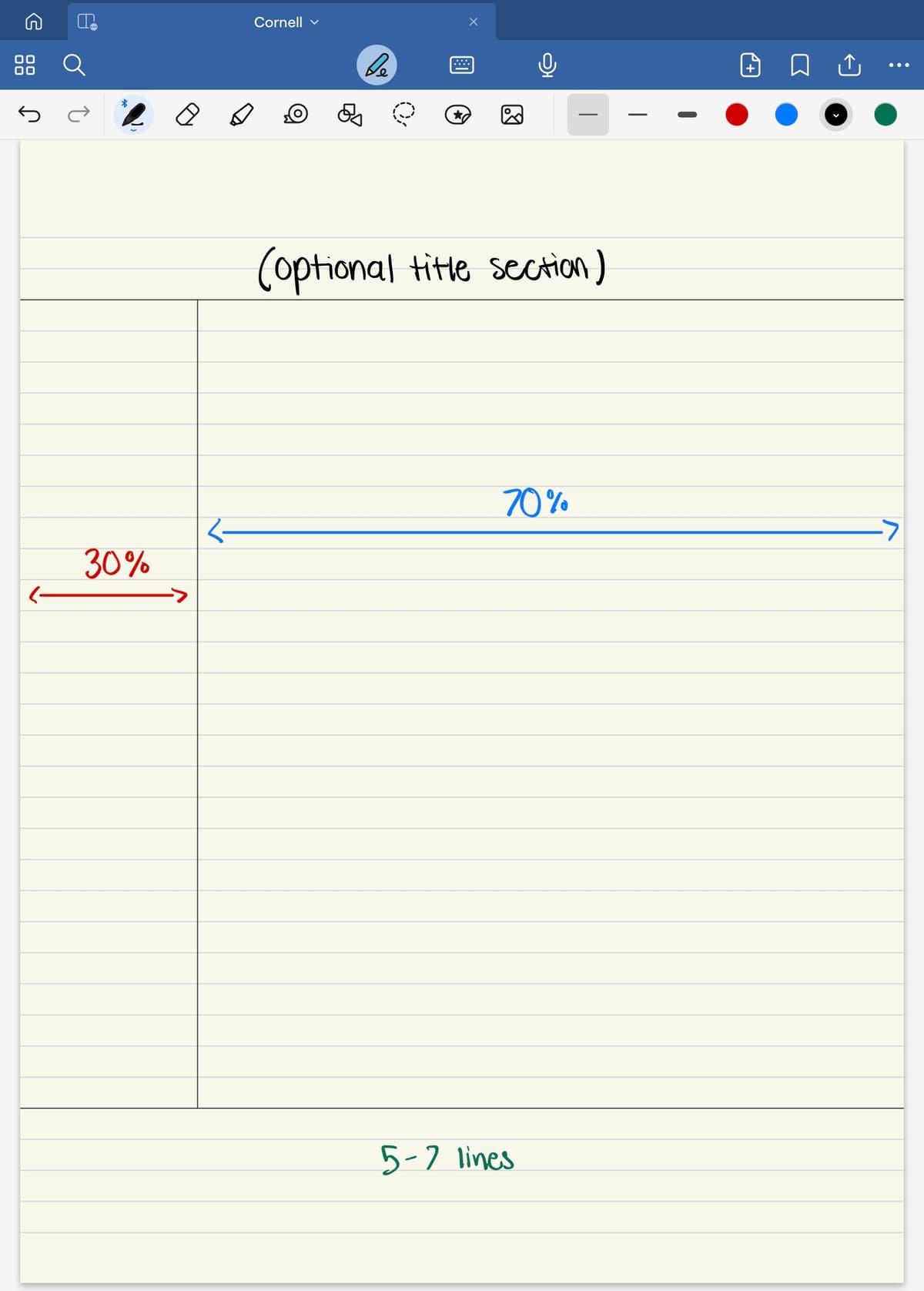
The Cornell Method divides each page into three areas. A narrow left column holds cues. A wide right column holds your notes. A bottom box holds a brief summary.
Cornell University developed the method in the 1950s for lecture content. The structure makes you distill information while you take notes.
The Workflow
- During a lecture, take notes in the right column
- After the lecture (ideally within 24 hours), write cue words and questions in the left column
- Write a brief summary in the bottom section
- Study by covering the right column and using the cues to recall the content
Strengths
- Built for learning. The cue-note-summary layout supports active recall, one of the most effective study techniques.
- No setup required. You can start with a piece of paper and a pen right now.
- Forces processing. Writing cues and summaries makes you engage with the material, not just transcribe it.
- Long track record. Students have used it in schools for decades.
Weaknesses
- Session-bound. Each Cornell page is tied to a single lecture or reading session. Connecting ideas across sessions requires additional work.
- Awkward in some digital tools. The fixed layout can be hard to rebuild in apps made for freeform pages.
- Limited to linear content. Works well for lectures but less well for nonlinear thinking, brainstorming, or creative work.
Best For
College students in lecture-heavy courses, especially in the first year when study habits are still forming.
4. The Outline Method
How It Works
The Outline Method uses indents to show levels. Main topics sit at the left edge. Subtopics move in one level. Details move in again. It matches how many people already arrange notes.
The Workflow
- Write main topics at the top level
- Indent supporting points below each topic
- Indent further for details, examples, and evidence
- Use the same bullets, numbers, or dashes for each level
Strengths
- Easy to learn. Almost everyone already knows how to outline.
- Good for ordered content. Classes, textbooks, and talks with a clear order fit outlines well.
- Easy to review. In digital tools, you can fold sections and study one level at a time.
- Works almost anywhere. Most note apps support outlines.
Weaknesses
- Forces order on messy ideas. Some ideas do not fit neatly into parent-child links. When ideas cross-reference each other, outlines struggle.
- Passive capture risk. It is easy to outline a class without thinking about the content. Copying structure is not the same as understanding.
- Isolation. Each outline exists on its own. Cross-outline links take extra work.
Best For
Students and workers who deal with orderly content and want a plain method that works right away.
5. Mind Mapping
How It Works
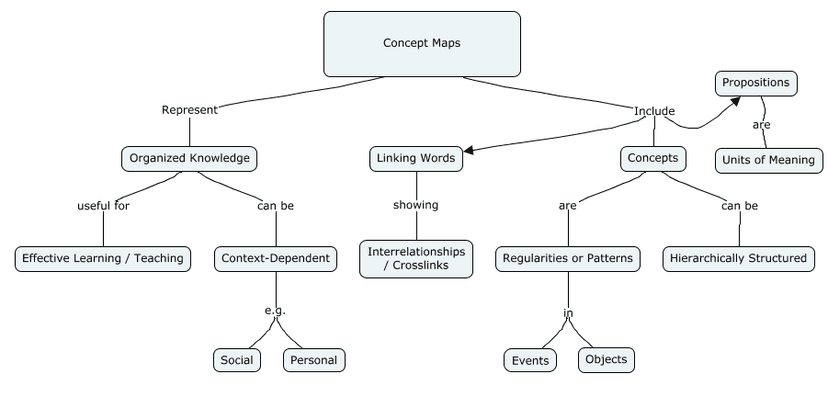
Mind mapping places a central idea in the middle and branches related ideas outward. Sub-branches add detail. Colors, icons, and placement add meaning.

The Workflow
- Write the central topic in the center of the page or canvas
- Draw main branches for key themes or subtopics
- Add sub-branches for details and examples
- Use colors, images, or icons to create visual cues
- Look for connections between branches
Strengths
- Visual and spatial. Uses visual memory, which can improve recall for many learners.
- Shows relationships. The radial shape makes links between ideas visible at a glance.
- Great for brainstorming. The open format lets ideas flow freely and sparks creative thinking.
- Big-picture clarity. A single mind map can summarize an entire topic on one page.
Weaknesses
- Space-limited. Complex topics quickly outgrow a single mind map. You have to choose what belongs on the page.
- Hard to search. Text notes are easier to search. Mind maps require visual scanning.
- Tool-dependent. Hand-drawn maps are flexible but hard to edit. Digital tools are easier to edit but can feel constrained.
- Not for every learner. Some people find visual order distracting.
Best For
Visual learners, brainstorms, exam review, and project planning. See our guide on mind mapping for exam success for student strategies.
6. Evergreen Notes
How It Works
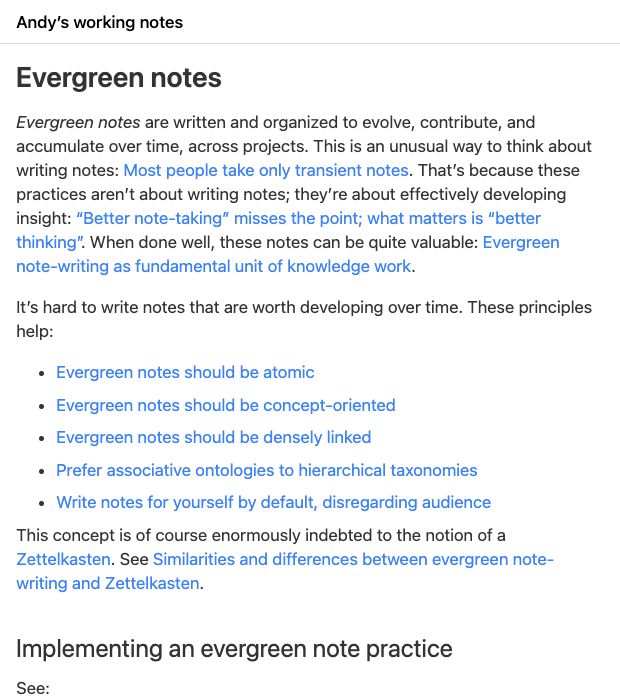
Evergreen Notes, a concept by Andy Matuschak, are notes that evolve over time. You write them to revisit, edit, and link later.
Each evergreen note is atomic, meaning it holds one idea. Write it in your own words and title it as a claim. "Review improves recall over time" is an evergreen note. "Review" is just a topic label.
The Workflow
- When you find a useful idea, write an evergreen note
- Title it as a clear claim
- Write in your own words, referencing but not copying sources
- Link to related evergreen notes
- Revisit and edit notes as your view deepens
Strengths
- Knowledge that matures. Notes get better over time as you refine your thinking and add new proof.
- Statement titles force clarity. You cannot stop at "Cognitive load." You need a claim, like "Reducing cognitive load improves user onboarding."
- Natural writing material. Evergreen notes are close to usable paragraphs for essays and papers.
- Pairs with other systems. Evergreen notes can live within Zettelkasten, a PARA Resources folder, or any other system.
Weaknesses
- High per-note effort. Each evergreen note requires real thought and editing. This limits the volume you can produce.
- Slow to start. Like Zettelkasten, the value grows with volume. Early on, a small set of notes can feel thin.
- Needs regular review. Notes only stay "evergreen" if you return to update them. Without that habit, they become another pile of old notes.
Best For
Writers, researchers, and knowledge workers building skill over time. It pairs well with Zettelkasten and tools that support two-way links.
Head-to-Head Comparison
Read this table by matching the row to your main job. Exam prep rewards Cornell and Mind Mapping. Research writing rewards Zettelkasten and Evergreen Notes. Project work rewards PARA.
| Criteria | Zettelkasten | PARA | Cornell | Outline | Mind Map | Evergreen |
|---|---|---|---|---|---|---|
| Setup time | Hours | Minutes | None | None | Minutes | Hours |
| Daily effort | 15 to 30 min | 5 min | Per session | Per session | Per session | 15 to 30 min |
| Connection-building | Excellent | Poor | Poor | Poor | Good | Excellent |
| Action management | Poor | Excellent | N/A | Moderate | Moderate | Poor |
| Exam prep | Good | Moderate | Excellent | Good | Excellent | Good |
| Research papers | Excellent | Moderate | Poor | Moderate | Moderate | Excellent |
| Long-term value | high | Moderate | Low | Low | Low | high |
| Beginner-friendly | No | Yes | Yes | Yes | Yes | No |
Table 2: Head-to-head scoring for setup, upkeep, links, action work, exams, research, long-term value, and beginner fit.
When to Choose Each Note-Taking System
Choose by the job first:
- Lecture recall: Cornell or Outline.
- Project order: PARA.
- Research writing: Zettelkasten or Evergreen Notes.
- Brainstorming and review: Mind Mapping.
- AI with sources: Atlas. For general notes, use Obsidian, Notion, or Logseq.
If You're a Student in Lecture-Heavy Courses
Start with the Cornell Method for in-class notes and the Outline Method for textbook reading.
Add mind mapping for exam review. If you want deeper links across courses, add Zettelkasten later. See our guide for students building a second brain for more.
If You're a Graduate Researcher
Start with Zettelkasten for research papers and idea development.
Use PARA alongside it for thesis tasks, timelines, and admin work.
If You're a Working Professional
Start with PARA for work and personal knowledge.
Add Evergreen Notes inside your PARA Resources folder when you want to build expertise.
If You're a Writer or Content Creator
Start with Zettelkasten or Evergreen Notes for ideas that develop over time.
Use mind mapping to plan a piece and PARA to manage active writing projects.
If You're Not Sure
Start with PARA because it is simple. You can add Zettelkasten links or Evergreen Notes later. Starting simple beats starting complex and giving up.
AI and Note Systems
Most systems here came before AI tools were common. They forced a trade-off: Zettelkasten provides links but demands more effort, while PARA provides simple order but leaves connections to you. AI can now reduce the work of finding those links.
For research-heavy work, AI tools can help with both order and links. Atlas works with papers, PDFs, and cited research notes. Atlas is not a general-purpose note-taking system. If your main inputs are personal notes, meeting notes, or freeform writing, use Obsidian, Notion, or Logseq instead.
A research workspace like Atlas can help you:
- Find links between sources. It can surface relationships you might miss when linking notes by hand.
- Support question-based search. You can ask about your sources instead of folder names.
- Generate maps from sources. Atlas can turn source sets into visual maps for review.
- Ground answers in your notes. Each answer points back to the source material.
This doesn't make the systems obsolete. PARA is still the simplest way to organize. Zettelkasten thinking still produces the deepest knowledge. Cornell still works beautifully for lecture capture. But AI removes the maintenance burden that causes most people to abandon their systems.
In 2026, choose the system that matches how you think. Then use AI only for the parts that used to add too much upkeep.
Next Steps
You've read about six systems. Don't try to implement all of them. Pick one:
- First time with a system? Start with PARA or Cornell.
- Want deep knowledge? Try Zettelkasten with our complete guide.
- Want AI for research sources? Atlas is not a general-purpose note-taking system. For personal notes or drafts, use Obsidian, Notion, or Logseq. For cited research, see how Atlas can map documents into connected notes.
The perfect system does not exist. The system that works is the one you start using today and keep using next month.
Ask Atlas about research notes
Import Markdown notes, ask a question, and inspect citations for research.