


A second brain gives you one place for what you learn. Notes, PDFs, project ideas, and exam review all stay in the same system. You spend less time hunting and more time studying.
Use a two-course retrieval test to judge the system. After setup, you should be able to ask one question that spans two classes and trace the answer back to the notes or readings that support it. Passing that test means your notes are ready for exam prep and paper writing.
This guide is for students who manage lectures, textbooks, research papers, group projects, and exams each week.

Build a cited study library across courses
Upload lectures and papers, then ask questions across your course materials.
Why Do Students Need a Second Brain?
Students need a second brain because one term creates more material than memory can hold. Each class brings notes, readings, problem sets, slides, and exams. Without one place to keep them, good ideas get buried when exam week or paper season starts.
The Scale Problem
Many undergraduates take 4-5 courses per term. Each course can create:
- 30+ hours of lecture notes
- 15-20 assigned readings
- Multiple problem sets, papers, or projects
- Exam review materials
That is hundreds of files in one term. Over four years, it becomes thousands. Without a system, you lose track of most of it. The load is too large for working memory.
The Connection Problem
Your psychology course discusses cognitive load theory. Your UX design course covers the same idea from another angle. Your education course applies it to classroom design. These links make your essays sharper, but only if you notice them.
A second brain makes links across classes easier to see. You can spot the same idea in three contexts and use it with more care.
The Retrieval Problem
You know you read something relevant to your thesis proposal. It was in a paper from last semester's research methods class. Or maybe it was a textbook chapter. Or a lecture slide. You spend 45 minutes searching and find a vague highlight with no context.
A second brain with good search lets you find the source once, with enough context to use it.
Before You Start Your Student Second Brain
Start with this week's coursework
Do not begin with a complex system. Begin with the work you already have this week: two courses, one current assignment, and the reading stack you keep putting off. Your first goal is simple. Put class material in one workspace and make it easy to ask, "Where did I see this before?"
Match the tool to your coursework
If your courses are paper-heavy, use a tool that can keep PDFs, notes, and cited answers together. If you mostly need a planner, use a workspace with tasks and calendars. If you enjoy shaping every folder and link by hand, use a local notes app.
Step-by-Step Student Second Brain Setup
Use this setup process in order. Each step should stay quick:
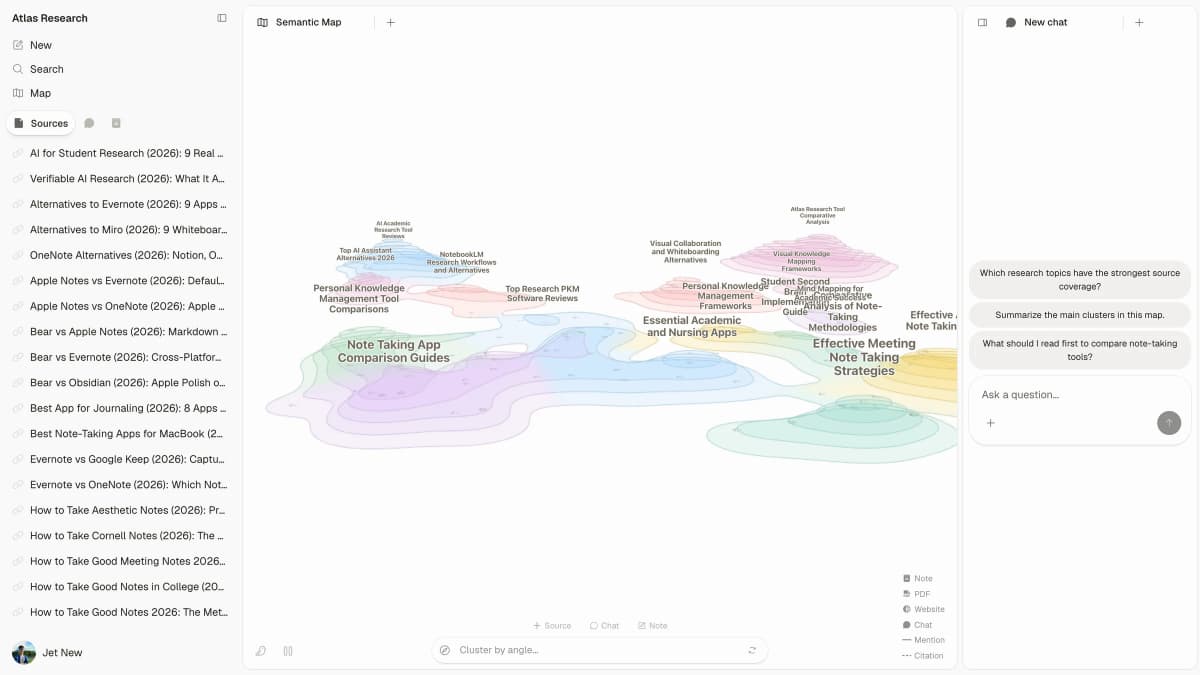
- Pick Atlas if most of your work lives in PDFs, readings, and notes. Pick Obsidian if you want local files. Pick Notion if planning is the main job.
- Make one folder for each course. Add separate folders only for readings, lectures, assignments, and exam prep.
- Add new notes the same day. For a PDF, save the file and write two lines about why it matters.
- Review once a week. Merge duplicate notes, add links, and mark topics that still feel weak.
Detailed setup instructions
Step 1: Choose Your Tool
Start by checking whether the tool can handle the work you do each week:
| Feature | Why It Matters for Students |
|---|---|
| PDF annotation | Research papers and textbooks |
| Quick capture | Ideas during lectures |
| Search | Finding notes during exam prep |
| Cross-referencing | Connecting ideas across courses |
| Mobile access | Reviewing on the go |
| Free tier | Student budgets |
Table 1: The tools below take different approaches to those needs:
| Tool | PDF Support | AI Search | Student Price Check | Sync and Mobile Check | Best For |
|---|---|---|---|---|---|
| Atlas | Strong | Yes | Evaluation sample, then Pro | Web workspace for source sets | Research-heavy students |
| Notion | Basic | Yes | Free Education Plus for eligible solo students | Strong laptop, tablet, and phone apps | Organized planners |
| Obsidian | Plugin | Plugin | Local app is free, and students get 40% off Sync and Publish | Local files by default, with paid Sync | Technical students |
| Roam | Basic | No | Paid app | Web and mobile access | Graduate researchers |
| Google Docs | N/A | Basic | Free with a Google account | Drive sync across devices | Simplicity |
| Zotero | Strong for papers | No | 300 MB free storage, with paid plans starting at 2 GB | Desktop plus connector workflow | Citation library |
Table 2: For most students, the choice is about tradeoffs. Atlas fits paper-heavy classes because it can search across uploaded sources and show cited answers. Obsidian stores notes as local Markdown files, but you build more of the structure yourself. Notion is designed for connected docs, projects, and tasks, so it fits when planning and group work matter as much as notes.
Step 2: Organize by course and type
Keep it simple. Create a structure that maps to your actual academic life:
/Fall 2026
  /CS 301 - Machine Learning
  /PSY 201 - Cognitive Psychology
  /PHIL 310 - Ethics
  /STAT 250 - Statistical Methods

/Research
  /Thesis Proposal
  /Lab Notes

/Career
  /Internship Applications
  /Portfolio
Within each course, sort by type: lectures, readings, assignments, and exam prep. Keep the setup quick. If it takes two hours, you are building a hobby system instead of a study system.
Step 3: Build Capture Habits
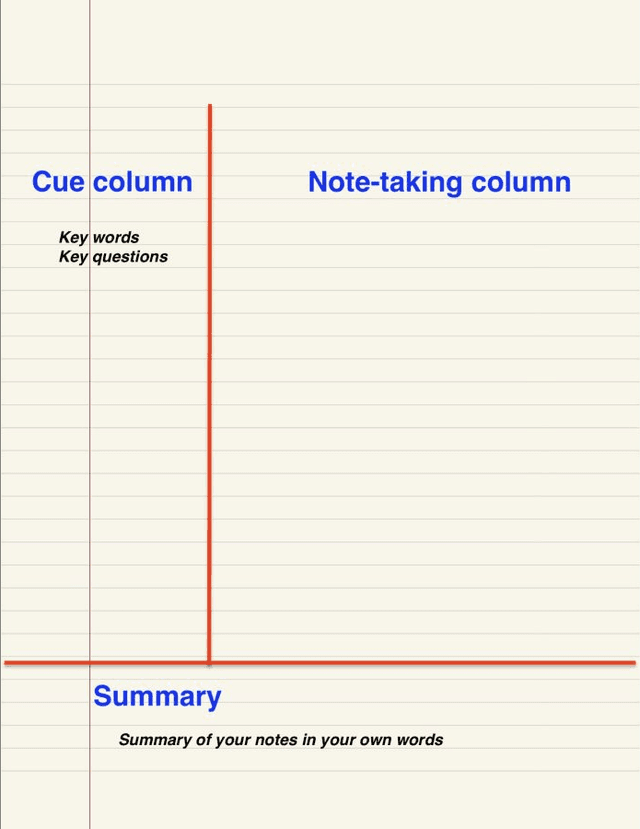

The best system fails if you don't use it. Here's a practical capture workflow for each type of student content:
Lecture notes:
- Take notes directly in your second brain tool during lectures
- If you prefer handwriting, digitize key concepts the same day
- Add a 2-3 sentence summary at the top of each lecture's notes
- Flag questions or confusing concepts for later review
Readings and papers:
- Upload PDFs to your knowledge workspace
- Highlight key arguments, methods, and conclusions
- Write a brief note in your own words about why this reading matters
- Note how it connects to other things you've read or discussed in class
Ideas and questions:
- Use quick capture (mobile app, voice note) for ideas that strike between classes
- Process these during a weekly review
- Connect them to relevant course materials
Exam prep:
- Don't create new materials from scratch. Synthesize from your existing notes
- Use your second brain's search to pull together everything on a topic
- Create summary notes that link back to detailed source notes
Check pricing, sync, and privacy
Before you commit, check three student-specific details:
- What happens after the free tier? Notion says its Education Plus plan is free for individual students. Obsidian gives students 40% off Sync and Publish. Zotero includes 300 MB of free storage, then starts paid storage at 2 GB. Atlas offers a short evaluation sample, then Pro is $20/month or $204/year.
- Can you work across devices without breaking the system? If you read on an iPad, write on a laptop, and review on a phone, test sync before you import a full term of notes. A system that only works on one device will fail during busy weeks.
- What class material should stay out of the tool? Do not upload private classmate data, clinical notes, unpublished lab data, or graded work with sensitive comments unless the tool and your school rules allow it. For normal readings and papers, prefer tools that keep answers tied to source text so you can check claims before citing them.
Workflows for Common Student Tasks
Writing Research Papers
A second brain changes the research paper process. You begin with a body of notes you have already worked through.
-
Explore your existing knowledge first. Search your second brain for what you already know about the topic. You'll often find relevant notes from previous courses.
-
Add new sources to your knowledge workspace. As you read new papers, add them to your second brain with annotations and connections to existing notes.
-
Let connections guide your argument. The links between notes often reveal arguments and structures you wouldn't have seen otherwise.
-
Cite with confidence. Every note traces back to its source, so your citations are grounded from the start.
With Atlas, you can upload your sources and ask questions across them. The mind map view shows how sources relate, which can help shape your argument before you draft.
Preparing for Exams
Most students study by re-reading. Research consistently shows this is one of the least effective study strategies. Active recall and spaced repetition work far better. And a second brain supports both.
Active recall with your second brain:
- Search for a topic and try to recall what you know before reading your notes
- Write practice questions based on your notes, then answer them from memory
- Use your note summaries as cues, then check the detailed notes
Spaced repetition:
- Review course notes at increasing intervals (1 day, 3 days, 7 days, 14 days)
- Flag notes that are hard to recall for more frequent review
- Use your second brain's search to pull up related concepts for context
Synthesis across topics:
- Search for a concept across all your courses to see it from multiple angles
- Create exam review notes that link to your detailed notes
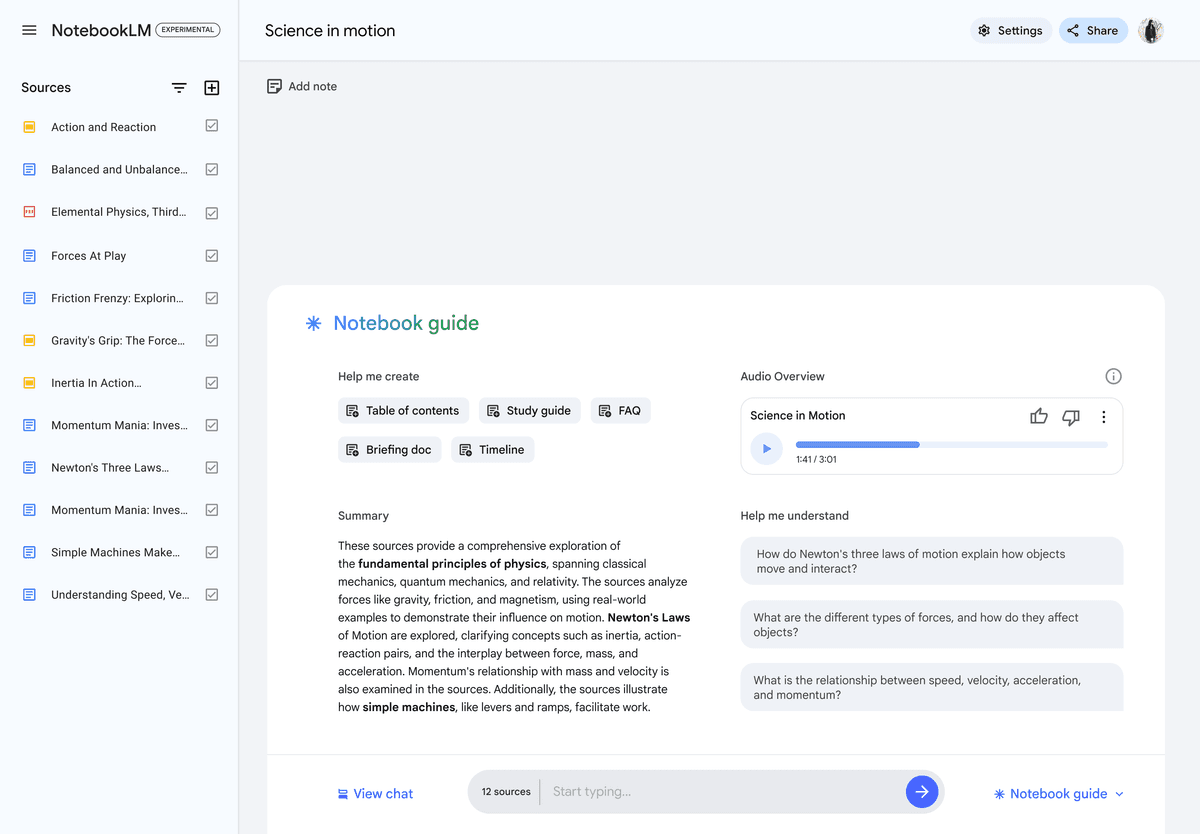
- Use AI-powered tools to ask questions across your entire knowledge workspace
Managing Group Projects
Group projects are where student knowledge management gets messy. Everyone uses different tools. Notes get scattered across shared drives, group chats, and email.
Use your second brain as your personal layer:
- Keep your own notes on group discussions and decisions
- Save relevant research you've done for the project
- Track your contributions and action items
- After the project, archive with a summary of what you learned
The Student Second Brain Stack
You don't need one tool to do everything. Here's a practical stack for students:
Tools for storing knowledge
Core workspace: Atlas or Obsidian for notes, links, and search.
Citation tool: Zotero is free and works well for papers.
Tools for capture and planning
Quick capture: Use your phone's notes app for ideas between classes.
Calendar and tasks: Keep the calendar or task app you already use.
The key is that your knowledge workspace is the hub. Every other tool should feed into it or point back to it.
Mistakes Students Make
These mistakes usually show up after the first burst of setup energy fades. Fix them early and the system stays useful during busy weeks.
Watch for three patterns. Students save files without writing their own notes. They build too many folders. They also forget to search the system before an assignment. The fix is simple. Process new material, keep the structure small, and make search part of every study session.
Mistake 1: Transcribing Lectures Word-for-Word
Your second brain is for study material you can reuse. Capture the main ideas, examples, formulas, and open questions. Leave out filler and side comments unless they explain a key point.
Mistake 2: Saving Without Processing
Downloading a PDF is not learning. Highlighting a paragraph is barely learning. The real work is writing in your own words what an idea means and how it connects to what you already know. Schedule 30 minutes after each class to do that processing.
Mistake 3: Starting Over Each Semester
Your knowledge compounds. Notes from last semester's statistics course are relevant to this semester's research methods course. Don't archive everything and start fresh. Keep your knowledge workspace growing.
Mistake 4: Over-Engineering the System
You don't need five levels of folders, a color-coding system, and a tagging taxonomy. You need a place to put things, a way to find them, and the habit of using both. Start simple. Add complexity only when simplicity fails.
Mistake 5: Not Using What You Capture
The whole point of a second brain is retrieval. Before starting any assignment, search your knowledge workspace. Before studying for an exam, explore your connected notes. Before writing a paper, check what you already know. If you're not retrieving, you're just hoarding.
From Semester to Semester: Building Compounding Knowledge
The real power of a student second brain emerges over time. Here's what it looks like across your academic career:
Semester 1: You're building capture habits. Your second brain is small but growing. You start noticing that having notes in one place saves time during exam prep.
Semester 2: Your second brain starts linking ideas across courses. A concept from last term appears in a new class. You understand it better because you can see both views.
Year 2: You have a large knowledge workspace. Research papers get easier because you have already worked through useful sources. Study sessions take less setup because you build on what you know.
Graduation: You leave with more than a degree. You have a connected knowledge workspace representing four years of learning. One that can inform your graduate research, your career, or whatever comes next.
This is building a second brain in the useful sense: a system that makes old learning easier to reuse.
Next Steps for Your Student Second Brain
You don't need a perfect system. You need a working one.
- Pick a tool for the work you do most
- Create folders for your current courses
- After your next class, process your notes into the system
- Before your next assignment, search your knowledge workspace first
Your second brain starts paying back the first time you find something you would have lost. For most students, that happens within the first week.
The knowledge you're building right now is the foundation of everything that comes next. Your career, your research, your expertise. Give it a system worthy of keeping.
Avoid the Scattered Notes Mistake
The easiest failure mode is a second brain that becomes another pile of files. If your main problem is scattered PDFs and notes, use Atlas for the source-heavy part of the system. Upload reading files from two courses. Ask one question that spans both classes, then check the cited sources before you use the answer.
Keep your main course folder or reference manager as the record of what you saved. Use Atlas only for the reading set you need to compare, and copy verified findings back into the notes or draft where you will use them.
Build a cited study library across courses
Upload lectures and papers, then ask questions across your course materials.