


PARA uses four folders for notes, files, and references. This guide adds four practical tools most summaries skip. The Move Rule decides when a note should move, stay, or get linked. The Fit Score shows whether the problem is folders, names, search, or source review. The AI Review Rule treats bucket suggestions as drafts for your weekly review. The PARA Playbook turns cleanup into a 15-minute review instead of a rebuild.
The part most PARA summaries miss is the move rule. When you search for the same note repeatedly while producing one output, that note either belongs in the current project, needs a clearer name, or should become part of an area you maintain.

Research source notes with Atlas
For Resources research, add text notes, ask a question, and inspect citations.
Quick Definition
PARA is Tiago Forte's system for organizing digital information into Projects, Areas, Resources, and Archives. Projects contain work with an outcome and deadline; Areas contain ongoing responsibilities; Resources hold useful reference material; Archives hold inactive items from the other three groups.
The method sorts information by its current job rather than its topic. A note can move from Resources to a Project when it becomes useful, then move to Archives when the work ends.
How PARA Works
The PARA Move Rule
Most PARA guides explain the four buckets. The harder choice is knowing when to move an item. Use this rule:
Move a note when its job changes. Link it when two jobs need it. Leave it alone when search can find it.
Forte's official PARA guide makes the same action-first point:
Tiago Forte, founder of Forte Labs: "the ultimate system for organizing your life is one that is actionable."
That keeps PARA just-in-time. You avoid a long filing project before the note matters. You also avoid a junk drawer where every saved link becomes a "resource."
Just-in-time organization means you file at the moment of use. Do not build empty folders for a future self you cannot predict. Wait until a note has a job, then move it to the smallest place that makes the next use obvious.
| Situation | What to do | Why |
|---|---|---|
| A saved article supports this week's deliverable | Move it to the Project | The next action matters more than the topic |
| A note supports a role you keep maintaining | Move it to the Area | The standard repeats after one project ends |
| One source supports many projects | Keep it in Resources and link to it | Copying it creates stale duplicates |
| A finished project may be useful later | Archive it with the old project name | Search can still recover the work |
Table 1: PARA Move Rule for deciding whether to move, link, or leave an item.
Where PARA Fits in a Second Brain
Building a Second Brain is the larger method. PARA is the filing layer inside it. CODE explains the work loop. Capture saves raw material. Organize gives it a home. Distill makes the best parts easier to reuse. Express turns notes into an output.
That means PARA should not do every job. It should answer one question: where should this item live right now?
| Reader | Best PARA use case | Extra layer to add later |
|---|---|---|
| Student | Keep assignments, course duties, readings, and old class files apart | A study system for spaced review |
| Researcher | Separate the active paper from saved sources and finished literature reviews | Links between claims, papers, and quotes |
| Team lead | Name shared folders by deliverable, owner, and date | A team rule for status labels |
| Consultant | Keep client work active without mixing old projects into new ones | A source library for reusable examples |
Table 2: Role-specific PARA use cases and the layer each reader may add next.
For AI tools, PARA is a guardrail. Let AI suggest a bucket, rename a vague file, or find a source across Resources. Do not let it move items without a weekly review. The useful check is whether the note has a current job, an ongoing role, or future value.
The Four PARA Categories
The PARA method is an organization system created by Tiago Forte. It uses four buckets: Projects, Areas, Resources, and Archives. These buckets cover active work, ongoing roles, useful notes, and old material.
PARA is an acronym for the four buckets:
- Projects: Short-term efforts with a clear goal and deadline
- Areas: Ongoing responsibilities you maintain over time
- Resources: Topics of interest you may reference in the future
- Archives: Old items from the other three buckets
That's the entire system. No sub-categories to agonize over. No tagging taxonomies to design. Four buckets map to how you use information, with no color-coding schemes to maintain.
The important shift is activity. A project sits close to current work. An area stays open because it needs upkeep. A resource waits until it becomes useful. An archive keeps old material out of the way without deleting it.
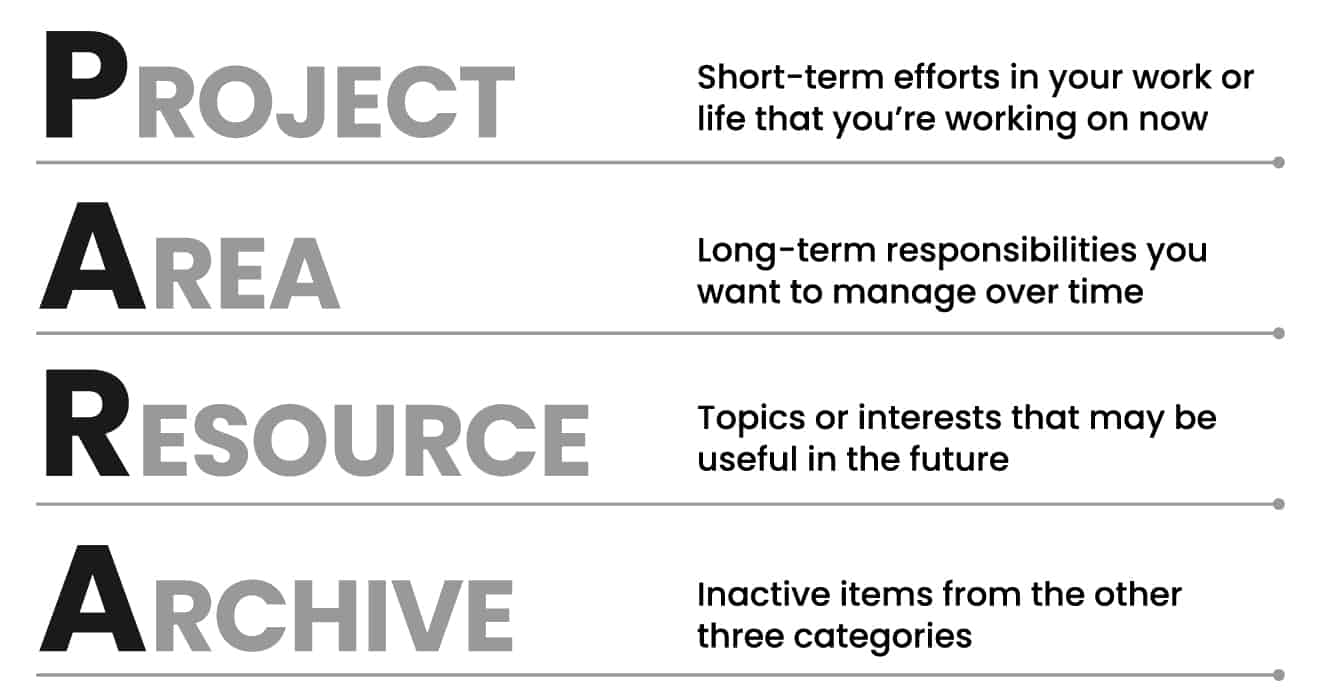
PARA Examples at a Glance
- Project:
Submit climate policy paper by March 15has an outcome and deadline. - Area:
Coursework qualitynames an ongoing standard you maintain. - Resource:
Climate policy sourcesholds useful material without a current deadline. - Archive:
Climate policy paper - submittedkeeps finished work searchable but out of the active workspace.
Breaking Down Each Category
Use the current job of an item to choose its category. The examples below show the boundary between each bucket and the category it is most often confused with:
- Projects: work with a defined outcome and deadline.
- Areas: responsibilities with a standard to maintain and no finish date.
- Resources: useful material with no current obligation attached.
- Archives: inactive work retained for possible future use.
Projects
A project has two defining characteristics: a clear goal and a deadline. If it doesn't have both, it's not a project.
Examples:
- Write research paper on climate policy (due March 15)
- Redesign portfolio website (launch by end of month)
- Plan spring break trip (depart April 5)
- Complete biology lab report (due Friday)
Not projects:
- "Get healthier" (no deadline, no clear endpoint)
- "Learn Spanish" (ongoing, no clear completion)
- "Stay on top of email" (that's an Area)
Most people have 10-15 active projects at any time. If you have more than 20, some of them aren't projects. They're aspirations. Move them to Resources or archive them.
Areas
Areas are ongoing roles with a standard to maintain but no finish date. They represent commitments in your life.
Examples:
- Health and fitness
- Finances
- Academic coursework
- Professional development
- Apartment / living space
- Relationships
Areas don't end. You don't "finish" your health. You maintain it. That changes where notes go. Project notes move to Archives when the project ends. Area notes build over time.
Resources
Resources are topics you might use later. They are not tied to a current role. They hold ideas, links, and notes for future work.
Examples:
- Machine learning techniques
- Travel destinations
- Cooking recipes
- Design inspiration
- Productivity methods (yes, including PARA itself)
Resources are the most flexible bucket. A note about salary talks goes here if you are only learning. If you start a job search, move that note into the project.
Archives
Archives hold old items from the other three buckets. Put finished projects, dropped roles, and stale resources here.
Examples:
- Completed course materials from last semester
- Old client projects
- A hobby you've paused
- Tax documents from previous years
The archive isn't a graveyard. It's cold storage. You can pull things out when they become relevant again. The point is keeping your active workspace clean.
How to Implement PARA
Step 1: Start Where You Are
Don't reorganize everything at once. Instead, apply PARA to new information going forward. Old files can stay where they are until you naturally need them. If the backlog is mostly readings and source notes, first decide how to organize research notes before moving files.
Step 2: Create Four Folders
Open your primary tool, such as your file system, Notion, or an Atlas second brain workspace. Create four folders:
/Projects
/Areas
/Resources
/Archives
Step 3: Apply the Two-Question Test
When you save something new, ask two questions:
- Is this related to a current project? If yes, it goes in that project folder.
- Is this related to an ongoing area of responsibility? If yes, it goes in that area.
If neither, it goes in Resources. If it's old or inactive, Archives.
Step 4: Do a Weekly Review
Spend 15 minutes each week reviewing your PARA structure. This keeps the system aligned with the action-first rule in Forte's PARA guide:
- Have any projects been completed? Move them to Archives.
- Have any resources become relevant to a current project? Move them.
- Are any "projects" areas in disguise? Recategorize them.
The weekly review keeps PARA from becoming another abandoned system.
PARA Goals and Commitments
PARA works best when each active folder points at a real commitment. A vague folder name creates clutter because it does not say what you owe, when it matters, or who needs the result.
Identifying Commitments
Start with the promises you have already made. A class assignment, client deliverable, job search, product launch, or trip plan belongs in Projects when it has an outcome and a date. A role such as health, finances, teaching, or team management belongs in Areas because it needs steady upkeep.
Connecting Efforts to Long-Term Goals
PARA is not a goal-setting system, but it should reflect your goals. If a folder does not support a current commitment, an ongoing role, or future work you still care about, it probably belongs in Archives.
Goal Setting Inside PARA
Use goals to name projects, not to create more buckets. Improve writing is too vague for Projects. Draft literature review by July 12 is clear enough to act on, review, and archive later.
PARA vs Other Systems
Different systems solve different problems. Here is how PARA compares with other approaches. For a deeper look, see our comparison of note-taking systems.
| Feature | PARA | Zettelkasten | Traditional Folders | Tags-Based |
|---|---|---|---|---|
| Learning curve | Low | High | low | Low |
| Best for | Action-oriented work | Research & writing | Simple file storage | Flexible retrieval |
| Structure | 4 categories | Flat + links | Unlimited hierarchy | No hierarchy |
| Maintenance | Weekly review | Ongoing linking | Manual filing | Tag discipline |
| Scales to | Hundreds of items | Thousands of notes | Breaks at scale | Breaks without discipline |
| Cross-referencing | Limited | Excellent | Poor | Good |
| Actionability | Core focus | Secondary | Not addressed | Not addressed |
Table 3: PARA compared with Zettelkasten, folders, and tags.
PARA vs Zettelkasten
The Zettelkasten method and PARA solve different problems. PARA organizes information for action. Zettelkasten connects ideas for thinking.
Use PARA when you need to manage projects, roles, and practical notes. It helps you find things fast and keep your workspace clean.
Use Zettelkasten when you are building long-term knowledge. It fits researchers, writers, and students who need ideas to connect over time.
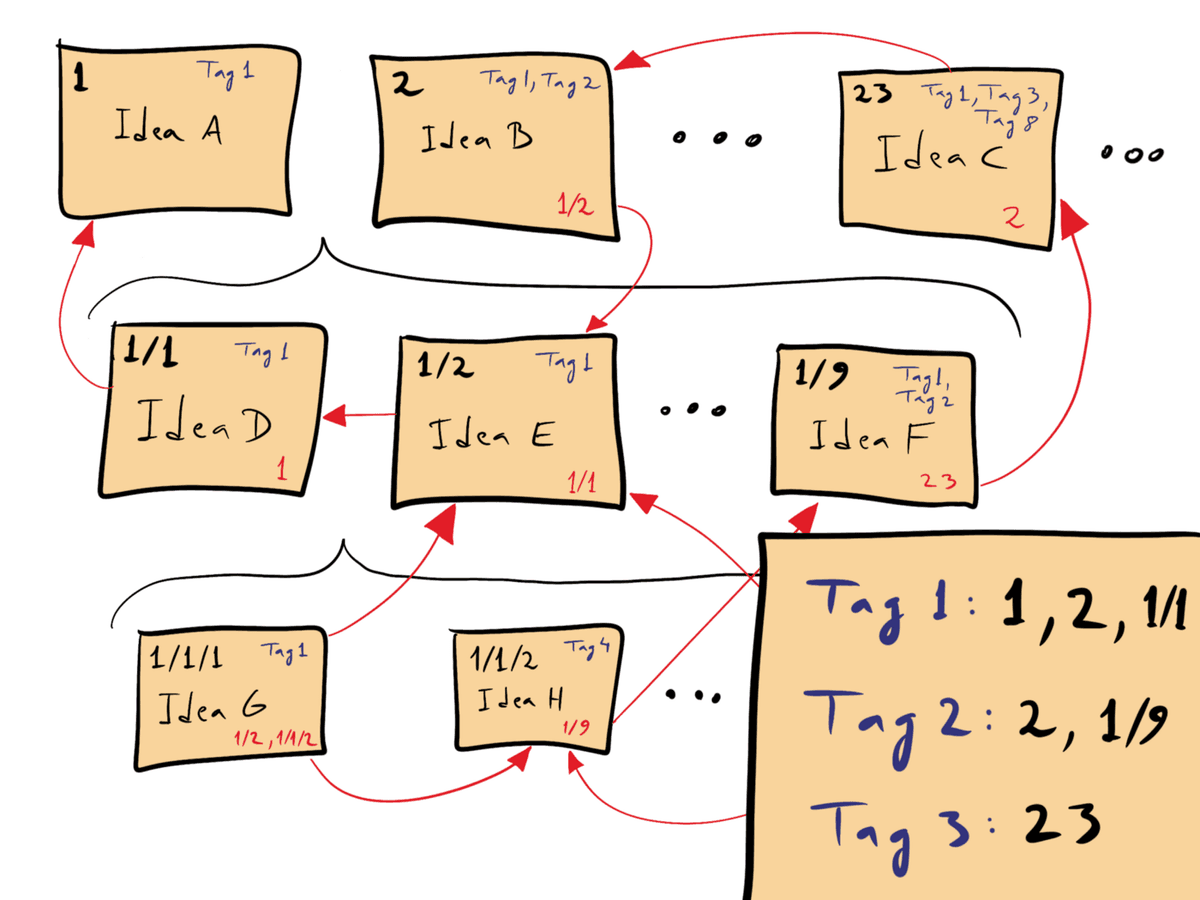
David B. Clear’s schematic shows numbered notes connected by references and tags. It explains the linking method, not the PARA folder structure. CC BY-SA 4.0: source.

Use both when PARA handles the top level. Let Zettelkasten handle idea work inside Resources.
PARA vs Traditional Folders
Deep folder trees seem logical but break down quickly. A personal knowledge management system needs a retrieval rule as well as folders. Where do you put a proposal that involves two clients? What about a personal project that uses work skills?
PARA avoids this by sorting around action. The same file might move from Resources to Projects to Archives. It should live where it helps most right now.
The CODE Framework and PARA
Capturing Information
PARA is the storage layer inside Tiago Forte's broader CODE workflow: capture, organize, distill, express. PARA handles the organize step. It tells you where a note should live after capture.
| CODE step | What PARA does | What PARA does not do |
|---|---|---|
| Capture | Gives new notes a first home | Decide whether the note is worth keeping |
| Organize | Splits notes into four action states | Create deep links between ideas |
| Distill | Keeps source material findable | Summarize or highlight the source for you |
| Express | Keeps project material close to output | Write the output |
Table 4: PARA's role inside the CODE workflow.
Distilling to Essentials
PARA does not decide which sentence matters most. That is distillation work. Keep highlights, quotes, and key claims with the source until a project needs them.
Expressing Your Knowledge
Expression is the output step. A paper, memo, lesson plan, or launch brief should pull from Projects first. Resources feed the work only after the project has a real deliverable.
PARA Rules for Daily Use
I use a simple PARA friction test when a folder starts to feel messy:
| Friction signal | What it means | PARA move |
|---|---|---|
| You search for the same file twice in a week | The item is active again | Move it from Resources or Archives into a Project |
| A folder needs more than two subfolders | The category is hiding multiple jobs | Split the items by Project, Area, Resource, or Archive |
| A note has a next action and a date | It is no longer just reference | Move it into Projects |
| A resource keeps feeding new work | It may be an Area | Promote it if you now maintain a standard there |
Table 5: PARA friction test for weekly review.
AI search does not replace PARA. It reduces the penalty when a useful note sits in the wrong bucket. It can suggest where a source belongs. The weekly review still decides whether the note supports a project, an area, or future work. If Resources contains papers or source notes, read the smart notes app guide after setup.
AI-Assisted Sorting
AI can help sort after PARA gives you the rule. Let it propose a bucket, rename vague files, or find old sources. Review the move yourself before changing the folder.
Team Collaboration
For teams, PARA needs naming rules before it needs more folders. Use one shared rule per bucket:
"Only when a project or area becomes collaborative... should it be moved to shared Projects or Areas folders."
Tiago Forte makes that point in his team PARA guide. Shared PARA should start small. Move work into the team system only after another person needs the folder.
- Projects: Include the deliverable, such as
Launch pricing page. - Areas: Name the owned work, such as
Customer support quality. - Resources: Avoid team names; use a topic such as
Sales enablement examples. - Archives: Keep the old project name and add its state, such as
Launch pricing page - archived.
Labels and Links
Use links and labels only when they solve a real lookup problem:
| Need | Better choice | Example |
|---|---|---|
| A resource supports one project | Link it from the project note | Link Pricing research from Launch pricing page |
| A note needs a short status | Add a simple label | waiting, draft, or review |
| A source supports many projects | Keep it in Resources and link out | One market report linked from three projects |
| A team needs shared sorting | Write a naming rule | Project - outcome - date |
Table 6: Labels and links to use with PARA when one item belongs in more than one place.
When Not to Move a Note Yet
PARA gets worse when every useful item moves too early. Before moving a note, check the job it is doing today.
| Tempting move | Better choice | Reason |
|---|---|---|
| Move every saved article into a current project | Link only the article you will use this week | The project folder should hold working material, not every possible source |
| Promote every repeated topic into an Area | Wait until you own a standard for it | Interest alone belongs in Resources |
| Archive a slow project because it has been quiet | Rename it if the outcome is still active | The problem may be an unclear project name |
| Duplicate one source into several projects | Keep one copy in Resources and link to it | One source is easier to update and cite |
Table 7: PARA checks for deciding when a note should stay where it is.
Source-Heavy Projects and Resources
PARA gives you structure. A research paper organizer can help when one folder turns into a source library, which is the part a folder system handles poorly. The two layers work together as follows:
Projects: Keep project sources together. If the project depends on papers or reports, use cited search to check claims.
Areas: Build small reference bases around ongoing roles. A health area might hold lab notes, doctor questions, and insurance files. A teaching area might hold rubrics, syllabi, and student feedback.
Resources: Keep useful notes here until they support active work. Search can help. The weekly review still decides when a resource should move.
Archives: Keep old notes out of view. Make sure they stay searchable. An old source can become useful again.
The split is simple. PARA decides where the note lives. Search decides how fast you can retrieve it. If Resources is mostly papers, reports, or source notes, add better search before you add more folders.
Tools and Weekly Review
Use file folders or Drive for shared documents, Notion for project databases, Obsidian for linked notes, OneNote or Evernote for capture, and Atlas-style cited search when Resources becomes a source library.
The 15-Minute Review
PARA only works if old choices get corrected. Use this quick review once a week:
| Review check | Pass signal | Move to make |
|---|---|---|
| Projects | Every project has a next action and end point | Archive stalled projects or rename them as Areas |
| Areas | Each area still has a standard you maintain | Merge areas you no longer review |
| Resources | Topics are easy to scan without deep folders | Rename unclear notes before adding subfolders |
| Archives | Old work is out of sight but still searchable | Move revived items back into Projects or Areas |
Table 8: Weekly PARA review checklist for keeping folders clean.
PARA Fit Score
Use this quick score before you rebuild a messy notes app. Give each row 0, 1, or 2 points.
| Check | 0 points | 1 point | 2 points |
|---|---|---|---|
| Active work | No clear projects | Some projects are named | Every project has an outcome |
| Ongoing roles | Areas are vague | Areas match real roles | Each area has a standard |
| Future notes | Resources are a junk drawer | Some notes have clear names | Most notes can be found by title |
| Old work | Archives are mixed with active work | Some old work is moved | Old work is out of sight |
| Review habit | No review rhythm | Review happens sometimes | Weekly review is on the calendar |
Table 9: PARA Fit Score rubric for deciding whether to fix names, move notes, or rebuild folders.
Scores below 5 usually mean the problem is not the app. The buckets are unclear. Scores from 5 to 7 usually need a review pass. Scores from 8 to 10 mean PARA is working, and the next problem is probably search, links, or source review. The examples below show the score in use:
- A student with class notes, lab PDFs, and exam tasks in one folder improved from 4/10 to 8/10 by moving current assignments into Projects and course duties into Areas.
- A researcher with 80 saved papers and no current output improved from 5/10 to 8/10 by keeping the papers in Resources and creating one Project for the active literature review.
- A team drive with old launches mixed with active work improved from 3/10 to 7/10 by archiving shipped work and naming each active folder by its deliverable.
Common PARA Mistakes
- Too many projects: Most people can actively manage 5-10 projects. Move aspirations and inactive work into Areas, Resources, or Archives.
- Confusing areas and projects: "Get healthy" is an Area because it continues; "Run a 5K by June" is a Project because it ends.
- Over-organizing resources: Improve unclear note names before adding more folders. Resources should remain easy to scan.
- Never archiving: Move inactive projects out of the working view. You can restore them if the work resumes.
- Applying PARA everywhere at once: Set up one notes or files app first, then expand after the weekly review works there.
Who Should Use PARA?
PARA works best for people who:
- Manage several projects at once
- Need a low-upkeep system
- Want to find notes quickly without complex setup
- Feel overwhelmed by their current digital mess
- Have tried and abandoned more complex systems
PARA may not be enough if you:
- Need deep idea links. Add Zettelkasten for this.
- Work mainly with research and academic writing.
- Need cited search across many source notes.
For most people, PARA is a strong starting point. Add other systems only when a real problem appears.
Start Using PARA
Use these starter folders before you design anything custom:
/Projects/Project name - outcome
/Areas/Role or standard to maintain
/Resources/Topic or source library
/Archives/Old project name - archived
This template is enough for most first setups. Add subfolders only after a folder becomes hard to scan.
| Common hurdle | Practical answer |
|---|---|
| I do not know where a note belongs | Put it where the next use will happen |
| A note fits two places | Keep one copy and link to it from the second place |
| Resources is too large | Rename unclear notes before adding nested folders |
| My team uses different names | Agree on one naming rule per bucket |
| AI suggests the wrong folder | Treat the suggestion as a draft and decide during review |
Table 10: PARA setup FAQ for common implementation hurdles.
First Setup
You can start PARA in five minutes:
- Create four folders in your primary tool
- Move your current active projects into the Projects folder
- Sort new notes with the two-question test
- Schedule a 15-minute weekly review
For more on building a second brain, start with the tool guide.
Compare personal knowledge management and the Zettelkasten method when PARA feels too light.
Research source notes with Atlas
For Resources research, add text notes, ask a question, and inspect citations.