
Best Cross-Platform Note-Taking Apps (2026): 8 Tested
Best cross platform note taking apps in 2026. Notion, Obsidian, OneNote, Evernote, Joplin, Atlas, Standard Notes, Logseq, tested on Mac, Windows, iOS, Android.
- Byline

Summary
The best cross-platform note-taking app is Notion for workspace notes, while Obsidian, OneNote, Evernote, Joplin, Atlas, Standard Notes, and Logseq cover different workflows.
Compare sync, operating-system support, markdown portability, privacy, free plans, and AI note workflows.
Use Notion for workspace notes, Obsidian for local markdown, OneNote for free cross-platform capture, and Atlas for cited research notes.
The right app depends on devices, Linux needs, export formats, sync tolerance, and whether notes must become source-grounded answers.
Cross-platform note-taking is harder than single-platform note-taking. Many apps work well on 2 platforms and feel weak on 3 others. Sync, matching tools, and native apps all matter.
This guide ranks 8 apps for 2026. The test set covers macOS, Windows, Linux, iOS, Android, and web.

 Atlas
AtlasCompare research paper organizer workflows
Compare tools for PDF organization, search, citation export, and synthesis.
What Counts and How We Tested
The evaluation separates basic eligibility from performance. An app first has to capture, search, sync, and export notes across device families. It also has to handle platform gaps, offline edits, sync conflicts, and a future move to another app.
What Counts as Note-Taking Software?
For this guide, note-taking software means an app that can capture, sort, search, sync, and export your notes. It has to work across more than one device family. A browser-only editor can qualify if the phone and desktop apps feel strong. A PDF reader, task manager, or team wiki does not qualify unless note capture is the main workflow.
The baseline set is capture, search, sync, and export. Capture includes typed notes, web clips, files, voice, sketches, or scans. Search has to work after the library grows. Sync means edits survive device changes and offline work. Export means a clean path out, such as Markdown, ENEX, HTML, or PDF.
Test Matrix Findings
The fastest way to choose is to score each app on its weakest platform. Its strongest version reveals little about the gaps you will face elsewhere. In this eight-app matrix, only four apps have native Linux clients. Only four keep the main copy local by default. Only two are strong for handwriting or ink-heavy tablet notes.
| Failure mode in the test matrix | Apps that handle it best | Apps that need caution |
|---|---|---|
| Native Linux required | Obsidian, Joplin, Standard Notes, Logseq | Notion, OneNote, Evernote, Apple Notes |
| Local files required | Obsidian, Joplin, Logseq | Notion, OneNote, Evernote, Atlas |
| Handwriting required | OneNote | Notion, Standard Notes, Atlas |
| Heavy web clipping required | Evernote, Joplin | Logseq, Standard Notes, Atlas |
| Source-grounded research required | Atlas plus a file-based notes app | Google Keep, Simplenote, Apple Notes |
| Enterprise wiki required | Confluence, Notion | Joplin, Simplenote, Logseq |
Table 1: Failure modes for cross-platform notes apps.
How We Tested Cross-Platform Notes Apps
The scoring framework is simple. A good app has to move the same note across desktop, phone, and browser without creating cleanup work. For each app, we checked whether the same core workflow works on Mac, Windows, iOS, Android, and Linux or the web. We then scored sync delay, offline edits, export format, feature gaps, and support depth.
| Test area | What we checked | Why it matters |
|---|---|---|
| Platform reach | Native or usable web access across Mac, Windows, iOS, Android, and Linux where available | "Cross-platform" should not mean "desktop plus a weak phone app" |
| Sync recovery | Version history, conflict handling, and manual recovery path | The worst sync bug is a silent overwrite |
| Portability | Markdown, ENEX, PDF, HTML, or proprietary export | Your notes should remain usable if the vendor changes pricing or direction |
| Offline behavior | Local-first, cached-offline, or online-required workflow | Travel, campus Wi-Fi, and mobile work expose weak clients quickly |
| Support surface | Official docs, help center, community forum, changelog, and account recovery | Cross-device failures need a real support path because app-store reviews cannot solve account or sync problems |
Table 2: Test criteria for cross-platform notes apps.
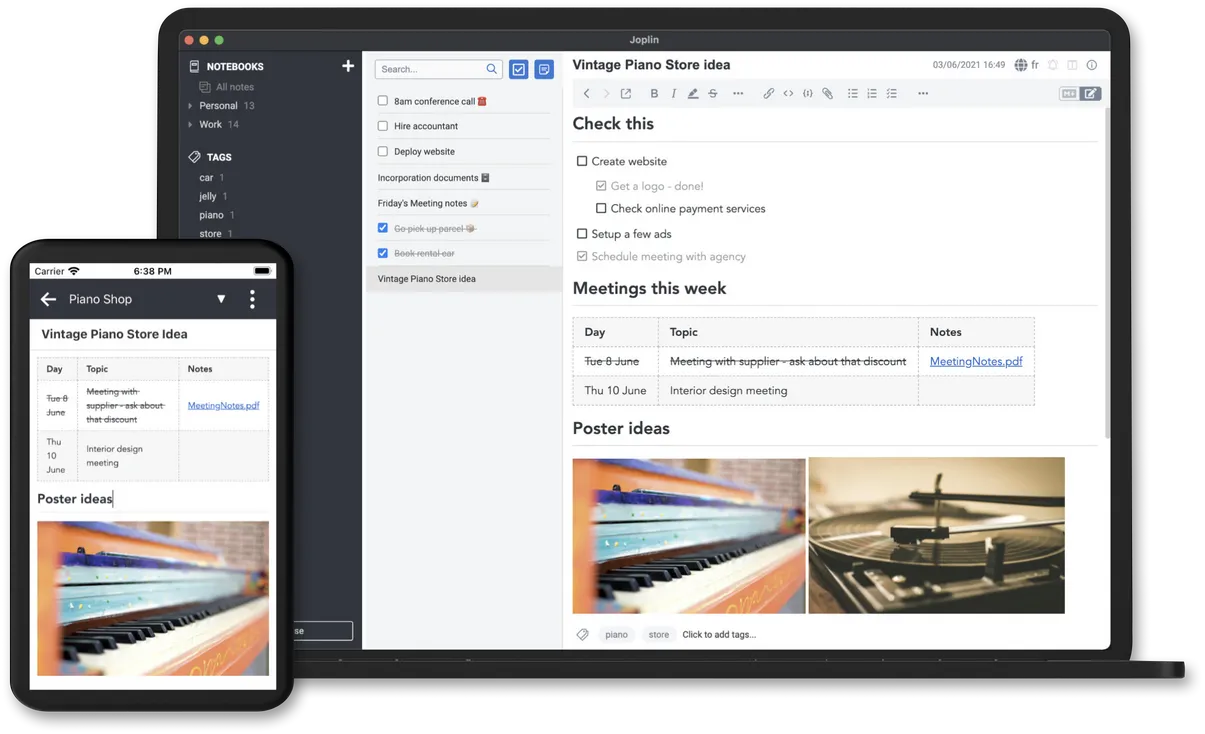
This Joplin homepage visual shows the same notebook on desktop and phone. That is the core requirement here. The note surface has to stay readable across devices. Source is the Joplin homepage.
How to Compare Cross-Platform Notes Apps
Test the app on every device you use, including offline mode and sync after two devices edit the same note. Check that the core tools remain available on mobile.
Export a test notebook before you commit. Markdown gives you the cleanest route to another app. Compare paid sync with free options such as OneNote, Joplin, or Apple Notes for Apple-only use. The second-brain apps guide adds lock-in and graph depth to this test.
8 Best Cross-Platform Note-Taking Apps
The eight ranked apps meet different versions of the cross-platform requirement. Compare the weakest client in your device mix, the sync model, and the export format before treating any overall winner as the best fit for your notes.
1. Notion: Best Cross-Platform Overall
Notion has the most polished cross-platform experience. Native apps on Mac, Windows, iOS, Android, plus a web app that's nearly as full-featured as the desktop apps. Sync is fast and reliable.
It fits most users who need notes that follow them everywhere. The free tier is useful. Notion Plus is $12/month or $120/year. Platform support covers Mac, Windows, iOS, Android, and web. There is no native Linux app.

This Notion education screen shows why it wins for shared workspace notes. The app is strongest when notes, tasks, and databases live together. Source is Notion's education template gallery.
2. Obsidian: Best for Linux Power Users
Obsidian stores notes as local markdown files in a folder you control. Native apps on Mac, Windows, Linux, iOS, Android. Sync via Obsidian Sync ($4/user/month billed annually or $5 monthly), iCloud, Dropbox, Git, or any cloud folder.
It fits Linux users, power users, and anyone who wants file ownership. Obsidian is free for personal use, with paid Sync and Publish add-ons. It runs on Mac, Windows, Linux, iOS, and Android.
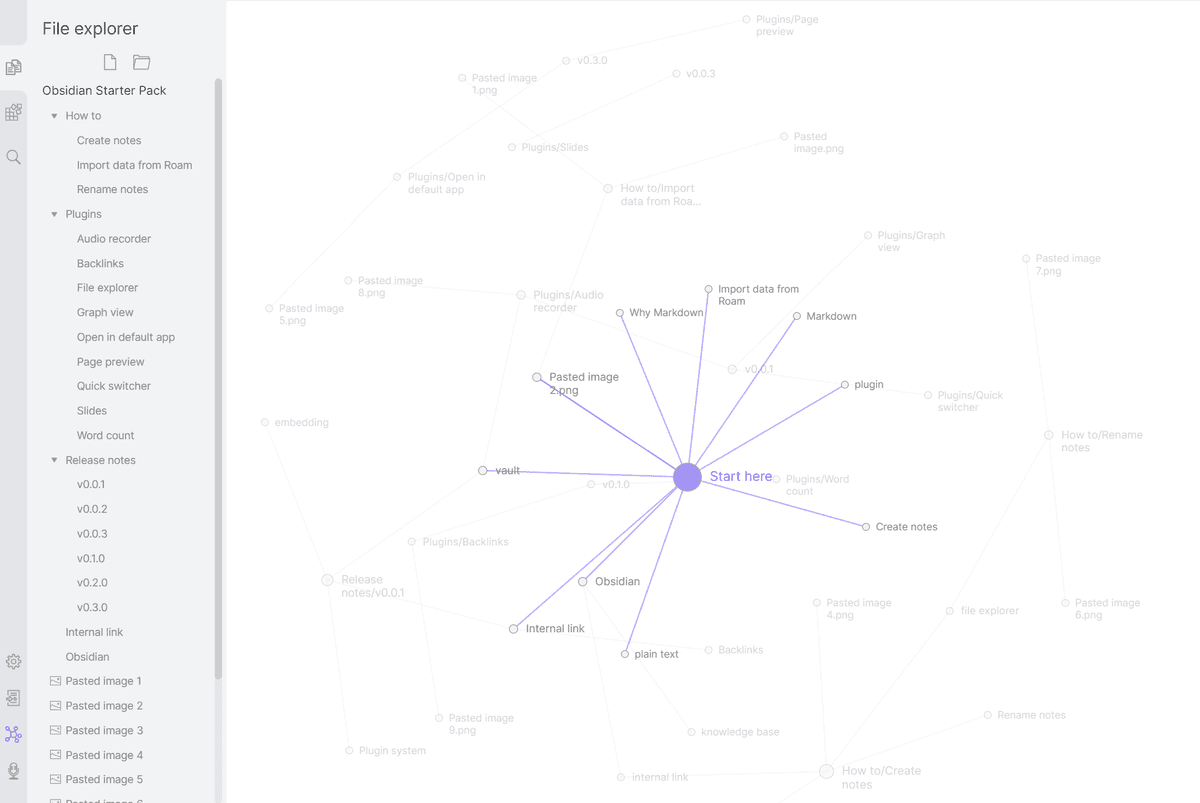
This Obsidian graph view shows the local linked-notes model. It is useful when sync needs to preserve a file-based vault. Source is Obsidian's product imagery.
3. OneNote: Best Free Cross-Platform
Microsoft OneNote is free with a Microsoft account. Native apps on Mac, Windows, iOS, Android, plus a strong web app. Its notebook to section to page layout works well across devices.
It fits Surface users, Windows users, and anyone who wants a free cross-platform notes app. OneNote is free with a Microsoft account and runs on Mac, Windows, iOS, Android, and web. Linux users are limited to the browser.

This OneNote App Store screen shows notebooks, sections, and pages on mobile. That layout is why OneNote remains the safest free cross-device pick. Source is Microsoft OneNote on the App Store.
4. Evernote: The Historical Cross-Platform Default
Evernote was the cross-platform notes app for a decade. The web clipper is still best-in-class. Pricing changes hurt its reputation, but the apps remain capable across Mac, Windows, iOS, Android, and web.
It still makes sense for heavy web clippers and existing Evernote users. The free tier is limited to one device, Personal is $14.99/month, and the apps cover Mac, Windows, iOS, Android, and web.
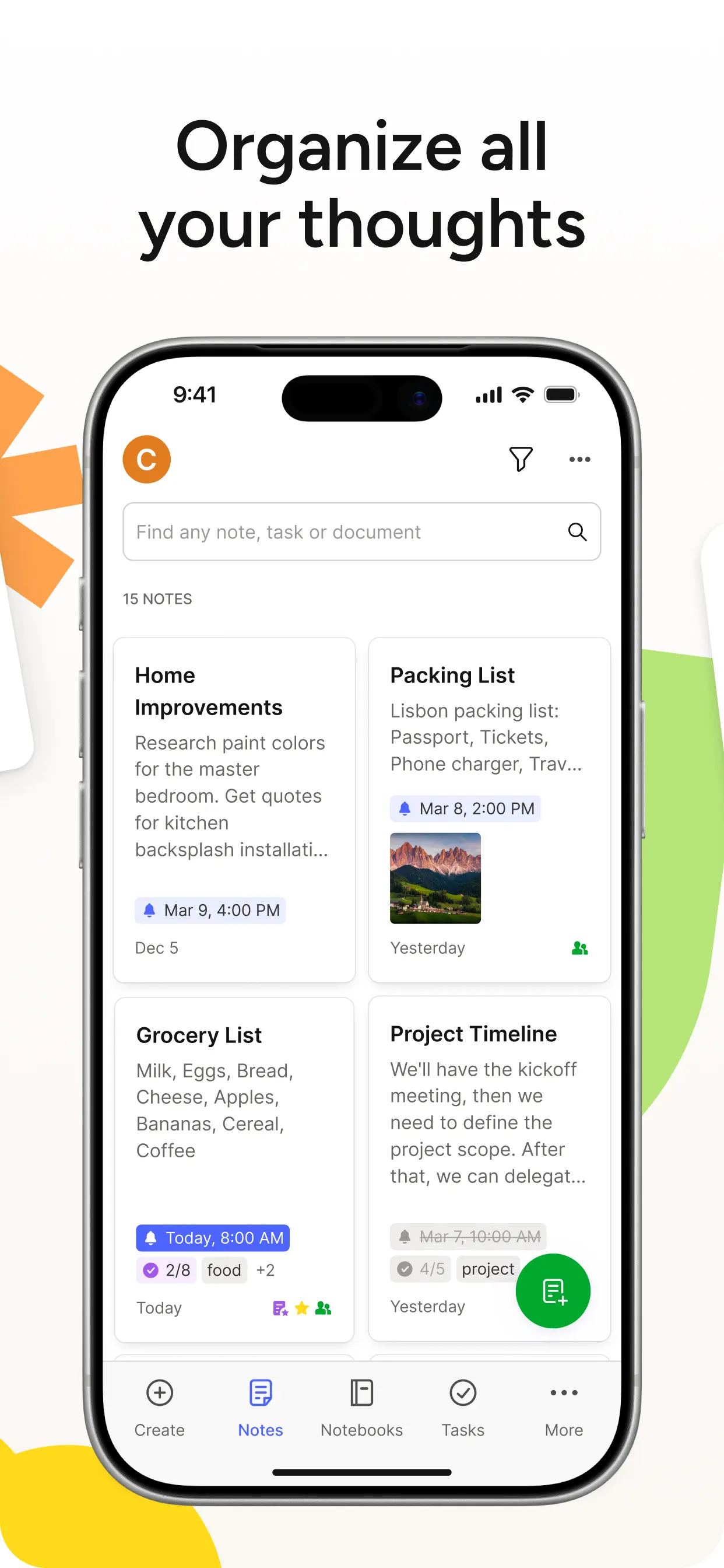
This Evernote App Store screen shows its capture-heavy mobile surface. It is still strongest when web clips, scans, and mixed notes matter. Source is Evernote on the App Store.
5. Joplin: Best Open-Source Cross-Platform
Joplin is fully open source and runs on Mac, Windows, Linux, iOS, and Android. Sync via Joplin Cloud ($2.99/mo), Dropbox, OneDrive, WebDAV, or S3, your choice. End-to-end encryption optional.
It fits open-source users and anyone who wants control over the sync backend. The app is free, Joplin Cloud is optional at $2.99/month, and platform support covers Mac, Windows, Linux, iOS, and Android.
6. Atlas: Best Web-First AI-Grounded Cross-Platform
Atlas runs in any browser, with no install needed. Upload notes, PDFs, and articles, and Atlas builds a mind map across them with source-cited AI Q&A. The web-first model works on Mac, Windows, Linux, iOS, and Android browsers.
It fits cited research notes across devices without installing apps. Atlas Pro is $20/month.
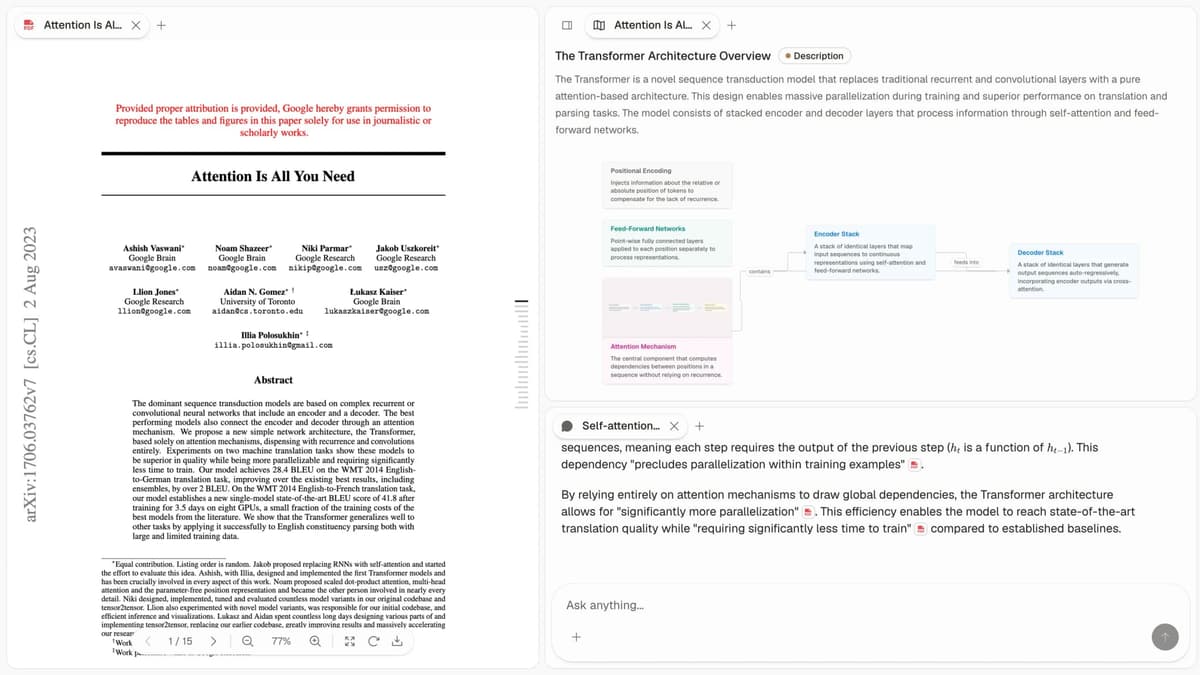
Atlas is browser-first, so its value is not native sync. The screenshot shows a source PDF, a mapped concept view, and a cited answer panel in one workspace. Source is first-party Atlas product imagery.
7. Standard Notes: Best Privacy-Focused Cross-Platform
Standard Notes is end-to-end encrypted by default, with native apps on Mac, Windows, Linux, iOS, Android, and web. The free tier covers plain-text notes. Paid tiers add markdown, rich text, themes, and editor extensions.
It fits users who want end-to-end encryption without giving up cross-platform support. The Productivity plan is $90/year.
8. Logseq: Best Cross-Platform Linked Notes
Logseq is the open-source block-based outliner. Native apps on Mac, Windows, Linux, iOS, Android. Bidirectional links, daily notes, and graph view, all stored as local markdown.
It fits researchers and power users who want linked notes with cross-platform support. Logseq is free and runs on Mac, Windows, Linux, iOS, and Android.
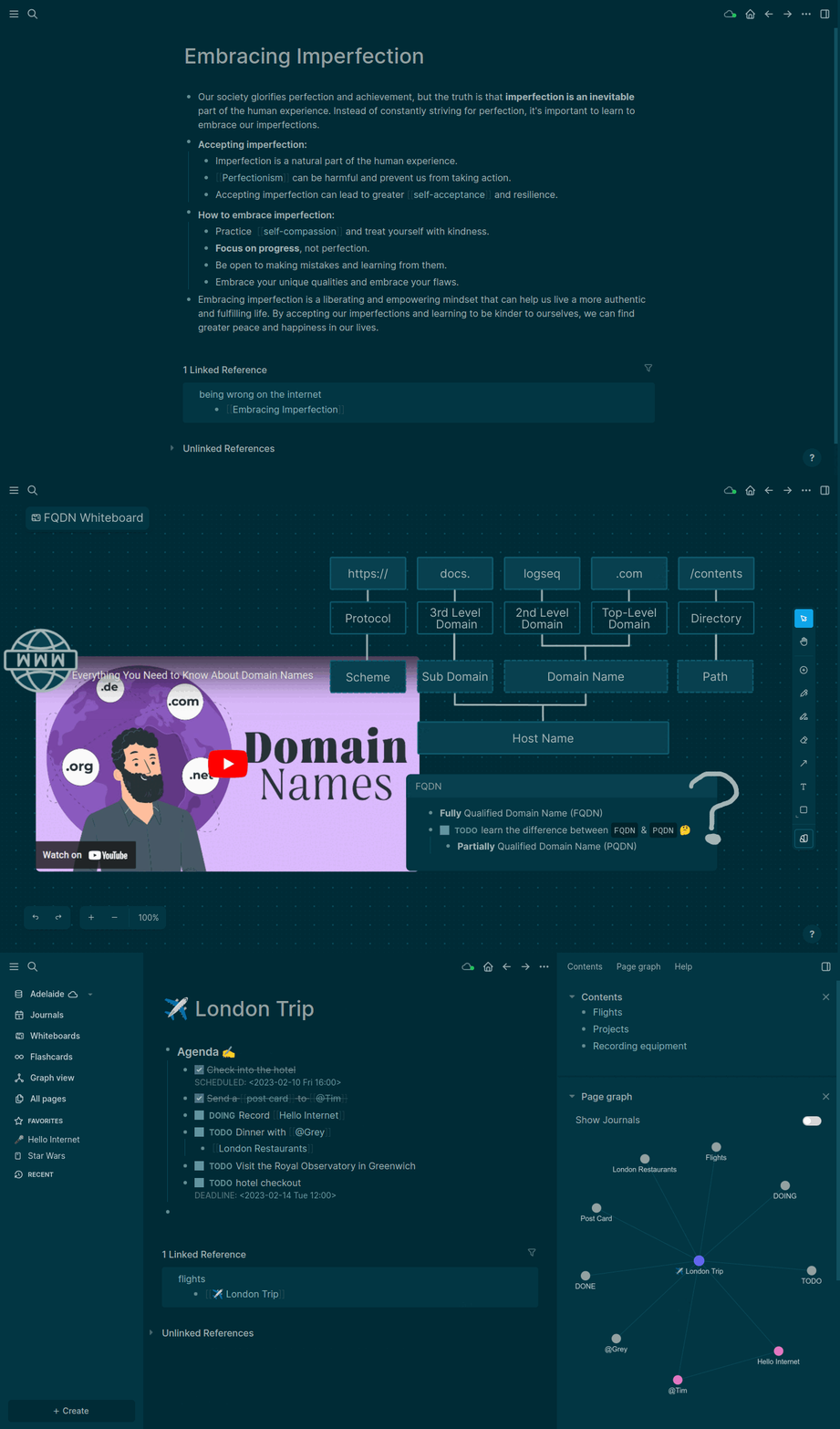
This Logseq product screen shows the outliner-first interface with nested bullets and linked references. It belongs here for users who want local linked notes on every major platform. Source is Logseq's official README product demo.
Comparison Table
Use this table to spot platform risk before comparing features. The strongest choices have native clients across your devices. A good browser app can also replace a missing client.
| App | Mac | Windows | Linux | iOS | Android | Web | Free | Sync |
|---|---|---|---|---|---|---|---|---|
| Notion | Yes | Yes | Browser | Yes | Yes | Yes | Tier | Built-in |
| Obsidian | Yes | Yes | Yes | Yes | Yes | No | Yes | $8/mo |
| OneNote | Yes | Yes | No | Yes | Yes | Yes | Yes | Built-in |
| Evernote | Yes | Yes | No | Yes | Yes | Yes | 1 device | Built-in |
| Joplin | Yes | Yes | Yes | Yes | Yes | No | Yes | BYO backend |
| Atlas | Browser | Browser | Browser | Browser | Browser | Yes | Tier | Built-in |
| Standard Notes | Yes | Yes | Yes | Yes | Yes | Yes | Tier | Built-in (E2E) |
| Logseq | Yes | Yes | Yes | Yes | Yes | No | Yes | BYO backend |
Table 3: Platform support and sync model summary.
Choosing and Capturing Across Platforms
These narrower choices matter when one device, input method, or team system controls the decision.
Other Cross-Platform Apps Worth Considering
Some popular notes apps are useful but miss the main cross-platform bar for this query. They belong in the buyer's shortlist because they solve narrower jobs well.
| App | Best fit | Cross-platform constraint | Keep it if |
|---|---|---|---|
| Apple Notes | Apple-only capture, scanning, quick personal notes | Windows and Android users are stuck with limited browser access | Your devices are all Apple and sharing outside that ecosystem is rare |
| Google Keep | Fast lightweight notes tied to a Google account | Thin structure, weak long-form writing, and limited export control | You need simple reminders, lists, and shared household notes |
| Zoho Notebook | Visual notebooks across desktop, mobile, and web | Smaller ecosystem and fewer power-user extensions than Notion or Obsidian | You want a free-form notebook feel without Microsoft or Google |
| Simplenote | Plain-text notes that sync quickly | Plain text only, with no rich research, files, or database-style organization | You want the smallest possible cross-platform scratchpad |
Table 4: Shortlisted apps for narrower notes jobs.
Best Cross-Platform App by Use Case
Notion is the best overall pick, while OneNote is the strongest free option. Linux users should compare Obsidian, Joplin, Standard Notes, and Logseq. Choose Standard Notes or Joplin for privacy, Atlas for cited web research, and Apple Notes when all your devices are from Apple.
Cross-Platform Pitfalls to Avoid
Avoid Apple-only apps when you also use Windows or Android. Test web apps without internet, and check whether the mobile app lacks tools you use on desktop. Edit the same test note on two devices to see how the app handles a sync conflict. Version history in Notion, Obsidian, Evernote, and OneNote can help you recover an older copy.
Capture Methods Across Devices
Cross-platform choice is not only where notes sync. It is how notes enter the system on each device.
| App | Web clipping | Images and files | Voice or transcription | Sketching or handwriting | Best capture pattern |
|---|---|---|---|---|---|
| Notion | Browser extensions and share sheet | Strong files, embeds, databases | AI meeting notes and third-party workflows | Weak native handwriting | Web pages, team docs, databases |
| Obsidian | Community plugins and browser workflows | Good local attachments | Plugin-dependent | Stronger on desktop than on tablets | Markdown research vaults |
| OneNote | Strong clipper and Microsoft capture path | Strong files, images, ink | Audio recording and Microsoft 365 transcription options | Best handwriting pick in this list | Classes, meetings, tablet notes |
| Evernote | Best-in-class web clipper | Strong attachments and scanning | Audio notes, plan-dependent AI features | Basic annotation with limited ink tools | Web research and receipts |
| Joplin | Official Web Clipper | Attachments and OCR workflows | Limited compared with OneNote/Evernote | Limited | Open-source clipping plus Markdown notes |
| Atlas | Browser upload and source import | Strong PDFs and articles | Not a voice-note product | Not a handwriting product | Research sources that need cited synthesis |
| Standard Notes | Limited compared with Evernote or Joplin | Good encrypted attachments on paid plans | Limited | Limited | Private text notes |
| Logseq | Browser and plugin workflows | Good local assets | Limited | Whiteboard-oriented with limited tablet notes | Daily notes, outlines, linked blocks |
Table 5: Capture strengths across note-taking input methods.
If handwriting matters, OneNote is the default. If web clipping matters, Evernote and Joplin are the first tools to test. If research PDFs matter more than capture speed, Atlas is the better companion. It turns sources into cited answers instead of another notebook.
Where OneNote, Microsoft 365, and Confluence Fit
OneNote fits best when notes need to stay near Outlook, Teams, OneDrive, or class notebooks. A Markdown app is easier to move if you may leave Microsoft. Choose Confluence when the real need is shared project specs, decisions, and team docs. Keep a personal notes app for private capture and thinking.
Sync, Privacy, and Offline Use
Cross-platform access depends on more than an app being available in each store. The sync engine must recover from competing edits, the privacy model must fit the notes, and the offline client must remain useful when the network disappears.
Sync Reliability and Conflict Resolution
Cross-platform tools live or die on the sync engine, and three patterns dominate.
Notion and Google Keep use cloud-led real-time sync. Conflicts resolve in seconds, and editing on several devices feels smooth. The downside is that the server holds the source of truth. A vendor outage can become your work outage.
Obsidian can sync Markdown files through iCloud, Dropbox, OneDrive, or Obsidian Sync. Logseq and Joplin work in a similar way. The user owns the source of truth on disk. The risk is conflict files such as note (conflicted copy).md. The user must merge them by hand when two devices edit the same note offline.
Standard Notes and Obsidian Sync use encrypted sync with clear conflict handling. This is the strongest privacy posture, with a small UX overhead during conflict resolution.
For users who write often on several devices, cloud-led sync such as Notion feels most invisible. For users who care most about owning files, file-based sync such as Obsidian or Joplin is the safer option. Before you commit, test conflicts yourself. Edit the same note on two devices offline. Bring both online and see what the tool does.
Privacy and Encryption Across Platforms
Notion, Google Keep, and OneNote are cloud-led tools. Their AI features run in the cloud. Notion publishes a SOC 2 Type II report on the Notion Trust Center and offers an opt-out for model training. OneNote inherits Microsoft 365 governance. Google Keep ties to the Google account's privacy posture. Workspace admins get DLP and retention controls.
Obsidian, Joplin, Standard Notes, and Logseq are local-first tools that keep the canonical copy on the user's disk. Standard Notes is the only one in this comparison with end-to-end encryption by default. Obsidian Sync adds opt-in E2E encryption.
Atlas uses TLS in transit and AES-256 at rest. Vendor SOC 2 Type II is in progress at the time of writing. Uploads are not used to train third-party foundation models.
For regulated work, OneNote on Microsoft 365 Business or Enterprise is the only option here with DLP and eDiscovery. For maximum personal privacy, Standard Notes is the strongest choice.
Offline Capability
Obsidian, Joplin, Logseq, and Standard Notes are the best offline choices. The main copy is local, and sync is a separate layer.
Notion, OneNote, and Evernote are cached-offline tools. Notion expanded selective offline cache in 2024. OneNote works offline on desktop and caches chosen files on mobile. Paid Evernote plans can keep notebooks on the device.
Atlas AI Q&A needs a server, so answers require a connection. Cached PDFs can still render offline. Google Keep also needs the web for full function, while mobile apps cache recent notes.
For users who travel without steady internet, local-first tools are the safest default. For users who live in coffee shops with Wi-Fi, the cached-offline tools are usually sufficient.
Cost, Vendor Risk, and Scale
Subscription price is only one ownership cost. A durable notes system also needs a viable vendor, portable exports, acceptable search performance as the library grows, and enough support to recover from cross-device failures.
Pricing Across Tiers
| Tool | Free Tier | Personal Paid | Annual Cost (Paid) | Notes |
|---|---|---|---|---|
| Notion | Generous | Plus $10/mo | $120 | AI add-on $10/mo |
| Obsidian | Full | Sync $4/mo | $48 | $50/yr commercial |
| Joplin | Full | Cloud $3/mo | $36 | Self-hosted free |
| Standard Notes | Limited | Pro $9/mo | $108 | E2E by default |
| OneNote | Free w/ MS account | Bundled with M365 | $99-$130 | Copilot $20/mo |
| Logseq | Full | Sync $5/mo | $60 | Open source |
| Evernote | Light | Personal | $130-$180 | Pro $170-$216 |
| Atlas | Yes | Pro $20/mo | $240 | AI synthesis |
Table 6: Annual pricing for cross-platform notes apps.
For the lowest cost, OneNote on a Microsoft 365 Family plan is hard to beat. It costs $129.99/year and can be shared with up to six users. For Linux support, Obsidian Sync at $48/year is the stronger value.
Vendor Risk and Long-Term Stability
Obsidian, Joplin, Logseq, and Standard Notes have the lowest data risk. They store the main copy in plain text on the user's disk. The editors could shut down tomorrow, and the vault would still work.
Notion, OneNote, and Evernote have some format risk. They are backed by larger companies with stable funding, but the data lives in closed formats. Export tools exist. Round trips can still lose detail.
Microsoft is the lowest-risk vendor by company size. Notion is well-funded with a public roadmap. Evernote stabilized after the 2023 acquisition. Atlas is younger, so quarterly Markdown export is the recommended hedge.
The practical rule is the same for every tool. Keep a regular export of key notes outside the vendor's app.
Performance Scaling and Search
Large note libraries expose another cross-platform weakness. Search that feels instant on desktop can become slow or incomplete on mobile. Use this as the stress test once your library passes 1,000 notes.
| Library type | Safer picks | Watch out for | Practical test |
|---|---|---|---|
| Thousands of short text notes | Obsidian, Joplin, Standard Notes, Simplenote | Mobile startup and sync queue length | Search for an exact phrase created on another device |
| Mixed notes, screenshots, and PDFs | OneNote, Evernote, Atlas | OCR availability, attachment search, and offline cache size | Search text inside an image or PDF from mobile |
| Team workspace with databases | Notion | Offline access and permission-filtered search | Search a page inside a shared database from phone and browser |
| Research corpus with papers | Atlas plus Obsidian or Zotero | Citation trace, source retrieval, and duplicate PDFs | Ask a question that needs two uploaded sources, then verify each citation |
| Local-first graph with many links | Obsidian, Logseq | Graph rendering and plugin overhead | Open graph/search on a low-power laptop and phone |
Table 7: Search stress tests for large libraries.
Support and Resources
Support matters more for cross-platform notes than for single-device apps. Failures often happen between clients. A good app needs public setup docs, clear account recovery, and a support channel for sync fixes.
| App | Best support surface | Useful source |
|---|---|---|
| Notion | Help center, status page, workspace admin docs | Notion Help Center |
| Obsidian | Official help, community forum, plugin community | Obsidian Help |
| OneNote | Microsoft Support and Microsoft 365 admin docs | Microsoft OneNote help |
| Evernote | Help center, release notes, account support | Evernote Help & Learning |
| Joplin | Official docs, forum, GitHub, sync-provider docs | Joplin synchronization docs |
| Standard Notes | Help center, security docs, Proton account support | Standard Notes Help |
| Logseq | Docs, forum, GitHub, Discord community | Logseq documentation |
| Atlas | Product docs and direct product support | Atlas product support |
Table 8: Support resources for notes app troubleshooting.
Next Steps
Start with the operating system that has the weakest app support. Linux users should test Obsidian, Joplin, Standard Notes, or Logseq. People who use Mac, Windows, and mobile can compare Notion and OneNote. For a low-cost option, start with OneNote or Joplin.
Choose Atlas only when the workflow is web-first and depends on cited answers across research sources. If your notes include PDFs that must support those answers, compare research paper organizer workflows before changing your daily notes app. Choose Standard Notes when privacy leads the decision. The right pick must work well on every device you use.
AtlasCompare research paper organizer workflows
Compare tools for PDF organization, search, citation export, and synthesis.
Frequently Asked Questions
Notion is the most-used cross-platform note-taking app with native apps for Mac, Windows, iOS, Android, and a strong web app. Obsidian wins for cross-platform power users who want local files, runs on Mac, Windows, Linux, iOS, and Android. OneNote is the strongest free cross-platform option (Mac, Windows, iOS, Android, web) and works particularly well on Surface devices. Atlas is web-first, so it works on any device with a browser without an install.