


Gemini Notebook, formerly NotebookLM, works best for one bounded source set. Each plan now has its own caps. Paying more raises those caps, but separate notebooks still cannot search each other. Exports, source checks, and team controls also need care.
This legacy NotebookLM interface shows a source panel, study actions, and 12 sources. The 2024 Google for Education image illustrates notebook scope; current Gemini Notebook controls differ.
Google renamed NotebookLM to Gemini Notebook in July 2026. This article uses the new name unless a source still says NotebookLM. The tool is still useful for source chat, study guides, and Audio Overviews. The key is knowing which limits a paid plan can fix and which need a new workflow.

Continue source work in Atlas
Keep sources, cited answers, notes, and maps together in one research project.
Should You Use NotebookLM Despite Its Limits?
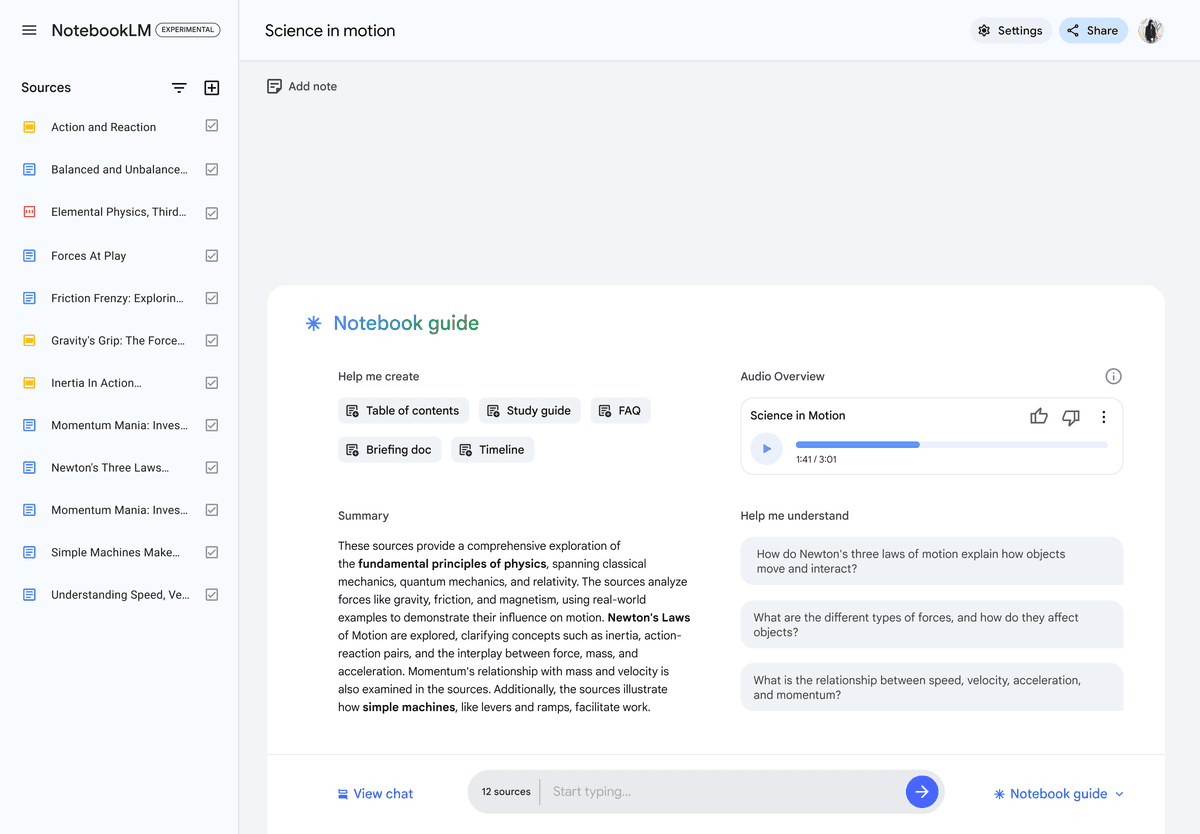
Use NotebookLM when one notebook can hold the whole job. It is still strong for class readings, meeting packets, study guides, and audio overviews. Our NotebookLM student guide shows that focused use case. Look for a second system when the work spans many notebooks, needs export, or grows into a source library.
Here are the direct answers to the limit questions that matter most:
-
Does NotebookLM have a limit? Yes. Notebook, source, chat, media, report, quiz, mind-map, and Deep Research quotas vary by plan.
-
How many sources can it hold? Each notebook holds 50 sources on Standard, 100 on Plus, 300 on Pro, 500 on Ultra 20 TB, or 600 on Ultra 30 TB, according to Google's current plan help.
-
What happened to daily limits? Chat and Studio now use compute-based limits. The allowance refreshes every five hours until the weekly ceiling; inspect Settings → Usage for your account's remaining capacity.
-
What is the upload-size limit? A local source can contain up to 500,000 words or 200 MB. Google says there is no page limit, but protected or poorly extracted files can still import incompletely.
-
Does upgrading remove cross-notebook and export limits? No. An upgrade raises numerical quotas; it does not turn separate notebooks into one retrieval context or create a complete, continuously synchronized export.
-
Use NotebookLM for one bounded source set and quick study help.
-
Add Atlas, Obsidian, Zotero, or another research system when the source library needs to grow across projects.
Current Gemini Notebook Limits by Plan
Google's official upgrade table lists five consumer plan columns. Its current FAQ explains file-size, word-count, import, citation, and note-recovery caveats. The source allowance per notebook is no longer a universal 50.
| Limit | Standard | Plus | Pro | Ultra 20 TB | Ultra 30 TB |
|---|---|---|---|---|---|
| Notebooks | 100 | 200 | 500 | 500 | 500 |
| Sources per notebook | 50 | 100 | 300 | 500 | 600 |
| Each local source | 500,000 words or 200 MB | 500,000 words or 200 MB | 500,000 words or 200 MB | 500,000 words or 200 MB | 500,000 words or 200 MB |
Table 1: Consumer notebook and source capacities checked 5 October 2026. Google labels them subject to change; managed accounts have their own terms.
Google replaced fixed daily interaction quotas with compute-based usage limits. The allowance refreshes every five hours until a weekly ceiling. Plus has twice Standard's allowance, Pro has four times Standard's, and Ultra has five or twenty times Pro's depending on the subscription. These multipliers do not promise a fixed number of chats or videos.
Google's rollout announcement explains that source count, prompt complexity, chat length, and feature choice affect consumption. Check Settings → Usage before starting a large job. Studio shows expected usage and offers Generate later on the web when immediate capacity is exhausted.
These consumer columns do not describe every work or school account. Workspace and Education access depends on the organization's edition, license, admin settings, and rollout. Check the account-specific help surface before treating a consumer quota as available to a managed user.
| Account route | What governs access and limits | Check before committing work |
|---|---|---|
| Personal Google account | The Standard, Plus, Pro, or Ultra consumer plan above | Current bundle, region, reset timing, and price |
| Workspace or Education | Organization edition, assigned license, age eligibility, and admin controls | The managed-account availability and limits, sharing policy, and data terms |
| Google Cloud enterprise | Purchased service, supported region, and administrator configuration | Contract terms, retention, access control, and approved data classes |
Table 2: Google separately explains supported sources, grounded chat and citations, and note export. Cross-notebook search and complete export are structural workflow limits; a larger quota does not remove them.
Limit Triage
I use a 3-part triage for NotebookLM limits. Capacity asks whether the notebook can hold enough sources. Fidelity asks whether answers stay accurate as the source set grows. Governance asks whether the account, privacy, sharing, and export model fits the team.
| Triage question | NotebookLM risk | Practical workaround |
|---|---|---|
| Capacity | A project can exceed its plan's per-notebook source or media quota. | Upgrade, split by research question, or reduce the active source set. |
| Fidelity | Many mixed-quality sources make retrieval less predictable. | Keep each notebook focused, name sources well, and ask narrower questions that point to the relevant evidence type. |
| Governance | Consumer, Workspace, Education, and upgraded plans handle access and data controls differently. | Confirm the account type, admin settings, privacy policy, and export path before uploading sensitive work. |
Table 3: NotebookLM limit triage for finding whether source caps, answer quality, or data rules are the real blocker.
This triage matters more than the raw number of sources. A 25-source notebook with messy scans can perform worse than a 45-source notebook with clean PDFs. Good prompts also matter.
For my own review, I treat a NotebookLM setup as high risk when two of the three rows are red. A large but clean reading notebook is a size problem. A team notebook with private drafts, unclear admin controls, and weak export is a data-rule problem. Those require different fixes.
First Source Test
Product limits tell you how much NotebookLM accepts. A small trial shows whether it can handle the files and questions in your project.
Create one test notebook with about 10 sources that reflect your real work. Include the longest PDF, a scan if you use scans, two sources that disagree, and one source with a fact you already know. Then ask NotebookLM to:
- Find a known fact and open the citation behind it.
- Compare the two sources that disagree and describe the difference.
- Say when the sources do not contain enough support for an answer.
- Produce the format you need to move into notes or a draft.
Check the saved text as well as the answer. A correct citation cannot help if the import dropped a table, footnote, or scanned page. Also test the export path before you build a large notebook around it.
This trial does not predict how every notebook will behave. It tests your file types, questions, and output needs. Repeat it after a major product change or when you move to a new source set.
If the question is which research workflow to adopt rather than whether a quota fits, use the job-based comparison in our AI research assistants guide. It does not change the plan limits documented here.
Limits a Higher Plan Cannot Solve
A paid plan raises quotas, but it does not merge notebooks or create a lossless archive. These limits come from how the product organizes work.
Treat them as system choices, not temporary caps. Test them before moving a long-lived research library into the product.
Use two checks before you commit:
- Can one notebook hold every source needed for the decision?
- Can you preserve the evidence and notes in the form your next tool requires?
Gemini Notebook caps each notebook according to plan: 50, 100, 300, 500, or 600 sources. That is enough for many class assignments and focused reviews. Larger corpora still need deliberate partitioning, and the partition matters because notebooks remain separate retrieval contexts.
| Limit area | What the limit means in practice | Who feels it first |
|---|---|---|
| Sources | 50–600 sources per notebook, depending on plan. | Literature-review users with large paper sets |
| Compute usage | Chat and Studio can exhaust the five-hour or weekly allowance. | Students using NotebookLM daily |
| Privacy | Private notebook data has Google account and admin rules. | Researchers with sensitive material |
| Work and school access | Workspace admins can turn NotebookLM on or off. | Labs, schools, and companies |
| Source import | PDFs, Docs, websites, YouTube, and audio work best. | Users with scans or nonstandard files |
Table 4: Google's beginner tips, October 2024 update, and audio/video source update show which NotebookLM limits come from numbers, admin rules, or source formats.
The takeaway is simple. Source count is only the first constraint. The larger pitfall is treating a notebook like a long-term research system.
Cross-Notebook Retrieval
Gemini Notebook answers from the sources selected in the open notebook. It cannot search all notebooks in your account at once. Copying the same file into many notebooks also wastes space and can leave old copies behind.
Build each notebook around one question or choice. Keep a short list outside the app that names its scope, file owner, and last review date.
Export and Portability
Gemini Notebook can copy or download some outputs and send some work to other Google tools. It cannot export a full copy of the notebook. Before a long project, test what happens to source details, notes, cited passages, chats, and study files.
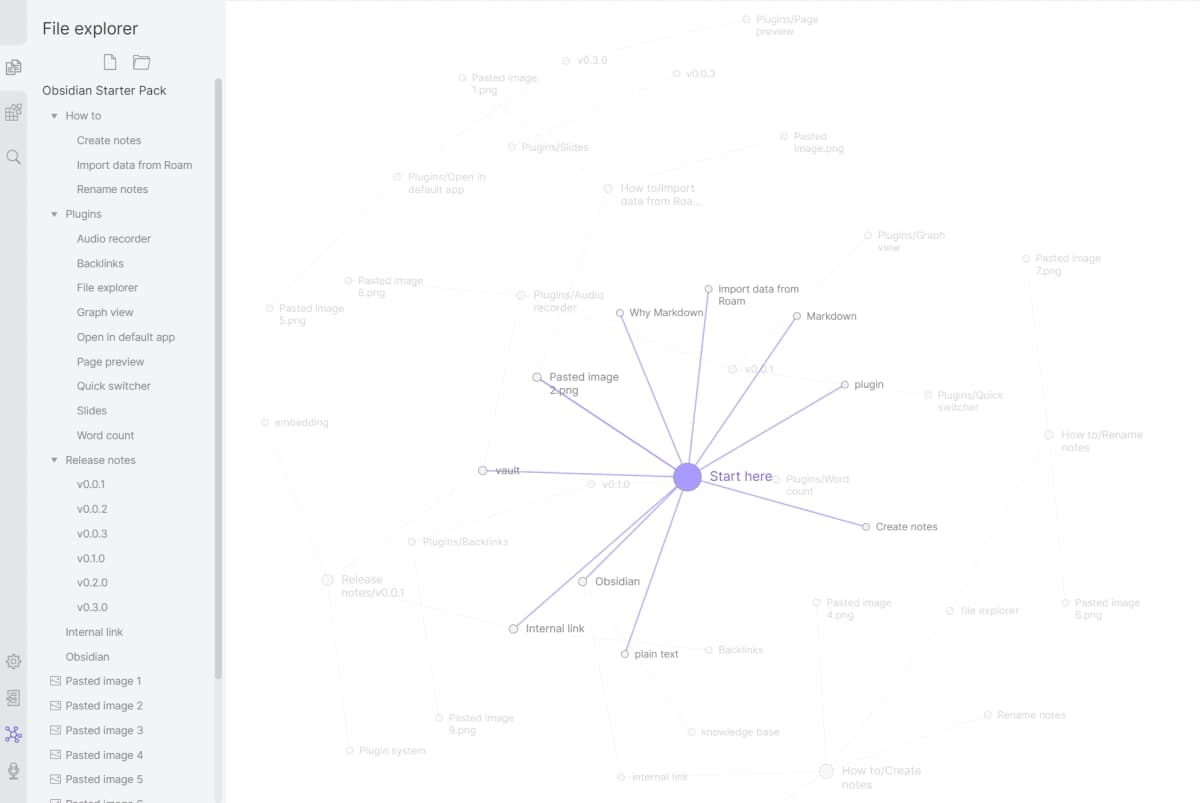
Keep the source files elsewhere. Use Zotero when you need full paper details and a formatted reference list; Zotero documents its library export options. Use Obsidian when you need local Markdown files and links.
Citation Depth
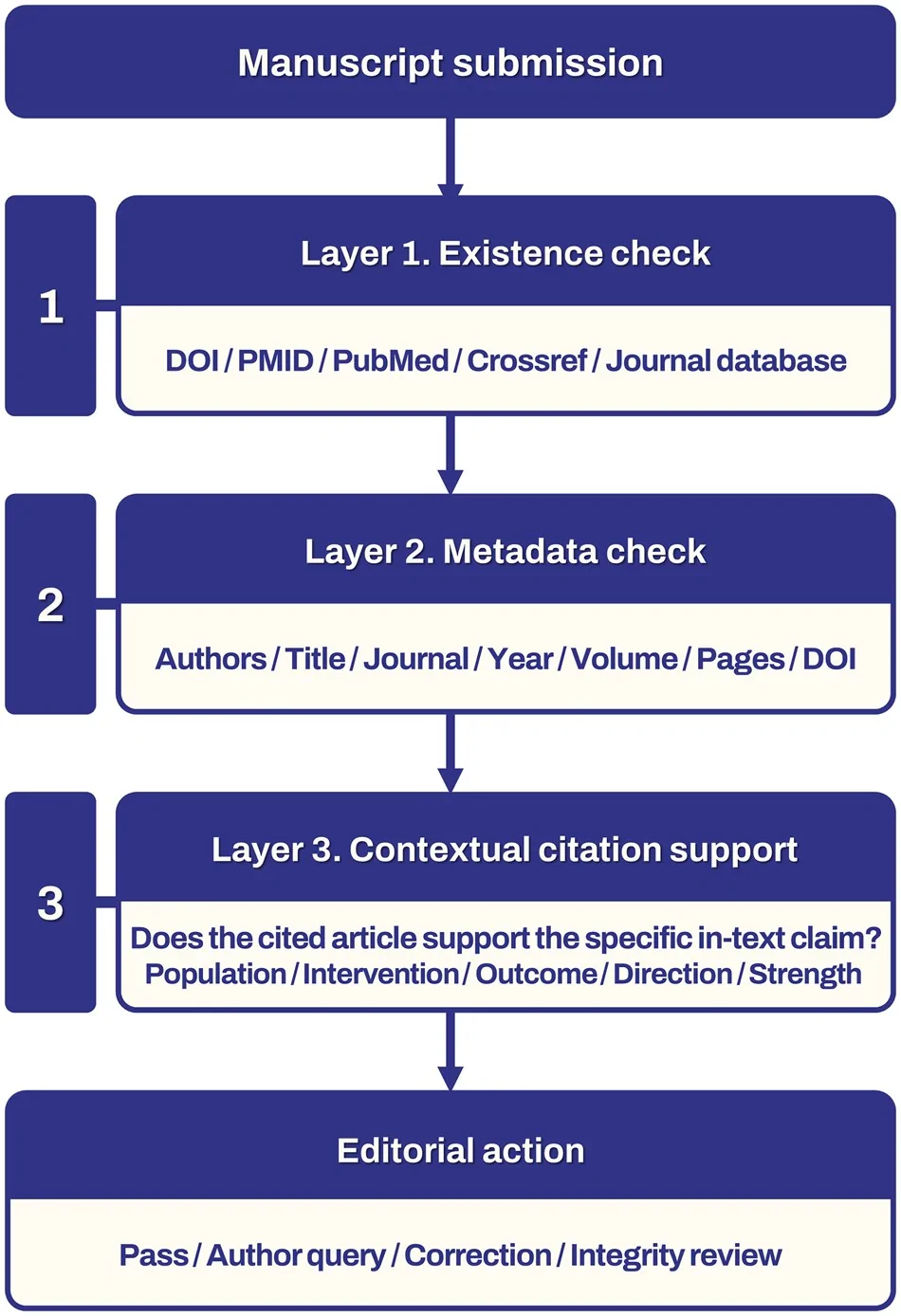
Inline citations help you find a passage, but they do not prove that every word is right. Open the passage and read it in context. Use a reference manager when you need full APA, MLA, Chicago, or journal data.
Long-Term Discovery
Mind Maps and study outputs help you explore one notebook. They do not create one search layer for the whole account. For work that lasts years, choose where the main files, tags, links, and review notes will live.
Teams and Governance
Access and data rules vary by account, age, region, and Workspace setup. A Workspace admin can turn Gemini Notebook on or off. The New School's institutional guide shows why schools must check account and privacy rules. Do not assume a work account has the same tools as a personal account.
For private work, check the plan terms, data rules, sharing roles, deletion path, and admin controls. Keep your own copy of each source.
When to Add Atlas, Obsidian, or Zotero
If your project still fits inside one notebook, keep using Gemini Notebook. First decide whether the interruption is merely a quota or a durable workflow problem.
| Problem | Best next move | Why |
|---|---|---|
| The compute allowance is exhausted | Check the reset time or defer a Studio generation | A second workspace adds complexity without solving a structural problem. |
| You need full bibliographic records and formatted citations | Use Zotero | Zotero owns reference metadata and word-processor citation workflows. |
| You need locally owned, linked notes | Use Obsidian | Markdown files remain under your control and can form a persistent note graph. |
| You need cited synthesis across one deliberately assembled project | Use Atlas | Keep the selected sources, cross-document questions, cited passages, notes, and map in one project. |
Table 5: Use the smallest tool that closes the gap. Upgrade or wait for a reset when you only need more quota. Add Obsidian for file ownership, Zotero for reference data, or Atlas for cited synthesis across a source set you chose. For that last workflow, compare Atlas and NotebookLM.
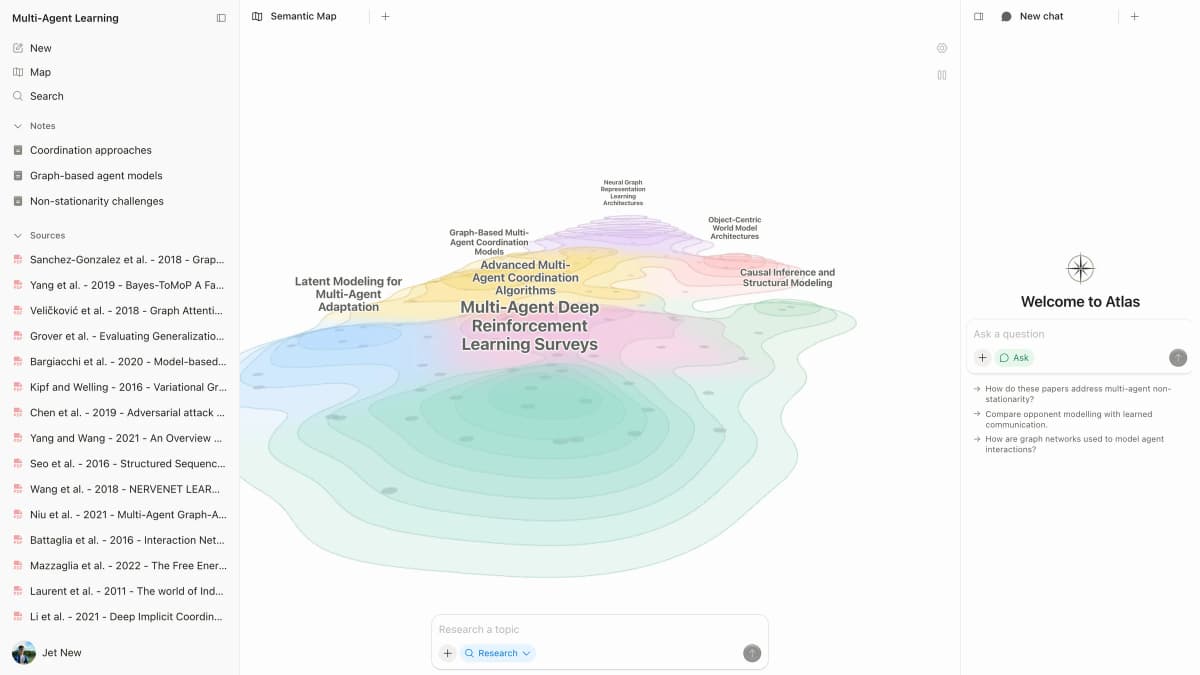
Atlas is not account-wide memory. Its answers work within the current project, and citations still need inspection. It is an adjacent research workspace, not an unlimited NotebookLM replacement. To test the fit, upload representative sources, ask one cross-document question, open the supporting passage, and inspect the resulting Knowledge Map before moving the rest of the project.
Test Gemini Notebook with Your Own Sources
Create a test notebook with ten representative sources: the longest PDF, one scan, one source with tables, two sources that disagree, and one source containing a fact you already know. Use our NotebookLM workflow guide if you need help with setup. Then ask Gemini Notebook to:
- Find the known fact and open the cited passage.
- Compare the two disagreeing sources without smoothing away the disagreement.
- Identify a question the sources cannot answer.
- Produce the exact output you need to move into notes or a draft.
- Export or copy the result and confirm which citation and source details survive.
Record omissions separately from wrong answers. A response can cite the correct document yet miss a qualifying sentence, table, footnote, or scanned page. Repeat the test on the mobile and managed-account setup your team will actually use.
Workarounds for the Limits That Matter
Read this table by starting with the limit that interrupts your work, then choose the least costly fix that preserves one coherent source set.
An upgrade is the right fix for a quota. A second tool is justified only when the missing behavior is part of the long-term workflow.
Keep the original sources outside Gemini Notebook in either case. That preserves a return path if plans, exports, or account access change. Compare the broader choices in our NotebookLM alternatives guide.
| Limitation | Lowest-cost workaround | When to add another tool |
|---|---|---|
| Source quota | Narrow the notebook or upgrade | The project still exceeds one coherent notebook |
| Isolated notebooks | Maintain a scope index and duplicate only essential sources | The same questions repeatedly span notebooks |
| Weak archive portability | Keep originals and canonical notes elsewhere | You need lossless migration or reproducible history |
| Citation formatting | Verify passages, then format in Zotero | A paper needs complete bibliographic control |
| Discovery over time | Use deliberate notebook names and an external index | You need a persistent linked knowledge base |
| Governance | Use the correct managed plan and admin settings | Roles, retention, audit, or regional controls are insufficient |
Table 6: Workarounds separate a temporary quota problem from a durable system-design problem.
When Gemini Notebook Is Better
Choose Gemini Notebook when one source set contains the whole question and Google's study outputs save time.
Keep Gemini Notebook when one source set contains the whole question and Google's study formats are valuable. Google documents how the notebook works with Gemini app integrations. Our NotebookLM and Claude Projects comparison covers a different choice: Google study tools versus a general project workspace. Gemini Notebook remains a strong choice for:
- a course module or exam packet;
- a meeting or policy packet that changes as one unit;
- quick source-grounded chat inside Google Drive workflows;
- Audio Overviews, Video Overviews, reports, flashcards, and quizzes;
- a shared notebook whose account and admin rules have already been approved.
Upgrading is the simplest answer when the only blocker is a numerical quota and the larger plan fits the budget.
Gemini Notebook Limits Verdict
NotebookLM is a good tool with real constraints. Understanding those constraints lets you use it where it excels and choose something better where it does not.
If source caps or isolated notebooks are the blocker, test the same source set in a companion system. Ask one question that the split notebooks could not answer. Keep Gemini Notebook when its study outputs and Google ties matter more. Whatever you use, follow a source-checking workflow before you publish a claim.
Continue source work in Atlas
Keep sources, cited answers, notes, and maps together in one research project.