


No AI research tool can promise that every answer is true. A more useful question is: what does the tool do when it cannot find proof for a claim? Some tools quote the source, test a rule, or check a saved result. Others refuse to answer or stop the work before a weak claim reaches a paper.
Many of the tools in search results are open-source projects for people who write code. This guide explains what each one checks, what proof it keeps, and which errors it can find.

Check answers against your own sources
Ask across selected papers and open each cited passage.
Quick answer
Choose the tool that catches the error you fear. provref checks paper numbers against saved results. Verbatim RAG quotes sources. PureReason and Parseltongue test rules. Research-OS records each research step.
These checks cannot prove that a source is true. They can help you find and reject claims that lack support.
If fake or weak citations are your main concern, compare the narrower AI citation checker tools.
What to look for
Decide where the tool must catch an error. A writer may need citations that open the source. An AI agent may need a rule check. A paper build may need to stop when a number has no saved result.
Check these five properties:
- What can it check? The input may be source files, saved results, code, a set of trusted facts, or only the AI answer.
- What happens next? The tool may quote a source, label a claim, check a rule, refuse to answer, or block the next step.
- Can you see the failure? Look for a record of why a claim failed and what proof was missing.
- Where does it run? It may be a code library, a tool for the terminal, a web service, or a full research system.
- What can still go wrong? A tool may accept a bad source, choose a weak match, or check the wrong version of a claim.
The details below come from each project's code page and product site. Test each tool on your own data before you rely on its results.
9 hallucination prevention tools
| Tool | Main control | Interface | Best fit | Important limit |
|---|---|---|---|---|
| PureReason | Symbolic and semantic claim checks | Python and API server | Fast checks inside an agent | Not a general research writer |
| Parseltongue | Formal directives with quoted evidence | CLI and Python API | Specification and code checks | Requires a formal claim model |
| Veritas | Assumptions, invariants, and validation | Docker-first research system | Math-heavy research and engineering | Requires substantial local infrastructure |
| provref | Valid references to stored values | Build-time TypeScript and LaTeX | Preventing invented paper numbers | Cannot prove that stored data is correct |
| Verbatim RAG | Source-span extraction | Python and web interface | Answers limited to source wording | Retrieval can still select the wrong span |
| Sophia | Provenance checks and abstention | Reasoning layer | Blocking unsupported attributions | Published results are project-authored |
| Research-OS | Append-only evidence ledger | Local CLI | Auditable research operations | Does not write the report for you |
| COVE | Per-claim verification | Web service and REST API | Checking output against a knowledge base | Depends on knowledge-base quality |
| NGF | Embedding-level geometric checks | Python research framework | Experimental reasoning research | Early framework with self-reported tests |
Table 1: The table shows what each tool checks, how you use it, the job it fits, and the risk that remains.
1. PureReason
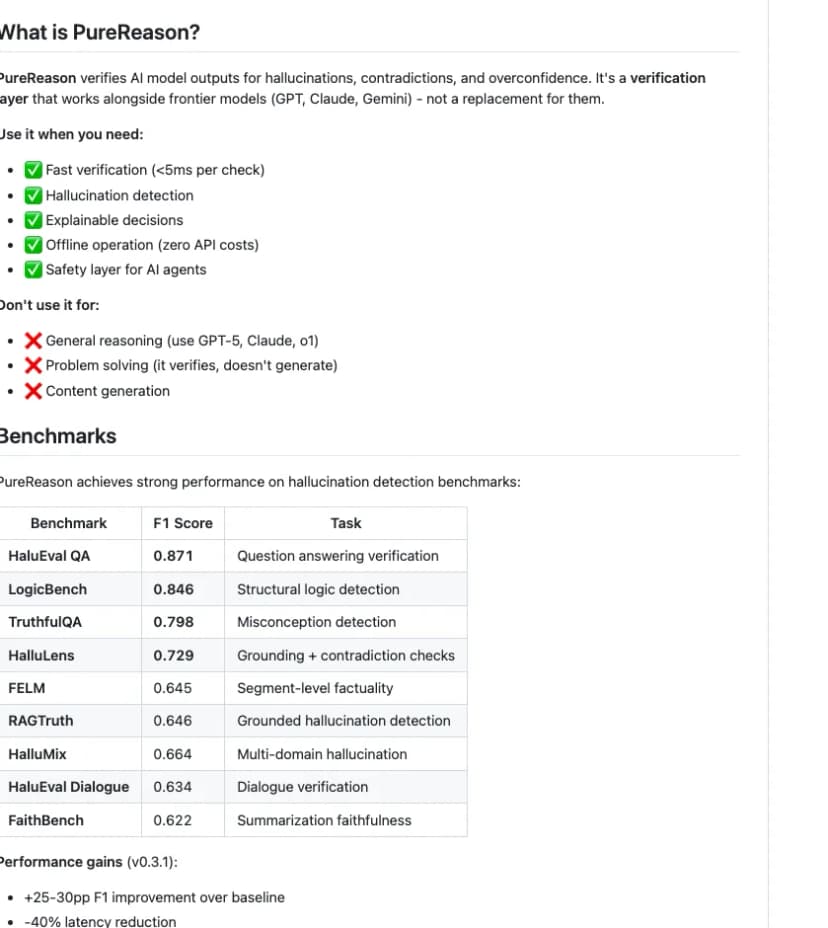
PureReason checks AI claims against logic rules and text with a similar meaning. It runs on your computer. Its code page reports results for HaluEval QA, LogicBench, TruthfulQA, and test speed.
It fits an AI agent that needs a fast check before it accepts a claim. The project has a narrow scope. It says the tool is not built to read more than 10,000 tokens of text at once.
2. Parseltongue
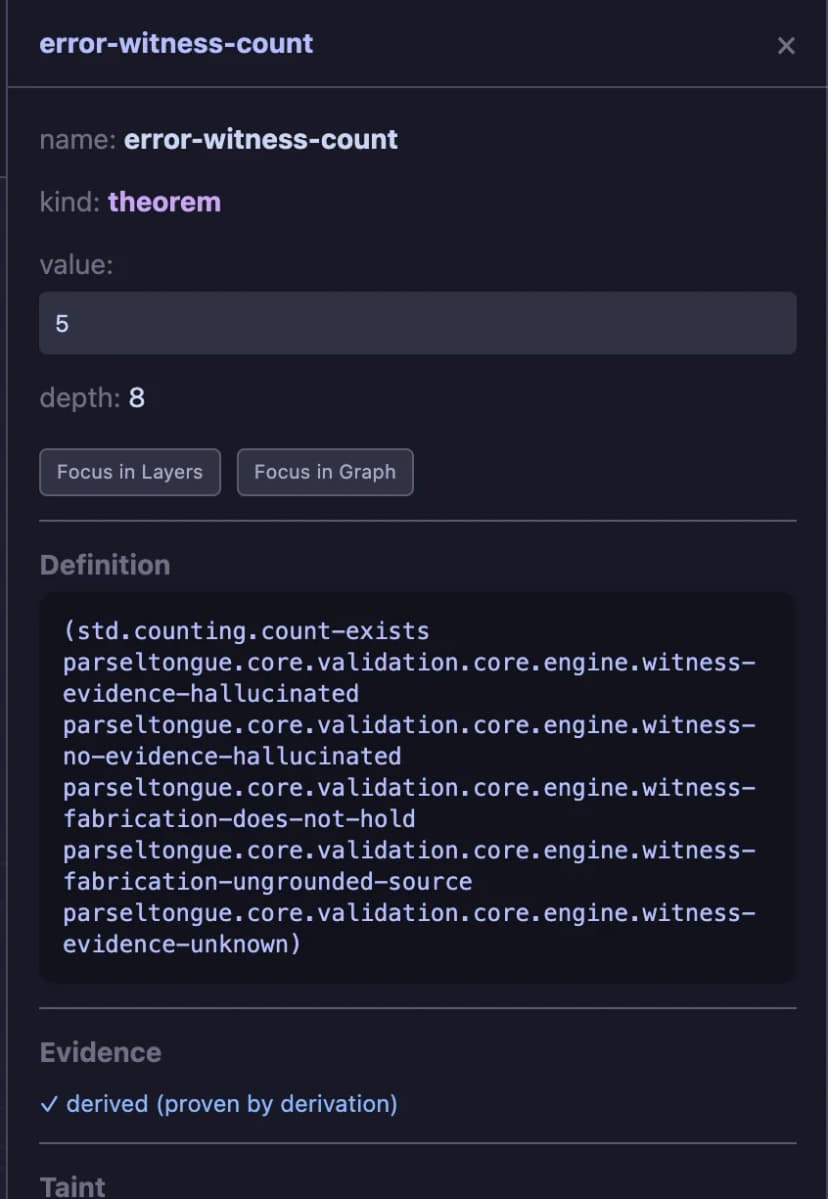
Parseltongue lets a team write rules for facts pulled from code and documents. Claims can quote the source code. The tool can compare needs with code or check a setup against its docs.
You can use it from a terminal, Python, or an API. Teams must first state their facts and steps as rules, which makes each check easier to inspect.
3. Veritas
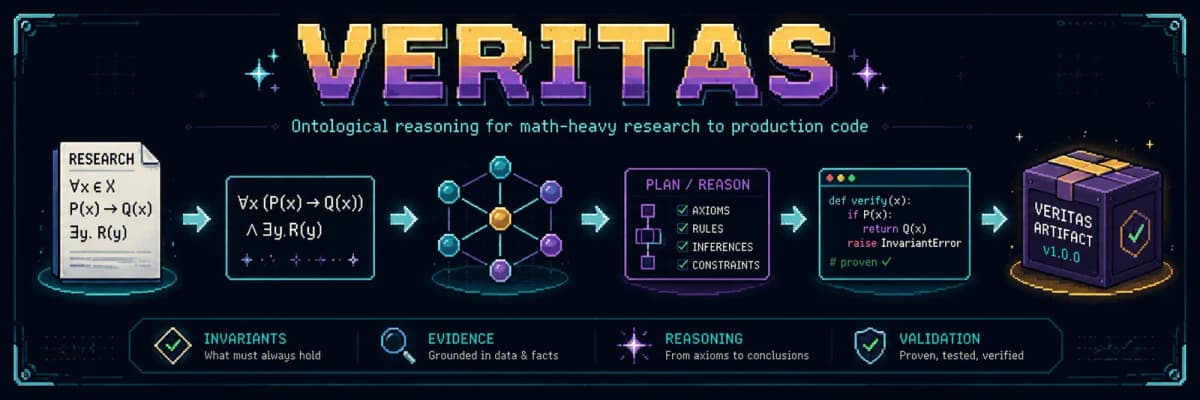
Veritas is an open-source system for math-heavy work. It reads PDFs, pulls out formulas, searches text, and links ideas in a graph. It checks the starting facts, rules, and result when it turns a formula into code.
You run Veritas yourself. Its setup needs a local AI model, a CUDA-ready NVIDIA GPU, and the NVIDIA Container Toolkit. It is more involved than a simple citation checker.
4. provref
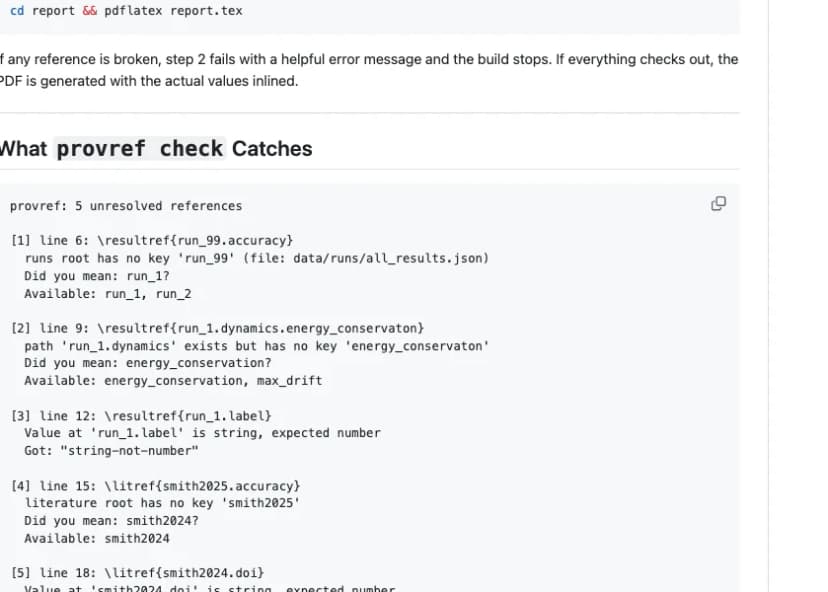
provref targets one clear error: an AI agent making up a number in a LaTeX paper. Authors use a command such as \resultref{run_5.accuracy} instead of typing the number. The tool stops the paper build if it cannot find that value in saved JSON data.
This creates a clear pass or fail check. The author must still confirm that the saved value is right and fits the claim.
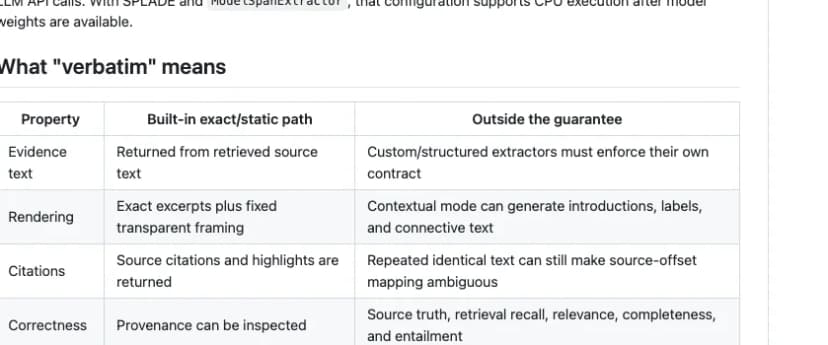
5. Verbatim RAG
Verbatim RAG limits its output to words from source files. A small setup can run without an AI writing model. A larger one can convert and search files, then show results on a web page.
Use it when the exact wording matters. A person still needs to check that the quote answers the question in context.
6. Sophia
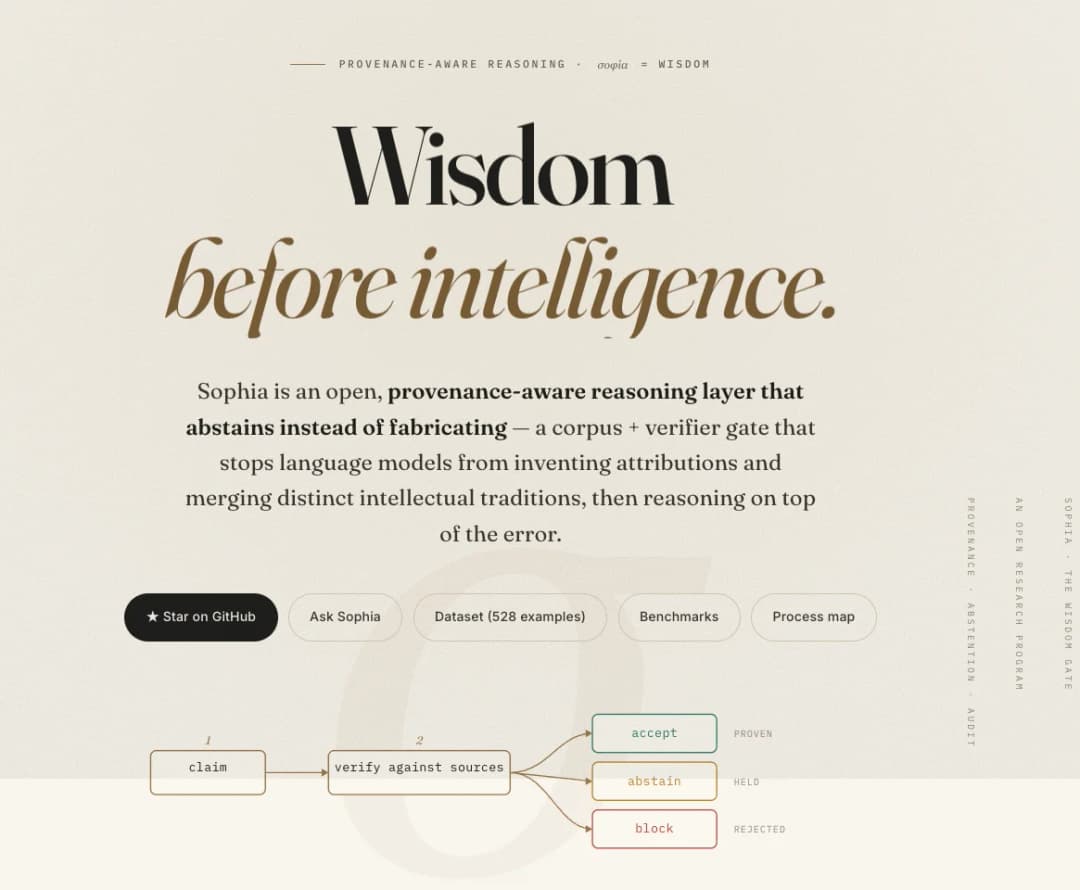
Sophia checks where a claim came from and can refuse to answer when support is weak. It checks claims against sources, then accepts, holds, or blocks them. The project keeps a public log of failures and describes itself as a research program.
Its project site reports fewer false source links in local tests. Repeat those tests with your own models and sources before you use the figures to make a product choice.
7. Research-OS
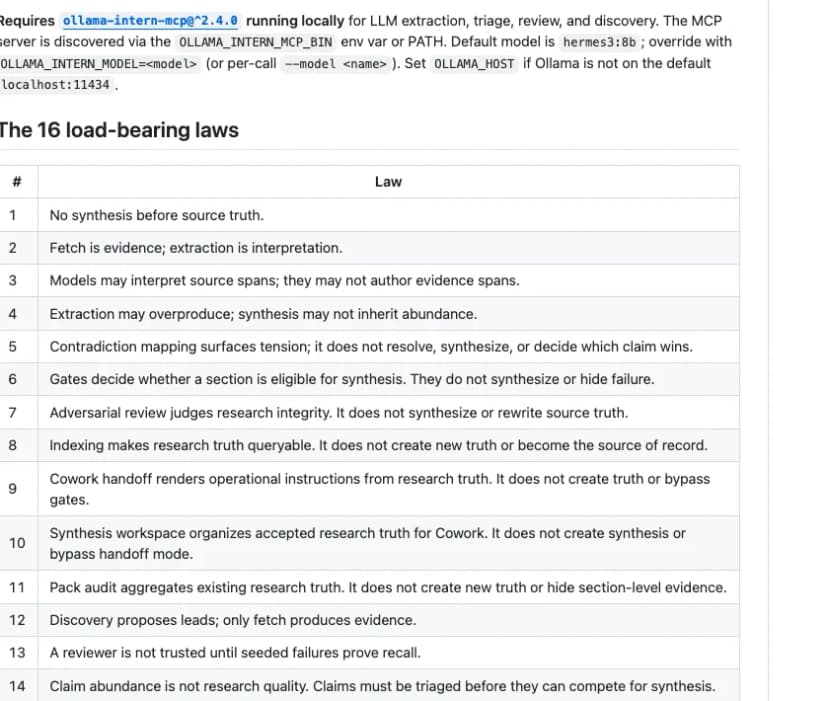
Research-OS runs on your computer and records where claims came from. Its log cannot rewrite an older entry. An AI may explain a quote, but it cannot create the source quote.
It fits a research team that wants a record for each step. You will still need another tool to compare the findings and write the report.
8. COVE
COVE checks an AI answer against trusted sources. It marks a claim as supported, opposed, or unknown. Each result points to a file and passage. A REST API lets developers add the check to another system.
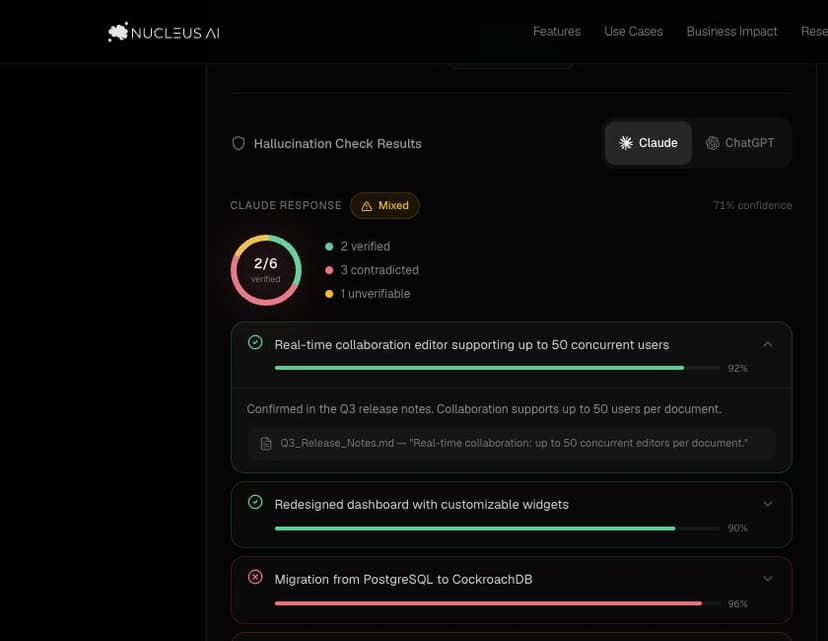
This works best when a team already has a trusted set of facts and files. Missing or poor sources can still lead to a weak result.
9. Noetic Geodesic Framework
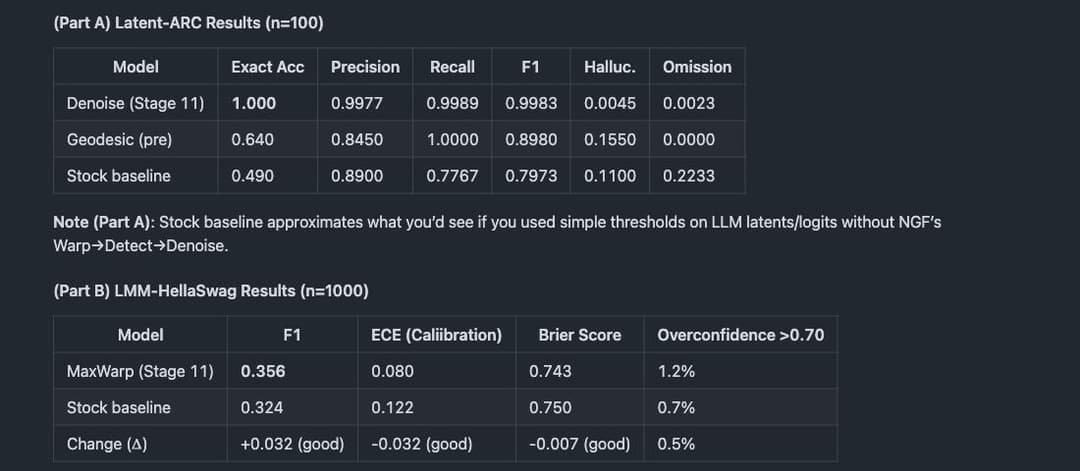
The Noetic Geodesic Framework tests a way to find false answers by looking at the number patterns inside an AI model. Its plan describes math-based checks that can work with language models.
The code page reports results on Latent-ARC and LMM-HellaSwag tests. NGF is still an early research project. Read its test method and repeat the tests before you use its results to choose a system.
How verification approaches differ
The nine tools solve different problems. Their checks fall into four groups.
Formal claim checks
PureReason and Parseltongue test claims against rules set by a person. Veritas uses similar checks for formulas, starting facts, and plans. These tools can reject a claim that breaks a rule. The rules and facts still need to be sound.
Source-constrained output
Verbatim RAG limits answers to text from a source. COVE checks claims against a trusted set of files. Both tools show the text behind a result. A person must still judge whether the tool found the right text and whether the source is sound.
Build and workflow gates
provref stops a paper build when a number has no saved source. Research-OS keeps a log that older entries cannot change. These tools catch errors while the work is being done.
Experimental reasoning layers
Sophia checks where a claim came from and can refuse to answer. NGF tests a math-based way to spot false answers inside a model. Both are early research projects. Repeat their tests with your own use case.
How to test a tool
Test the errors you care about, not only easy questions. Build a small set of examples that includes both good and bad claims.
- Add claims with clear support. Include facts that appear in the source.
- Add claims with no support. Ask for a detail that the source does not contain. A safe tool should refuse to answer or mark the claim as unknown.
- Add a conflict. Give the tool two sources that disagree and see whether it points out the conflict.
- Add exact values. Test dates, group sizes, and measures that must match a source or saved result.
- Open the proof. Read the quote, rule log, build error, or saved file behind each result.
Record each wrong pass, wrong block, and refusal to answer. Track the tool's speed and the time needed to check its result. A tool that blocks every claim is not useful.
Where Atlas fits
Atlas is made for researchers who do not want to build a tool with code. Add the sources you want to use and ask questions about them. Each answer has citations that open the source text, so you can check the wording before you use a claim.
Use Atlas when you already have papers, reports, or notes and want answers you can check. It does not test formal logic, stop a LaTeX build, run model tests, or act as a code gate for another AI agent.
Atlas lets you open cited passages and check them yourself. Our verification guide explains what can still go wrong.
Upload the papers, ask a focused question, and open each cited passage before keeping the answer.
Which tool should you choose?
Choose the smallest tool that can stop your main error. If an AI may invent a result value, provref can check it during the paper build. If an AI may write a claim with no support, choose a tool that quotes a source or checks a trusted set of files.
Think about who will run the tool. A developer can add code, an API, or a terminal check to an AI system. A researcher may prefer a workspace where citations open for review.
- Choose provref when paper numbers must resolve to stored experiment results.
- Choose Verbatim RAG when answers must stay close to quoted source text.
- Choose PureReason or Parseltongue when claims must pass formal checks.
- Choose Veritas for a local, ontology-based research and engineering stack.
- Choose Research-OS when staged work and audit records matter most.
- Choose COVE when an existing application needs claim checks against a knowledge base.
- Explore Sophia or NGF when you are researching new abstention or reasoning methods.
- Choose Atlas when a researcher needs cited answers from selected sources without writing code.
Limits of no-hallucination claims
Every tool still needs human review. A quote may not answer the question. A rule may start from a false fact. A saved value may come from a flawed test. A trusted set of files may be missing key sources.
Test any claim of "zero hallucination" with your own data. Define the error you want to catch and include hard examples. Repeat the product's tests when you can, and keep a person in charge of the final research decision.
Use the AI with references checklist to check whether each citation opens the right source, supports the exact claim, and preserves limiting context.
Check answers against your own sources
Ask across selected papers and open each cited passage.