


Academic research software helps you find papers, decide which ones belong in your review, read them closely, compare their findings, and keep citations attached to your notes. This guide ranks tools by the part of that literature workflow they handle best.

Synthesize your screened research papers
Ask across your paper set and inspect citations alongside a visual map.
Choosing Research Software
For a source-check comparison of seven AI research assistants on a 200-paper set, see our AI research assistants guide.
Look first for source storage, paper search, evidence checks, and linked notes. Your software needs to store, sort, and trace papers reliably, then make source handoff easy when you move to writing. Links to PubMed, Semantic Scholar, arXiv, Google Scholar, and library systems cut manual work when search and source checks belong in one tool.
AI-assisted discovery is now a core feature. The newest research tools use AI to find papers, sum up findings, and pull out key data. This saves time during reviews, but quality varies by tool. For a focused look at this area, see our ranking of the best AI tools for academic research.
Research also creates messy working knowledge. You collect reading notes, hunches, links between papers, and ideas that shift as you read. Good research software gives you a place to sort that work next to your sources.
Team features matter when you work with co-authors or an advisor. Shared libraries, comments, and live editing are worth seeking in that case. Solo researchers can usually skip them.
Your research software should fit how you write. LaTeX users need clean source export. Word and Google Docs users need a simple handoff from notes to draft. Pricing matters too, especially for students. Free tiers, student discounts, and campus licenses can decide which tools are realistic. Open-source options like Zotero have built loyal followings partly because of this.
A 2022 survey by Bosman and Kramer ran in PLOS ONE. It found that over 85% of researchers use multiple dedicated software tools. Cost is a top barrier to adopting new platforms, so price is not a side issue.
Literature research platforms
These tools cover the main academic research workflow. They help with search, screening, reading, paper maps, synthesis, and writing. I excluded lab notebook, data repository, and bibliography-only platforms that do not serve that literature workflow.
The short list covers source synthesis, review screening, hard-paper reading, field mapping, claim checks, and citation context. Atlas fits source synthesis. Elicit fits review screening. SciSpace helps with hard papers. Semantic Scholar, ResearchRabbit, and Litmaps help you find and map the field. Consensus and Scite help you check claims and citation context.
For this June 2026 update, the comparison uses each tool's public product surface and the role it plays in the 4S workflow below.
- Atlas: Use it after you have papers. Upload sources, ask cited questions, and map ideas.
- Elicit: Use it to screen papers for a review. It helps pull fields into a table.
- SciSpace: Use it when a paper is hard to read. It explains hard passages.
- Semantic Scholar: Use it for broad paper search, alerts, and quick paper checks.
- ResearchRabbit: Use it to grow a paper set from a few seed papers.
- Consensus: Use it when you want answer-style evidence from papers.
- Scite: Use it to see how later papers cite a claim.
- Litmaps: Use it to map papers and track new work near a seed paper.
Comparison Table
This table compares the tools before the detailed reviews. The columns cover workflow phase, evidence handling, source links, AI depth, team support, pricing, and corpus fit.
| Platform | Research phase | Evidence workflow | Source grounding | AI depth | Team use | Price and corpus fit |
|---|---|---|---|---|---|---|
| Atlas | Synthesis and notes | No formatted bibliography | Cited answers from uploaded sources | High across your own source set | Shared workspace | Small evaluation allowance. Pro from $20/mo. Best after you have a paper set |
| Elicit | Search and review | Exports to citation tools | Paper-linked extraction tables | High for screening and data extraction | Limited | Free tier. Plus from $12/mo. Best for systematic review work |
| SciSpace | Paper reading | Light citation support | Explains the paper being read | Medium for single-paper help | Limited | Free tier. Premium from $12/mo. Best for dense papers |
| Semantic Scholar | Paper discovery | Saves and exports papers | Indexed paper records and citation graph | Medium for summaries and alerts | No | Free. Best as a broad search layer |
| ResearchRabbit | Literature mapping | Sends papers to other tools | Citation and author graph | Medium for discovery maps | Shared collections | Free. Best for finding related papers |
| Consensus | Claim search | Links answers to papers | Paper-backed answers | Medium for question answering | No | Free tier. Best for quick evidence checks |
| Scite | Citation context | Citation statements and references | Citing-paper context | Medium for claim checks | Teams available | Free tier. Best for seeing support or contrast |
| Litmaps | Paper mapping | Exports and alerts | Citation network around seed papers | Medium for map-based discovery | Shared maps | Free tier. Best for tracking a topic |
Table 1: Academic research software compared by workflow phase, evidence handling, source grounding, AI depth, collaboration, and corpus fit.
4S Workflow Map
The 4S workflow separates four jobs that otherwise get blurred together in a long tool list.
The criteria use evidence from each tool's current public product surface to classify search, screening, study, or synthesis as a primary job, a supporting job, or outside the product's design. This is an editorial capability map, not a performance test.
- Search: find relevant papers.
- Screen: sort papers and extract fields.
- Study: understand hard passages.
- Synthesize: connect findings across the final source set.
The labels below describe the job each product is built to handle. “Primary” means the phase is central to the product, “supporting” means it helps without replacing a specialist tool, and “not designed” marks a job that belongs elsewhere.
| Tool | Search | Screen | Study | Synthesize | Best use |
|---|---|---|---|---|---|
| Atlas | Not designed | Supporting | Supporting | Primary | Connect a finished paper set |
| Elicit | Primary | Primary | Supporting | Supporting | Search and screen studies |
| SciSpace | Not designed | Supporting | Primary | Not designed | Read hard papers |
| Semantic Scholar | Primary | Supporting | Not designed | Not designed | Find papers and alerts |
| ResearchRabbit | Primary | Supporting | Not designed | Not designed | Grow a paper map |
| Consensus | Supporting | Primary | Not designed | Not designed | Check paper-backed answers |
| Scite | Supporting | Primary | Not designed | Not designed | Check citation context |
| Litmaps | Primary | Supporting | Not designed | Not designed | Track a topic over time |
Table 2: 4S workflow fit for academic research tools across search, screening, study, and synthesis.
Where Atlas Fits
Atlas fits after search and screening. Use it when you already have papers and need to connect claims, notes, and ideas. As the comparison and 4S tables above show, Atlas is the tool in this list with cited answers grounded in your uploaded sources. If your paper set is ready, upload it to Atlas, ask which claims recur or conflict, and open each cited passage before using the answer.
Detailed Tool Reviews
1. Atlas
Atlas is an academic research workspace for researchers who need to synthesize insights across many sources and see how ideas connect. Atlas lets you upload PDFs, save websites, and build a personal wiki of connected ideas. The AI reads across your sources and returns cited answers grounded in your own documents.
- Upload PDFs, articles, and web pages into a unified workspace
- Ask questions across your entire source library and get cited answers
- Mind maps show links between concepts, papers, and ideas
The practical difference is that the source document, map, and answer stay in the same research workspace. Researchers can move from reading to synthesis while keeping the source available for checking.
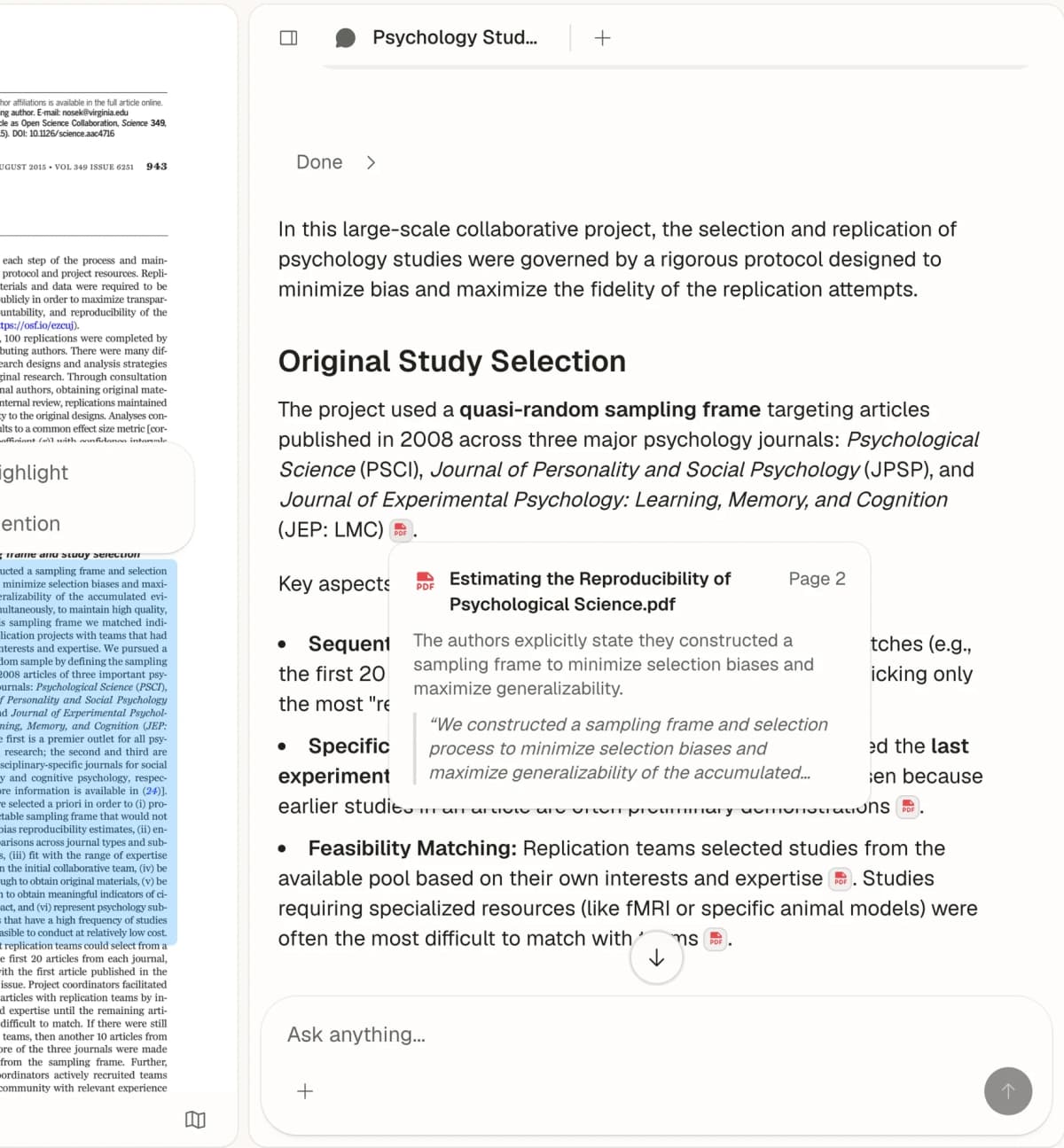
Most academic research software handles one phase well. Atlas targets synthesis. That is the stage where you have collected papers and need to connect them. The map shows links between sources and concepts you might miss when reading one paper at a time. The AI is grounded in your uploaded documents, so each answer is traceable.
Walter Tay, co-founder at Knoyo Health, said Atlas helped him "wade through the sea of articles" he reads daily.
Atlas provides an evaluation allowance of 10 sources and 10 lifetime AI chats. Pro costs $20/month or $204/year. Pair it with Semantic Scholar, ResearchRabbit, or Elicit for initial paper search, and keep a reference manager for formatted Word or LaTeX citations.
2. Elicit
Elicit is strongest for researchers running structured reviews with data extraction needs. Its search grasps research questions rather than just keywords. Elicit says it can search, summarize, extract from, and chat with over 125 million papers. For a deeper look, see our guide to Elicit alternatives.
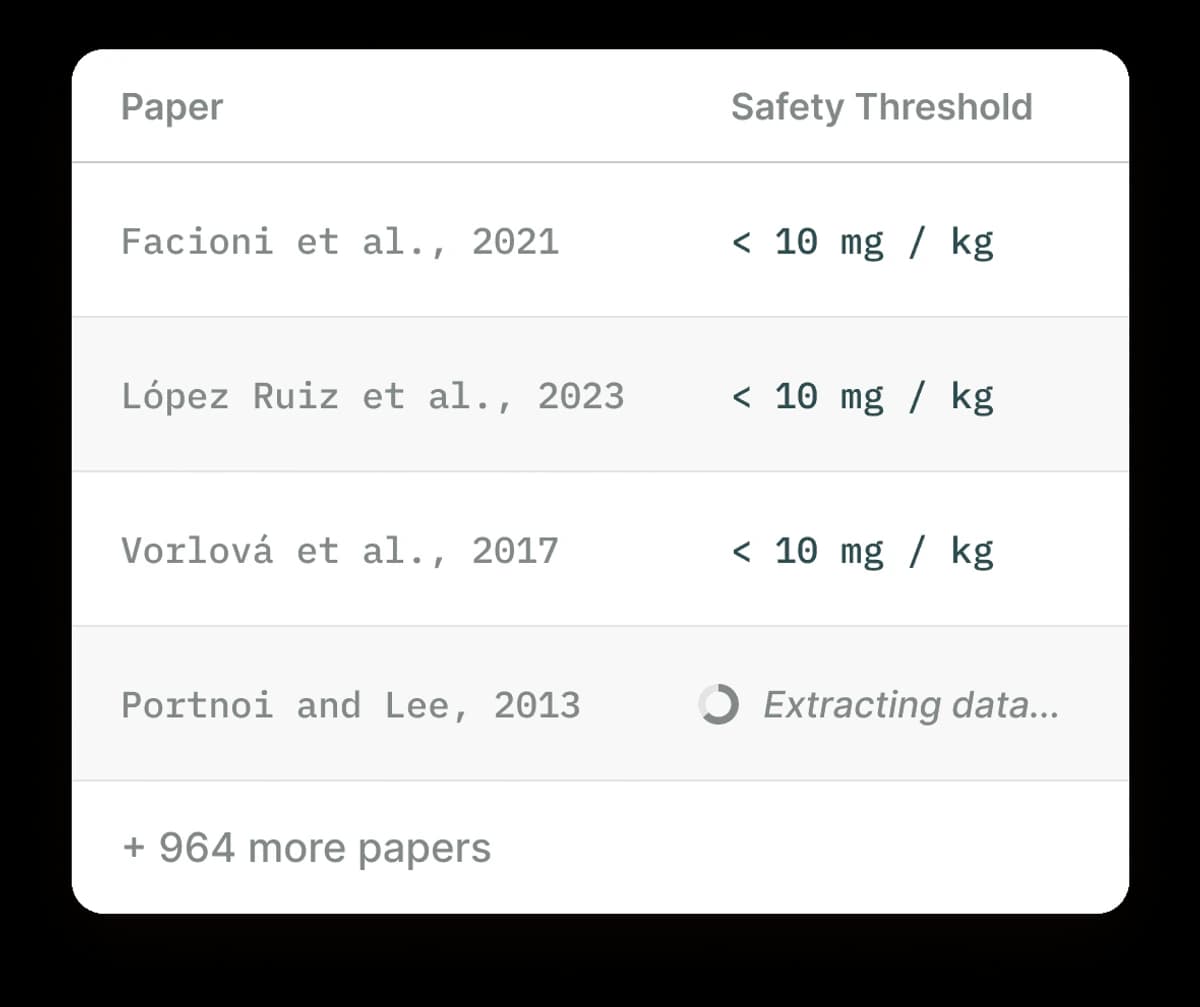
Elicit is useful when the research job is structured paper extraction.
- Semantic search across 125M+ academic papers
- Data extraction for methods, outcomes, sample sizes, and limits
- Export to spreadsheet and citation manager formats
Elicit's extraction feature is its strongest advantage. Tell it what to pull from each paper, such as method, sample size, or key findings. It fills a table across your full set of papers. This can save weeks of manual work when reviews compare many studies on set criteria.
Elicit has a free tier, with Plus from $12/month. Its value is concentrated in search, screening, and structured extraction; move the papers you keep into a separate reading or synthesis workspace when the review turns from selection to interpretation.
3. SciSpace
SciSpace (formerly Typeset) helps students and researchers who struggle with dense academic papers. Its AI sits beside papers and explains ideas, equations, and methods in plain terms. The SciSpace alternatives guide covers nearby tools for that reading job.
- AI copilot that explains highlighted text in simpler terms
- Plain-language explanations of mathematical equations
- Paper summary generation
SciSpace is built for the reading phase. If a paper is outside your core area, the AI notes help. Students working through new methods may find them useful too. Highlight a confusing passage and get an explanation in seconds.
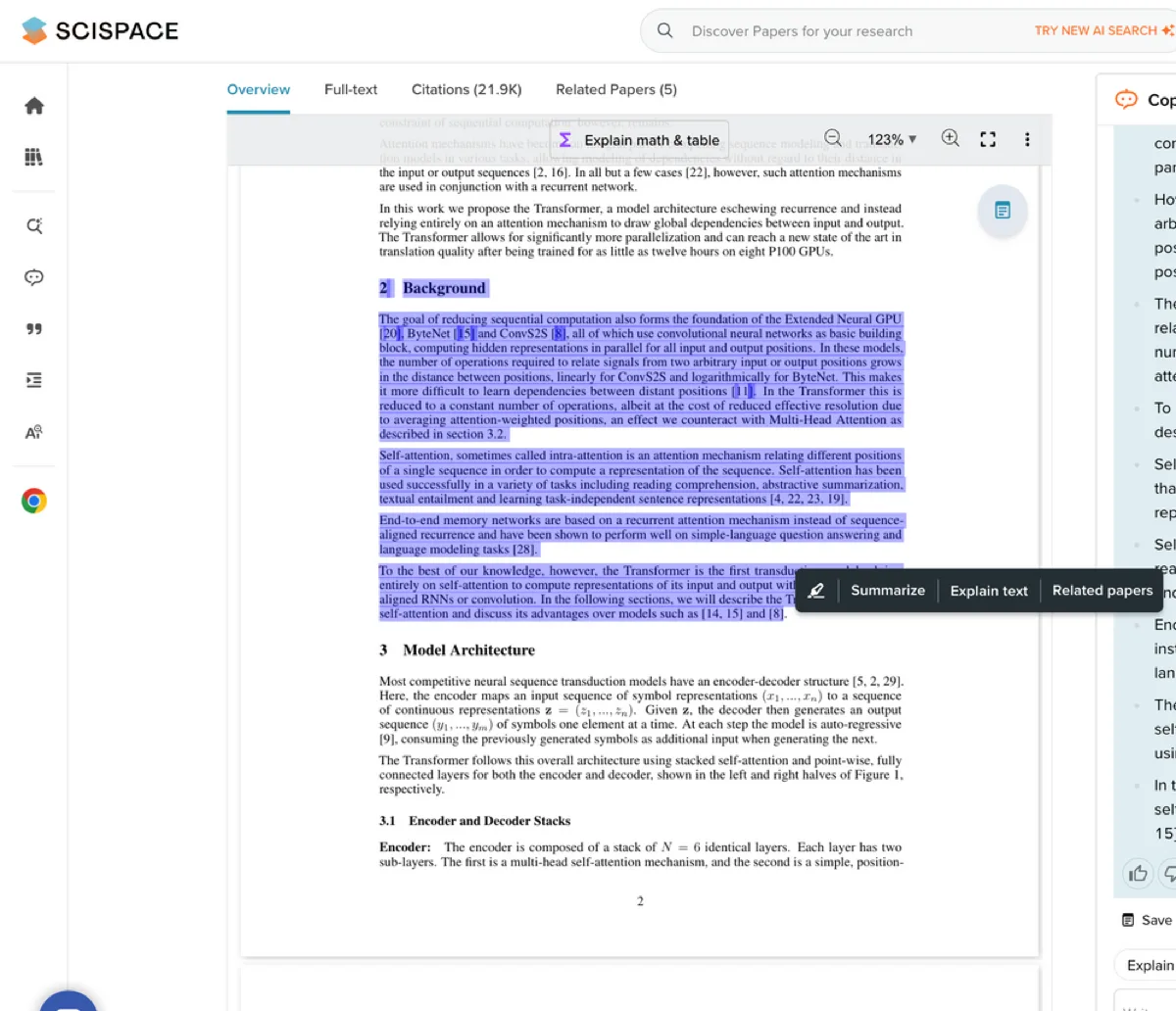
Official SciSpace resource screenshot showing a highlighted PDF passage and Copilot explanation. It illustrates the reading interface, not the accuracy of an explanation.
SciSpace has a free tier, with Premium from $12/month. Treat it as a reading companion for the paper in front of you, especially when a method or equation blocks progress, rather than as the home for a multi-paper synthesis.
4. Semantic Scholar
Semantic Scholar, built by the Allen Institute for AI, serves researchers who need broad academic search, alerts, and citation context. It searches over 214 million papers, and its AI features, including TLDR summaries and citation context, make it more than a search box.
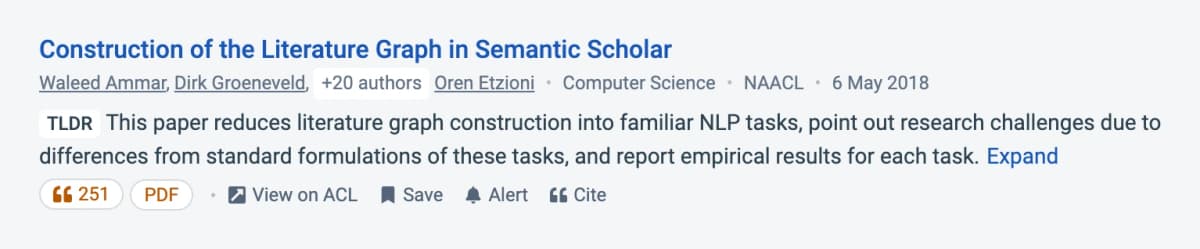
The paper result shows a TLDR summary alongside the paper's title and citation actions.
- TLDR summaries for fast paper screening
- Citation context showing how papers cite each other
- Research alerts for new papers in your area
For paper discovery, Semantic Scholar is hard to beat on value. TLDR summaries let you screen papers fast. Citation context shows a paper's role in the field. Research alerts keep you current without manual searches.
Semantic Scholar is free and earns its place at the start of the workflow. Export or save the papers that survive screening; extraction, durable notes, and argument building happen after discovery.
5. ResearchRabbit
ResearchRabbit is a literature mapping tool for researchers who want to find related papers and follow a topic over time. Its official site frames it around literature reviews, paper maps, and topic trends.
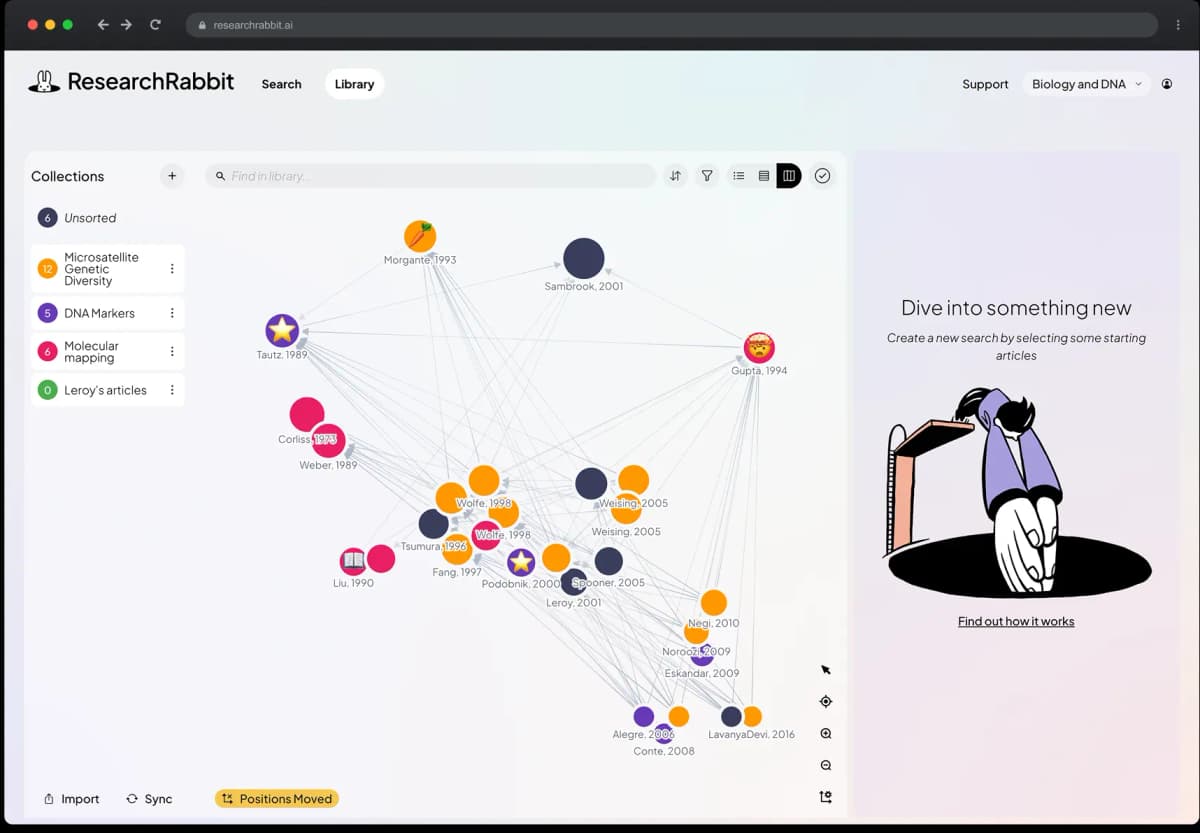
The map shows connected papers alongside a collection list; it illustrates discovery, not a complete literature review.
- Visual maps of papers and authors
- Related-paper discovery from seed papers
- Alerts for new work in a topic area
ResearchRabbit is strongest when you already have a few key papers. Use it to explore the surrounding field. It helps you see clusters and follow citation trails that keyword search can miss.
ResearchRabbit is free. Its map is most useful while the corpus is still growing, then the selected papers need to move into the system you use for close reading, citations, and synthesis.
6. Consensus
Consensus is a search engine for researchers who want quick answers grounded in published papers. It answers research questions from papers and is useful when you want a fast sense of what studies say before you read the papers yourself.
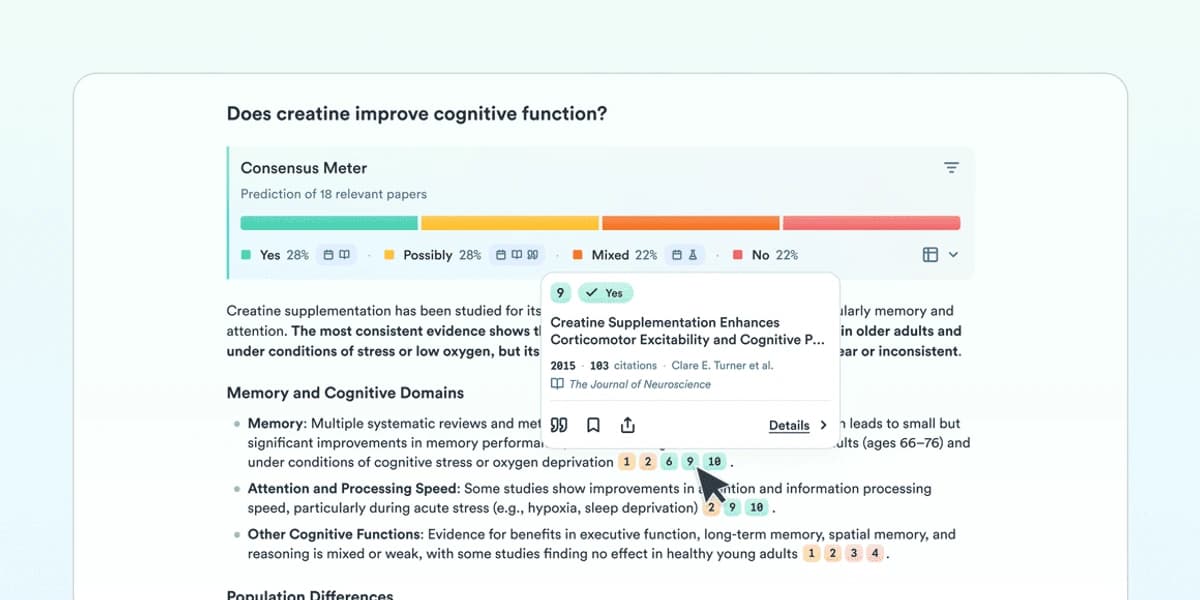
The meter summarizes results for one query; inspect the cited papers before carrying a finding into a review.
- Question-style search over papers
- Paper-backed answer summaries
- Study snapshots for fast screening
Consensus is best when your first task is to test a claim. It gives you a quick answer and points back to papers, which makes it a useful first pass before deeper review.
Consensus has a free tier, with paid plans available. A paper-backed answer is a fast orientation device, not the end of the review: open the studies behind it before carrying the claim into your own work.
7. Scite
Scite is useful when you need to see whether later papers support, mention, or contrast a claim. It focuses on citation context, showing how later papers cite a work instead of only counting citations. That context helps you judge whether a claim is supported or disputed.
- Citation statements grouped by context
- Support, mention, and contrast labels
- Search across papers and references
Scite is useful when a paper has many citations but you need to know what those citations mean. It helps you avoid treating citation count as a quality score.
Scite has a free tier, with paid plans available. Use the citation statements to decide where a claim deserves a closer read; the surrounding paper and your assembled source set still determine what the evidence means.

8. Litmaps
Litmaps helps researchers who want map-based discovery and alerts from seed papers. You can build maps from seed papers and monitor nearby work, which fits the stage where you know the core papers and want to avoid missing newer or adjacent studies.
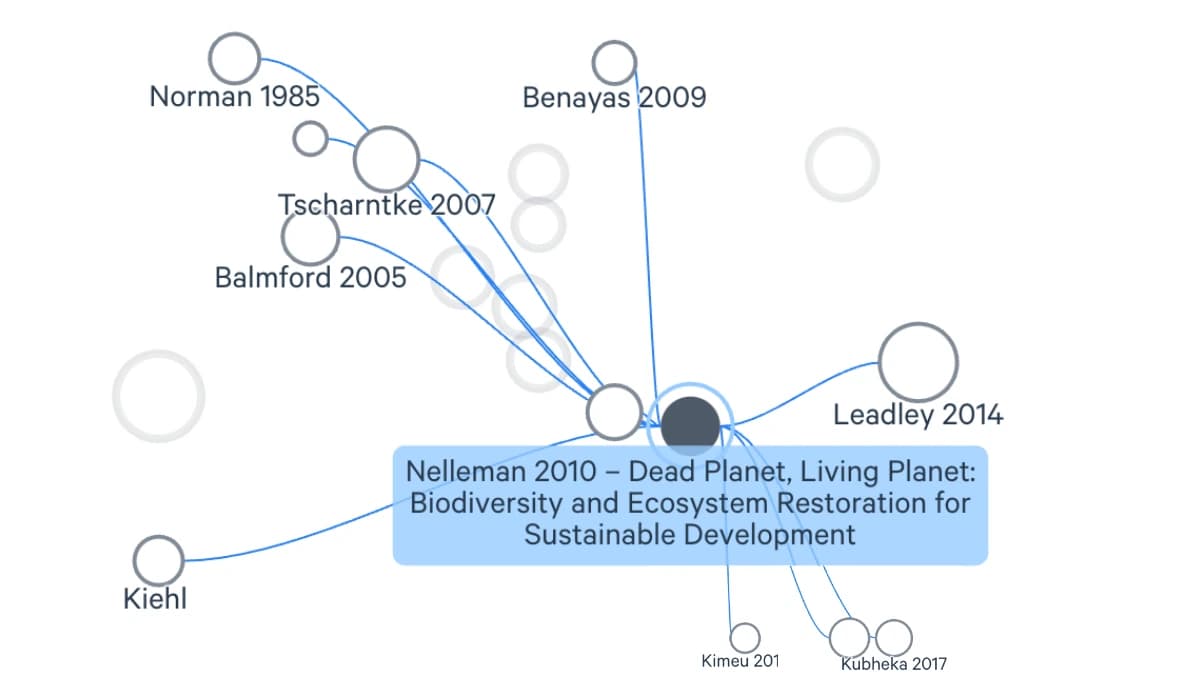
The seed-paper map shows links between papers that can guide further discovery.
- Seed-paper maps
- Alerts for new nearby papers
- Visual exploration of connected work
Litmaps is good for keeping a topic warm over time. It is less about one search session and more about watching the field move.
Litmaps has a free tier, with paid plans available. It is the monitoring layer in a stack: alerts keep the map current, while reading notes and cross-paper conclusions belong in the workspace that holds the sources themselves.
Choosing the Right Tool
The best academic research software depends on where you are in the project and what kind of work you do.
Match the platform to your research phase. Semantic Scholar helps you find papers. ResearchRabbit and Litmaps help you map a field. Elicit helps you screen and extract data. Consensus and Scite help you check claims. SciSpace helps when a paper is hard to read. Atlas is strongest once you have sources and need to connect them. For more options, see our guide to tools for research analysis.
If cost is the main limit, start free. Use Semantic Scholar for search, ResearchRabbit for maps, Elicit for screening, and Atlas for synthesis.
Use AI where the volume is painful. Elicit can help screen large result sets. Atlas can answer questions across a source set and show links between ideas. Still, you should check citations and read the source passages before relying on any AI answer.
Use the 4S stack to keep decisions simple. Search tools find papers. Screen tools help you sort them. Study tools help you read hard papers. Synthesis tools help you connect the final set.
Solo researchers have different needs than teams. If you share sources often, look for shared projects, maps, or workspaces.
Simple Workflow Map
Search for papers
For the first pass, use Semantic Scholar when you need a broad search box. Use ResearchRabbit when you already know a few key papers and want to find near matches.
Screen the results
Move into paper screening after that. Elicit is useful here. It can help pull key fields into a table. You still need to check the papers yourself.
Check the claims
Then check the claims. Consensus helps with quick paper-backed answers. Scite helps you see how later papers treat a claim.
Read the hard papers
After that, read the hard papers. SciSpace can explain a dense passage in shorter language. It is most useful when a method or equation slows you down.
Synthesize the final set
Finally, synthesize the full paper set in Atlas. Upload the papers you kept. Ask a question across the set. Check the cited passages. Use the map to see which ideas sit close together.
Most students do not need every tool on this list. Begin with one search tool, one screening tool, and one home for notes and synthesis. Add a reading helper only when dense papers repeatedly slow the work. After a week, keep the tools that shorten a real research step without creating an equal amount of export, import, or checking work.
Conclusion
The best tool depends on the task that slows you down.
Use Atlas for source maps, notes, and cited answers. Use Elicit for review screening. Use Consensus or Scite to check claims. Use SciSpace for hard papers. Use Semantic Scholar, ResearchRabbit, or Litmaps to find the next paper.
Most researchers do best with a small stack. Start with the phase where you spend the most time. Pick one tool for that phase. Add the next tool only when a real gap appears.
If reviews are a big part of your work, see our guide to the best literature review software. It covers screening, data extraction, and synthesis. Researchers comparing AI-specific workflows can also use the AI literature review guide, the research paper organizer guide, or our comparison of AI tools for academic research.
Synthesize your screened research papers
Ask across your paper set and inspect citations alongside a visual map.