


Literature review software covers several jobs. One tool finds papers. Another helps a team screen them. Other tools check claims, code text, or answer questions from a chosen paper set. Start with the stage that slows you down.
This guide compares eight tools in the order you might use them. The order is Elicit, ResearchRabbit, Litmaps, Covidence, Rayyan, Scite, MAXQDA, and Atlas. The claims come from official product pages checked on August 10, 2026. This article does not report a hands-on test. Plans and limits can change.
Atlas publishes this article and appears in the list. Atlas works best after you choose the paper set. It gives cited answers from sources you upload. It does not search a full paper index, run dual screening, or manage a bibliography.

Synthesize included papers with cited answers
Upload screened papers, compare themes, and inspect every supporting passage.
What to Compare
Start with the record you need to keep. Search tools should export paper IDs and references. Screening tools should save votes, conflicts, and reasons for exclusion. Analysis tools should link each note or value to the paper behind it.
For a formal review, record the databases, search terms, dates, duplicate rules, reviewer roles, and tool versions. Also save the reason for each full-text exclusion. PRISMA 2020 guides reporting. A tool alone cannot make a review comply with it.
Use six questions to compare the tools:
- Which stage does it own? Name the exact job: search, screening, extraction, claim checks, analysis, or writing.
- Which sources can it use? A large index may still miss key journals or databases in your field.
- What can you check? Look for links to papers, source text, extracted fields, votes, and review history.
- What can you export? Check CSV, RIS, BibTeX, document, and project-export support before committing.
- What happens to uploads? Read the current rules on privacy, storage, model training, and team controls.
- Which limits affect your review? Plans may cap papers, projects, collaborators, AI usage, exports, or alerts.
How this comparison was prepared
The comparison uses current product, help, price, and policy pages from each vendor. It does not assign scores or report a controlled test. A vendor page can show that a feature exists. It cannot prove that the feature is accurate or will save time on your review. Check key outputs against the paper and your protocol.
8 Tools by Review Stage
The order follows a common review path. Elicit, ResearchRabbit, and Litmaps help find papers. Covidence and Rayyan help screen them. Scite shows how later work cites a claim. MAXQDA supports close coding. Atlas answers questions from the final source set.
Elicit
Best stage: Search and structured extraction.
Elicit takes a plain-language question and searches its paper index. You can add columns for fields such as the study type, sample, and result. Elicit also has keyword and study filters. Its exports can move papers or tables to the next tool.
Elicit fits a team that needs to turn a broad question into a paper set or evidence table. A formal review should still record each database search. Check that Elicit covers the main sources in your field.
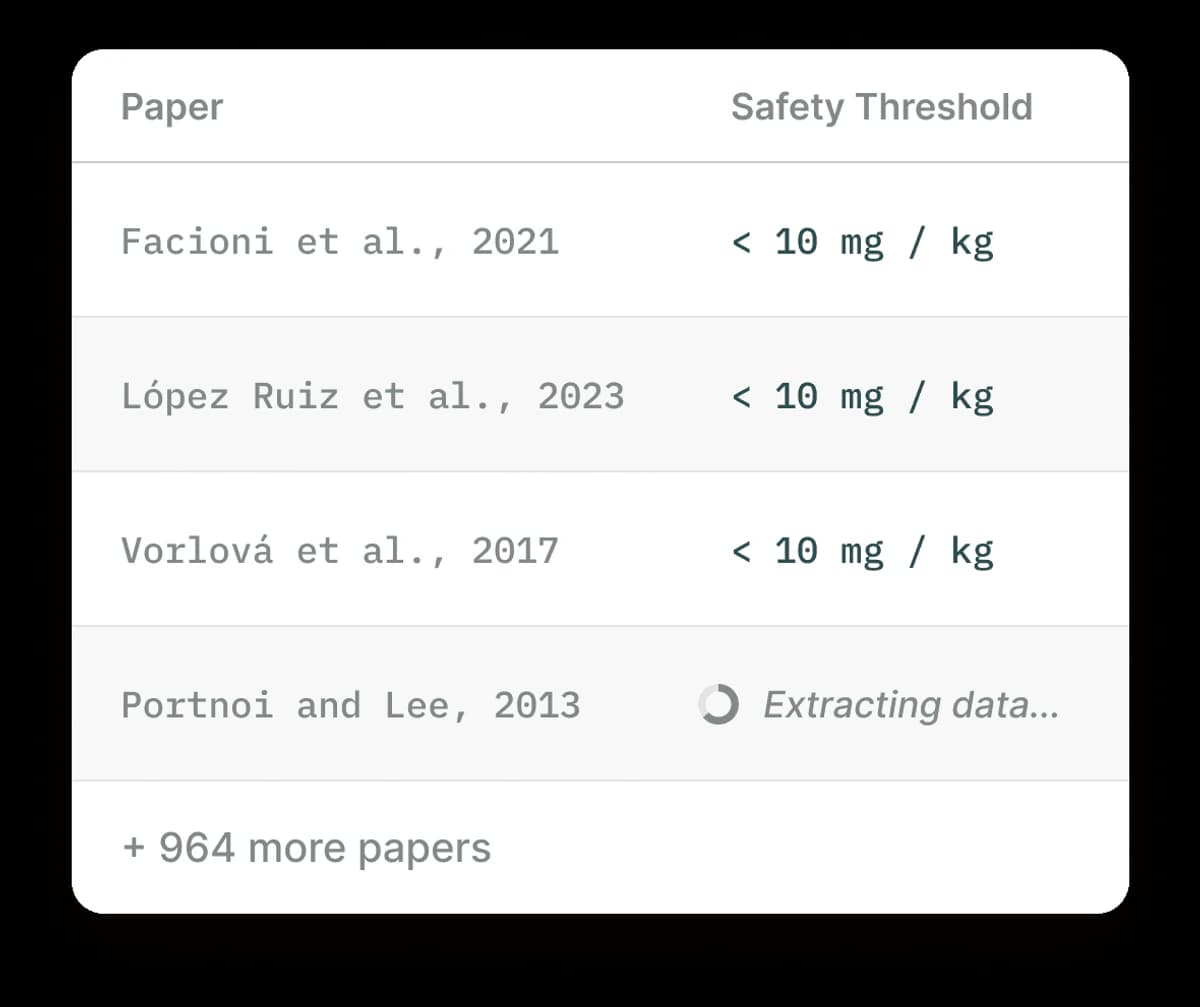
Official Elicit product screenshot from its paper-search workflow, showing extracted fields beside candidate papers.
As of August 10, 2026, Elicit's pricing page lists free and paid plans. Export types and review limits vary by plan. Read Elicit's privacy policy before you add private work. Elicit asks users to test its extraction and screening on their own data. Treat each generated field as a lead until the paper supports it. Export the chosen records before screening. See Elicit alternatives if its coverage or workflow does not fit.
ResearchRabbit
Best stage: Expanding from seed papers.
ResearchRabbit starts from papers you trust. It shows related work, references, citations, and authors. Its maps help you see groups of papers and find work that a keyword search may miss.
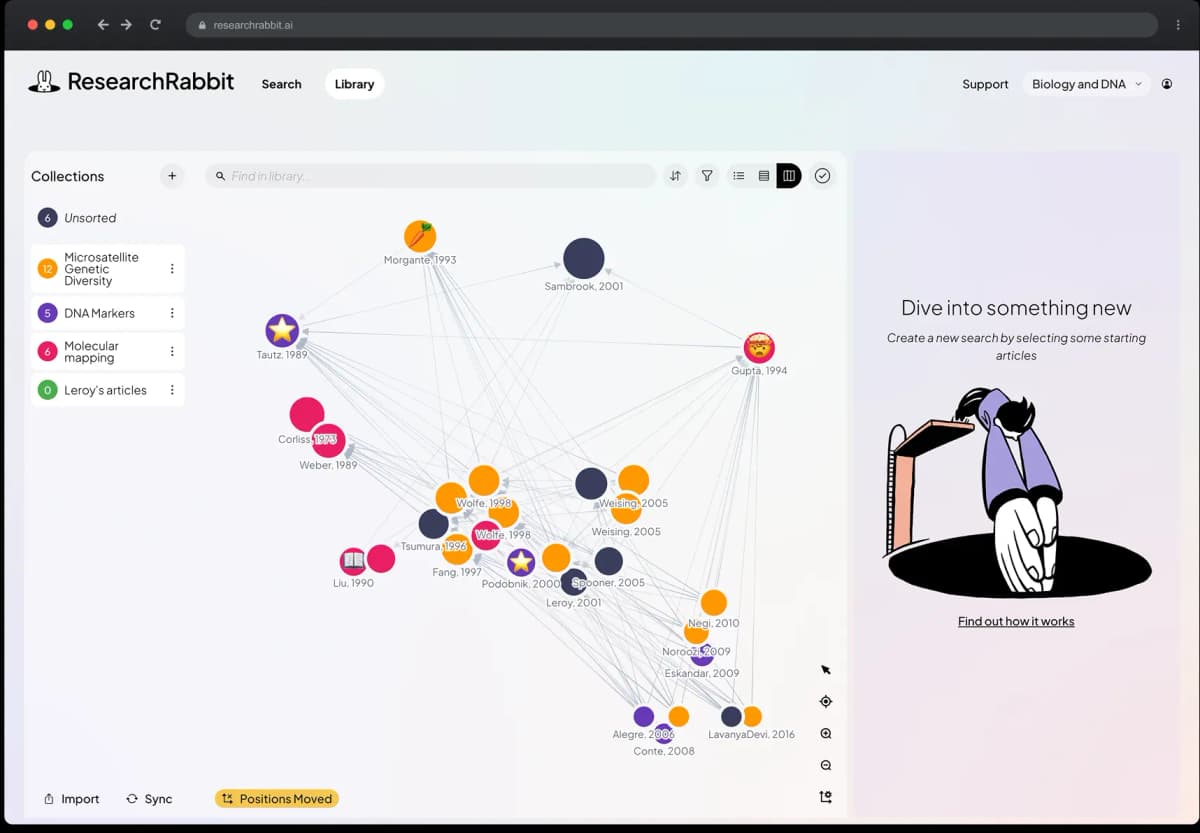
Official ResearchRabbit product screenshot showing how a seed collection expands into a citation network.
The ResearchRabbit free tier includes search, maps, collections, team work, Zotero import, and BibTeX transfer. Its paid tier adds larger seed sets and more search controls. Check the vendor's data rules before you save private notes. For a formal review, use library databases as well. Record why you chose the seed papers, then export the results to Zotero or a screening tool.
Litmaps
Best stage: Mapping a field and monitoring updates.
Litmaps builds a map from seed papers and their citation links. It helps you see the shape of a field and spot groups of related work. Alerts can flag new papers after the first search.
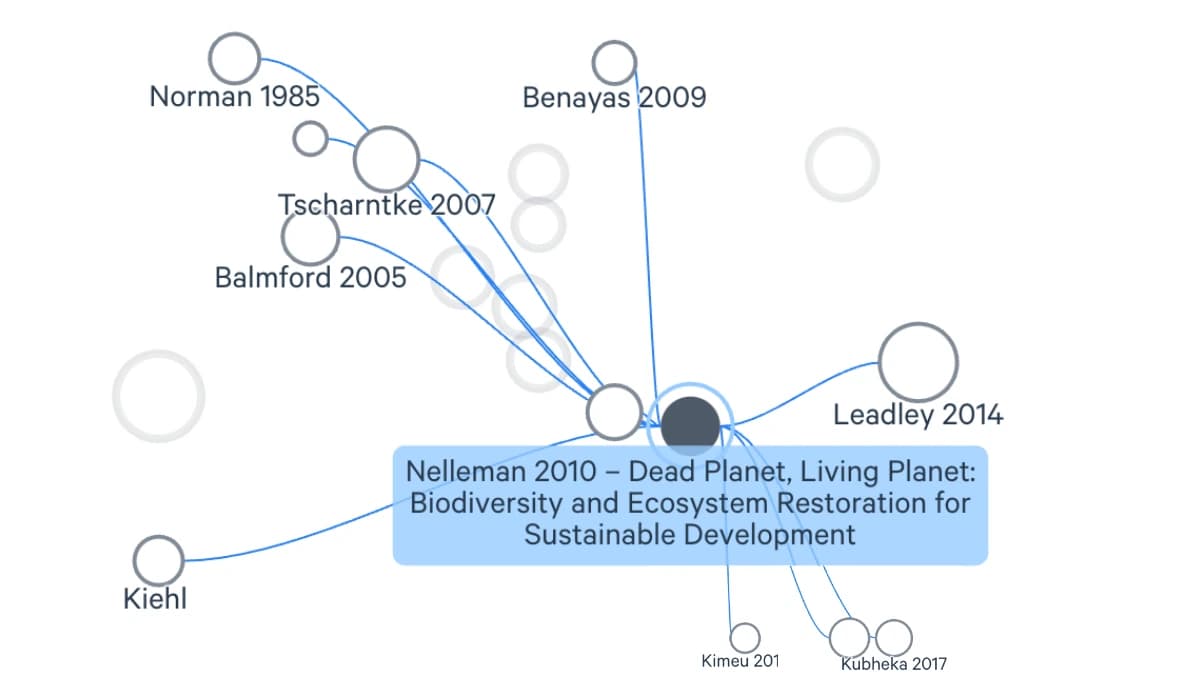
The seed-paper map shows links between papers that can guide further discovery.
As of August 10, 2026, Litmaps pricing lists a limited free plan. Paid plans add larger maps, more search tools, and alerts. Check the current data terms before you map private work. The seed papers and Litmaps index shape every map. Use the map to grow or watch a search. Then export the papers and apply the same selection rules to all of them.
Covidence
Best stage: Managed systematic-review screening and extraction.
Covidence imports references and guides a team through screening. It stores votes, conflicts, full-text choices, extracted data, and risk-of-bias work. Those records can feed reports such as a PRISMA flow chart.
Covidence suits a team that needs set reviewer roles and a clear audit trail. Current Cochrane guidance names it as the main screening and data tool for standard intervention reviews. The same guidance says its forms may not fit every complex review. Test the form and export before you screen the full set.
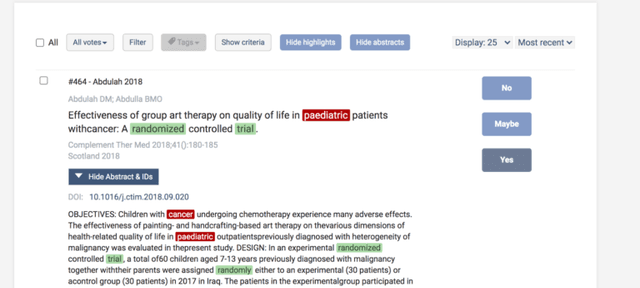
Official Covidence screenshot of a title and abstract screening record with reviewer decision controls. It shows one screening step, not a complete systematic-review audit trail.
As of August 10, 2026, Covidence pricing lists a trial, review plans, and team plans. Some registered Cochrane reviews get access through Cochrane. A team may upload full papers and review data, so check local data rules first. Also check whether your library already pays for access.
Rayyan
Best stage: Flexible collaborative screening.
Rayyan imports references and finds likely duplicates. Teams can vote on titles, abstracts, and full text. They can also add labels and reasons for exclusion. Blind mode hides each reviewer's vote until the team opens the conflicts.
As of August 10, 2026, Rayyan pricing lists a free plan with limits on active reviews and team size. Paid plans add more team, report, and AI tools. Plan limits change. Check whether the plan includes PRISMA reports, PICO fields, bulk actions, and duplicate tools. Read Rayyan's privacy policy before you add full papers or private review data.
Rayyan still needs a written protocol and a later analysis step. Resolve each conflict. Then export the chosen papers and the reasons for exclusion. The time saved will depend on the size of the set, the rules, the team, and the plan.
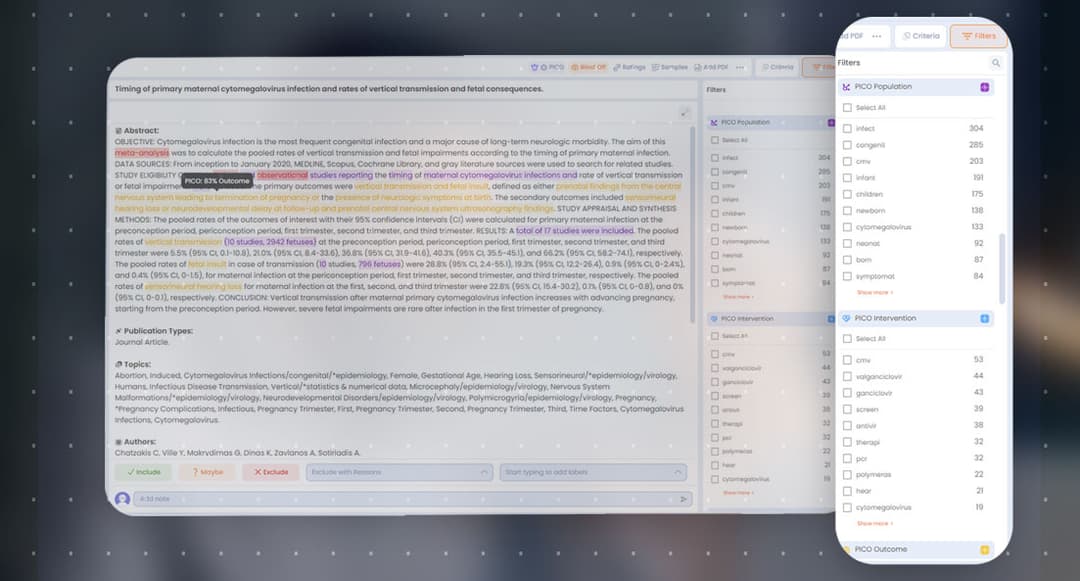
Official Rayyan Workbench screenshot of title-and-abstract screening with decision actions and PICO filters. It shows one screening layout; blind review is controlled separately in review settings.
Scite
Best stage: Inspecting citation context.
Scite shows the text around a citation. It labels that text as supporting, contrasting, or mentioning. This helps you see how later papers treat a study. Search, Assistant, and Reference Check can also trace a claim through the citation graph.
Use each label as a route to the source. Read the cited text and the paper before you change a claim.
Scite offers trials plus personal and group access. Check its current price and data terms before you save a private draft or paper list. See AI that cites sources for other answer tools that show sources.

MAXQDA
Best stage: Qualitative coding and mixed-methods synthesis.
MAXQDA is a tool for close text analysis. You can import papers, build a code set, write memos, pull coded text, compare cases, and export reports. It fits a review that needs formal coding or a close study of themes.
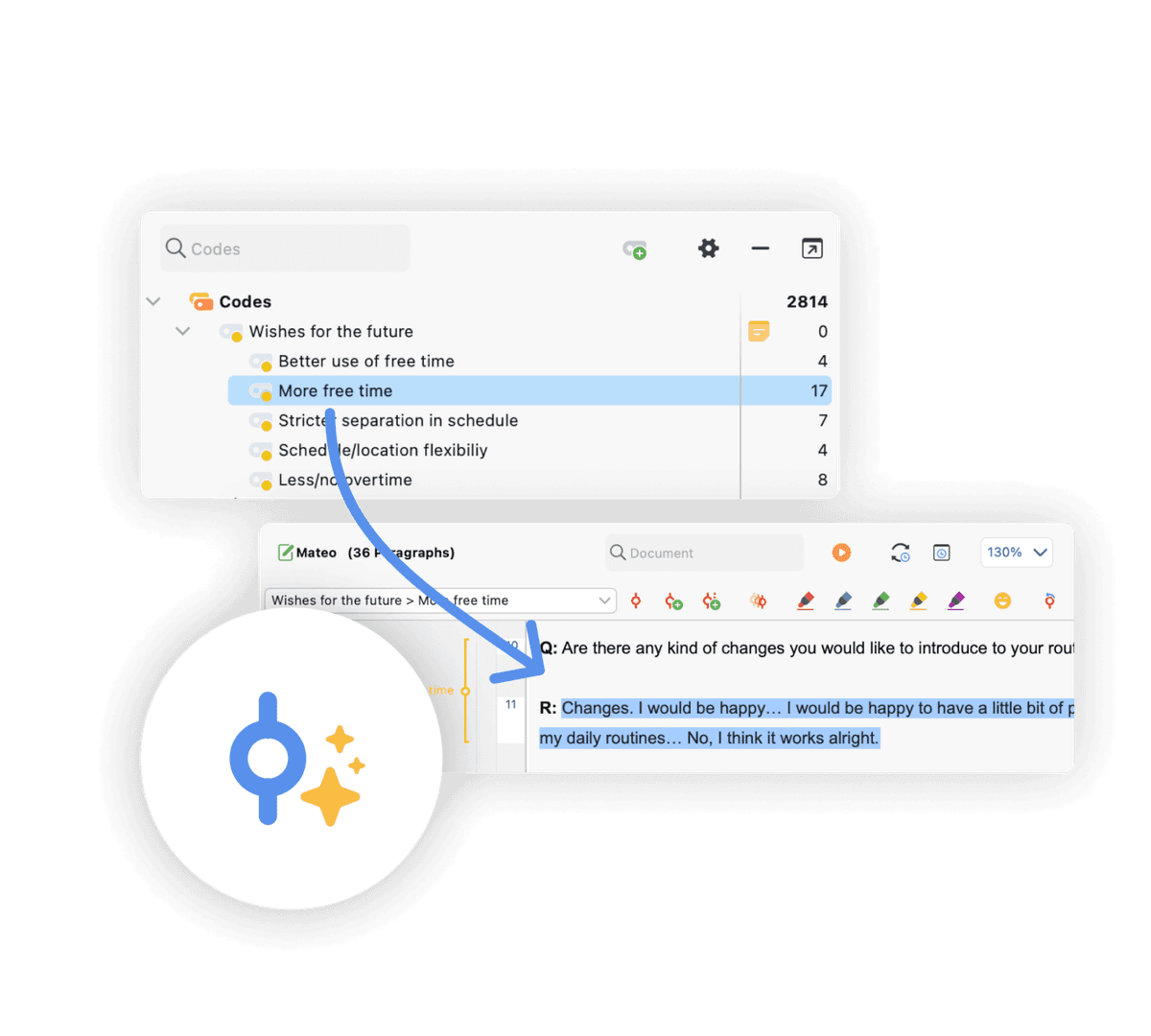
Official MAXQDA screenshot linking a code hierarchy to a selected transcript passage. It illustrates qualitative coding after screening; it does not show paper discovery or review-level synthesis.
MAXQDA's optional AI Assist can sum up selected text or suggest codes. The vendor warns that AI output can be wrong. Check each code and summary yourself. A local project may have different data rules from an AI add-on, so read the current privacy statement. MAXQDA pricing varies by user type, term, region, and add-on. Use the live quote.
MAXQDA does not find or screen the full paper set. Import the chosen full texts after screening. Keep the codebook and memo trail, then export the coded evidence. See tools for research analysis for other forms of analysis.
Atlas
Best stage: Source-grounded synthesis across included papers.
Atlas works on sources you add to a project. Once you choose the papers, you can ask a question across the set. The answer links claims to source text. You can open that text, save a finding, or explore links in a map.
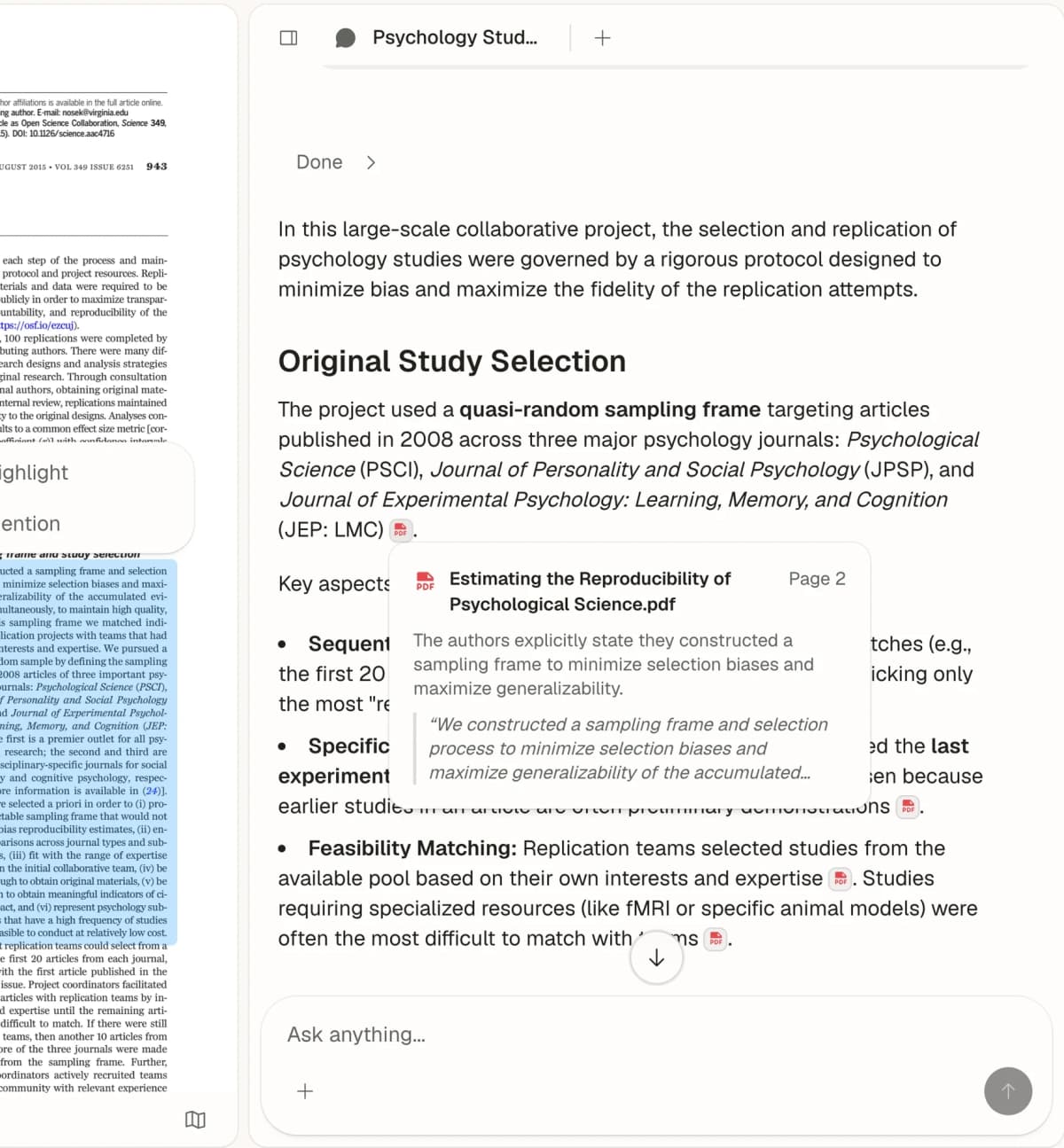
Atlas starts with the paper set from the prior stages. It does not search a full paper index, run a systematic review, compute a meta-analysis, or manage references. Upload the chosen papers and ask, "Which findings agree or conflict, and what text supports each finding?" Open each key citation before you use the answer in a table or draft.
If your paper set is informal rather than a protocol-led review, the AI reading assistant comparison separates paper triage, mixed-source study, book chat, cited synthesis, and audio reading.
Atlas has free and paid access with source and use limits. Check the live plan against the size of your paper set. The key test is simple. Do the cited passages make an answer faster to check than a manual search?
Comparison Table
Use the table to find the right stage and handoff. Then open the vendor links above for current limits. A "check path" is the record you can inspect. It does not mean an automated result is correct.
| Tool | Best-fit stage | Source boundary | Verification path | Export or handoff | Access checked Aug. 10, 2026 | Main limitation |
|---|---|---|---|---|---|---|
| Elicit | Search and extraction | Elicit paper index plus supported uploads | Open the paper and supporting text for extracted fields | RIS, BIB, CSV, Excel, or document exports vary by workflow and plan | Free and paid plans | Not a complete database-search or review-governance substitute |
| ResearchRabbit | Citation discovery | Seed papers and its scholarly index | Open the connected paper and citation trail | BibTeX, Zotero, and shared collections | Free tier plus paid search tools | Seed choice shapes the network |
| Litmaps | Field mapping and alerts | Seed papers and citation index | Inspect papers and the citation paths in a map | Map/reference exports and sharing | Limited free plan plus paid plans | Mapping does not establish search completeness |
| Covidence | Screening and extraction | Imported search records and full texts | Reviewer decisions, conflicts, forms, and risk-of-bias records | RevMan, CSV, Excel, and review exports | Trial, review packages, and institutional access | Structured workflow may not fit every complex review type |
| Rayyan | Collaborative screening | Imported references and PDFs | Blind decisions, conflicts, labels, and exclusion reasons | Reference and review reports vary by plan | Free and paid plans | Advanced workflow, report, and AI access varies by plan |
| Scite | Citation-context checks | Scite's indexed scholarly literature | Read the citing passage and linked paper | Results inform a bibliography or claim check | Trial, individual, and institutional access | Automated citation labels still need interpretation |
| MAXQDA | Qualitative analysis | Imported documents and project data | Codes, retrieved segments, memos, and reports | Project and report exports | Trial and configurable licenses | Its AI add-on does not find or screen papers |
| Atlas | Owned-source synthesis | User-provided project sources | Open citations and read supporting passages | Save findings and continue into notes or maps | Free and paid access | Does not discover, screen, or manage references |
Table 1: The table compares workflow ownership, evidence inspection, and handoffs rather than scoring unlike tools on one artificial scale.
How to Choose the Right Review Tool
Choose the software that protects the most important method record at the current stage.
For a formal systematic review: Search the required databases first. Choose Covidence for a managed team review. Choose Rayyan for flexible screening with a free starting plan. Use Elicit only when you can record and check its role. Your method, rather than any tool, must meet the review rules.
For a scoping review: Elicit can shape a broad search. ResearchRabbit and Litmaps can grow it from known papers. Save the database searches and seed logic. Screen the papers before you treat map clusters as themes.
For a thesis or narrative review: ResearchRabbit or Litmaps can find related work. A reference manager should keep the paper data. Use MAXQDA when you need a clear codebook. Use Atlas to compare claims across papers you own and to check the cited text.
For a qualitative synthesis: Choose MAXQDA when codes, memos, and formal text analysis are core to the method. Atlas can help with early cited questions. Keep the codebook and your own reading as the source of the final analysis.
For a tight budget: Start with the free plan for the stage you need. Check its live limits. A free search plan may lack key exports. A free screening plan will not write the final review. Ask your library about Covidence, MAXQDA, Scite, and database access before you pay.
When two tools overlap, compare the handoff. CSV or RIS helps move references. Votes and reasons matter for screening. Coded text matters for close analysis. Cited passages matter when you compare sources.
Build a Simple Review Workflow
Keep the tool set small. Write down each handoff so records do not vanish between products.
Thesis or Narrative Review
Use Elicit for a question-led search. Use ResearchRabbit or Litmaps to follow related work. Save accepted papers in a reference manager. Once the paper set is stable, add the full text to Atlas for cited questions. Choose MAXQDA instead when the method needs formal coding.
Before you draft, make an evidence table. Give each row a claim, paper, source passage, limit, and your own reading. Use that table as the bridge from reading to writing.
Formal Systematic Review
Write the protocol and search the databases your field requires. Export all results and remove duplicates. Screen in Covidence or Rayyan. Use separate reviewers where the protocol calls for them. Save each full-text exclusion reason. Test the data form on a few papers first.
After screening, use the analysis method named in the protocol. MAXQDA fits text coding. Statistical software should run a meta-analysis. Atlas can help explore the chosen sources with cited answers. In your methods, record each tool, version, date, and use of AI.
Rapid Review
Define the shorter method and its limits before you search. Elicit can build a paper set. ResearchRabbit can follow citation paths. Scite can show how later work cites a key paper. Use Rayyan or Covidence if the screen still needs an audit trail.
Add the chosen full texts to Atlas only after the selection rule is clear. Ask narrow questions and open the source text. Mark any answer that you cannot check. A rapid review saves time by narrowing its scope. Source checks still matter.
For each path, keep a handoff log. Note what went into a tool, what changed, what came out, and what the next tool got. This makes tool changes and method reporting safer.
Conclusion
The best literature review software fits one stage and gives the next stage a clean record. Use Elicit, ResearchRabbit, or Litmaps to find papers. Use Covidence or Rayyan to screen them. Scite checks citation context. MAXQDA codes text. Atlas gives cited answers from your source set.
Feature counts do not tell you whether a handoff will work. Check source limits, review records, exports, data rules, team access, and the route back to the paper. See best AI research assistants for the broader market. See literature review mistakes for common process faults.
Use Atlas only when the papers are already available and the next job is to compare them. Upload the included sources, ask a cited question, and open each supporting passage before carrying the finding into notes or writing.
Synthesize included papers with cited answers
Upload screened papers, compare themes, and inspect every supporting passage.