


My practical screen is a four-handoff test. Can the team export records, keep screen labels, lock data fields, and cite final notes back to the PDFs? If a tool breaks one handoff, treat it as a phase tool instead of the review system of record.
This 2026 guide covers 5 tools used often in review work: Covidence, Rayyan, ASReview, Elicit, and Atlas.
AI helps most with repeat work. Keep the plan in charge, then let the tool handle the slow steps. It can rank records, pull fields, flag conflicts, and prepare notes for synthesis. The tools below are grouped by review phase: screening, extraction, bias checks, audit trail, and synthesis.

Read included review papers with Atlas
Add screened papers as PDFs, ask a question, and inspect cited passages.
AI Review Tool Criteria
AI tools map to clear review steps. Semantic search can support keyword searches. Relevance models can speed screening. Extraction tools can pull study fields from full texts. The biggest gains are in screening and data pulls.
| Phase | What Happens | How AI Helps |
|---|---|---|
| Protocol development | Define research question, inclusion criteria, search strategy | Limited. This requires human judgment |
| Search | Run database searches, collect results | Semantic search supplements keyword searches |
| Screening | Review titles/abstracts, then full texts | AI-assisted relevance prediction (biggest time savings) |
| Data extraction | Pull study characteristics and outcomes into tables | Automated extraction from full texts |
| Bias assessment | Evaluate study quality using frameworks (RoB, GRADE) | AI-assisted risk of bias scoring |
| Synthesis | Combine findings, perform meta-analysis if appropriate | AI-powered thematic synthesis, visualization |
| Reporting | Write up results, generate PRISMA diagram | PRISMA flow automation |
Table 1: This phase map keeps tool choice tied to review work instead of vendor categories.
Use this rule before choosing a platform. Protocol-heavy teams need audit trails first. Screening-heavy teams need cautious active learning. Synthesis-heavy teams need cited answers after the included set is final.
| Handoff Test | Pass Signal | Tool Risk if Missing |
|---|---|---|
| Record export | RIS or CSV leaves with IDs intact | Reviewers cannot replay screening |
| Label preservation | Include, exclude, maybe, and conflict labels export | Decisions become hard to audit |
| Field stability | Extraction columns stay fixed before full-text work starts | Outcome data drifts across reviewers |
| Cited synthesis | Notes link back to included PDFs | Final claims lose source traceability |
Table 2: Four-handoff test for judging whether a tool can carry a systematic review phase without hiding reviewer decisions.
How I Scored the Tools
I scored each tool against five review jobs. The jobs were screening records, pulling data, checking bias, keeping an audit trail, and supporting synthesis. Each job got 0 for no fit, 1 for partial fit, and 2 for strong fit. Audit trail and bias support mattered more for clinical reviews. Missed choices are harder to defend later.
For this guide, I used a source-audit pass rather than a vendor demo. I checked pricing pages, screenshots, export claims, the PRISMA 2020 workflow, Cochrane's Covidence recommendation, and an ASReview validation study. If a tool did not show a handoff, I scored that phase as partial.
The score rewards five review jobs:
- Screening: blind review, conflict handling, or active learning.
- Data extraction: reusable fields, table exports, or PDF field pulls.
- Bias work: built-in forms, reviewer notes, or clear handoff points.
- Audit trail: exports that preserve decisions, labels, and notes.
- Synthesis: cited answers, maps, or cross-paper comparison.
This scoring rubric favors defensible review work: clear decisions, reusable exports, and synthesis evidence the team can replay.
My 10-point handoff score is the sum of the five 0-2 job scores. It is a quick way to see why no single tool wins every phase.
| Tool | Screening | Extraction | Bias | Audit | Synthesis | Total |
|---|---|---|---|---|---|---|
| Covidence | 2 | 2 | 2 | 2 | 1 | 9 |
| Rayyan | 2 | 1 | 1 | 1 | 0 | 5 |
| ASReview | 2 | 0 | 1 | 1 | 0 | 4 |
| Elicit | 0 | 2 | 1 | 1 | 1 | 5 |
| Atlas | 0 | 1 | 1 | 1 | 2 | 5 |
Table 3: Numeric handoff scores based on screening, extraction, bias, audit, and synthesis fit.
Feature Comparison Table
Read this table with your review's risk level in mind. A Cochrane-style review should rank PRISMA support, blind review, conflict checks, and audit trail above ease of use. A scoping review can use lighter controls if the team records where AI was used.
| Tool | PRISMA / Review Controls | Screening Sensitivity Fit | Extraction Support | Bias / QA Controls | Audit Trail | Best Workflow Fit |
|---|---|---|---|---|---|---|
| Covidence | Strong | Strong for dual screening | Strong templates | Built-in risk-of-bias workflows | Strong | End-to-end managed systematic reviews |
| Rayyan | Moderate | Strong title and abstract screening | Basic | Blind review and conflict handling | Moderate | Fast collaborative screening on a budget |
| ASReview | Limited platform controls | Strong active-learning prioritization | None | Transparent models, but reviewer QA is manual | Moderate if exported | Open-source screening experiments |
| Elicit | Limited | Not a screening workflow | Strong structured extraction | Manual verification required | Limited | Search and extraction support alongside SR software |
| Atlas | Post-screening synthesis workspace | Included-PDF exploration after screening | Limited extraction | Source-grounded answers for synthesis notes | Source links for review notes | Cross-paper synthesis across included PDFs |
Table 4: This feature comparison separates protocol controls from synthesis support, because those jobs need different tools.
The Tools: Compared
The 5 tools below are not interchangeable. Covidence, Rayyan, and ASReview manage review workflow. Elicit helps with search and extraction. Atlas fits after screening and extraction. Use it when the team needs cited answers across the final set of studies.
Quick read:
- Covidence: best when the team needs a guided review hub.
- Rayyan: best when the team needs fast blind screening.
- ASReview: best when open-source active learning matters.
- Elicit: best for paper search and data extraction support.
- Atlas: best for cited synthesis after screening is done.
If your included set is already screened, follow this research-paper synthesis workflow. Upload the PDFs to Atlas and ask one cross-paper question that must cite specific studies.
Test how each tool handles the work before choosing a stack:
-
First, Covidence supports a shared decision queue for title and abstract screening.
-
Second, ASReview supports active-learning review, where each relevance decision trains the next ranking pass.
-
Third, Elicit shows whether extraction fields stay tied to paper rows.
Covidence
Covidence is best for teams conducting Cochrane-style systematic reviews. It is a full review workbench, and Cochrane recommends it for new reviews.
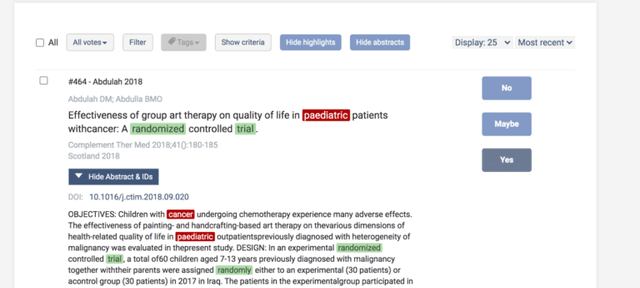
This official Covidence screening-guide image shows the title and abstract review interface. View the source screenshot and screening guidance.
What it does:
- Learns from screen votes.
- Finds duplicate records.
- Builds data tables.
- Supports risk-of-bias checks.
- Creates PRISMA flow data.
Strengths:
- Good team controls.
- Good audit trail.
- Strong help docs.
Tradeoffs:
- It can cost too much for solo work.
- It is less loose than a custom stack.
Pricing: Free for Cochrane reviews, institutional subscriptions vary, individual plans from $240/year
Rayyan
Rayyan is best for budget-conscious researchers who need collaborative title and abstract screening. It learns from include and exclude votes, so it fits teams that need blind review and conflict handling without a heavy review hub.
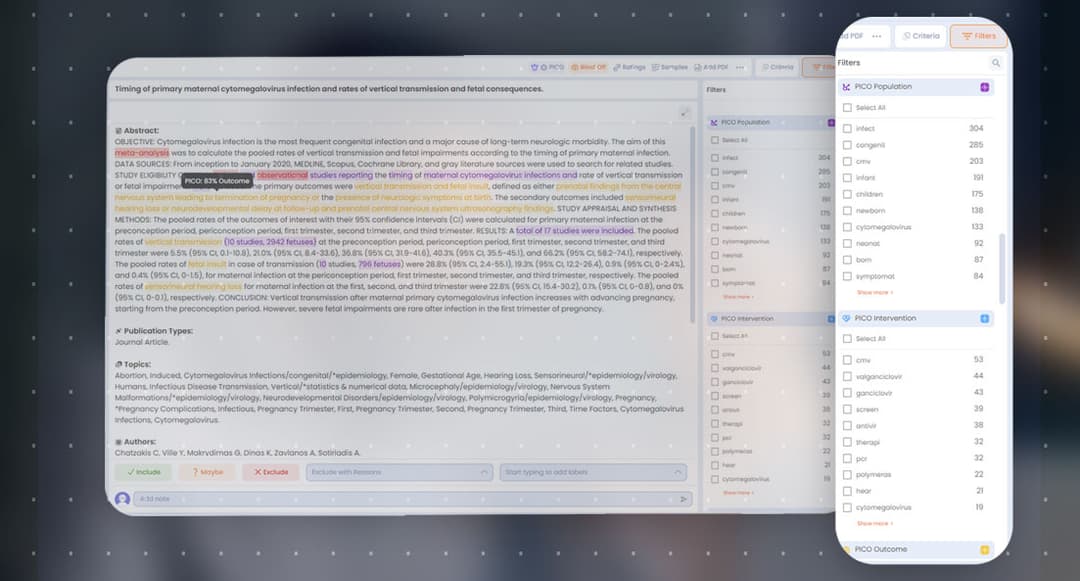
Rayyan’s official Workbench page publishes this screening interface. The displayed record is a product example, not study evidence, and the image does not establish screening accuracy.
What it does:
- Ranks records by likely fit.
- Lets reviewers work blind.
- Flags duplicates.
- Works on mobile.
- Exports review data.
Strengths:
- Useful free tier.
- Fast team screening.
- Simple to learn.
Tradeoffs:
- It is mainly a screen tool.
- Data tables are basic.
- The model needs early human votes.
Pricing: Free for individuals, Teams from $10/user/month
ASReview
ASReview is best for researchers who want open-source, transparent AI screening. It uses active learning to put likely hits first, and its open code makes model choices and review settings easier to inspect.
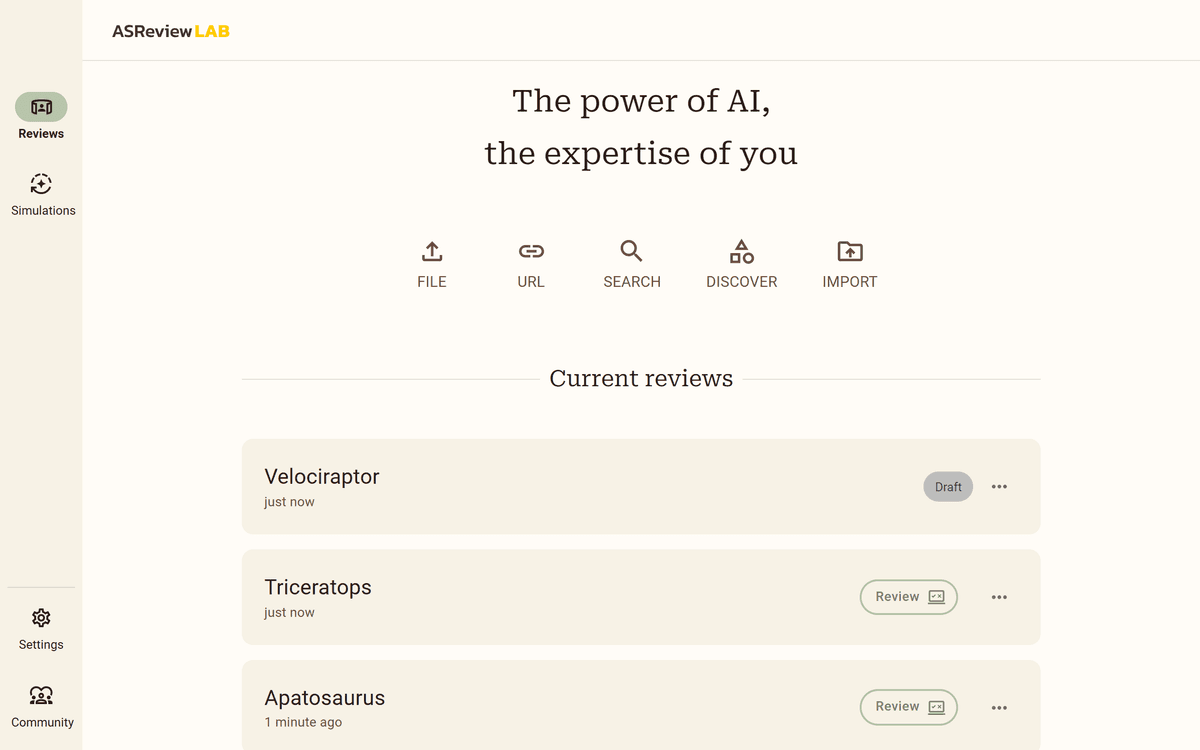
This official documentation screenshot shows the ASReview LAB project dashboard. Open the ASReview documentation.
What it does:
- Ranks records for screen order.
- Offers several model choices.
- Runs simulations.
- Tracks screen progress.
Key strengths:
- Free and open source.
- Reproducible.
- Can reduce screening effort by 80-95% in studies.
- Desktop and server options.
Tradeoffs:
- The desktop app is not a team hub.
- It does not pull study data.
- Setup takes more care.
Pricing: Free (open-source)
Elicit
Elicit is best for AI-first research workflows with structured extraction. It is not a full review platform, so treat it as a search and data-pull layer beside your screening tool.
What it does:
- Semantic search across 125M+ papers.
- Pulls methods, outcomes, and sample sizes.
- Comparison tables across studies.
- Concept-based paper search.
- Study summaries.
Key strengths:
- Strong data tables.
- Search can find papers that keywords miss.
- Exports to spreadsheets.
Tradeoffs:
- No full screen workflow.
- No PRISMA support.
- It cannot replace a review hub.
- It is bound by its paper index.
Pricing: Free tier (5,000 credits/month), Plus $12/month
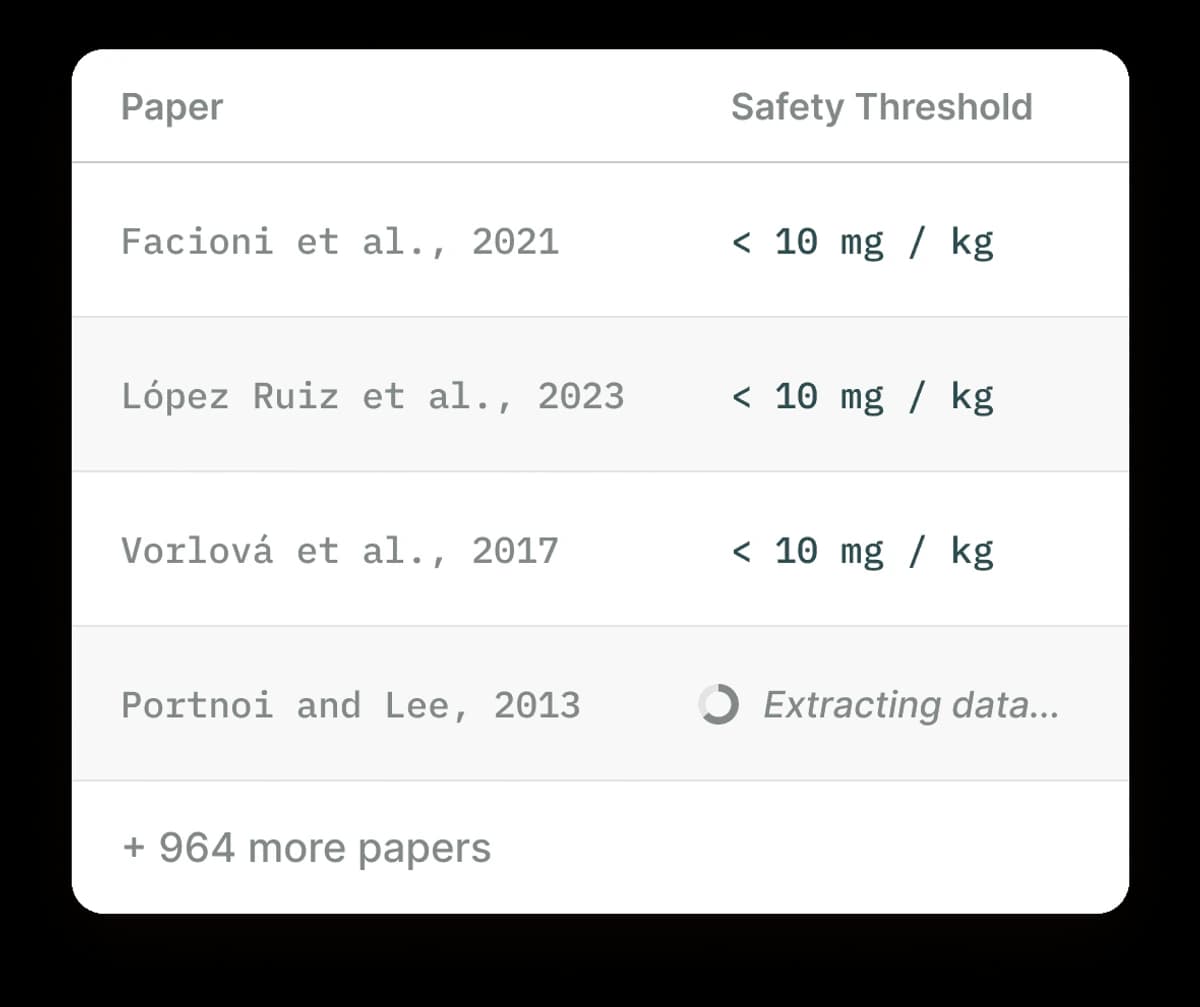
The Elicit image shows paper rows, a Safety Threshold field, completed rows, and a "+ 964 more papers" note.
That is the useful visual test for extraction tools. Each study becomes a row. Each review field becomes a column. Each filled cell still needs a source check before it enters the final table.
Atlas
Atlas is best for synthesis and connection discovery across extracted studies. Use it in the post-screening phase when the final paper set is ready and the team needs cited answers across those PDFs.
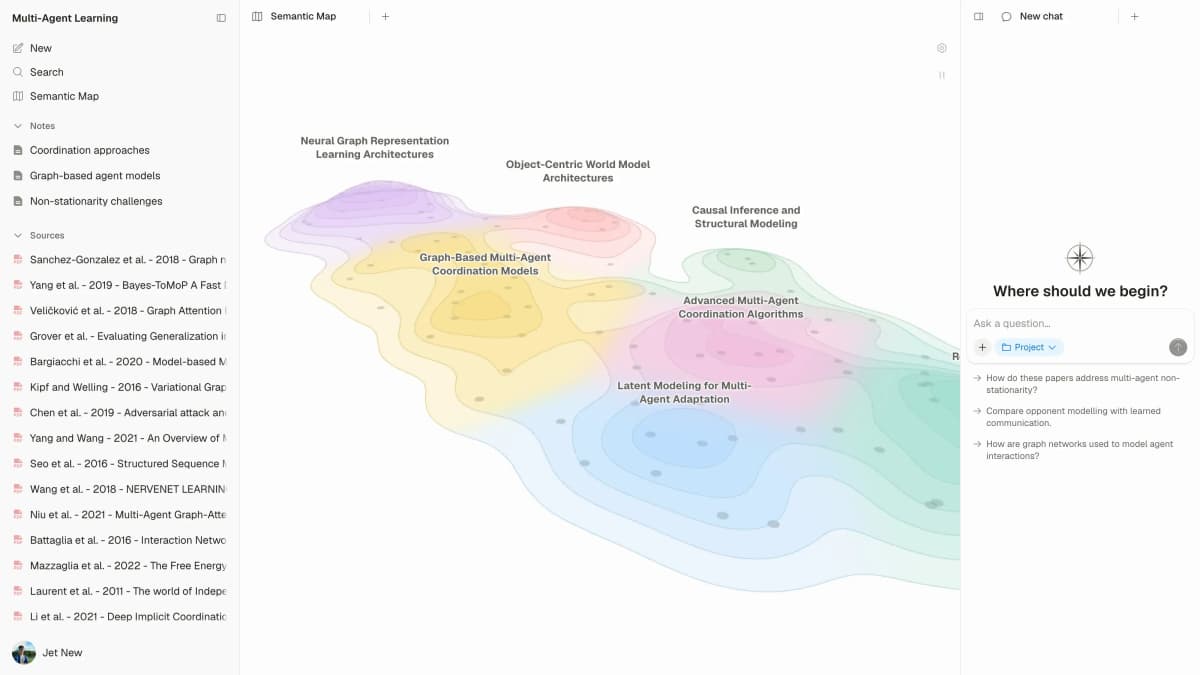
The map is a project-level synthesis surface for connecting included papers after screening; it does not perform protocol screening. See Atlas Semantic Maps.
What it does:
- Upload papers and find links between them.
- Shows a mind map.
- AI chat across your paper library.
- Compares themes across sources.
- Links answers back to sources.
Key strengths:
- The map shows patterns.
- Answers include citations.
- Low setup: upload included PDFs and start exploring.
Tradeoffs:
- Not a screening or protocol tool.
- Does not replace Covidence or Rayyan for PRISMA compliance.
- Better for synthesis than data tables.
Pricing: Free tier available, Pro from $20/month
Use Atlas narrowly in a systematic review workflow: export the final included PDFs, upload them, ask cross-paper synthesis questions such as "Which outcomes recur across the included RCTs?", and keep each answer tied to the source documents.
That gives reviewers a synthesis space while the screening rules stay intact.
Building a Systematic Review Tool Stack
No single tool covers every phase well. Pick the stack by budget and review risk.
Budget Stack (Under $25/month)
- Search: Elicit plus a database search.
- Screen: ASReview or Rayyan.
- Pull data: Elicit.
- Map findings: Atlas.
- Cite: Zotero.
Total cost: $12-24/month
Standard Academic Stack
- Search: Elicit plus database searches.
- Screen: Rayyan or Covidence.
- Pull data: Covidence plus Elicit.
- Check bias: Covidence.
- Map findings: Atlas plus team review.
- Cite: Zotero.
Total cost: $30-50/month depending on institutional access
PRISMA Workflow with AI Integration
Here is how AI tools map to the PRISMA 2020 flow:
Identification
├── Records from databases (PubMed, Scopus, etc.)
├── Records from Elicit semantic search
├── Duplicate removal (Covidence/Rayyan auto-detect)
└── Total records after deduplication

Screening
├── Title/abstract screening (Rayyan or ASReview AI-assisted)
├── AI prioritization reduces workload by 60-90%
├── Full-text retrieval
└── Full-text screening (Covidence workflow)

Included
├── Studies included in review
├── Data extraction (Covidence + Elicit)
├── Risk of bias assessment (Covidence)
└── Synthesis (Atlas mind map + manual analysis)
Key rule: AI helps at each stage. It should not make final calls. People still decide what to include, how to judge study quality, and what the results mean.
Common AI Review Mistakes
Mistake 1: Relying Solely on AI Screening
AI screening tools predict fit, but they are not perfect. Screen a sample by hand and set stop rules. A missed key study can weaken the review.
Mistake 2: Not Documenting AI Use
Review methods must be clear and repeatable. Record each AI tool, its settings, and its role. Many journals now ask for AI disclosure. PRISMA-S helps when you report search work.
Mistake 3: Skipping Verification of AI Extraction
AI data pulls save time, but errors add up. Check at least a subset of studies. A 20% spot check is a useful floor. Always check main outcomes.
Mistake 4: Treating Synthesis as Final
AI can find themes and links across studies. The review team still has to judge certainty, handle mixed results, and write the claims. AI synthesis gives you a starting draft. The team still has to finish the analysis before anything is published.
For more common pitfalls, see our guide on literature review mistakes, writing literature reviews with AI, and AI research assistants. You can also learn how to synthesize research papers more effectively.
Review Team Setup Guide
Pricing Models and Support
Check export paths before your team commits to a tool. At minimum, confirm that records can move through RIS, CSV, or spreadsheet files. Also check whether PDFs, labels, notes, and exclusion reasons can leave the platform.
Use the pricing model as a risk signal. Free tools help global access, but the team owns setup and support. Paid platforms cost more, but they can reduce risk when a review needs audit records, roles, and vendor help.
| Model | Tools | Best Fit | Main Risk |
|---|---|---|---|
| Free and open source | ASReview | Low-budget teams that can manage setup | Team owns support |
| Freemium | Rayyan, Elicit, Atlas | Solo or small academic teams | Limits may appear mid-review |
| Institution paid | Covidence | Labs with library access | Access can end after a role change |
Table 5: Pricing and support models for review tools, including access model, team setting, and operational risk.
Access matters too. ASReview is the strongest fit for low-budget teams because it is open source. Rayyan and Elicit offer useful free tiers. Covidence makes more sense when a lab, library, or institution already pays for it.
For long reviews, support model matters as much as AI features. Open-source tools give transparency and community support. Enterprise tools give vendor support and audit controls. Mixed stacks work best when 1 person owns exports between tools.
Quick Start and Troubleshooting
Use this setup order when the team is new to AI-assisted review tools.
- Export citations from each database in RIS or CSV.
- Import records into Rayyan, Covidence, or ASReview.
- Screen a seed set by hand before trusting model ranks.
- Export included full texts and data tables.
- Upload final PDFs to Atlas for cited cross-paper questions.
Common setup problems are usually file problems. If records fail to import, check the RIS file for missing titles or duplicate IDs. If model ranks look wrong, screen more seed records by hand. If data extraction fields drift, lock the field names before the team starts full-text work.
Installation and Configuration Checks
I use this implementation checklist before a team commits to a review stack. It catches the handoff failures that are easy to miss during a demo but painful once screening has started.
- Installation path: note whether the tool runs in a browser, desktop app, local server, or institution-managed workspace.
- Settings owner: name the person who controls include rules, data fields, reviewer roles, and stop rules.
- Data sources: record which databases, semantic search tools, citation files, and full-text folders feed the project.
- Output files: test RIS, CSV, spreadsheet, PDF, label, note, and exclusion-reason exports before full screening begins.
- System architecture: decide where records live, where PDFs live, where AI processing happens, and what the audit copy is.
- Multi-project support: separate thesis, grant, rapid review, and guideline projects so labels and extraction fields do not drift.
- API reference or CLI usage: use scripts for imports, exports, duplicate checks, or reports. Keep include decisions in the review workflow.
- License and support: confirm who pays, who can invite reviewers, and what happens when a student or librarian leaves the team.
For me, the red flag is not a weak AI demo. It is a tool that cannot show where records entered. It also needs to show which settings changed, which labels exported, and how final notes point back to the studies.
Can these tools share data? Usually yes, but not always cleanly. RIS and CSV are safest for records. PDFs, labels, notes, and exclusion reasons need a test export before the review starts.
What about privacy? Do not upload restricted full texts until your team has checked the vendor terms. Institutional tools often have clearer data terms than free web tools.
Who maintains the stack? Name one owner for exports, licenses, and support. This avoids broken handoffs when a student, librarian, or reviewer leaves the project.
Target Industries and Use Cases
The same AI systematic review tools fit different review settings. The risk level changes the stack.
| Setting | Typical Use Case | Safer Stack |
|---|---|---|
| Academic lab | Thesis or grant review | Rayyan or ASReview plus Elicit |
| Clinical team | Guideline evidence review | Covidence plus manual bias checks |
| Public health group | Rapid evidence map | Rayyan plus Atlas for cited synthesis |
| Library service | Support many student reviews | Covidence or Rayyan templates |
| Solo researcher | Scoping review | ASReview, Elicit, Zotero, and Atlas |
Table 6: These review settings change the risk level, so the safer stack should match the audit burden.
High-stakes reviews need stricter audit notes. Lower-risk scoping work can use lighter tools if exports and decisions stay clear.
Validation and Impact Checks
Do not judge an AI review tool by speed alone. Run a small validation pass before the team trusts the output.
| Check | How to Run It | Pass Signal |
|---|---|---|
| Screen recall | Hand-screen a random sample after AI ranking | No obvious missed includes |
| Data extraction | Recheck at least 20% of pulled fields | Main outcomes match the PDF |
| Bias work | Compare AI hints with reviewer notes | Disagreements are logged |
| Audit trail | Export decisions, labels, and notes | A new reviewer can replay the path |
Table 7: These checks make speed claims useful. They show whether the tool kept recall, data accuracy, bias notes, and decisions the team can replay.
This validation step is the real impact test. A tool saves time only if it keeps missed-study risk, data errors, and audit gaps visible.
PICO, Bias, and File Format Fit
PICO means population, intervention, comparison, and outcome. A review tool should keep PICO fields visible during search, screen, data pulls, and synthesis. Writing the PICO question itself is the team's job.
| Need | Stronger Fit | Watch Out |
|---|---|---|
| PICO fields | Covidence and Elicit can structure study data | The team still defines the fields |
| Risk of bias | Covidence supports bias workflows | Rayyan and ASReview focus more on screening |
| File import | Rayyan, Covidence, and ASReview handle citation files | Test RIS and CSV before launch |
| Full texts | Elicit and Atlas work best once PDFs are ready | Copyright and vendor terms still apply |
| Data sources | Elicit helps find papers beyond keyword search | Database search logs still belong in the protocol |
Table 8: This table keeps PICO, bias, file import, full-text access, and data-source coverage visible while the team chooses the stack.
This is why "all-in-one" is not always better. The right stack keeps PICO fields, bias notes, file exports, and source links visible. It should not hide reviewer choices.
Final Recommendation for AI Systematic Review Tools
If you are planning your first AI-assisted systematic review:
- Start with your rules. No tool replaces a clear plan. Define your question, include rules, and search plan first.
- Choose a screening tool. Rayyan (free) or ASReview (free, open-source) for most academic reviews. Covidence if your institution provides access.
- Add Elicit for data pulls. This saves the most manual work after screening.
- Use Atlas for synthesis. Upload the final papers and ask cited questions across the set.
- Document everything. Record which tools you used, at which phases, and how AI outputs were verified.
AI can make reviews faster. The review stays credible only when the team keeps the same method rules.
My recommendation is to pick the screening tool first. Add extraction and synthesis tools only where they solve a real handoff. For most academic teams, Rayyan or ASReview handles screening. Elicit helps with structured pulls. Atlas fits once the PDFs are ready for cited synthesis.
A small test is safer because you can check one export before adding the next tool.
For nearby workflow choices, compare literature review software. For AI-specific planning, use AI literature review tools. For source files, see research paper organizers. For common errors, review literature review mistakes.
Read included review papers with Atlas
Add screened papers as PDFs, ask a question, and inspect cited passages.