
Atlas vs Elicit (2026) | In-Depth Research Comparison
Atlas is a visual research workspace. Elicit is an AI research assistant for systematic literature search. Compare on paper deconstruction, citation grounding.
- Byline

Summary
Use Atlas after you have the papers. Use Elicit when you still need to find and screen them.
The updated comparison covers maps, source-backed answers, paper search, table extraction, migration, and reuse.
Atlas turns uploaded papers into evidence you can inspect. Elicit helps find papers and fill research tables.
Researchers can use Elicit to narrow the corpus and Atlas to synthesize the selected sources.
Note: We make Atlas, and our team wrote this comparison. Where Elicit has the better answer for a given research job, the article says so plainly. See the table rows where Elicit wins and the "When Elicit is the right call" section below. The goal is to help you choose the right tool for your current research stage.

Atlas

Synthesize the papers you found in Elicit
Upload selected PDFs and inspect cited answers across the corpus.
Quick answer
Atlas is a visual research workspace for people who need to understand a body of papers. That may be a thesis, a treatment decision, a market brief, or a long paper review.
Elicit is an AI research assistant for literature search. You enter a research question. Elicit finds relevant papers, extracts fields into a table, and summarizes the results with citations. Our guide to AI for literature reviews covers this broader workflow.
The decision turns on research stage. Use Elicit to find papers. Use Atlas to read, map, and cite the papers you keep. Elicit wins discovery and extraction tables. Atlas wins Knowledge Maps, Semantic Maps, citation-grounded answers, and shared context inside a research project.
Atlas turns each paper into a Knowledge Map. It shows a whole project in a Semantic Map. It answers with cited passages and explains why each passage supports the claim.
Criteria and methodology
We compared the tools on real research jobs. The table below is the short version, and it includes rows where Elicit wins.
| Atlas | Elicit |
|---|---|
| ✗ Works from uploaded papers and cited open-access sources. Broad paper search is outside its scope. | Elicit wins: searches academic indexes from a research question ✓ |
| Atlas wins: Knowledge Maps show claims, evidence, definitions, and relations ✓ | Structured extraction table with no per-paper argument map |
| Atlas wins: answer claims link to passages with a short support note ✓ | Citations and source links, with less visible reasoning trace |
| ✗ Reads an uploaded CSV as context. Extraction-column building is outside its scope. | Elicit wins: purpose-built extraction columns across many papers ✓ |
| Upload PDFs and Elicit exports into a project | Exports tables and references for reuse ✓ |
| Atlas wins: sources, maps, chats, and citations share one project context ✓ | Saved projects support discovery and extraction workflows |
Table 1: Atlas and Elicit capabilities across the research workflow.
The table supports a stage-based choice. Elicit covers discovery and extraction, while Atlas covers close reading and cited synthesis.
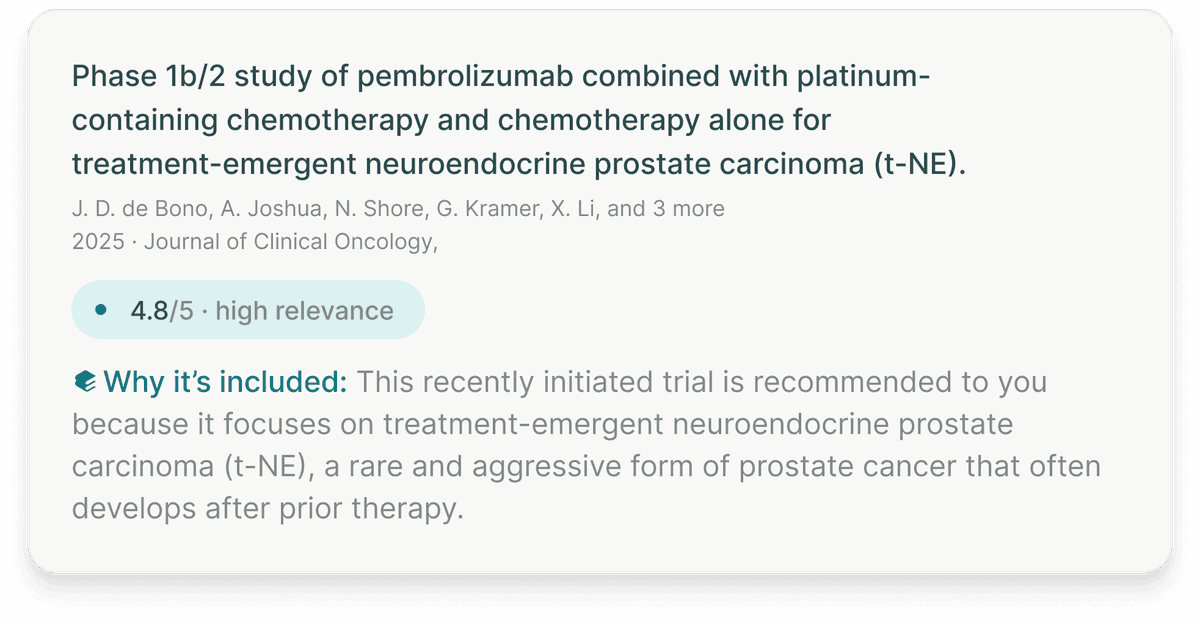
This official Elicit screenshot shows an included paper, relevance score, and explanation for why the paper was recommended. The explanation supports the screening decision with visible evidence. Elicit documents this workflow in its systematic literature review overview.
How is Atlas different?
Elicit and Atlas both help with research over sources. They differ on three jobs that decide whether the final output is defensible.
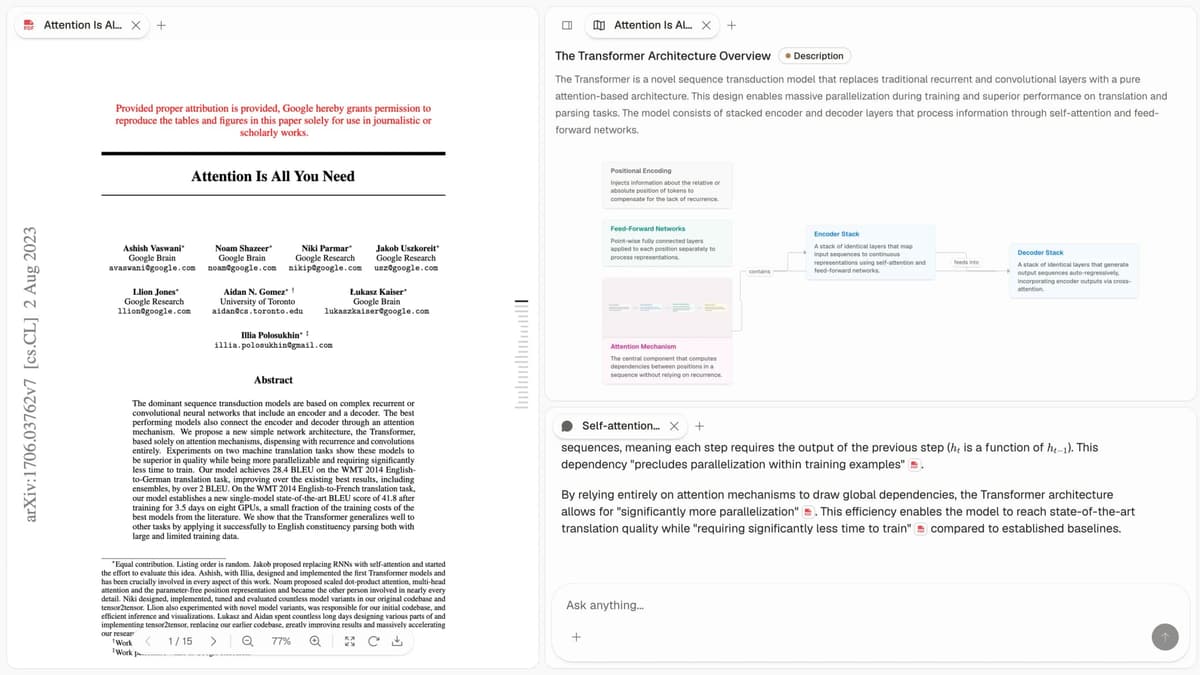
Atlas covers the close-reading stage. Cited answers sit beside a visual map of the project.
Visual maps for papers and projects
Atlas builds two visual maps as you read. A Knowledge Map shows one paper as claims, evidence, definitions, and relations. You see the paper's spine first, then click down into the passages.
A Semantic Map shows a whole project. Sources, notes, chats, and citations cluster by topic. You can look at the same project from a new angle without reading everything again. This is how 200 papers stop being a folder and start being a corpus.
The distinction between a per-paper map and a project-wide Semantic Map is explained further in our knowledge graph guide.
"It's like an ultimate GPT. I can finally see what I've read." Kyle Lao, CEO & Co-founder of MenSC Labs
Elicit does not have a per-paper argument map. It also does not have a project map you can redraw by topic. If you have tried to recover an old paper from memory, the Knowledge Map is the part you feel first.
Source traces for every claim
The hard problem is not only that an AI model may invent a claim. It may also attach a real citation to a claim the passage does not support. Atlas answers with the claim, the source passage, and a short note explaining why the passage supports the claim.
You can click into the paragraph and read the highlighted sentences in context. Elicit may include citations or links to sources. Atlas goes one level deeper. It shows why the cited passage supports the answer. For casual Q&A that difference may not matter. For a thesis sentence, legal brief, or treatment summary, it does.
Project-scoped research context
Elicit treats each project as a separate workspace. Work goes in, an answer comes out, and the next project starts mostly fresh.
Atlas keeps citations, notes, chats, Knowledge Maps, and the Semantic Map together inside the project where they were created. Later questions in that project can use the same bounded corpus.
A separate Atlas project starts with its own evidence base. Add a source to each relevant project rather than expecting another project's notes or chat history to appear automatically. Elicit remains stronger for discovering papers and extracting structured fields.
Comparing Atlas and Elicit
Atlas is deeper once you have the papers. Elicit is broader when you are still finding them.
The sections below explain the same pattern in five places. We cover paper maps, project maps, cited answers, citation notes, and project context. Each table includes at least one row where Elicit wins or ties.
Where Consensus, SciSpace, and NotebookLM fit
Consensus belongs in the nearby market. Use it when you want a quick answer from papers on a narrow question. Use Elicit when you need the paper set and extraction table. Use Atlas when the selected papers need close reading, visual maps, and source-backed synthesis. For broader context, see our guide to AI tools for academic research.
SciSpace overlaps with Elicit on paper discovery and reading, as the SciSpace vs Elicit comparison explains. NotebookLM works from an uploaded source set and emphasizes source-grounded notebooks. The Atlas vs NotebookLM comparison covers that adjacent choice.
Paper deconstruction with Knowledge Maps
The Knowledge Map is Atlas's per-paper view. It turns a paper into a layered argument map. Node text comes from the paper and stays close to its wording. You can read from the top-level thesis down to a specific paragraph.
| Atlas | Elicit |
|---|---|
| Multi-level argument structure ✓ | Structured-data extraction across papers (table view) |
| Labeled relations (motivates, causes, enables) ✓ | ✗ |
| Faithful-to-source node text ✓ | ✗ |
| Hierarchical breadcrumbs ✓ | ✗ |
| ✗ | Systematic literature search across academic indexes ✓. Search is Elicit's strength. |
Table 2: Paper deconstruction in Atlas compared with Elicit search and extraction.
Good to know: The bottom row belongs to Elicit. Atlas does not ship that surface. The Knowledge Map helps when you return to a paper weeks later and need the argument back quickly.
See the research paper analysis guide for the reading tasks behind this comparison.
Project view with Semantic Maps
The Semantic Map is Atlas's project view. It puts sources, notes, chats, and citations on a canvas where related items cluster together. You can redraw the same project around a new topic without uploading files again.
| Atlas | Elicit |
|---|---|
| Spatial embedding of sources + notes + chats ✓ | Saved-question search results table |
| Auto-labeled topic clusters ✓ | ✗ |
| Topic-angle re-projection ✓ | ✗ |
| One project-scoped evidence view ✓ | ✗ |
| ✗ | Auto-discovery of papers from a research question ✓. Discovery is Elicit's strength. |
Table 3: Project mapping in Atlas compared with Elicit discovery tables.
Good to know: Elicit's strength on that row is real. If automatic paper discovery is the main job, Elicit is the better fit. The Semantic Map helps when 200 papers stop being a folder and start being a corpus you can inspect from more than one angle.
Elicit describes its discovery workflow on the official paper search page. For ways to manage the selected corpus afterward, compare research paper organizers.
Citation-grounded answers
Atlas gives you the claim, the passage, and a short explanation. The explanation tells you why the passage supports the claim. You can jump to the source paragraph, read the highlighted sentences, and check whether the reasoning holds.
| Atlas | Elicit |
|---|---|
| Claim, source passage, and support note ✓ | Summary with inline citations to source papers |
| Reasoning traces (why this passage supports this claim) ✓ | ✗ |
| Jump-to-source with passage highlight ✓ | Jump to source paper ✓ |
| H/V ratio < 0.1 benchmark published ✓ | Per-question synthesis across papers |
| ✗ | Structured-data extraction (intervention, outcome, sample) across papers ✓. Elicit builds the extraction table. |
Table 4: Citation evidence in Atlas compared with Elicit paper synthesis.
Good to know: Both tools cite sources. The key gap is whether the tool explains why the passage supports the claim. For casual Q&A, that may not matter. For a thesis sentence, it does.
The AI citation analysis guide explains how to inspect support beyond a reference link.
Literature-grounded annotations
Atlas annotates each paper when you upload it. Citations inside the paper become objects you can inspect. When the cited source is open access, Atlas can pull the relevant passage and show how the argument builds across sources.
| Atlas | Elicit |
|---|---|
| Auto-annotate on ingest ✓ | ✗ |
| Multi-citation synthesis (how citations build the argument) ✓ | ✗ |
| Resolve cited sources (open-access) ✓ | ✗ |
| Exact passage / page / paragraph anchors ✓ | ✗ |
| ✗ | Cited academic-index access ✓. Elicit searches beyond the uploaded corpus. |
Table 5: Atlas annotations compared with Elicit academic index access.
Good to know: These notes resolve citations inside the paper you are reading. When a cited source is open access, Atlas pulls in the passage. The scope stays inside cited scholarly sources. You can see how a paper builds on prior papers.
That source-following task is covered in more detail in the AI citation tracking tools guide.
Project-scoped context
Atlas keeps citations, notes, Knowledge Maps, Semantic Maps, and chats inside one project. A separate project starts with its own sources and context.
| Atlas | Elicit |
|---|---|
| Project-scoped research context ✓ | Saved projects per question |
| Sources + notes + maps + chats share one project ✓ | Extraction state remains in an Elicit project ✓ |
| Separate projects isolate unrelated context ✓ | Separate projects organize distinct reviews ✓ |
| Sources must be added to each relevant project | Results can be exported and imported elsewhere ✓ |
| ✗ | Generous no-cost plan for discovery ✓. Free search with project-scoped storage. |
Table 6: Atlas project context compared with Elicit projects.
Good to know: Atlas keeps a source set useful when ongoing questions stay inside the same project. A separate project starts with separate context, so add the relevant sources there again.
This longer-lived library behaves more like a research-focused second brain.
Using Atlas after Elicit
Migrating from Elicit to Atlas
Most teams keep Elicit for search and extraction, then move deep reading into Atlas.
Start with the artifacts Elicit gives you. You usually have saved questions, paper lists, extracted columns, and source links. Elicit's export documentation covers CSV, Excel, RIS, and BIB formats. Download the PDFs you want to read more closely.
The clean migration path is simple:
- Create a new Atlas project.
- Upload the selected PDFs.
- Upload the exported CSV as a source.
- Let Atlas build Knowledge Maps for the papers.
- Ask synthesis questions across the PDFs and the table.
The PDFs and paper references move cleanly. The CSV also remains useful because Atlas can read it as source material. If you ask about a column from the Elicit table, Atlas can use that table next to the underlying papers.
Extraction templates, saved academic searches, and the interface for adding table columns remain in Elicit. If column extraction is the core job, keep Elicit in the stack.
Once the selected sources are in Atlas, use the research synthesis workflow. It shows how paper-level findings become a supported cross-paper answer.
Worked example with 8 papers
Imagine a review section on fasting and insulin response. You have 8 papers and need a 600-word section with citations.
In Elicit, the natural workflow is a table. You create columns for protocol, sample size, duration, outcome, effect size, and limitations. Elicit fills those fields across the papers. That is useful when the output is also a table or when you need to check a variable across many papers.
In Atlas, the same 8 papers become a project. Each paper gets a Knowledge Map. Claims sit at the top level. Supporting passages sit below them. Relations such as "supports" or "contradicts" connect the ideas.
Then you ask a synthesis question. For example, ask what the eight studies agree on and where they disagree. Atlas answers with cited passages. Each sentence has a source you can inspect. You keep the sentence, refine it, or chase the disagreement with a follow-up.
If the deliverable is a results table, Elicit is faster. If the deliverable is prose where each sentence needs evidence, Atlas carries more of the synthesis. Many researchers use Elicit first, then move the selected PDFs into Atlas for the write-up.
The literature review writing guide covers how those checked findings become a coherent section.
The payoff grows when the next subsection stays in the same project and overlaps with the same papers. Its existing notes, maps, and chats remain available for that continued work.
How to use Elicit and Atlas together
The strongest workflow uses both tools in sequence. Start in Elicit when the problem is still wide. Move to Atlas when the source set is small enough to read. Elicit's own explanation of its literature-review workflow describes semantic search, custom columns, and exports.
Here is the handoff.
- Search in Elicit with a plain research question.
- Screen the results for fit.
- Build the extraction table for fields you care about.
- Export the table and references.
- Download the PDFs you will cite or discuss.
- Upload those PDFs into Atlas.
- Ask Atlas synthesis questions that need passage-level support.
This split keeps each tool in its best role. Elicit is good at turning a broad question into a candidate set. Atlas is good at turning that candidate set into arguments you can defend.
For a student, that might mean using Elicit on Monday to find the first 25 papers. On Tuesday, the student screens abstracts and keeps 8. On Wednesday, those 8 papers go into Atlas. The student then asks Atlas which papers agree, which papers conflict, and which claims have the strongest support.
For a consultant, the flow is similar. Elicit can help find published research behind a market claim. Atlas can turn the chosen reports and papers into cited notes for a client deck. Every useful sentence can point back to the source.
For a health researcher, Elicit may help find candidate trials. Atlas helps once the trials are selected and the question shifts to interpretation. You can inspect the passage behind each claim before using it in a brief.
The handoff also keeps costs and attention cleaner. Do not upload every paper Elicit finds. Upload the papers that survived screening. Atlas works best when the project contains the set you intend to read, cite, and revisit.
Limits and review checks
What to check before trusting either tool
AI research tools can save time, and their output still needs review. Use this 5-step check:
- Check whether the cited paper matches the claim. If the claim is about a trial, confirm that the source is a trial rather than a review or commentary.
- Check the passage. A citation alone can still mislead, so the specific paragraph must support the sentence you plan to use. Apply a repeatable AI citation checker workflow to high-stakes prose.
- Check the scope. Some papers answer a narrow question, so keep the final claim within that boundary.
- Check for missing studies and hidden details. Search tools can miss papers, and extraction tools can miss details inside tables and supplements.
- Check the output format. Elicit fits a screening table, while Atlas fits a paragraph that needs passage-level support.
These checks turn a fast draft into a reliable one. The best tool makes each review step easier to inspect.
Where the boundary sits in real projects
The boundary between the tools is easiest to see by project stage.
At the start, you usually do not know which papers matter. You need search, screening, and fast extraction, so Elicit fits that stage well.
In the middle, the corpus gets smaller. You have enough papers to read, and a search table no longer answers the main question. Atlas starts to matter when the question changes from "what exists?" to "what does this body of research say?"
Near the end, the output becomes prose, slides, or a decision memo. Each sentence needs support, and you need to know which claim came from which passage. Atlas is built for that stage.
As the project continues, the split gets clearer. Elicit helped build the set, and Atlas keeps that set, its maps, notes, and chats useful inside the same project. If a separate project needs the same papers, add those sources to it again. Maps, notes, and chats do not carry over automatically.
That does not make one tool universally better. It makes the job clearer. Elicit is the search-and-table tool. Atlas is the reading, mapping, and synthesis workspace.
When Elicit is the right call
There are jobs where Elicit is the better recommendation.
First, use Elicit for column extraction across many papers. If every row is a paper and every column is a field, Elicit gets you to the table faster. Atlas does not ship a column-extraction surface.
Second, use Elicit for first-pass paper search. You have a question and do not yet know which papers matter. Elicit can search paper indexes and summarize candidates. Atlas starts from your uploaded library plus cited sources inside those papers.
Third, use Elicit when the table is the deliverable. Screening logs, evidence grids, and intervention tables fit Elicit's project view. Revisit Atlas when the review shifts from screening to close reading or prose synthesis.
This matters most in formal review work. A reviewer often needs a repeatable record of why each paper was included, excluded, or flagged for a second pass. Elicit is closer to that audit trail because the project is organized around rows, columns, and screening decisions. Atlas is closer to the reading desk after that screen. It helps you inspect the papers that survived, compare their claims, and write from passages you can defend. Elicit separately documents its PRISMA 2020 workflow. Keeping that boundary clear prevents tool sprawl and keeps the review process easier to explain to a supervisor, client, or team lead.
In regulated or high-stakes research, that division also helps with accountability. The screening record explains how the corpus was assembled, while the Atlas project explains how the surviving sources support the final argument, so reviewers can inspect both the selection process and the reasoning process without mixing them together.
Common objections and edge cases
"My field cares about systematic-review rigor and PRISMA flow diagrams. Does Atlas help?" Atlas is not a PRISMA screening tool. It does not ship a screening queue, inclusion log, or locked extraction template. Use Elicit or a purpose-built review tool for screening. Use Atlas after the included papers are selected and the review moves into synthesis.
"I want one answer that searches the open web beyond my library. Which tool?" Neither tool is a general web-answering product. Elicit searches paper indexes from a research question. Atlas works from your uploaded library and cited sources inside those papers. If you need news, blogs, or broad web sources, use a general web research tool.
"I am a solo researcher with no collaborators. Does project context still matter?" Yes. Keep an ongoing corpus in the same project when later questions should use its sources, notes, maps, and cited chats. Create a separate project when the evidence base changes.
Price comparison
Atlas is a paid product. There is no perpetual no-cost plan. You get a short evaluation sample with 10 sources and 5 lifetime AI chats. After that, Atlas Pro is $20/mo or $204/yr with unlimited sources and unlimited AI chats. The paid tier includes Knowledge Maps, Semantic Maps, and source-justified answers. Elicit publishes its current tiers on the official pricing page.
| Atlas | Elicit |
|---|---|
| Free: ✗ (evaluation sample only: 10 sources · 5 lifetime AI chats) | Basic: Free, with unlimited paper search and limited Research Agent and report usage ✓ |
| Pro: $20/mo or $204/yr (unlimited sources · unlimited AI chats · all features) | Paid: Plus $11/mo billed annually · Pro $49/mo, with higher workflow limits |
| Pro unlocks Knowledge Map, Semantic Map, and claim-source-justification ✓ | ✗ |
Table 7: Atlas and Elicit pricing tiers for research workflows.
When to choose Atlas vs Elicit
Choose Atlas when you already have the papers and need close reading, visual structure, or passage-level support for a written argument.
Choose Elicit when you still need to discover papers, screen a large candidate set, or extract the same fields across many studies.
- Want paper structure as a visual argument map? Go with Atlas. (Knowledge Map)
- Want answers that explain why a citation supports the claim? Go with Atlas. (source-justified answers)
- Want one focused evidence base for maps, notes, and cited chat? Go with Atlas. (project-scoped context)
- Want paper search from a research question? Go with Elicit.
- Tied: extracting fields from 20 papers can involve both tools. Elicit builds the table faster. Atlas helps once you need to write from the selected papers.
If Elicit has narrowed the corpus, upload those selected papers to Atlas and compare one cited synthesis against the extraction table.
Recommendations by user type
- PhD researchers: use both. Use Elicit to find candidate papers. Use Atlas once those papers need close reading.
- Students writing literature reviews: use Atlas when the assignment is a thesis, dissertation, or long review. The Knowledge Map helps you recover each paper's argument later.
- Knowledge workers: use Atlas when reports or papers feed client work. Source-justified answers are easier to defend in a meeting.
- Personal researchers with high stakes: use Atlas when the answer affects a medical, legal, or major-purchase decision. Elicit can start the search. Atlas helps defend the answer.
Elicit is the better starting point when a review begins with search or table extraction. Find papers, screen abstracts, and fill a table there. Atlas is better after the key papers are known and the question becomes synthesis. In practice, many researchers use Elicit to build the paper set and Atlas to understand, map, and cite the selected sources.
Atlas
Synthesize the papers you found in Elicit
Upload selected PDFs and inspect cited answers across the corpus.
Frequently Asked Questions
Atlas does. That is the core of Atlas's citation surface. Every answer is rendered as a claim-source-justification triple: the claim, the passage it draws from, and a one-sentence explanation of why the passage supports the claim. You can click into the source paragraph and read the highlighted sentences in context. Elicit may cite at the sentence level or link to sources, but it does not render the reasoning trace that connects the claim to the passage. That trace is the move when you need to defend a thesis sentence, a brief paragraph, or a treatment-plan summary. Read more about how Atlas grounds claims in Verifiable AI Research (2026): What It Actually Means.