
Atlas vs Notion (2026): An In-Depth Research Comparison
Atlas research vs Notion compares a visual research workspace with Notion docs and databases across citations, visual maps, collaboration, export, and pricing.
- Byline

Summary
Use Atlas for citation-grounded research synthesis. Use Notion for docs, databases, wikis, and project tracking.
The updated comparison covers citation grounding, Knowledge Maps, markdown export migration, databases, wikis, and project-scoped context.
Atlas traces claims to source passages, while Notion organizes team documents and structured workspace data.
Teams can keep Notion for documentation and use Atlas for research corpora that need verifiable answers.
Note: We make Atlas. This comparison comes from the team that built it. Where Notion has the better answer for a given research job, the article says so plainly. See the table rows where Notion wins and the "When to choose Notion" section below. The goal is to give you the data you need to choose the right tool for the kind of work in front of you. We are not trying to convince you Atlas is the answer to every research job.

Atlas

Synthesize papers with cited answers
Ask across uploaded papers and inspect the passage behind each answer.
Quick verdict
Atlas is a visual research workspace for people who work through many papers. That could mean a thesis, treatment decision, major-purchase teardown, or literature review.
Notion is an all-purpose docs-and-database tool. It gives you pages, boards, calendars, and templates for wikis, trackers, and personal knowledge bases.
Both tools can sit in a researcher's daily flow. The split comes after the first answer. Atlas turns each paper into a Knowledge Map, projects one project's corpus into a Semantic Map, and ties answers back to source passages.
Notion has the stronger template library and shared workspace model. If you need to trust an answer drawn from a focused research corpus, Atlas earns the comparison through maps and inspectable source traces.
How we compared Atlas and Notion
We compared the jobs that make the tools feel similar at first. Can they collect sources? Can they answer questions? Can they share notes? Can they turn source material into output you can defend?
I treated source context, paper structure, answer grounding, shared docs, export, and workspace boundaries as separate tests. In my judgment, Notion deserves full credit where pages, databases, or team coordination are the actual job.
Pages, wikis, task boards, CRMs, and shared workspaces favor Notion. Papers, corpora, claims, citation chains, and literature review sections favor Atlas.
How is Atlas different?
Notion and Atlas both touch reading and source work. They split on 3 points that decide whether the output is easy to defend. This section walks through them in order.
Visual maps for papers and projects
Atlas builds 2 kinds of visual map as you read. A Knowledge Map breaks a paper into claims, evidence, definitions, and links between ideas. You see the paper's spine first. Then you can click into the passages that support it.
A Semantic Map shows the whole project on 1 canvas. Sources, notes, chats, and citations cluster by topic. You can view the same project from a new angle without reading it again.
Unlike a conventional mind map or knowledge graph, the Semantic Map makes a paper corpus explorable by topic.
"It's like an ultimate GPT. I can finally see what I've read." Kyle Lao, CEO & Co-founder of MenSC Labs
Notion does not break each paper into claims and evidence. It also does not re-map a whole project from a new topic angle. If you have tried to recover a paper you read weeks ago, the Knowledge Map pays for itself first.
Visual maps make a body of papers legible at a glance. The zoomable Knowledge Map is the surface Atlas is built around.
Inspectable claim support
The hallucination problem in AI research tools isn't "the model made something up." It's "the model put a citation next to a claim that the cited passage doesn't justify."
Atlas renders every answer as a claim-source-justification triple: the claim, the passage, and a one-sentence explanation of why the passage supports the claim. You can click into the source paragraph and read the highlighted sentences in context.
The benchmark Atlas runs internally is the H/V ratio. It measures how often a cited sentence fails a passage-level check. Atlas targets H/V < 0.1, and we publish the benchmark method in Verifiable AI Research.
Notion's answers may include citations or links to sources. They are not grounded at the same claim-justification level. For casual Q&A, that difference may not matter. For a thesis sentence, legal brief, or treatment summary, it does. Every Atlas claim traces to its source, with an explanation of why the source supports it.
Project-scoped research context
Atlas keeps sources, notes, chats, Knowledge Maps, and Semantic Maps inside the project where they were created. That boundary gives every answer and map one focused evidence base. A separate project starts with its own sources, so unrelated research does not leak into the answer.
Notion uses workspace access rules. Pages and databases can connect across areas that a member can access. Choose Atlas when a bounded corpus and source trace matter. Choose Notion when flexible links across a shared workspace or a broader second-brain app matter more.
Comparing Atlas and Notion
Both tools help with research, but they serve different jobs. Atlas maps papers, links claims to passages, and keeps project context alive.
Notion handles workspace pages, docs, databases, templates, and shared systems.
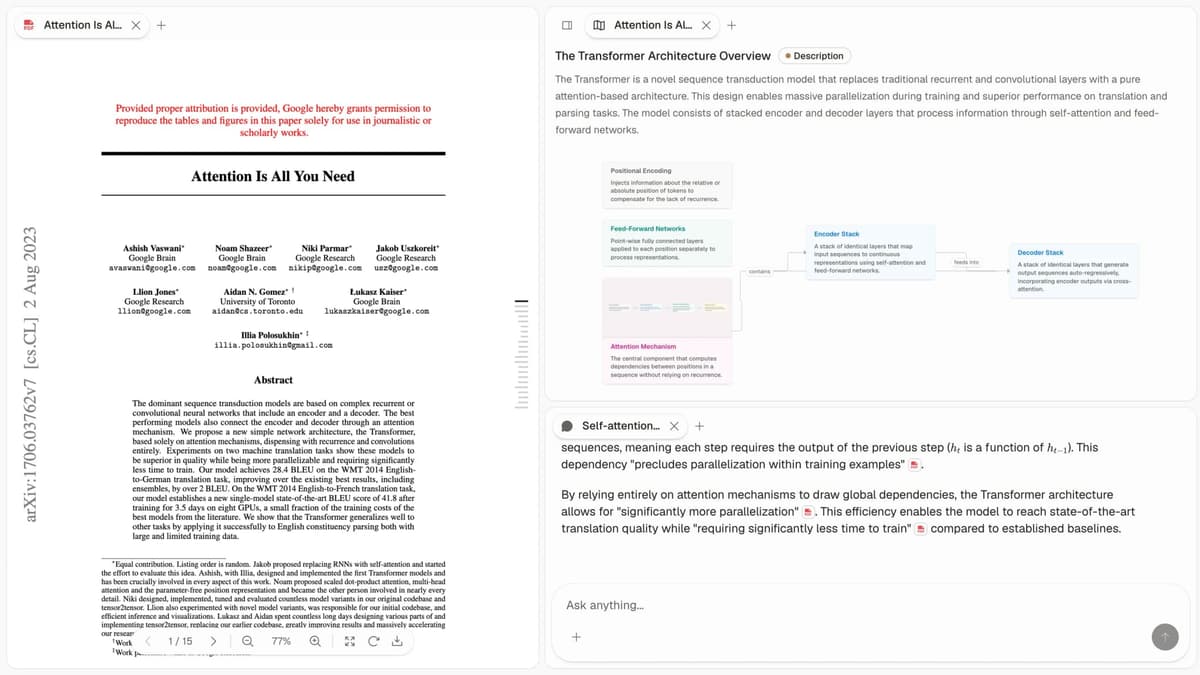
The screenshot above is taken directly from the Atlas product. I used the table below to judge each product on citation grounding, Knowledge Maps, database views, AI writing help, markdown migration, team collaboration, and pricing. I credit Notion wherever its workspace model is the stronger fit.
| Atlas | Notion |
|---|---|
| Citation grounding: Atlas pairs each answer with the claim, source passage, and reason the passage supports it. | Citation grounding: Notion can answer over page content, but it does not show the same claim-to-passage reasoning trace. |
| Knowledge Maps: Atlas turns each uploaded paper into claims, evidence, definitions, and links between ideas. | Knowledge Maps: Notion has no native paper argument map. Users build notes, outlines, or databases by hand. |
| Database views: Atlas is not a relational database tool. It organizes papers through projects, maps, citations, and source traces. | Database views: Notion wins here with tables, boards, calendars, galleries, relations, rollups, formulas, and filters. |
| Shared workspace database: No. Atlas does not replace a shared database workspace. | Shared workspace database: Yes. Notion is built for this job. |
| AI writing help: Atlas is strongest for cited synthesis over uploaded sources. | AI writing help: Notion is stronger for drafting, summarizing, rewriting, and Q&A over workspace pages. |
| Markdown migration: Atlas accepts the source PDFs. You rebuild structure as projects and maps. | Markdown migration: Notion exports pages and databases as Markdown, CSV, HTML, or PDF. |
| Team collaboration: Atlas is a single-user research workspace today. Share the output elsewhere when teammates need to edit. | Team collaboration: Notion wins with real-time editing, comments, permissions, and teamspaces. |
| Pricing: Atlas offers an evaluation sample, then Atlas Pro at $20/mo or $204/yr. | Pricing: Notion has Free and Plus plans, with Notion AI included on Business and Enterprise. |
Table 1: Atlas vs Notion feature comparison across citation grounding, Knowledge Maps, database views, AI writing help, migration, collaboration, and pricing.
Paper deconstruction with Knowledge Maps
The Knowledge Map is Atlas's per-paper view. It breaks a paper into claims, evidence, and links between ideas. The node text is drawn directly from the paper.
Breadcrumbs let you move from the main thesis to a specific paragraph, supporting a structured research-paper analysis workflow.
| Atlas | Notion |
|---|---|
| Multi-level argument structure ✓ | Manual pages with embedded PDF previews |
| Labeled relations (motivates, causes, enables) ✓ | ✗ |
| Faithful-to-source node text ✓ | ✗ |
| Hierarchical breadcrumbs ✓ | ✗ |
| ✗ | Flexible page and database templates ✓. requires manual setup. Paper argument structure is not auto-deconstructed |
Table 2: Knowledge Map capabilities in Atlas vs Notion, covering argument structure, labeled relations, node text fidelity, and breadcrumbs.
Good to know: The bottom row belongs to Notion. Atlas does not ship that surface. The Knowledge Map's payoff is recovering a paper's argument three weeks after you first read it, when topic chips alone are no longer enough.
Project view with Semantic Maps
The Semantic Map is Atlas's per-project surface. It projects all the sources, notes, chats, and citations in a project into a spatial embedding where related items cluster by topic. Re-project the same canvas under a different topic angle without re-ingesting anything.
| Atlas | Notion |
|---|---|
| Spatial embedding of sources + notes + chats ✓ | Database views (table, board, calendar) of source rows |
| Auto-labeled topic clusters ✓ | ✗ |
| Topic-angle re-projection ✓ | ✗ |
| One project-scoped evidence view ✓ | ✗ |
| ✗ | Real-time collaboration and team sharing ✓. strong for team docs. Does not add research-level citation depth |
Table 3: Semantic Map capabilities in Atlas vs Notion, covering spatial embedding, topic clusters, re-projection, and project-scoped evidence.
Good to know: Notion's strength on that row is genuine. If your work depends on it, that's the boundary. The Semantic Map's payoff is when 200 papers stop being a folder and start being a corpus you can re-project under different topic angles without re-reading.
Citation-grounded answers
Atlas produces claim-source-justification triples. Each answer shows the claim, the passage, and a short note on why the passage supports the claim.
You can jump to the source paragraph, read the highlighted sentences, and perform an AI citation check before using the answer.
| Atlas | Notion |
|---|---|
| Claim-source-justification triples ✓ | Notion AI Q&A over pages (no claim-source-justification) |
| Reasoning traces (why this passage supports this claim) ✓ | ✗ |
| Jump-to-source with passage highlight ✓ | ✗ |
| H/V ratio < 0.1 benchmark published ✓ | ✗ |
| ✗ | Integration with team tools (Slack, Linear, GitHub) ✓. good for connecting workflow tools. Citation grounding is not part of its scope |
Table 4: Citation-grounded answer capabilities in Atlas vs Notion, covering claim-source-justification triples, reasoning traces, source highlighting, and H/V benchmark.
Good to know: Both tools can point to sources. The key question is whether the tool explains why a passage supports a claim. A missing reasoning trace may go unnoticed in everyday Q&A. It matters for a thesis sentence or brief paragraph.
Literature-grounded annotations
Atlas annotates each paper on ingest. Citations inside the paper become objects you can inspect. When a cited source is open-access, Atlas pulls the relevant passage. You can see how the paper builds its argument without leaving the document.
Atlas creates paper annotations during ingest and can resolve cited sources when they are open-access. Exact passage, page, and paragraph anchors support closer citation analysis.
Notion handles this as manual page comments and wiki notes. Those tools suit memos, while Atlas adds a paper-level citation layer.
Good to know: These annotations resolve citations inside the paper you're reading. When a cited source is open-access, Atlas pulls in the passage. You can see how one paper builds its case from the sources it cites.
Project-scoped context
Atlas keeps citations, notes, Knowledge Maps, Semantic Maps, and chats inside one project. Those surfaces share the same uploaded evidence. A separate project has a separate evidence base.
| Atlas | Notion |
|---|---|
| Project-scoped research context ✓ | Workspace pages and database queries ✓ |
| Sources, notes, maps, and chats share one evidence base ✓ | Pages and databases share a workspace ✓ |
| Separate projects isolate unrelated context ✓ | Accessible pages can link across teamspaces ✓ |
| Sources must be added to each relevant project | Workspace content remains available according to permissions |
| ✗ | Template community and shared workspaces ✓. Templates support fast coordination, while citation traces are outside their scope |
Table 5: Project context in Atlas vs Notion, covering evidence boundaries, shared surfaces, and workspace access.
Good to know: Atlas's project boundary is deliberate. Put sources that answer the same research question together, and create a separate project when the evidence should stay isolated.
Price comparison
Atlas is a paid product. There is no permanent free plan. Per Atlas pricing, you get an evaluation sample with 10 sources and 5 lifetime AI chats. After that, Atlas Pro costs $20/mo or $204/yr and includes unlimited sources and unlimited AI chats.
Notion's current pricing lists Free at $0 and Plus at $10 per member each month. Business costs $20 per member each month, while Enterprise pricing is custom. Business and Enterprise include Notion AI. Free and Plus provide a limited trial.
| Atlas | Notion |
|---|---|
| Free: ✗ (evaluation sample only: 10 sources · 5 lifetime AI chats) | Free: Personal use free, basic AI usage limited ✓ |
| Pro: $20/mo or $204/yr (unlimited sources · unlimited AI chats · all features) | Plus: $10/member/mo with a limited Notion AI trial |
| Pro unlocks Knowledge Map, Semantic Map, and claim-source-justification ✓ | Business: $20/member/mo with Notion AI. Enterprise pricing is custom |
Table 6: Pricing comparison between Atlas and Notion, including free tier, Pro tier, and feature unlocks.
When to choose Atlas vs Notion
- Want paper structure deconstructed multi-level? Go with Atlas. (Knowledge Map)
- Want answers that explain how each citation justifies the claim? Go with Atlas. (claim-source-justification)
- Want one focused evidence base for maps, notes, and cited chat? Go with Atlas. (project-scoped context)
- Want shared docs, databases, and templates? Go with Notion.
- Tied: keeping a reading list with notes you share with a teammate: both work fine. The wedge only opens up once you're building a corpus you'll return to.
The deciding boundary is the object you need to manage. Atlas centers its research flow on a source and its supporting passages. Notion centers its workspace on a page or database row.
Use this five-question test if the answer is still ambiguous:
- If you need to defend claims to a supervisor, client, reviewer, or teammate, lean Atlas. If a linked page is enough, lean Notion.
- If the main object is a PDF corpus, lean Atlas. If the main object is a page tree, lean Notion.
- If the evidence should stay bounded to one research question, lean Atlas. If pages should connect across a shared workspace, lean Notion.
- If teammates need to co-edit the output live, use Atlas for the research layer and Notion for the shared document.
- If the main job is tasks, meetings, CRM, calendar, or wiki upkeep, use Notion.
Recommendations by user type
- PhD researchers: Atlas. Years 1-2 are full of literature review work, where Knowledge Maps save rereading. Years 3-4 need source traces for thesis claims. Notion works for one-off tasks. Atlas is better for multi-year research.
- Students doing literature reviews and thesis research: Atlas, scoped to dissertation, thesis, and literature review work. Knowledge Maps help most during the reading phase, while each project keeps its sources and cited conversations together.
- Knowledge workers (consultants, analysts, PMs, journalists): Atlas for reading and citing papers. Notion for documenting decisions, building wikis, or running shared project trackers.
- Personal researchers with stakes: Atlas for medical, legal, major-purchase, or deep self-study work. Notion is a fine start. Atlas becomes useful once you need to defend the answer.
Notion is better when the job is pages, databases, projects, and shared docs. Atlas is better when the job is source reasoning with checkable citations. The Atlas and Obsidian comparison covers a more local-first alternative. Many groups keep Notion as the operating layer and use Atlas for the research corpus underneath. That split keeps each product in its lane.
Data ownership, privacy, and portability
Ask what your research looks like when it leaves each product. Notion has mature export. Pages and databases can leave as Markdown, CSV, HTML, or PDF. Those formats work well for docs, lists, and project records.
Atlas keeps source traceability at the center of each research project. The uploaded paper stays as the anchor. Notes and synthesis point back to passages, maps, and source traces.
For a research group, the boundary is straightforward. Keep records, meeting notes, task history, and shared docs in Notion. Those files need live editing and page export. Keep source-heavy synthesis in Atlas. That work needs exact passage anchors and reasoning traces. Your data is private to your Atlas account and is not used to train Atlas models. If your institution requires local-only storage, review both products before use.
Architecture and workspace boundaries
A Notion page starts as a tree of blocks. A database is a set of pages with properties, views, filters, formulas, relations, and rollups. That structure gives Notion its flexibility. The same base unit can become a meeting note, CRM row, task, wiki page, or content calendar entry. It also suits shared operations.
Atlas starts from source-grounded project context. A paper becomes a Knowledge Map. Project material becomes a Semantic Map. Citations, notes, maps, and chats stay associated with that project. This is a focused form of knowledge-graph AI. Database rows remain outside its scope. Atlas keeps a claim tied to the passage, paper, and project that justify it.
The query fields reveal the better fit. Use Notion for rows organized by status, owner, due date, and relation. Use Atlas for claims organized by paper, passage, citation chain, and project evidence.
Atlas quickstart for a Notion user
Do not start by recreating your Notion workspace in Atlas. Start with one source-heavy project where Notion is weakest.
- Pick a real research question that has papers behind it. Generic note-taking tasks will not show Atlas at its best.
- Export or locate the PDFs that support that question.
- Upload 3-10 papers to one Atlas project.
- Open the Knowledge Map for the paper you know best and check whether the top-level claims match your reading.
- Ask one synthesis question across the uploaded papers.
- Inspect two or three source traces before trusting the answer.
- Move only the final memo, decision, or summary back into Notion if collaborators need to edit the output.
That quickstart keeps each product in its native form. Notion remains the operating layer. Atlas becomes the evidence layer under the research claim.
Templates and integrations
Notion has the broader ecosystem by a wide margin. It has templates, a web clipper, an API, embeds, and documented workspace connections. That makes it faster to build calendars, hiring pipelines, roadmaps, class notes, sprint boards, CRM views, and dashboards. If your workflow depends on a template or connected app, Notion is the safer bet.
Atlas is narrower on purpose. The product does not try to replace a shared wiki, ticket tracker, or automation hub. The ecosystem question is therefore less "which has more integrations?" and more "where should the source of truth live?" Use Notion as the integration layer when the source of truth is a page, task, status, owner, deadline, or meeting record. Use Atlas as a research-paper organizer when the source of truth is a paper, citation chain, claim, evidence passage, or corpus map. The cleanest stack is Notion for coordination and Atlas for source-grounded reasoning.
Migrating from Notion to Atlas
Migration from Notion to Atlas requires more than 1 import. The tools store research in different ways. Notion stores pages and database rows. Atlas stores papers, Knowledge Maps, Semantic Maps, notes, and chats within projects. Transfer the source material first. Then rebuild the structure in Atlas's native form.
What Notion exports. From workspace settings or a page menu, Notion can export to Markdown + CSV, HTML, or PDF, as documented in Notion's export guide. Markdown + CSV is the best default for research. It gives you .md files for pages, .csv files for databases, and attached PDFs in the zip.
What migrates cleanly. Page bodies, headings, lists, and inline links move without much trouble. Database rows with text fields also come across cleanly. The key artifact is the attached PDF. Upload those PDFs to Atlas, and each one becomes a Knowledge Map on ingest.
What does not migrate. Notion formulas, rollups, database relations, synced blocks, Notion AI Q&A history, and template buttons are Notion-native. Atlas is not a database tool, so it does not mirror them. Page comments become inline text. Embeds become links.
Recommended order:
- Export the Notion workspace as Markdown + CSV with subpages included.
- Unzip the export and find the PDF attachments.
- Upload PDFs to Atlas in batches by project.
- Rebuild project structure as Atlas Semantic Maps instead of recreating the Notion page tree.
- Keep Notion as the shared wiki when existing docs already live there.
Worked literature-review example
Suppose you need to turn 8 papers on retrieval-augmented generation into a 600-word background section. Every claim needs a citation your supervisor can check.
In Atlas, you drag the 8 PDFs into a new project. Each one becomes a Knowledge Map within a few minutes. Claims are nodes. Evidence sits under them. Labeled links show how the ideas connect. You open 2 or 3 maps side by side and scan where the papers agree or diverge. Then you ask how the 8 papers define and evaluate retrieval-augmented generation.
The answer returns with source traces for each claim. You check 2 or 3 passages, move the verified points into your draft, and edit them into prose. The Semantic Map shows which papers you have leaned on and which ones are still underused. This research-synthesis workflow keeps every sentence traceable.
In Notion, you create a database for the 8 papers. You add title, authors, key claims, and source URL fields. Each PDF opens in a tab or embed. You read it, paste excerpts into the notes field, and tag the claims by hand.
To synthesize, you re-read the rows or ask Notion AI over the page. The answer may quote your excerpts. It does not provide the same claim trace or map across papers. You type citations into the draft from the source field. The review can take a few sittings, and you must remember each thesis sentence's source passage.
Notion is faster when you already know the exact quote. Its editor lets you paste that quote into a draft without uploading a PDF or waiting for ingest.
For a single known quote, Notion wins on speed. Atlas wins when you must synthesize across sources and defend the paragraph.
When Notion is the right call
Notion is the better tool for several research-adjacent jobs, and we'd recommend it without hedging:
- Shared wikis: If a group needs onboarding docs, decision logs, meeting notes, or runbooks, use Notion. Its editing, permissions, and page tree are built for that job. Atlas is single-user today, so it is the wrong form for a shared wiki.
- Project trackers with databases: Notion handles boards, calendars, relations, rollups, formulas, and CRM-style pipelines. Atlas has no database primitive and no intent to add one.
- Lightweight personal notes: For a journal, meeting notes, recipes, or a personal knowledge base, Notion has the right level of structure. Atlas's per-paper maps are overkill for notes that are not tied to source documents.
- Templates: Notion's template library covers most common workflows. If your work matches a popular template, Notion is the fastest setup.
Use the unit of work as the diagnostic. If it is a page or database row rather than a paper, Notion is almost always the right call.
Common objections and edge cases
Can I use both Atlas and Notion together? Yes, and many researchers do. Use Atlas for the corpus. That means PDFs, Knowledge Maps, Semantic Maps, and source-traced answers. Use Notion for the shared layer, such as memos, decision logs, trackers, and wikis. There is no direct integration. Sources are uploaded to each tool separately. The workflows still fit together. Do the deep reading in Atlas, then write the shared memo in Notion.
What about Notion AI's Q&A over my pages? Notion's AI overview documents writing, workspace Q&A, and connected-app search, while Research Mode handles broader reports on eligible plans. Notion AI is capable, but its evidence trace differs. It grounds at the page or citation level. Atlas shows the claim, source passage, and reason together. For more options, compare the dedicated Notion AI alternatives guide.
How does pricing compare at low volume? Notion has a usable free personal plan. Atlas has an evaluation sample of 10 sources and 5 lifetime AI chats. For casual notes, Notion Free is the cheaper start.
Notion Plus is $10 per member each month and includes a limited Notion AI trial. The Business plan costs $20 per member each month and includes Notion AI, according to Notion pricing. Atlas Pro costs $20 per month. Compare the research surfaces included at each price.
Atlas Workspace, NotebookLM, and ChatGPT
Here, Atlas Workspace means the Atlas AI research workspace compared throughout this article. NotebookLM and ChatGPT are adjacent AI options for source Q&A or general assistance.
Obsidian.md and ForthWrite
Obsidian.md is a local Markdown knowledge base. ForthWrite is an email drafting tool, so it does not replace either Atlas or Notion for the workflows assessed here.
Final comparison table
I use this final table as the decision check. Notion keeps every workspace advantage it earns, while Atlas wins only where a researcher needs claim-to-passage evidence. The side-by-side view restates the practical choice before the recommendation.
| Atlas | Notion |
|---|---|
| Citation grounding: Yes. Atlas shows the claim, passage, and reason together. | Citation grounding: Partial. Notion can answer over pages, but it does not show the same source trace. |
| Knowledge Maps: Yes. Atlas maps each paper into claims and evidence. | Knowledge Maps: No. Notion users build notes and outlines by hand. |
| Database views: No. Atlas is not a shared database workspace. | Database views: Yes. Notion is built around pages and databases. |
| AI writing help: Best for cited synthesis over uploaded sources. | AI writing help: Best for drafting and Q&A over workspace pages. |
| Markdown migration: Upload source PDFs and rebuild the project map. | Markdown migration: Export pages and databases as Markdown, CSV, HTML, or PDF. |
| Team collaboration: Single-user research workspace today. | Team collaboration: Real-time editing, comments, permissions, and teamspaces. |
| Pricing: Evaluation sample, then Atlas Pro. | Pricing: Free and Plus plans. Notion AI is included on Business and Enterprise. |
Table 7: Final side-by-side comparison of Atlas vs Notion across citation grounding, Knowledge Maps, database views, AI writing help, migration, collaboration, and pricing.
Final recommendation
Choose Notion if the next step is a shared workspace. Use it for pages, databases, tasks, templates, wikis, and shared docs.
Choose Atlas if the next step is cited research. Upload papers. Inspect the Knowledge Map. Ask a cited question. Check the source trace before the answer becomes part of a memo, thesis, or decision brief.
Atlas
Synthesize papers with cited answers
Ask across uploaded papers and inspect the passage behind each answer.
Frequently Asked Questions
Atlas is built around this citation surface. Every answer is rendered as a claim-source-justification triple: the claim, the passage it draws from, and a one-sentence explanation of why the passage supports the claim. You can click into the source paragraph and read the highlighted sentences in context. Notion may cite at the sentence level or link to sources, but it does not render the reasoning trace that connects the claim to the passage. That trace is the move when you need to defend a thesis sentence, a brief paragraph, or a treatment-plan summary. The detailed grounding method is covered in the Verifiable AI Research guide.