


Notion AI launched as a paid add-on for the Notion workspace. It does three jobs well: summarize a page, draft from a prompt, and answer questions about your workspace. The 2024-2026 wave of rivals goes deeper on cited answers, fast capture, project work, or open code.
This guide ranks 7 Notion AI alternatives by the four jobs people use AI workspaces for: cited answers, fast capture, project work, and open code.
Ask cited questions across research sources
Upload your documents and trace each answer back to the exact passage.
Why switch from Notion AI?
For the deeper framework, Cognitive Load, Vendor Lock-in, and Knowledge-Graph Density, applied across eight leading second-brain apps, see our second-brain apps guide.
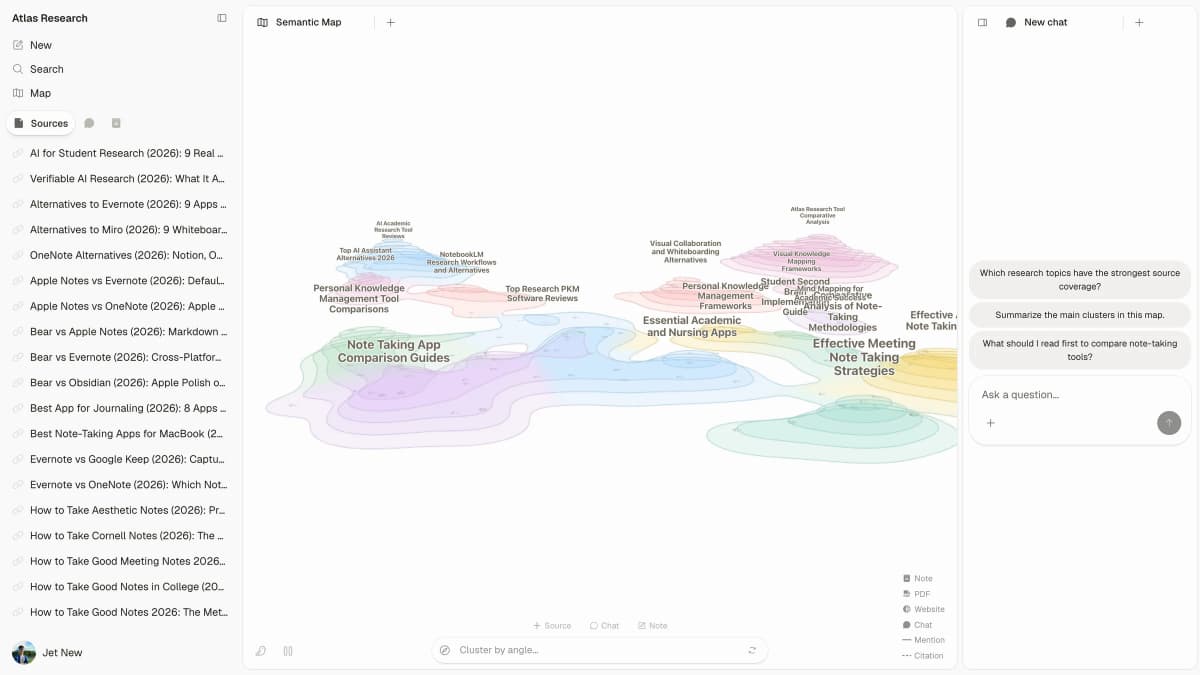
Switch for source depth when you need to see the exact passage behind an answer. Notion AI summarizes pages and answers workspace questions, which covers most quick lookups. Atlas's Semantic Map shows how a project's notes and PDFs group by topic, and each answer cites the passage behind it.
Switch for ownership when closed cloud SaaS is the problem. AppFlowy, Anytype, and Obsidian let you keep data local or self-hosted.
Switch for specialization when one workflow matters more than an all-in-one workspace. Mem is built for fast AI-first capture. ClickUp Brain is built for project management plus AI. Coda is built for doc-as-spreadsheet workflows.
How to choose a Notion AI alternative
Judge each tool by the job that made you search. Start with source proof. Then check export, team rights, and the real price after AI is included.
For research and study, citations matter more than writing polish. For teams, task context and access rules matter more. For open-code buyers, local files and API-key control matter most.
Use a citation-trace test before switching. Upload the same source set to each tool. Ask one question that needs a quote-level answer. Then check whether the answer links to the exact passage. If the tool only links to a page, treat it as workspace search. If it links to the paragraph or chunk, treat it as research-grade AI.
This test is quick. It also exposes fake confidence. A useful research tool should show where the answer came from.
Do not skip this step. It saves cleanup time later.
7 best Notion AI alternatives
1. Atlas: Best for cited synthesis
Atlas holds your notes, PDFs, and web pages in a project and answers questions across them. Each answer cites the passage behind it, and the Semantic Map groups the project's sources by topic.
Choose Atlas if your main problem is research answers, not workspace drafting. The Atlas and Notion comparison explains where each workspace fits. Atlas has a Free plan, and Plus is $20/month with hundreds of AI messages a month.
2. ClickUp Brain: Best for project teams
ClickUp Brain is the AI add-on for ClickUp's project tool. It can write task notes, recap updates, and answer from docs and tasks. It fits teams that already run work in ClickUp.
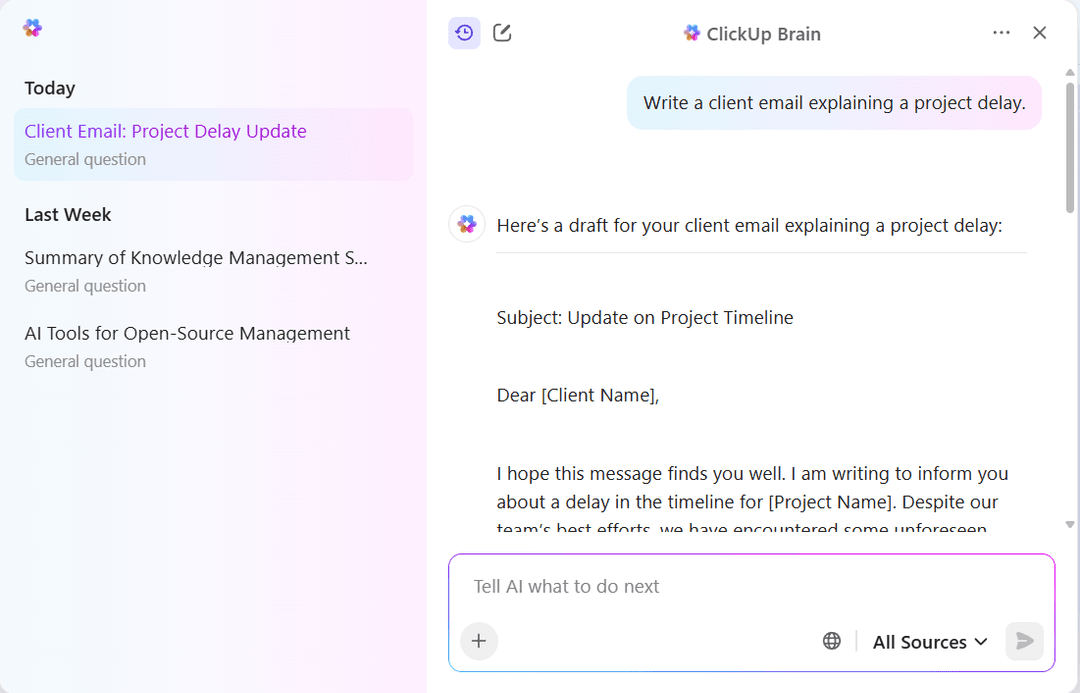
The launch screenshot shows a project-delay email prompt and the draft response. Official ClickUp Brain announcement.
Choose ClickUp Brain if ClickUp is already the team's project hub. ClickUp's pricing page lists Brain AI at $9 per user per month on top of a ClickUp plan.
3. Coda AI: Best for structured docs
Coda AI works inside Coda's doc-meets-spreadsheet workspace. It writes text, recaps docs, and fills table rows from prompts. It is stronger than Notion for docs that act like sheets.
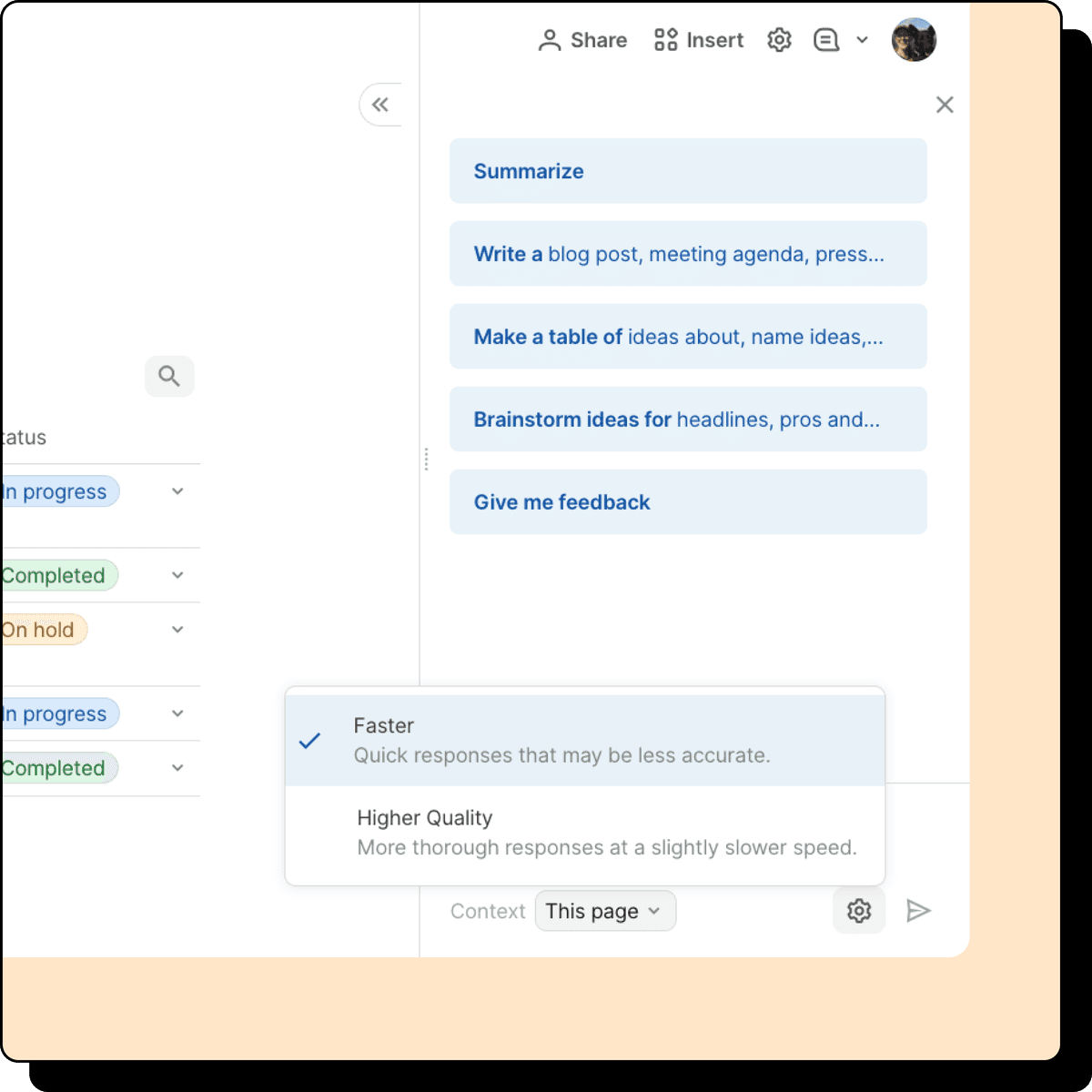
Coda AI opens as a side panel in a doc with a status table: one click to Summarize, Write, Make a table, Brainstorm ideas or Give me feedback, a Faster or Higher Quality setting, and “This page” as its context. That makes it a workspace assistant for drafting and tables, not a tool for cited answers across files. Official Coda AI feature guide.
Choose Coda AI if your team runs ops in docs with tables. Coda is now Superhuman Docs, and its page says Coda AI is included for Doc Makers. Coda's pricing page redirects to Superhuman's Docs plans, so check current prices there.
For an Apple-first writing app with bundled AI, Notion vs Craft compares the solo-user path.
4. Mem: Best for quick capture
Mem is an AI-first notes app. You write quickly, then Mem organizes notes through tags, links, and chat. It feels much lighter than Notion's structured-workspace model.
Choose Mem if you want fast capture without folder hierarchies. Mem's free plan allows 25 new notes and 25 messages a month. Plus is $9/month and Pro is $29/month.
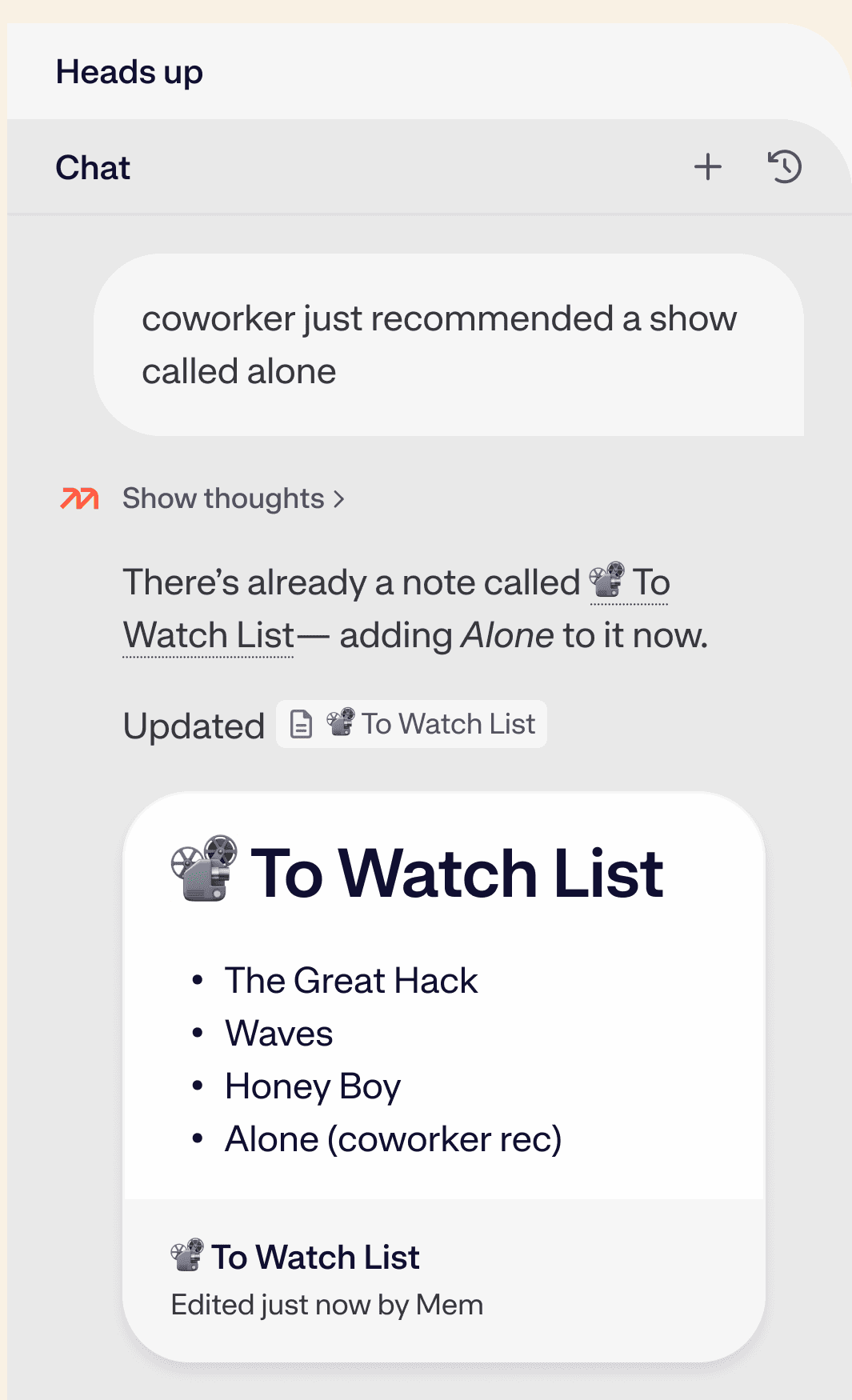
Mem's published Push-to-Remember example shows an Agent adding a movie recommendation to an existing note. The list is vendor demo content.
5. Obsidian + Smart Connections
Obsidian with the Smart Connections plugin adds AI search to local Markdown files. The plugin ships with a local embedding model that surfaces related notes, and its companion Smart Chat plugin answers with a model you connect, such as an API key or a local model.
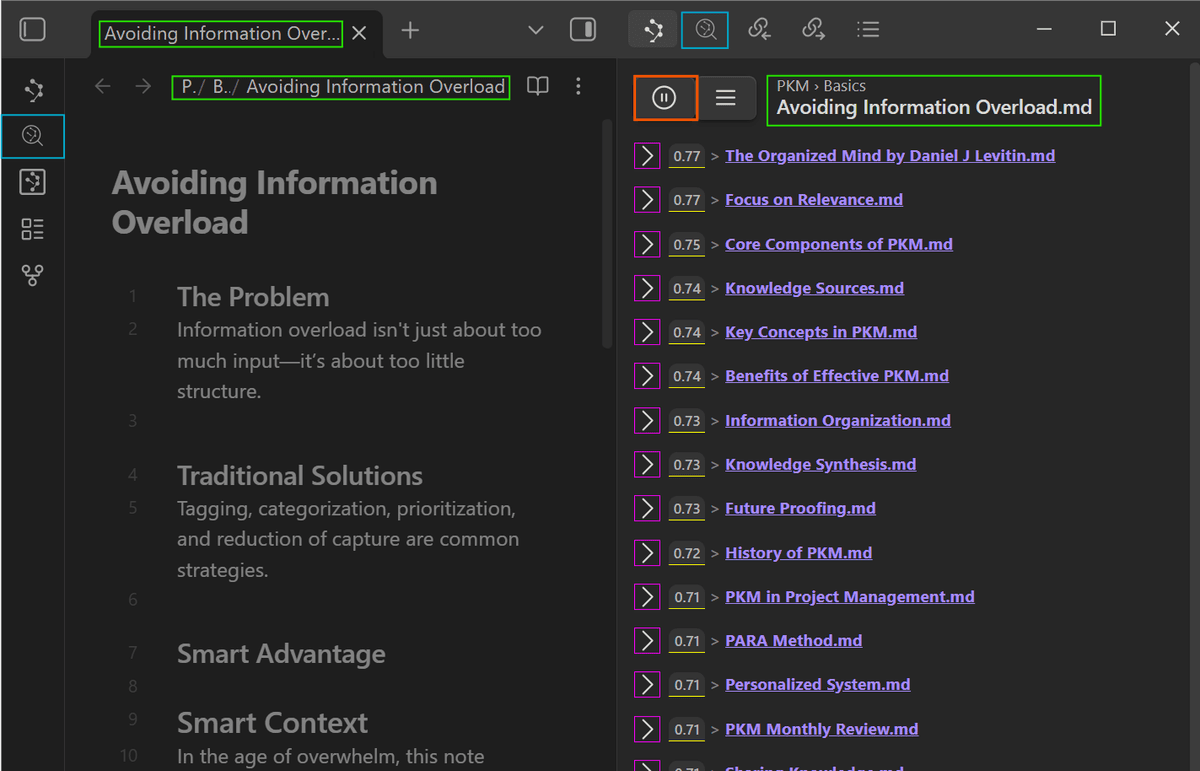
The plugin’s Connections pane ranks related notes beside the current note. Official Smart Connections documentation.
Choose Obsidian + Smart Connections if you want local files plus AI. The app and plugin are free, but you pay your model provider. For Apple-only note apps, see Notion vs Apple Notes. For more options, see Apple Notes alternatives.
6. Anytype: Best for private notes
Anytype keeps notes local first, with P2P sync and end-to-end encryption. Its object model feels close to Notion databases. AI support is still early.
Choose Anytype if privacy and local files matter more than mature AI. It is free to start.

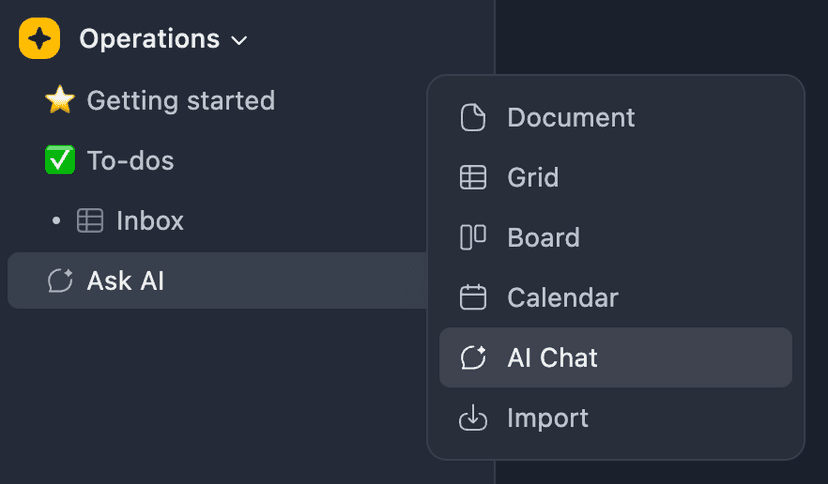
The menu shows several object types available when creating content in Anytype. Official product page.
7. AppFlowy: Best open-code workspace
AppFlowy is an open-code Notion-style app with AI through an OpenAI API key. You can self-host it under the AGPL license. In 2026, it is the closest open-code match to Notion.
Choose AppFlowy if your team wants a full Notion-style app with open code. AppFlowy's Personal plan is free, and Pro is $12 per member per month billed yearly.

Other alternatives for narrower needs
These tools did not make the top 7 because they solve a narrower job. Check them if that job is your real reason for leaving Notion AI.
- Docmost is a strong fit when you want an open-source wiki that feels closer to Confluence or internal docs than a personal AI workspace.
- AFFiNE is worth a look when you want docs, whiteboards, databases, and AI in one local-first app.
- Tana fits graph-first teams that want notes, tasks, and projects as linked nodes instead of pages.
- Slite fits teams that care more about a maintained knowledge base than a flexible block workspace.
Comparison table
Use this table to narrow the list before reading pricing. Atlas is strongest for cited answers. ClickUp Brain and Coda AI make more sense when the work already lives in those apps.
| Tool | Best For | Free Tier | Paid From | Open Source | AI Q&A |
|---|---|---|---|---|---|
| Atlas | Cited answers | Yes | $20/mo Plus | No | Yes (cited) |
| ClickUp Brain | PM-heavy teams | ClickUp plan only | $9/user/mo add-on | No | Yes |
| Coda AI | Doc + DB | Yes | See Superhuman Docs plans | No | Yes |
| Mem | AI-first capture | Yes | $9/mo Plus | No | Yes |
| Obsidian + SC | Local files | Yes | $0 (plus model costs) | Source-available plugin | Yes (your model) |
| Anytype | Local-first encrypted | Yes | $0 to start | Yes | Limited |
| AppFlowy | Open-code Notion | Yes | $12/member/mo Pro | Yes | Yes |
Table 1: Notion AI rivals compared by use case, free access, entry price, code access, and AI question answering.
Best Notion AI alternative by use case
Use the following shortlist when one requirement matters more than the rest. Test the leading choice with your own documents before moving the whole workspace.
- Choose Atlas for cited research answers.
- Choose ClickUp Brain for teams that live in tasks.
- Choose Coda AI for docs plus tables.
- Choose Mem for AI-first capture.
- Choose Obsidian + Smart Connections for local files.
- Choose Anytype for private notes.
- Choose AppFlowy for the closest Notion-style app with open code.
If Notion AI falls short on citations, upload the same documents to Atlas and ask a question that requires evidence from more than one source. Open the cited passages before you reuse the answer.
Annual pricing for individuals and teams
Notion AI is now part of Notion's Business plan, listed at $20 per member per month on monthly billing, while Free and Plus get only a trial (Notion pricing). Here is what a year costs at each tool's listed price, checked October 2026:
| Tool | Solo annual | Team of 5 annual | What's included |
|---|---|---|---|
| Atlas Plus | $240 | $1,200 (five Plus accounts) | Cited answers across sources |
| Notion Business (includes Notion AI) | $240 at monthly rate | $1,200 at monthly rate | Workspace + AI, up to 20% less billed yearly |
| ClickUp Unlimited + Brain AI | $192 ($84 + $108) | $960 | PM + AI |
| Mem Plus | $108 | No team plan listed | AI-first capture |
| Obsidian Sync + Smart Connections | $48 + model costs | $240 + model costs | Local files + your model |
| AppFlowy Pro | $144 | $720 | Hosted, or self-host |
| Anytype | $0 to start | $0 to start | Local-first |
Table 2: One-year costs for a solo user and a five-person team at each vendor's listed price in October 2026. ClickUp uses yearly-billed Unlimited plus Brain AI; Coda is left out because its prices now sit on Superhuman's plan page.
Individual pricing
For one person, Obsidian Sync ($48/year plus model costs) and Mem Plus ($108/year) cost least among the paid options here. Getting Notion AI now means Notion's Business plan, $240/year at the monthly rate.
Team pricing
For teams, the bring-your-own-model route costs least but takes more work. Five Obsidian Sync seats cost $240 a year before model costs, against $1,200 for five Notion Business seats at the monthly rate. The tradeoff is operational work: API quotas, model choice, and rate limits. AppFlowy sits in between at $720 a year for five Pro members, or you can self-host it.
Privacy, data residency, and self-hosting
AI workspaces send note content through model APIs. That makes data handling more sensitive than it is in plain note tools. Here is each tool's stance in 2026:
- Atlas is a cloud workspace. The sources you add stay in your projects, and answers cite them, so check what you upload as you would with any cloud tool.
- Notion AI: Notion's pricing page lists zero data retention with LLM providers on Enterprise, and its Notion AI FAQ describes a workspace setting that controls whether data is shared to improve Notion AI.
- ClickUp Brain, Coda AI, and Mem are cloud services that send note content to AI model providers. Check each vendor's security and AI data pages for certifications and training rules before adding sensitive material.
- Obsidian + Smart Connections has the strongest privacy story for solo users. Notes stay in local Markdown files. AI calls go from your machine to your chosen API, such as OpenAI, Anthropic, or a local Ollama model.
- Anytype is local-first with end-to-end encryption and P2P sync. It has few AI features so far.
- AppFlowy can be self-hosted, and its pricing page lists a Local AI option for running AI on your own machine.
Teams with strict rules should compare Notion Enterprise, ClickUp Enterprise, and self-hosted AppFlowy against their own requirements. Solo users who want on-device AI can start with Obsidian + Smart Connections and a local model.
AI answer quality and source citations
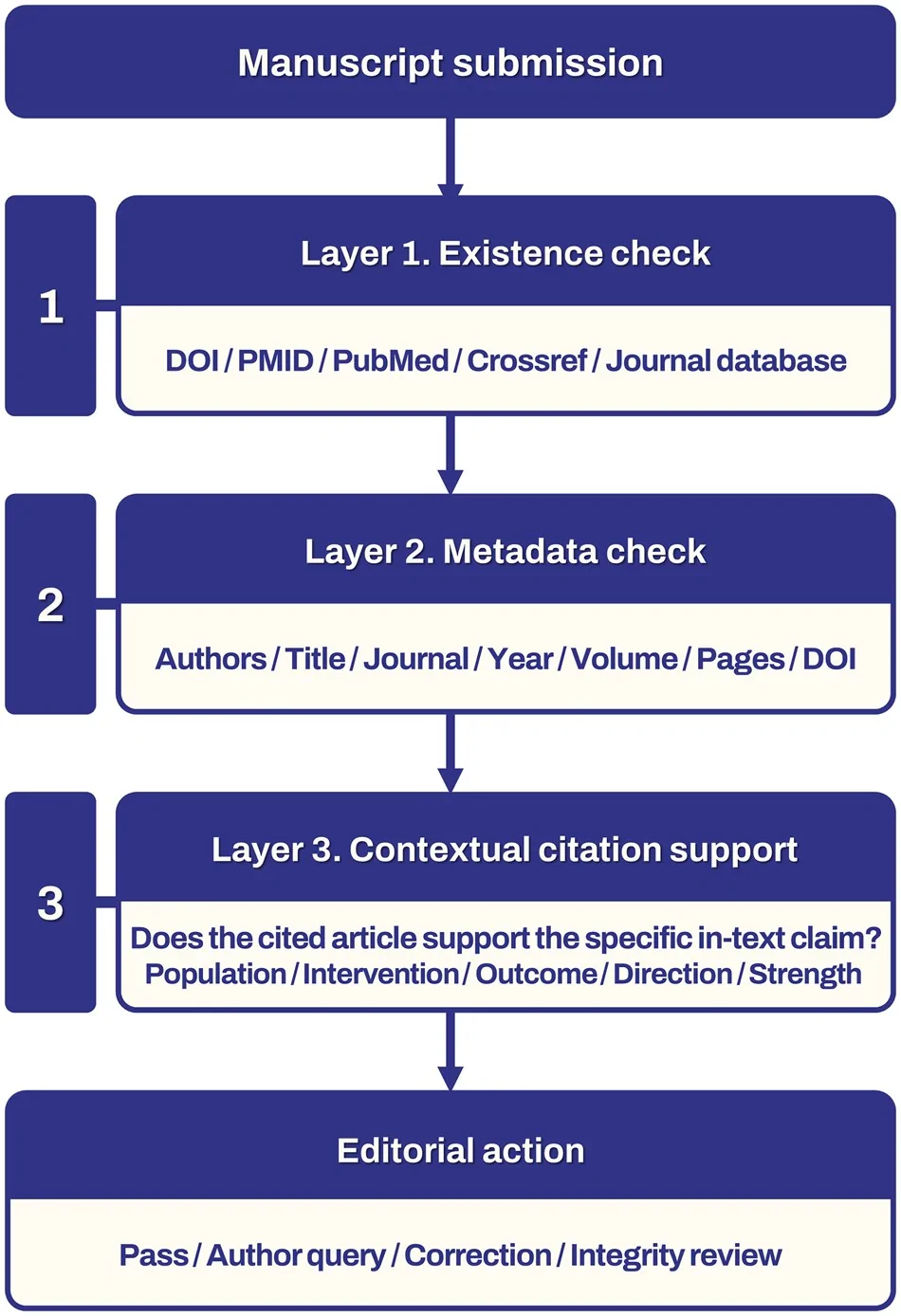
AI workspaces vary in how reliably they ground answers in your notes. Watch for two failure modes. In the first, the model invents a page reference that does not exist. In the second, retrieval fails silently and the model answers from general training data.
We did not run a side-by-side citation test for this page, so run the citation-trace test above on your own files. Atlas answers link back to the passage in the note, PDF, or web page they used, which makes that check fast.
Mem's AI is conversational and capture-focused, built for questions like "what did I write about X last month". Obsidian + Smart Connections shows related notes beside the current one. The answer quality still depends on the model you choose.
Use this scorecard when citation depth is the deciding factor. The key question is not whether a tool can answer from your files, but whether it lets you audit the answer fast.
| Tool | What to check |
|---|---|
| Atlas | Does the citation badge open the passage in the note, PDF, or web page that proves the claim? |
| Notion AI | Does the answer cite only the page, or the paragraph that proves the claim? |
| ClickUp Brain | Does the answer point to the task, doc, or comment that supports it? |
| Coda AI | Does the answer show which doc, row, or table cell was used? |
| Mem | Does the answer find a prior note, or does it paraphrase without a source? |
| Obsidian + Smart Connections | Does the plugin show which note the model answer drew on? |
| Anytype | Does the current AI feature expose a source link at all? |
| AppFlowy | Does your AI setup show which page the answer came from? |
Table 3: What to check in each tool's answers before trusting them, from page-level sources to exact passages.
If citations matter more than polish, shortlist Atlas, Obsidian + Smart Connections, or a custom AppFlowy stack.
Final recommendation
Notion AI is fine if Notion is already your workspace. Switch when you need deeper answers, faster capture, project context, or open code. Pick Atlas for cited answers. Pick ClickUp Brain for project work. Pick Coda AI for docs plus tables. Pick Mem for capture. Pick Obsidian for local files, Anytype for privacy, and AppFlowy for a full Notion-style app with open code.
Ask cited questions across research sources
Upload your documents and trace each answer back to the exact passage.