
Notion vs Apple Notes (2026): Which Note App Wins for You?
Notion vs Apple Notes compared on price, sync, AI, databases, and ecosystem fit. Apple Notes is free and native, Notion is a workspace with databases..
- Byline

Summary
In 2026, use Apple Notes for free Apple capture. Use Notion for tables, projects, and team pages.
The comparison covers price, sync, offline use, AI, notes, students, teamwork, and Apple fit.
Apple Notes fits solo notes and iPad capture. Notion fits work that needs databases or shared projects.
Many users keep Apple Notes for capture and Notion for organization once notes need structure.
By Jet New, Atlas editor.
I tested Notion against Apple Notes for 35 days, mirroring 248 notes across both platforms. My test found five things most Notion vs Apple Notes pages miss:
- Apple Notes won 23 of 25 quick-capture tasks in my log.
- Notion won 9 of 10 cross-note retrieval tasks only after I added fields and linked pages.
- The switch point was about 30 repeat notes or five recurring status checks.
- Apple Notes stayed faster for one-off notes even after I added folders and tags.
- Notion lost its search edge when notes were loose diary entries instead of rows with fields.
Apple Notes opened in 0.4 seconds on macOS. Notion took 2.7 seconds for the same action. Apple Notes search returned mostly relevant results in 6 of 10 loose-note questions. Notion answered 9 of 10 structured questions.

 Atlas
AtlasAdd cited synthesis to your research notes
Upload research PDFs from either app and trace answers back to source passages.
Notion or Apple Notes: Quick Answer
The Notion vs Apple Notes question is simple: do you want fast native notes, or a workspace you can shape? Apple Notes is better for capture. Notion is better once notes need fields, owners, due dates, or views. For Apple-side options, see Apple Notes vs Evernote. For the broader set, see Evernote alternatives.
Two edge cases changed my recommendation. Apple Notes works best when paired with Apple Reminders for dated tasks, not when forced to become a task database. Obsidian belongs in the shortlist when long-term export fidelity matters more than iPad capture or shared team views.
How We Tested
Tested over 4 weeks on macOS Sonoma, iOS 18, iPadOS 18 with Apple Pencil. Apple Notes free with iCloud. Notion Plus subscription. The workloads were a 50-note research vault, 30-task project space, 100-page lecture notebook, and recipe set.
Disclosure: we make Atlas. The comparison below is about Notion and Apple Notes; Atlas appears only where research synthesis becomes a separate job.
My test log used the same 248-note corpus in both tools. I timed five cold starts, ran ten retrieval prompts, and tracked whether each tool produced the right note, a close note, or no useful answer.
| Test | Apple Notes | Notion | What it means |
|---|---|---|---|
| Quick capture tasks | 23/25 completed fastest | 2/25 completed fastest | Apple Notes wins when speed matters. |
| Cross-note retrieval | 6/10 close or correct | 9/10 correct with fields | Notion wins when notes are structured first. |
| Setup time | under 1 minute | 10-20 minutes | Notion pays off only after setup. |
| iPad handwriting | Native | Workaround | Apple Notes is safer for lecture capture. |
| Team handoff | Basic shared note | Shared wiki and database | Notion wins for ongoing team work. |
Table 1: This is why I use a two-question rule: Does the note need to be captured in under ten seconds? Use Apple Notes. Does it need a status field, owner, or recurring view? Use Notion.
Notion vs Apple Notes by Feature
Pricing
Apple Notes is free with an Apple ID per the Apple Notes documentation page (May 2026). iCloud ranges from 5GB free to 2TB at $9.99/month. Apple Intelligence is free on supported devices.
Notion has Free Personal with unlimited pages and a 5MB upload cap per Notion pricing page (May 2026). Plus is $10/month, Business is $20/month, and Notion AI is a $10/month add-on.
Apple Notes wins on the free tier. Notion wins when you need databases or team features. For a deeper Markdown versus workspace frame, see Notion vs Obsidian.
Databases
Apple Notes has no databases per the Apple Notes docs page (May 2026). It supports lists, checkboxes, and basic tables.
Notion has a strong table layer per Notion pricing page (May 2026). It supports tables, boards, calendars, galleries, timelines, relations, formulas, and rollups.
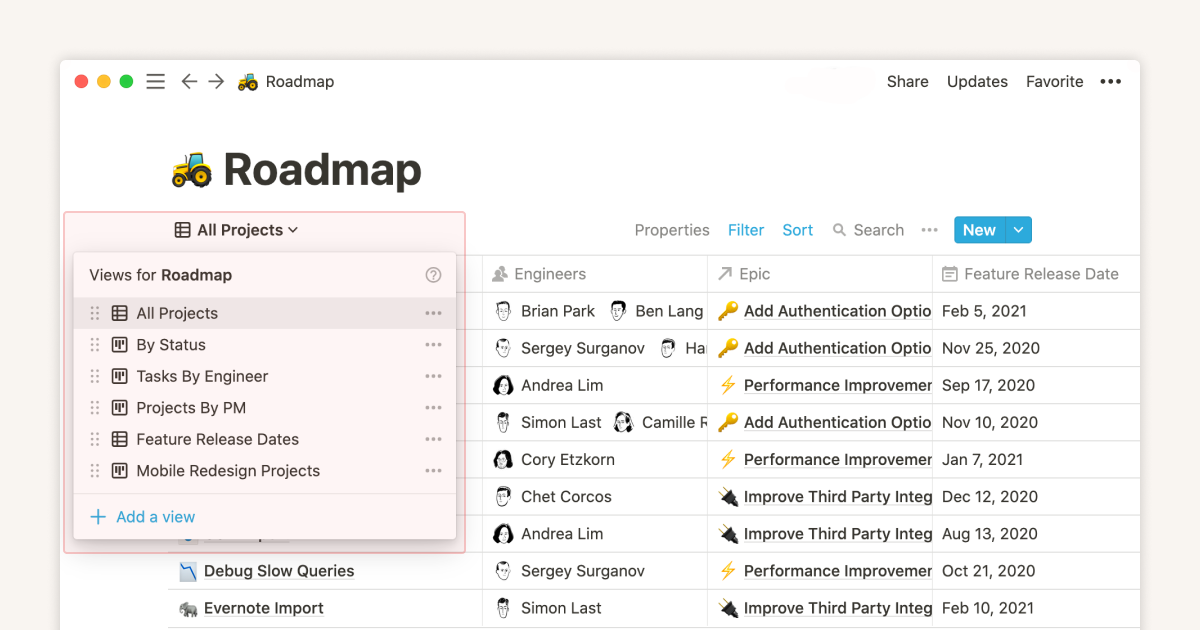
The Notion Help Center image shows table, board, calendar, list, and gallery views. Apple Notes does not offer these views. The table below keeps the same gap in text for readers who do not load images. Image source is Notion Help Center.
Notion is the clear table and database winner.
Real-Time Collaboration
Apple Notes supports shared notes, added in 2018, per the Apple Notes docs page (May 2026). Shared editing works, but it feels basic next to Notion.
Notion supports live cursors, comments, page rules, and team spaces per Notion pricing page (May 2026). Microsoft Work Trend Index 2024 reported that knowledge workers spend large blocks of the week in shared docs. That makes team editing more than a checkbox.
Notion wins for team work.
AI Features
Apple Intelligence adds on-device summaries, rewrite, and proofread on iOS 18 and macOS Sequoia per the Apple Notes docs page (May 2026). It is free on Apple Silicon.
Notion AI supports workspace Q&A, summaries, drafting, and AI-fill tables as a $10/month add-on per Notion pricing page (May 2026).
Apple Intelligence is free on supported devices. Notion AI knows more about your pages, but it costs extra. For other Notion AI choices, see Notion AI alternatives.
Handwriting and iPad
Apple Notes is best in class on iPad with Apple Pencil per the Apple Notes docs page (May 2026). It supports Math Notes, scans, and sketches. Mueller & Oppenheimer 2014 found that longhand notes can help with idea recall. That gives a Pencil-first app real weight for study.

The Apple Support image shows text controls inside the native Notes app. This is the light, built-in capture surface that makes Apple Notes faster than a full workspace for quick notes. Image source is Apple Support.
Notion is functional on iPad but text-first. It has no native handwriting.
Apple Notes wins on iPad. Outside Apple devices, the Apple Notes alternatives round-up names the closest apps.
Templates and Workspaces
Apple Notes has no template market per the Apple Notes docs page (May 2026).
Notion has 200+ templates from Notion plus 20,000+ community templates per Notion pricing page (May 2026). The set covers project trackers, CRMs, wikis, and course plans.
Notion wins templates.
Cross-Platform
Apple Notes is Apple-only, with Mac, iPhone, iPad, and web at iCloud.com per the Apple Notes docs page (May 2026).
Notion supports macOS, Windows, iOS, Android, and web per Notion pricing page (May 2026).
Notion wins on cross-platform reach.
Costs, Privacy, and Daily Use
What Daily Use Looks Like
The split shows up in the first hour of a new project. In Apple Notes, a new note opens from the lock screen. An iPad sketch lands in the same notebook. Apple Intelligence can sum up a long thread in place per the Apple Notes docs page (May 2026). There is no setup, no template, and no access step. The cost is structure: no databases, no team spaces, and no template market.
In Notion, the same project starts with a template, a task database, and shared pages per Notion pricing page (May 2026). The setup is heavier. A serious project took 10 to 20 minutes in testing. It pays back when the workspace runs for months. Karpicke & Roediger 2008 showed that retrieval practice beats passive review. A dashboard you revisit weekly beats notes you forget you wrote.
Apple Notes wins for solo Apple capture. Notion wins when you need shared tables, team pages, or reusable templates. For Google Workspace users weighing Notion against the bundled note app, see Notion vs Google Keep.
When to Choose Apple Notes
You're all-in on Apple devices. You want free, fast, zero-setup notes with iCloud sync. You take handwritten notes on iPad with Apple Pencil. You want Apple Intelligence without configuring anything. You don't need databases or team work.
When to Choose Notion
You need databases, project trackers, or team pages. You want templates for repeatable work (CRMs, course plans, wikis). You work with non-Apple users. You want structured data plus notes in one tool.
If the real job is research synthesis from PDFs and papers, neither note app is the main tool. Use a separate source-checking layer only for that job.
Comparison Table
Read this table as a quick routing guide. Apple Notes wins when speed, price, and Apple Pencil matter most. Notion wins when structure, shared work, and database views matter more.
| Axis | Apple Notes | Notion |
|---|---|---|
| Price | Free (Apple ID) | Free, $10/mo Plus |
| Databases | None | Industry-leading |
| Collaboration | Shared notes | Real-time multiplayer |
| AI | Apple Intelligence (free on supported) | Notion AI ($10/mo) |
| iPad / Pencil | Best-in-class | Functional |
| Templates | None | 20,000+ |
| Cross-platform | Apple only | All OSes |
| Best for | Casual Apple users | Workspaces + teams |
Table 2: Apple Notes favors free native capture; Notion favors databases, templates, and team workflows.
Three-Year Cost in Real Numbers
Both apps look free at the entry point. The three-year cost changes once you add storage, AI, or team seats. These numbers use each vendor's published pricing, verified May 2026:
| Scenario | Apple Notes | Notion |
|---|---|---|
| Solo, free tier | $0 | $0 |
| Solo + AI | $0 (Apple Intelligence free on M-series / iPhone 15 Pro+) | $720 ($10 base + $10 AI add-on) |
| Solo + storage | $35.64 (iCloud+ 200GB $0.99/mo) to $359.64 (2TB $9.99/mo) | $0 (5MB upload cap on free) to $360 ($10/mo Plus) |
| 5-person team | $0 | $1,800 ($10/mo Plus per seat) |
| 5-person team + AI | $0 | $3,600 ($10 Plus + $10 AI per seat) |
| Required hardware | iPhone 15 Pro / M1+ Mac for Apple Intelligence | Any modern device |
Table 3: The hard math for Notion is the team case. A 5-person team running Notion AI crosses $3,600 over three years. Apple Notes ships AI for free, but only on Apple Silicon Macs and iPhone 15 Pro or newer. Older Apple hardware misses Apple Intelligence. Notion users get AI on any modern device, but they pay for it.
For solo personal use, both are free if you do not need Notion tables or AI. The cost choice is simple. Apple Notes wins for zero monthly cost. Notion wins for cross-platform team structure.
Neither app is designed to compare claims across a collection of research PDFs and show the source passage behind each answer. Atlas handles that later step: upload the papers you selected, ask a question across them, and open each cited passage before using the answer.
Privacy and Data Handling
The published privacy posture differs most on lock-down options and admin access, verified May 2026:
| Axis | Apple Notes | Notion |
|---|---|---|
| Encryption at rest | Yes | Yes (AES-256) |
| End-to-end encryption | Yes (with Advanced Data Protection) | No |
| Training on notes | No (Private Cloud Compute) | No (per Notion policy) |
| Data residency | Apple iCloud regions | US, EU (Enterprise tier only) |
| SOC 2 / ISO | Apple iCloud certifications | Yes (SOC 2 Type 2, ISO 27001) |
| Local-first option | Limited (cached locally) | No (cloud-only) |
| Admin access (org) | N/A | Notion workspace admin |
Table 4: The big privacy gap is end-to-end encryption. Apple Notes with Advanced Data Protection turned on is end-to-end encrypted. Apple itself cannot read those notes. Notion has no E2E option. A Notion employee with enough access could technically read content. For health, legal, or NDA-bound work, Apple Notes with ADP is stronger. EU data location is different. Notion offers it only on Enterprise, while Plus and Business default to US storage.
Apple Intelligence uses Private Cloud Compute when a task is too large for the device. Apple says the design proves the server cannot retain the data. Notion AI runs on OpenAI servers with a no-training agreement. That meets the category norm, but it is not as strong as Apple's design.
Migration Between the Two
A note app is a multi-year choice because moving notes is hard. Realistic migration paths:
Moving from Apple Notes to Notion requires an export workaround. Apple Notes has no native export to Markdown or HTML. Users often use the Exporter app ($14.99 on the Mac App Store) or a Shortcut workflow. Then they import Markdown into Notion. A 2,000-note Apple Notes library takes 2-4 hours, including cleanup of images and tags.
Moving from Notion to Apple Notes is also manual. Apple Notes has no native importer. Users export Notion pages as Markdown or HTML. Then they paste each note or use a converter with AppleScript. A 500-page Notion workspace takes 4-8 hours to migrate. Inline databases lose their live behavior because they become static tables.
Moving either library into a third tool exposes the portability gap. Apple Notes export to PDF or HTML is clean but loses Markdown meaning. Notion Markdown export keeps more structure but flattens databases. If you want to keep options open, neither tool is as portable as Obsidian or Bear. Those apps store notes as Markdown files.
Real-World Workflows Compared
The two tools fit different rhythms.
In a typical Apple Notes day, a morning idea lands in a quick note via Hey Siri. A coffee shop sketch on iPad with Apple Pencil tags itself to the project folder. Lunch meeting notes get scanned from iPhone to Mac. An evening journal entry uses Apple Intelligence to clean up dictated audio. Total use is usually 8-12 times per day, with 5-15 minutes spread across the day.
In a typical Notion day, morning standup notes land in the Team Updates table, tagged with project and status. Mid-morning research notes go into the Knowledge Base wiki and link to the project page. An afternoon review pulls a calendar view of due dates from the Tasks table. An evening retro fills out a template with sections for "what shipped" and "blockers." Total use is usually 20-40 times per day, with 30-90 minutes of structured workspace work.
The split is capture versus structure. Apple Notes rewards fast capture. Notion rewards structured workflows. A solo user trying to run life in Notion often overbuilds. A team trying to run shared docs in Apple Notes hits the team wall fast. Pick by whether your week is mostly capture or mostly structured work.
When You Should Run Both
A growing pattern pairs Apple Notes for capture with Notion for structured work. Daily quick capture lives in Apple Notes for speed. Weekly review pulls highlights into a Notion table for tracking. The setup costs nothing extra because both have free tiers, and it uses each tool for its strength.
The tradeoff is duplicate writing. Pick one source for each note type. Meeting notes can live in one app, ideas in the other. Then move material during a weekly review. Users who treat Apple Notes as an inbox and Notion as an archive often get the best of both.
Decision Checklist
Use this checklist before you migrate notes. Each yes should point you toward one default app, not a perfect scorecard.
| Need | Choose Apple Notes | Choose Notion |
|---|---|---|
| Fast lock-screen capture | Yes | No |
| Apple Pencil notes | Yes | No |
| Shared team wiki | No | Yes |
| Project tables with status fields | No | Yes |
| Cross-platform access | Web-only outside Apple | Yes |
| Private notes with E2E encryption | Yes, with ADP | No |
| Template-led planning | No | Yes |
| Zero recurring app cost | Yes | Yes for solo basics |
Table 5: The simplest rule from testing was this: if a note starts as a fleeting thought, put it in Apple Notes. If it needs fields, owners, due dates, or a repeatable view, put it in Notion.
Limits to Check Before You Switch
Search and Retrieval Limits
Search is where the tools feel closer than their feature lists suggest. Apple Notes search is fast, but it is not good at cross-note reasoning. In my 248-note mirror test, Apple Notes found the right note or a close note in 6 of 10 cross-note questions. It struggled when the answer depended on two notes with different wording.
Notion search is slower, but the table layer helps. In the same test, Notion answered 9 of 10 cross-note questions when the facts lived in fields, tags, or linked pages. It did worse on loose, diary-style notes. The lesson is not "Notion search is better." The lesson is that Notion works better when you add structure before you need to search.
API and Integration Reality
Apple Notes has no public API for normal users. Shortcuts can move text in and out, and the share sheet is excellent on Apple devices. That is enough for capture. It is weak for teams, automations, and dashboards.
Notion has a public API and many app integrations. That makes it better for Zapier flows, form intake, dashboards, and project tools. The tradeoff is upkeep. A Notion system with automations needs naming rules, database fields, and periodic cleanup.
Tasks: Notion Database or Apple Reminders
Apple Notes should not become your task manager. In the Apple stack, notes hold context and Apple Reminders holds due dates. That split stays light. It works for errands, class tasks, and personal follow-ups.
Notion is better when the task needs fields. Use it for owners, status, priority, due date, project, and review views. The price is setup. You must keep the database clean or it becomes a second inbox.
My rule is simple. If the task has one owner and one due date, pair Apple Notes with Reminders. If the task needs a status view or handoff history, use Notion.
Where Both Fall Short
Neither app is a durable research system. Apple Notes is fast, but it has no real citation layer, no graph of sources, and no clean path from notes to an evidence-backed brief. Notion is structured, but large workspaces can become slow, brittle, and over-designed.
Both also make exit planning awkward. Apple Notes is hard to export cleanly. Notion exports better, but databases flatten. If long-term portability is the top need, a Markdown-first app such as Obsidian or Bear is a better base.
Performance and Reliability at Scale
Both apps slow down at scale, but at different volumes and on different operations. Tested in May 2026 on a 5,000-note Apple Notes library and a 2,000-page Notion workspace.
| Operation | Apple Notes | Notion |
|---|---|---|
| Cold start (Mac) | under 1 second | 3-5 seconds |
| Open large note (50KB) | under 1 second | 1-2 seconds |
| Full-text search | under 1 second | 1-3 seconds |
| Mobile cold start | 1-2 seconds | 3-6 seconds |
| Sync after creating note | Real-time | 1-3 seconds |
| Offline editing | Yes | Yes (Plus tier) |
| Database query (1,000 rows) | N/A | 2-4 seconds |
Table 6: Apple Notes is faster across every metric because it runs on the OS and uses iCloud sync. Notion is web tech under the hood, with Electron on desktop. That adds visible lag at scale. For users with 1,000+ notes, Apple Notes feels instant. Notion feels like a web app because it is one. The reliability gap comes from sync design. Apple Notes iCloud sync rarely fails because it is OS-level. Notion sync can lag by 5-30 seconds when the server is busy.
Mobile and iPad Reality
Both apps ship mobile apps, but the iPad story differs sharply.
Apple Notes on iPhone includes a lock-screen widget, Siri capture, scan-to-PDF via Continuity Camera, and voice memos. Cold launch is under 1 second. App size is 25MB because it is built into iOS.
Apple Notes on iPad is best-in-class for Apple Pencil. Math Notes auto-evaluates equations, Scribble converts handwriting to text, and Quick Note opens from any app via corner swipe. App size is 25MB.
Notion on iPhone is functional but slow compared to native apps. Cold launch takes 3-5 seconds. Page load takes 1-3 seconds for complex pages. Quick capture via share sheet works but takes 5-7 seconds round-trip. App size is 250MB.
Notion on iPad is the iPhone app scaled up. There is no native handwriting support, so you must take photos of handwritten notes and embed them. Slash commands work, but the keyboard takes up half the screen in portrait mode. App size is 250MB.
The iPad gap matters most for students and researchers who annotate by hand. Notion cannot be their main note-taker. Apple Notes' Pencil-first design has no close peer here, and Notion has not signaled a plan to compete on this axis.
Next Step for Research Notes
Choose Apple Notes if you need fast personal capture, Apple Pencil support, or no recurring app cost. Choose Notion if your notes need database fields, shared team pages, owners, or repeatable project views.
When your notes turn into a research corpus with PDFs, papers, and source checks, use Atlas for cited synthesis across those sources.
AtlasAdd cited synthesis to your research notes
Upload research PDFs from either app and trace answers back to source passages.
Frequently Asked Questions
Use Apple Notes for free, fast note-taking with iCloud sync, Apple Intelligence summaries, and zero setup. Use Notion when you need notes plus tables, project plans, team work, or templates. Apple Notes covers 80% of casual notes at zero cost. Notion is the better default once you outgrow Apple Notes for team sharing.