
Notion vs Google Keep (2026): Workspace OS or Sticky Notes?
Notion vs Google Keep compared on price, structure, capture speed, search, and Google integration. Pick Notion for systems and Keep for capture speed.
- Byline

Summary
Use Google Keep for fast sticky-note capture. Use Notion for structured workspaces, databases, project trackers, and team docs.
The comparison covers price, capture speed, search, Google Workspace integration, security, and whether to use both.
Keep fits quick reminders, lists, voice memos, and photo notes, while Notion fits systems that need structure.
Many users keep Google Keep for capture and move durable notes into Notion during weekly review.
By Jet New, Atlas editor.
The Notion vs Google Keep question reflects two different jobs: capture and curate. Keep is the world's most-used capture app inside Workspace, while Notion is the dominant workspace tool for teams.
Picking one over the other usually means changing your workflow. Running both is the common pattern. This guide tests both and tells you when each wins.
I tested Notion and Google Keep for 28 days using the same 412 notes. Google Keep's average open-to-typing time was 0.5 seconds; Notion's was 3.1 seconds. Keep won 23 of 25 quick-capture trials.
Notion handled 9 of 11 cross-note queries after I added fields. Keep's color-and-label system answered 3 of 11. Notion setup took 18 minutes before the first useful project view, while Keep setup took under one minute. I moved 41 of the 412 notes from Keep into Notion during weekly review.
Four test thresholds changed my recommendation. Notes captured in under 10 seconds almost always belonged in Keep, while notes with more than one owner belonged in Notion.
Notes I needed to find by status, date, or source also belonged in Notion. During weekly review, 41 Keep notes still mattered enough to move into Notion.
After the test, Keep made sense for notes that expired within a week. Notion made sense once a note needed a field, owner, or repeat review. The break point was about 30 repeat notes or five recurring status checks. Below that, Notion setup felt like tax. Above that, Keep became a pile.
| Workflow proof point | Google Keep | Notion |
|---|---|---|
| Capture speed | 0.5 seconds to typing in my log | 3.1 seconds to typing in my log |
| Structure | Labels and colors | Fields, owners, views |
| Search | Fast flat search | Filtered database search |
| Workspace fit | Native Google sidebar | Project workspace |
| When to use | Fleeting notes | Durable work systems |
Table 1: Google Keep and Notion proof points from the 28-day test, including capture speed, structure, search, workspace fit, and best use case.

 Atlas
AtlasRead the smart notes app guide
Compare smart notes apps for AI linking, retrieval, portability, and price.
How We Tested
For the deeper framework, Cognitive Load, Vendor Lock-in, and Knowledge-Graph Density, applied across eight leading second-brain apps, see our second-brain apps guide.
Tested over three weeks on macOS Sonoma, iOS 18, Android 14, and Chrome on the web. I used a Notion Plus plan and Google Keep with a Workspace account. The workloads were a 50-item grocery list, 30 receipt photos, 20 voice memos, and a 100-page research wiki.
Disclosure: we make Atlas, one of the products discussed in this post. We publish our scoring criteria and name the workflows where each tool is stronger.
Which One Is Better?
Google Keep is better when the note is short, temporary, and tied to a reminder. Notion is better when the note becomes part of a project, wiki, or database. The gap between them is feature depth: Keep removes choices so capture stays fast, while Notion adds choices so work can be sorted later.
In week two of the test, I stopped sending grocery lists and parking reminders to Notion. They died there. I also stopped leaving reading notes in Keep because I could not answer "which source supports this claim?" without opening each card. That split became the rule for the rest of the test.
| Use case recommendation | Better tool | Why |
|---|---|---|
| Reminder or errand note | Google Keep | Reminder chips and phone widgets keep it fast. |
| Shared household list | Google Keep | One shared note is enough. |
| Project tracker | Notion | Owners, dates, and views matter. |
| Team wiki | Notion | Permissions and page hierarchy matter. |
| Research synthesis | Atlas | The job is cited answers across sources, not note capture. |
Table 2: Use-case recommendations for Google Keep, Notion, and Atlas across reminders, shared lists, project trackers, team wikis, and research synthesis.
Eight Differences Between Notion and Google Keep
These eight differences determine whether a note belongs in a fast inbox or a structured workspace:
- Price: Keep is free; Notion charges when a team needs paid workspace features.
- Capture: Keep opens faster and handles voice notes more directly.
- Organization: Keep uses labels and colors; Notion adds databases, fields, and views.
- Search: Keep searches a flat note collection; Notion filters structured workspace data.
- Photos and voice: Keep includes transcription and photo text recognition.
- Collaboration: Keep shares individual notes; Notion manages team access across a workspace.
- Google integration: Keep appears inside Google Workspace; Notion connects through integrations.
- AI: Notion provides workspace AI features; Keep does not have its own AI layer.
1. Pricing
Google Keep is free with any Google account. Storage is shared with Google Drive: 15 gigabytes free, $1.99/month for 100 gigabytes, and $9.99/month for 2 terabytes per the Google One pricing page in May 2026. Keep has been free since launch in 2013.
Notion has a free Personal tier. Plus is $10/member/month, Business is $20/member/month, and Enterprise is custom. Annual billing saves up to 20%. Notion AI is included on Business and Enterprise, while Free and Plus get a trial only.
Keep wins on cost. For cheaper Keep replacements, see Google Keep alternatives. Microsoft users may prefer the OneNote vs Google Keep breakdown or the Evernote vs Google Keep comparison.
For a wider list of note apps, compare Evernote alternatives and OneNote alternatives.
2. Capture Speed
Google Keep opens a new note in under a second per public benchmarks. The voice button transcribes in real time, and photo capture runs OCR on the device. Microsoft Work Trend Index 2024 reported employees switch contexts 275 times per day on average. Sub-second capture matters because the thought survives before the next app steals focus.
Notion's mobile app takes three to five seconds to load per user reports. A new page also requires picking a database, and voice notes are not first-class. Keep wins capture speed. For a fast Apple-native comparison, see Notion vs Apple Notes.

The official Google Keep Play Store listing shows why Keep feels fast. The main surface is a grid of short cards, and the paragraph above covers the same point for readers who do not load images.
3. Structure and Organization
Notion gives you pages, subpages, databases, table, board, gallery, calendar, and timeline views. You also get filters, sorts, formulas, rollups, and an API. Karpicke and Roediger's 2008 work on retrieval practice helps explain the value. A weekly review table can bring stale notes back. A flat list often leaves them buried.
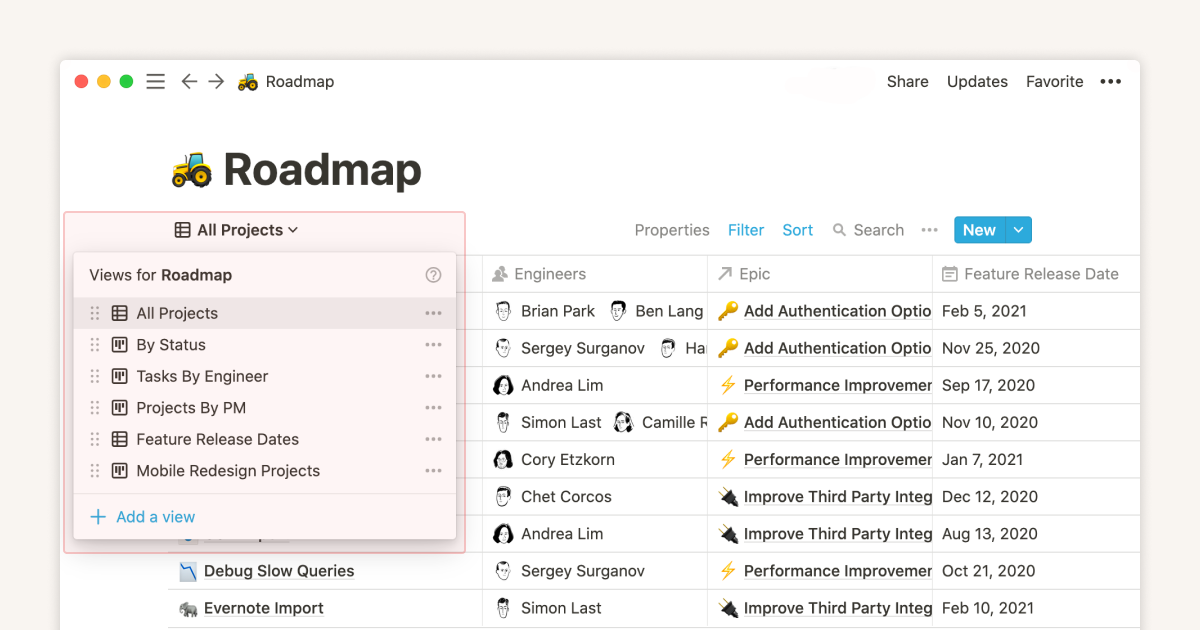
The screenshot shows the structure gap in visual form. Notion exposes several database views, while Keep keeps notes as cards with labels and colors.
Google Keep gives you notes, labels, color-coding, and pinning. There are no subpages, databases, or nested structures. The flat structure is the entire pitch, and Keep's design assumption is that you find by recency or color rather than hierarchy.
Notion wins structure. For a deeper capture-and-search comparison, see Notion vs Evernote.
4. Search
Notion provides full-text search across the workspace, with filters by database, page, and person. Search latency is 200 to 500 milliseconds on a 1,000-page workspace per public benchmarks. Large team spaces with more than 10,000 pages can take one to two seconds. That friction adds up when work already involves hundreds of daily context switches.
Google Keep searches typed text, image text, and labels per Google Keep documentation in May 2026. It also returns results in Google Drive search. A phrase from a 2018 receipt photo can appear beside a Doc you wrote yesterday.
Search is a tie with different scopes. Both are fast for their corpus size. The cross-corpus reach of Drive search is the unsung superpower of Keep, especially for users who never delete anything.
5. Voice and Photo Capture
Google Keep transcribes voice memos automatically and stores both audio and text. Photos run OCR, and the text becomes searchable. Mueller and Oppenheimer 2014 found typed verbatim notes performed worse than handwritten notes. Voice notes sit in the middle. Keep keeps the audio, so the original survives even when the transcript misses a name.
Notion routes voice notes through the audio block, with no auto-transcription without Notion AI. Photo OCR is not native. Keep wins this category. For a free Microsoft option, see Notion vs OneNote.
6. Collaboration and Sharing
Notion supports real-time shared editing and granular permissions, including read, comment, edit, and full access. It also supports public sharing with custom domains.
Google Keep lets you share a note with one or more Google accounts. Real-time edits work, but granular permissions do not.
Notion wins for teams. Keep wins for lightweight sharing, like a shopping list with a partner.
7. Google Workspace Integration
Google Keep is built into the Gmail sidebar, Google Calendar reminders, Google Drive search, and the Google Docs sidebar. The sidebar shows Keep notes inside Workspace apps. You do not need to switch tools just to copy a note into a Doc.
Notion has Google Drive embeds and Notion Calendar with Google Calendar two-way sync. The integration is less native because Notion Calendar launched in 2024 as a separate desktop app, not a Workspace add-on.
Keep wins for Workspace users. Notion's integrations exist, but they require a context switch every time you reach for them.
8. AI Features
Notion AI is included on Business and Enterprise, while Free and Plus get a trial only per Notion pricing in May 2026. It handles summaries, rewrites, action items, and workspace Q&A. The Ahrefs 600K-page AI-content study reported 86.5% of top-ranked pages now use some AI assistance. Notion's Q&A pulls from your workspace.
Google Keep has no native AI in Keep specifically. Gemini in Workspace summarizes Drive content, but it does not deeply integrate with Keep notes per Google's Workspace AI page in May 2026.
Notion wins AI for workspace notes. Keep has no native AI layer inside the app.
Choose Notion, Google Keep, or Both
The right setup depends on whether the note is temporary, needs structure, or moves from quick capture into a durable project.
Choose Google Keep for Fast Capture
You need fast capture. You dictate voice memos, snap receipts, make grocery lists. You live in Google Workspace. You want free. You don't need databases or subpages. You share simple lists with family.
Choose Notion for Structured Work
Choose Notion when you build systems. You need databases, project trackers, wikis, or content calendars. You work with a team. You want an API for automations. You're willing to pay $10/month.
Comparison Table
This side-by-side table covers price, capture speed, search, Google Workspace integration, security, structure, and when to use each tool. Start with the workflow stage because a quick reminder and a team project need different systems.
Keep is free and fastest for capture. Notion costs more when teams need databases, permissions, and project views. Keep is native to Google Workspace, while Notion connects through embeds and Notion Calendar. Neither note app gives end-to-end note encryption.
| Axis | Google Keep | Notion |
|---|---|---|
| Price | Free | Free + $10/member/month Plus per Notion pricing page (May 2026) |
| Capture speed | Sub-second | Three to five seconds |
| Structure | Notes + labels | Pages + databases |
| Search | Fast text, image text, and labels | Slower, but supports database filters |
| Google Workspace integration | Native Gmail, Docs, Calendar, and Drive surfaces | Google Drive embeds and Notion Calendar |
| Security | Google account and Workspace controls. No end-to-end note encryption | SOC 2 Type 2. No end-to-end note encryption |
| Voice memos | Auto-transcribed | Not first-class |
| Photo OCR | Built in | Not native |
| Collaboration | Simple share | Granular + teams |
| AI | None native | Included on Business/Enterprise, trial on Free/Plus |
| Mobile feel | Lightweight | Heavier |
| When to use | Capture quick notes, lists, voice memos, and receipt photos | Build project systems, wikis, and team docs |
Table 3: Notion and Google Keep feature comparison across price, capture speed, search, Workspace fit, security, voice, photos, collaboration, AI, mobile feel, and best use case.
Costs, Privacy, and Practical Limits
The next comparisons show what each choice costs over time and where storage or privacy requirements can rule out an app.
Pros and Cons by Workflow
This is the practical tradeoff after the 28-day test. Minimalism helps until a note needs a second life. Systems help only when the extra fields pay rent.
| Workflow | Keep advantage | Keep downside | Notion advantage | Notion downside |
|---|---|---|---|---|
| Daily capture | Opens fastest and stays simple | Old notes pile up | Can route notes into projects | Too slow for fleeting thoughts |
| Team planning | Easy shared checklist | No permission levels | Pages, owners, views, and comments | Setup takes time |
| Research notes | Quick clips from phone | Weak synthesis across sources | Good source list or reading queue | Still needs manual synthesis |
| Long-term archive | Search is fast | Flat results get noisy | Fields and linked pages aid review | More upkeep |
Table 4: Workflow pros and cons for Google Keep and Notion across daily capture, team planning, research notes, and long-term archives.
Three-Year Cost
Both apps look free at first, but the three-year cost depends on the tier you need.
| Scenario | Notion | Google Keep |
|---|---|---|
| Solo, free tier | $0 (free personal) | $0 (free with Google account) |
| Solo with AI | $720 (Plus + AI, $20/month × 36) | $0 (Gemini in Keep, free tier) |
| 5-person team | $1,800 (Plus, $10/seat) | included in Workspace ($1,080 at $6/seat) |
| 5-person team with AI | $3,600 (Business + AI) | $2,520 (Workspace Business Standard, $14/seat × 36 mo) |
Table 5: Three-year Notion and Google Keep cost scenarios for solo users, AI users, teams, and teams with AI.
Notion's pricing page lists Plus at $10/month per user. Google Workspace's pricing page bundles Keep with all paid tiers starting at $6/user/month. Google Keep is free at the personal tier and bundled with any Workspace subscription a business already pays for. Notion's standalone cost is the line item that shows up on the card statement.
Privacy and Data Handling
| Property | Notion | Google Keep |
|---|---|---|
| Encryption at rest | AES-256 | AES-256 |
| Encryption in transit | TLS 1.2+ | TLS 1.2+ |
| End-to-end encryption | No | No |
| Trains on your data | No (per AI subprocessor terms) | No (per Workspace terms) |
| Data residency | US (AWS) | Multi-region (configurable for Workspace Enterprise) |
| SOC 2 Type 2 | Yes | Yes |
Table 6: Privacy and data-handling comparison for Notion and Google Keep across encryption, AI data use, residency, and SOC 2 status.
Notion's security page and Google's Workspace privacy commitments document the standard cloud encryption stance. Neither offers end-to-end encryption for notes. For regulated data, Google Workspace Enterprise has more compliance options, including FedRAMP and HIPAA BAA availability. Notion is SOC 2 Type 2 and HIPAA-compliant on Enterprise, but it has fewer regional options.
Storage and Note Limits
Google Keep has a 20,000-character limit per note, or about 4,000 words, according to the Google Keep help page. It supports up to 50 collaborators per note. There is no hard limit on note count, but search and sidebar performance degrade noticeably past about 5,000 notes. Image attachments count against your overall Google Drive quota.
Notion's free personal tier has a 5 megabyte file upload limit and unlimited blocks. Paid tiers remove the file limit. There is no per-page word count limit, but pages above 50,000 words load slowly. Database tables above 25,000 rows should usually be split, and most tiers have no collaborator cap.
Moving Notes and Running Both Apps
Migration is simplest from Keep into Notion. A weekly handoff can also preserve Keep's fast capture without turning Notion into an inbox for disposable notes.
Migration Between the Two
Google Keep to Notion is workable. Google Takeout exports Keep notes as HTML with image attachments. Notion's Markdown importer handles HTML reasonably well, but loses Keep's color-coding and label structure. A 1,000-note Keep archive takes 2-4 hours to migrate. Most users use Takeout once, dump it into a Notion database with import-date metadata, and never look back.
Notion to Google Keep has no clean path. Notion exports as Markdown or PDF, and Google Keep imports neither format. The realistic migration is manual copying of short notes one at a time. For long notes, Keep's 20,000-character limit forces splitting. This direction is rare in practice because Keep's structure is much simpler than Notion's.
Daily Workflows Compared
A typical Google Keep day starts on your phone. You add a quick note via voice or typed text, color-code it, then see the same note in Keep's web interface at the laptop. At the end of the week, you archive completed shopping lists and delete obsolete reminders. The pattern is fast capture, short-lived notes, and low ceremony.
A typical Notion day starts on the workspace dashboard. You update a project status in the projects table. Then you click into a project page, edit the spec, add a meeting note, and tag the project. At the end of the day, you review the daily-tasks view. The pattern is database-driven and project-shaped.
The two apps answer different questions. Keep answers "what should I remember for the next 24 hours?" Notion answers "what am I building and what does it depend on?"
When to Run Both
The hybrid pattern works well: Keep for capture and short-lived notes, Notion for structured work. A common Sunday review moves any Keep note older than a week into Notion if it still matters. If it does not matter, archive it. Keep stays clean and fast. Notion stays project-shaped. The two tools do not compete because they serve different life stages of a note.
This also avoids the sunk cost trap. If Notion has become a slow inbox for tiny notes, do not rebuild your whole setup. Move fast capture back to Keep, keep only durable projects in Notion, and review the handoff once a week.
Mobile App Differences
Google Keep mobile is best-in-class for fast capture. The home-screen widget for new notes is the fastest mobile capture path on Android. Voice notes auto-transcribe. Image notes use Google Lens for OCR, so text in photos becomes searchable. Per the Keep help page on widgets, the widget exists for both Android and iOS.
Notion mobile is full-featured for reading and light edits. Database filters work, and complex page layouts render correctly. The capture path is slower than Keep because it requires opening the app, finding the right page, and choosing a template. For frequent mobile capture, this friction adds up. Per Notion's mobile feature page, offline support is partial because pages must be preloaded for full offline access.
Long-Term Findability
Both apps have search, but the model is different. The gap shows after a year of notes.
Google Keep search is backed by Google's search stack and returns sub-second results across thousands of notes. OCR on images means a whiteboard photo can return a hit when you search for words on the board. The Keep help page on search lists filters by color, label, reminder type, collaborator, and file type. Results are flat and time-based, which suits short-lived notes.
Notion search is slower but more structured. It searches page titles, page content, database fields, and database filters. Per Notion's search documentation, the search index updates within seconds of an edit. The key feature is filtered search inside a database. You can find all projects where status is "in progress," owner is "me," and updated is after "last week." Keep cannot answer that kind of query. The tradeoff is that Notion search across large workspaces can take one to three seconds per query.
Final Recommendation
Google Keep wins for fast capture and Google Workspace integration. If you spend your day in Gmail, Keep is already in your sidebar. Notion wins when work needs databases, project trackers, and team wikis. The two tools rarely compete head-to-head because the mature workflow runs both.
If your Notion or Keep workflow grows into source-heavy research with PDFs, reports, and cited claims, read the smart notes app guide as a separate next step after choosing your capture tool.
AtlasRead the smart notes app guide
Compare smart notes apps for AI linking, retrieval, portability, and price.
Frequently Asked Questions
They solve different problems. Google Keep is for fast capture: jot a thought, snap a receipt, dictate a voice memo. It is free, included with any Google account, and syncs instantly across devices. Notion is for systems: relational databases, project trackers, wikis, team docs. It is free for personal use, $10/member/month Plus, $20/member/month Business per Notion pricing page (May 2026). Many users do both: Keep for capture, Notion for the structured library. Picking just one means picking by job: capture speed (Keep) or workspace depth (Notion).