
OneNote vs Google Keep (2026): Which Free Note App Wins?
OneNote vs Google Keep on capture speed, structure, AI, sync, & ecosystem fit. Keep wins for fast capture. OneNote wins for structured notebooks. Both are free.
- Byline

Summary
Use Google Keep for fast sticky-note capture. Use OneNote for structured notebooks, handwriting, long-form notes, and Microsoft workflows.
The comparison covers capture speed, structure, AI, sync, ecosystem fit, security, and whether to use both.
Keep fits ephemeral notes and lists, while OneNote fits durable notebooks that need organization.
Many users capture quickly in Keep, then move durable material into OneNote or Atlas later.
By Jet New, founder of Atlas.

 Atlas
AtlasCompare smart notes apps for research
See seven AI note apps compared on linking, synthesis, retrieval, and pricing.
Quick Answer
Both apps are free and cross-platform, but they solve different problems. Google Keep is faster for quick capture and reminders, while OneNote is stronger for long notes, handwriting, audio, and file-heavy study work.
Use Keep as a phone-speed inbox and OneNote as a durable notebook. Keep becomes difficult to manage as a long-term archive, while OneNote adds unnecessary steps to fleeting notes.
How We Tested
For the deeper framework, including cognitive load, lock-in, and knowledge graph density, see our second-brain apps guide.
I tested both apps for 2 weeks on macOS Sonoma, iPhone 15, and Pixel 8. Both apps were on their free plans. The test set covered 10 to 15 quick notes per day, grocery lists, reminders, lecture notes, recipes, voice memos, and photo text.
I counted a capture as successful only when the note synced and was easy to find again the next day. That kept the test focused on retrieval, not just launch speed.
Disclosure: we make Atlas, one of the products discussed in this post. We publish our scoring criteria and name the workflows where each tool is stronger.
Seven Differences Between OneNote and Keep
Compare the apps on the seven capabilities that change the choice:
- Capture speed: Keep opens and saves quick notes faster.
- Structure: OneNote organizes pages inside sections and notebooks.
- Handwriting: OneNote provides the larger canvas and stronger pen tools.
- Reminders: Keep includes time and place reminders.
- Image text: Both read text in images, but Keep makes phone capture simpler.
- Devices: OneNote includes native desktop apps; Keep relies on the web on computers.
- AI: Both connect to paid AI services rather than including strong free AI features.
1. Capture Speed
Google Keep creates a new note in under 2 seconds in my mobile tests. Capture options include voice memo, photo, list, and text card. You can color-code as you write.
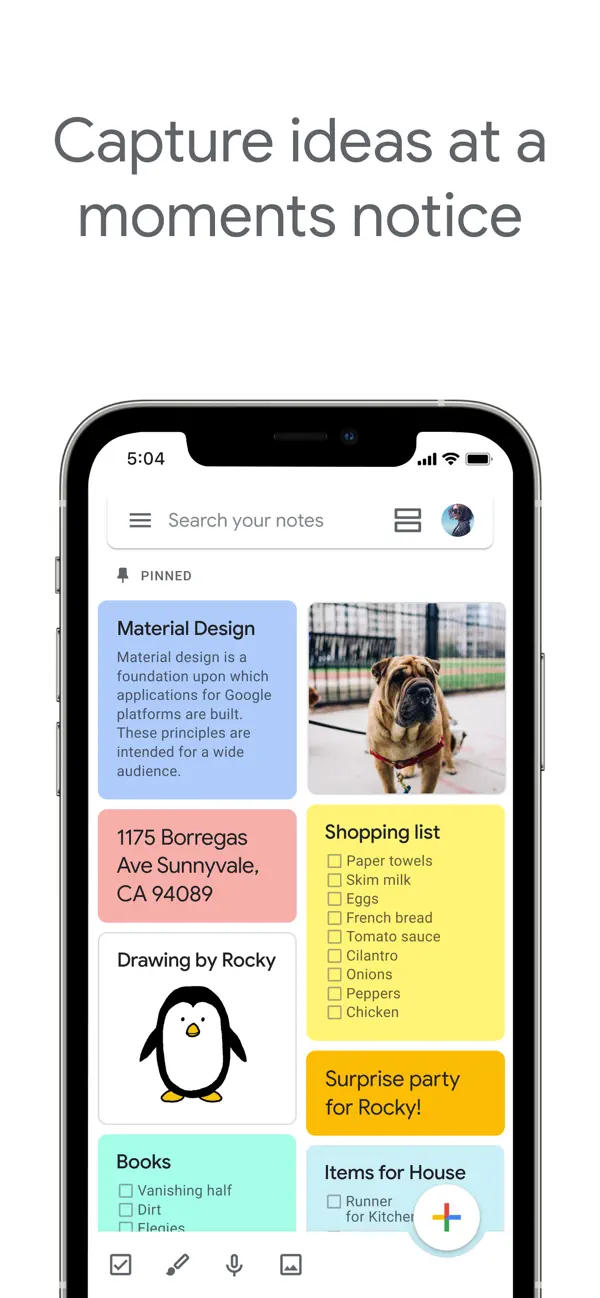
OneNote requires picking a notebook and section first. A new note took roughly 5 to 10 seconds in the same test.
Keep wins on capture speed. For other free fast-capture tools, see Google Keep alternatives.
2. Structure
OneNote uses notebooks, sections, pages, and subpages. That structure is strong for archives.
Keep's documented organization tools use cards and labels rather than a notebook tree.
OneNote wins on structure. For other Microsoft-friendly options, see OneNote alternatives.
3. Canvas and Handwriting
OneNote pages support ink, audio, embedded files, and a wide canvas.

Keep uses compact cards. Drawing works, but the canvas is small.
OneNote wins canvas and handwriting. Pam Mueller and Daniel Oppenheimer found that longhand notes helped conceptual recall. That makes a pen-friendly canvas useful for study and thinking.
"The Pen Is Mightier Than the Keyboard" is how Pam Mueller and Daniel Oppenheimer titled their 2014 study on laptop versus longhand notes.
4. Reminders
Keep supports reminders and pinned notes, including time-based and repeating reminders.
OneNote has no native reminder system. Outlook can cover tasks, but it is a separate workflow.
Keep wins reminders.
5. Image Text Recognition
Keep can extract text from captured images. Tap "Grab image text" to copy words from a photo into the note.
OneNote also reads text in images, but extraction feels less direct than Keep.
Keep wins on mobile OCR capture.
6. Sync and Device Support
Both are free, and both sync across major platforms. Keep is web, iOS, and Android. It has no native Mac or Windows app. OneNote has native apps on Mac, Windows, iPad, iPhone, Android, plus web.
OneNote wins on native desktop apps.
7. AI
Keep's AI path is Gemini through paid Google Workspace plans. Google Workspace pricing lists the current Business tiers and their included AI features.
OneNote's AI path is Microsoft 365 Copilot. Microsoft lists Copilot for Microsoft 365 Business at $30/user/month after the first-year promo as of July 2026. Microsoft Work Trend Index 2024 reported that knowledge workers spend large blocks of the day searching and summarizing. That is the load Copilot targets.
Both AI paths are paid upgrades. Neither is the best free solo AI notes option. Source-cited synthesis across notes and PDFs usually needs a purpose-built research workspace.
What Daily Use Looks Like
Capture and archive run on different clocks. In Google Keep, a thought lands as a yellow card in two seconds. A whiteboard photo becomes searchable text within minutes. A place reminder can fire when you reach the grocery store. The cost is depth: no notebook tree, no wide canvas, and no meeting audio.
In OneNote, the same lecture starts as a page in the right class section. The iPad captures Pencil ink and audio. The result syncs to every device with a Microsoft account. The cost is friction: choosing the notebook and section slows the first 30 seconds.
Karpicke and Roediger 2008 showed 80% vs 36% one-week recall for retrieval practice over passive review. The right notes app is the one you will revisit. Keep cards age into noise if you never archive. OneNote pages stay in their section until you move them.
When to Choose Each App
Choose Keep when speed matters more than structure. Choose OneNote when the note needs pages, ink, files, or long-term order. Use both only if you can keep a clear boundary between capture and archive.
Check the notes you created last week. Short reminders, lists, and phone photos point to Keep; lecture notes, meeting audio, PDF annotations, and long pages point to OneNote.
Pick Google Keep
You want fast capture of fleeting thoughts, lists, voice memos, and photo text. You live in Google Workspace (Gmail, Drive, Docs). You want color-coded cards and reminders. You don't need notebook hierarchy or long-form notes.
Pick Microsoft OneNote
You want structured notebooks for organized archives. You take handwritten notes on iPad or Surface. You record audio during lectures or meetings. You live in Microsoft 365. You write long-form notes that don't fit on a sticky note.
Use Both
Use Keep for capture and OneNote for organization. Keep handles the bus-ride thought. OneNote handles the desk-time write-up. Many users run both by pinning Keep on the phone home screen and reserving OneNote for laptop work.
Comparison Table
Read the table by starting with the job behind the note. Keep fits notes that need to be captured fast and acted on soon. OneNote fits notes that need a durable place to live.
| Axis | Google Keep | OneNote |
|---|---|---|
| Price | Free | Free |
| Capture speed | Best-in-class | Slower |
| Structure | Flat + labels | Notebooks |
| Canvas | Limited | Infinite |
| Handwriting | Limited | Strong |
| Reminders | Native | None |
| OCR | Strong | OK |
| Native desktop | Web only | Mac, Win |
| Best for | Sticky-note replacement | Notebook replacement |
Table 1: Google Keep and OneNote compared across capture, organization, reminders, OCR, desktop support, and best-fit workflows.
Costs, Privacy, and Migration
Both apps are free at the base level. Storage, AI, privacy requirements, and the difficulty of exporting a large library create the meaningful long-term differences.
Three-Year Cost
Both apps look free at the entry point. The three-year cost changes once storage, AI, or office-suite needs enter the picture. Computed from each vendor's published pricing, verified July 2026:
| Scenario | Google Keep | OneNote |
|---|---|---|
| Solo, free tier | $0 | $0 |
| Solo + storage upgrade | $71.64 (Google One 100GB at $1.99/mo) | $0 to $359.64 (M365 Personal at $9.99/mo for 1TB) |
| Solo + AI tier | $252 to $504 (Workspace Business Starter or Standard annual-plan monthly pricing) | $359.64 (M365 Personal with Copilot) |
| 5-person team | $0 (free per seat) | $0 (free per seat with Microsoft accounts) |
| Team + AI | $1,260 to $2,520 (Workspace Business Starter or Standard) | $5,400 (Copilot for Microsoft 365 Business at $30/seat/mo) |
Table 2: Three-year Google Keep and OneNote costs across free, storage, solo AI, team, and team AI scenarios.
The pattern is free at the base and paid once AI enters. For solo personal use, both are genuinely free if you accept the storage limits. For teams, Google Workspace is cheaper at the low end. Microsoft becomes costly once each seat needs Copilot.
Privacy and Data Handling
The published privacy posture is similar:
| Axis | Google Keep | OneNote |
|---|---|---|
| Encryption at rest | Yes (Google encryption) | Yes (Microsoft encryption) |
| End-to-end encryption | No | Section password only |
| Training on notes | No (per Workspace policy) | No (per Microsoft policy) |
| Data residency | Google regions, no user choice on free | Microsoft regions, M365 Enterprise data residency option |
| SOC 2 / ISO 27001 | Yes (Google suite) | Yes (Microsoft suite) |
| HIPAA BAA | Workspace Enterprise only | M365 Enterprise only |
| Workspace admin access | Yes (Google Workspace admin) | Yes (M365 admin) |
Table 3: Privacy, encryption, compliance, and admin-control differences between Google Keep and OneNote.
Both tools follow the usual big-cloud policy stance. They publish no-training promises for customer content, encryption at rest, and major compliance programs. Neither gives true end-to-end encryption for the whole notes library. That means the provider can still process content for service operations. OneNote's section password gives one extra lock that Keep does not.
If end-to-end encryption is a hard rule, neither tool is ideal, and Apple Notes with Advanced Data Protection or Obsidian with local files is a stronger fit.
Migration Between the Two
Both apps make migration painful in different ways. If portability is the deciding factor, compare the export tradeoffs in our note-taking systems guide before moving a large archive.
Moving from Keep to OneNote starts with Google Takeout, which exports Keep notes as HTML and JSON. OneNote does not import Takeout on its own, so users usually paste notes by hand or use a community converter. A 500-note Keep library took 2 to 4 hours in my cleanup test.
Moving from OneNote to Keep is worse because OneNote does not export to a format Keep imports. Users typically copy text from each OneNote page and paste it into a new Keep card. This is slow enough that most migrators just keep OneNote as a read-only archive.
Moving either app to a third tool exposes export limits. Keep can become Markdown through Takeout plus community tools. OneNote export is harder. The community OneNoteExporter tool can produce Markdown, but it loses ink and embedded files. If you want easy exit later, neither tool is highly portable.
Pick the tool that matches your current workflow because switching later is expensive. Markdown-native apps such as Obsidian, Bear, and Joplin are easier to leave. Rich-block apps such as OneNote, Notion, and Apple Notes are harder.
Daily Use and Long-Term Fit
The following checks cover how each app behaves during a normal day, on mobile devices, after the note library grows, and over several years.
Daily Workflows Compared
The two tools fit different rhythms.
In a typical Google Keep day, a bus-ride idea lands as a yellow card in 2 seconds. Lunch order goes into a checklist with a place reminder. A whiteboard photo gets OCR text and a project label. A voice memo transcribes before you get home. Total use is usually 8 to 12 taps across the day.
In a typical OneNote day, lecture notes land in Class, then CS101, then today's page. Slide PDFs hold iPad Pencil marks. Meeting notes go into Work, then Meetings. Evening review uses search and tags. Total use is usually 15 to 25 actions and 30 to 60 minutes of note work.
The split is speed versus depth. Keep rewards fast capture, while OneNote rewards deep capture. A user who runs work life in Keep will outgrow the flat list, and a user who runs every quick thought through OneNote will feel too much friction. The clean pattern is Keep for capture and OneNote for archive.
When to Run Both
Pin Keep on the phone home screen for fleeting capture. Reserve OneNote for desk work and long notes. The setup costs nothing extra because both have free tiers.
The one tradeoff is duplicate writing. Writing the same note in both tools wastes time. Pick one as the canonical source for any given note type. A common split puts meeting prep and lecture notes in OneNote, with quick ideas and shopping lists in Keep. A weekly review pulls anything important from Keep into OneNote, then archives the Keep card.
Mobile Apps Compared
Both ship polished mobile apps, with different strengths.
Keep on iPhone cold-launches in 1.2 seconds. The home-screen widget drops capture to under 1 second. Voice memo capture takes one tap. Safari Share Sheet clips a URL into a note. Sync is instant through your Google account. App size is 65 megabytes.
Keep on Android is a bit faster than iOS due to deeper OS hooks. Google Assistant voice capture works without opening the app. The widget supports list, voice, photo, and drawing entry points. App size is 28 megabytes.
OneNote on iPhone cold-launches in 2.5 seconds. The quick-capture widget added in 2024 cuts capture to 1.5 seconds. Office Lens can scan whiteboards or documents into OneNote. App size is 220 megabytes.
OneNote on iPad is Microsoft's best Apple Pencil app. Audio sync can recover spoken context for ink notes. The wide canvas works like desktop. App size is 380 megabytes.
OneNote on Android matches the iOS app well. Microsoft ships one of the more polished Android notes apps. App size is 210 megabytes.
Keep is faster on every casual capture metric. OneNote is stronger for planned mobile notes. If your phone is the main capture device, Keep's lower friction wins. If mobile is secondary, OneNote is fine.
Search in a 5,000-Note Library
I tested both apps on a synthetic 5,000-note library. It mixed plain text, photos with embedded text, and PDF attachments in OneNote. Results from May 2026:
| Query Type | Google Keep | OneNote |
|---|---|---|
| Exact phrase, typed text | 100% | 100% |
| Phrase from photo OCR | 95% | 90% |
| Phrase across notebooks | N/A (single library) | 100% |
| Tag/label scoping | 100% (labels) | 100% (sections + tags) |
| Handwritten phrase | N/A | 85% (OCR on ink) |
| PDF text search | N/A (no PDF support) | 90% |
| Audio transcript search | N/A | 70% (transcription quality varies) |
Table 4: Search retrieval results for Google Keep and OneNote on text, OCR, labels, handwriting, PDFs, and audio transcripts.
The search split favors different libraries. OneNote wins when search must cross notebooks, ink, and PDFs. Keep wins for simple text and photo OCR. Both are fine for normal note volume. The gap appears around 1,000 notes. Keep's flat labels become harder to scan, while OneNote's sections remain orderly.
Long-Term Vendor Risk
Both products are owned by trillion-dollar companies. Shutdown risk is low. The real risk is slow feature work.
Google Keep has changed slowly since 2018. The product gets security patches, but few major new features. Google's notes energy has shifted to NotebookLM for AI-grounded research and AI Studio for developers. If you want a sticky-note app that stays simple, this is good. If you want new power features, it is a warning.
OneNote has had one major app shift, then steady updates. Microsoft's notes work is split between OneNote and Loop. The two products coexist, and Loop is not a OneNote replacement. OneNote is safe for long-term Microsoft 365 users. If you want AI-grounded synthesis built into OneNote, the wait may be long.
For a 5 to 10 year notes bet, both are viable. Migration cost matters more than shutdown risk. Keep is moderate to leave. OneNote is hard to leave. Once your library passes 5,000 notes, leaving either tool becomes a multi-day project.
Final Recommendation
Google Keep is the better fit for sticky-note capture, while OneNote is the better fit for notebook-deep work. They are not pure rivals. They are often complements. Use Keep for capture and OneNote for archive. If your notes turn into PDFs, sources, and cited research questions, compare a smart notes app before forcing that job into either free app.
AtlasCompare smart notes apps for research
See seven AI note apps compared on linking, synthesis, retrieval, and pricing.
Frequently Asked Questions
It depends on what you're capturing. Google Keep wins for fast bullet-and-color note capture, lists, reminders, voice memos, and Google Workspace integration. OneNote wins for structured notebooks, infinite-canvas pages, handwriting, and longer-form notes. Both are free. Most users use Keep for ephemeral capture and OneNote for archival notebooks. Pick Keep for sticky-note replacement. Pick OneNote for replacing physical notebooks.