
Notion vs Obsidian (2026): Which Knowledge Tool Wins?
Notion vs Obsidian compared on pricing, sync, AI, plugins, and offline use. Notion ($10/mo) wins for teams, Obsidian (free) wins for plain-text power users.
- Byline

Summary
Use Notion for cloud workspaces, shared pages, and team tables. Use Obsidian for local Markdown files, links, and notes you want to keep for years.
July 2026 update covers price, sync, offline work, files, AI, plugins, and research notes.
Notion starts with shared structure in the cloud. Obsidian starts with text files on your device.
Many teams track projects in Notion and keep long notes in Obsidian.
Notion and Obsidian are the two products serious knowledge workers debate when they outgrow Apple Notes. Both store notes. Neither feels like a simple note app. Notion gives you a shared workspace in the cloud. Obsidian gives you raw Markdown files and a strong editor on top of them. The right pick starts with one question. Do you want your notes inside a vendor's database, or as plain files on your own disk?
This comparison ranks Notion vs Obsidian across 9 jobs. It uses current vendor pricing, official docs, and a small workflow test for readers who want to choose with less guesswork.

 Atlas
AtlasSee how Atlas handles source-grounded research
Upload a research paper and trace each answer to its supporting passage.
How We Compared Them
We checked each tool against capture, storage, linking, team sharing, and AI research. We also checked prices against the Notion pricing page, Obsidian pricing page, and Obsidian license overview on July 1, 2026.
For the hands-on pass, we used a 40-note test vault and workspace. It had 20 reading notes, 10 project notes, 5 meeting notes, and 5 clipped links. Notion took less setup for tables and shared views. Obsidian took less setup for durable files, links, and offline search.
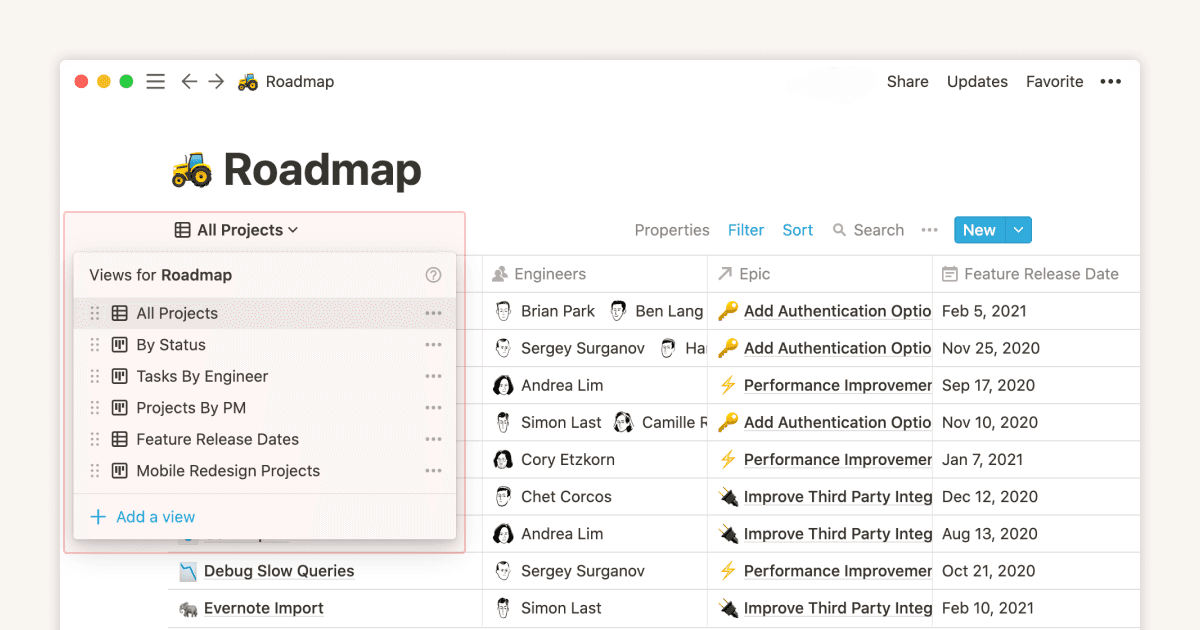
Notion shows one project database through several saved views. Choose it when the same records must support a table for editing, a board for status, and a calendar for dates without duplicating the underlying entries.
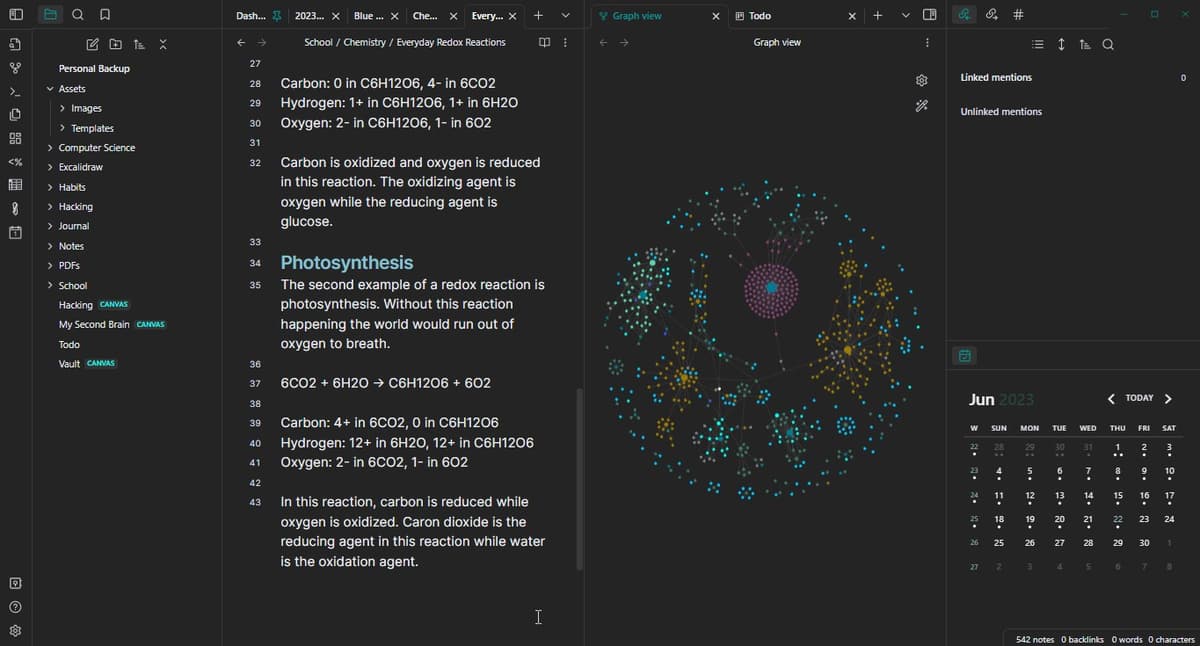
Obsidian keeps the Markdown file tree, the open note, backlinks, and the graph in one local workspace. Choose it when durable files and explicit links matter more than database views shared by a team.
What Notion and Obsidian Each Are
For the broader second-brain frame, see our second-brain apps guide.
Notion launched in 2016 and grew on one core idea: pages made of blocks. A block can be text, a heading, a checkbox, an image, a table, or another page. Databases became Notion's defining feature. Each row is a full page, and the same database can appear as a table, list, board, gallery, calendar, or timeline. By 2026, Notion supports AI inside the workspace, team comments, and API access.
Obsidian launched in 2020 with the opposite premise. Your notes live as plain .md files in a folder on your computer. Obsidian is a viewer and editor for that folder. Open a note and type [[. Obsidian suggests notes to link. Visit any note and you can see every other note that links to it. The graph view renders the vault as a network. Obsidian is local-first by default, and sync is opt-in.
The core split is simple. Notion is the cloud workspace. Obsidian is the file folder. Everything else follows from that.
Pricing: Notion vs Obsidian (2026)
Notion:
- Free: unlimited pages for one person, 5MB per file upload, and 7-day page history.
- Plus: $10/mo per seat (annual). Larger uploads, 30-day page history, and custom domains for sites.
- Business: $20/mo per seat (annual). Team spaces, advanced permissions, SAML SSO.
- Enterprise: custom pricing. Audit log, SCIM provisioning, customer success manager.
- Notion AI: included on Business and Enterprise, with limited trial use on Free and Plus.
Obsidian:
- Personal and commercial use: free. No feature limits. Unlimited vaults.
- Commercial license: $50/year per user, optional support for teams.
- Obsidian Sync: $4/mo annual ($5/mo monthly), end-to-end encrypted sync across devices.
- Obsidian Publish: $8/mo annual ($10/mo monthly), publish notes as a public site.
For a single personal user, both tools can be $0. Notion starts charging when you need larger uploads, longer page history, or team features. Obsidian starts charging only if you buy Sync, Publish, or an optional support license. For a team of 10, Notion Plus is $1,200/yr and Business is $2,400/yr. Obsidian can still be free, or $500/yr if the company buys optional Commercial licenses. For one person doing serious work, the storage model matters more than the cost.
Feature Comparison
Storage: Cloud Database vs Plain Markdown
The deepest difference between Notion and Obsidian is where your notes live.
Notion stores every page in its hosted database. You access pages through the Notion app or web. Export options are HTML, Markdown, or PDF. The hard part is databases. Formula columns, relations, and rollups flatten during export. The files keep the content but lose much of the structure.
Obsidian stores every note as a Markdown file on your local disk. You can open any note in VS Code, TextEdit, vim, or any editor that reads .md.
Links use wiki-style [[note name]] syntax inside the file. If Obsidian shut down tomorrow, your vault would still be a folder of plain text files.
For a long-term knowledge base, this matters. Obsidian feels safer if you want files you can keep for decades. Notion feels easier if you want fast setup, auto-sync, and team sharing.
| Storage question | Notion | Obsidian |
|---|---|---|
| Where do notes live? | Hosted workspace database | Local Markdown vault |
| What survives export best? | Page text and files | The vault itself |
| What needs rebuild work? | Tables, formulas, relations, and views | Plugin setups and themes |
| Best research use | Shared paper tracker | Long-term reading notes |
Table 1: Where Notion and Obsidian keep notes and what moves cleanly.
If your real blocker is cited answers from papers, neither storage model solves it by itself. After you choose the note home, compare source-grounded research assistants as a separate research layer.
Migration Reality Check
The cleanest Notion-to-Obsidian move is not a one-click clone. Notion exports non-database pages as Markdown and full-page databases as CSV plus Markdown subpages. Obsidian's official Importer plugin can bring those files into a vault. The open-source importer repository explains how it converts the export to plain Markdown files, but you still need a cleanup pass.
In our 40-note test, plain notes moved well. The messy parts were database views, formula fields, relation fields, and image paths. Treat a move as a 4-step job:
- Start with one top-level Notion area before you export the full workspace.
- Import that ZIP with Obsidian Importer into a test vault.
- Check links, images, tables, and database rows before moving more files.
- Rebuild only the views you still use. Do not rebuild dead Notion dashboards.
If most of your value sits in Notion tables, stay in Notion or move slowly. If most of your value sits in prose, notes, and links, Obsidian migration is much safer.
40-Note Test Result
This was a small editorial test, not a lab benchmark. It still exposed the practical split. Notion was faster for shared structure. Obsidian was faster once the job moved to local files, links, and search.
| Test job | Notion result | Obsidian result | Decision impact |
|---|---|---|---|
| Build the first project tracker | 14 minutes with table, owner, status, and date fields | 31 minutes with plugins and note templates | Notion wins if the first job is team tracking |
| Link 20 reading notes | Manual page links and backlinks | Fast [[note]] links from the keyboard | Obsidian wins if the first job is idea linking |
| Work with no network | Recently opened pages only | Full vault available | Obsidian wins for travel and field work |
| Move notes out | Markdown export plus CSV cleanup | Files already sit in the vault | Obsidian wins for exit safety |
| Ask cited questions | Page references through Notion AI | Plugin-dependent retrieval | Neither gives exact source-sentence checks natively |
Table 2: 40-note test results for setup, links, offline work, exit, and cited research.
Linking and Structure
Notion's structure is hierarchical. Every page lives inside another page or in the workspace root. You work through a sidebar tree. Databases are the connection layer. A row can reference another page, and views can filter by relation. Backlinks exist, but they are a secondary mechanic. The default mental model is parent-child.
Obsidian's structure is networked. Every note can link to any other note with [[ syntax. Folders exist but are optional. Many power users keep a flat folder structure and rely on links and tags. The default mental model is graph.
This matters because project work often fits a tree. Tasks break into subtasks, owners, and dates. Research work often fits a graph. Ideas connect across topics in ways that do not fit one parent folder.
A 2-year-old Notion workspace usually looks like a tidy outline with deep folders. A 2-year-old Obsidian vault usually looks like a graph of 1,500+ atomic notes that link in unexpected ways. Both are legitimate, they support different cognitive jobs. For the outliner-first cousin of this debate, see Notion vs Roam Research.
AI Features in 2026
Both apps now have AI paths, but they ask for different tradeoffs.
Notion AI now sits inside Business and Enterprise plans, with limited trial use on Free and Plus. It can draft text inside a page, answer questions across the workspace, and fill database properties. For example, it can tag a row or summarize a meeting note.
Obsidian has no first-party AI. Community plugins such as Smart Connections, Copilot for Obsidian, and Text Generator can connect a model to your vault. This gives you more control. It also adds setup work across API keys, prompts, privacy choices, and cost tracking.
Notion AI is strongest for drafting and page summaries. Obsidian is stronger when you want to choose the model and keep the note base local.
For cited AI answers, the main gap is proof. Notion and Obsidian can point you back to pages or files. A research workflow often needs the exact source sentence behind a claim.
| Research evidence job | Notion | Obsidian | Atlas |
|---|---|---|---|
| Answer across uploaded papers | Workspace search through Notion AI | Depends on the installed plugin and model | Searches the sources in one project |
| Show the passage behind an answer | Links back to a page | Links back to a note or file | Opens the cited source passage |
| Keep research separate from general notes | Requires a dedicated workspace or database | Requires a dedicated vault or folder | Uses a project with its own source set |
Table 3: Atlas is the separate research layer when the decision depends on checking source passages. Notion remains better for shared databases, and Obsidian remains better for local Markdown ownership.
Plugins and Extensibility
Notion exposes a public API for reading and writing pages and databases. Tools such as Zapier, Make, and Notion Automations can move data between apps. Notion does not let outside code run inside the app. Most extension work happens through the API.
Obsidian lets add-ons run inside the app. Users install them from the in-app catalog. As of 2026, the catalog lists 2,000+ plugins, including:
- Dataview for tables and lists from note metadata.
- Templater for reusable note templates.
- Excalidraw for sketch-style diagrams.
- Calendar for daily-note navigation.
- Periodic Notes for daily, weekly, and monthly notes.
- Citations for BibTeX-based research notes.
- Smart Connections for model-backed search over the vault.
Obsidian's plugin model is the main reason power users choose it. Notion's API model is the better fit for teams that need notes tied to the rest of their tools.
Sync, Mobile, Offline
Notion syncs in real time across web, macOS, Windows, iOS, and Android. Real-time multiplayer editing works on shared pages. Offline mode caches recent pages but disables search and database queries when offline. Mobile apps are usable but slower than the desktop app for heavy database work.
Obsidian runs natively on macOS, Windows, Linux, iOS, and Android. The desktop app is a 200MB Electron download but feels fast because it works on local files. Sync is opt-in via Obsidian Sync ($4/mo, end-to-end encrypted). You can also sync with iCloud, Dropbox, Google Drive, Syncthing, or git. Offline-first is the default, Obsidian doesn't need a network for any core function.
If your connection is weak, Obsidian is safer. It works well on flights, in field work, and in locked-down rooms with no internet. If several people edit the same page live, Notion is safer.
Performance at Scale
Notion can slow down in large workspaces, especially when table views span many links. Notion has shipped speed work over 2024-2026, but cloud sync still adds a floor to response time.
Obsidian operates on local files. In our 10,000-note test vault, notes opened from disk with no network wait. Search felt near-instant through built-in search and Omnisearch. The graph view slowed down past 5,000 notes. The editor stayed quick.
For a personal knowledge base that grows to 5,000-10,000 notes over a decade, Obsidian wins on speed. For a team workspace that grows to 5,000 pages across 50 people, Notion wins on coordination.
Comparison Table
Use the table to map jobs to tools. It does not name a single winner. Notion wins when structure and team sharing matter. Obsidian wins when local files and long-term control matter.
| Capability | Notion | Obsidian |
|---|---|---|
| Storage | Hosted cloud database | Plain Markdown files on local disk |
| Default structure | Hierarchical parent-child pages | Networked wiki-style links |
| Free tier | Unlimited pages, 5MB file cap | Free for all use, no feature limits |
| Paid plan starts at | $10/mo per seat (Plus) | $4/mo Sync and $50/yr optional Commercial license |
| AI built-in | Built into Business and Enterprise | Community plugins |
| API access | Public REST API | Local file access |
| Plugins | API-side integrations | 2,000+ community plugins in-app |
| Offline use | Downloaded pages and recent pages | Fully offline-first |
| Real-time multiplayer | Yes | No live multiplayer by default |
| Export | Markdown, HTML, and PDF, with databases flattened | Already Markdown |
| Best for | Teams, shared docs, structured tables | Solo knowledge base, file ownership |
Table 4: Notion and Obsidian by storage, price, AI, offline use, export, and fit.
Notion and Obsidian Use Cases
When to Pick Notion
Pick Notion if any of these apply:
- You work with a team: Real-time collaboration, comments, and shared pages are first-class.
- You need structured tables: Notion databases with views, filters, and relations are its strongest workspace primitive.
- You want fast setup: The free tier covers most personal use without configuration.
- You don't care where your data lives: Cloud-first storage is acceptable.
- You want notes plus project tracking: Notion replaces a wiki, a project tracker, and a doc tool in one.
For Apple-first solo writers, Notion vs Craft covers a writing-focused tool. If you want Notion against the macOS default, see Notion vs Apple Notes. For journals, see our Notion for journaling guide.
The cost trap is seat count. A 25-person team on Plus is $3,000/yr. The same team on Business is $6,000/yr. That can be fair for shared work and team knowledge. It is hard to justify for pure note-taking.
When to Pick Obsidian
Pick Obsidian if any of these apply:
- You want plain-text ownership: Markdown files survive software churn for decades.
- You build a personal knowledge base: Backlinks and the graph view reward atomic notes connected over years.
- You work offline often: The local-file architecture has no network dependency.
- You like to tinker: Community plugins let you bend the app to your workflow.
- You don't need real-time team editing: Solo use or async collaboration via git.
For Apple-only writers, Bear vs Obsidian tests both on the same work. If you are leaving a paid capture archive, Obsidian vs Evernote covers that move. Obsidian vs Apple Notes covers the Mac power-user choice.
The friction is setup time. Obsidian rewards people who enjoy tuning their tools. The first month may mean choosing plugins, naming folders, and writing daily-note templates. Notion gives you most of the value in 1 hour. Obsidian gives you more value over 100 hours. If your notes are long-term infrastructure, that work pays off. If you want a notepad, it does not.
How to Choose: A Decision Path
Use the first question that separates your actual workflow, then choose the tool named in the answer.
- Will multiple people edit the same notes in real time? If yes, Notion. Obsidian's collaboration story is async.
- Will you use the notes in 10 years? If yes, Obsidian, Markdown files outlast cloud apps.
- Are you on a flaky connection often? If yes, Obsidian, offline-first by design.
- Do you want notes plus databases, calendars, or project tracking? If yes, Notion, databases are the primitive.
- Do you want cited AI answers across all your notes? If yes, neither Notion AI nor Obsidian's plugins ship exact source-sentence checks natively.
- Do you not know yet? Start with the free tier of both. Notion's free tier covers most personal use, Obsidian is free for personal use without limits. Use each for a week. The one you want to keep open in the morning is the one you should pick.
See also Obsidian alternatives, Notion AI alternatives, and the best knowledge management software. For an AI-first three-way, read NotebookLM vs Obsidian vs Atlas.
AtlasSee how Atlas handles source-grounded research
Upload a research paper and trace each answer to its supporting passage.
Frequently Asked Questions
Use Obsidian if you want full ownership of plain-text Markdown files on your own disk and a long-running personal knowledge base. Use Notion if you want a cloud workspace with databases, shared pages, and a low setup cost. Obsidian is free for personal use, Notion's free tier is generous (unlimited pages, 7-day page history) but caps at 5MB per file upload. For pure note-taking with backlinks, Obsidian is faster to learn. For notes plus tables, calendars, and team sharing, Notion is faster to deploy.