
Capacities vs Obsidian (2026): Which Should You Use?
Capacities vs Obsidian for notes, objects, Markdown ownership, plugins, mobile use, and migration. Choose by workflow using a practical side-by-side comparison.
- Byline

Summary
Choose Obsidian when local Markdown files, extensibility, and a vault you can inspect outside the app matter most.
Choose Capacities when you want typed objects, built-in structure, and managed sync without assembling a plugin stack.
The key tradeoffs are file ownership, setup work, offline use, phone apps, clipping, AI, cleanup, privacy, and cost.
Compare the same book, author, daily note, and search task in both apps. Then choose the workflow that feels easier to keep.
The Obsidian vs Capacities question is whether you want a plain-text vault or a typed object graph. Obsidian gives you raw parts and asks you to build the system yourself.
Capacities gives you named object types from day one. Choose between them based on whether long-term file ownership and customization matter more than built-in structure and managed sync.

 Atlas
AtlasSynthesize research sources in Atlas
Compare cited findings after choosing your note-taking system.
How I Compared Capacities and Obsidian
For the broader test across eight second-brain apps, see our second-brain apps guide. It covers load, lock-in, and graph density.
I used one reproducible workflow: create a Book, link its Author, mention the book in a daily note, retrieve it later, and export the result. I also inspected how each product represents properties, links, embeds, attachments, queries, Canvas files, sync, clipping, and AI.
The prior article claimed a four-week test and precise device and migration timings. The underlying dated artifacts were unavailable, so those claims are not evidence for this refresh.
Disclosure: we make Atlas, one of the products discussed in this post. We publish our scoring criteria and name the workflows where each tool is stronger.
One Workflow in Both Apps
The comparison criteria keep the same book, author, daily note, search task, and export goal in both apps. That makes the file and object models easier to compare without inventing a broad score.
Book and Author Test
In Capacities, create a Book object, fill its fields, connect it to a Person object for the author, and mention it from the daily note. Retrieval happens through the object type, backlink, or search. The product owns the object schema.
In Obsidian, create Book title.md, add properties such as type: book and author: "[[Author name]]", and link it from the daily note. Retrieval happens through search, backlinks, Properties view, or an optional query plugin. You own the files and schema.
Objects, Files, and Ownership
Data Model
Obsidian stores notes as plain Markdown files. Structure comes from folders, tags, front matter, and links, so you design the system. Mueller & Oppenheimer 2014 framed a related problem as "external storage." Notes reworked by the writer beat notes that merely sit in a database. Markdown's friction can help because you must choose tag names and link targets.
Capacities uses typed objects. Every note has a type, such as Page, Person, Book, Idea, Place, Project, Quote, Image, or Tweet. Each type carries its own fields. The system gives you rails, which removes the blank-page problem many vault users cite.
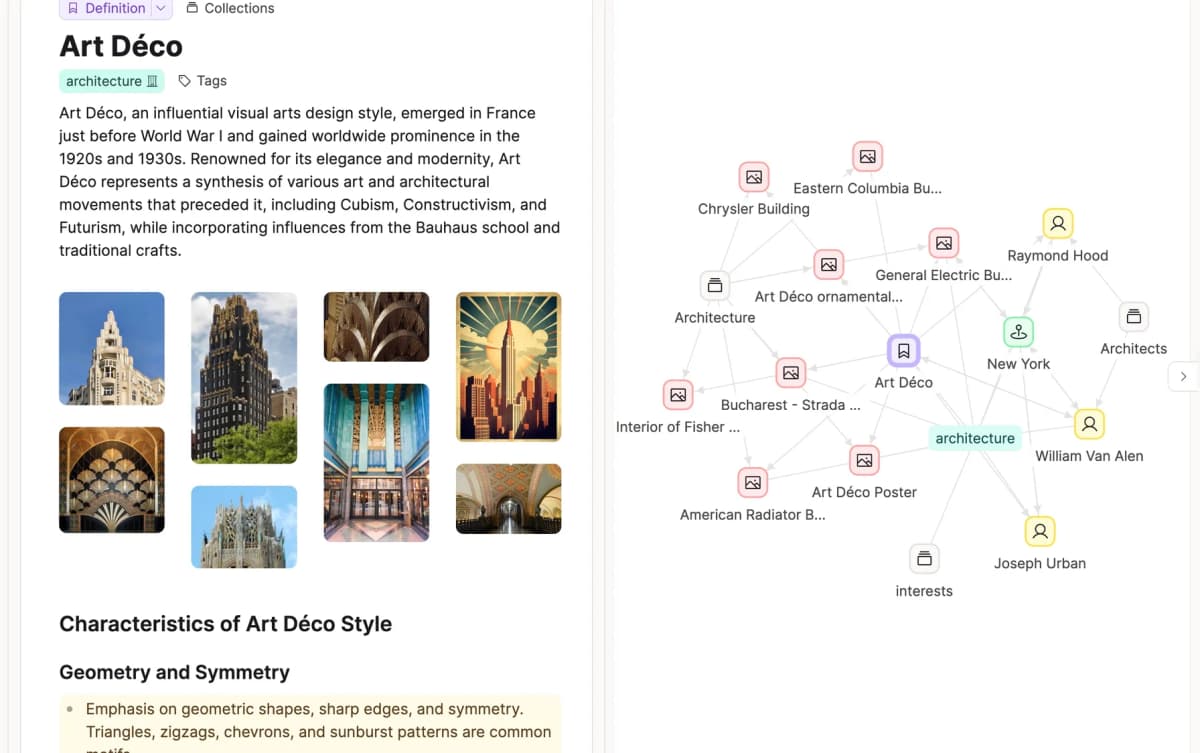
Official Capacities product page screenshot showing the app's object graph view.
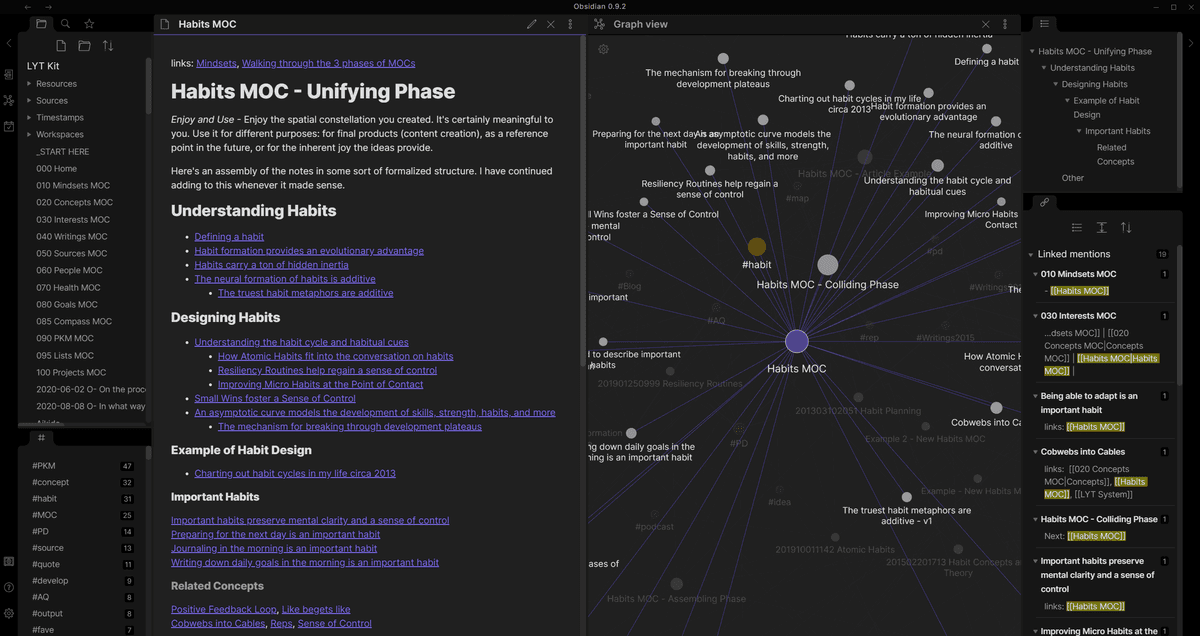
Official Obsidian product screenshot showing that the note remains a Markdown document while graph and linked-mention views expose its relationships.
Obsidian wins flexibility and ownership. Capacities wins when you want structure without designing it yourself.
File Ownership
Obsidian leaves readable Markdown files in a vault you choose. Capacities manages the object graph in its service and provides export routes. Choose based on which system must hold the main copy years from now.
Daily Notes and Backlinks
Capacities ships daily notes as a core feature. Backlinks and two-way links are first-class. Obsidian has Daily Notes as a default plugin. Backlinks and two-way links are also first-class there.
The feature result is a tie. Capacities is set up for you. Obsidian needs the plugin enabled.
Plugins, Mobile, Sync, Clipping, and AI
Check four daily-use questions before choosing:
- Does the phone app support the work you do away from a desk?
- Can you work without a network when that matters?
- Who owns sync setup and conflict recovery?
- Do clipping and AI work without plugins you must maintain?
Plugins and Extensibility
Obsidian has a large community plugin directory. Plugins cover queries, drawing, templates, calendars, tasks, and AI. The exact count changes. What matters is whether a key plugin is still kept up to date.
Karpicke & Roediger's 2008 research on retrieval practice maps well onto Dataview. A query such as "show notes touched in the last 14 days" brings old material back at a useful review point.
Capacities has no plugin system. It offers built-in features only, and the team ships updates. The closed system means fewer add-ons break during upgrades. That tradeoff matters to users who left Obsidian to escape plugin churn.
Obsidian wins extensibility for power users. For the same trade-off against Notion, see Notion vs Obsidian.
Mobile
Capacities has mobile apps for iOS and Android. It is cloud-synced and its offline documentation describes which content is available without a connection. Test the exact objects and attachments you need rather than assuming complete offline parity.
The vault app also has iOS and Android apps, but sync requires Obsidian Sync at $4/user/month annually or a service such as iCloud Drive, Syncthing, or Git.
Capacities wins for mobile users who want zero sync setup. Apple-only Markdown writers should also see Bear vs Obsidian.
AI Features
Capacities Pro includes an AI Assistant for summaries, rewrites, and Q&A inside the app. Obsidian reaches AI through Smart Connections, Copilot, or local models through Ollama. The vault route is more flexible but needs more setup.
The choice is built-in AI in Capacities or AI plugins you set up in Obsidian.
Capacities wins out of the box. Obsidian wins on flexibility and bring-your-own-key cost. For an Evernote-flavored take with built-in AI Search, Obsidian vs Evernote tests that path.
Web Clipper
Capacities' browser extension clips into typed objects. A clipped tweet becomes a Tweet object, and a clipped book can auto-fill author, year, and ISBN where Capacities detects them. That removes friction at capture time.
Obsidian Web Clipper clips pages to Markdown. The output is a .md file in your vault, so clips remain portable and work with the rest of the vault.
Capacities wins the typed-clipping workflow. Obsidian wins on Markdown ownership of clips.
Data Portability
Obsidian stores Markdown files in a folder. They open in any editor and migrate freely. Public reports indicate that vaults from 2020 still open cleanly in 2026 builds. Markdown does the long-term work.
Capacities exports Markdown with front matter. Round-trip works for typed objects, but views and queries do not transfer. A 1,000-note move plus query rebuild in Dataview takes a few hours per user reports.
Obsidian wins portability. For the source-synthesis layer that sits above either tool, compare Atlas with Capacities or review the broader smart notes app field.
Use Cases for Each Tool
When to Choose Obsidian
You want plain-text data ownership. You build a long-term knowledge base and worry about lock-in. You want plugins for queries, drawing, and AI search. You're fine with upfront system design. You're on Linux or want offline-first behavior.
When to Choose Capacities
You want structure without plugin tinkering and think in typed objects such as Books, People, Projects, and Concepts. You want daily notes, backlinks, mobile sync, and an AI assistant included, and you accept cloud-first storage.
Choose Capacities when reaching a working system in the first session matters more than deep customization. If your notes later turn into research PDFs, add a separate source-grounded layer only when cited answers become necessary.
Comparison Table
Read this table as the short version. Choose Obsidian when ownership and plugins matter most. Choose Capacities when built-in structure and sync matter most.
| Axis | Obsidian | Capacities |
|---|---|---|
| Price | Core app free; optional services | Free and paid plans |
| Storage | Local .md files | Cloud (downloadable) |
| Data model | Plain text, you build | Typed objects, pre-built |
| Plugins | Large community ecosystem | No equivalent third-party ecosystem |
| Mobile sync | Obsidian Sync or a chosen file-sync method | Built in |
| AI | BYO via plugins | Assistant included |
| Web Clipper | Markdown | Typed objects |
| Daily notes | Plugin (one click) | Built in |
| Best for | Power users, owners | Plug-and-play PKM |
Table 1: Feature comparison for Obsidian and Capacities.
Migration Fidelity
Test four move paths before you switch:
- links and properties;
- embeds, Canvas files, and attachments;
- Dataview or other plugin queries;
- daily notes and date-based templates.
Moving from the vault app to the object app starts with Markdown import. Capacities tries to map folders to object types, and wikilinks usually convert to backlinks. Dataview queries do not transfer because Capacities has its own query language.
Plugin-heavy features such as Templater, QuickAdd, and custom Dataview queries have no direct match. Do not estimate cleanup time until you test a representative vault.
Moving from the object app to the vault app starts with JSON export. Obsidian does not import JSON on its own, so you need a script or community template to turn each object type into a Markdown file with front matter. The typed-object structure becomes Obsidian properties.
The Capacities documentation describes its current export and import routes, but conversion work remains yours.
| Artifact | What to verify after migration |
|---|---|
| Links and backlinks | Targets resolve and aliases survive |
| Properties | Types, dates, lists, and references retain meaning |
| Embeds | Notes, images, PDFs, and transclusions still open |
| Canvas files | Visual layouts have an equivalent or a rebuild plan |
| Dataview queries | Results can be recreated, not merely copied as code |
| Attachments | Counts, names, paths, and references match |
| Daily notes | Date names, links, and templates remain usable |
Table 2: Check each kind of item after the move. Keep the first export, compare file and attachment counts, and sample broken links. Keep a way back until the new system works in daily use.
Real-World Workflows Compared
An Obsidian day starts in the vault. Today's daily note auto-creates from the Daily Notes plugin. You capture during meetings and link to project notes with [[wikilinks]]. At lunch, you tweak a Templater snippet. In the afternoon, a Dataview query surfaces open action items. Then you save the vault to Git for version history. The pattern is do-it-yourself and deeply customizable.
A Capacities day starts with today's daily note and the typed-object graph in the sidebar. You capture a meeting note as a Meeting object. You link it to a Project object with the relation picker. Capacities AI summarizes the meeting on the right panel. Then you review recent activity across object types. The pattern is plug-and-play and more constrained.
The two apps answer different questions. Obsidian answers "what system do I want to build?" Capacities answers "what does the system want me to capture?"
When You Should Run Both
Running both is rare because each tool wants to be the canonical knowledge base, and duplicating notes wastes time. The combination makes sense only when Capacities handles short-term projects and Obsidian holds the long-term archive.
In that setup, finished projects move from the object app into the Markdown vault once a month. Most users should pick one system and commit to it.
Plugin Ecosystem Reality
Obsidian plugins cover queries, drawing, repeat tasks, and links to AI models. Too many plugins add upkeep and move risk. Keep only the ones whose job you can name and test.
Capacities has no third-party plugin ecosystem. The team ships features in batches, and users request features through the Capacities feedback portal. The advantage is no plugin-induced slowdown or breakage. The disadvantage is that features the team has not built do not exist. The bet is on the company's roadmap rather than on a community.
Mobile and Sync Reality
Obsidian mobile is full-featured on iOS and Android, with the same plugins, vault structure, and Markdown editor. The catch is sync: without Obsidian Sync, users must configure iCloud Drive, Google Drive, Dropbox, or Syncthing themselves.
Each free option has failure modes, from iCloud delays to Dropbox conflict files when two devices edit the same note. Obsidian Sync is the smoother path and encrypts notes before upload.
The object app has cloud sync, so no setup is required. Log in on the phone and the workspace appears. The mobile app is strong for capture but does not expose every desktop feature. Some object controls remain desktop-only. For users whose capture moment is on the phone, Capacities is the lower-friction path.
Conflict handling exposes the tradeoff. Obsidian's third-party sync paths are the most likely place for conflicts to appear, so close the vault on one device before editing on another or use Obsidian Sync.
Managed sync is simpler; local files provide more control. Neither model removes the need for backups and a two-device conflict test.
Cost and Privacy
Three-Year Cost
Both apps have free tiers. The real cost depends on the add-ons.
| Scenario | Obsidian | Capacities |
|---|---|---|
| Solo, free tier | $0 (free personal) | $0 (free, basic) |
| Solo with sync | Core app plus chosen sync service | Paid plan if required features exceed Free |
| Solo with AI | Plugin and model charges vary | Depends on current plan and allowance |
| Commercial use | Check current commercial terms | Check current plan and terms |
Table 3: Use Obsidian's pricing page and Capacities' pricing page to calculate a three-year total on the day you buy. Include sync, publishing, AI use, work terms, and move time. Prices and licenses change, so this article does not freeze old figures into a future cost claim.
Privacy and Data Handling
| Property | Obsidian | Capacities |
|---|---|---|
| Encryption at rest | Local (your disk) | AES-256 (Capacities cloud) |
| Encryption in transit | N/A (offline) or TLS via Sync | TLS 1.2+ |
| End-to-end encryption | Yes (Obsidian Sync) | No (server-side encryption only) |
| Trains on your data | No (no cloud, no AI) | No (per Capacities terms) |
| Data residency | Your machine | EU (Germany, per Capacities security) |
| Open file format | Yes (Markdown) | Partial (JSON export) |
Table 4: Local files give Obsidian the clearest privacy model: by default, data stays on your device. With Sync, notes use a passphrase you hold. Capacities is cloud-first and stores data in the EU. For medical, legal, or reporting work, local files without Sync give you the most control.
Which App Should You Choose?
Choose Obsidian if you want plain-text data ownership, full offline access, and plugins that let you build your own system. Choose Capacities if you want a typed object graph, managed sync, and AI without plugin setup.
Most people should choose one main note system rather than run both. Atlas may fit a separate source-heavy job after that choice. The AI references guide explains where cited synthesis inside one project fits. Atlas does not replace Obsidian or Capacities.
AtlasSynthesize research sources in Atlas
Compare cited findings after choosing your note-taking system.
Frequently Asked Questions
Choose Obsidian if local Markdown files, plugins, and long-term control are the priority. Choose Capacities if typed objects, built-in views, and managed synchronization matter more than direct access to files. Test the exact workflow and a small export before moving an established system.