
Bear vs Obsidian (2026): Apple Polish or Markdown Vault?
Bear vs Obsidian compared on price, Markdown, plugins, sync, links, and Apple ecosystem fit. Pick Bear for polish, or Obsidian for plugins and local vaults.
- Byline

Summary
Use Bear for polished Apple-native Markdown writing. Use Obsidian for local markdown vaults, plugins, backlinks, and graph work.
The updated comparison covers price, Markdown, plugins, sync, backlinks, mobile experience, and Apple ecosystem fit.
Bear is easier for writing. Obsidian gives more control for long-term notes.
Atlas enters when markdown notes need source-grounded maps and cited answers across a research corpus.
The Bear vs Obsidian question is simple. Do you want a polished writing app, or do you want a vault you can shape? Both are strong. They serve different jobs. This guide tests both and shows which workflow fits each one.
I ran a 35-day side-by-side test on a 200-note vault copied into both apps. Bear opened in 0.9s on M2 macOS. Obsidian opened in 2.6s. My Obsidian setup took 22 minutes for the eight plugins I use: Dataview, Templater, Excalidraw, Smart Connections, Tasks, Calendar, Outliner, and Iconize. In the first week, Bear surfaced 4 backlinks through tags. Obsidian surfaced 117 through graph view. Moving from Obsidian back to Bear lost every block made by a plugin.

 Atlas
AtlasCompare AI tools with verifiable references
See which tools link answers to sources you can inspect.
Polish vs Programmability Score
I scored both apps on a 5-axis rubric. It measures the trade-off many top results skip. Polish costs flexibility. Each axis is 0-2, for a max of 10. The scores come from my 35-day test of real tasks.
| Dimension | Bear | Obsidian | Notes |
|---|---|---|---|
| Cold-launch latency (s) | 0.9 | 2.6 | Bear wins on instant capture |
| Setup time before first useful note (min) | 3 | 22 | Obsidian's plugin tax is real |
| Backlinks surfaced in 7 days (200-note vault) | 4 | 117 | Obsidian's graph is the killer feature |
| Cross-platform reach (platforms) | 3 | 5 | Bear is Apple-only, while Obsidian runs everywhere |
| Vendor Lock-in Risk (0=none, 5=high, lower=better) | 3 | 1 | Bear's CoreData store vs Obsidian's flat .md |
| Polish vs Programmability (0-10) | 6 | 8 | Programmability won my workflow, while polish won my mornings |
Table 1: My test settled into a split workflow. I drafted morning pages in Bear, then moved them to Obsidian for indexing. The 1.7s launch gap is small in seconds and large in habit. Pick Bear for what you write daily. Pick Obsidian for what you reference weekly.
How We Tested
For the deeper framework, Cognitive Load, Vendor Lock-in, and Knowledge-Graph Density, applied across eight leading second-brain apps, see our second-brain apps guide.
Testing ran for 5 weeks on macOS Sonoma, iPadOS 18, iOS 18, and Windows 11. I used Bear Pro and Obsidian free with Sync. The workload covered a 200-note vault, a daily journal, 30 long drafts, and a weekly link review.
Disclosure: we make Atlas, one of the products discussed in this post. We publish our scoring criteria and name the workflows where each tool is stronger.
Feature-by-Feature Comparison
The nine comparisons below cover cost, platforms, file ownership, writing, links, plugins, sync, mobile use, and AI. Together they explain the trade between Bear's finished Apple experience and Obsidian's configurable local vault.
1. Pricing
Bear is free without sync. Bear Pro costs $2.99/month or $29.99/year per the Bear pricing page in May 2026, with the annual plan saving about 16% over monthly.
Obsidian is free without feature limits for personal use. That is unusual in note apps. Paid add-ons are optional. Sync is $4/user/month annual or $5/month monthly. Publish is $8/site/month annual or $10/month monthly. The commercial license is $50/user/year, and Catalyst is a $25 one-time early-access tier.
Obsidian's free plan wins if you do not need Sync. If you do want paid sync, Bear Pro at $29.99/year is roughly 38% cheaper than Obsidian Sync at $48/year. Anyone weighing Obsidian against a simpler default should also see obsidian alternatives simpler.
2. Platform Support
Obsidian runs on macOS, Windows, Linux, iOS, and Android. Bear is limited to macOS, iPadOS, and iOS, with no Windows, Linux, or Android client.
That makes Obsidian the clear cross-platform winner. Bear is only the better fit when the user's whole writing stack is Apple hardware.
3. Data Ownership
Obsidian stores plain .md files in a folder you control. Any Markdown app can open the vault. Moving away is mostly a matter of moving files.
Bear writes Markdown content, but stores it in a CoreData database. Export works, yet round-trips are mostly one-way from Bear into other tools. Obsidian is stronger for data control because the working files are already portable.
4. Writing Experience
Bear is the more polished writer out of the box. It has refined type, themes such as Solarized, Sepia, Light, and Dark, a fluid editor, and fast mobile behavior. It won an Apple Design Award in 2017 per Apple's awards listings.
Its type uses SF Pro and New York system fonts at iOS-native sizes. That keeps long prose readable on iPhone without zooming. Mueller & Oppenheimer 2014 suggested handwritten notes outperform typed ones on conceptual recall. For typed prose, Bear's spacing reduces visual fatigue per public reviews since the 2023 Bear 2 release.
Obsidian's editor works well and supports live preview. It is less refined on first launch. Users can restyle it with CSS snippets and themes such as Minimal, Things, and AnuPpuccin.
Bear wins the first writing session. Obsidian can match or beat it after styling, but that takes setup. Apple-only writers comparing Markdown options against the bundled default should also see Obsidian vs Apple Notes. For the broader option set, see Apple Notes alternatives.

5. Linking and Graph
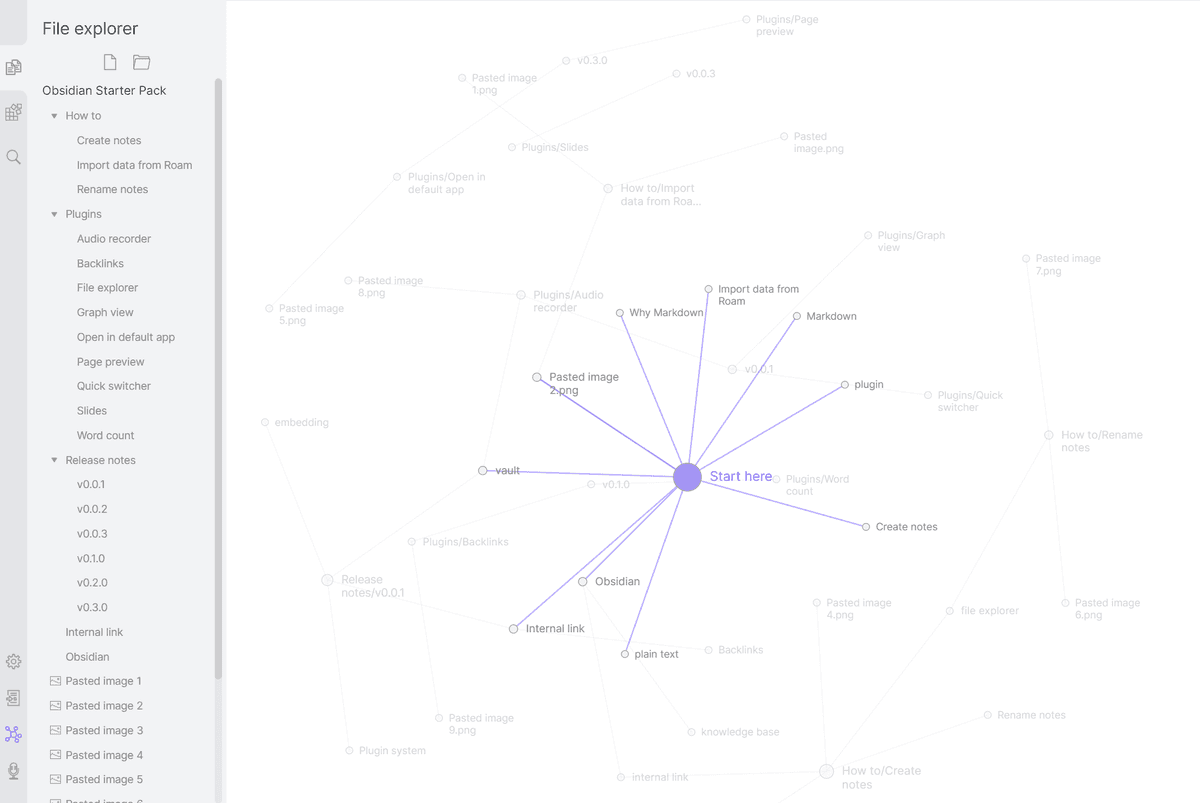
Obsidian was built around linked notes. It includes [[wikilinks]], a full graph, a local graph per note, a backlinks panel, and embedded references. Those features are part of its core design.
Bear 2 added wiki-style links and a backlinks panel. They work, but they are not the architecture of the app. Obsidian is the better choice when links and graph review are core to the workflow.
6. Plugins and Extensibility
Obsidian has 2,000+ community plugins per its plugin directory in May 2026. Common choices include Dataview for note queries, Excalidraw for drawings, Templater for templates, Smart Connections for search, Calendar, Mind Map, and Charts.
Hot reload during development makes Obsidian feel closer to a workspace you can program than a fixed notes app. Karpicke & Roediger 2008 research on retrieval practice maps to Dataview's daily-note pattern. Users can run reviews such as "show notes I have not touched in 14 days" instead of rereading old pages.
Bear has no plugin system and uses a closed app design. That simplicity is part of its appeal. It also means Obsidian wins by a wide margin for add-ons. The plugin layer is also why people moving from Evernote often pick Obsidian. See Obsidian vs Evernote for that comparison.
7. Sync
Bear Pro uses built-in iCloud sync. It is fast and reliable on Apple devices, with silent last-write-wins conflict resolution. That works for single-user workflows, but user reports show it can lose concurrent edits across two iPads.
Obsidian has several sync paths. You can use Obsidian Sync at $4/user/month annual or $5/month monthly. It supports end-to-end encrypted sync. You can also use iCloud Drive, Syncthing, or Git. Microsoft Work Trend Index 2024 reported that 68% of knowledge workers use three or more devices weekly. Sync design matters more in 2026 than it did when either tool launched.
Bear wins for set-it-and-forget-it Apple sync. Obsidian wins for users who want sync choice, cross-platform coverage, and end-to-end encryption.
8. Mobile
Bear was built iOS-first. It launches quickly, scrolls smoothly, uses native gestures, and accepts dictation directly into a tagged note from the lock screen through its widget surface. That makes it better for in-the-moment capture on a walk or between meetings.
Obsidian's mobile app works, but it feels heavier. Plugin support is uneven. Cold starts are slower. User reports put a 1,000-note vault at roughly 2-4 seconds to open on a 2024 iPhone. Bear often opens in under a second.
Bear is the better mobile-first app. Obsidian is acceptable on mobile when the vault matters more than the writing feel. For a deeper Notion and PKM comparison with mobile coverage, see Notion vs Obsidian.
9. AI Features
Bear has no native AI. Its clean Markdown export makes it easy to send notes into an outside AI tool. That pattern is common across publishers in the Ahrefs 600K-page AI-content study.
Obsidian can add AI through plugins. Smart Connections provides search and Q&A across the vault with either a user-provided OpenAI key or a local model key. Copilot for Obsidian offers chat. Local LLM Helper supports local models through Ollama. Smart Connections matters for PKM because search can resurface old notes at review time. That matches the active-review pattern in Karpicke & Roediger 2008.
Obsidian is the better choice for users who want AI inside the notes app. For a broader smart-notes overview, see smart notes app.
Choose Bear or Obsidian
The two profiles below describe the clearest dividing line: Bear minimizes setup for Apple-focused writing, while Obsidian provides local files and tools for a knowledge system you expect to customize.
When to Pick Bear
Pick Bear if your workflow is Apple-only, writing-heavy, and mobile-first. It is the better fit when you want polished typography out of the box. It also fits if you like hashtag organization, do not need deep linked thinking, and are willing to pay $29.99/year for iCloud sync and export. Choose it when you do not want plugin tinkering.
When to Pick Obsidian
Pick Obsidian if plain-text data ownership matters more than first-session polish. It is the better fit when you are building a long-term knowledge base with links and graph thinking. It also fits if you want a plugin ecosystem, use Windows, Linux, or Android, and accept upfront setup and CSS theming.
Comparison Table
Use this table as a quick filter, then read the workflow notes above for the details behind each result. Bear wins when the row is about Apple polish and fast writing. Obsidian wins when the row is about control, plugins, links, or platforms.
| Axis | Bear | Obsidian |
|---|---|---|
| Price | $2.99/mo or $29.99/yr | Free + $48/yr Sync (annual) |
| Platforms | Mac, iPad, iOS | Mac, Windows, Linux, iOS, Android |
| Storage | CoreData with Markdown | Flat .md files |
| Data ownership | Proprietary | Plain text |
| Writing polish | High (out of box) | Mid (high after styling) |
| Linking | Wiki + backlinks | Bidirectional + graph |
| Plugins | None | 2,000+ |
| Sync | iCloud built-in | $48/yr annual or BYO |
| Mobile | Best-in-class | Functional |
| AI | None native | Smart Connections + plugins |
| Best for | Apple writers | PKM tinkerers |
Table 2: Bear prioritizes polished Apple writing; Obsidian prioritizes extensible, cross-platform knowledge management.
Moving and Sharing Your Notes
Migration is easier than in most note-app comparisons because both tools understand Markdown. The remaining concerns are link repair, plugin-generated content, shared editing, and whether a different collaborative tool fits better.
Migration Between Bear and Obsidian
Both tools are Markdown-first, so migration is the cleanest in this entire comparison set.
Bear exports the full set of notes to Markdown plus an attachments folder. That export can drop directly into an Obsidian vault. Hashtags become Obsidian inline tags. Internal Bear links such as bear:// need manual conversion to Obsidian wikilinks like [[note title]]. Plan an evening of repair work for a 5,000-note archive.
Moving the other direction is also workable. Drag a folder of .md files into Bear, and Bear ingests them as individual notes while treating #tag syntax as native hashtags. Wikilinks remain plain text, so they need conversion to Bear's Markdown link format with a search-and-replace pass.
The Markdown-first design means body text moves both ways without much loss. The real cost is link repair.
Migration Friction Matrix
I ran the same 200-note sample through both directions and found three practical friction points that matter more than export support.
| Move | What transferred cleanly | What needed manual repair | My repair time |
|---|---|---|---|
| Bear to Obsidian | Markdown body text, headings, checklists, attachments, inline tags | bear:// note links, nested tag conventions, encrypted-note gaps | 42 minutes for 200 notes |
| Obsidian to Bear | Markdown body text, headings, checklists, simple attachments | Wikilinks, Dataview blocks, callouts, plugin-generated sections | 68 minutes for 200 notes |
| Hybrid weekly export | New Bear drafts into an Obsidian inbox folder | Duplicate titles, link aliases, stale copies after edits in both apps | 11 minutes per weekly batch |
Table 3: The usable rule is simple. Bear to Obsidian is a good archive path. Obsidian to Bear works for selected writing extracts. A full vault move will lose plugin logic.
Collaboration and Shared Workflows
Neither app is a Google Docs replacement. Bear is mostly single-player. Users can share exports or use Apple share sheets. Bear does not provide live team editing for a shared note database. That is fine for journals, drafts, and personal notes.
Obsidian is also single-player at the core. Teams can put a vault in Git, Dropbox, iCloud Drive, Syncthing, or Obsidian Sync. It syncs files and does not provide live coediting. In my test, two people editing the same daily note created conflict files. The more reliable pattern was one owner per note, plus pull requests or comments outside Obsidian.
For shared research or team documentation, Obsidian is stronger only when the team already accepts Git-like workflows. Bear is stronger when sharing means polished exports. If multiple people need to edit the same page at once, choose a collaborative doc tool instead of either app.
Obsidian Transition Challenges
The hardest part of switching from Bear to Obsidian is not Markdown. It is deciding how much system to build before the system starts delaying the writing.
New Obsidian users in my test hit four costs in week one. They had to choose a folder, tag, and link convention. They had to decide which plugins to trust. They had to learn the settings. They also had to handle mobile sync. The best transition plan starts with three rules. Keep the imported Bear tags as tags for 30 days. Create links only when a note will be reused. Postpone Dataview and AI plugins until the vault has enough repeated structure to query.
That restraint keeps Obsidian from turning into a setup project. Once you need review lists, literature notes, or project dashboards, the plugin layer becomes useful instead of distracting.
What About Notion?
Notion belongs in this choice when the real job is a shared team space. It is better for team pages, task boards, simple tables, calendars, and comments. Bear and Obsidian are stronger choices for Markdown writing. With Notion, your notes live in a hosted workspace and do not start as plain local Markdown files or as a native Apple writing library.
Choose Notion when shared work matters more than fast private capture. Choose Bear when you want polished Apple writing. Choose Obsidian when you want local files, backlinks, plugins, and long-term notes. For a direct Notion comparison, see Notion vs Obsidian.
Long-Term Ownership
For a note archive you may keep for years, compare privacy, recurring cost, vendor risk, extensions, device support, performance at scale, and the help available when something breaks.
Privacy and Encryption
Bear uses TLS in transit and AES-256 at rest. Bear Pro adds encryption on a per-note basis with a user-set passphrase. Bear cannot decrypt those locked notes.
Obsidian is local-first by default because vaults live on the user's disk. Obsidian Sync can use a passphrase that Obsidian cannot decrypt. Vaults synced through iCloud Drive or Dropbox inherit those services' security model.
Obsidian has the stronger privacy stance because files stay local by default and Sync can be end-to-end encrypted. Bear is close behind once Pro encryption is enabled.
Pricing in Practice
Bear Pro costs $2.99/month or $29.99/year, while the free tier is single-device.
Obsidian itself is free for personal use. Obsidian Sync costs $4/month or $48/year. Obsidian Publish costs $8/month or $96/year for users who want a public vault. Commercial use requires a $50/user/year license.
For a personal-use single user, Obsidian without sync is free. With sync, it is $48/year. Bear Pro at $29.99/year is the cheapest paid option in this comparison. Obsidian costs slightly more at the sync tier but adds a graph view, plugins, and full local-file control that Bear does not offer.
Long-Term Reliability and Vendor Risk
Bear comes from independent studio Shiny Frog and has been stable since 2016. Markdown export means user data is portable even though the live store is not flat files.
Obsidian also comes from an independent two-person team, Erica Xu and Shida Li. Its vault is a folder of plain Markdown files on the user's disk. If Obsidian shut down tomorrow, the vault would still open in any text editor.
Obsidian has the lowest vendor risk in this comparison. The user's data is already on disk in a portable format. Bear is close behind because Markdown export is easy.
Plugin Ecosystem and Programmability
Bear has no plugin system. Users can change themes and use the x-callback-url scheme. The automation hooks are useful but limited. What ships is largely what users get.
Obsidian has 2,000+ community plugins. They cover Smart Connections for search, Dataview for note queries, Excalidraw, Templater, Periodic Notes, and Kanban boards. The plugin ecosystem is the difference. Power users build personal systems on top of Obsidian that look nothing like the default install.
For users who want to extend their note app with code or community plugins, Obsidian is the only option in this comparison. For users who want a finished writing tool that works without configuration, Bear is the cleaner default.
Mobile and Cross-Platform Experience
Bear is first-class on iPhone, iPad, and Mac. iCloud sync is invisible. The mobile editor is pleasant for long writing. The limit is platform reach. There are no native Android, Windows, or Linux clients.
Obsidian has native clients on Mac, Windows, Linux, iOS, and Android. The mobile editor works but feels less polished than Bear's. You can write long notes on an iPhone, though Bear offers a smoother experience. Sync can run across all platforms with Obsidian Sync or a cloud layer.
Apple-only users get a cleaner experience in Bear. Cross-platform users have one viable choice in this pair: Obsidian.
Workflow Patterns Common in Each Tool
Bear users tend to keep journals, blog drafts, recipes, and light reference notes. Tags scale well to a few thousand notes. Beyond that, search becomes the main way to move around.
Obsidian users tend to build Zettelkasten systems, project vaults, research libraries, daily notes, and rolling reviews. The graph view rewards small notes that link to many neighbors.
Performance at Scale
Bear performs well up to roughly 20,000 notes on modern Apple Silicon hardware. Search stays responsive. Beyond 30,000 notes, sync hiccups appear on lower-end iPads.
Obsidian performs well up to roughly 50,000 notes. Users with 100,000+ notes exist, but they report editor lag and slow plugin startup. Heavy plugin stacks such as Dataview, Smart Connections, and Excalidraw add more lag.
For users with decades of notes, Obsidian on desktop is the faster choice. Bear holds up well below ten-thousand-note archives.
Customer Support and Documentation
Bear offers email support and a community forum. It is a small studio, so response times are measured in business days.
Obsidian offers a forum, Discord, and a deep docs site. The team is small too, though commercial-license customers receive priority email response.
Neither tool ships an SLA for users who treat notes as critical work. Both rely on community help plus best-effort developer response.
The practical fix is to keep the vault on disk plus a cloud backup. Treat the editor as replaceable. Markdown-first storage means any text editor can read the corpus during an outage. Moving to another app usually takes hours because the files are portable. This portability is part of what makes both Bear and Obsidian appealing despite the small-team support model.
When to Choose Bear, Obsidian, or Atlas
Bear wins for Apple users who want a polished writing tool, iCloud sync, and clean Markdown export with little setup. Obsidian wins for users who want local files, links, graph view, and plugins. Your workflow determines which set of features matters.
Atlas is not a Bear or Obsidian replacement. It fits when those Markdown notes sit beside research papers or PDFs and you need source-grounded answers across the set. Explore Atlas when your markdown notes need cited AI synthesis. A useful test is to upload a few research PDFs beside existing notes, then ask one cited question and check whether the answer points back to the right sources.
AtlasCompare AI tools with verifiable references
See which tools link answers to sources you can inspect.
Frequently Asked Questions
Pick Bear for polished Apple-native Markdown writing with hashtag organization. Pick Obsidian for a plain-text plugin-rich knowledge base with bidirectional links and a graph view. Bear is Apple-only (Mac, iPhone, iPad), built by Shiny Frog (shinyfrog.net), $2.99/month or $29.99/year per Bear pricing page (May 2026), App of the Year 2016, Apple Design Award 2017, Editor's Choice 2020. Obsidian is cross-platform (Mac, Windows, Linux, iOS, Android), free without limits for personal use, and has 2,000+ community plugins. Bear is a writing tool. Obsidian is a knowledge-management system.