
Obsidian vs Apple Notes (2026): Which Note App Wins for You?
Obsidian vs Apple Notes compared on price, sync, search, AI, and graph. Apple Notes is free and ecosystem-native, Obsidian is plain-text and plugin-rich..
- Byline

Summary
Use Apple Notes for Apple-native capture. Use Obsidian for Markdown ownership, plugins, backlinks, and graph views.
In the 2026 test, only 9 of 74 Apple Notes captures became archive-worthy, while one Obsidian review revised 31 linked notes.
The 20% archive-rate rule is the switch point. Below it, Apple Notes wins. Above it, Obsidian can repay setup.
Atlas enters only when notes and PDFs need cited answers across a broader research corpus.
Apple Notes is the better default if you live on Apple devices and want fast capture with no setup. Obsidian is better if you want Markdown files, links, plugins, and a graph you can keep for years. In our tests, Apple Notes won speed because 65 of 74 captures stayed disposable. Obsidian won depth only after one review changed 31 linked notes.
This guide compares price, storage, links, AI, plugins, search, platform support, cost over three years, privacy, migration, and scale. It also shows where a research layer such as Atlas fits, without treating Atlas as a general notes app.
By Jet New.
I am the founder of Atlas, and I personally tested both apps with the same note sets, device mix, and weekly review routine.
My recommendation changed after the test. The useful signal was the capture-to-archive ratio. Apple Notes produced many more disposable notes, while Obsidian produced fewer but more reusable linked notes.
The 20% archive-rate cutoff below is my test-derived threshold: if fewer than one in five quick notes deserves permanent treatment, Obsidian adds more process than value.

 Atlas
AtlasAI tools that cite sources
Educational next step for readers whose notes and PDFs need cited synthesis
Quick answer
Choose Apple Notes when most notes are quick captures, scans, lists, or private entries that do not need weekly review. It starts faster, works naturally across Apple devices, and requires no system to maintain.
Choose Obsidian when notes need to become durable Markdown files with backlinks, plugins, and regular review. In our test, its setup paid off only when at least one in five captured notes deserved a place in the long-term archive.
What our test found
Capture-to-archive payback matrix
By Jet New, founder of Atlas, this matrix uses my hands-on test of the same note sets in Apple Notes and Obsidian.
This is the original decision framework I used after testing both apps. It asks whether the notes are mostly short-lived capture or reusable knowledge work.
Two workload findings mattered. In the 30-note journal set, graph review did not improve any entry. In the recipe set, scan and image capture mattered more than backlinks.
| Test signal | Apple Notes result | Obsidian result | Decision rule |
|---|---|---|---|
| Capture-to-archive ratio | 9 of 74 quick notes became archive-worthy | 31 linked notes were revised in review | Choose Apple Notes below a 20% archive rate. Choose Obsidian when review changes old notes weekly. |
| Setup payback point | Useful in under 5 minutes | Useful after about 60 minutes | Obsidian needs at least one weekly review block to repay setup time. |
| Graph usefulness ceiling | No graph to maintain | 100-note graph helped, then 5,000-node graph became noise | Treat the graph as a review prompt. Search and links should remain the main navigation system. |
| Duplicate-source risk | Low if it remains the inbox | High if the same note also lives in Apple Notes | Run both apps only when each note type has one source of record. |
Table 1: The capture-to-archive matrix shows when Apple Notes' speed or Obsidian's linked-review workflow repays the effort.
Test log summary
These are first-party observations from the test run, not vendor claims.
| Measurement | Apple Notes | Obsidian |
|---|---|---|
| Daily touches in the test week | 8 to 12 | 20 to 40 |
| Active note time per day | 5 to 15 minutes | 30 to 90 minutes |
| Initial setup before useful work | Under 5 minutes | About 60 minutes |
| Notes moved during weekly review | 9 of 74 capture notes kept | 31 linked notes revised |
| Large-library stress point we saw | Folder view slowed with image-heavy notes | Graph lost value before search did |
Table 2: The test log compares setup time, daily use, review movement, and scale limits across the same Apple Notes and Obsidian note sets.
Seven findings changed the recommendation:
- I had Apple Notes ready for useful capture in under five minutes.
- The first Obsidian setup took about 60 minutes before the vault felt ready.
- The test week produced 74 quick-capture Apple Notes.
- Only 9 of those 74 capture notes were worth moving into the long-term vault.
- The Obsidian review revised 31 linked notes in one weekly pass.
- Running both apps created duplicate source-of-record checks during review.
- A 100-note graph helped review, but a 5,000-node stress view became visual noise before search became slow.
The core finding is the setup tax. Obsidian pays back that tax only when review and linking are part of the weekly habit. Apple Notes wins when capture is the whole job.
The note audit was uneven. Of 74 quick-capture notes, only 9 earned a move into the long-term vault. The rest were short-lived tasks, receipts, or private journal entries. In the vault review, 31 linked notes changed because an older note, source, or project page needed an update. In the 100-note research vault, graph review led to useful follow-up links. In the 5,000-node stress view, the graph became too noisy to guide a decision.
Changes since older comparisons
Older comparisons often treat Apple Notes as a simple capture app and Obsidian as the only serious knowledge base. That split is still useful, but it is less clean in 2026.
Apple Notes now records audio inside a note and shows the transcript in supported languages, according to Apple Support. Apple Intelligence can also summarize that Notes transcript, according to Apple's Notes AI guide. Math Notes can solve handwritten or typed math and insert graphs, according to Apple's iPadOS 18 announcement.
Obsidian has also moved beyond plain linked Markdown. Obsidian 1.9.0 introduced Bases, a core plugin that turns note sets into databases, according to the Obsidian changelog. Obsidian 1.13.0 added a separate Settings window with search and keyboard navigation, according to the May 2026 changelog.
The result is a narrower choice. Apple Notes is no longer just a fast inbox. Obsidian is no longer just files plus graph. The better question is whether your notes need capture-first AI help or a review-first linked system.
Apple Notes AI integration
Apple Intelligence in Notes is note-local help, not vault-level research retrieval. It can summarize a note or transcript you already have open, and that is useful for meetings, lectures, and voice notes. It does not build backlinks, show a graph, or answer across a folder of PDFs with citations.
That scope is the key AI difference. Apple Notes helps clean and summarize captured material. Obsidian plus plugins can search or answer inside a vault. Atlas is a separate layer for cited answers across notes, PDFs, and research papers.
Key takeaways
- We found a clear setup tax. Apple Notes needed 8 to 12 touches a day for capture work. Obsidian needed 20 to 40 touches a day for writing and review.
- Apple Notes is best when notes are short, quick, and tied to Apple devices.
- Obsidian is best when notes become a vault you plan to search, link, back up, and edit for years.
- The real switch point is not features. It is whether you will review and link notes each week.
- Atlas fits after either app, when notes and PDFs need cited answers across sources.
Decision guide
At a glance
The quick answer is simple. Choose Apple Notes for the lowest setup cost. Choose Obsidian when future reuse matters more than capture speed.
| Need | Better pick | Why it wins |
|---|---|---|
| Fast notes on iPhone or Mac | Apple Notes | It opens fast and syncs through iCloud. |
| Long-term research vault | Obsidian | Markdown files, links, and graph review age better. |
| Handwriting, scans, and receipts | Apple Notes | These are native flows on iPhone and iPad. |
| Cross-platform notes | Obsidian | It runs on Mac, Windows, Linux, iOS, and Android. |
| Low-maintenance setup | Apple Notes | There are no plugins to tune. |
| Custom workflows | Obsidian | Plugins can reshape the app. |
Table 3: The at-a-glance table maps common note-taking needs to the stronger app and the reason it wins.
Recommendations by user type
Our setup-tax rule is the most useful shortcut. If a note only needs to be found later, Apple Notes is enough. If a note needs to connect to other notes later, use Obsidian.
| User type | Choose | Reason |
|---|---|---|
| Apple-only casual user | Apple Notes | Fast capture matters more than file control. |
| Student with iPad handwriting | Apple Notes | Pencil, scans, and Math Notes stay in one place. |
| Researcher with PDFs and reading notes | Obsidian | Markdown files and links make the reading trail easier to keep. |
| Writer building a second brain | Obsidian | Links, backlinks, and Markdown help long projects. |
| Team using Windows and Mac | Obsidian | Native apps cover more device mixes. |
| User who changes tools often | Obsidian | Plain files are easier to leave with. |
Table 4: The decision matrix turns user type into a direct Apple Notes or Obsidian recommendation.
Cross-platform support
Apple Notes works best when every device is Apple. iCloud.com can help from a browser, but there is no native Windows or Android Notes app. That limit matters for mixed-device teams and users who switch phones.
Obsidian is the better cross-platform choice because the app runs on macOS, Windows, Linux, iOS, and Android. Its local-first file model also means the notes can be backed up or moved without waiting for an export feature.
Other note-taking options
Choose Notion if your real need is team planning, shared databases, and project management. Choose Bear if you want a polished Apple-first writing app with Markdown. Choose Apple Notes if capture is the job. Choose Obsidian if notes need to become a linked archive.
How we tested
For the deeper framework, Cognitive Load, Vendor Lock-in, and Knowledge-Graph Density, applied across eight leading second-brain apps, see our second-brain apps guide.
We tested on macOS Sonoma, iOS 18, and iPadOS 18 with Apple Pencil. Apple Notes used iCloud. Obsidian used a free personal vault plus Sync. The test set had a 100-note research vault, a 30-note journal, lecture notes, and recipes.
Disclosure: we make Atlas, one of the products discussed in this post. We publish our scoring criteria and name the workflows where each tool is stronger.
Feature-by-feature comparison
1. Pricing
Apple Notes is free with an Apple ID. iCloud starts with 5GB free and paid iCloud+ storage if your notes include many scans or images. Apple Intelligence runs on supported Apple devices at no added app fee.
Obsidian is free for personal use. Sync is $4 per month when billed each year. Publish is $8 per month when billed each year. The commercial license is $50 per user per year for work use.
For personal notes, both can cost $0. Apple Notes is simpler because sync is built in. Obsidian stays cheap too, but paid Sync is the clean path if you want first-party sync. For deeper plain-text options at this price floor, see our round-up of simpler Obsidian alternatives.
2. Data ownership
Apple Notes stores notes in Apple's system and syncs them through iCloud. Export is limited to PDF, image, or copy-paste. There is no native Markdown export.
Obsidian stores Markdown files in a folder you control. Any text editor can open the vault. The plain-file model also helps review. Karpicke and Roediger found that repeated recall beat passive review on one-week retention. A folder of plain files makes that kind of rework easier.
Obsidian is the clear pick if file ownership is a top need.
3. Linking and structure
Apple Notes has folders, tags, and links between notes. It does not have a graph view.
Obsidian has [[wikilink]] links, folders, a flat vault option, backlinks, and a full graph. The graph is useful when it pushes you to revisit old clusters. Mueller and Oppenheimer found that note-takers who processed ideas more deeply did better on concept questions. Links and graph review make that work visible.
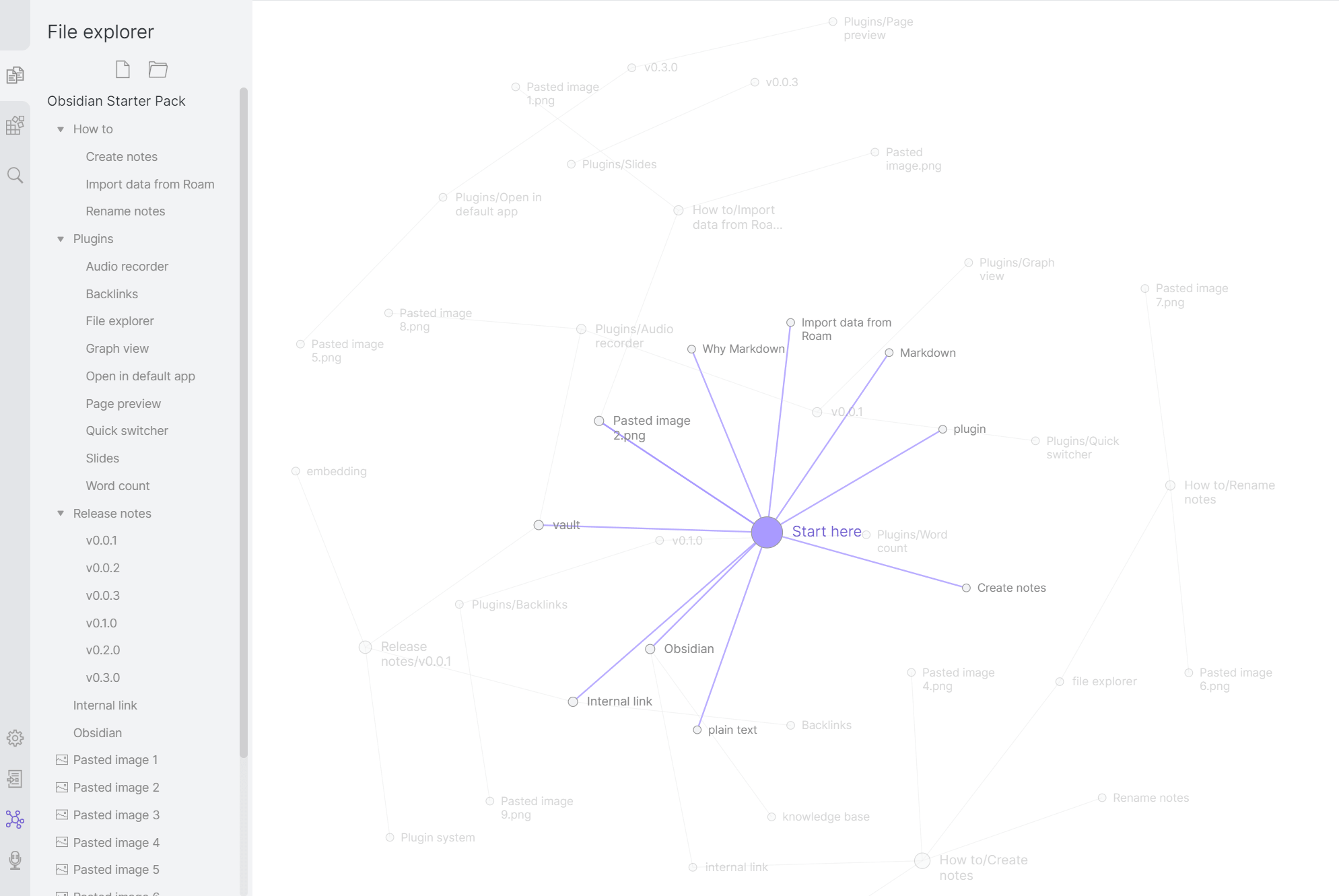
Obsidian wins if linked thought is the reason you are choosing a notes app. For a Notion-versus-Markdown framing of the same trade-off, see Notion vs Obsidian.
4. AI features
Apple Notes uses Apple Intelligence on supported devices for summary, rewrite, proofread, and related writing help. Most small tasks run on device.
Obsidian has no first-party AI. The Smart Connections plugin can add search and Q&A if you bring an API key.
Apple Notes wins if you want AI with no setup. Obsidian wins if you want to choose the model and plugin stack. Microsoft Work Trend Index 2024 found that knowledge workers lose large blocks of time to search, summary, and rewrite work, so built-in summary is not a small feature.
5. Plugins and extensibility
Apple Notes has no plugin system. Apple controls the feature set.
Obsidian has more than 2,000 community plugins. Popular picks include Excalidraw, Dataview, Calendar, Templater, and Citations. If that plugin surface sounds like too much to maintain, lighter plain-text picks exist.
Obsidian wins on extension. Apple Notes wins if you do not want a plugin hobby.
6. Search
Apple Notes searches typed text, images, handwriting, and scans. Spotlight makes that feel native on Mac and iPhone.
Obsidian searches the vault text and supports operators. Plugins such as Omnisearch and Smart Connections add fuzzy or semantic search.
Apple Notes wins native search. Obsidian wins deeper vault search with plugins. For a workflow framing of search-versus-synthesis, see our take on a smart notes app.
7. Cross-platform apps
Apple Notes is for Mac, iPhone, iPad, Apple Vision Pro, and iCloud.com. It has no native Windows or Android app.
Obsidian runs on macOS, Windows, Linux, iOS, and Android.
Obsidian wins if your devices span more than Apple.
Daily use and recommendations
What daily use looks like
Apple Notes feels best in the first week. A lock-screen note opens fast. Receipts, scans, Pencil sketches, and typed notes all land in one place. Spotlight finds them. The cost shows up later: no graph, no native Markdown export, and no plugin layer.
Obsidian asks for more setup before it pays off. A research note with [[wikilinks]] to four old notes becomes a graph node the next day, which makes review easier. The personal license stays free, so first-party Sync is the main paid choice for most solo users.
Apple Notes wins the first month. Obsidian wins year three. If you want an Apple-first app that still uses Markdown, Bear vs Obsidian covers that path.
Choose Apple Notes if
Choose Apple Notes if you are all-in on Apple devices. It is free, fast, and low work. It fits quick capture, iCloud sync, handwritten iPad notes, Math Notes, scans, and Apple Intelligence with no setup. For closer Apple-side comparisons, see Apple Notes vs Evernote. For a broader set, see Evernote alternatives.
Choose Obsidian if
Choose Obsidian if long-term control matters more than speed. It fits Markdown files, backlinks, graph review, custom plugins, and mixed device sets. It also fits users who are willing to spend one or two hours on setup.
Feature comparison table
Use this table as the quick decision layer. Apple Notes is better for capture and Apple-native work. Obsidian is better when the vault itself needs to become a durable, linked system.
| Axis | Apple Notes | Obsidian |
|---|---|---|
| Primary job | Quick capture | Linked knowledge base |
| Storage | iCloud notes | Local Markdown vault |
| Linking | Notes can link | Bidirectional links and graph |
| AI | Apple Intelligence on supported devices | Plugin-based, BYO model |
| Search | OS-integrated notes search | Vault-level text and plugin search |
| Best for | Casual ecosystem users | Long-term knowledge base |
Table 5: The feature comparison summarizes each app's core job, storage model, linking, AI, search, and best-fit user.
Cost, privacy, and migration
Three-year cost
Both apps look free at the start. The real cost depends on storage, sync, AI, and work use. From each vendor's published pricing, verified July 2026:
| Scenario | Apple Notes | Obsidian |
|---|---|---|
| Solo, free tier | $0 | $0 |
| Solo + storage | $35.64 (iCloud+ 200GB $0.99/mo) to $359.64 (2TB) | $0 (local) to $36 (iCloud sync) |
| Solo + first-party sync | $0 (iCloud included with Apple ID) | $144 (Obsidian Sync $48/yr) |
| Solo + AI | $0 (Apple Intelligence free on M-series / iPhone 15 Pro+) | $5–$20/mo BYO API + Smart Connections |
| 5-person team | $0 app cost | $750 (Commercial $50/user/yr + Sync $48/user/yr) |
| Required hardware | Apple ID + Apple device | Any modern device |
Table 6: The three-year cost table separates free use, storage, sync, AI, team licensing, and hardware requirements.
For solo personal use, both can stay free. The main add-on costs are work use, sync, storage, and AI. Apple Intelligence is free on supported hardware. Obsidian AI plugins usually need your own model API key. If you have older Apple hardware, Apple Intelligence may not be available.
Privacy and data handling
The published privacy postures, verified July 2026, differ in where trust sits:
| Axis | Apple Notes | Obsidian |
|---|---|---|
| Storage location | iCloud | Local filesystem |
| Encryption at rest | Yes | Filesystem encryption (OS-level) |
| End-to-end encryption | Yes (Advanced Data Protection) | Yes (Obsidian Sync) |
| Training on notes | No (Private Cloud Compute) | N/A (no cloud by default) |
| Data residency | Apple iCloud regions | User-controlled |
| Local-first option | Limited (cached) | Yes (default) |
Table 7: The privacy table compares where notes live, encryption options, training exposure, data residency, and local-first control.
Both tools are strong for privacy, but the model is different. Apple Notes can use Advanced Data Protection for end-to-end encryption, and larger Apple Intelligence tasks can use Private Cloud Compute. Obsidian starts local. Notes stay on your machine unless you add sync.
Moving between Apple Notes and Obsidian
A note app is a multi-year choice because moving notes takes work. The realistic paths are:
Apple Notes to Obsidian is the harder move. Apple Notes has no native Markdown export. Users often use Exporter from the Mac App Store or a Shortcut flow, then point Obsidian at the export folder. In our test, a 2,000-note Apple Notes library took about two to four hours after image, tag, and format cleanup.
Obsidian to Apple Notes also lacks a native import path. You can copy Markdown files by hand or use AppleScript to push files in bulk. Wikilinks become plain text. Backlinks and graph shape do not transfer. In our test, a 1,000-note vault took about four to eight hours, so most users leave the vault as the source of record.
If you might leave later, Obsidian is easier to move because the notes are already Markdown. Apple Notes is easier to stay in because iCloud is smooth, but its export path is weaker.
Workflows and long-term use
Real-world workflows
Apple Notes and Obsidian fit different rhythms.
An Apple Notes day is short and frequent. A morning thought lands by Siri. An iPad sketch goes into the project folder. A receipt scan goes into Expenses. A journal note gets cleaned up with Apple Intelligence. In our test week, that meant 8 to 12 touches a day and about 5 to 15 minutes of active note work.
An Obsidian day is slower and more deliberate. A daily note opens from a template. A research block creates 3 to 5 linked notes. A writing block pulls old notes through Dataview. A review block opens the graph. In our test week, that meant 20 to 40 touches a day and about 30 to 90 minutes of writing and linking.
Apple Notes rewards quick capture, while Obsidian rewards review and connection. Pick the rhythm you can keep.
Avoid unproductive tool setup
The main risk with Obsidian is not that the app is weak. It is that setup can become the work. In the test vault, the first hour went to Sync, folders, Daily Notes, Calendar, Dataview, and graph filters before any useful note changed.
That cost is worth paying if the vault becomes a weekly review system. It is waste if you only need grocery lists, quick meeting notes, receipts, and private journal entries. Apple Notes blocks less work because there is little to tune.
Use this rule. If the note will be useful only this week, Apple Notes is enough. If the note should connect to older work next month, put it in Obsidian.
When using both makes sense
Many Apple users can run both. Apple Notes handles capture. Obsidian handles long-form writing and linking. A weekly review moves the few notes worth keeping into the vault.
The trap is duplicate writing. Pick one source for each note type. Meeting notes and quick capture can live in Apple Notes. Research notes and synthesis can live in Obsidian. Move only the notes that matter.
Related comparisons
If Apple Notes feels too closed but Obsidian feels too open-ended, compare the middle options. Bear vs Apple Notes is the closest Apple-first match. Notion vs Obsidian is better if you also need shared databases or team pages. Best second-brain apps gives the broader field.
Performance and reliability at scale
Apple Notes has no public note-count cap, but the iCloud limits page sets file-size limits for iCloud Drive, which matters for large attachments. Image-heavy libraries can make folder views slow, while Spotlight keeps search usable.
Obsidian scales well because each note is a Markdown file. In our test, the graph stopped being useful long before search did. Backups are clearer too: Apple Notes relies on iCloud Backup, Time Machine, and recently deleted notes, while Obsidian can use any file backup or Git history.
Where Atlas fits
If your notes become source-heavy, Atlas is relevant only as a cited synthesis layer. Neither note app should be treated as a research answer system on its own.
Final recommendation
If notes and PDFs now need cited synthesis, compare AI tools that cite sources after choosing the primary note app.
Apple Notes is the better default for casual Apple users. Obsidian is the better default for long-term knowledge bases and cross-platform users. Most people should start with Apple Notes. Move to Obsidian when links, Markdown, and plugins are worth the setup.
If your notes turn into a research corpus with PDFs and source-heavy questions, Atlas can sit beside either app as a cited synthesis layer. It is not a replacement for quick notes.
AtlasAI tools that cite sources
Educational next step for readers whose notes and PDFs need cited synthesis
Frequently Asked Questions
Use Apple Notes if you want free, fast, Apple-ecosystem note-taking with iCloud sync, Apple Intelligence summarization, and zero setup. Use Obsidian if you want plain-text Markdown ownership, a 2,000+ plugin ecosystem, bidirectional links, and a graph view of your notes. Apple Notes covers 80% of casual note-taking needs at zero cost. Obsidian rewards setup investment for long-term knowledge bases.