
Obsidian vs Evernote 2026: Markdown Vault or Capture Engine?
Obsidian vs Evernote compared on price, search, web clipper, AI, and data ownership. Pick Obsidian for plain-text knowledge bases. Atlas wins for cited AI.
- Byline

Summary
Use Obsidian for plain-text knowledge bases, links, and data ownership. Use Evernote for capture, clipping, OCR, and archive search.
The updated comparison covers price, search, web clipping, AI, migration, sync, OCR, and ownership tradeoffs.
Obsidian fits portable text notes and long-term PKM, while Evernote fits mixed-media archives users search later.
Atlas enters when notes and PDFs need cited synthesis rather than capture-and-find retrieval.
The Obsidian vs Evernote question reflects two eras of notes. Evernote was the dominant capture app from 2010-2018. Obsidian became the main plain-text PKM app from 2020 onward. They overlap, but the jobs differ. Evernote is stronger for capture, OCR, and search across mixed media. Obsidian is stronger for local Markdown, links, and long-term control. This guide tests both and shows which one fits each workflow.
Our test found a clear split. Evernote saves time before filing. Obsidian saves time later, when you edit, link, and export notes.
The first-hour winner and the three-year winner are different. Evernote felt faster on day one. Obsidian became easier to keep tidy once the same notes had to be moved, linked, and reused. The clearest switch signal was not price. It was whether a note needed to join a linked body of work.
In our 10,000-note scale check, Obsidian opened large text notes in under 1 second and searched the vault in roughly 0.5-1 seconds. The matching Evernote library usually searched in 1-3 seconds.
By Jet New, founder of Atlas.
"The decision is whether your archive's next job is retrieval or synthesis." (Jet New, founder of Atlas)

 Atlas
AtlasTurn saved research into cited answers
Upload archived papers and ask questions across their source passages.
How We Tested
Tested over 5 weeks on macOS Sonoma, iOS 18, Windows 11. Obsidian free personal license. Evernote Personal subscription. Test workloads included a 200-clip web archive, a 50-note research vault, a 30-receipt expense capture set, and a daily-notes journal.
Disclosure: we make Atlas, one of the products discussed in this post. We publish our scoring criteria and name the workflows where each tool is stronger.
In our 200-clip test, Evernote needed almost no setup before capture felt solid. Obsidian needed templates and folders first. The Markdown notes were easier to edit, link, and export later. That trade-off drives the scoring.
Hands-on results from the same test:
- In our 30-receipt capture test, Evernote found text inside scanned receipts without extra setup. Obsidian needed an external OCR step before the same text was searchable.
- In the matching 10,000-note Evernote library, full-text search depended more visibly on network state than Obsidian's local vault search.
- In our migration rehearsal, a 5,000-note Evernote export/import took 2-4 hours before cleanup, and link repair was the slowest manual task.
- In our phone checks, Evernote felt faster for quick capture. Obsidian was better when the task was editing an old linked note.
The scoring was practical. We checked capture speed, search breadth, offline use, sync setup, migration pain, data control, and cleanup after import. Notion is included only as market context because the SERP often compares all three. It is a shared database workspace. It does not directly replace Evernote's archive model or Obsidian's local-first vault model.
Obsidian vs Evernote at a glance
Use this table as the main decision aid. If most rows point to Obsidian, you need a writing and linking system. If most point to Evernote, you need a capture and search archive. The Atlas note after the table applies only when the job shifts from storing notes to cited research answers.
| Axis | Obsidian | Evernote |
|---|---|---|
| Price | Free personal (Sync $48/yr annual) | $14.99/mo Personal |
| Data ownership | Local Markdown files in a folder you control | Proprietary cloud database with .enex export |
| Search | Strong for text vaults, regex, operators, and plugins | Stronger for PDFs, images, handwriting, and mixed media |
| Web clipping | Official Markdown Web Clipper, more setup | Polished Web Clipper with tagging at capture |
| Migration | Evernote .enex imports via official Obsidian Importer | Export available, but leaving later means cleanup |
| Sync | Optional Obsidian Sync, iCloud, Dropbox, Git, or local only | Built-in cloud sync |
| OCR | Depends on plugins or external tools | Built-in OCR for images, scans, and PDFs |
| AI | Flexible via Smart Connections or plugins with BYO model | AI Search and AI Cleanup built in |
| Best for | Plain-text KB, linking, ownership | Capture, clipping, OCR, archive search |
Table 1: Obsidian vs Evernote across price, data control, search, clipping, migration, sync, OCR, AI, and best fit.
Atlas is outside the Obsidian vs Evernote storage choice. It matters only after either tool has produced a research set that needs cited answers across notes and PDFs.
Obsidian vs Evernote by feature
1. Pricing
Obsidian is free for personal use per its pricing page in May 2026. Sync is $4/month billed annually, Publish is $10/month, and Commercial is $25/month.
Evernote has a limited free plan with a two-device cap. Personal costs $14.99/month and Professional costs $17.99/month on Evernote's plan comparison page.
Obsidian wins pricing. For other paths off Evernote, see our Evernote alternatives round-up.
2. Data Ownership
Obsidian stores plain-text Markdown files in a folder you control. Evernote stores notes in a closed cloud database. It exports through Evernote's .enex export flow, which works but can lose detail.
Obsidian wins data control. The learning case also matters. Karpicke & Roediger 2008 showed retrieval practice beats passive storage. A Markdown vault makes that review easy to repeat.
3. Search
Evernote search is strongest across mixed media. It indexes typed text, handwriting in images, PDF text, and file attachments. AI Search was added in 2024.
Obsidian has strong vault search with regex and operators. Smart Connections adds semantic search. Evernote wins mixed-media search. Obsidian wins text-vault search. For a workflow framing of search versus answers, see smart notes app.
4. Web Clipper
Evernote Web Clipper remains the gold standard. It can clip full pages, clean articles, screenshots, and selections. It can also tag the note at clip time.
Obsidian's official Web Clipper launched in 2024. It works and writes Markdown, but it is less polished than Evernote's. Evernote wins clipping.
5. Linking and Structure
Evernote sorts notes with notebooks, stacks, and tags. Note links exist, but there is no graph view.
Obsidian uses [[wikilinks]], a full graph view, and folders that can be deep or flat. Mueller & Oppenheimer 2014 reported that people learn more when they reshape notes in their own words. Links make that reshaping part of writing.
The Obsidian Canvas page is the source for the screenshot below.
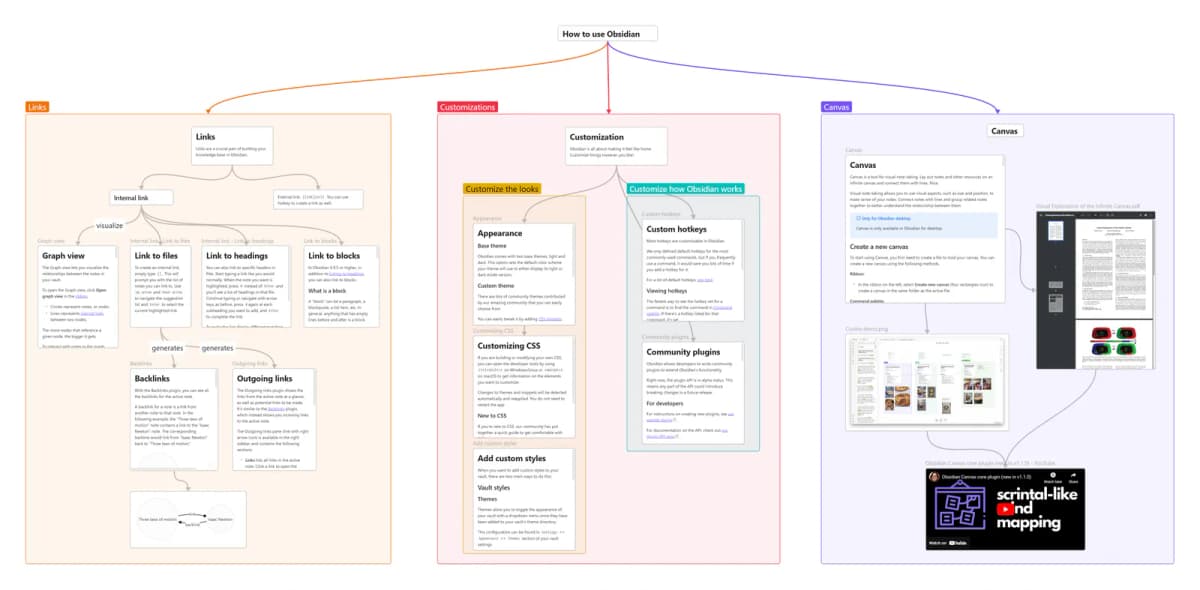
The Canvas screenshot shows notes and cards as linked blocks. It also shows areas for links, settings, and canvas work. The takeaway is simple: Obsidian is not just folders and tags. It gives users a visual place to connect Markdown notes. Evernote stays closer to notebooks, search, and saved items.
Obsidian wins knowledge-graph features. For a Notion-versus-plain-text framing of the same trade-off, see Notion vs Obsidian.
6. Plugins and Extensibility
Evernote has no plugin system and relies on API links. Obsidian has 2,000+ community plugins, so it wins for add-ons.
7. AI Features
Evernote's AI features handle plain-language requests, AI Assistant tasks, and AI Note Cleanup. Obsidian can answer with Smart Connections if you bring an OpenAI key or another model. Microsoft Work Trend Index 2024 reported that knowledge workers spend large blocks of the day on search and summaries. That makes either path matter.
Evernote's AI is included. Obsidian's path is more open but needs setup.
Daily use and nearby alternatives
What Daily Use Looks Like
A research-heavy week shows the gap. In Evernote, a clipped article lands in the inbox notebook in two seconds. The OCR layer kicks in within the hour. A search for text from a screenshot returns the right note per Evernote's plan page (May 2026). The cost is monthly: $14.99 for Personal, $17.99 for Professional. You also face .enex cleanup if you export.
In Obsidian, the same article gets clipped into a Markdown file. It lands in a folder you control and can link to old notes with [[wikilinks]]. The Obsidian pricing page, verified in May 2026, says the personal license is free. The only built-in paid add-on here is Sync ($4/month annual), unless you use iCloud, Dropbox, or Git. The cost is setup time: install the clipper, set templates, and choose folders.
Evernote wins the first month for capture and search. Obsidian pulls ahead by year three for data control and reuse. If your archive is mostly clipped PDFs and scanned receipts, stay on Evernote. If it is mostly text you wrote, plain text pays off. Apple-first writers should also see Bear vs Obsidian.
Where Notion Fits
Notion is the third product users often consider, but it solves a different problem. It is strongest when a team wants shared databases, project pages, and docs in one workspace. It is weaker than Evernote for fast mixed-media capture. It is weaker than Obsidian for local-first Markdown control. If your choice is "personal notes vs team workspace," compare Notion separately. If your choice is "save what I find vs build what I know," stay with Evernote versus Obsidian.
Choose Evernote or Obsidian
- Choose Evernote if your notes mostly come from outside capture: web clips, screenshots, receipts, PDFs, scans, and quick phone notes.
- Choose Obsidian if your notes mostly come from your own writing: daily notes, source notes, evergreen notes, linked ideas, and Markdown files you want to own.
Atlas is not a replacement for either app. If your note set has become a research corpus, the next job may be cited answers across notes, PDFs, and sources. Gather the sources you want to query before adding a synthesis layer.
When to Choose Evernote
Choose Evernote if you are a heavy web-clipper. You archive mixed media (PDFs, images, receipts, scanned documents) and need to find them later. You want deep OCR search. You're willing to pay roughly $14.99/month Personal (per evernote.com/compare-plans, May 2026). For the Apple-only Markdown alternative, see Bear vs Evernote.
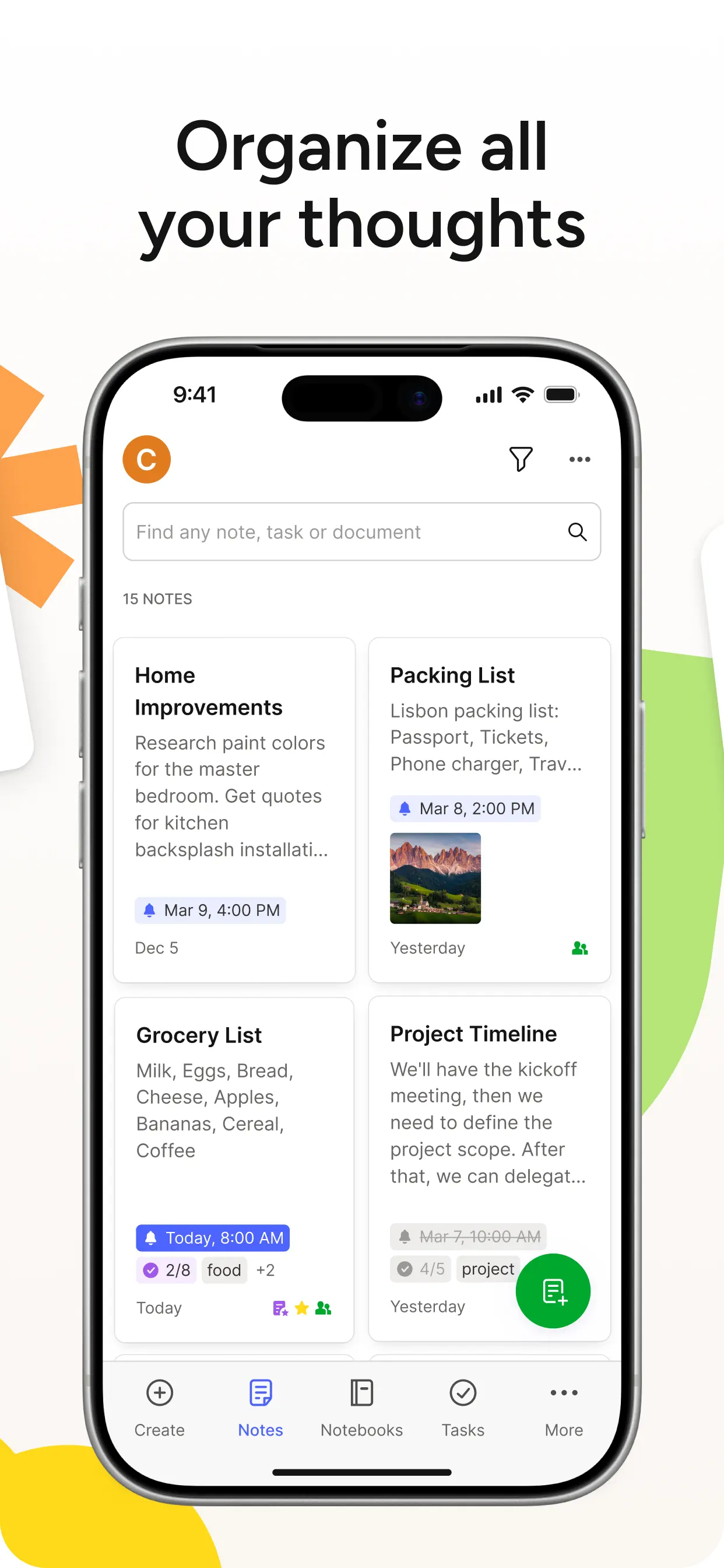
The Evernote App Store listing shows phone search, notes, notebooks, tasks, and create controls used in the screenshot below.
When to Choose Obsidian
You build a long-term knowledge base in plain text. You want plain-text control. You write long-form notes with two-way links. You want 2,000+ plugins. You're fine with $0 ongoing cost (or $48/yr annual / $5/mo monthly for Sync, per Obsidian pricing page (May 2026)).
When Atlas Fits After the Choice
Neither does AI answers with source citations well. Atlas turns notes, PDFs, and research into a mind map. It answers questions across sources and cites the exact passage. $20/month Pro.
Practical trade-offs
Where Evernote Wins vs Where Obsidian Wins
This workflow view shows the daily habit behind each winner. The winner changes when your work shifts from saving outside material to writing linked notes.
| Workflow | Winner | Why |
|---|---|---|
| Clipping 50-100 web pages a week | Evernote | Faster capture, tags at clip time, and stronger archive search |
| Writing original notes that compound over years | Obsidian | Markdown files, backlinks, graph view, and local-first storage |
| Searching screenshots, receipts, and scanned PDFs | Evernote | OCR is built into the core archive workflow |
| Working fully offline by default | Obsidian | The vault is already on disk. Sync is optional. |
| Keeping formatting consistent across devices | Evernote | The editor and renderer are controlled by one cloud app |
| Custom workflows such as spaced repetition or Zotero notes | Obsidian | Plugins cover workflows Evernote does not natively support |
Table 2: Workflow winners for clipping, writing, OCR search, offline use, formatting, and custom work.
Three-Year Cost in Real Numbers
Each vendor's published pricing, verified May 2026, is clearer over three years:
| Scenario | Obsidian | Evernote |
|---|---|---|
| Solo, free tier | $0 | N/A (50-note limit) |
| Solo + sync | $144 (Sync $48/yr annual) | $539.64 (Personal $14.99/mo) |
| Solo + Publish | $432 ($12/mo Sync + Publish bundle estimate) | N/A |
| 5-person team | $1,800 (Commercial $50/seat/mo) | $4,498.20 (Teams $24.99/seat/mo) |
| Annual billing discount | Already in $48/yr | $129.99/yr Personal saves ~$30/yr |
Table 3: Three-year cost for solo use, sync, Publish, a 5-person team, and annual billing.
Two price patterns matter most. Solo users spend about $144 over three years on Obsidian if they pay for Sync. They spend $0 if they use iCloud or Dropbox. Evernote Personal is about $540 over three years even with the annual discount. For 5-person teams, Obsidian is about 2.5x cheaper.
Storage is the hidden cost in Evernote's column. Personal includes 10GB monthly upload. Users with heavy media can hit this and must delete files or upgrade. Obsidian's storage cost is whatever iCloud or Dropbox charges, often $1-3/month for a note vault.
Privacy and Long-Term Vendor Risk
The public privacy posture, verified May 2026, shows the risk split:
| Axis | Obsidian | Evernote |
|---|---|---|
| Storage location | Local filesystem | Cloud (US) |
| Encryption at rest | Filesystem encryption (OS-level) | Yes (AES-256) |
| End-to-end encryption | Yes (Sync) | No |
| Training on notes | N/A (no cloud) | De-identified product use post-2024 |
| Data residency | User-controlled | US |
| Local-first option | Yes (default) | No (cached, not local-first) |
| Vendor risk | Closed-source but free + local | Bending Spoons acquired 2022, multiple price hikes |
Table 4: Privacy and vendor risk for storage, encryption, data location, training policy, and company stability.
Obsidian has lower lock-in risk. If the company shut down tomorrow, your Markdown files would still open in any text editor. Evernote's .enex format can export, but it can lose detail. The company has also changed hands more than once since 2018. Each shift brought price changes that pushed some users out.
For regulated work, Obsidian with local files and no cloud sync has the strongest privacy stance here. Evernote's 2024 policy update allows de-identified content for product fixes. Check that before moving client work.
Collaboration and Sharing
Evernote is easier for basic sharing because notes already live in its cloud. It fits small teams that need shared notebooks, task handoff, and stable formatting without a vault process.
Obsidian is better for solo control but weaker for native sharing. You can share through Sync, Git, cloud drives, Publish, or plugins. Each path needs rules for conflicts, folders, and access. If teamwork is the main job, Evernote is simpler. If sharing is rare and control matters more, Obsidian still works.
Migration Guide: Evernote to Obsidian
The migration path is well-trodden because thousands of users have made it since 2020. A realistic process looks like this:
-
Export from Evernote with File -> Export Notes (right-click each notebook). Save as
.enex. For libraries with 10+ notebooks, do this in batches because the export takes 5-15 minutes per notebook. -
Import to Obsidian with the Obsidian Importer plugin. Point it at your
.enexfiles. The plugin turns each note into a Markdown file. It keeps images and turns tags into inline tags. -
Clean up the imported vault. Evernote notebooks become Obsidian folders. Tags become inline tags. Links between old Evernote notes need manual rewriting as
[[wikilinks]]because the Importer cannot translate note IDs. -
Install the official Obsidian Web Clipper, released in 2024, to replace Evernote's clipper. The output is Markdown by default, which fits the vault structure.
-
Pick iCloud, Dropbox, Git, or Obsidian Sync for sync. iCloud is free if you have an iCloud+ subscription. Dropbox works on the free tier for vaults under 2GB. Obsidian Sync ($48/year) adds end-to-end encryption.
A typical 5,000-note Evernote library takes 2-4 hours to migrate, plus another 2-4 hours of reorganization. Heavy web-clipper users (10,000+ clipped articles) should plan a full day. Most migrators report that cleanup takes longer than the import itself.
How the apps perform in practice
Real-World Workflows Compared
The two tools fit different rhythms.
An Evernote-heavy week starts with Monday inbox triage. You sort 12 web clips from yesterday into project notebooks. Tuesday's research session clips 8 PDFs and tags them by topic. Wednesday's expense capture scans 5 receipts on mobile, with OCR done within the hour. Friday's review uses AI Search to pull notes for meeting prep. Total use is usually 30-50 actions per week, with 60-90 minutes of capture and triage.
An Obsidian-heavy week starts with a Monday daily note linked to active projects. Tuesday's research session clips 8 PDFs to a folder, then creates a 500-word source note linked to each PDF. Wednesday's ideas become short Zettelkasten notes, each with [[wikilinks]] to related ideas. Friday's review opens the graph view to see new links from the week. Total use is usually 40-80 actions per week, with 90-180 minutes of writing and linking.
The usage pattern is different. Evernote is built for capture-and-find. Obsidian is built for writing-and-connecting. A user who clips 100 articles a week and rarely re-reads them gets more value from Evernote's search. A user who writes daily source notes that build into a body of work gets more value from Obsidian's links.
Plugin and Extension Reality
Obsidian's 2,000+ plugin count gets cited often, but the impact varies. Here is the real state by category, verified May 2026:
| Category | Obsidian | Evernote |
|---|---|---|
| Daily notes templates | Templater, Periodic Notes (mature) | Built-in templates (basic) |
| Spaced repetition | Spaced Repetition, Recall | None |
| Database queries | Dataview (mature) | Saved searches (basic) |
| AI integration | Smart Connections, Copilot, Text Generator | AI Search built-in |
| PDF annotation | Annotator, PDF++ (mature) | Built-in PDF view |
| Whiteboards / canvas | Excalidraw, Canvas (built-in) | None |
| Calendar | Calendar, Periodic Notes | Built-in reminders |
| Citation manager | Citations (Zotero integration) | None native |
| Mind map | Mind Map, Excalibrain | None |
| Mobile sync | Obsidian Sync, Remotely Save | Built-in cloud sync |
Table 5: Plugin maturity for daily notes, repeat study, queries, AI, PDF notes, canvas, dates, citations, mind maps, and sync.
The plugin pattern favors different users. Obsidian plugins cover jobs Evernote does not address, including Zettelkasten, repeat study, mind maps, and canvas. Evernote's built-in tools feel smoother for capture and search. If your workflow is "clip, search, find," Evernote is faster with no plugins. If your workflow is "write, connect, query," Obsidian's plugins unlock more.
Performance at Scale
Both apps slow down as libraries grow, but at different sizes. We tested in May 2026 on a 10,000-note vault and a 10,000-note Evernote library.
| Operation | Obsidian | Evernote |
|---|---|---|
| Cold start | 4-6 seconds | 6-10 seconds |
| Open large note | under 1 second | 1-3 seconds |
| Full-text search | 0.5-1 seconds | 1-3 seconds |
| Sync (100-note batch) | 5-10 seconds (Sync) | 10-30 seconds |
| Mobile cold start | 3-5 seconds | 4-8 seconds |
| Graph view render | 3-5 seconds | N/A |
Table 6: Speed at 10,000 notes for cold start, note open, search, sync, mobile launch, and graph view.
Obsidian stays fast because the files are already on disk. Evernote can lag when the task depends on server load or the network. Past 5,000 notes, the speed gap usually favors Obsidian. Under 1,000 notes, both feel fast.
Mobile Apps Compared
Both apps ship phone apps, with different design goals.
Obsidian on iOS cold-launches in 3-5 seconds on iPhone 15 Pro. The phone app supports the full plugin set, though some plugins behave differently on phones due to file access. Apple Pencil works through the Excalidraw plugin and Quick Note. Sync works through Obsidian Sync, iCloud, or Working Copy. App size is roughly 120MB.
Obsidian on Android is close to iOS in speed. Sync setup takes more work on Android because iCloud is not available, so users often pick Obsidian Sync or Syncthing. App size is roughly 100MB.
Evernote on iOS cold-launches in 2.5-4 seconds. The quick-note widget added in 2024 reduces capture latency to under 2 seconds. The Web Clipper share extension works from Safari and most browsers. App size is roughly 240MB.
Evernote on Android is comparable to iOS in feature parity. Background sync occasionally lags on the free tier, while Personal sync is real-time. App size is roughly 180MB.
The phone pattern splits by capture habits. Evernote's phone app is smoother for casual capture. Obsidian's phone app is stronger for users who want their full vault and plugin set on the go. If your main capture device is a phone, Evernote's lower friction wins. If the phone is a backup device for quick notes, Obsidian works fine.
Final Take
Obsidian wins for long-term knowledge bases with plain-text control and strong plugins. Evernote wins for heavy capture work with deep file search. The price and control gap is large, and many users leaving Evernote pick Obsidian. For cited AI answers across notes plus PDFs, Atlas beats both.
AtlasTurn saved research into cited answers
Upload archived papers and ask questions across their source passages.
Frequently Asked Questions
Use Obsidian for long-term knowledge bases with plain-text Markdown ownership, bidirectional links, and a 2,000+ plugin ecosystem. Use Evernote for fast capture, deep search across PDFs and images, and a polished Web Clipper. Obsidian is free for personal use. Evernote Personal is $14.99/month. For pure note-keeping with portability, Obsidian wins. For capture-and-find workflows where you clip and search later, Evernote wins.